

The 10 Best Email Finder Chrome Extensions in 2026
A user on r/coldemail nailed the core problem: they'd been using a "verified" email finder and still hitting 20%+ bounce rates on cold sends. That gap between "verified" and "actually deliverable" is where most email finder Chrome extensions fail you. The tool says the email's good, you load it into your sequence, and your domain reputation takes the hit.
Not all verification is equal. Some tools guess email patterns and call it a day. Others run multi-step checks that catch spam traps, honeypots, and catch-all domains before you ever press send. The difference shows up in your bounce rate, your sender reputation, and ultimately your pipeline.
Our Picks (TL;DR)
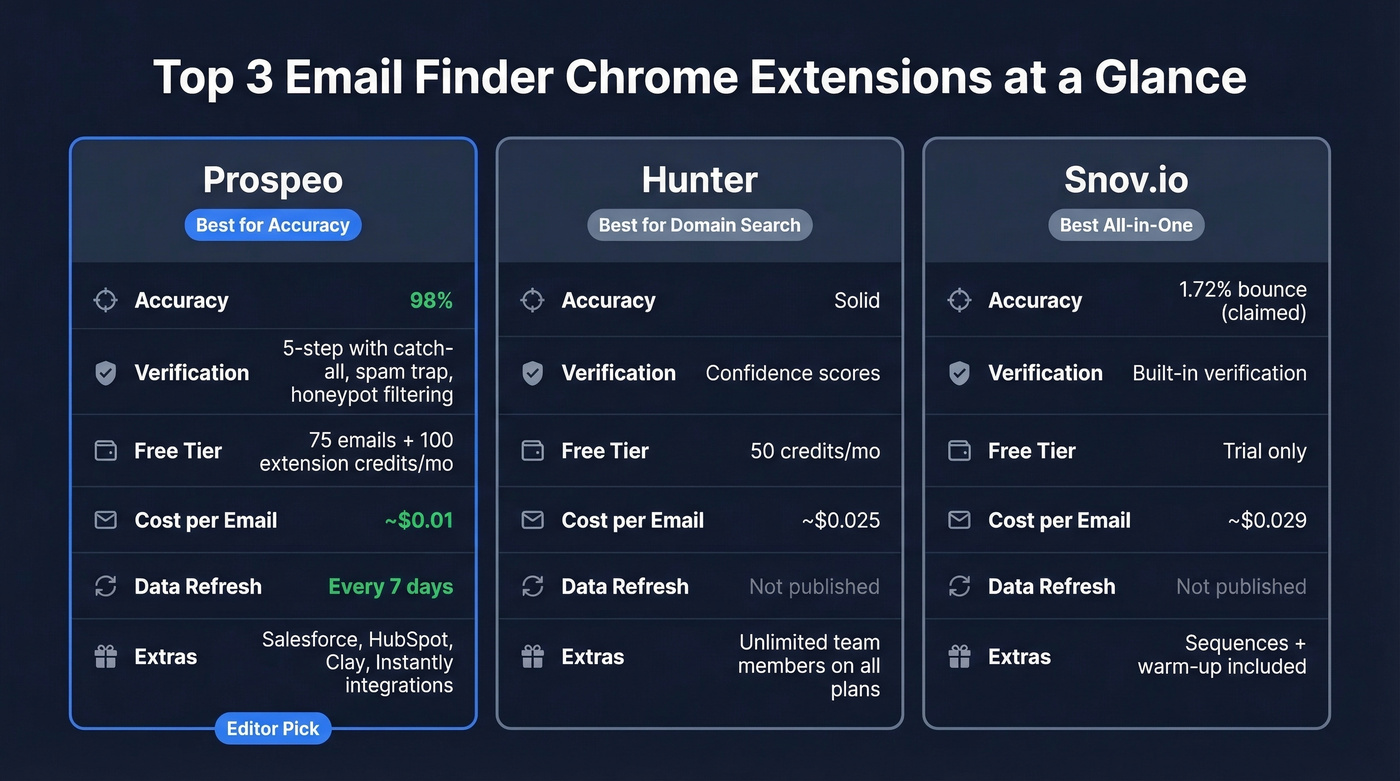
- Prospeo - Best for accuracy and data freshness. 98% email accuracy, 5-step verification, 7-day data refresh. Free tier available, ~$0.01/email on paid plans.
- Hunter - Best for domain search. Clean UI, reliable domain-level email discovery. Free tier with 50 credits/mo.
- Snov.io - Best all-in-one. Email finding, sequences, and warm-up in a single platform. Starter at $29.25/mo (annual) with 1,000 credits.
The 10 Best Email Finder Extensions for Chrome
Prospeo
Prospeo is the extension you install after you've been burned by bad data. The 98% email accuracy rate comes from a 5-step verification process that includes catch-all handling, spam-trap removal, and honeypot filtering. The database covers 300M+ profiles with 143M+ verified emails and 125M+ verified mobiles, all refreshed on a 7-day cycle - the industry average sits around six weeks, so that's a meaningful edge for anyone prospecting fast-moving markets. If you’re comparing broader options, see our roundup of data enrichment services.
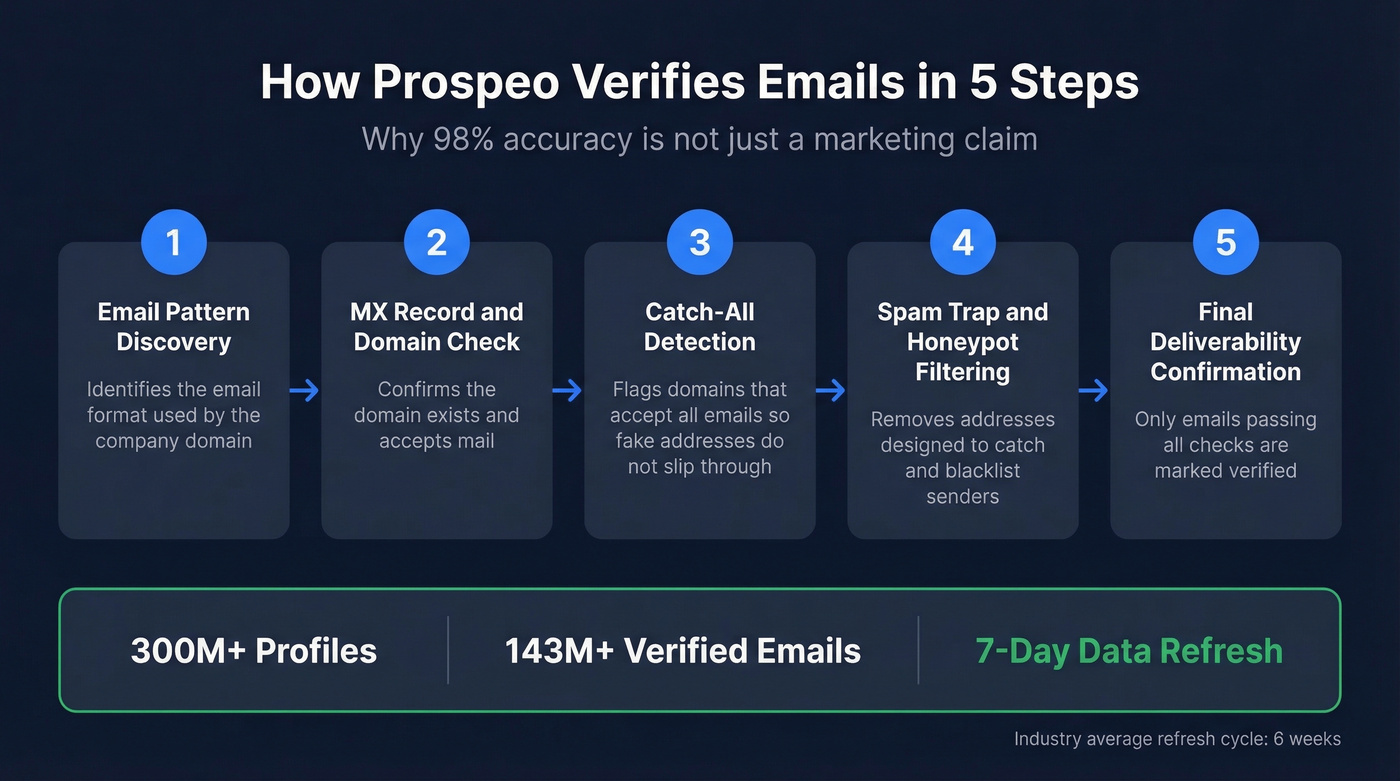
The proof is in the results. Meritt went from a 35% bounce rate to under 4% after switching, and their pipeline tripled from $100K to $300K per week. That's not a marginal improvement - that's the difference between burning your domain and booking meetings. If you’re troubleshooting bounces, start with our email bounce rate benchmarks and fixes.
Use this if: You've been hurt by bounces and need deliverability you can trust. The free tier gives you 75 emails + 100 extension credits/month to test it.
Pricing: Free tier available. Paid plans run ~$0.01/email with no contracts. Integrates natively with Salesforce, HubSpot, Smartlead, Instantly, Lemlist, Clay, Zapier, and Make. (If you build lists in Clay, our Clay list building guide breaks down real workflows and costs.)
Hunter
Hunter is the safe pick. Its domain search feature remains best-in-class - paste in a company domain and you get a list of associated email addresses with confidence scores. Simple, fast, reliable.

Why it wins: Unlimited team members on all plans, a clean extension, and the most straightforward credit system in the category. One credit finds one email. Half a credit verifies one. No confusion. If you’re shopping around, compare it against other options in our Hunter alternatives list.
Key tradeoff: The free tier is just 50 credits/month. And while accuracy is solid, it's not category-leading - we've seen higher bounce rates from Hunter than from tools with deeper verification pipelines. For teams sending at volume, that gap adds up.
Pricing: Free (50 credits/mo), Starter $49/mo ($34/mo annual) for 2,000 credits, Growth $149/mo for 10,000 credits, Scale $299/mo for 25,000 credits.
Snov.io
Snov.io is the best option if you want finding and outreach in one tool. The Chrome extension finds emails, the platform verifies them, and the built-in sequencer sends them - plus unlimited mailbox warm-ups are included on Pro. Snov.io publishes a 1.72% bounce rate from internal testing, though real-world prospecting with messier lists will run higher. For more outreach stack options, see our guide to SDR tools.
A mid-2025 plan update moved teamwork features to Pro and Ultra tiers for new subscriptions, while existing users on older plans were grandfathered in.
Use this if: You're a solo SDR who wants one subscription instead of three. Skip this if: You need team collaboration on a budget - you'll be pushed to Pro at $74.25/mo.
Pricing: Starter $29.25/mo (annual) for 1,000 credits and 5,000 recipients. Pro $74.25/mo for 5,000 credits and 25,000 recipients.
RocketReach
A Reddit user who tested multiple email finders chose RocketReach and reported the lowest bounce rates of anything they'd tried. That tracks with what we've heard from other teams - RocketReach punches above its weight on accuracy, especially for mid-market SaaS contacts.
Skip this if: You need built-in sequences or outreach automation. RocketReach is purely a data tool with no sending capabilities.
Pricing: Free (5 lookups), paid plans from ~$50-$250/mo depending on tier.
Kaspr
Before you get excited about Kaspr's "unlimited B2B email credits" on paid plans, understand the credit system. There are three separate types: B2B email, direct email, and phone. The Starter plan ($49/mo/user) gives unlimited B2B emails but only 5 direct email credits/month and 100 phone credits/month. Business at $79/mo/user bumps direct emails to 200/month - that's where Kaspr becomes genuinely useful for direct outreach.
EU coverage is strong. Kaspr pulls from 200M+ profiles with real-time verification from 150+ sources and a focus on European contacts. But reviewers flag outdated data as a recurring issue, so verify before you send. If you’re evaluating verification depth, our Bouncer alternatives guide covers dedicated verifiers too.
Best for: European-focused teams who need B2B email volume and can live with the credit complexity.
GetProspect
The billing model here is the real differentiator: you only pay for verified contacts. Emails that come back as "not found" don't cost a credit. Most competitors charge you regardless. GetProspect also handles automated data cleaning - emoji removal, company name normalization - which saves time on list hygiene. If you’re building a broader outbound engine, pair this with proven sales prospecting techniques.
Pricing: Free (50 valid emails), Starter $49/mo for 1,000 valid emails, Growth tiers up to $399/mo. G2 rating sits at 4.0/5 across 41 reviews - users praise simplicity but note the database is smaller than bigger platforms.
Skrapp
At $30/mo for 1,000 credits, Skrapp is one of the cheapest paid plans on this list. The credit policy is equally generous: you aren't charged for duplicates, invalid results, or unknown results - only for emails marked Valid or Catch-all. Credits roll over, and you keep them even after canceling. For a deeper breakdown, see our Skrapp pricing guide.
Skrapp reports 3B+ searches processed and a 92% email search success rate with 200M+ refreshed B2B profiles. Not the deepest pool, but for bootstrapped teams and freelancers, the price-to-value ratio is hard to beat.
Best for: Freelancers and small teams on a tight budget.
Apollo
Apollo's free tier is a popular starting point for early-stage teams because it combines prospecting with basic sequencing and lightweight CRM-style workflows. It comes up frequently on Reddit and G2 for its generous free plan. If you’re deciding between tools like this and pure databases, our best sales prospecting databases roundup can help.
Here's the thing: Apollo is better for volume prospecting than precision targeting. If you're running high-volume outbound and can tolerate some bounces, it's a great entry point. If deliverability is critical, pair it with a dedicated verification tool.
Pricing: Free tier with limited credits, paid plans from ~$49-$99/mo per user.
ContactOut
Focused on professional profile email and phone extraction. Free tier gives you 4 emails and 2 phone numbers daily. Sales plan runs $79/mo. Best for recruiters and sourcers who need personal emails alongside business contacts - more of a sourcing tool than a sales tool.
Clearout
Primarily a verification tool with a finder extension. Free tier includes 100 credits, then pay-per-use at roughly $0.02/credit in bulk. Best as a complement to your primary finder when you need an extra verification layer, not a replacement. If you’re tightening deliverability end-to-end, use an email deliverability guide alongside verification.
Pricing Comparison
| Tool | Free Tier | Starter Price | Credits | ~Cost/Email | Best For |
|---|---|---|---|---|---|
| Hunter | 50 credits | $49/mo | 2,000 | $0.025 | Domain search |
| Snov.io | Trial | $29.25/mo | 1,000 | $0.029 | All-in-one |
| RocketReach | 5 lookups | ~$50/mo | Varies | ~$0.05-0.10 | Data quality |
| Kaspr | 15 B2B + 5 direct + 5 phone | $49/mo/user | Unlimited B2B* | Varies* | EU contacts |
| GetProspect | 50 valid emails | $49/mo | 1,000 valid | $0.049 | Fair billing |
| Skrapp | 100 credits | $30/mo | 1,000 | $0.03 | Budget |
| Apollo | Limited credits | ~$49/mo | Varies | ~$0.04 | Volume |
| ContactOut | 4 emails/day | $79/mo | Varies | ~$0.08 | Recruiting |
| Clearout | 100 credits | Pay-per-use | Flexible | ~$0.02 | Verification |
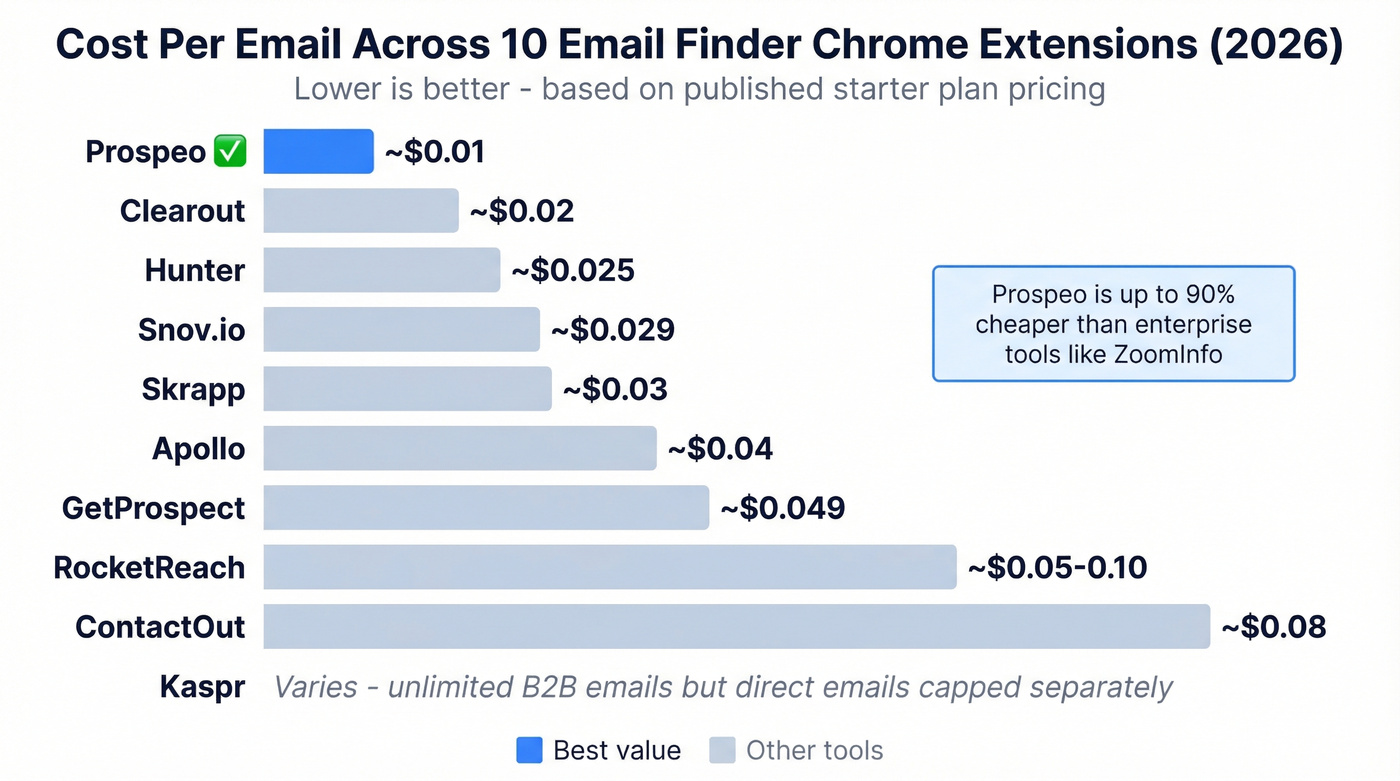
*Kaspr's unlimited B2B emails don't include direct emails or phones - those are capped separately.

That 20%+ bounce rate problem from Reddit? Prospeo's 5-step verification with spam-trap removal and honeypot filtering drops it under 4%. 40,000+ users already trust the Chrome extension to find verified emails at 98% accuracy - refreshed every 7 days, not 6 weeks.
Get 75 free emails and 100 extension credits to prove it yourself.
How Accurate Are These Extensions, Really?
Let's be honest: most "accuracy" claims in this space are meaningless because tools conflate two different metrics.
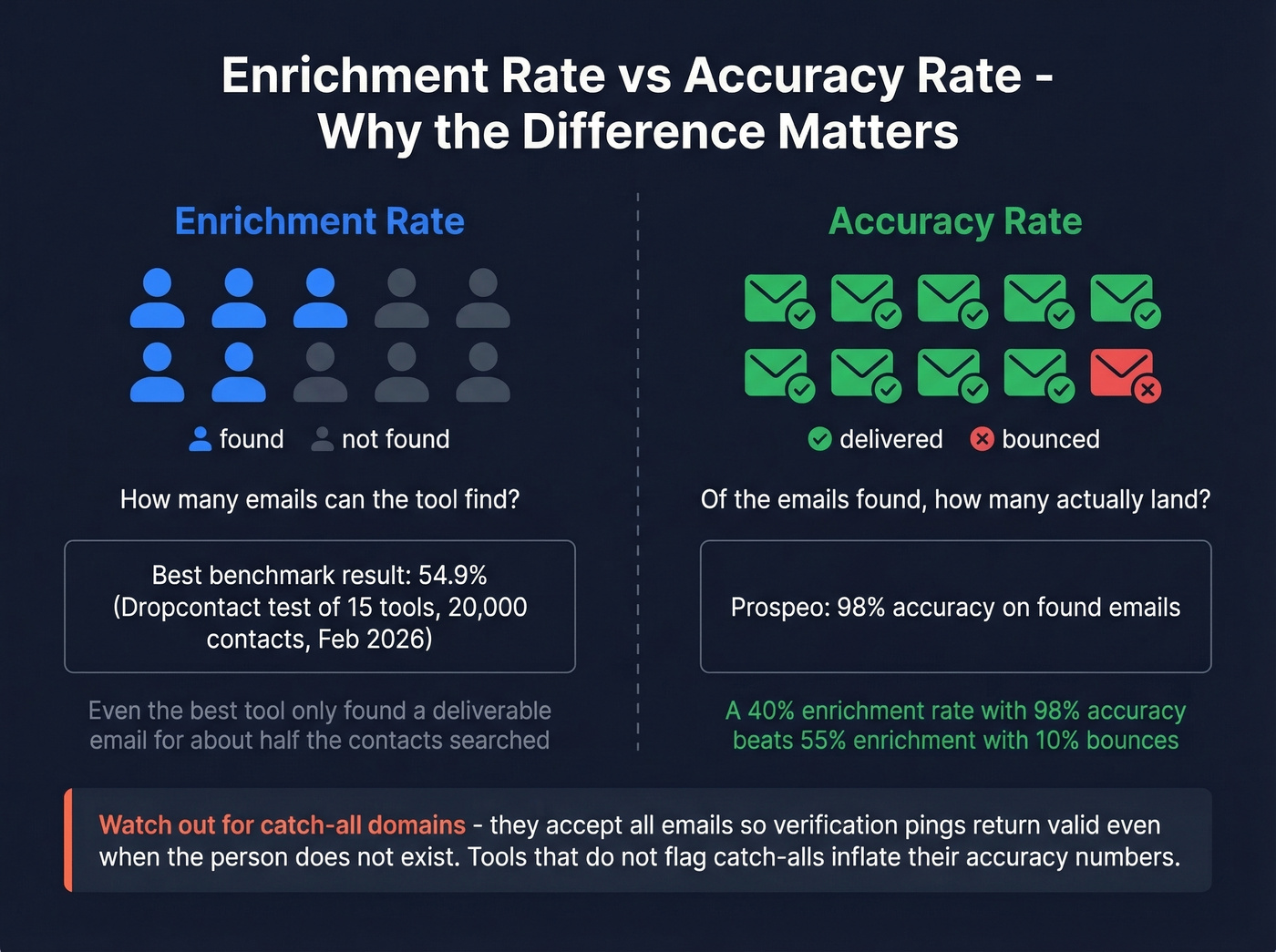
A Dropcontact benchmark tested 15 tools across 20,000 real contacts (updated February 2026) and measured "effective enrichment rate" - the percentage of emails found minus hard bounces and wrong domains. Dropcontact led at 54.9%, followed by Fullenrich at 48.3% and Enrow at 40.9%. Even the best tool only found a deliverable email for about half the contacts searched. A smaller Clearout mini-test on a list of 20 leads showed "valid email found" results ranging from 40% up to 80% across the tools it compared - directionally consistent with the larger benchmark.

But enrichment rate and accuracy rate are different things. Enrichment rate measures how many emails a tool can find. Accuracy rate measures how many of those found emails are actually deliverable. A tool can have a 40% enrichment rate but 98% accuracy on the emails it does find - and that's a far better outcome than 55% enrichment with 10% bounces baking your domain reputation.
Catch-all domains create the most havoc. A catch-all domain accepts all incoming emails regardless of the specific address, so verification pings come back "valid" even when the person doesn't exist. Tools that don't flag catch-all domains inflate their accuracy numbers. If your current tool's "verified" emails are bouncing above 5%, the verification is shallow. If you need a step-by-step diagnostic, see how to check if an email exists.
Most email finder extensions charge you for bad data. Prospeo's proprietary verification catches catch-all domains, spam traps, and honeypots before they torch your sender reputation. At ~$0.01/email with no contracts, it's 90% cheaper than ZoomInfo with higher accuracy.
Install the extension and stop paying for emails that bounce.
Choosing the Right Extension
Your pick depends on four things.
Volume. Under 500 emails/month? A free tier will cover you. Over 5,000/month? You need paid plans with bulk credits - and should consider API or CSV enrichment instead of clicking through an extension one profile at a time. (If you’re scaling, our lead enrichment guide covers common workflows.)
Budget. Skrapp at $30/mo is the value leader for basic needs. Hunter and Kaspr sit in the $49/mo range. RocketReach and ContactOut push toward $79+.
Accuracy requirements. If you're running cold email at scale, bounces above 3-4% will damage your domain. Prioritize tools with multi-step verification. This is the single most important factor for anyone doing outbound at volume, and it's the one most teams underweight when shopping for an email finder Chrome extension.
Integration needs. Check whether the tool pushes directly to your sequencer (Instantly, Lemlist, Outreach) or CRM (Salesforce, HubSpot). Stitching together Zapier workflows adds friction and failure points that compound at scale. If you’re formalizing your process, use a connect outreach tool to CRM checklist.
For solo operators, Snov.io's all-in-one approach saves money. For teams, Hunter's unlimited seats or tools with native integrations make more sense. And if deliverability is non-negotiable, a tool with deep verification like Prospeo pays for itself in protected sender reputation alone.
Safe Usage - Daily Limits
Chrome extensions for finding emails from professional profiles operate within platform-imposed limits. These are community-sourced best practices, not official numbers, but they're widely referenced:
| Action | Free Account | Premium | Sales Navigator |
|---|---|---|---|
| Profile views/day | 80 | 100 | 1,000 |
| Searches/month | 300 | 6,000 | 6,000+ |
| Connection requests/week | Under 80 | Under 80 | Under 80 |
Exceeding these thresholds can trigger account restrictions. Pick one primary extension, keep daily activity moderate, and use bulk enrichment via API for high-volume needs instead of hammering profiles one by one.
FAQ
Are email finder Chrome extensions legal?
Yes - these tools surface publicly available business contact information, which is legal in most jurisdictions. You must comply with GDPR for EU contacts and CAN-SPAM for US recipients. The legal risk isn't in finding the email; it's in how you use it afterward.
Do I need to verify emails separately?
Some extensions verify during the finding process - Prospeo's 5-step verification runs automatically, for instance. Others only guess email patterns without confirming deliverability. Always confirm verification status before sending. Shallow checks miss catch-all domains and stale addresses that bounce.
What's a catch-all domain and why does it matter?
A catch-all domain accepts all incoming emails regardless of the specific address, so verification pings return "valid" even if the person doesn't exist. Tools without catch-all detection inflate accuracy numbers. Look for extensions that explicitly flag these domains - it's the number one cause of "verified" emails still bouncing.
Can I use multiple extensions at once?
You can install several, but running them simultaneously on the same page can cause conflicts and increase account restriction risk. Pick one primary tool for daily prospecting and keep a second as backup for contacts your main tool can't find.
What's a good free email finder Chrome extension?
Prospeo's free tier (75 emails + 100 extension credits/month) offers the most usable volume with full verification included. Hunter gives 50 credits/month with solid domain search. Apollo's free plan adds basic sequencing but with lower accuracy. For teams under 500 lookups/month, any of these free tiers will cover initial prospecting needs.