

Skrapp Email Verifier: What the Data Actually Shows
You upload 2,000 "verified" emails from the Skrapp email verifier, launch your outbound sequence Monday morning, and by Tuesday your bounce rate is sitting at 8%. Your sending domain just took a hit. Deliverability is tanking. The tool that promised 97%+ accuracy didn't deliver. Industry best practice is total bounces under 2% and hard bounces under 1% - that's a wide gap to explain away. (If you want the deeper mechanics and fixes, see our guide on bounce rate.)
So what's actually going on with Skrapp's verifier?
30-Second Verdict
Skrapp's verifier is free to use with a free account, which makes it handy for light checks and small lists. But that 97%+ accuracy claim doesn't hold up once you're dealing with real-world data and catch-all domains. A community benchmark of 2,500 contacts showed Skrapp's email finder returning just 46% valid emails. Credit limits get tight fast, and catch-all handling is essentially "here's a label, good luck." If your bounce rate matters - and it does - you need multi-step verification with actual catch-all resolution, not just labeling. (Related: email deliverability and improve sender reputation.)
What Skrapp's Verifier Does
Skrapp runs incoming emails through a set of checks: syntax validation, role-based detection for addresses like info@ and support@, gibberish filtering, disposable email flagging, and free provider identification. It then performs an SMTP handshake with the recipient's mail server to confirm reachability without sending a test email. That's standard practice across most verifiers - nothing proprietary here.
Skrapp also offers a verification API (v3) with single and bulk endpoints for premium accounts, useful if you're integrating verification into an existing workflow.
The output is one of five statuses:
| Status | What It Means | Action |
|---|---|---|
| Valid | Email is confirmed reachable | Safe to send |
| Catch-All | Domain accepts all mail (riskier) | Quarantine, test in batches |
| Invalid | Unreachable | Remove immediately |
| Unknown | Couldn't be resolved | Suppress or re-verify later |
| Pending | Temporary processing status | Wait, then re-check |
Upload a CSV or paste emails, hit verify, download results. Skrapp's bulk verification guide walks through the steps. No complaints about usability - the issue is what happens after you get your results.
Accuracy: Claims vs. Reality
What Skrapp Claims
Per Skrapp's pricing page, the tool delivers a 92% average email search success rate and 97%+ verification accuracy. Their database is "refreshed daily." (For a broader view of vendors in this category, compare email search tools.)
What Independent Data Shows
Every verifier claims 97-99%. Real-world results tell a different story.
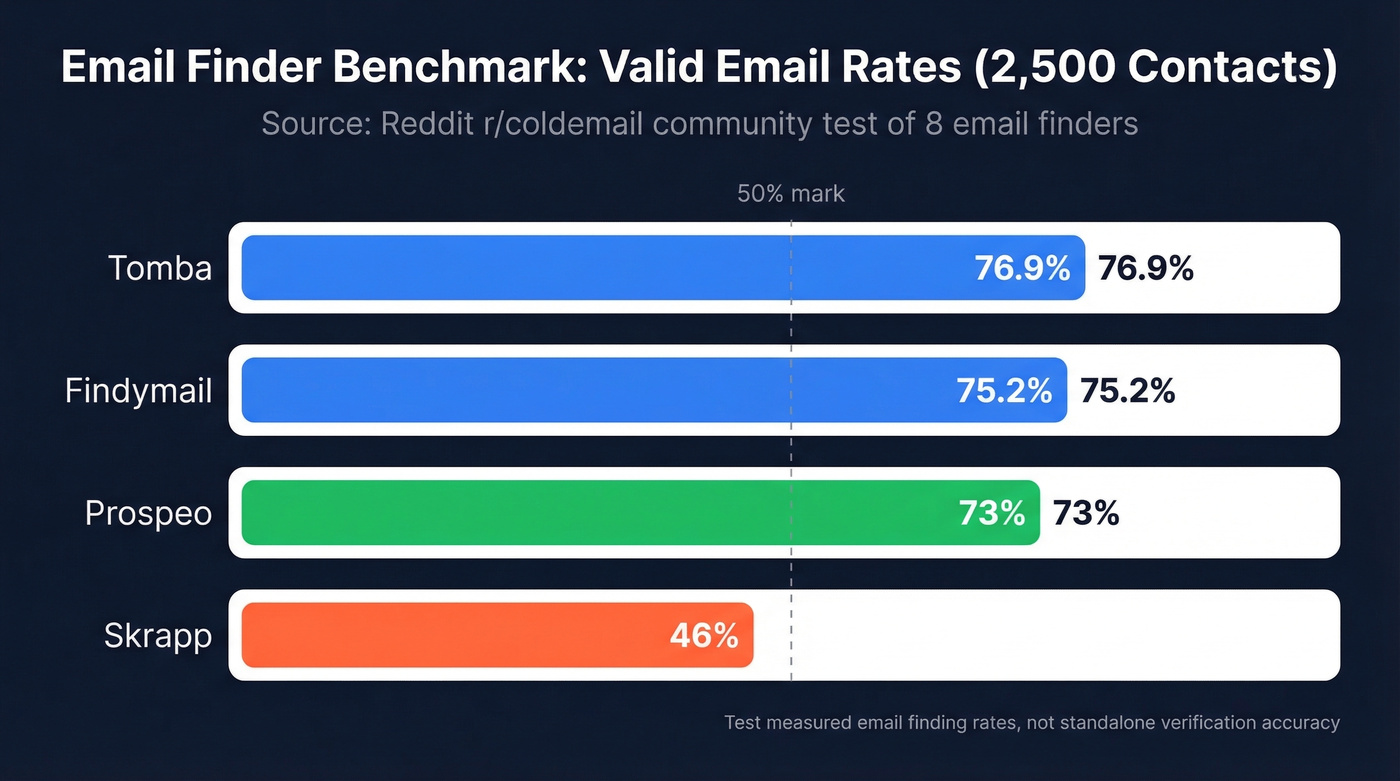
In a Reddit benchmark test of 2,500 contacts run through eight email finders, Skrapp's finder returned 46% valid emails. Tomba hit 76.9%. Findymail came in at 75.2%. Important distinction: that test measured email finding rates - how many valid addresses each tool could locate from the same input list - not standalone verification accuracy. Finding and verifying are different operations. But the results still reveal how much gap can exist between vendor claims and production output. (If you're building lists at scale, this ties into lead enrichment and data enrichment services.)
A Hunter benchmark of 15 verifiers using 3,000 real emails found the top performer hitting 70% overall accuracy. Catch-all domains, unknown statuses, and server-level blocking create a persistent gap between lab conditions and reality.
The Catch-All Blind Spot
Here's the thing. Catch-all domains - servers configured to accept all incoming mail regardless of whether the mailbox exists - can represent up to 30% of a typical B2B list. In our experience analyzing B2B lists, that 30% figure is conservative for industries like legal and finance where we've seen it climb past 40%.
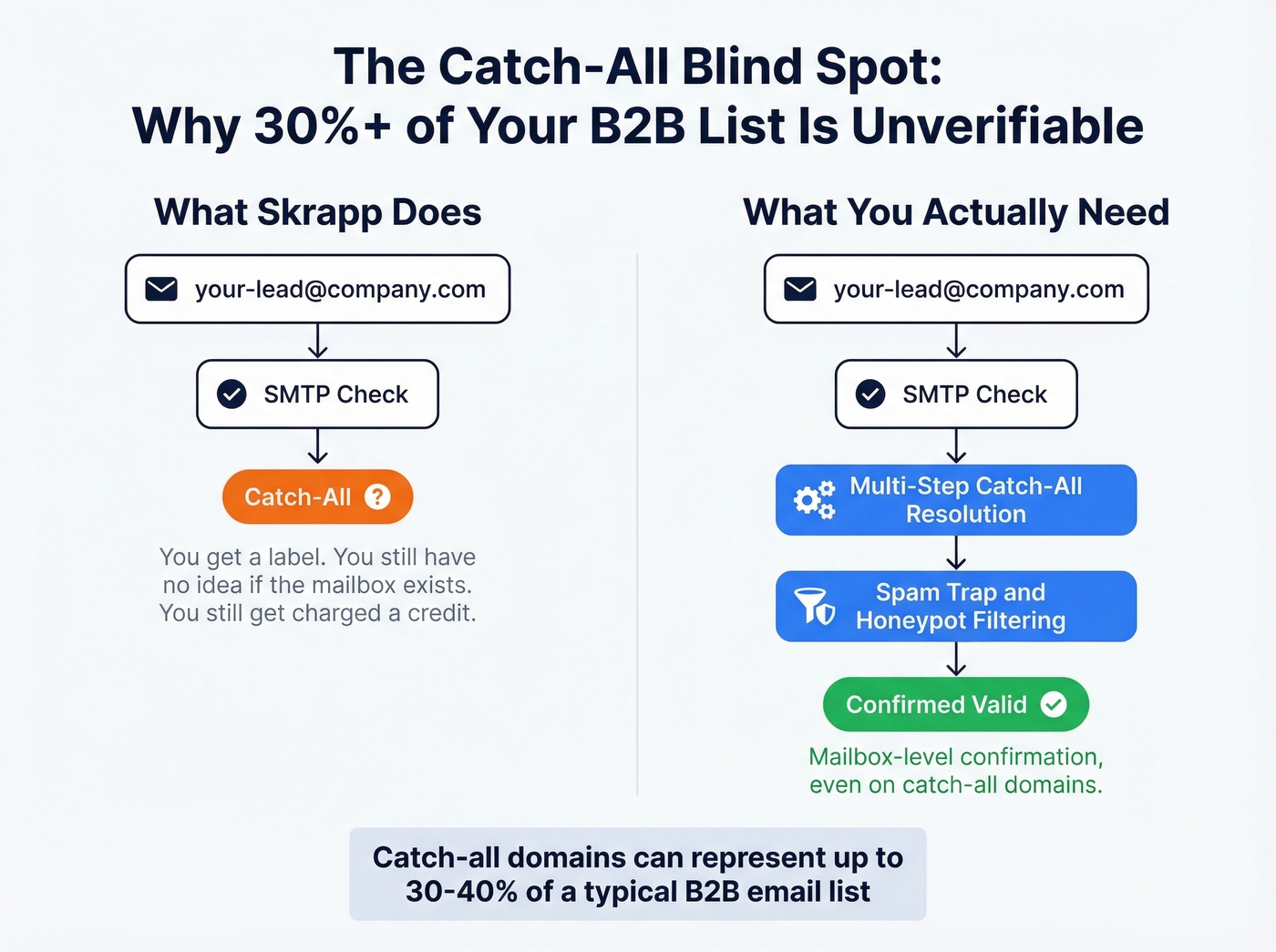
Skrapp flags catch-all domains as a separate status, but it doesn't give you a mailbox-level confirmation on those domains - because a catch-all setup makes that impossible with basic SMTP checks. You get a "Catch-All" tag and you're charged a credit for it. A 250 SMTP response from a catch-all domain doesn't confirm the mailbox exists. It just means the server accepted the connection.
The operational playbook: quarantine catch-alls by default, test in micro-batches of 20-50, and suppress if bounce indicators worsen. Or use a verifier with multi-step catch-all handling that actually brings your bounce rate closer to what the vendor promised. (If you’re cleaning lists aggressively, also factor in spam trap removal.)


Skrapp labels catch-all domains and wishes you luck. Prospeo's 5-step verification includes catch-all handling, spam-trap removal, and honeypot filtering - built on proprietary infrastructure, not third-party providers. The result: 98% email accuracy and bounce rates under 2%.
Stop paying credits for "Catch-All" labels that tell you nothing.
Pricing and Credits
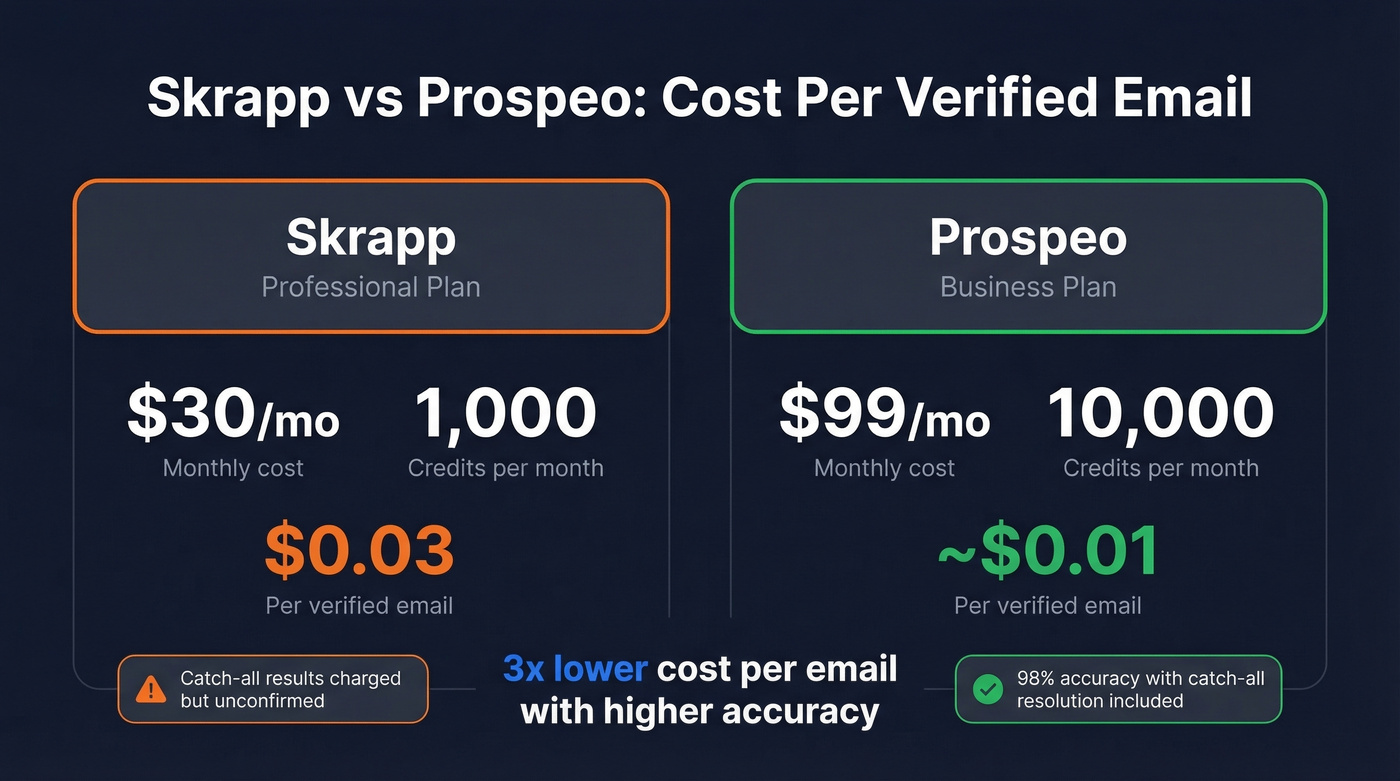
Skrapp runs on credits. One credit verifies one email address. Their "Fair Credit Policy" means you're only charged when the result comes back as Valid or Catch-All - Invalid and Unknown results don't cost you anything. That's a genuine positive. Credits roll over month-to-month, and previously searched duplicates don't consume additional credits. (If you're comparing verification vendors, start with Bouncer alternatives.)
Here's the breakdown on annual billing:
| Tier | Monthly Cost | Credits/Mo | Cost/Credit | Users |
|---|---|---|---|---|
| Free | $0 | 100 | $0 | 1 |
| Professional | $30 | 1,000 | $0.03 | 2 |
| Enterprise | $262 | 50,000 | ~$0.005 | 15 |
One oddity worth flagging: Skrapp's pricing page lists 100 free credits per month, but their help center verification guide says 50. It's possible the 50-credit figure applies specifically to the verifier while 100 covers all email operations - but Skrapp doesn't clarify this anywhere. A verification company that can't verify its own documentation isn't a great look. (For the full cost breakdown, see Skrapp pricing.)
Chrome Extension and Email Finding
Beyond the web-based verifier, many users first encounter Skrapp through its Chrome extension, which pulls email addresses directly from professional profiles and company websites. Visit a profile, click the extension icon, and it returns associated professional emails along with a confidence score.
The extension is convenient for one-off prospecting. But the same accuracy limitations apply. Emails surfaced through the Chrome extension still need verification, and the credits you spend finding an address are separate from the credits consumed when you verify it. If you're relying on the extension for high-volume list building, those credits disappear fast on the free and Professional tiers. (If extensions are your workflow, compare email scraper Chrome extensions.)
What Real Users Say
Skrapp holds a 4.5/5 on G2 across 324 reviews, with 75% five-star ratings. Users consistently praise ease of use and fast email retrieval.
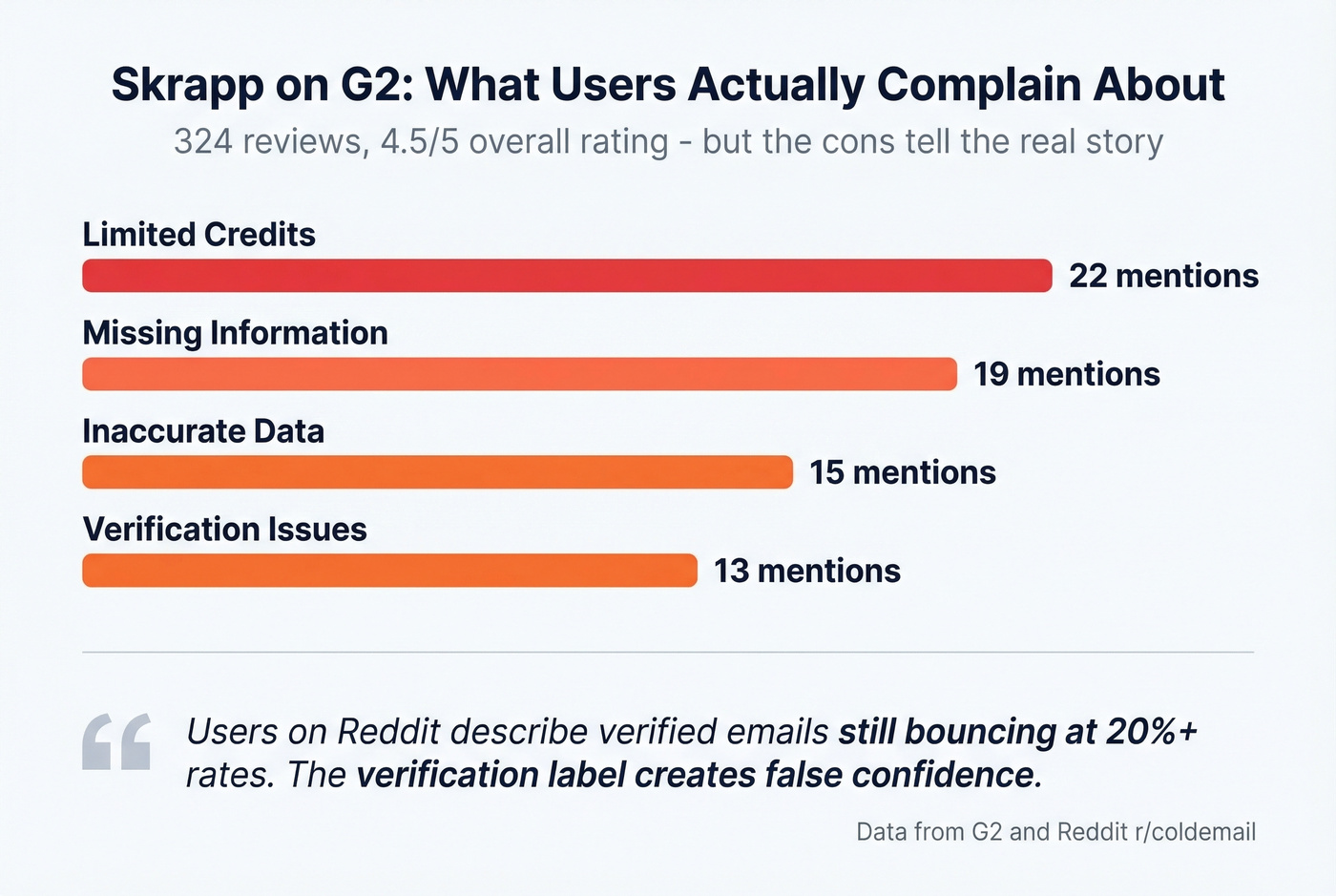
The cons are more telling. Across G2 reviews, the most common complaint categories are: Missing Information (19 mentions), Limited Credits (22 mentions), Inaccurate Data (15 mentions), and Verification Issues (13 mentions).
Reddit sentiment echoes the accuracy concern. Users on r/coldemail describe "verified" emails still bouncing at 20%+ rates. The consensus isn't that Skrapp is bad - it's that the verification label creates false confidence. We've seen this pattern repeatedly: teams trust the "Valid" tag, skip secondary verification, and watch their domain reputation erode over a single campaign. (If you're running sequences, it helps to standardize sequence management.)
When Skrapp Works (and When It Doesn't)
Use Skrapp if you need a free, quick check on fewer than 100 emails per month and you don't mind manually handling catch-all results.
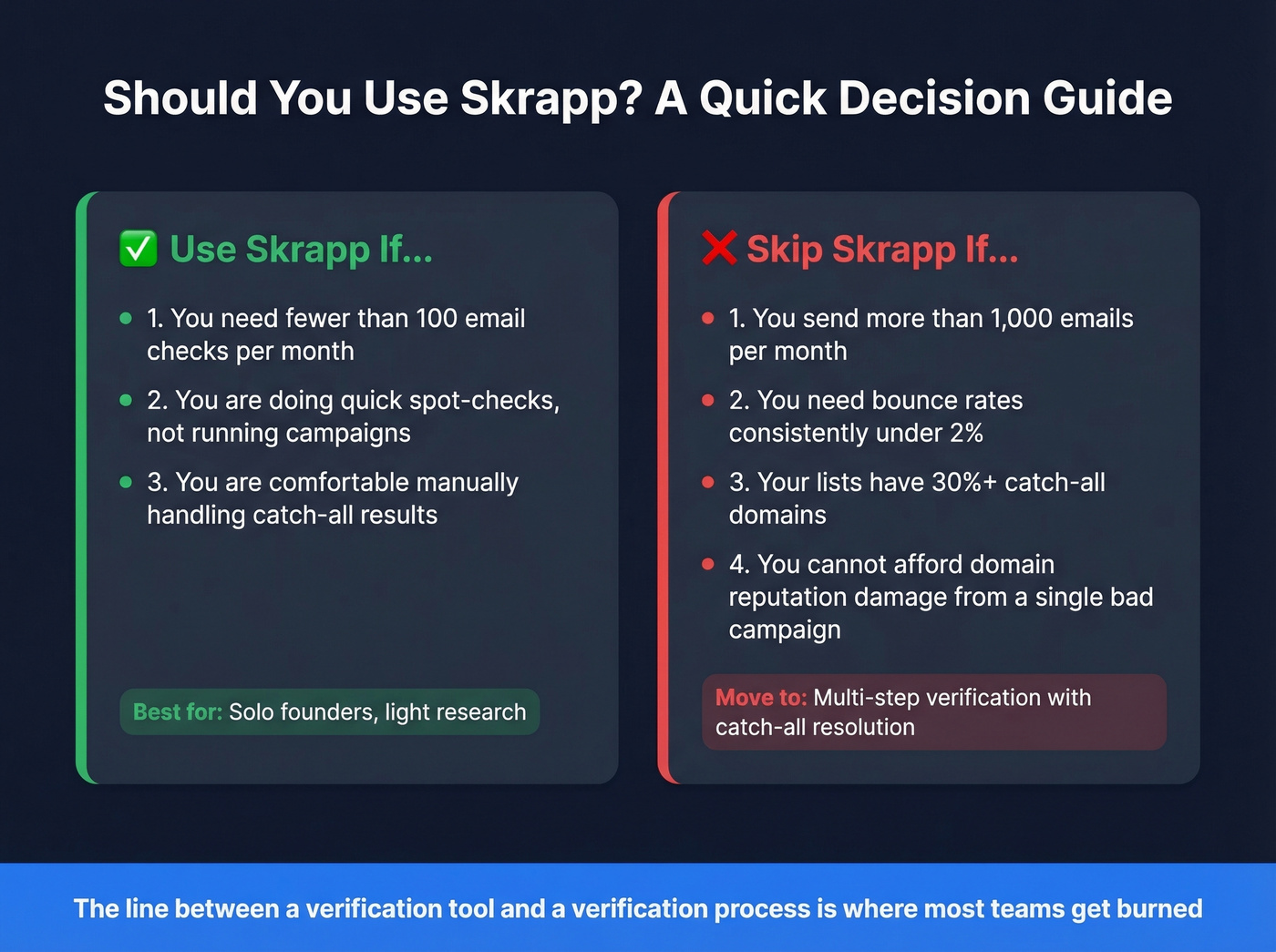
Skip Skrapp if you run outbound at scale beyond 1,000 emails per month, you need sub-2% bounce rates consistently, or you can't afford to manually quarantine and test catch-all domains. Most teams outgrow Skrapp's verifier before they realize it. The free tier is genuinely useful for spot-checking a handful of addresses. But the moment you're uploading CSVs and running sequences, you need verification that handles catch-alls instead of just labeling them. That's the line between a verification tool and a verification process.
For teams at that scale, Prospeo's email finder runs a 5-step verification process that handles catch-all domains, removes spam traps and honeypots, and delivers 98% email accuracy across 143M+ verified emails refreshed every 7 days. The free tier gives you 75 emails per month to test - no contracts, no sales calls, no credit card. Stack Optimize built from $0 to $1M ARR using Prospeo's data, maintaining 94%+ deliverability and sub-3% bounce rates across every client with zero domain flags.
At $0.03/credit, Skrapp's Professional tier adds up fast - especially when catch-alls eat credits without confirming a single mailbox. Prospeo verifies emails at ~$0.01 each with 98% accuracy, refreshes data every 7 days, and only charges for results you can actually use.
Get 3x the verification accuracy at one-third the cost per email.
FAQ
Is Skrapp's email verifier free?
Yes - Skrapp offers a free account with 100 email credits per month, though their help center lists 50 in some places. You're only charged credits for Valid and Catch-All results, not Invalid or Unknown.
How accurate is Skrapp's email verification?
Skrapp claims 97%+ accuracy, but independent benchmarks show significant gaps. In a Reddit test of 2,500 contacts, Skrapp returned just 46% valid emails - behind Tomba at 76.9% and Findymail at 75.2%. Hunter's benchmark of 15 dedicated verifiers found even the best maxing out at 70% overall accuracy on real-world lists with catch-all domains included.
What does "catch-all" mean in verification results?
A catch-all domain accepts every email sent to it, whether the specific mailbox exists or not. Basic SMTP checks can't confirm individual mailboxes on these servers. Catch-alls can represent up to 30% of a B2B list, so quarantine them, test in micro-batches of 20-50, and suppress any that bounce.
Does Skrapp have a Chrome extension?
Yes. The Skrapp.io Chrome extension finds professional email addresses from profiles and company websites without leaving your browser. It surfaces emails with a confidence score, but addresses still need separate verification - the finder and verifier consume separate credits, which adds up quickly on lower-tier plans.