

SMTP Settings for Outlook: The Only Guide Actually Up to Date in 2026
Most guides covering SMTP settings for Outlook still tell you to use basic auth and an app password. That advice stops working entirely by April 2026 for Exchange Online SMTP AUTH client submission - and for many accounts, it already doesn't. Here are the correct settings, the business vs. consumer differences, and fixes for the errors you're actually hitting.
Quick Reference Table
| Setting | Value |
|---|---|
| SMTP server | smtp-mail.outlook.com |
| SMTP port | 587 |
| Encryption | STARTTLS |
| Authentication | OAuth2 / Modern Auth |
| IMAP server | outlook.office365.com |
| IMAP port | 993 (SSL/TLS) |
| POP server | outlook.office365.com |
| POP port | 995 (SSL/TLS) |
These cover consumer Outlook.com, Hotmail, and Live accounts. If you're on Microsoft 365 for business, jump to the Microsoft 365 section below. And if you're hosting email through GoDaddy with Microsoft 365, the same Exchange Online settings apply - GoDaddy's Office 365 plans run on Exchange Online under the hood.
Enable POP/IMAP Access First
POP and IMAP are disabled by default on Outlook.com. Skip this step and your third-party client connects to nothing, then throws a cryptic error that tells you approximately zero about what went wrong.
- Sign into Outlook.com - Settings, then Mail, then Sync email (sometimes labeled "Forwarding and IMAP").
- Toggle POP or IMAP on depending on which protocol your client uses.
- If you get a connection error after enabling, go to https://account.live.com/activity and approve the sign-in attempt by clicking "This was me."
That third step catches everyone off guard. Microsoft's security layer flags the new connection as suspicious, and you won't see a useful error message in your email client. Just a generic authentication failure.
Microsoft 365 / Exchange Online: Three Sending Methods
Microsoft 365 offers three ways to send mail. Picking the wrong one causes most headaches.
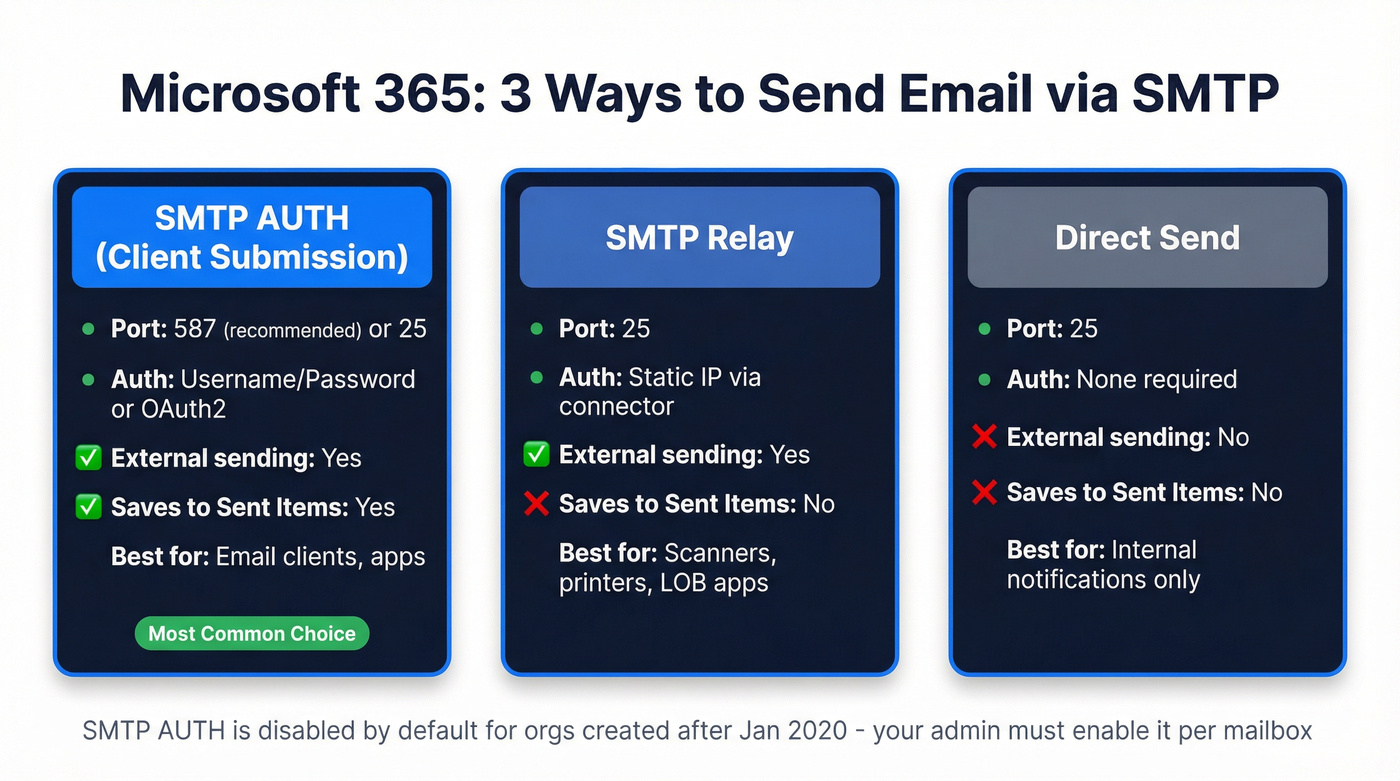
| SMTP AUTH (Client submission) | SMTP Relay | Direct Send | |
|---|---|---|---|
| Port | 587 (recommended) or 25 | 25 | 25 |
| Auth type | Username/password or OAuth | Static IP via connector | None |
| Sends externally | Yes | Yes | No |
| Saves to Sent Items | Yes | No | No |
SMTP AUTH client submission is what most people want - it authenticates with a mailbox, saves sent messages, and works for external recipients. The catch: Microsoft disabled SMTP AUTH by default for organizations created after January 2020. Your admin needs to enable it per-mailbox in Exchange Online before it'll work. We've seen teams burn hours troubleshooting connectivity when the real problem was a single checkbox in the admin center.
SMTP Relay is for scanners and line-of-business apps that send from a fixed IP. Direct Send is internal-only. If you're configuring a copier or ERP system, go with relay.
GoDaddy Outlook SMTP Settings
If you purchased Microsoft 365 through GoDaddy, your SMTP server is smtp.office365.com on port 587 with STARTTLS - identical to standard Exchange Online. GoDaddy doesn't run its own mail servers for these plans; it resells Microsoft 365. The only difference is that some admin tasks like enabling SMTP AUTH per mailbox need to be done through the Microsoft 365 admin center rather than GoDaddy's dashboard.

Outlook caps your daily sends and throttles based on bounce rate. One bad list and your sender reputation is toast. Prospeo verifies emails at 98% accuracy with 5-step verification - spam-trap removal, honeypot filtering, and catch-all handling included.
Clean your list before Microsoft cleans your sending privileges.
Outlook Sending Limits
| Account Type | Daily Recipients | Per Message | Notes |
|---|---|---|---|
| M365 subscriber (Outlook.com) | 5,000 | 500 | 1,000 non-relationship |
| Free Outlook.com | ~300-1,000 | Varies | Depends on account history |
| Exchange Online (business) | 10,000 | 500 | 30 msgs/min throttle |
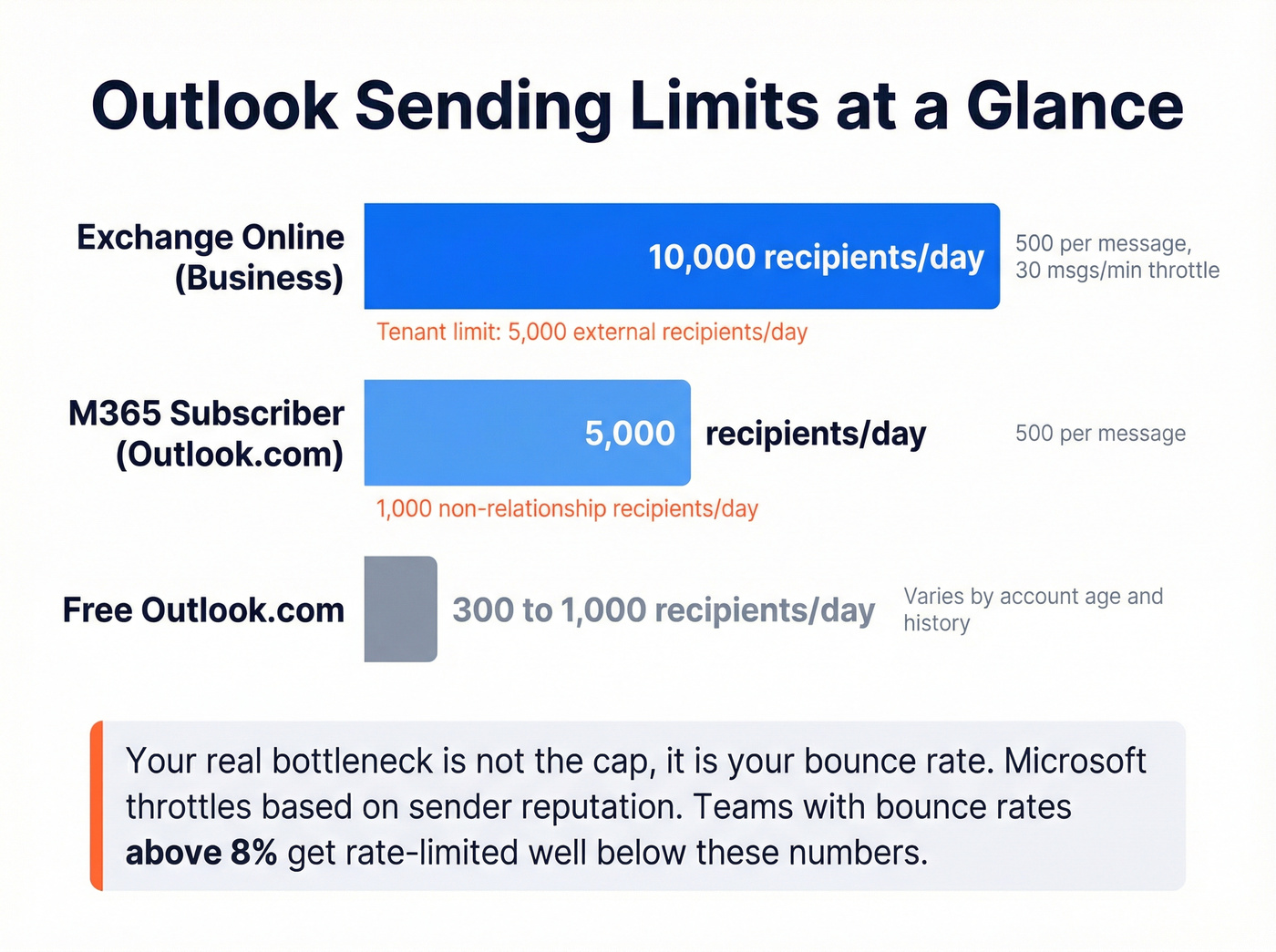
"Non-relationship recipient" means someone you've never emailed before - Microsoft tracks this separately and caps it at 1,000/day for subscribers.
Microsoft also canceled plans in January 2026 to impose a 2,000 external recipient/day cap for Exchange Online bulk senders, so the 10,000 limit still stands. Exchange Online enforces a tenant-level external recipient limit of 5,000/day too, which is often the one that actually bites business teams running outbound campaigns across multiple mailboxes.
Here's the thing: if you're using Outlook for outbound sales, the daily cap isn't your real bottleneck. Bounces are. Every bad address counts against your sender reputation, and Microsoft's throttling is reputation-based. We've watched teams get rate-limited at 2,000 sends because their bounce rate was north of 8%. Verify your list before you send. Prospeo's free tier gives you 75 email verifications per month at 98% accuracy - enough to spot-check a list before it tanks your deliverability.
If you want to go deeper on bounce thresholds and what “safe” looks like, see our Email Bounce Rate benchmarks and fixes, plus this Email Deliverability Guide for the full checklist.
Common Errors and Fixes
"SmtpClientAuthentication Is Disabled"
This is the error of 2026. For some new accounts, the toggle to enable SMTP AUTH is missing entirely from the settings UI.
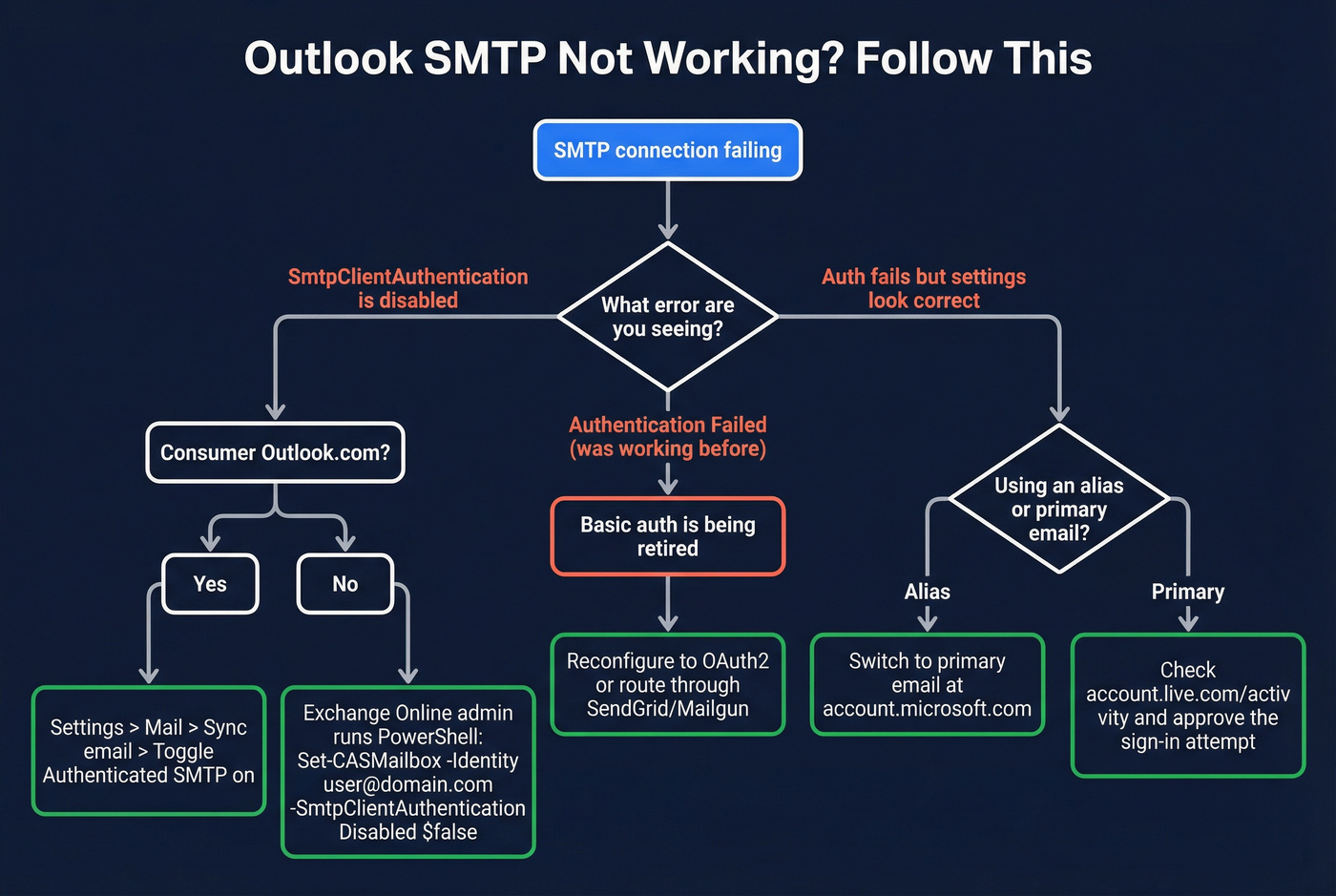
Fix for consumer Outlook.com: Go to Settings, then View all Outlook settings, then Mail, then Sync email. Look for the "Authenticated SMTP" toggle.
Fix for Exchange Online admins: Enable it via PowerShell:
Set-CASMailbox -Identity user@domain.com -SmtpClientAuthenticationDisabled $false
Consumer Outlook.com users who don't see the toggle need to contact Microsoft support - the PowerShell cmdlet only works in Exchange Online.
Alias vs. Primary Address Failure
SMTP fails when you authenticate with an Outlook alias instead of your primary Microsoft account email. IMAP works fine, but outgoing mail just... doesn't.
Fix: Always use your primary Microsoft account email for SMTP authentication. Check which address is primary at https://account.microsoft.com. This tripped up a wave of users on r/Outlook who thought Microsoft had killed SMTP entirely - it was an alias issue exposed by the OAuth2 migration.
"Authentication Failed" After Settings Worked Before
Your WordPress site or Python script was sending mail fine for months. Then it stopped. Nothing changed on your end.
Cause: Basic-auth setups stop working as Microsoft moves Outlook.com and Exchange Online toward OAuth2-only SMTP AUTH.
Fix: Reconfigure your client to use OAuth2. For apps that don't support it natively, route through a transactional email service like SendGrid or Mailgun.
If you're sending cold outreach, also watch your email velocity so you don’t trigger throttling.
Basic Auth Is Dead in 2026
Microsoft isn't gradually discouraging basic auth anymore. They're killing it on a hard timeline.
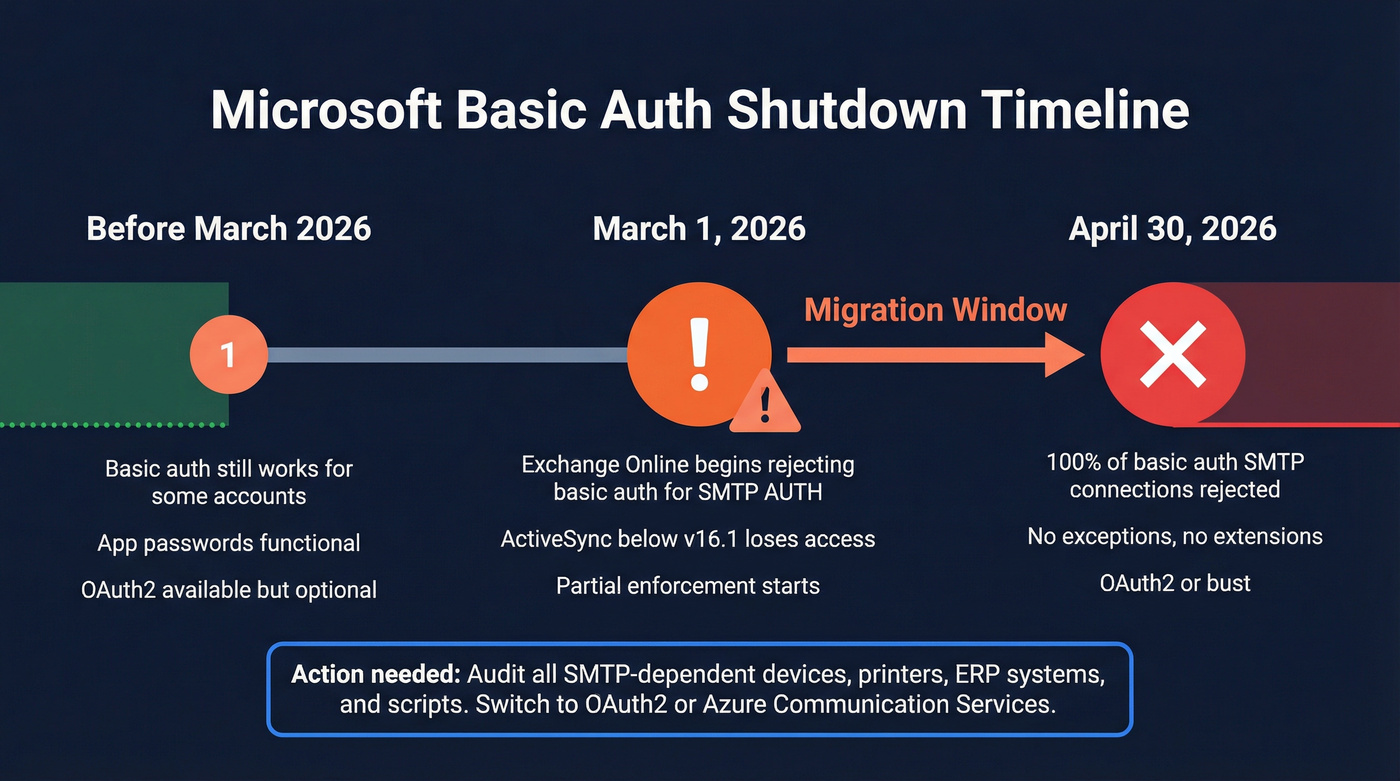
March 1, 2026: Exchange Online begins rejecting basic auth for SMTP AUTH client submission. Devices running ActiveSync versions below 16.1 also lose access.
April 30, 2026: 100% of basic auth SMTP AUTH client submission connections are rejected. No exceptions.
If you're running any device or application that can't support OAuth2 - old multifunction printers, legacy ERP systems, IoT devices - your options are Azure Communication Services Email or Microsoft's High Volume Email service. The consensus on r/sysadmin is that most teams are scrambling to audit their SMTP-dependent devices before the March cutoff. Don't wait.
Configure Outlook SMTP in Third-Party Apps
WordPress
Use a WordPress mail plugin that supports OAuth2 for Microsoft accounts. Set the host to smtp-mail.outlook.com, port 587, STARTTLS. Skip any guide that tells you to generate an app password - that path is a dead end in 2026.
If you’re doing outreach from WordPress forms or lead magnets, pair this with targeted email campaigns so you’re not blasting everyone the same message.
Python (smtplib)
Use smtp-mail.outlook.com on port 587 with STARTTLS. For OAuth2, register an app in Microsoft Entra ID and use the MSAL library to obtain an access token. In our testing, the token refresh flow adds about 15 lines of code compared to the old basic-auth approach, but it's the only method that'll keep working past April.
Thunderbird
Thunderbird supports OAuth2 natively for Outlook.com accounts. When adding your account, select OAuth2 as the authentication method. If Thunderbird auto-detects basic auth, override it manually - the auto-detection hasn't caught up with Microsoft's changes yet.
If you’re using Outlook/Thunderbird for sales, you’ll get better replies with tighter sales follow-up templates and stronger email subject lines.
Let's be clear: any guide recommending app passwords for Outlook.com is outdated on authentication. The host, port, and encryption values are still correct. The authentication method is not.
Configuring SMTP is the easy part. Filling your pipeline with real, deliverable contacts is the hard part. Prospeo gives you 143M+ verified emails refreshed every 7 days - not the stale data that spikes your bounce rate past Microsoft's threshold.
Get contacts that actually land in inboxes for $0.01 each.
If you’re building lists for outbound, use sales prospecting techniques and a clean workflow for lead enrichment so you’re not sending to outdated contacts.
FAQ
What port does Outlook SMTP use?
Port 587 with STARTTLS encryption. Port 25 is blocked by most ISPs and cloud providers like Azure and AWS, so 587 is the only reliable option for client submission.
What's the difference between smtp-mail.outlook.com and smtp.office365.com?
smtp-mail.outlook.com is the SMTP server for consumer Outlook.com accounts. Microsoft 365 client submission uses smtp.office365.com. Using the wrong server for your account type triggers authentication errors - it's one of the most common misconfigurations we see.
Can I use Outlook SMTP for bulk email?
No. Outlook.com caps subscribers at 5,000 recipients/day, and Exchange Online tops out at 10,000. For bulk sending, use a dedicated service like SendGrid, Mailgun, or Amazon SES - and verify your list first to keep bounce rates under control.
Do I still need an app password for Outlook SMTP?
No. Outlook.com now requires OAuth2/Modern Auth, and Exchange Online is retiring basic auth for SMTP AUTH client submission by April 30, 2026. Configure OAuth2 instead of generating app passwords.