

How to Stop Emails from Going to Spam (For Good)
Your sales team just told you half their follow-ups are landing in spam. Marketing ops checked - authentication looks "fine," the content is clean, and nobody can explain why Gmail is eating your messages. Here's the thing: roughly one in six emails never reaches the inbox. And the fix isn't what most guides tell you.
These deliverability benchmarks aren't guesswork:
| Provider | Inbox | Spam | Missing |
|---|---|---|---|
| Gmail | 87.2% | 6.8% | 6.0% |
| Microsoft | 75.6% | 14.6% | 9.8% |
| Yahoo/AOL | 86.0% | 4.8% | 9.2% |
| Apple Mail | 76.3% | 14.3% | 9.4% |
| Global avg | ~84% | - | - |
Microsoft and Apple Mail are the worst offenders - about 1 in 4 emails miss the inbox entirely. This isn't just about marketing campaigns. Password resets, 2FA codes, and order confirmations get caught in the same filters. Gmail's the most forgiving, but only if you've done the work upfront.
What Actually Matters (Quick Version)
Inbox placement comes down to three things, in this order:
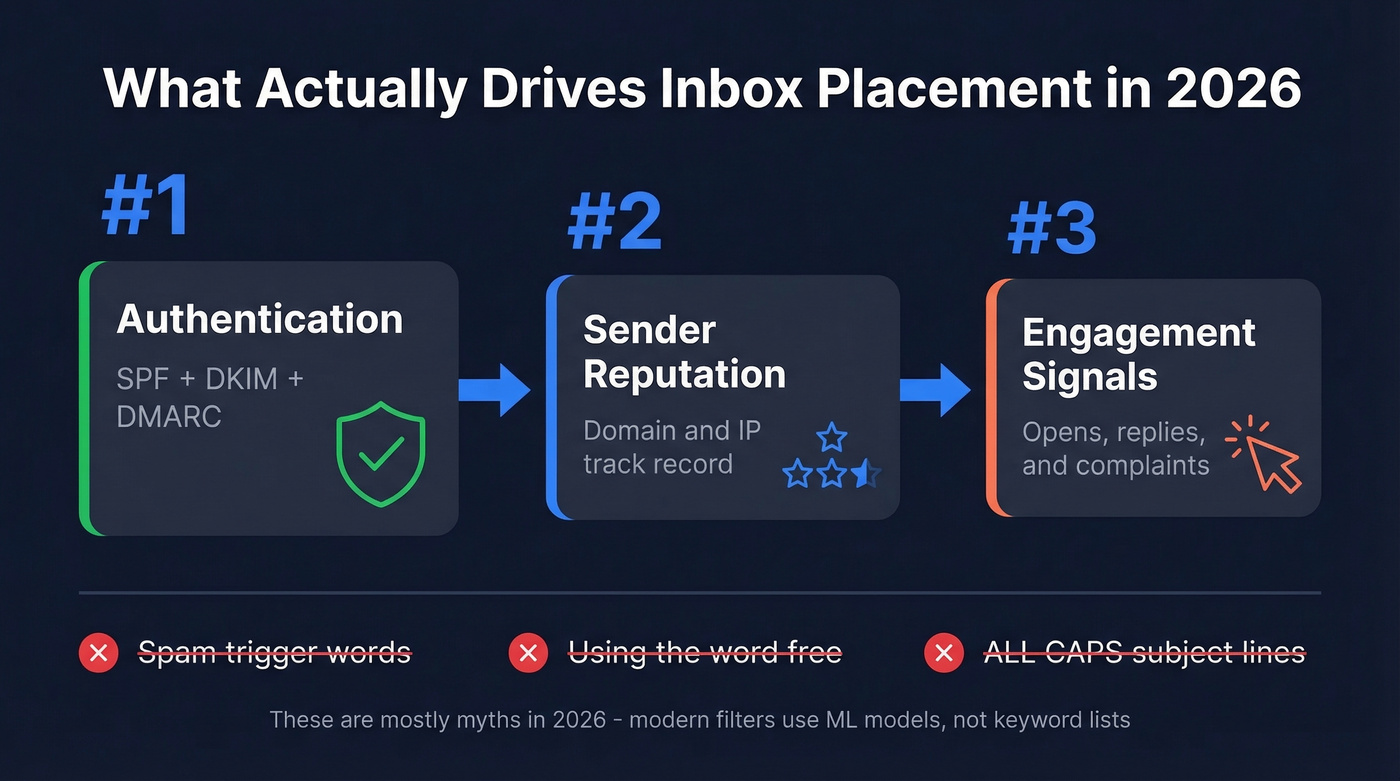
- Authentication - SPF, DKIM, and DMARC properly configured
- Sender reputation - your domain and IP track record with mailbox providers
- Engagement signals - opens, replies, and complaints from real recipients
Everything else is a rounding error. Spam trigger words? Mostly a myth. If you only have 10 minutes, set up DMARC and verify your email list. The rest of this guide covers why messages land in junk and how to fix each layer so they reach the inbox.
Why Emails Go to Spam in 2026
Every guide from 2015 told you to avoid words like "free," "act now," and "limited time offer." That advice is from a different era. Litmus put it plainly: spam trigger words are a deliverability myth. Modern filters use ML models that weigh sender reputation, engagement, content quality, and authentication simultaneously. A single word doesn't override those signals.
Today's filters care about your IP and domain reputation, whether your authentication passes, how recipients interact with your messages, and whether users are marking you as spam. A 0.3% spam complaint rate absolutely moves the needle. The word "free" in your subject line does not.
That's actually liberating. Stop obsessing over word choice and start obsessing over the infrastructure underneath your emails.
Set Up Email Authentication
Authentication is table stakes. Without it, you're asking mailbox providers to trust you on faith - and they won't. If you're trying to figure out how to stop emails from going to spam, this is almost always the first place to look.
SPF: One Record, 10 Lookups Max
SPF tells receiving servers which IPs can send on your domain's behalf. A basic record for Google Workspace:
v=spf1 include:_spf.google.com ~all
Two rules trip people up constantly. First, you can only publish one SPF record per domain. If you're using multiple sending services - your ESP, your CRM, your cold email tool - merge all the include: statements into a single record. Second, SPF has a 10 DNS lookup limit. Exceed it and SPF effectively fails evaluation. When you're hitting the limit, use dedicated subdomains per sending service or look into SPF flattening.
DKIM: Keys and Selectors
DKIM adds a cryptographic signature to your emails. The DNS record lives at:
selector._domainkey.yourdomain.com
The selector is arbitrary - you can't guess it from DNS alone. To find yours, inspect the DKIM-Signature header in any sent email. Use 2048-bit keys (not 1024) and rotate them every six months. Key rotation is one of those things everyone knows they should do and almost nobody actually does. If you want to double-check your setup, use this guide on verify DKIM is working.
DMARC: Start at None, Move to Reject
DMARC ties SPF and DKIM together and tells providers what to do when authentication fails. Start here:
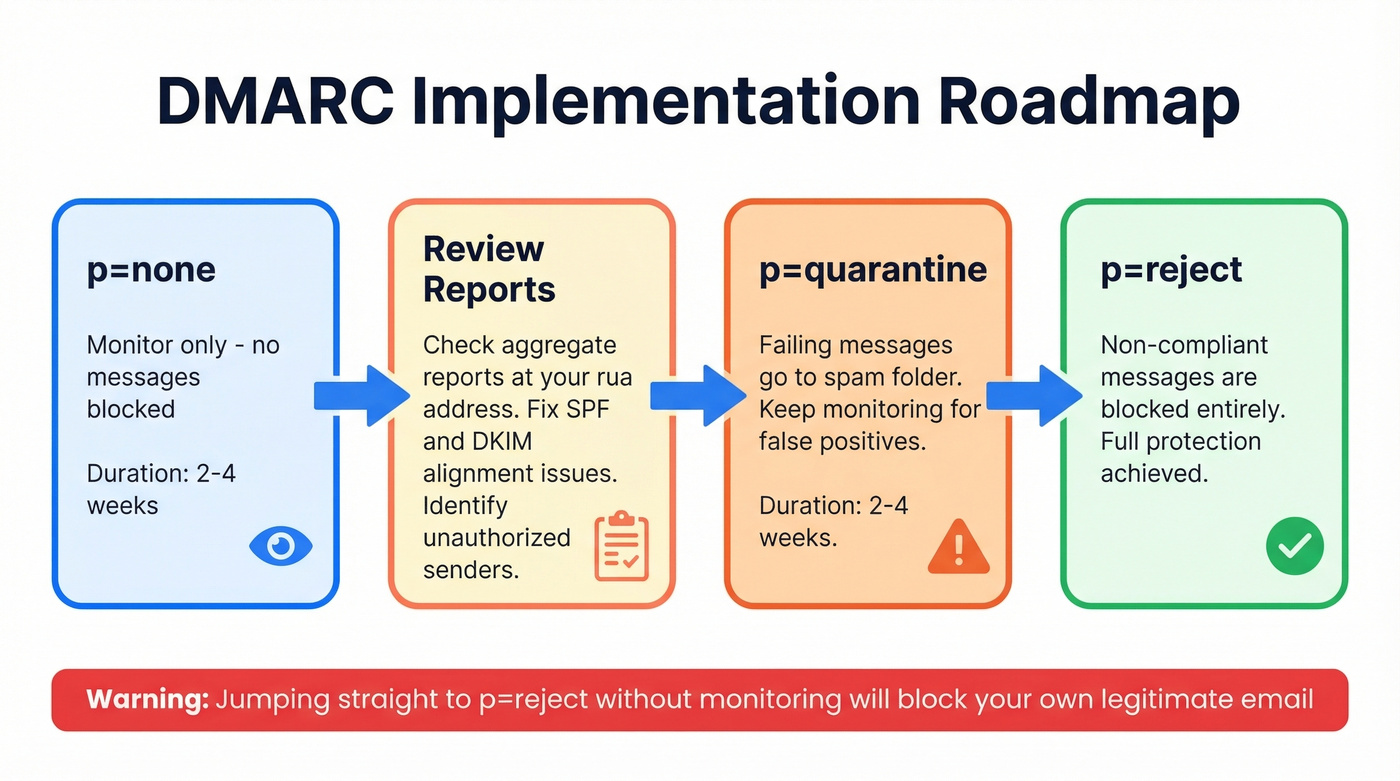
v=DMARC1; p=none; rua=mailto:dmarc-reports@yourdomain.com
p=none means you're monitoring only - no messages get blocked. Review the aggregate reports for a few weeks, fix any alignment issues, then move to p=quarantine and eventually p=reject. Jumping straight to reject without monitoring is how you accidentally block your own legitimate email. (If you're troubleshooting alignment, see DMARC alignment.)
The Authentication Deadline Is Here
This isn't optional anymore. In February 2024, Google and Yahoo started requiring DMARC for anyone sending 5,000+ daily emails. By late 2025, Gmail moved to strict SMTP-level enforcement - non-compliant messages get deferred or rejected outright. In 2026, non-compliant messages are rejected at SMTP level before delivery. Your recipient never sees the email. Period.
The industry responded fast. DMARC adoption hit 53.8% in 2024, up from 42.6% the year before, and Google reported a 65% reduction in unauthenticated messages reaching Gmail inboxes. If you haven't set up DMARC yet, you're already behind - and your deliverability numbers are showing it.

Authentication won't save you if your list is full of invalid addresses. Every hard bounce chips away at the domain reputation you just spent weeks building. Prospeo's 5-step verification catches spam traps, honeypots, and catch-all domains at 98% accuracy - for roughly $0.01 per email.
Stop feeding bad data to spam filters. Verify before you send.
Fix Your Sender Reputation
Authentication gets you in the door. Reputation determines which room you end up in - inbox or spam. If you need a deeper playbook, start with improve sender reputation.
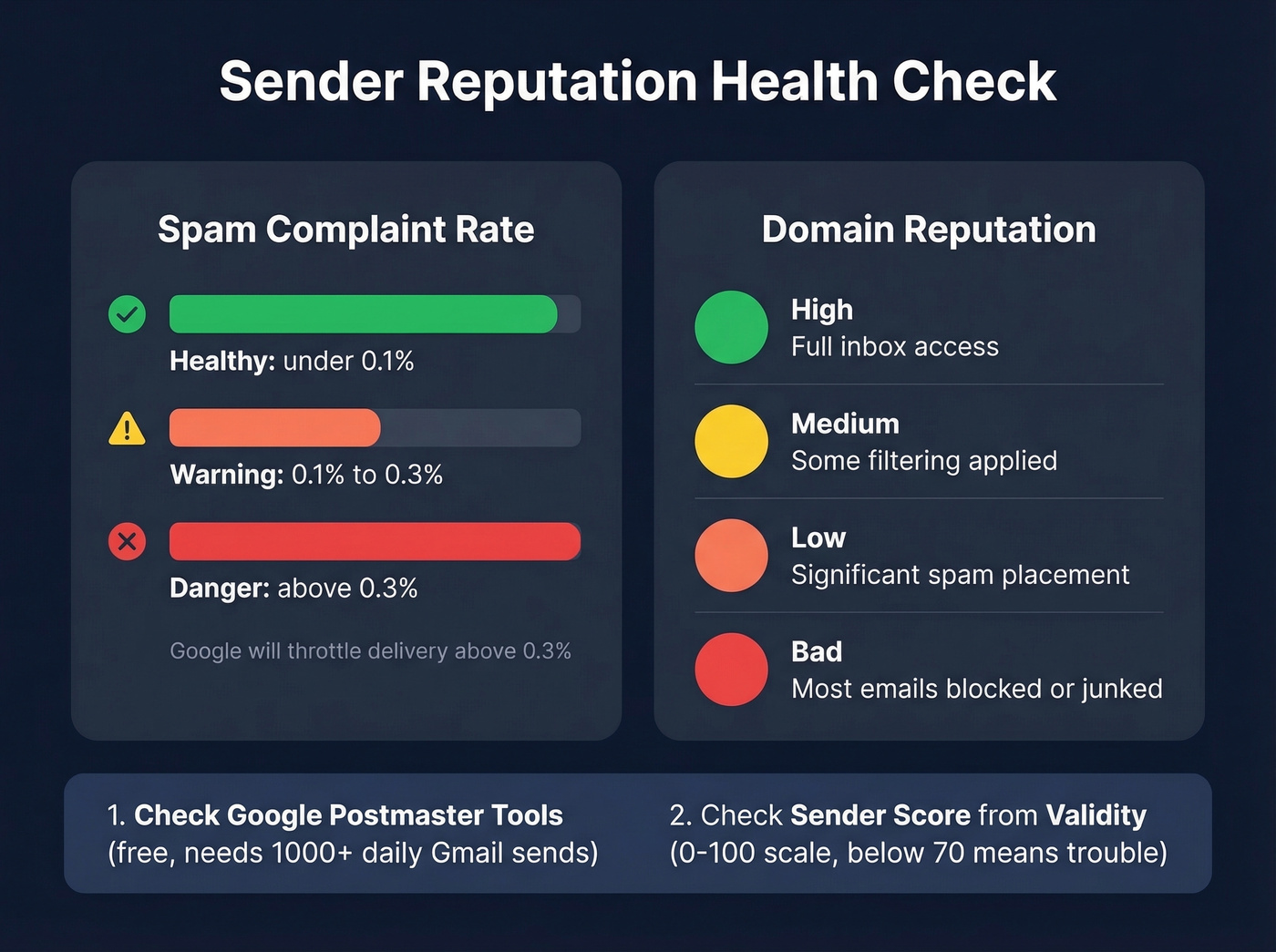
Head to postmaster.google.com, add your domain, and verify it with a DNS TXT record. Google Postmaster Tools is free and shows your spam complaint rate, IP/domain reputation, and authentication pass rates. One caveat: you need roughly 1,000+ daily Gmail sends before data populates. In our experience, most teams discover their reputation is worse than they expected the first time they check.
| Metric | Healthy | Warning | Danger |
|---|---|---|---|
| Spam rate | <0.1% | 0.1-0.3% | >0.3% |
| Reputation | High | Medium | Low/Bad |
If you see "Low" reputation for the first time, don't panic - but do stop sending at current volume immediately. Reputation recovers, but only if you fix the underlying cause first. Sender Score from Validity is a useful secondary check for IP reputation: a score below 70 on its 0-100 scale correlates with significant deliverability problems. For more tooling options, see email reputation tools.
Clean Your List to Keep Emails Out of Spam
Bad data is the silent killer of sender reputation. Every invalid address on your list generates a hard bounce. Enough hard bounces and mailbox providers flag your domain as careless at best, spammy at worst. (Benchmarks and bounce codes: email bounce rate.)
Spam traps make it worse. Pristine traps are addresses that never belonged to a real person. Recycled traps are abandoned addresses repurposed by ISPs. Typo traps catch common misspellings like gmial.com. All three exist specifically to catch senders who don't verify their lists. If you suspect you hit one, follow a remediation plan like spam trap removal.
The fix is straightforward: run your list through a verification tool before every send. Prospeo's 5-step verification process catches spam traps, honeypots, and catch-all domains that simpler tools miss - at 98% email accuracy and roughly $0.01 per email. That's cheaper than the deliverability consultant you'll need if you skip this step. Stack Optimize built their agency to $1M ARR using verified list hygiene, maintaining 94%+ client deliverability with bounce rates under 3% and zero domain flags across all clients.
Keep your bounce rate below 2%. Anything above that and you're actively damaging your reputation with every send.
Warm Up New IPs and Domains
New IPs and domains have no reputation - which looks suspicious to filters. You have to earn trust gradually. Skipping this step is one of the most common reasons teams struggle with spam placement on fresh infrastructure, and we've watched it happen more times than we can count. To avoid ramping too fast, use an email velocity framework.
| Week | Daily Volume | Hourly Pace |
|---|---|---|
| 1 | 500-1,000 | 100-200/hr |
| 2 | 2,000-5,000 | ~500/hr |
| 3 | 10,000-15,000 | 1,000-2,000/hr |
| 4 | 20,000-30,000 | 3,000-5,000/hr |
| 5+ | Scale to target | Monitor reputation |
Monitor bounce rates throughout. If they creep above 2%, slow down and clean your list again. Remove hard bounces immediately. This schedule is for marketing-volume sending on dedicated IPs - if you're sending under 50,000 emails per week, a shared IP from a reputable ESP is usually fine and comes pre-warmed.
Check and Remove Yourself from Blocklists
If your deliverability tanks overnight, check blocklists before anything else. The major ones: Spamhaus SBL, CSS, XBL, PBL, and DBL, plus Barracuda, SORBS, and SpamCop. Use the Spamhaus IP and Domain Reputation Checker to see if you're listed. If you are, follow a step-by-step Spamhaus blacklist removal process.
Delisting varies by list. CSS and XBL listings often expire automatically once you fix the underlying issue. SBL and DROP listings typically require your ISP to intervene - use the contact link on the listing page. PBL exclusions for single IPs can be handled through an exclusion form; subnet-level changes usually go through your ISP.
Don't request delisting before you've fixed the root cause. Submitting removal requests while you're still sending to bad addresses or running compromised infrastructure will make things worse. Fix first, then delist.
Cold Email? Different Rules
Cold outbound operates under tighter constraints than marketing email. If your deal sizes are under five figures, you probably don't need enterprise-level infrastructure - but you absolutely need clean data, because cold email filters are unforgiving. The consensus on r/coldemail is brutally practical:
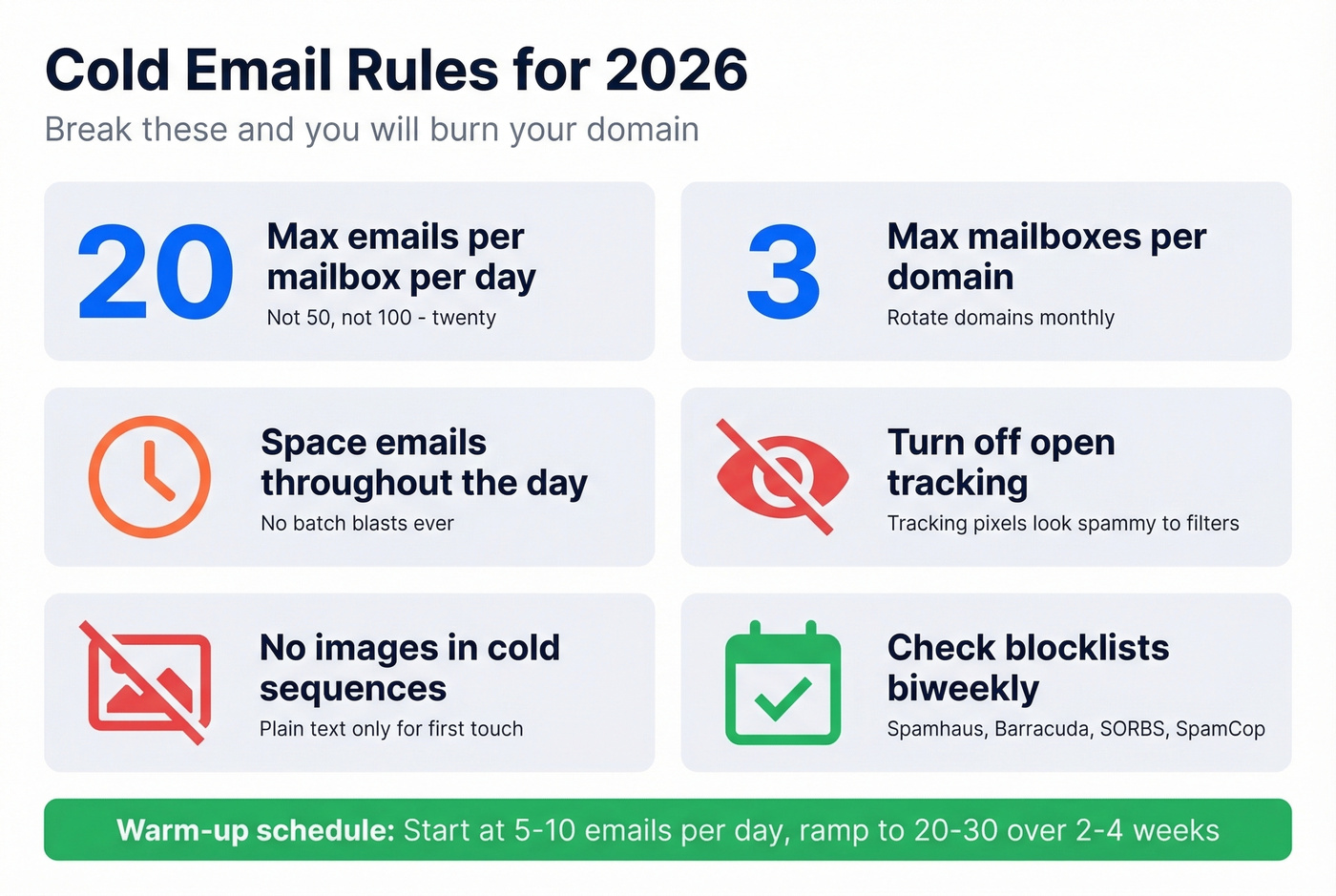
- 20 emails max per mailbox per day - not 50, not 100
- 3 mailboxes max per domain - rotate domains monthly
- Space emails throughout the day, no batch blasts
- Turn off open tracking (tracking pixels look spammy) - more on email tracking pixels
- Avoid images entirely in cold sequences
- Check blocklists biweekly, not monthly
For warm-up on new cold email domains, start at 5-10 emails per day per mailbox and ramp to 20-30 per day over 2-4 weeks. We've seen teams skip this and burn a domain in under a week. Following these rules is the most reliable way to stay out of the spam folder when running outbound campaigns. For a full outbound playbook, see cold email marketing.
For teams building prospect lists from scratch, start with verified data. Prospeo refreshes its database every 7 days versus the 6-week industry average, so you're not emailing people who changed jobs last month.
Stack Optimize built a $1M agency with zero domain flags and under 3% bounce rates - powered by Prospeo's verified data. When 1 in 6 emails never reaches the inbox, the difference between landing in spam and landing a meeting is the quality of your contact data. Prospeo refreshes every record every 7 days, not the 6-week industry average.
Your deliverability is only as good as your data. Fix the source.
FAQ
Why do my emails go to spam even with SPF/DKIM/DMARC?
Authentication is necessary but not sufficient. If your sender reputation is low (check Google Postmaster Tools) or your bounce rate exceeds 2%, filters still flag you. Reduce volume, clean your list, and send only to engaged recipients until your spam complaint rate drops below 0.1%.
How long does it take to fix email deliverability?
Typically 2-4 weeks of consistent, low-volume, high-engagement sending. There's no shortcut - you earn it back one clean send at a time. Monitor your spam complaint rate in Postmaster Tools and don't scale back up until you're solidly below 0.1%.
Can bad contact data cause spam placement?
Yes. Invalid addresses cause hard bounces, which tank sender reputation, which routes everything to spam. Running your list through a verification tool before sending prevents the entire cascade by catching traps, honeypots, and dead addresses first.
How do I prevent emails from going to spam permanently?
Set up SPF, DKIM, and DMARC. Verify your email list before every send to keep bounces under 2%. Monitor sender reputation in Google Postmaster Tools and maintain a spam complaint rate below 0.1%. There's no one-time fix - inbox placement is an ongoing discipline, not a checkbox.
How do I handle spam issues on a brand-new domain?
New domains lack reputation, so mailbox providers treat them with suspicion. Warm up gradually - start at 5-10 emails per day and ramp over 2-4 weeks. Authenticate from day one, verify every address before sending, and monitor bounce rates closely. Patience during warm-up is how you earn inbox placement on fresh infrastructure.