

UCEPROTECTL3 Blacklist Check: Why It Probably Doesn't Matter (and What Does)
You're an M365 customer, minding your own business, and Microsoft sends an alert: your IP is blacklisted by UCEPROTECTL3. Your stomach drops. You run a check on MxToolbox and every row lights up red. Suddenly you're wondering if every email you sent this week landed in spam.
Take a breath. Gmail doesn't care. Neither does Outlook.com. We've seen teams waste entire afternoons panicking over UCEPROTECTL3 listings that had zero measurable impact on their deliverability - and we don't want you to do the same.
The Short Version
- Check your listing at uceprotect.net/en/rblcheck.php or MxToolbox. Takes 30 seconds.
- Gmail, Microsoft 365, and Yahoo don't use UCEPROTECT. Less than 0.001% of email volume routes to recipients that reference it at all.
- Don't pay for delisting. Listings expire automatically after 7 spam-free days. Fix your sender reputation and data quality instead.
What Is UCEPROTECTL3?
UCEPROTECT is a DNS-based blacklist (DNSBL) that tracks IP addresses associated with spam. It operates on three levels, and Level 3 is the nuclear option: it doesn't list your individual IP or even your IP allocation - it lists your entire Autonomous System Number (ASN). That means if anyone sharing your ISP's network is spamming, your IP gets swept up in the blast radius.
An ASN can contain tens of thousands of IPs. You could be running a perfectly clean mail server and still show up on UCEPROTECTL3 because some unrelated customer on the same hosting provider tripped a threshold. Users report UCEPROTECT's attribution is sometimes flat-out wrong, listing IPs for spam they never sent.
As of early 2026, UCEPROTECT's own database shows 93,707 IPs on Level 1, 10,631 allocations on Level 2, and 1,001 entire ASNs on Level 3. That last number means over a thousand autonomous systems - potentially millions of IPs - are flagged at the broadest level. The collateral damage is enormous by design.
How the Three Levels Work
The levels escalate from surgical to indiscriminate. Your response depends entirely on which one you're listed at.
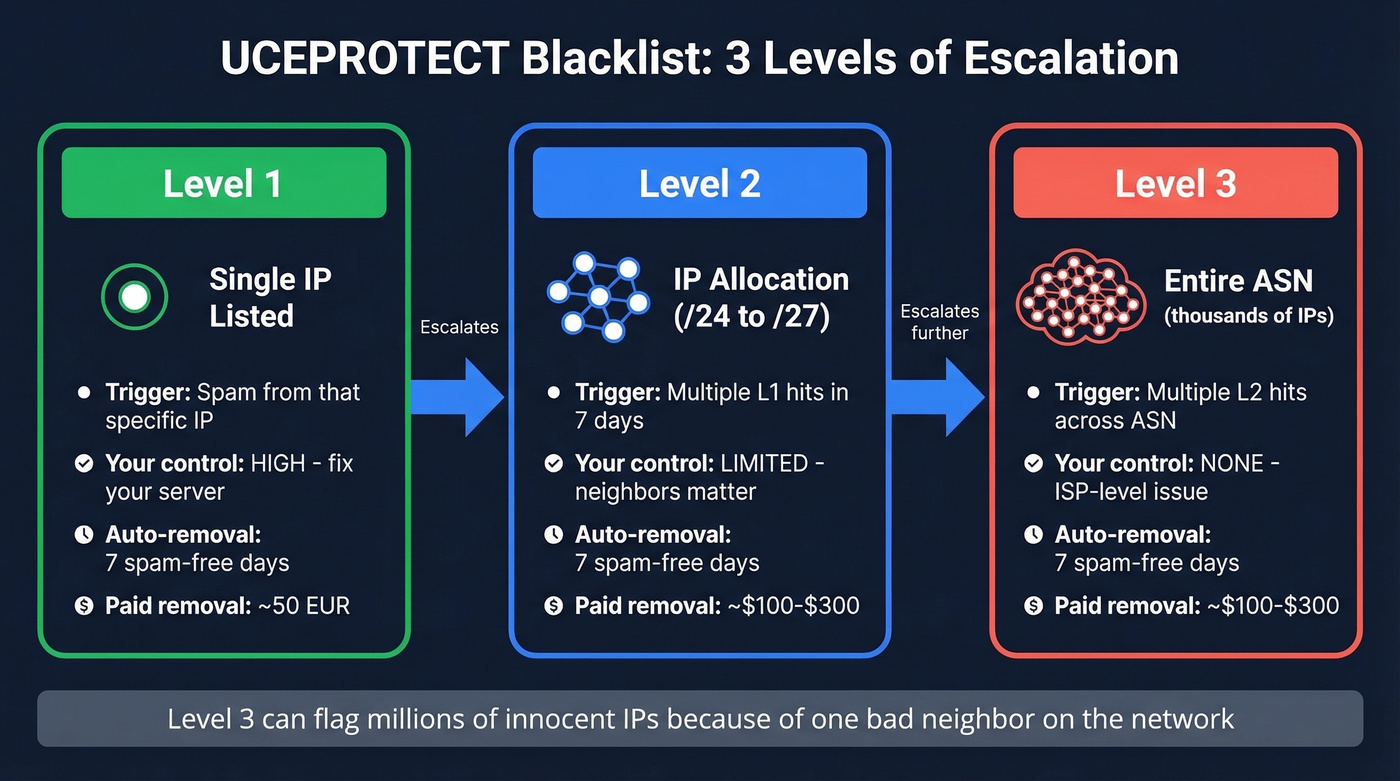
| Level 1 | Level 2 | Level 3 | |
|---|---|---|---|
| What's listed | Single IP | IP allocation (/24-/27) | Entire ASN |
| Trigger | Spam from that IP | Multiple L1 hits in 7 days | Multiple L2 hits in ASN |
| DNSBL zone | dnsbl-1.uceprotect.net | dnsbl-2.uceprotect.net | dnsbl-3.uceprotect.net |
| Auto-removal | 7 spam-free days | 7 spam-free days | 7 spam-free days |
| Paid removal | ~50 EUR/IP | ~$100-$300 | ~$100-$300 |
| Your control | Fix your server | Limited - neighbors matter | None - ISP-level issue |
Level 2 escalation follows specific thresholds: a /27 allocation gets listed after just 1 "impact," a /26 after 2, a /25 after 3, and a /24 after 4 or more. UCEPROTECT also runs a "provider protection" window - initially 4 hours where only the first impact counts, shrinking to 1 hour after 24 hours, then removed entirely after 48 hours. This escalation mechanic is poorly documented elsewhere, and understanding it matters if you're diagnosing why a clean /24 suddenly got swept into Level 2. Clean IPs registered at ips.whitelisted.org are excluded from Level 2 escalation, which is worth checking if you're a repeat victim.
Level 3 is where things get absurd. You have zero control. Your ISP's entire network is judged as a unit, and the only remediation is to complain to the ASN holder or take your business elsewhere.

A UCEPROTECTL3 listing won't tank your inbox rate - but a 35% bounce rate will. Most deliverability problems trace back to bad contact data, not obscure blacklists. Prospeo's 5-step email verification delivers 98% accuracy, and every record refreshes every 7 days so you're never sending to dead addresses.
Stop chasing blacklist ghosts. Fix the data that actually causes bounces.
How to Run a UCEPROTECTL3 Blacklist Check
The fastest method is UCEPROTECT's official lookup tool. Enter your IP and it tells you which levels you're listed on.

For a broader view, run your IP through MxToolbox's blacklist check, which queries dozens of DNSBLs simultaneously. UCEPROTECT will show up alongside lists that actually matter, like Spamhaus and Barracuda. That contrast alone should tell you something.
If you prefer the command line, reverse your IP octets and append the DNSBL zone:
dig +short 4.3.2.1.dnsbl-3.uceprotect.net
Or with nslookup:
nslookup 4.3.2.1.dnsbl-3.uceprotect.net
An A record back means you're listed. NXDOMAIN means you're clean. Swap dnsbl-3 with dnsbl-1 or dnsbl-2 to check the other levels.
Does UCEPROTECTL3 Actually Affect Deliverability?
For the vast majority of senders: no.
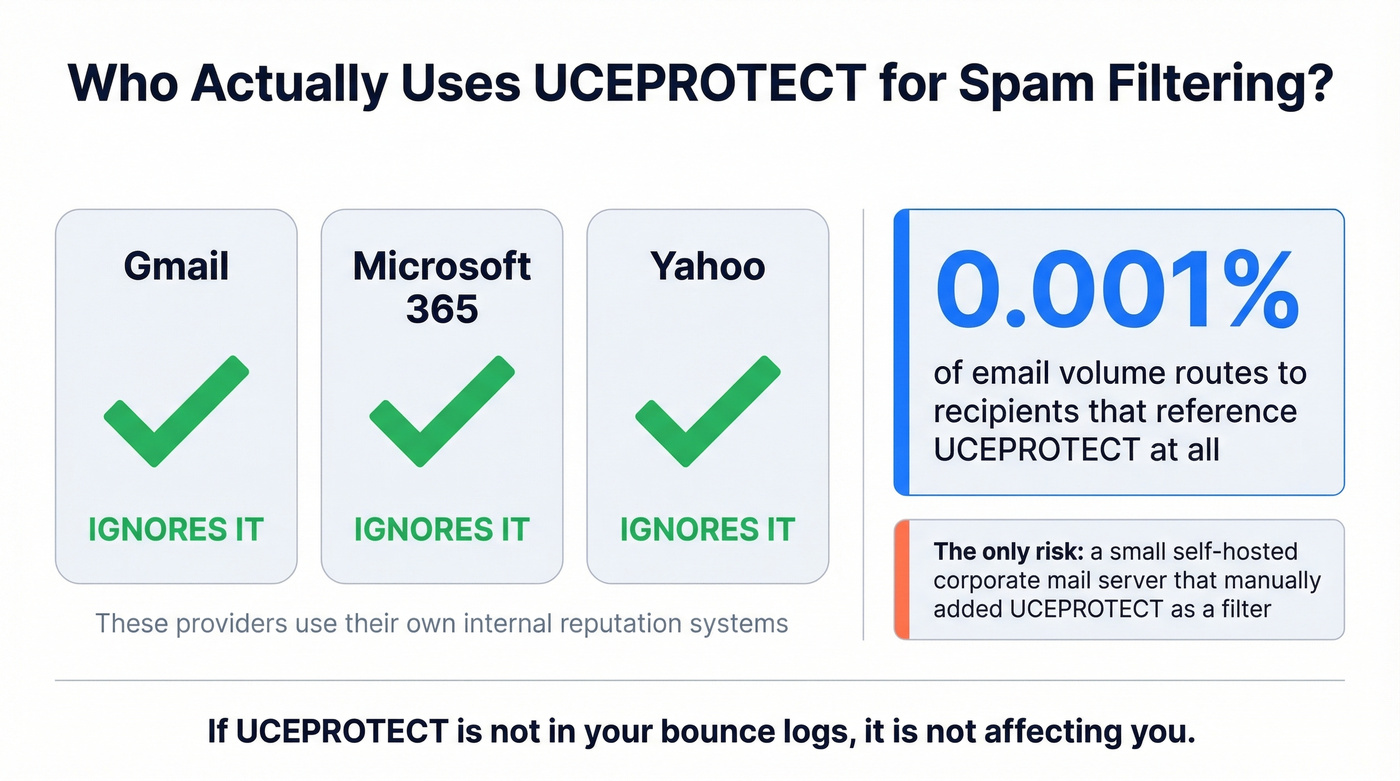
Gmail, Microsoft 365, and Yahoo don't use UCEPROTECT in their spam filtering. Microsoft's Exchange Online Protection relies on its own internal reputation systems. Opensense, which monitors deliverability across its platform, reports that less than 0.001% of email volume routes to recipients that reference UCEPROTECT at all. That's effectively zero.
The only scenario where a UCEPROTECTL3 listing bites you is if a recipient's mail server - typically a smaller, self-hosted corporate gateway - has manually configured UCEPROTECT as a filtering source. That's rare. And if it happens, contact that recipient's admin and ask them to whitelist you or stop using UCEPROTECT.
The practical diagnostic: check your bounce logs. If you don't see UCEPROTECT mentioned in any rejection messages, it isn't affecting you. Period.
Here's the thing - the consensus on r/sysadmin is blunt. Practitioners routinely call UCEPROTECTL3 a scam. And there's an uncomfortable truth about the blacklist-checker industry: tools that show you a wall of red flags next to "UCEPROTECT" are, intentionally or not, creating panic that drives you toward paid services. Not every red flag on a blacklist report is equal. UCEPROTECTL3 is the least important one you'll encounter.
Let's be honest: if you're sending to Gmail and Microsoft recipients, you'll never feel the impact of a UCEPROTECTL3 listing. Spend zero minutes on it. Spend those minutes on your bounce rate instead.
Don't Pay for Delisting
UCEPROTECT charges around 50 EUR for a Level 1 IP removal, with higher-level delistings commonly quoted in the $100-$300 range. There's no guarantee you won't be relisted the next day. If you insist on checking the paid option, the removal page is here - but we recommend against it. RFC6471, the IETF's own guidance on DNS blacklist practices, describes paid delisting as "perilously close to notions of extortion."
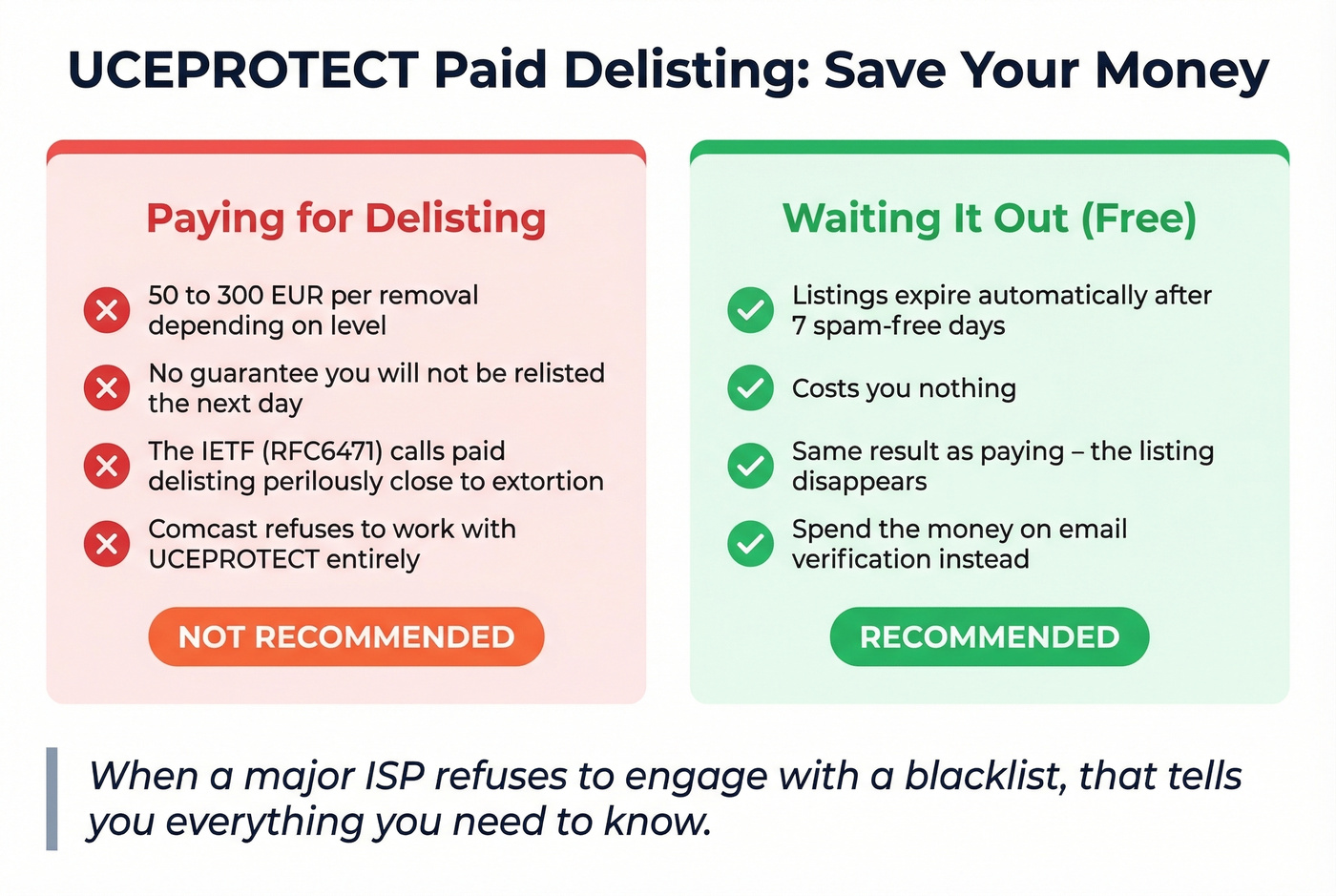
Comcast support told a customer they don't work with UCEPROTECT because the organization requires payment just to explain why an IP was listed, requires payment to delist, and doesn't guarantee against relisting.
When a major ISP refuses to engage with a blacklist, that tells you everything you need to know. Listings expire automatically after 7 spam-free days. Wait it out.
What Actually Prevents Blacklisting
UCEPROTECTL3 isn't your real problem. It's a symptom. The actual chain looks like this: bad contact data leads to bounces, bounces trip spam traps, and spam traps trigger blacklisting. Break any link in that chain and you're protected.

Authenticate everything. SPF, DKIM, and DMARC should be configured and passing for every sending domain. This is table stakes in 2026 - skip this and nothing else matters. (If you want to go deeper on DKIM, see how to verify DKIM is working.)
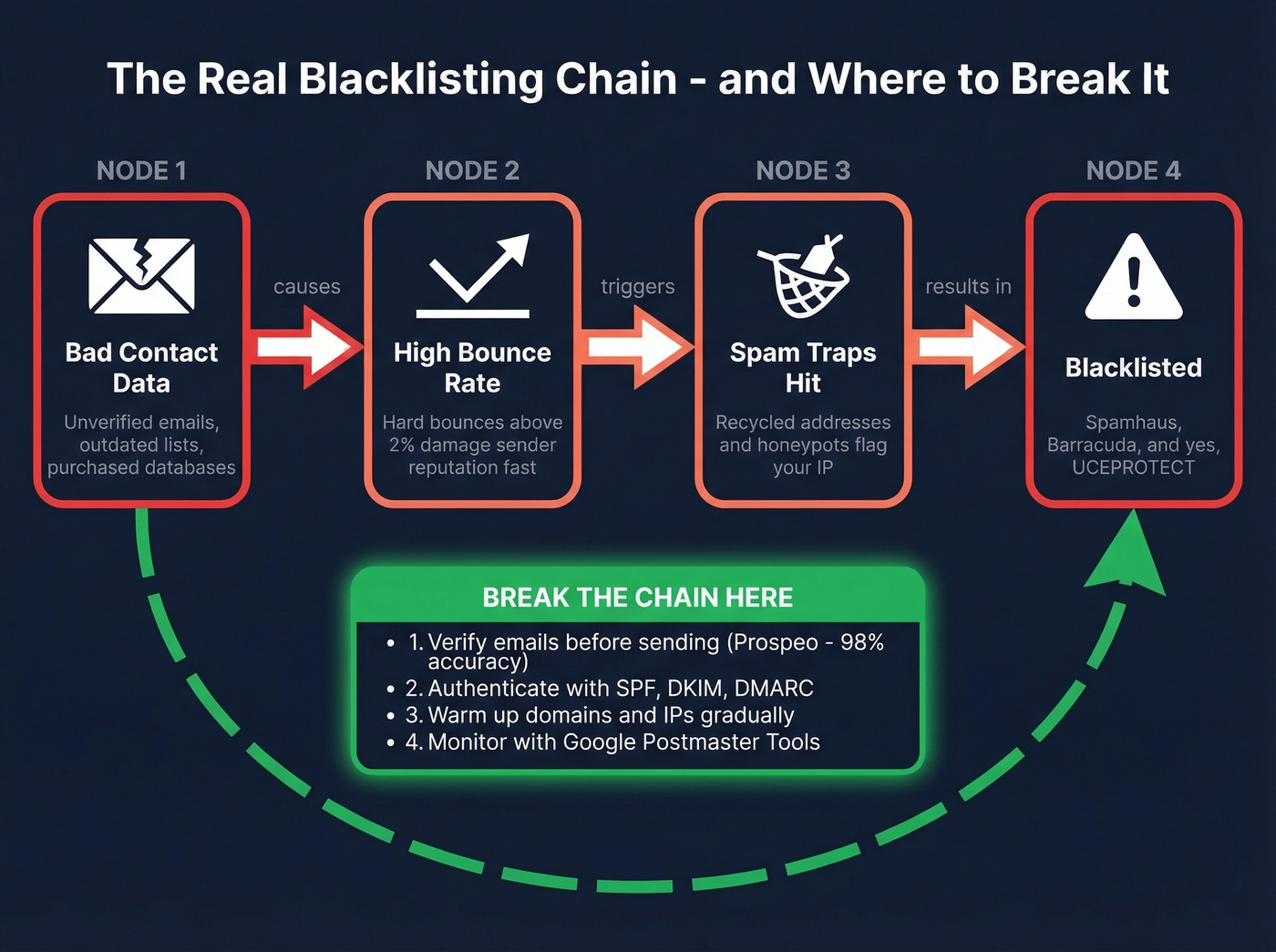
Control your sending volume. Sudden spikes - blasting 10,000 cold emails from a domain that normally sends 200 - trigger reputation systems far more consequential than UCEPROTECT. Warm up new domains and IPs gradually. Keep an eye on email velocity and your bulk email threshold.
Monitor with Google Postmaster Tools. It shows your domain's reputation with Gmail, spam complaint rates, and authentication pass rates. This is the deliverability dashboard that actually matters. If you're only checking one thing, check this.
Choose your hosting carefully. If your ISP's ASN is chronically listed on Level 3, that's a sign the network has a spam problem. Consider migrating to a provider with a cleaner reputation.
Fix the upstream cause: bad data. Bounces trigger the chain that lands you on blacklists in the first place. We've watched teams go from 35% bounce rates to under 4% just by verifying their lists before sending. Prospeo's 5-step email verification catches invalid addresses, spam traps, and honeypots before they damage your sender reputation - at 98% accuracy across 143M+ verified emails, with catch-all domain handling included. The free tier gives you 75 verifications per month, enough to audit your most critical lists before your next send. If you're building lists from scratch, start with a lead generation workflow and add data enrichment before you verify.
In our experience, the senders who actually have deliverability problems are the ones ignoring their bounce rates, not the ones listed on UCEPROTECT.
You just saved yourself from paying UCEPROTECT $250 for nothing. Now invest that energy where it counts: clean prospect data. Prospeo gives you 143M+ verified emails at ~$0.01 each with spam-trap removal, honeypot filtering, and catch-all handling built in - the things that actually protect your sender reputation.
Bounce rates under 4% start with data you can trust.
FAQ
Does UCEPROTECTL3 block my emails to Gmail?
No. Gmail doesn't use UCEPROTECT in its spam filtering, and neither do Microsoft 365 or Yahoo. Less than 0.001% of email volume routes to recipients that reference it. If your Gmail deliverability is suffering, investigate domain reputation, authentication failures, or content filtering instead.
How long does a UCEPROTECTL3 listing last?
Listings expire automatically after 7 spam-free days. Paid "express delisting" runs $50-$300 depending on the level, but it doesn't prevent relisting. The money is better spent fixing the root cause - typically high bounce rates from unverified contact data.
Can email verification prevent blacklisting?
Yes. Most blacklist triggers start with bounces from bad addresses, which trip spam traps and honeypots. Verifying emails before sending breaks that chain at the source.
Is UCEPROTECT a scam?
"Scam" is strong, but the business model is questionable. UCEPROTECT lists entire networks for the actions of individual bad actors, then charges for removal with no guarantee against relisting. The IETF's RFC6471 calls paid delisting "perilously close to extortion." Major ISPs like Comcast refuse to engage with them. Draw your own conclusion.