

Urgency Email Templates That Actually Reach the Inbox
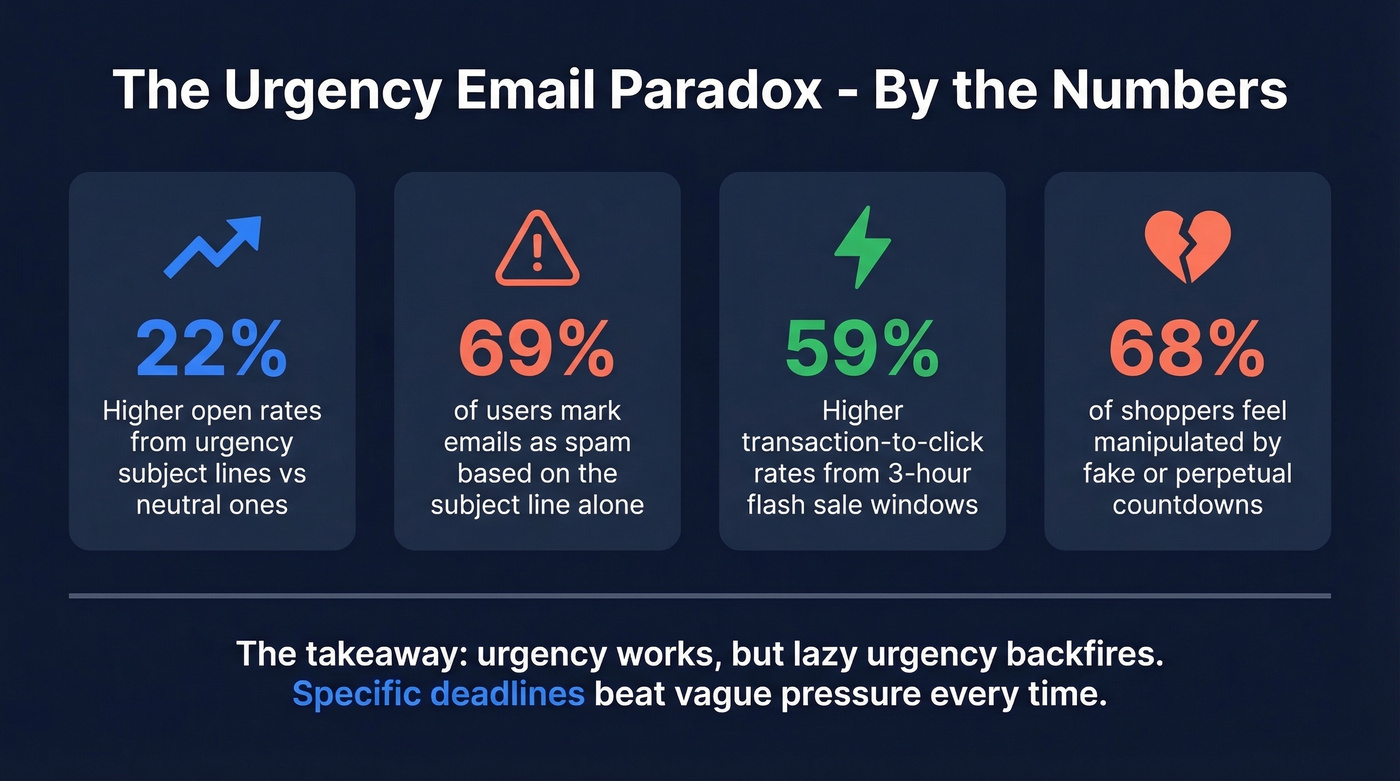
You've written the perfect deadline-driven email. Tight copy, real scarcity, a clear CTA. Then it lands in spam - because the subject line tripped a filter before anyone saw it. 69% of email users mark emails as spam based on the subject line alone, and most urgency email template collections online are stuffed with the exact phrases that trigger those filters.
Here's the thing: urgency isn't the problem. Lazy urgency is. The templates below cover four use cases - sales, marketing, B2B cold email, and internal comms - and each one is built to create real pressure without getting flagged. We've also included a swap table of spam-trigger phrases and their safer alternatives so you can audit your own copy in under a minute.
Why Urgency Works (and Why Most Templates Backfire)
Kahneman's loss aversion research shows that the pain of losing is roughly twice as powerful as the pleasure of gaining. That's the engine behind every deadline-driven email - inaction feels like loss. Urgency phrasing drives about 22% higher open rates compared to neutral subject lines.
But the same words that light a fire for humans also trip alarms for spam filters. "Act now," "last chance," "limited time" - these phrases have been abused so thoroughly that ESPs treat them as junk-mail signals. The templates below thread that needle: specific enough to create pressure, clean enough to reach the inbox.
Templates by Use Case
Sales Follow-Up Templates
Template 1: Expiring Offer
Subject: Pricing holds through Friday - wanted to flag this
Hi {{FirstName}},
Quick heads-up: the pricing we discussed locks in through {{Date}}. After that, the new rate sheet kicks in and it's a {{X%}} increase.
I don't want you to lose the number we agreed on. Want to get the paperwork moving this week?
Best, {{YourName}}
Template 2: Competitive Pressure
Subject: Saw {{CompetitorName}} just launched something similar
Hi {{FirstName}},
{{CompetitorName}} just rolled out {{feature/product}} - which means your team's window to move first is narrowing. The companies we're working with right now are locking in before the market shifts.
Worth a 15-minute call this week to see where you stand?
{{YourName}}
Why these work: they anchor urgency to an external event the recipient can verify. No vague "limited time" - just a date and a consequence.
If you want more reply-focused follow-ups, use these Sales Follow-Up Templates alongside your deadline-driven nudges.
Marketing & Ecommerce Templates
Template 1: Flash Sale
Subject: 40% off ends at midnight - no extensions
{{FirstName}}, our {{Season/Event}} sale is live for the next {{X}} hours. Everything in {{Category}} is 40% off - no code needed.
This window closes at midnight {{Timezone}}, and we won't be running this price again until next year.
[Shop {{Category}} →]
Experian's analysis of flash sale emails found that three-hour windows drove 59% higher transaction-to-click rates than standard promotions. Evening sends drove 23% higher transaction rates. Shorter, well-timed windows create real urgency - not manufactured urgency.
Template 2: Countdown Timer
Subject: {{X}} hours left - your cart's waiting
The items you saved are still available, but our {{Event}} pricing expires when the timer hits zero. [Complete your order →]
A Litmus case study found 43% of subscribers who opened a countdown email [re-opened it later](https://www.litmus.com/blog/using-countdown-timers-to-boost-engagement) to check the clock. Only 9% of marketers use countdown timers, which means they still stand out. But 68% of shoppers say they feel manipulated by fake or perpetual countdowns. If the timer resets when someone refreshes, you're burning trust faster than you're building conversions.
Use red or orange CTA buttons to signal time sensitivity. Keep white space around your deadline text so it doesn't get buried, and design mobile-first since most promotional emails get opened on phones. For more CTA patterns that don’t look spammy, see email call to action.
B2B Cold Email Templates
Keep these under 80 words. Seriously. If you’re building a full sequence, pair these with a B2B cold email sequence structure so urgency doesn’t show up too early.
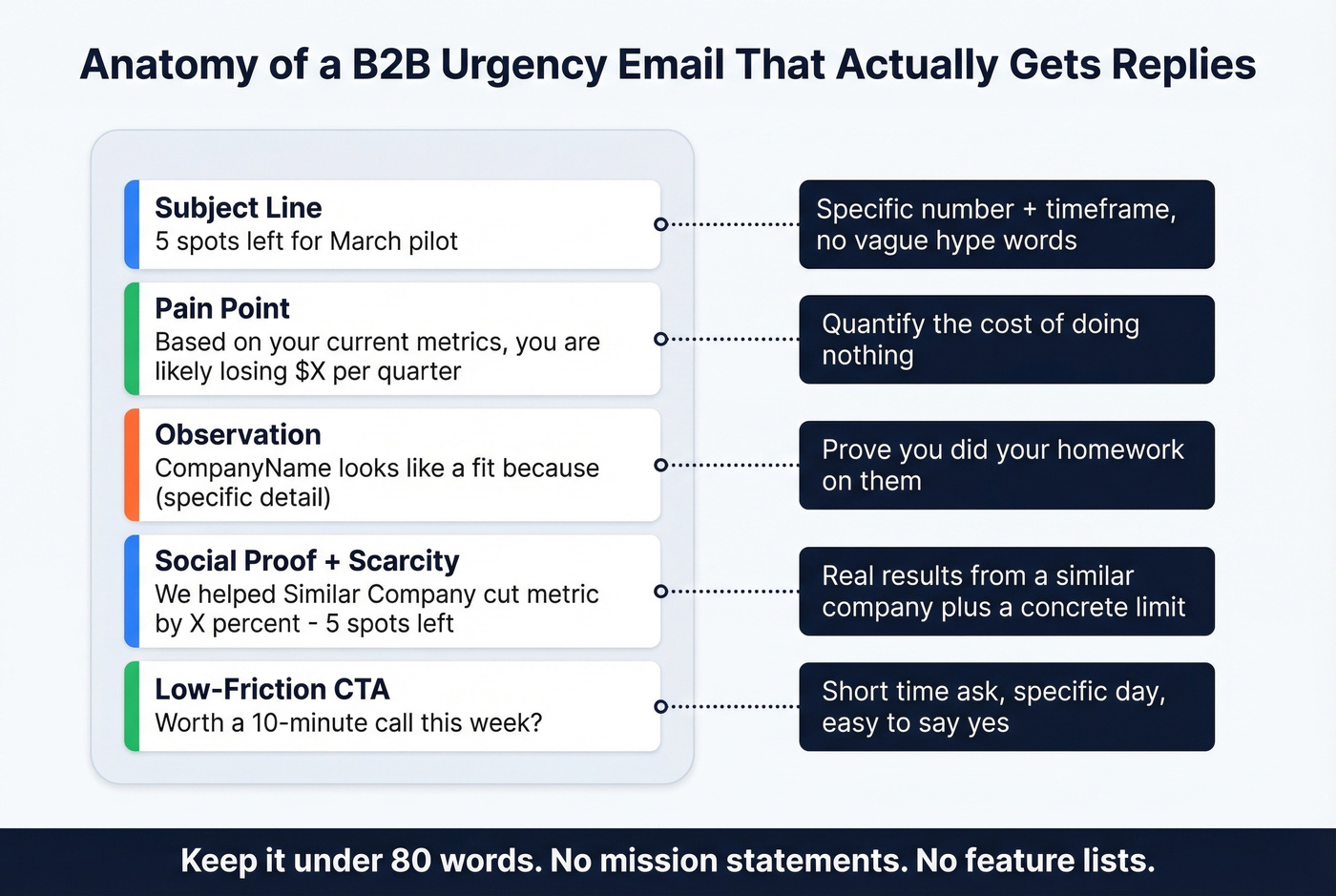
Template 1: Micro-Scarcity
Subject: 5 spots left for {{month}} pilot
Hi {{FirstName}},
We're running a free pilot with {{X}} companies in {{industry}} this month - 5 spots left.
{{CompanyName}} looks like a fit because {{specific observation about their business}}.
{{SocialProof - e.g., "We helped [Similar Company] cut [metric] by X%."}}.
Worth a 10-minute call this week?
{{YourName}}
Template 2: Quantified Inaction Cost
Subject: {{CompanyName}} is leaving ~${{X}}K on the table
{{FirstName}}, based on your current {{metric}}, you're likely losing ${{X}}K/quarter to {{problem}}.
We fixed this for {{Similar Company}} in {{timeframe}}. Happy to show you the playbook - I have two slots open Thursday.
{{YourName}}
The structure: pain, observation, scarcity, social proof, low-friction CTA. No paragraph about your company's mission. No three-bullet feature list.
These templates only work if they reach the right inbox. Bad addresses kill deadline emails faster than bad copy does - your "respond by Friday" message bounces on Wednesday, and your sender reputation takes the hit. We've seen teams cut bounce rates from 35% to under 4% just by running lists through Prospeo's real-time verification before hitting send. If you’re troubleshooting bounces, start with email bounce rate benchmarks and fixes.
Internal / Workplace Templates
The average internal communicator spends 240+ hours a year on email creation. These two templates cover the scenarios that actually require urgency. Skip them for routine updates - overusing urgency internally trains your team to ignore it when it matters.
Template 1: Action Required
Subject: Quick review needed by EOD to meet launch schedule
Team, the {{Project}} launch depends on sign-off from {{Department}} by end of day {{Date}}. Without it, we push the timeline by a week.
Please review the attached and reply with approval or comments by {{Time}}.
Template 2: Compliance Deadline
Subject: Mandatory: complete {{Training/Form}} by {{Date}} - 3 days left
Hi team, {{X%}} of the department has completed {{requirement}}. If you haven't yet, please do so by {{Date}} - this is a compliance requirement, not optional.
[Complete it here →]

Urgency templates only convert when they reach real inboxes. Teams using unverified lists see 35%+ bounce rates - which means your "respond by Friday" email never arrives. Prospeo's 5-step email verification delivers 98% accuracy, cutting bounce rates to under 4%.
Stop crafting perfect deadlines for addresses that don't exist.
Spam Trigger Swap Table
Spam filters don't just scan your subject line. Per Mailtrap's analysis, they also check header info, anchor text in hyperlinks, image alt text, footer/signature copy, HTML/CSS, and even attachment names. Swapping a spammy subject line isn't enough if your CTA button says "ACT NOW." For a deeper audit, run your copy through an email spam checker.
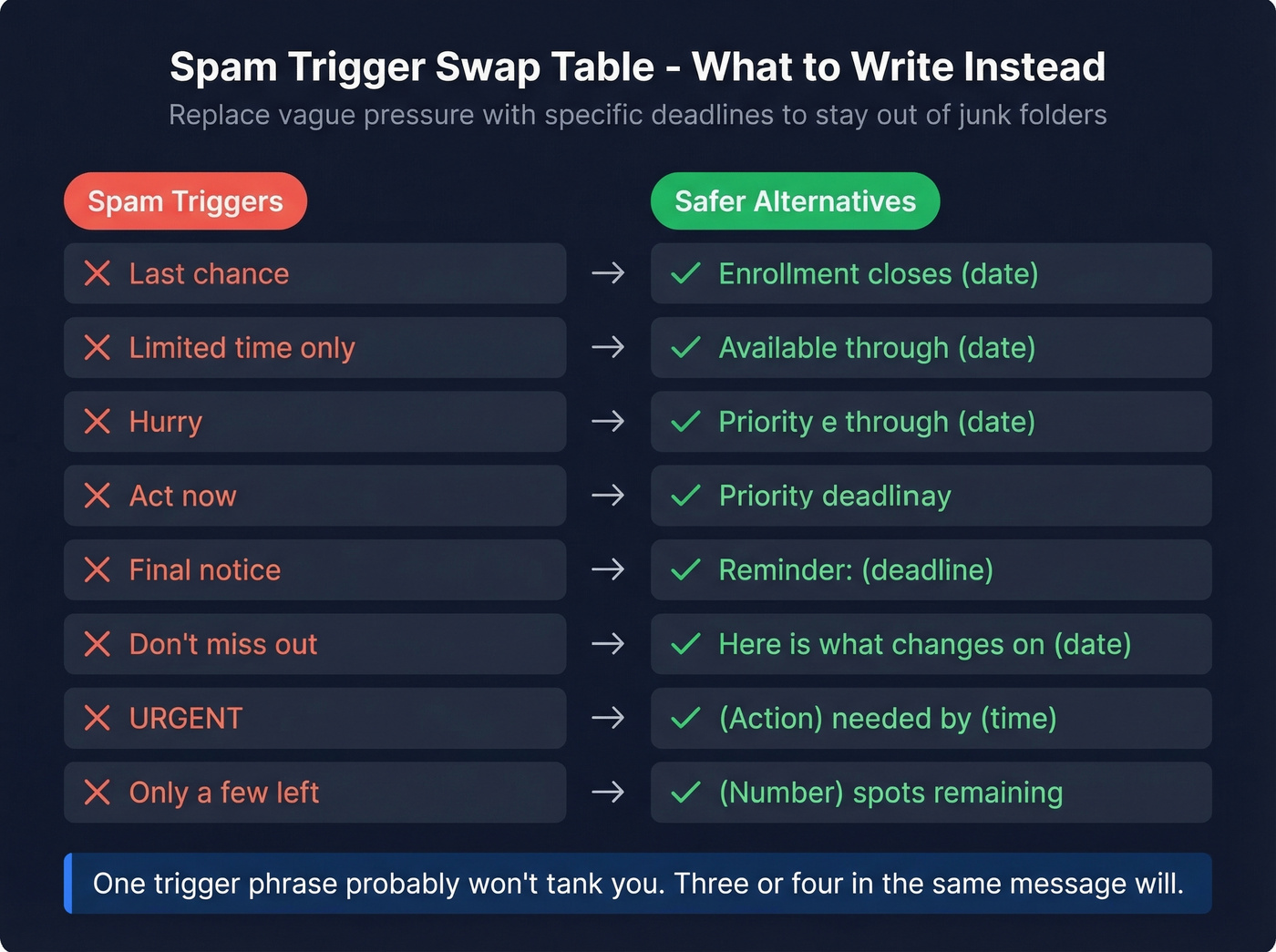
| Spam Trigger | Safer Alternative |
|---|---|
| Last chance | Enrollment closes {{date}} |
| Limited time only | Available through {{date}} |
| Hurry | Priority deadline |
| Act now | Get started today |
| Final notice | Reminder: {{deadline}} |
| Don't miss out | Here's what changes on {{date}} |
| URGENT | {{Action}} needed by {{time}} |
| Only a few left | {{Number}} spots remaining |
The pattern: replace vague pressure with specific deadlines. GetResponse flags "Act now," "Buy now," "Don't wait," and "Expiring soon" as phrases that raise red flags, especially when stacked together. One trigger phrase in an otherwise clean email won't tank you. Three or four in the same message will. Watch out for phishing-adjacent phrasing too - "Verify your identity" and "Final warning" trip the same filters.
When Urgency Emails Backfire
The takeaway from this r/Emailmarketing thread is blunt: when every brand uses the same urgency hooks simultaneously, recipients go numb and delete without reading.
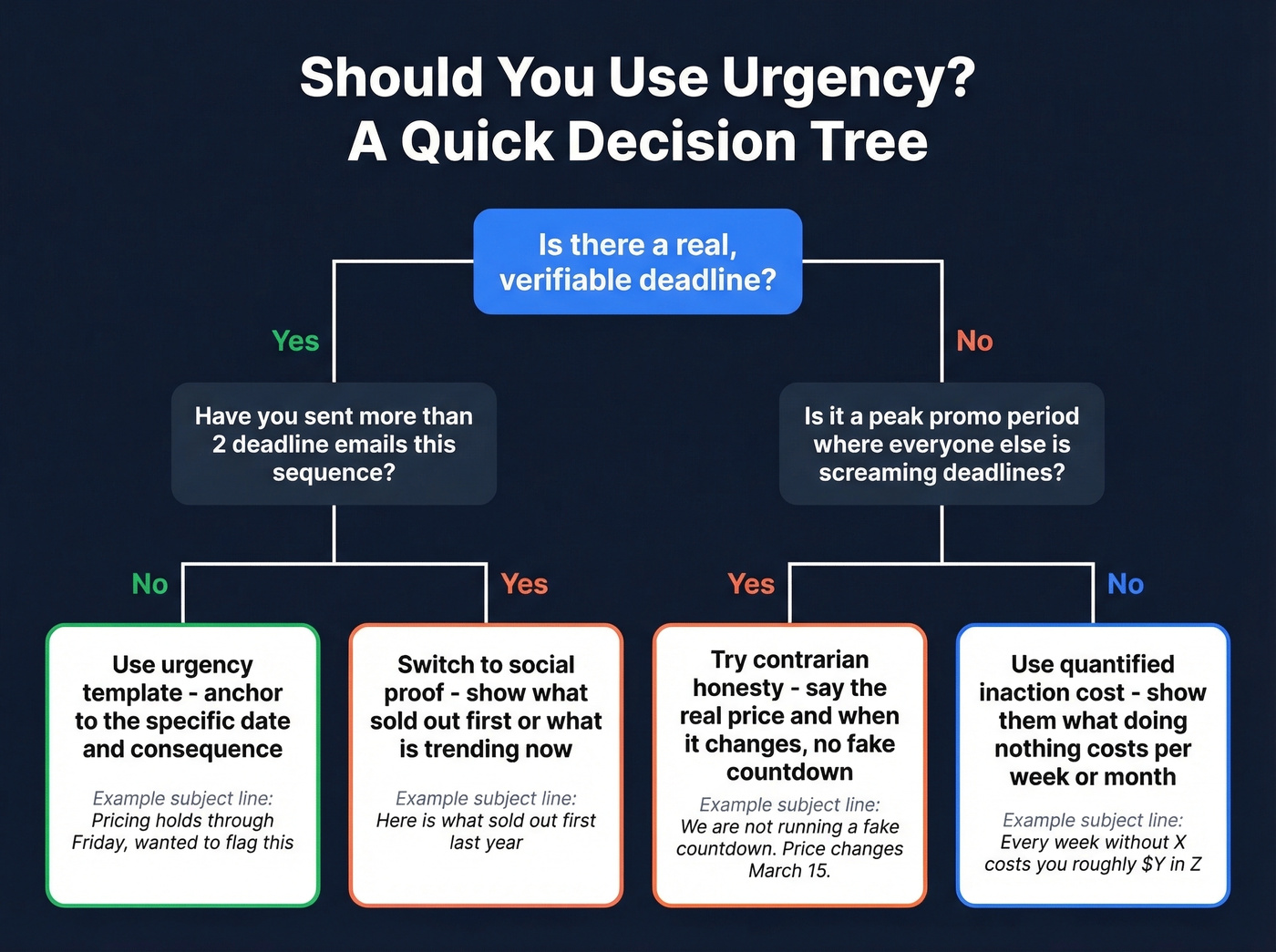
Let's be honest - if your average deal size is under five figures and you're sending more than two deadline emails per campaign sequence, you're not creating urgency. You're training people to ignore you.
When urgency stops performing, try these instead of doubling down:
Social proof reframe: "Here's what sold out first last year - and what's trending now."
Contrarian honesty: "We're not running a fake countdown. This is the real price, and it changes on {{date}}."
Quantified inaction cost: "Every week without {{solution}} costs you roughly ${{X}} in {{metric}}."
During peak promo periods where everyone else is screaming about deadlines, the social proof angle can outperform urgency by 15-20%. A/B test these against your standard subject lines - even a 5% open-rate lift compounds across campaigns. If you need more testable options, pull from these email subject line examples.
Measuring What Matters
The average email open rate across industries is 42.35%, but Apple's Mail Privacy Protection pushed reported open rates up by 18 points across 80,000+ accounts. Your "55% open rate" might be a phantom. For context on what “good” looks like now, compare against what is a good email open rate.
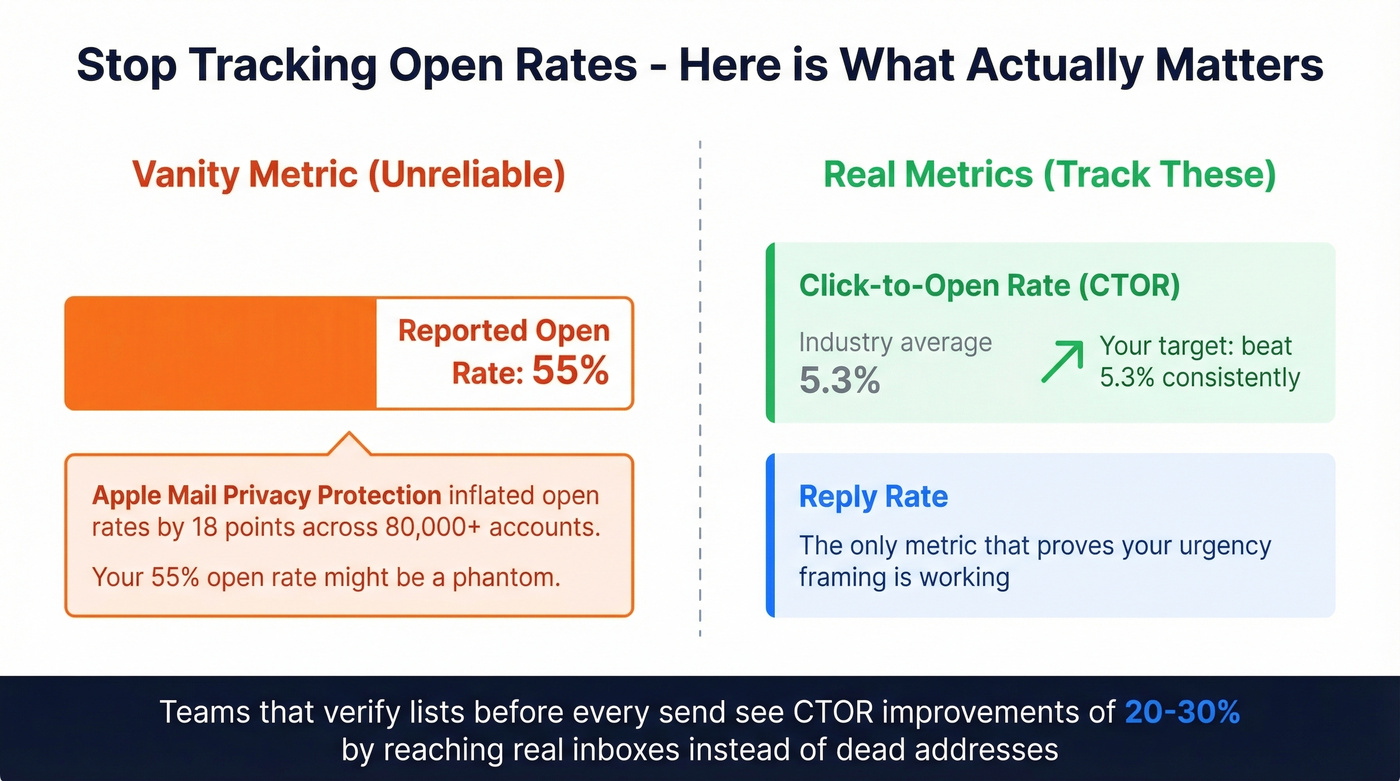
Focus on click-to-open rate and reply rate instead. Average CTOR across industries is 5.3%. If your deadline-driven emails beat that, the framing is working. If they match or fall below, the template isn't the problem - your list quality or offer relevance is. In our experience, teams that verify their lists before every send see CTOR improvements of 20-30% simply because they're reaching real inboxes instead of dead addresses and spam traps. If you’re tightening deliverability, use this email deliverability guide to fix the root causes.
Cold email urgency dies when you're guessing at contact data. Prospeo gives you 143M+ verified emails refreshed every 7 days - so your "5 spots left" message hits a real decision-maker, not a dead inbox. At $0.01 per email, bad data is no longer an excuse.
Send deadline-driven emails to verified buyers, not bounce logs.
FAQ
How many urgency emails should I send per campaign?
One to two per campaign cycle. Urgency fatigue is real - repeated deadline emails in the same sequence train recipients to ignore them. Save time-sensitive framing for genuine deadlines with clear, quantifiable stakes.
Does "URGENT" in the subject line actually work?
No. It's a documented spam trigger that signals low effort. "URGENT: read this now" gets filtered; "Budget approval needed by Thursday 3pm" gets opened. Replace the word with the actual deadline and specific action required.
How do I keep urgency emails out of spam?
Verify every email address before sending and avoid stacking more than one trigger phrase per message. Prospeo's 5-step verification removes spam traps and honeypots in real time, so your time-sensitive message lands where it should.