

How to Validate Any Email Address: The Complete 2026 Guide
It's 10 PM and your ESP just flagged your domain. Bounce rate: 8.3%. Half your outbound sequences are dead on arrival, the other half are landing in spam. Your pipeline depends on fixing this by morning.
We've been there. And after cleaning millions of addresses across client campaigns, we can tell you that most "validation guides" are thinly disguised product pages. This one isn't. Below you'll find the actual 5-step validation process, code examples you can steal, a tool comparison with real pricing, and the catch-all fix that most guides conveniently skip.
392.5B emails will be sent per day in 2026. The volume keeps climbing, but inbox standards are getting stricter - Google and Microsoft are cracking down harder than ever on senders with dirty lists. The difference between a healthy sender reputation and a blacklisted domain comes down to whether you verified your addresses before hitting send.
The Short Version
Email validation isn't just regex. It's a five-layer process: syntax, DNS, SMTP, disposable detection, and catch-all handling. Regex alone catches typos. It doesn't catch dead mailboxes, spam traps, or the catch-all domains that silently wreck your deliverability.
Your target: a bounce rate under 2%. The industry average sits at 2.48%. Anything above 5% puts you in blacklist territory.
Validation vs. Verification
These terms get used interchangeably, but they're technically different. Hunter's documentation draws a clean line between them.
Validation answers: "Could this address exist?" It checks format, syntax, and basic structural rules. Verification answers: "Does this mailbox actually exist and accept mail?" It goes deeper - MX lookups, SMTP handshakes, mailbox-level confirmation.
| Validation | Verification | |
|---|---|---|
| Checks | Syntax, format, RFC rules | MX records, SMTP, mailbox |
| Confirms | "Could exist" | "Does exist" |
| Catches | Typos, malformed addresses | Dead mailboxes, spam traps |
| Speed | Instant, client-side | Seconds, server-side |
Every serious tool does both. Don't get hung up on terminology - just make sure your tool actually pings the mail server.
How Email Validation Works
Every legitimate verification tool runs some version of this pipeline. Mailmeteor describes it as "15+ checks", but the core logic breaks down into five stages.
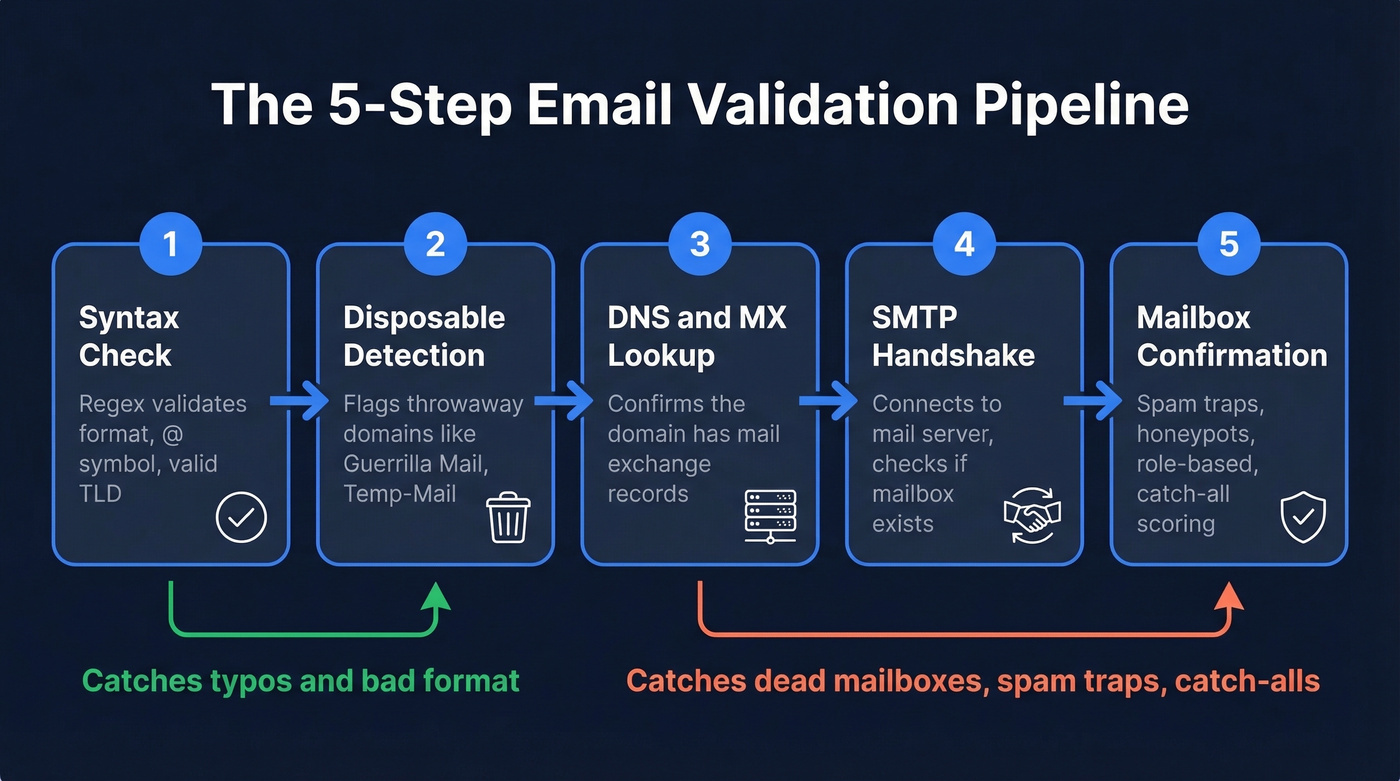
1. Syntax check. Does the address follow basic formatting rules? An @ symbol, a valid local part, a domain with a TLD of at least two characters. This is the regex layer - fast, cheap, and insufficient on its own.
2. Disposable/temporary email detection. Is the domain a throwaway service like Guerrilla Mail or Temp-Mail? These addresses self-destruct. Sending to them is pointless and signals to ESPs that you aren't curating your list.
3. DNS and MX record lookup. Does the domain actually have mail exchange records? Run nslookup -q=mx example.com and you'll see MX records with priority values - lower numbers mean higher priority. For example, aspmx.l.google.com at preference 1 handles mail before a preference 10 backup. No MX records? The domain can't receive email. Full stop.
4. SMTP handshake. The tool connects to the mail server and initiates a conversation - EHLO, MAIL FROM, RCPT TO - without actually sending a message. The server's response reveals whether the specific mailbox exists. This is the step that separates real verification from glorified format checking.
5. Mailbox confirmation and risk scoring. The final layer checks for spam traps, honeypots, role-based addresses like info@ and admin@, and catch-all configurations. This is where cheap tools fall short and good ones earn their money.
If you're trying to fix deliverability issues end-to-end, pair verification with an email deliverability audit so you’re not only cleaning data, but also improving inbox placement.
The Catch-All Problem
Here's the thing most validation guides gloss over: 30-40% of B2B email addresses sit on catch-all domains. The consensus on r/coldemail is that catch-all handling is the single biggest verification frustration for outbound teams. And it's easy to see why - these domains break standard SMTP verification completely.
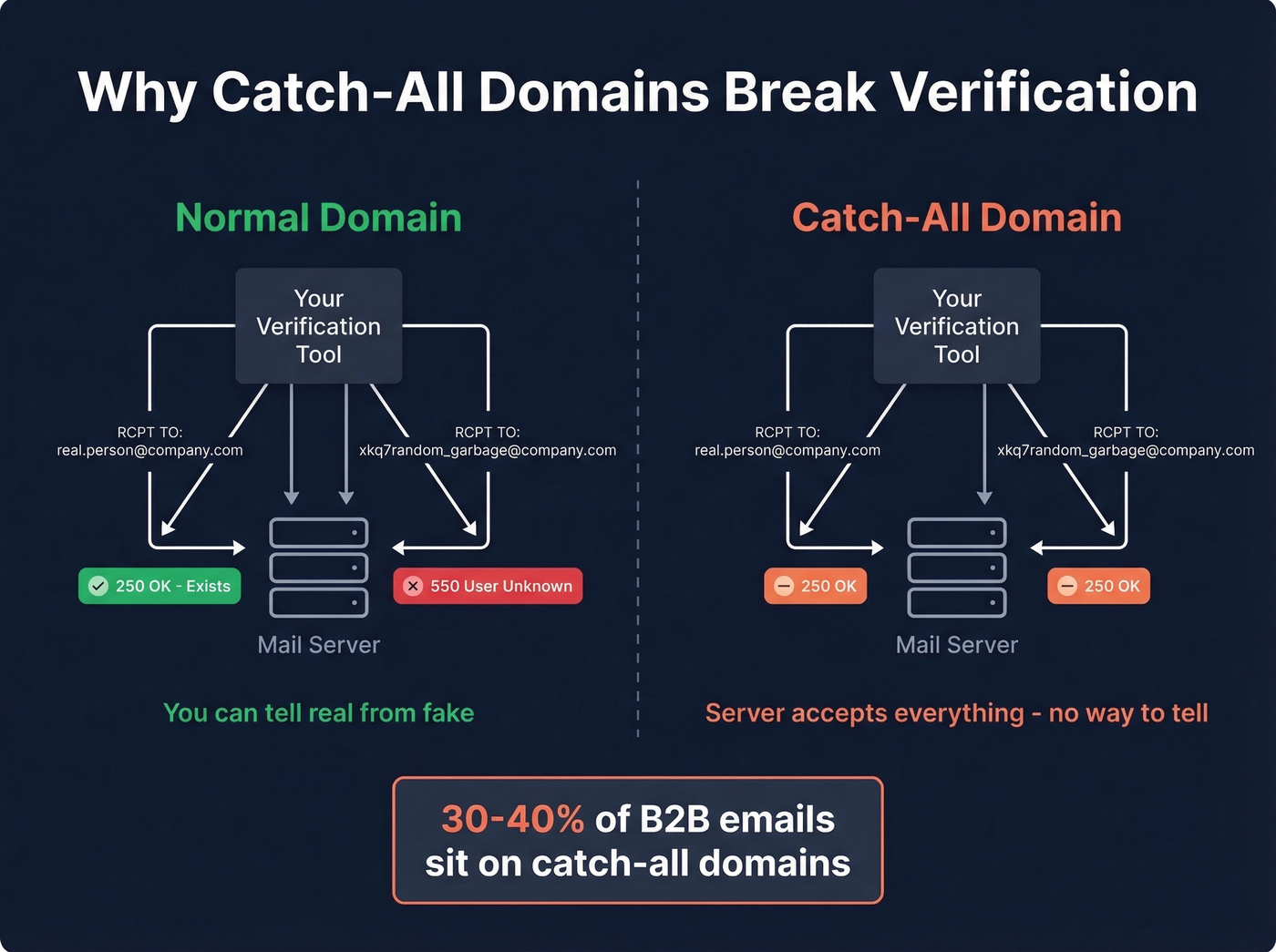
A catch-all domain accepts mail sent to any address at that domain, real or invented. When your verification tool sends an SMTP probe, both a legitimate address and a completely fabricated one get the same response:
RCPT TO:<real.person@company.com>
250 OK

RCPT TO:<xkq7random_garbage@company.com>
250 OK
The server says "sure, I'll take it" regardless. Your tool can't tell the difference, so it returns "unknown" or "risky."
The detection workaround is straightforward in theory: generate a random, obviously nonexistent address at the domain, probe it via SMTP, and if the server accepts it, flag the domain as catch-all. But enterprise Secure Email Gateways - Proofpoint, Mimecast, Barracuda - add another layer of complexity. They greylist, rate-limit, or outright reject SMTP probes, producing even more "unknown" results.
Let's be honest: if your current tool marks 30%+ of your list as "unknown," you don't have a list quality problem. You have a tool quality problem. Catch-all handling is the single biggest gap in email verification, and most tools punt on it entirely. A proper verification goes beyond a simple SMTP probe to cross-reference multiple data signals against a known-good database.
If you’re seeing lots of “unknown,” it’s also worth understanding email bounce rate mechanics and what different bounce patterns signal.

Prospeo's proprietary verification runs exactly this 5-step pipeline - syntax, disposable detection, DNS, SMTP, and mailbox confirmation - with built-in catch-all handling that most tools skip entirely. 98% accuracy, spam-trap removal, and honeypot filtering included. Every record re-verified on a 7-day cycle.
Stop marking 30% of your list as "unknown." Verify every address for $0.01.
Validate Emails Programmatically
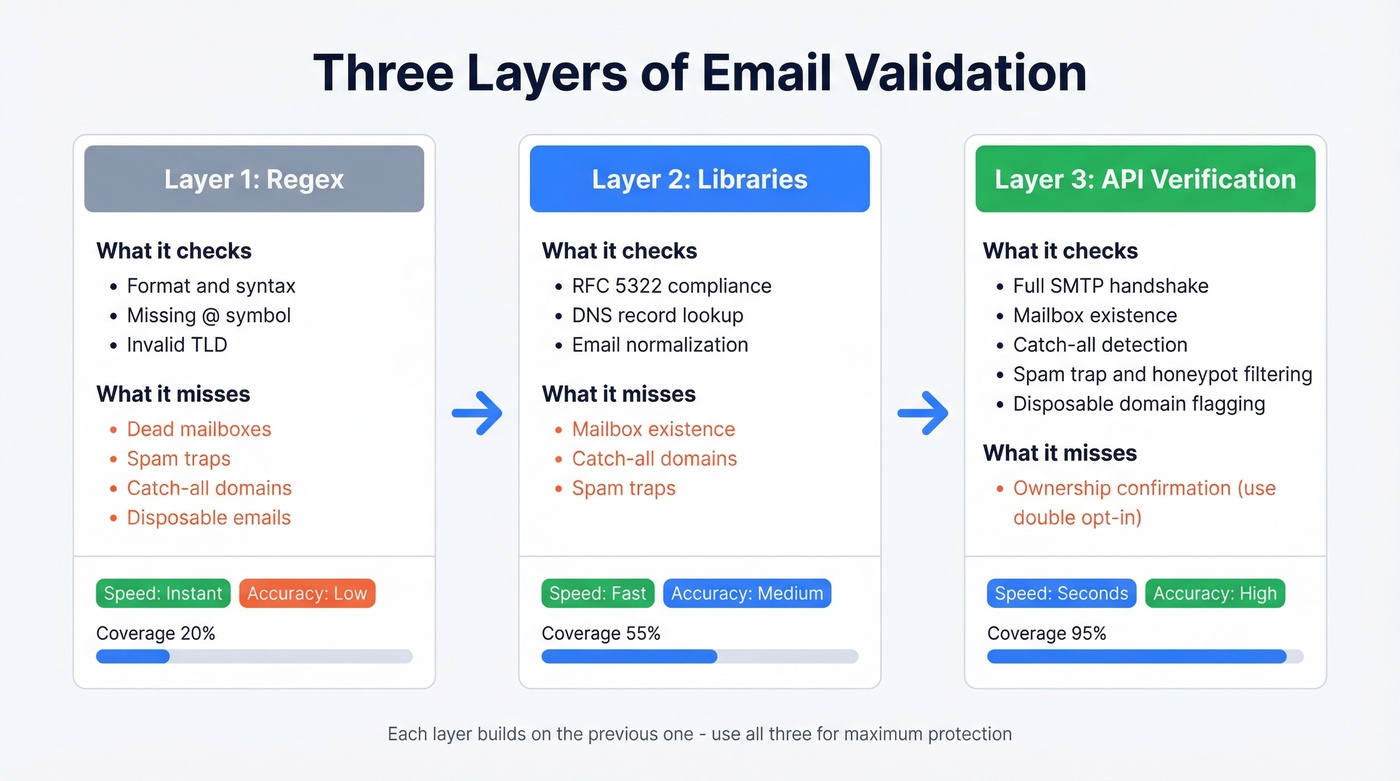
If you're building validation into your own app or workflow, you've got three layers to work with. Each catches different problems.
For outbound teams, this is often part of a broader cold email sequence workflow, where list quality determines whether the sequence performs at all.
Regex (Frontend)
Regex is your first line of defense - and it should be simple. The colinhacks "reasonable regex" approach argues that app developers don't need full RFC compliance. They need to catch obviously broken input:
pattern = r"^(?!\.)(?!.*\.\.)([a-zA-Z0-9.!#$%&'*+/=?^_`{|}~-]+)@[a-zA-Z0-9-]+\.[a-zA-Z]{2,}$"
if re.fullmatch(pattern, email):
    print("Valid format")
Use re.fullmatch(), not re.match(). The latter allows partial matches and will let garbage through. This catches typos, missing @ symbols, and malformed domains. It catches nothing else.
Python Libraries
The email-validator library handles RFC 5322 compliance, DNS checks, and normalization - a significant step up from raw regex:
from email_validator import validate_email, EmailNotValidError
try:
    result = validate_email("user@example.com", check_deliverability=True)
    print(result.normalized)
except EmailNotValidError as e:
    print(str(e))
Why not just write a more complete regex? Because an RFC 5322-compliant regex is hundreds of characters long and still can't confirm whether the mailbox accepts mail. Libraries abstract that complexity and add DNS-level validation.
API Verification
Neither regex nor libraries can answer the only question that matters: does this mailbox exist and accept mail right now?
That requires an API call to a verification service that performs the full SMTP handshake. This is also the layer that detects catch-all domains, spam traps, and disposable addresses at scale. For confirming ownership rather than just existence, confirmation tokens and double opt-in are the standard - but for outbound prospecting, API verification is the practical ceiling.
If you’re building this into a sending system, keep an eye on email velocity so verification gains don’t get erased by unsafe ramping.
What's a Good Bounce Rate?
The average bounce rate across all industries is 2.48%. Aim for under 2%. Never exceed 5%.
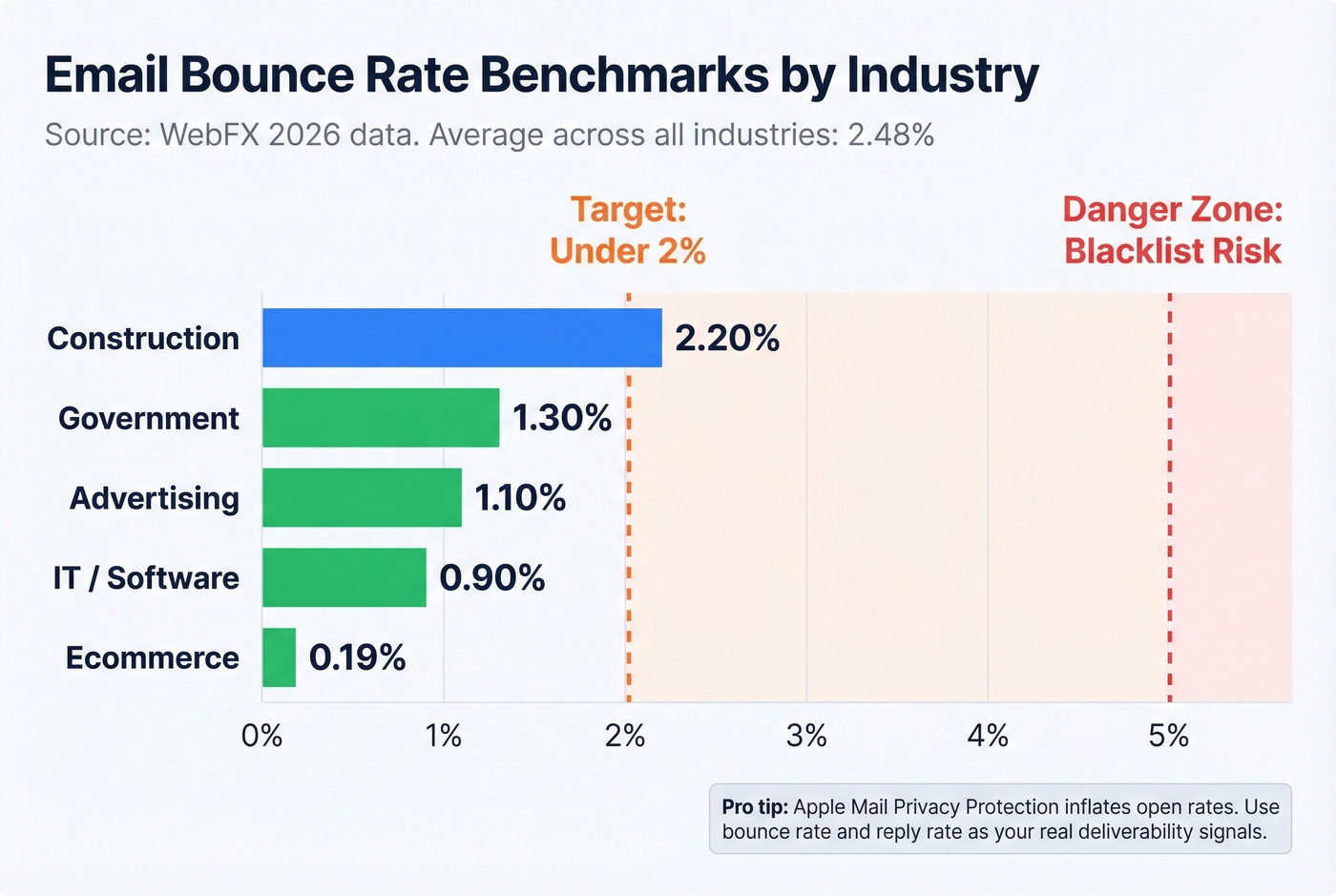
| Industry | Avg Bounce Rate |
|---|---|
| Ecommerce | 0.19% |
| IT / Software | 0.90% |
| Advertising | 1.10% |
| Government | 1.30% |
| Construction | 2.20% |
If you're in ecommerce, a 2% bounce rate is a five-alarm fire. If you're in construction, it's Tuesday. Context matters.
One more thing: Apple Mail Privacy Protection inflates open rates by pre-loading tracking pixels. Don't use open rates as your primary deliverability metric anymore. Bounce rate and reply rate are more reliable signals of list health.
If you’re still optimizing around opens, it’s worth revisiting what a good email open rate looks like in 2026.
Best Email Validation Tools
Every tool on this list claims 95%+ accuracy. Those numbers are self-reported with no independent benchmark. The real differentiator is catch-all handling, pricing at scale, and whether the tool fits your workflow.
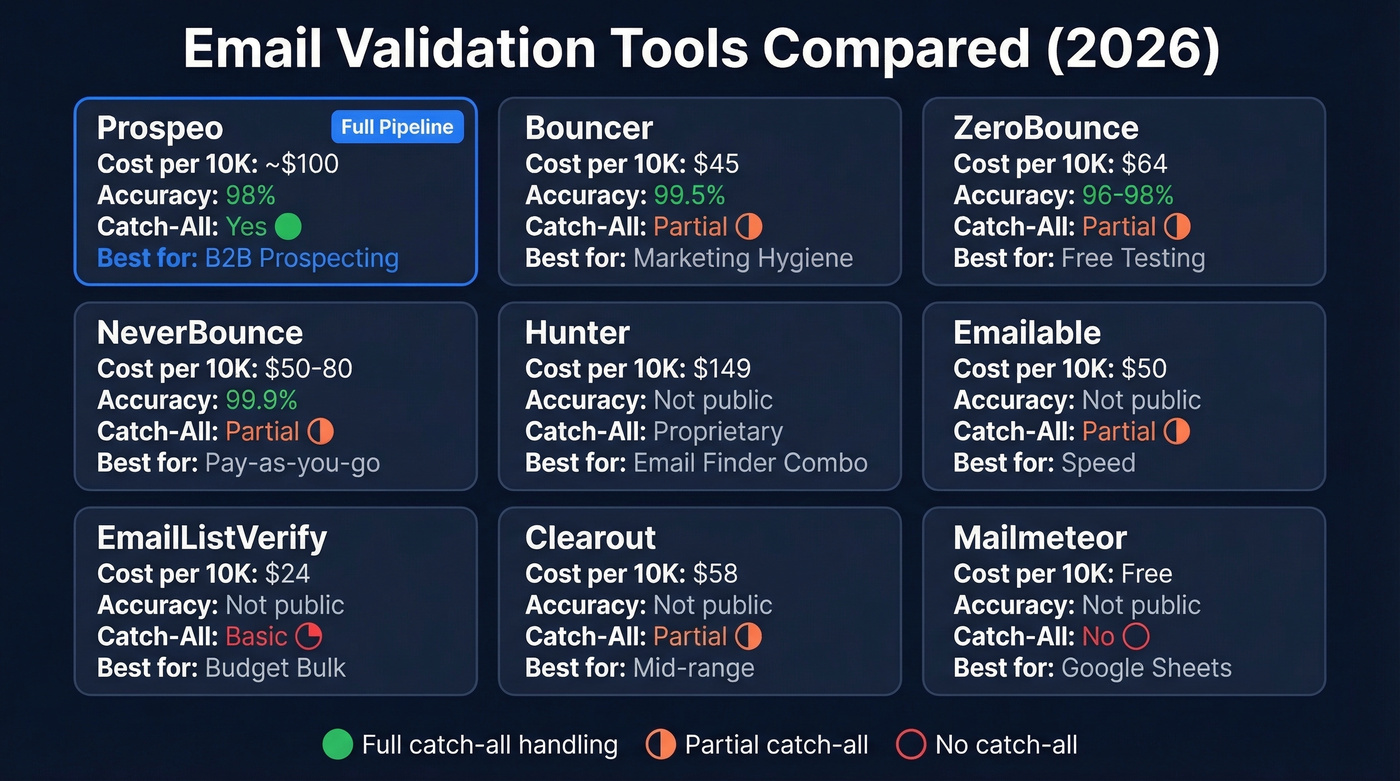
| Tool | Cost / 10K | Accuracy | Catch-All | Best For |
|---|---|---|---|---|
| Prospeo | ~$100 | 98% | Yes | B2B prospecting |
| Bouncer | $45 | 99.5% | Partial | Marketing hygiene |
| ZeroBounce | $64 | 96-98% | Partial | Free testing |
| NeverBounce | $50-80 | 99.9% | Partial | Pay-as-you-go |
| Hunter | $149 | Not public | Proprietary | Email finder combo |
| Emailable | $50 | Not public | Partial | Speed |
| EmailListVerify | $24 | Not public | Basic | Budget bulk |
| Clearout | $58 | Not public | Partial | Mid-range |
| Mailmeteor | Free (Sheets) | Not public | No | Google Sheets |
If you want a deeper comparison specifically against Bouncer-style verifiers, see Bouncer alternatives.
Prospeo
Prospeo runs the full 5-step verification pipeline - syntax, disposable detection, DNS/MX, SMTP handshake, and mailbox confirmation with catch-all handling, spam-trap removal, and honeypot filtering. The result is 98% email accuracy that holds up in production across B2B lists.
The 7-day data refresh cycle is the standout differentiator. The industry average is six weeks. Contacts pulled from Prospeo's database of 300M+ professional profiles are pre-validated at the source, so you aren't verifying stale data. Snyk's team dropped their bounce rate from 35-40% to under 5% after switching. Stack Optimize maintains sub-3% bounce rates across all their clients. Pricing is straightforward at ~$0.01 per email, 75 free verified emails per month, no contracts.
If you’re pairing verification with enrichment, compare options in data enrichment services.
Bouncer
Use this if: You're a marketing team running regular list hygiene on opt-in subscriber lists and you want the highest-rated standalone verifier.
Skip this if: You need B2B prospecting features beyond verification, or you're processing fewer than 1,000 emails at a time.
Bouncer earns its reputation - 4.9 on Capterra with 233 reviews, 4.8 on G2 with 232 reviews. At $45 per 10K verifications, it's competitively priced for mid-volume senders. The 1,000 free trial credits let you test before committing. Catch-all handling is partial, so expect some "unknown" results on enterprise-heavy lists.

ZeroBounce
ZeroBounce is the best free entry point in the space. 100 free verifications per month, a $15/month starting plan for low-volume senders, and $64 per 10K for bulk work. They publish more benchmark data than most competitors, which earns credibility. Catch-all handling is partial - better than nothing, but you'll still see "unknown" results on enterprise domains.
NeverBounce
NeverBounce offers two pricing tiers: plan pricing around $50 per 10K, or $0.008/email on pure pay-as-you-go ($80 per 10K). They claim the highest self-reported accuracy in the space at 99.9%. The tool integrates with most major ESPs and CRMs. Good option if you want pay-as-you-go flexibility without a monthly commitment.
Hunter
Hunter's email verifier runs $149 per 10K verifications - roughly 3x what Bouncer or NeverBounce charges. One customer reported a "15-20% improvement in being able to determine whether an address is valid or invalid," which is decent but doesn't justify the premium for verification alone. It makes sense if you're already using Hunter's email finder and want everything in one dashboard. For verification only? There are better options at a third of the cost.
If you’re using Hunter mainly for finding addresses, you’ll want to compare Hunter alternatives before paying verifier-level pricing.
Budget and Niche Picks
Emailable hits $50 per 10K with 250 free credits. The pitch is speed - fast list processing for straightforward verification workflows.
EmailListVerify is the budget pick at $24 per 10K, the cheapest option on this list by a wide margin. If you're cleaning massive lists and cost matters more than catch-all resolution, it gets the job done.
Clearout sits at $58 per 10K with a $31.50/month starting plan. Middle of the pack on pricing and features - worth evaluating for specific integrations, but it doesn't stand out against the top-tier options.
Mailmeteor offers a free email checker and a Google Sheets add-on with 50 free verifications per month. If your entire workflow lives in Google Sheets and you're checking small batches, it's the path of least resistance. Not built for scale.
Verifalia and Email Hippo are also worth a look. Verifalia starts around $49/month for 500 daily verifications; Email Hippo runs roughly $25-60 per 10K depending on volume. Neither offers the catch-all depth of the top-tier tools, but they're reliable for basic list cleaning.
Common Validation Mistakes
Five errors cause the most damage. We see them repeatedly across the campaigns we audit.
1. Relying on regex alone. Regex catches formatting errors. It doesn't catch dead mailboxes, spam traps, or disposable addresses. It's step one of five, not the whole process.
2. Not re-validating. Email lists decay by 28% annually. Average workforce turnover hit 41% in recent years. If you verified a list in January, nearly a third of those addresses are dead by December.
3. Ignoring catch-all and "unknown" results. Marking 30-40% of your B2B list as "unknown" and sending anyway is a recipe for bounces. Treat unknowns as risky - segment them, send at lower volume, or use a tool with better catch-all resolution.
If you suspect traps are part of the problem, follow a dedicated spam trap removal process before scaling sends.
4. Skipping verification at key touchpoints. Run checks at signup, at import, and before every campaign. A contact that was valid six months ago might not be valid today.
5. Trusting self-reported accuracy claims. Every tool says 97%+. The real question is: how does the tool handle catch-all domains? That's where accuracy claims fall apart.
How Often to Re-Validate
Re-validate every 3-4 months at minimum. For lists over 10K contacts, every 2 weeks is safer. The 28% annual decay rate means roughly 2.3% of your list goes stale every month.
Here's a practical cadence:
- Before every campaign: Quick verification pass on the send list
- Monthly: Re-check your most active segments and flag contacts that haven't engaged recently
- Quarterly: Full database re-validation
- After any import: Verify before the data touches your CRM
Look, if you're only validating at the point of purchase and never again, you're building on a foundation that crumbles a little more every week. We've seen teams with pristine initial data hit 8%+ bounce rates within six months simply because they never re-checked. Set a calendar reminder. Automate it if you can. Your sender reputation will thank you.
If you’re actively repairing a damaged domain, use a step-by-step sender reputation recovery plan alongside list cleaning.
Building validation into your stack? Prospeo's API returns verified emails with a 92% match rate and 50+ data points per contact. No third-party email providers in the chain - fully proprietary infrastructure with catch-all domain resolution baked in.
Get bounce rates under 2% without writing a single SMTP probe.
FAQ
Is email validation the same as verification?
Validation checks format and syntax - whether an address could exist. Verification confirms the mailbox exists and accepts mail via SMTP handshake. Most modern tools perform both steps automatically. When evaluating providers, confirm yours goes beyond syntax to check deliverability at the server level.
Can I validate an email address for free?
Yes. ZeroBounce offers 100 free verifications per month, Mailmeteor gives 50 free checks via Google Sheets, and Prospeo includes 75 free verified emails. These free tiers are enough to test accuracy before committing. For lists over a few hundred contacts, a paid plan is more practical.
Why does my tool mark emails as "unknown"?
Usually because the domain is catch-all or uses a Secure Email Gateway that blocks SMTP probes. 30-40% of B2B addresses sit on catch-all domains. Tools with advanced catch-all resolution cross-reference multiple data signals to reduce unknowns significantly.
How accurate are email validation tools?
Most claim 96-99%+, but these figures are self-reported with no independent benchmark. The real differentiator is catch-all handling: tools that can't resolve catch-all domains mark a large chunk of results as "unknown," inflating accuracy on the addresses they do resolve. Test with your own list before trusting any vendor's number.
How often should I re-validate my list?
Every 3-4 months at minimum. Email lists decay by roughly 28% per year due to job changes, domain shutdowns, and inbox closures. High-volume senders working 10K+ contacts should re-verify every 2 weeks to keep bounce rates under the 2% safe threshold.