

How to Verify a Yahoo Email Address in 2026
"Verify a Yahoo email address" means two totally different things, and mixing them up wastes time.
One version is personal: you're trying to get back into your own Yahoo account and it keeps throwing security checks at you. The other is operational: you've got a list of Yahoo addresses and you need to know which ones are real before you send a campaign and torch your domain reputation.
Yahoo addresses make up a big slice of many B2C lists, and Yahoo's mail servers are famously unhelpful for classic "SMTP verify" tricks. Let's break it down the right way so you don't chase the wrong fix.
Locked out of your Yahoo account? Head to How to verify your Yahoo account.
Trying to check if a Yahoo email exists before sending? Go to How to check if a Yahoo email is real.
How to Verify Your Yahoo Account
If Yahoo's asking you to prove it's really you, the flow is usually straightforward. The problem is what happens when the code never shows up, or the recovery options are outdated.
Receive a verification code
Yahoo often forces identity confirmation in a browser before it'll let you add the account to a mobile mail app. You can't jump straight into iOS Mail or Gmail and expect it to work.
Sign in through your mobile browser -> tap "Receive code" -> choose "By phone" or "By email" -> enter the code -> tap "Verify code." After that, you can add the account to your device's mail app.
If the code doesn't arrive, hit "Resend" once and wait a couple minutes. Don't spam-click it. In our experience, repeated resends can delay delivery because you keep invalidating the previous code.
Set up 2-step verification
Yahoo supports four methods: push prompts in the Yahoo app, phone (text or call), an authenticator app, and a physical security key.
One gotcha trips people up: if you're using Yahoo Account Key, you need to disable it before 2-step verification becomes available. Yahoo documents that here: https://help.yahoo.com/kb/add-two-step-verification-extra-security-sln5013.html
Also, the authenticator app option typically requires at least two recovery methods configured. During setup, Yahoo may give you an emergency recovery code. Save it somewhere that isn't your Yahoo inbox. Password managers are perfect for this.
When the code won't arrive (and what you can actually do)
Most failures come down to boring stuff: a landline listed as your recovery phone, a deleted recovery email, a typo in the recovery contact, or an ISP/network issue blocking delivery.
Here's the thing: Yahoo's official stance is blunt. If your recovery info is wrong and you can't receive a code through any method, you're basically done. Their help doc on verification code issues spells it out: https://help.yahoo.com/kb/fix-issues-yahoo-verification-codes-links-sln3139.html
Real talk: this is one of the most frustrating account recovery experiences among major providers. If you're reading this because you're locked out, fix your recovery options as soon as you're back in so you don't end up here again.
How to Check If a Yahoo Email Is Real
Now the sender side.
You have a Yahoo address (or a whole segment of them) and you want to know if it exists before you send. That sounds simple until you try to do it "the standard way" and Yahoo refuses to cooperate.
If you want a quick, dedicated walkthrough, see check if a Yahoo email exists.
Why SMTP checks fail on Yahoo
Classic mailbox verification uses an SMTP callback: connect to the recipient's mail server, issue RCPT TO, and see whether the server accepts or rejects the mailbox.
Yahoo often won't give you a clean yes/no. Many large providers respond with something like "250 OK" even for mailboxes that don't exist, because they don't want spammers probing their user base. The consensus in threads like this one on r/sysadmin is basically: don't rely on SMTP for Yahoo. https://www.reddit.com/r/sysadmin/comments/1f95vn9/is_it_possible_to_check_via_smtp_a/
So if you're using a DIY script or a cheap validator that only does SMTP handshakes, you're going to get a lot of false "valid" results.
For a deeper breakdown of what SMTP can and can't tell you, see SMTP check if email address exists.
The verification stack that actually works
Good verification tools treat SMTP as one signal, not the whole answer. A practical stack looks like this:
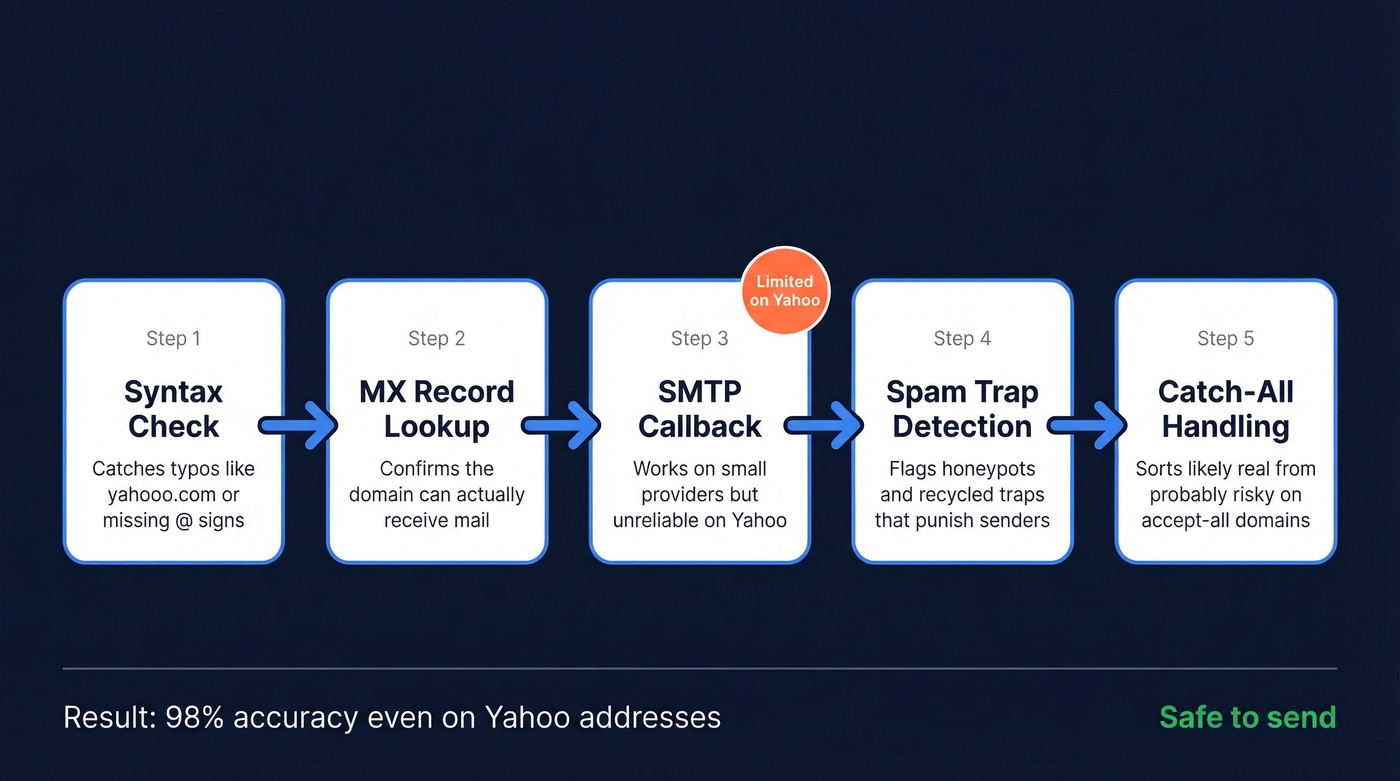
- Syntax check to catch obvious formatting errors.
- MX record lookup to confirm the domain can receive mail.
- SMTP callback where it works (smaller providers), and de-emphasized where it doesn't (Yahoo, Gmail, Outlook).
- Spam-trap and honeypot detection to keep you from mailing addresses designed to punish sloppy senders.
- Catch-all handling to deal with domains that accept everything, then sort "likely real" from "probably risky."
A quick scenario we see a lot: a brand runs a giveaway, collects 20,000 emails in a weekend, and then wonders why the next campaign gets hammered with bounces and complaints. The list isn't "bad people." It's just messy data: typos, throwaways, abandoned inboxes, and a few traps mixed in. Verification plus better collection rules fixes most of it.
One more point that people ignore until it hurts: list decay is real. If you only clean once and keep sending forever, your bounce rate creeps up month after month. If you need a repeatable process, use an email verification list SOP.

Yahoo's SMTP walls make basic validators useless. Prospeo runs a 5-step verification stack - syntax, MX, SMTP, spam-trap removal, and catch-all handling - so you get 98% email accuracy even on Yahoo addresses. At $0.01 per email, cleaning your list costs less than a single bounced campaign.
Stop guessing which Yahoo addresses are real. Verify them in seconds.
Why Yahoo Is Uniquely Tricky for Senders
Yahoo isn't just picky about whether an address exists. It's picky about whether you deserve to be in the inbox.
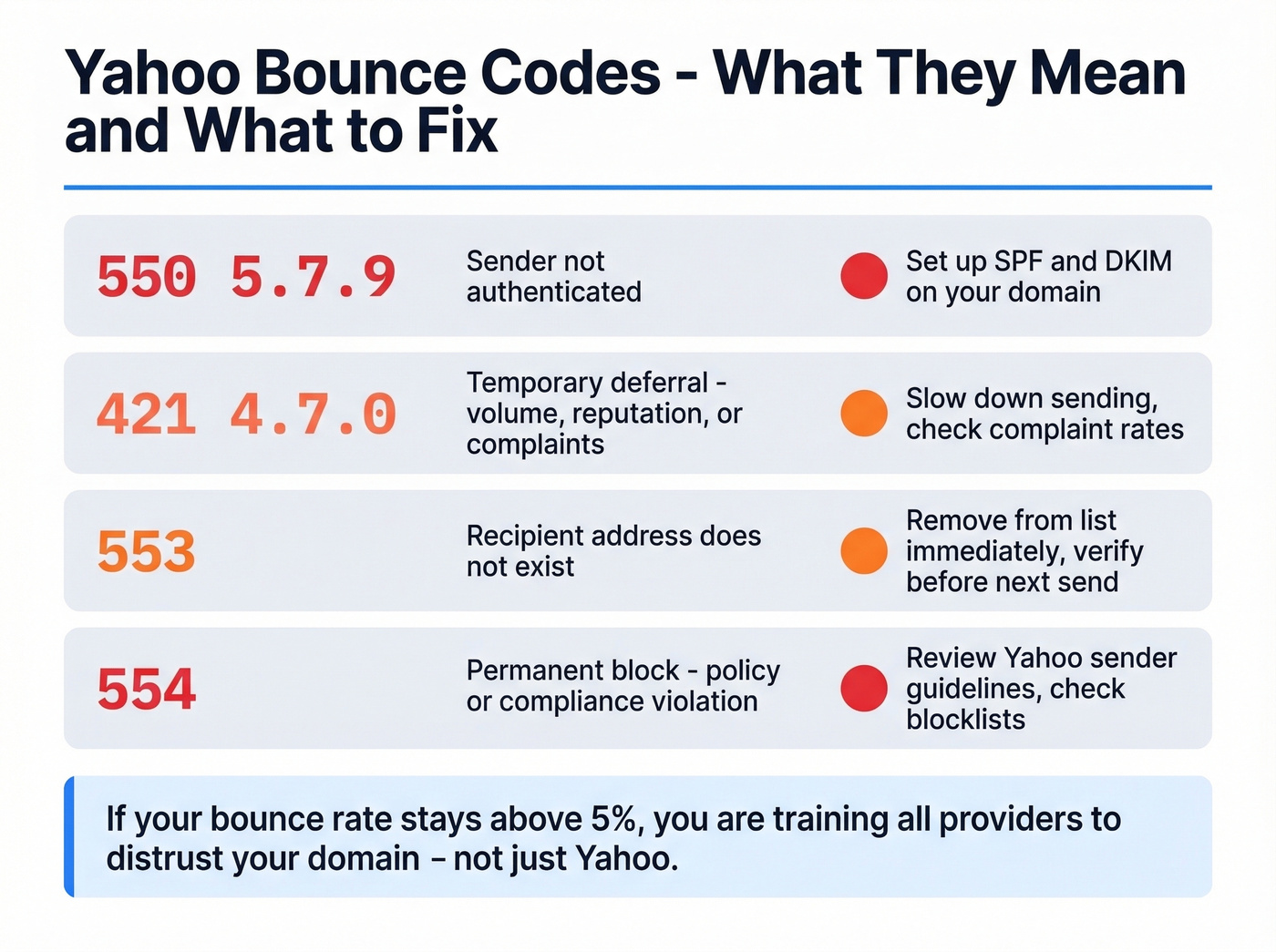
Since 2024, Yahoo has been strict about authentication. If your domain isn't set up with SPF or DKIM, you'll see bounces like 550 5.7.9 for unauthenticated sender. Yahoo's sender best practices are here: https://senders.yahooinc.com/best-practices/
And Yahoo's model is heavily engagement-driven. Complaint rates that look "small" on paper still hurt. A few complaints per thousand sends can trigger deferrals, throttling, or blocks if it keeps happening, especially when you're sending cold or to older lists.
These are the bounce codes worth recognizing, because they tell you what to fix:
| Code | Meaning |
|---|---|
| 550 5.7.9 | Sender unauthenticated (SPF/DKIM missing) |
| 421 4.7.0 | Temporary deferral (volume, reputation, or complaints) |
| 553 | Recipient address issue (often a mailbox that doesn't exist) |
| 554 | Permanent rejection/block (policy or compliance-related) |
If you're consistently over a 5% bounce rate, you're not just "losing sends." You're training providers to distrust you, and that spills over into Gmail, Outlook, and everyone else. Verification isn't busywork. It's reputation insurance. (If you want the bigger picture, see is email verification necessary.)
Best Tools to Verify Yahoo Addresses
Hot take: most teams over-invest in tools and under-invest in list hygiene. If you're using double opt-in, removing hard bounces immediately, and re-verifying quarterly, you don't need a fancy setup.
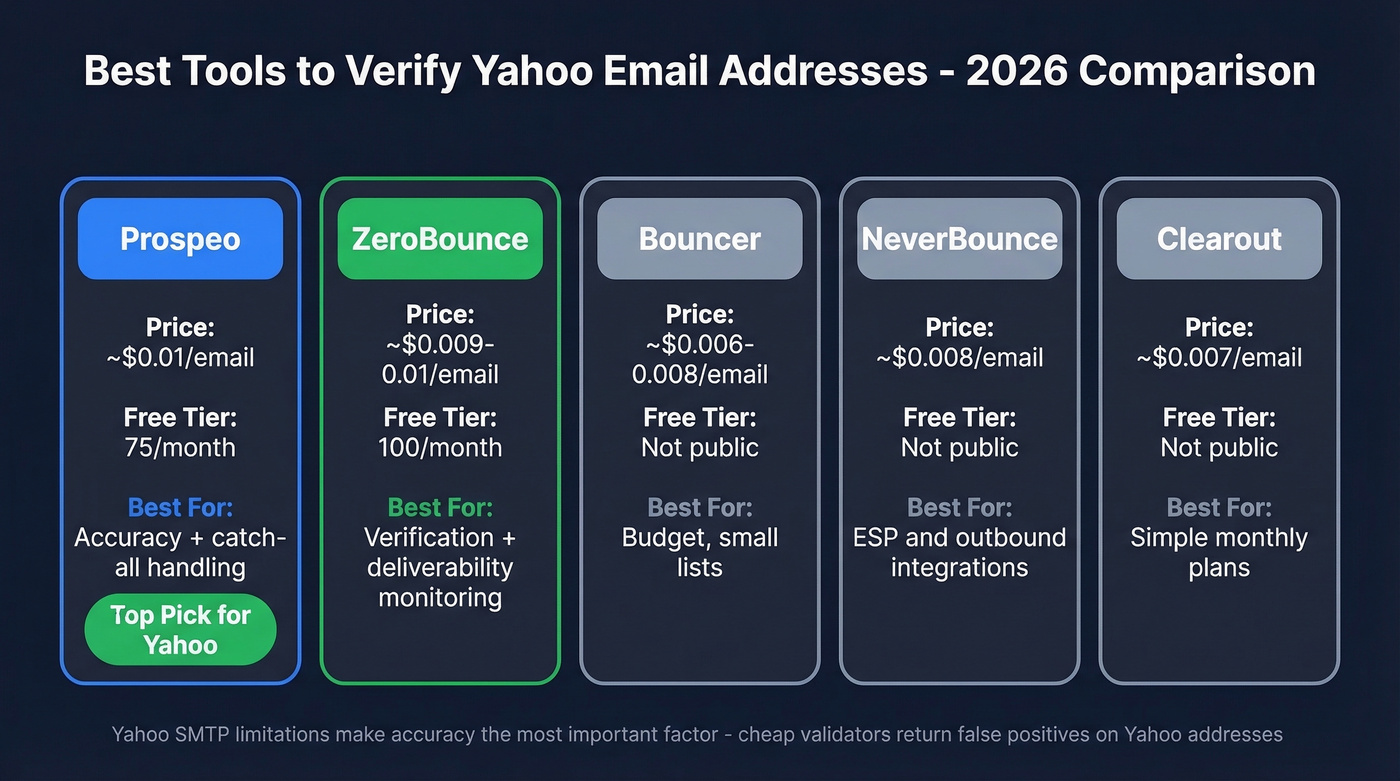
But if you're dealing with scraped data, old exports, partner lists, or anything that hasn't been touched in months, accuracy matters a lot more than people want to admit. Yahoo's SMTP behavior makes that gap even wider.
A benchmark from Hunter (15 tools tested on 3,000 addresses) shows overall accuracy clustering around the high 60% range for many providers, and Yahoo tends to be harder than average because of the SMTP limitations. https://hunter.io/email-verification-guide/best-email-verifiers/
If you want a broader comparison set, see our best email validation tools roundup.
Prospeo (best for accuracy + catch-all handling)
We've tested a lot of verifiers over the years, and the ones that hold up on Yahoo are the ones that don't pretend SMTP is the whole story.
Prospeo uses a 5-step verification flow designed for providers like Yahoo where mailbox-level responses are unreliable: syntax validation, MX checks, SMTP callbacks, spam-trap detection, and catch-all handling. It's backed by proprietary infrastructure (no third-party verification provider in the chain), which matters when you're trying to get consistent results at scale instead of "it worked yesterday."
If you're cleaning lists regularly, the data freshness is a big deal too: Prospeo refreshes data on a 7-day cycle, so you aren't making decisions off stale results for weeks. And the accuracy is straightforward: 98% email accuracy across 143M+ verified emails.
Pricing is simple: there's a free tier with 75 verifications per month (no card), and at scale it's about $0.01 per email with no contracts.
ZeroBounce (best if you also want deliverability monitoring)
ZeroBounce is the safe pick when you want verification plus deliverability tooling in the same vendor. It's a solid fit for teams that care about ongoing monitoring, not just a one-time scrub.
Plans commonly start around $18 for 2,000 verifications, and deliverability features are often packaged in higher tiers. This roundup includes current ballparks: https://www.lemlist.com/blog/best-email-verification-tools
Skip it if you only need verification. You'll pay for extras you won't touch.

Bouncer (best budget option for small lists)
Bouncer is the budget play. If you're cleaning a Yahoo-heavy segment once a quarter and your lists are under 5,000 addresses, it does the job without making you overthink the math.
It's not the tool we'd pick for messy, high-risk data, but for basic hygiene on decent lists, it's hard to beat on price.
NeverBounce and Clearout (best for workflow fit)
NeverBounce is a good choice if you want verification wired into your ESP or outbound stack with minimal setup. Clearout is popular with smaller teams that want a straightforward monthly plan and a simple UI.
One recommendation we stand by: if you're only sending a few thousand emails a month and your collection is clean (double opt-in, real customers), don't over-optimize this. Pick a tool that fits your workflow and spend the saved time tightening your signup forms and suppression rules.
| Tool | Price per Email | Free Tier | Best For |
|---|---|---|---|
| Prospeo | ~$0.01 | 75/mo | Accuracy + catch-all handling |
| ZeroBounce | ~$0.009-0.01 | 100/mo | Verification + deliverability monitoring |
| Bouncer | ~$0.006-0.008 | Not public | Budget, small lists |
| NeverBounce | $0.008 | Not public | ESP/outbound integrations |
| Clearout | ~$0.007 | Not public | Simple monthly plans |
List decay hits Yahoo addresses hard - abandoned inboxes, recycled traps, zero SMTP feedback. Prospeo refreshes data every 7 days (not the 6-week industry average) and strips spam traps and honeypots automatically. 143M+ verified emails, built on proprietary infrastructure that doesn't rely on third-party providers.
Clean your Yahoo list before your domain reputation pays the price.
Yahoo Email Domains to Include
When you're verifying in bulk, don't just filter for @yahoo.com. Yahoo operates several consumer domains, and lists often contain a mix.
Start with these:
- yahoo.com
- ymail.com
- rocketmail.com
- Regional variants like yahoo.co.uk, yahoo.co.jp, yahoo.fr, yahoo.com.au, yahoo.de, yahoo.ca
You'll also see a lot of AOL addresses in the same lists. They aren't "Yahoo domains," but many senders treat Yahoo and AOL similarly because deliverability rules and behaviors are closely related.
FAQ
Can I verify a Yahoo email address without sending an email?
Yes. Use syntax checks, MX lookups, and a verification tool that goes beyond SMTP.
SMTP callbacks alone aren't reliable for Yahoo because their servers often return 250 OK even when a mailbox doesn't exist. Multi-step tools add spam-trap detection and catch-all handling to get to a usable answer.
Why does Yahoo keep asking me to verify my identity?
Yahoo triggers verification when it sees a new device, an unfamiliar IP, or a login pattern it doesn't like.
Turning on 2-step verification (especially with an authenticator app) cuts down on these prompts because Yahoo trusts authenticated sessions more.
What does Yahoo error code 550 5.7.9 mean?
Yahoo rejected your email because the sender isn't authenticated. Set up SPF or DKIM on your sending domain.
Yahoo's guidance is here: https://senders.yahooinc.com/best-practices/
How accurate are verification tools for Yahoo addresses?
Accuracy varies a lot, and Yahoo is harder than average because SMTP responses aren't dependable.
Independent benchmarks on mixed datasets put many tools in the high-60% range overall. Tools that combine multiple signals and handle catch-all domains well perform better on Yahoo, where "SMTP says OK" doesn't mean much.
How often should I re-verify my Yahoo email list?
Quarterly is a good baseline. If you're collecting leads aggressively or running cold outbound, monthly is safer.
Our rule: re-verify any segment you haven't mailed in 60-90 days, and always verify new imports before the first send.