

How to Use Video for Sales: The 2026 Playbook Your Team Actually Needs
Your SDR spends seven minutes recording a personalized video walkthrough - mentioning the prospect's tech stack, their recent funding round, the exact pain point from their job posting. They hit send. The email bounces. That's not just a wasted touchpoint; it's the most expensive cold email you'll never send.
With cold email reply rates averaging 3.43%, video for sales is one of the few levers that actually moves the needle - and 44% of consumers say they've never received a video from a brand. The gap is wide open. What follows: the tools, the tactics, and the one step most teams skip before they ever hit record.
What You Need (Quick Version)
Teams using personalized video outreach in outbound see 10-16% reply rates - roughly 3-5x the text-only baseline. Deeply personalized videos can push that toward 30%. Getting there requires three things working together:
- A video tool that makes recording and sharing frictionless. We recommend Loom to start, Vidyard to scale, and HeyGen if you want AI personalization at volume.
- A framework for what to say at each stage of the deal cycle. Winging it produces rambling two-minute videos nobody finishes.
- Verified contact data so nothing bounces. Run your list through email verification first - a seven-minute recording that lands in a dead inbox is pure waste.
Why Video Outreach Works
The data isn't subtle. BombBomb's benchmarks show emails with video getting 120% higher response rates, 2x the click-through of text-only messages, and a 56% increase in replies to cold emails specifically. SalesLoft data reported by Vidyard puts the lift at +16% open rates and +26% more replies. Gong found that closed deals involve webcams 41% more often than lost deals. Video can boost conversion rates upward of 80%, and people spend 82-88% more time on pages that include it.
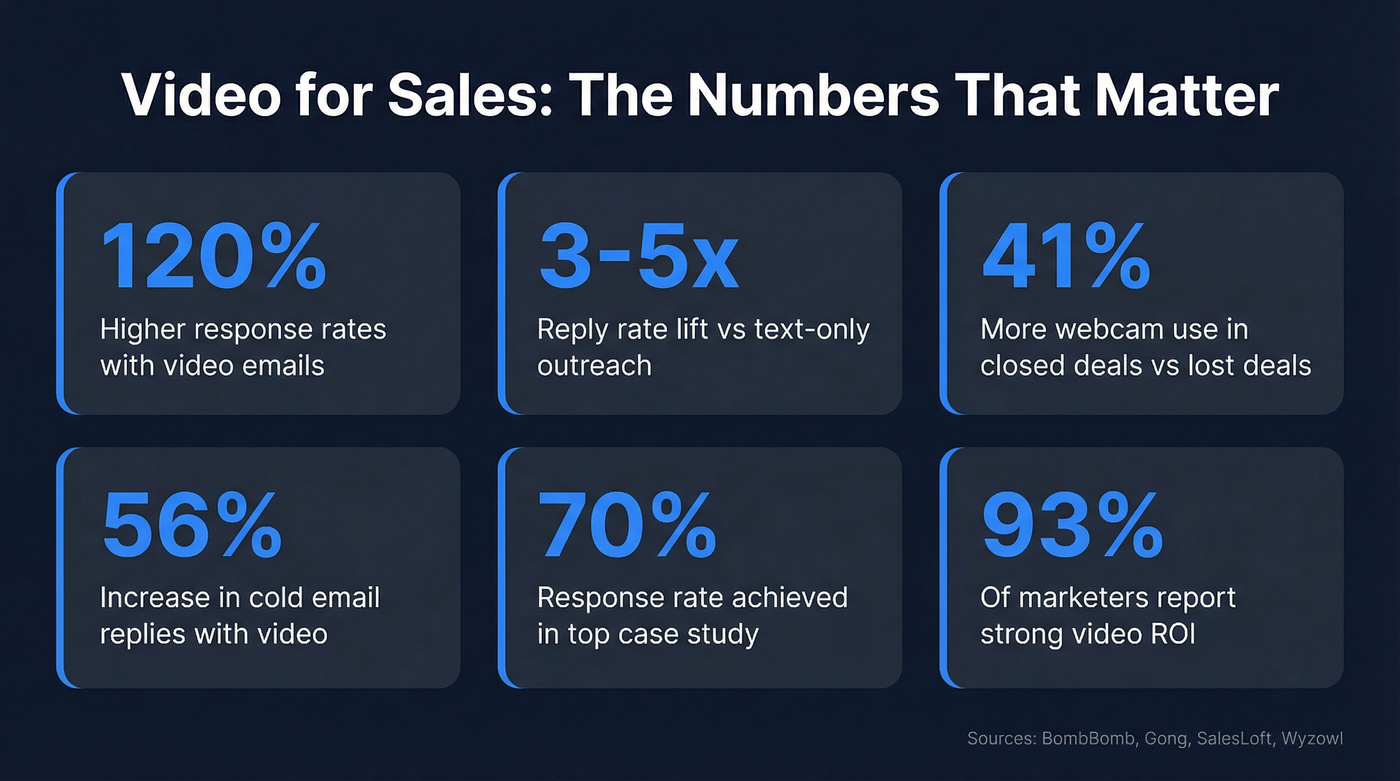
One BombBomb case study illustrates the ceiling: a sales team targeting a 25% response rate and $250k in pipeline achieved a 70% response rate and $1.2M in pipeline in a single month. The broader market has caught up - 89% of businesses now use video marketing according to Wyzowl's latest report, and 93% of marketers report strong ROI. Video isn't experimental anymore. It's baseline. The question is how to use it well at each stage.
Video at Each Sales Stage
Not every video should look the same. A cold prospecting clip and a proposal walkthrough serve completely different purposes, and they need different lengths, formats, and energy levels.
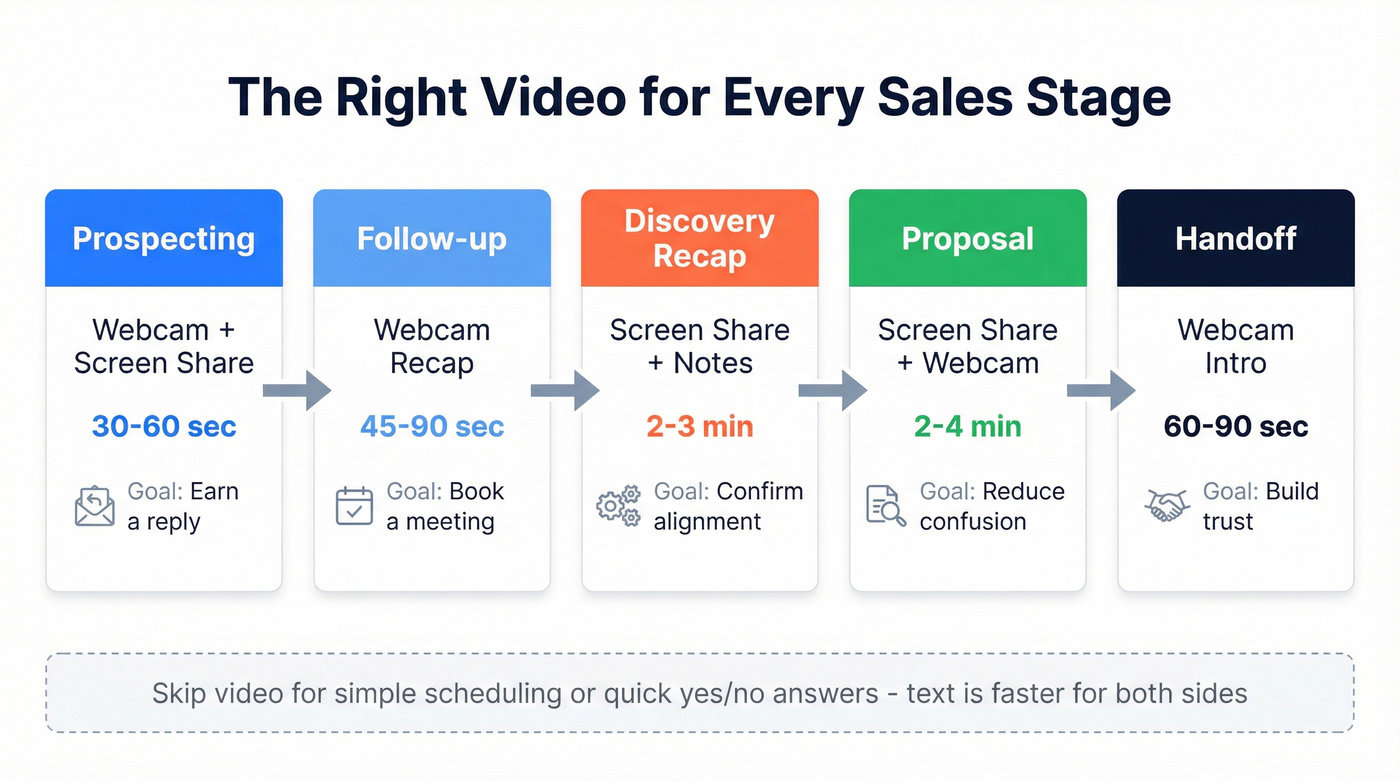
| Stage | Video Type | Ideal Length | Goal |
|---|---|---|---|
| Prospecting | Webcam + screen share | 30-60 sec | Earn a reply |
| Connect/Follow-up | Webcam recap | 45-90 sec | Book a meeting |
| Discovery Recap | Screen share + notes | 2-3 min | Confirm alignment |
| Proposal Walkthrough | Screen share + webcam | 2-4 min | Reduce confusion |
| Handoff | Webcam intro | 60-90 sec | Build trust with new contact |
For prospecting, keep it under 60 seconds. Cognism's SDR team uses a dual-channel approach: video emails for net-new prospects, then video follow-ups on other channels when there's no response. Prospecting videos aren't mini-demos - they're pattern interrupts. Mention something specific and ask one question. (If you want a tighter structure, borrow a few sales prospecting techniques that translate well to video.)
Discovery recaps and proposal walkthroughs earn more time because the prospect already has context. A two-minute video walking through your proposal deck eliminates the "let me re-read this PDF" friction and keeps your narrative intact. This is where video in enterprise sales really shines - complex deals with multiple stakeholders benefit from a visual walkthrough that everyone on the buying committee can replay.
Post-sale handoff videos are underused but powerful. A 60-second intro from the new CSM builds trust faster than a calendar invite. Skip video for simple scheduling confirmations or quick yes/no answers - text is faster for both sides.
Embedding Video in Sales Cadences
One of the most effective ways to deploy video is embedding it directly into your existing sequences. A video touch typically performs best as the second or third step - after an initial text email establishes context but before the prospect has tuned you out. Alternate between text-only and video touches so each format feels fresh rather than repetitive. (If you need copy to pair with the thumbnail, keep a few sales follow-up templates on hand.)
Personalization Is the Multiplier
A generic video performs barely better than a generic email. Personalization is what creates the gap.
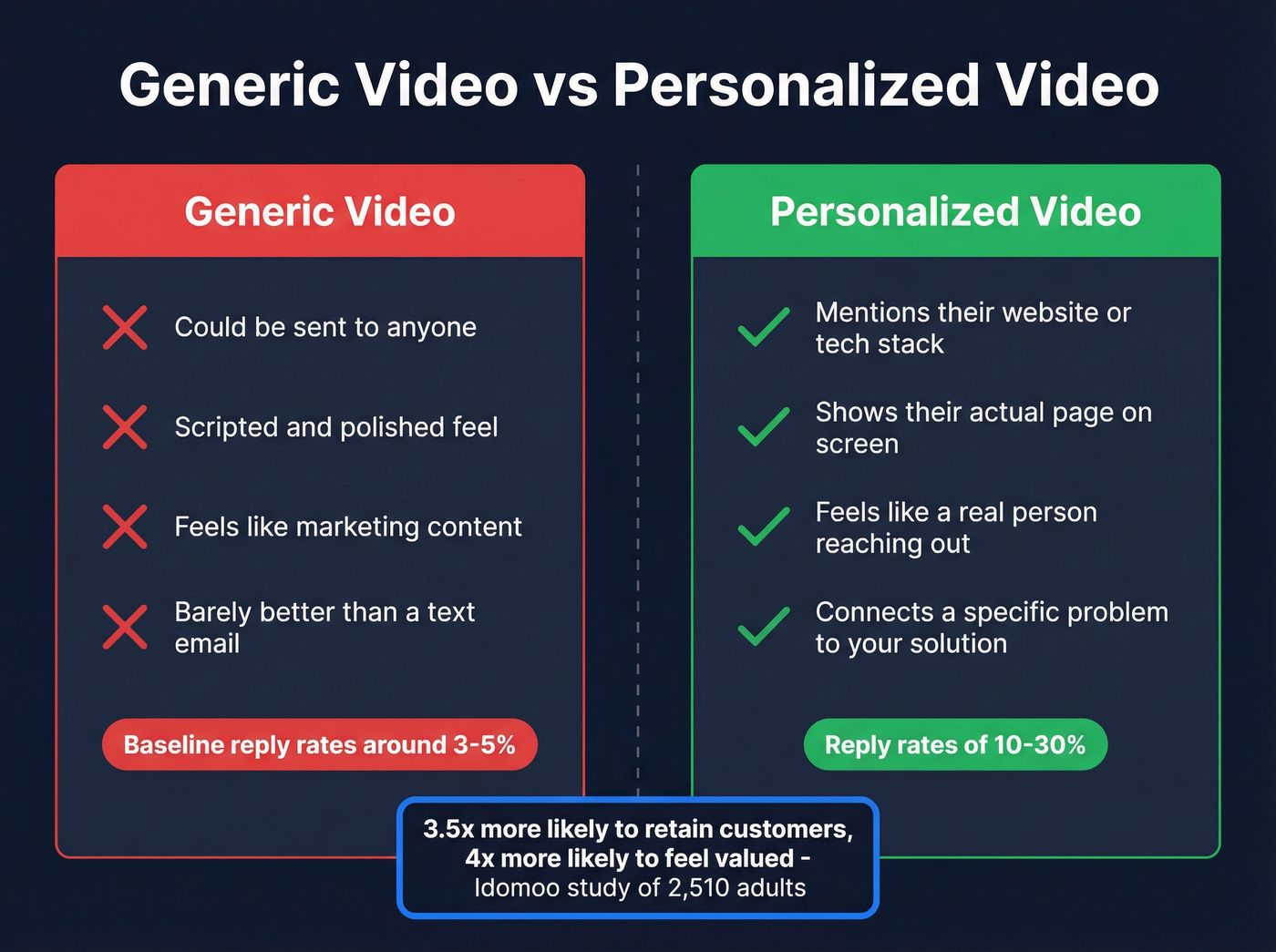
An Idomoo study of 2,510 adults across the U.S. and U.K. found that personalized video is 3.5x more likely to retain customers, 3x more likely to generate referrals, and makes recipients 4x more likely to feel valued. People exposed to "next gen video" are 58% more likely to buy. And 44% of consumers say they get upset when communications aren't personalized.
You don't need to be good on camera. You need to be fast and relevant. A 45-second video where you pull up the prospect's website, point at something specific, and connect it to a problem you solve will outperform a professionally lit, scripted clip that could've been sent to anyone.
Here's the thing: if you're uncomfortable on camera, that actually works in your favor. Polished videos feel like marketing. Slightly awkward, clearly genuine videos feel like a real person reaching out - which is exactly the point. Speed and specificity beat production value every time.

A personalized sales video takes 7 minutes to record. A bounced email takes 0 seconds to waste it. Prospeo's 98% email accuracy means your videos land in real inboxes - not dead ends. At $0.01 per verified email, protecting every video you send costs less than the coffee you're drinking.
Verify your list before you hit record.
AI Video in 2026
AI-powered sales video has evolved fast. Two years ago, sending a personalized clip meant a rep sitting in front of a webcam for every single prospect. Now it means AI avatars, voice cloning, dynamic personalized backgrounds, and the ability to send 1:1 video at 10x the volume.
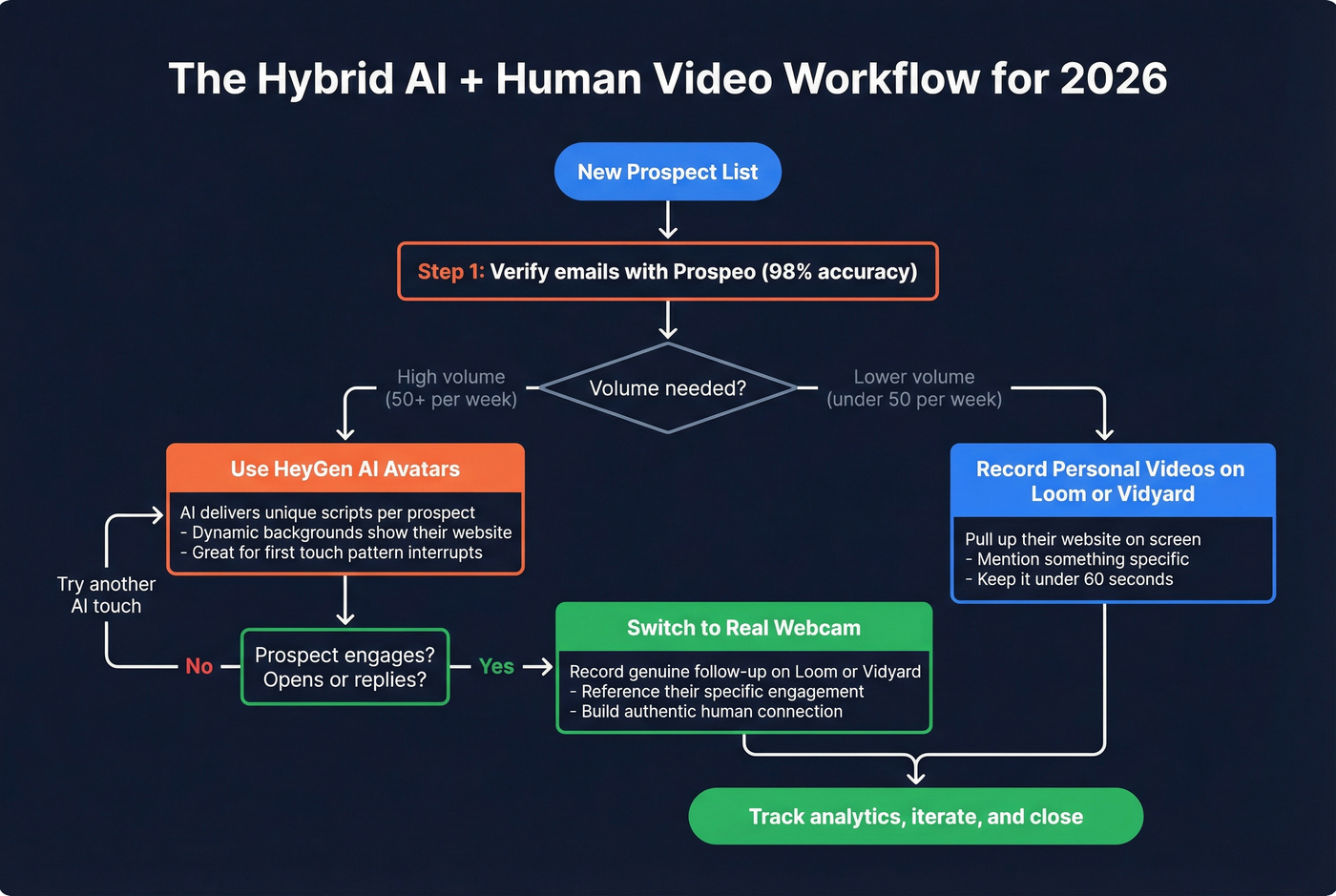
51% of marketers have already used AI tools for video creation, and 49% of companies now distribute video via email - making it the second most popular distribution channel after company websites. On the sales side, the shift is practical: Loom's Business + AI tier includes "video variables" - record once, then personalize elements for each recipient without re-recording. Vidyard's Video Agent Add-On can automatically create and deliver personalized video messages based on buyer actions across systems like Salesloft, Salesforce, HubSpot, Marketo, and Zapier. HeyGen gives you AI avatars and voice cloning so you can deliver unique scripts at scale. (If you're building a broader stack around this, start with a shortlist of SDR tools that support multichannel execution.)
The risk with AI video is obvious: if it feels robotic, it defeats the purpose. In our experience, the best implementations use AI for the repetitive scaffolding - intros, name mentions, company references - while keeping the core message authentically human. One effective pattern: HeyGen for the first touch, real webcam recordings once a prospect engages. That hybrid approach balances volume with authenticity and is quickly becoming the standard for B2B teams operating at scale.
Best Sales Video Tools
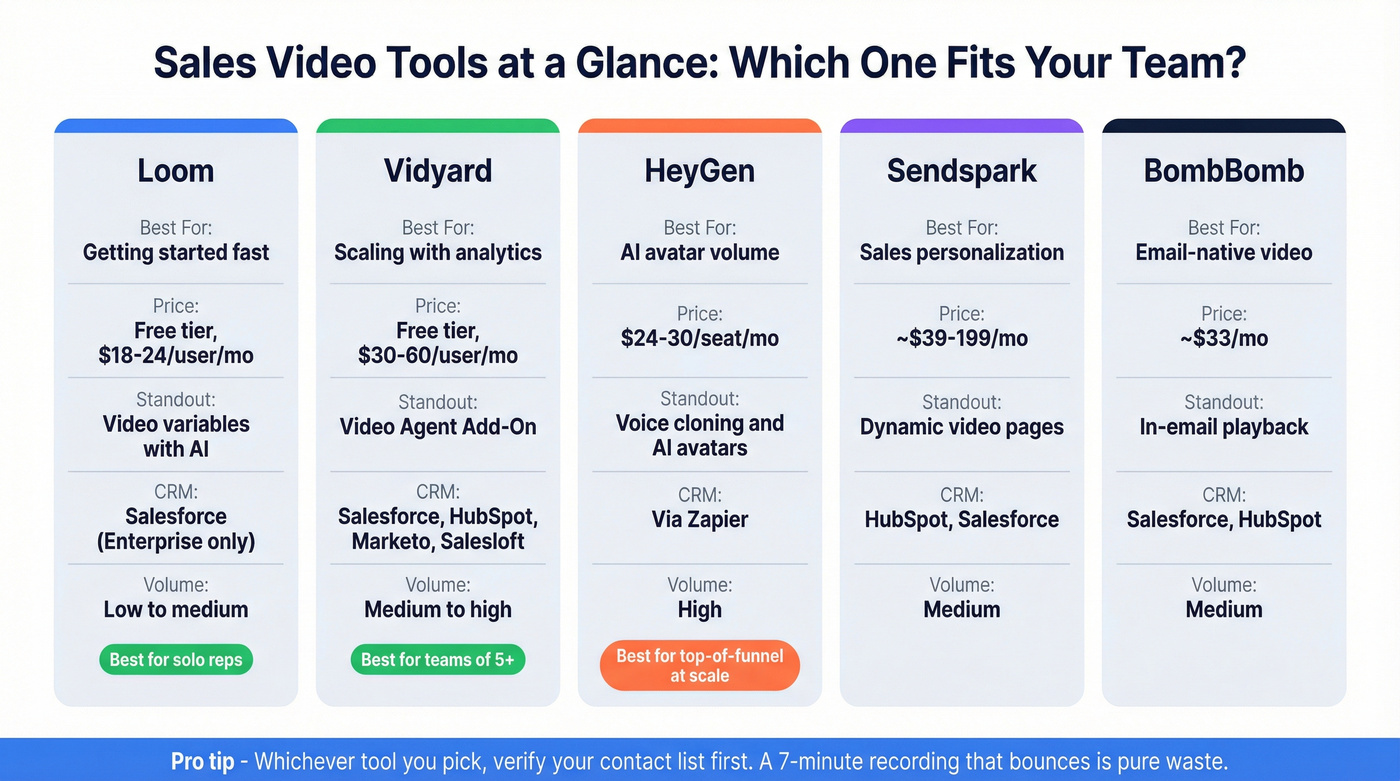
One Reddit thread on r/sales summed up what reps actually want: "screen + webcam overlay with a YouTube-like viewing experience at $15-25/month." Here's how the main options deliver.
| Tool | Best For | Starting Price | Key Feature | CRM Integration |
|---|---|---|---|---|
| Loom | Getting started fast | Free tier | Video variables (AI) | Salesforce (Enterprise) |
| Vidyard | Scaling with analytics | Free tier | Video Agent Add-On | Salesforce, HubSpot, Marketo, Salesloft |
| HeyGen | AI avatar volume | $24/mo | Voice cloning | Via Zapier |
| Sendspark | Sales personalization | ~$39/mo | Dynamic video pages | HubSpot, Salesforce |
| BombBomb | Email-native video | ~$33/mo | In-email playback | Salesforce, HubSpot |
Wistia is worth a mention if you're in marketing, but it's built for hosting and analytics on marketing content - not outbound sales workflows.
Loom
Use this if you want the fastest path from "never sent a video" to "sending five a day." Loom's free tier gives you 25 recordings with a 5-minute cap - enough to test whether video outreach moves your reply rates. Business runs $18/user/month; Business + AI at $24/user/month adds auto titles, summaries, chapters, text-based editing, filler word removal, and video variables. The "request email to view" feature is quietly powerful for prospecting - it captures the viewer's email before they watch, giving you a verified lead even from forwarded links.

Skip this if you need deep CRM analytics or team-wide performance dashboards. Salesforce integration is locked behind Enterprise pricing, and Loom's analytics are basic compared to Vidyard's. It's a recording tool that's great at recording - not a sales engagement platform.
Vidyard
Your team needs to measure which reps' videos get watched and which get ignored. That's Vidyard's territory. The free tier includes 5 videos per month, 15 AI videos, and 30-minute recording limits. A Starter tier sits between Free and Teams. Teams and Enterprise tiers add CRM/MAP integrations, plus the Video Agent Add-On that can automatically create and deliver personalized video messages based on buyer actions. Expect $30-60/user/month for a paid seat depending on plan, seats, and add-ons.

Vidyard is the right choice when you're building a video outreach program across 5+ reps and need to prove ROI to leadership. Solo reps should start with Loom.
HeyGen
Think of HeyGen as the volume play. Your team needs to send 200 personalized videos this week, and nobody has time to record each one. HeyGen's AI avatars and voice cloning create a digital version of you that delivers unique scripts to each prospect. Creator starts at $24/month annually; Business is around $30/seat/month with a two-seat minimum. Dynamic backgrounds mean you can show each prospect's website or logo behind your avatar.
The tradeoff is authenticity. AI avatars are impressive but detectable - and for six-figure deals where trust matters, a real webcam recording will always win. HeyGen shines for high-volume top-of-funnel where personalization at scale matters more than genuine human connection.
Sendspark and BombBomb
Sendspark is Loom rebuilt specifically for sales. Where Loom is a general screen-recording tool that sales teams adopted, Sendspark was purpose-built for outbound video personalization. Dynamic video pages let you customize landing pages per recipient. Solo starts around $39/month, Team around $199/month - steeper pricing, but more sophisticated personalization features. If your budget is tight, test with Loom or Vidyard's free tiers first.
BombBomb at around $33/month is built for reps who live in email. Its core trick is in-email video playback with engagement tracking. Less flexible for screen sharing, but if your workflow is "record face, embed in email, track opens," it does that well and nothing else.
Data Quality Comes First
Let's be honest about something most video outreach guides skip entirely: none of this matters if your emails bounce.
Video outreach is the highest-effort-per-prospect channel in outbound. A personalized prospecting video takes 3-7 minutes to record, trim, and send. When that email bounces, you lose the time investment that made the whole approach worth doing in the first place. We've watched teams get excited about video, record dozens of clips in a week, then discover a 30%+ bounce rate that torched their domain reputation along with their enthusiasm. (If you're troubleshooting that, start with email bounce rate basics before you change your messaging.)
Before you record a single video, run your prospect list through Prospeo's email verification. With 98% accuracy and a 7-day data refresh cycle, you're not sending to stale addresses. Snyk's 50-person AE team dropped their bounce rate from 35-40% to under 5% and saw AE-sourced pipeline jump 180%. Meritt tripled their pipeline from $100K to $300K per week.
The free tier gives you 75 email verifications per month - enough to validate your highest-priority video prospects before you invest recording time. Upload a CSV, get results in minutes, then record only for addresses you know will land. (If you're still building lists, pair verification with data enrichment services so personalization doesn't rely on guesswork.)
Video personalization works because you reference the prospect's tech stack, funding round, and job postings. Prospeo gives you all of that - 30+ filters including technographics, funding data, and live job posting signals across 300M+ profiles. Build the list, enrich it with 50+ data points, then record videos that actually land.
Find the intel that makes your sales videos impossible to ignore.
Five Mistakes That Kill Reply Rates
Burying the video under a wall of text. If your email has three paragraphs before the video thumbnail, most prospects never scroll to it. Lead with the video. One sentence of context, then the thumbnail. (You can also test different email subject lines to earn the open in the first place.)
Rambling past 90 seconds without a plan. You don't need a teleprompter, but you need three bullet points before you hit record: what you noticed about them, why it matters, and what you're asking for.
Ignoring lighting and audio basics. Face a window. Use headphones with a mic. Check your background. These take 30 seconds and make the difference between "professional" and "recorded this in a cave." If you're camera-shy, remember: your prospect isn't judging your production skills. They're judging whether you understand their problem.
Only using face-to-camera. Mix in screen shares, whiteboard sketches, and their website pulled up on screen. Variety keeps attention and lets you show rather than tell. Some teams even experiment with recording a quick Loom instead of leaving a voicemail - a video message stands out in crowded inboxes.
Never checking your analytics. Every video tool tracks watch time and click-through. If prospects drop off at 15 seconds, your intro is too slow. If they watch to the end but don't click, your CTA is weak. Iterate based on the data. (If you're standardizing this across reps, treat it like sales process optimization, not a one-off tactic.)
Quick-Start Checklist
If you're ready to start but want a clear sequence:
- Verify your prospect list so every address is deliverable. (If deliverability is a recurring issue, use an email deliverability guide to fix the root causes.)
- Pick one tool - Loom's free tier is the lowest-friction starting point.
- Write three bullet points before each recording: observation, relevance, ask.
- Record your first five videos in a single sitting to build the muscle.
- Track open rates, watch time, and replies for two weeks before optimizing.
Outbound video for sales doesn't require a massive tech stack or a production studio. It requires verified data, a clear framework, and the willingness to hit record.
FAQ
How long should a prospecting video be?
Aim for 30-90 seconds on cold outreach. Cognism's SDR team targets roughly 60 seconds - long enough to show you've done your homework, short enough to respect the prospect's time. Discovery recaps and proposal walkthroughs can run 2-3 minutes since the prospect already has context.
What equipment do I need?
A laptop webcam, decent lighting (face a window), and a quiet room. Personalization and relevance matter far more than production quality. A 45-second video mentioning the prospect's company by name outperforms a professionally lit generic clip every time.
How do I prevent video emails from bouncing?
Verify every email address before sending. High bounce rates damage your domain reputation, which means all your emails start landing in spam. Prospeo's free tier covers 75 verifications per month at 98% accuracy - enough to validate your top video prospects before you invest recording time.
Is video effective for B2B sales specifically?
B2B video selling tends to outperform consumer use cases because deal sizes justify the per-prospect time investment. When you're targeting accounts worth $50K+, a 60-second personalized clip that earns a meeting pays for itself many times over. The same Gong data on webcam usage in closed deals comes from B2B sales environments.