

Video Prospecting: The Practitioner's Playbook for 2026
You spent 45 minutes on a prospecting video - nailed the prospect's name, referenced their latest funding round, even showed their website on screen. Then the email bounced. Three times that week. That's two-plus hours of production time hitting dead inboxes, and it's the reason most reps abandon video outreach before it ever works.
We've watched teams waste entire weeks recording videos to unverified lists. The fix isn't better lighting or a fancier script. It's the pre-step nobody talks about: verifying your data before you hit record.
What You Need to Start
- Record: Loom for free for your first 25 videos, or Vidyard's free plan if you only need a handful this month.
- Scale: Sendspark at $49/mo when you're ready for AI personalization.
Total cost to start: $0.
Does Video Outreach Actually Work?
Here's what practitioners actually report - not vendor marketing, but real outbound teams sharing numbers.
| Approach | Reply Rate Lift | Source |
|---|---|---|
| Video in sequence as Step 2 | ~3x overall reply rate | r/salesdevelopment |
| Loom video added to emails | +20% response rate | r/SalesOperations |
| AI-personalized video | 15-20% positive reply vs 4-6% generic | r/salestechniques |
| Video in cold email | 26% reply-rate increase, 4x higher CTR | SalesLoft research |
| Video email | 120% higher response rate | BombBomb case studies |
Every source points the same direction. Reply rates lift meaningfully - somewhere between 20% and 3x depending on personalization depth and placement. Even the conservative end justifies the effort for high-value accounts where a single meeting is worth thousands.
The 45-Second Framework
Most reps overthink production and underthink structure. Vidyard's analysis of roughly one million videos shows 65% of viewers watch a sub-60-second video to the end. Past 20 minutes, that drops to 20%.
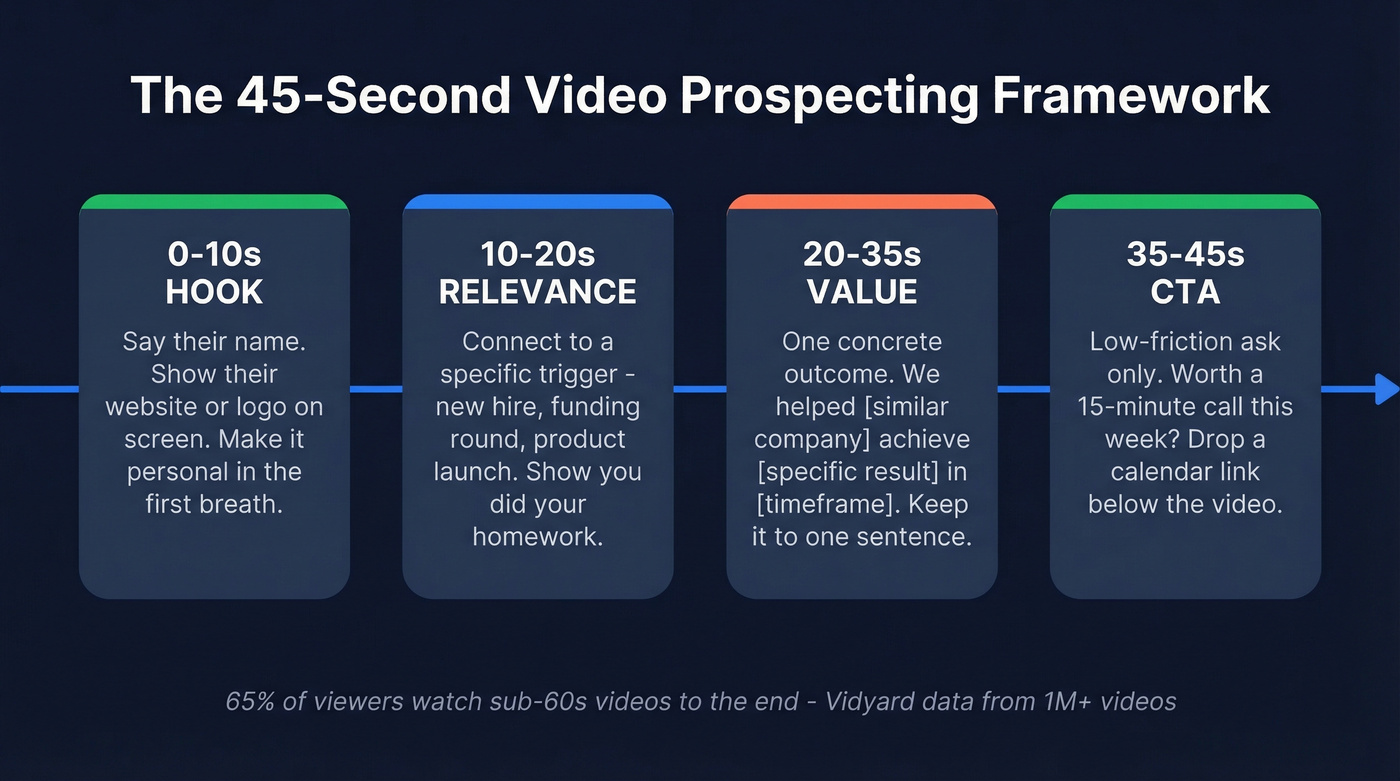
In our testing, the 45-second format consistently outperforms longer recordings:
- Hook (0-10s): Say their name, show their website or company logo on screen. "Hey Sarah - I was looking at Acme's careers page and noticed something."
- Relevance (10-20s): Connect to a specific trigger. "You're hiring 3 AEs, which usually means pipeline pressure."
- Value (20-35s): One concrete outcome. "We helped a similar team cut list-building time by 80% and triple pipeline in 6 weeks."
- CTA (35-45s): Low-friction ask. "Worth a 15-minute call this week? I'll send a calendar link below."
Use an animated GIF of you waving or pointing at the prospect's logo as the email thumbnail. GIF previews dramatically increase the chance prospects actually click play.
Here's a copy-paste script you can adapt right now:
"Hey [First Name] - I pulled up [Company]'s site and saw you just [trigger: launched a product / opened a new office / posted 5 SDR roles]. That usually means [pain point]. We helped [similar company] [specific result] in [timeframe]. Would it make sense to chat for 15 minutes this Thursday? I'll drop a link below."
Webcam, screen share, 40 seconds, done.
Where Video Fits in Your Sequence
Don't lead with video. The practitioner who reported 3x reply rates on r/salesdevelopment found video performed better as Step 2 than Step 1.
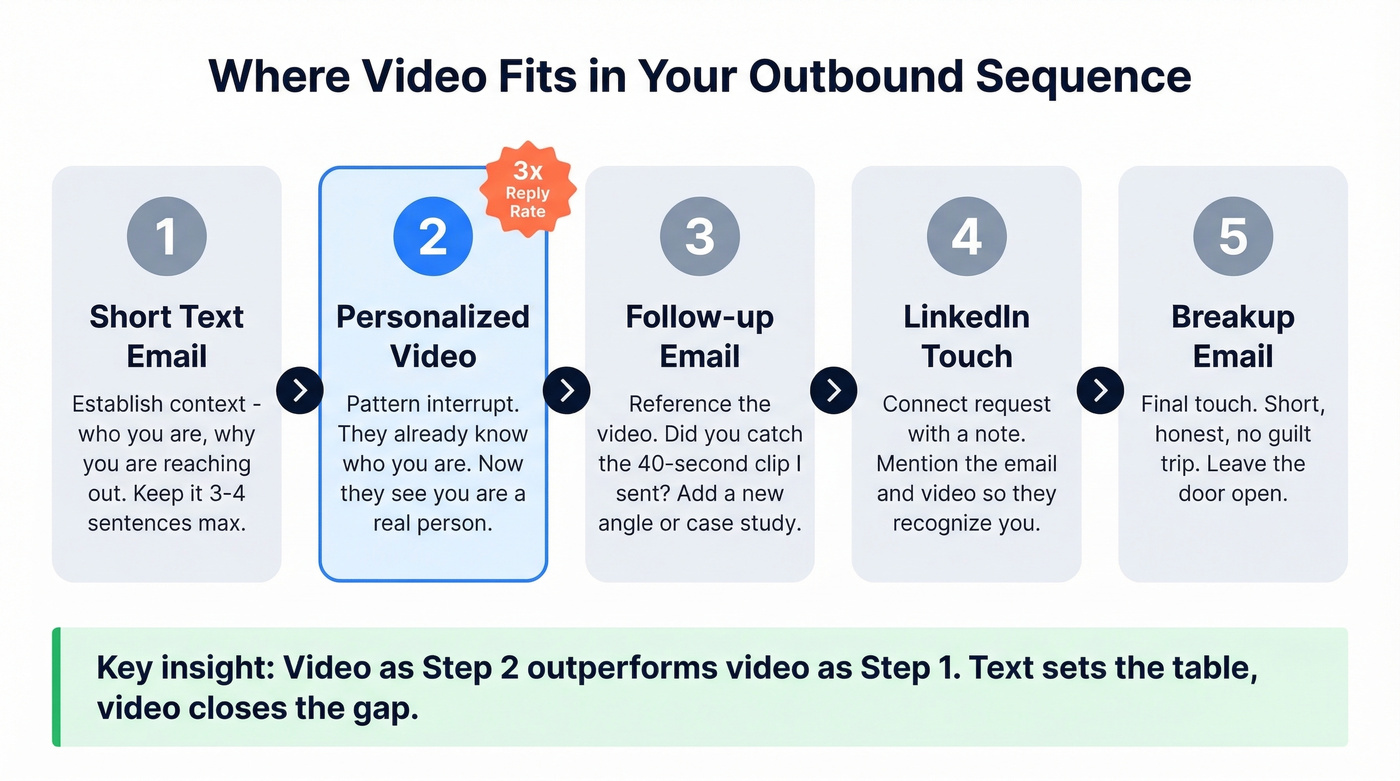
A short text email first establishes context - who you are, why you're reaching out. The video in Step 2 creates the pattern interrupt. The prospect already has a frame of reference, so the video feels like a follow-up from a real person rather than a random cold pitch. Text sets the table. Video closes the gap.
This framework applies to email sequences, but it works for social DMs too, especially for warm leads who've already engaged with your content. If you're building a broader outbound motion, pair this with proven sales prospecting techniques so video becomes a multiplier, not a crutch.
One objection worth addressing: some enterprise buyers won't click unknown video links. Mitigate this by using branded domains, embedding GIF thumbnails instead of raw links, and adding clear context in the email body before the video. (If you want the technical setup, start with a dedicated tracking domain.)

You just spent 45 seconds recording a personalized video. Don't let it bounce. Prospeo's 98% email accuracy and 7-day data refresh mean every video you send actually reaches a real inbox - not a dead end.
Verify your prospect list before you waste another recording.
AI Personalization: The Math
Here's the thing - manual video personalization hits a wall fast. Recording 50 individual 30-second videos takes roughly 10 hours when you factor in research, recording, re-takes, and uploading. At 15-20 videos a day, you've burned your entire morning on production.
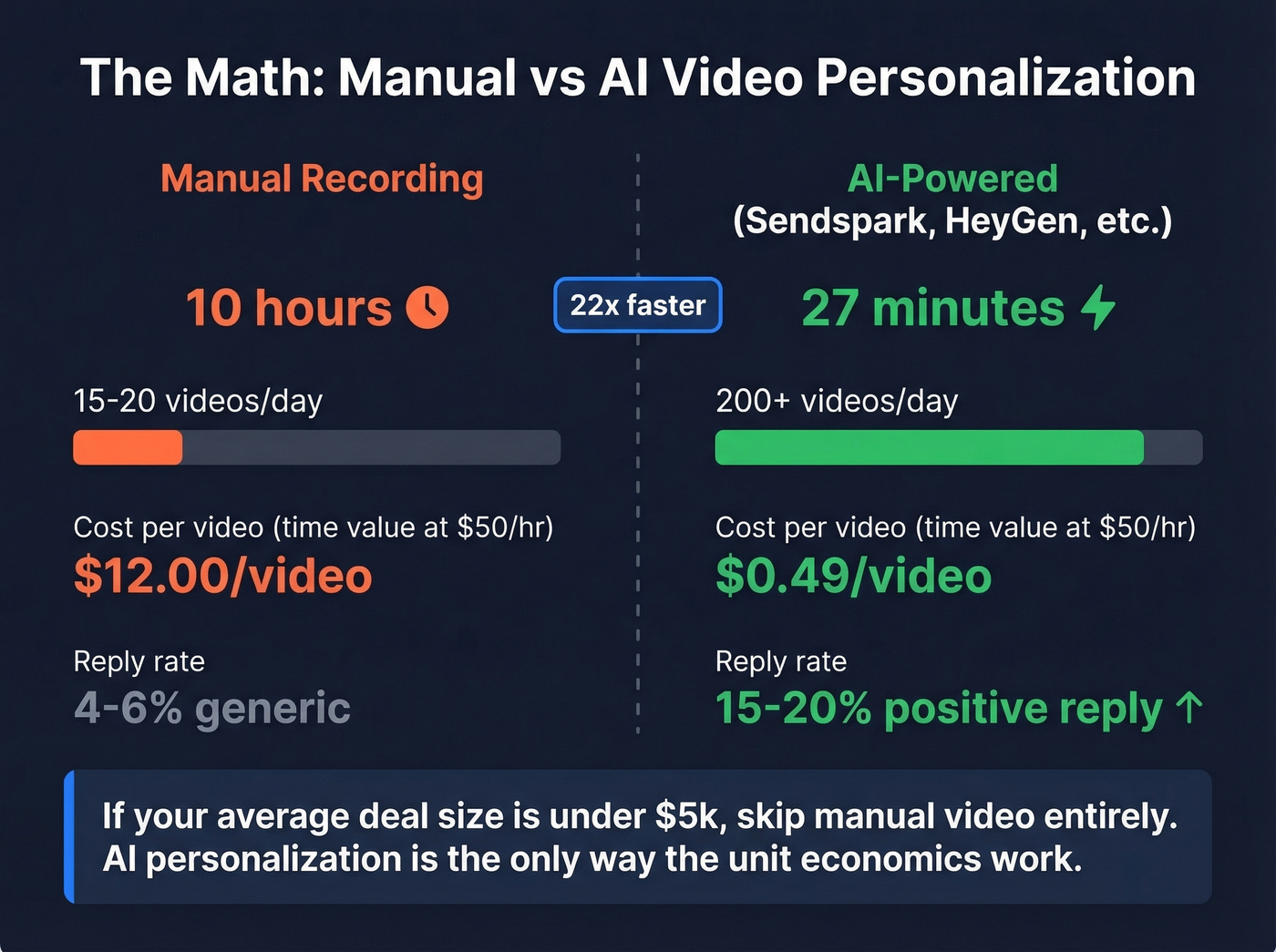
AI flips the math. The same 50 videos take about 27 minutes with tools like Sendspark, ElevenLabs for voice cloning, or HeyGen and Synthesia for avatars. You record once with a first-name placeholder, import your contact list, and the tool generates personalized versions at scale. The practitioner reporting 3x reply rates ran Sendspark with Clay and Smartlead - a stack built specifically for this outbound video workflow. Vidyard reports a 12x increase in AI avatar adoption, which confirms teams are catching on.
If your average deal size is under $5k, skip manual video entirely. AI-personalized video is the only way to make the unit economics work at that price point. Manual personalization is a dead end past 15 videos a day, and the practitioners hitting 15-20% positive reply rates are using AI, not spending afternoons in front of a webcam.
Tools + Pricing
| Tool | Best For | Starting Price | G2 Rating | Key Limitation |
|---|---|---|---|---|
| Vidyard | Analytics + tracking | Free / $59/mo paid | 4.5/5 (568) | CRM integrations locked to Teams tier |
| Sendspark | AI personalization | $49/mo (Solo) | 4.8/5 (341) | Overage costs add up |
| Loom | Simplest entry point | Free / ~$8/mo paid | 4.7/5 (1,097) | Limited analytics |
| BombBomb | Compliance + regulated industries | $42/user/mo | - | Higher per-seat cost |
Vidyard
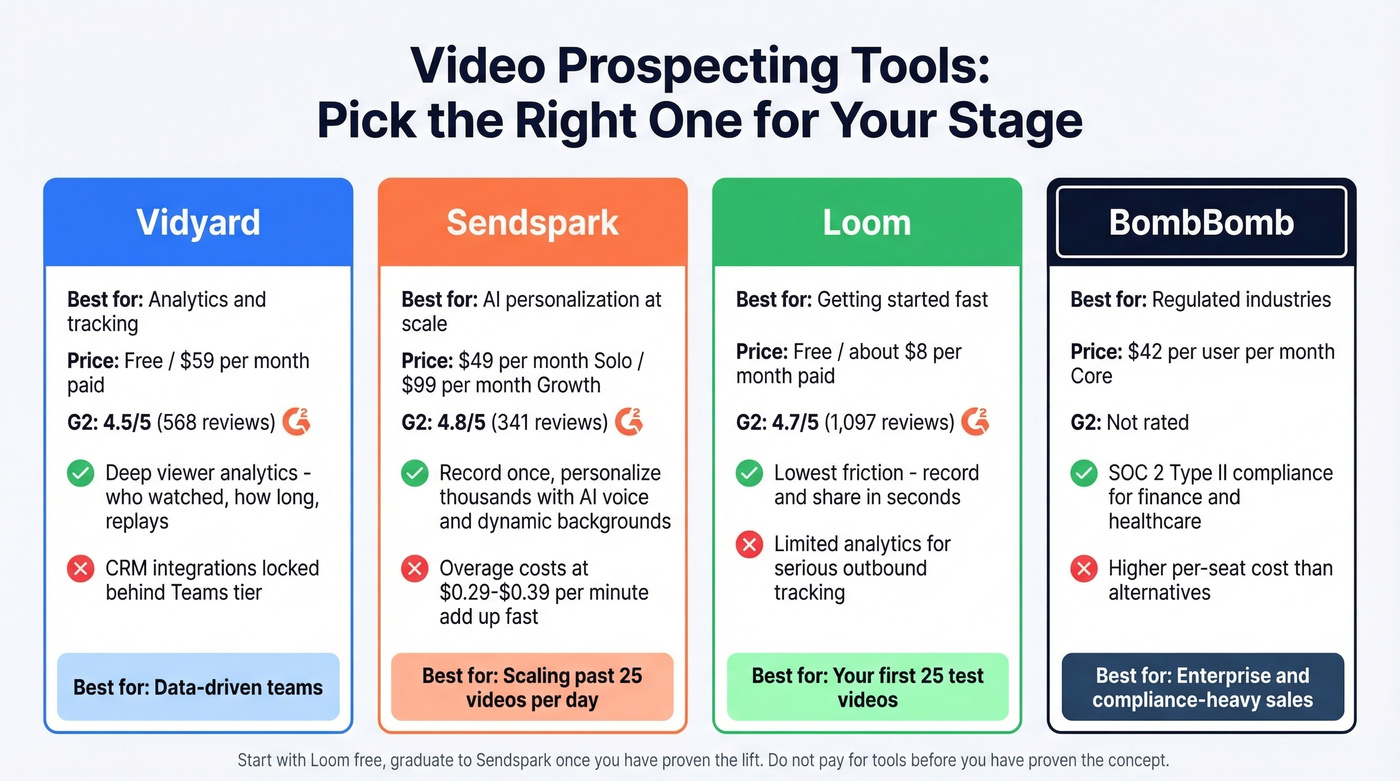
Use this if you need detailed viewer analytics - who watched, how long, which parts they replayed. The free plan gives you 5 videos/month and 15 AI videos. Starter at $59/user/mo unlocks full analytics, branded sharing pages, and CTA templates.
Skip this if you just need quick recordings without tracking depth. You'd be paying for analytics infrastructure you won't touch.
Sendspark
The "record once, personalize thousands" workflow is the real differentiator here: AI voice cloning, dynamic backgrounds showing each prospect's website, and personalized video pages. Solo plan at $49/mo includes 100 Dynamic Video Minutes; Growth at $99/mo bumps to 250 DVM across 3 seats. Overage runs $0.29-$0.39/min.
Don't start here. Test video free elsewhere first, then graduate to Sendspark once you've proven the lift on your first 25 videos.
Loom
The lowest-friction way to test video outreach. Free tier gives you 25 videos at 5 minutes each, and paid plans start around $8/creator/mo. That 4.7/5 G2 rating across 1,097 reviews tells you everything - people love the simplicity. Best for teams running their first video experiment. If you want a tighter playbook, follow a dedicated Loom video cold email workflow.
BombBomb
The enterprise play. Core at $42/user/mo, Copilot with AI tools at $70/user/mo. SOC 2 Type II compliance matters if you're selling into regulated industries like finance or healthcare. One enterprise team using BombBomb hit a 70% response rate and $1.2M pipeline in a single month - though that's clearly an outlier, not a baseline.
The Mistake That Kills Your Results
Video is high-effort outreach. Even with AI, you're investing more per contact than a text email. So every bounced email is expensive - not just in deliverability damage, but in wasted production time.
Let's be honest about the math: if 15-35% of your emails bounce because your data is stale, and each video takes even 2-3 minutes of AI-assisted production, you're throwing away hours every week. One Prospeo customer, Meritt, saw their bounce rate drop from 35% to under 4% after switching to verified data. That's the difference between a video program that scales and one that quietly dies after two weeks. (If you're benchmarking, use these email bounce rate ranges and fixes.)

Verify before you record. A 98% email accuracy rate and 7-day data refresh cycle mean your list stays current - stale data from providers refreshing every six weeks will silently sabotage your campaigns. If you're troubleshooting inboxing, start with an email deliverability guide and then tighten your sender reputation.
Running Sendspark with Clay and Smartlead? Prospeo plugs right in. Build verified contact lists with 30+ filters - buyer intent, job changes, headcount growth - then push them straight into your video outreach stack. At $0.01/email, your AI video workflow finally has data that matches its speed.
Feed your video prospecting stack with contacts that actually connect.
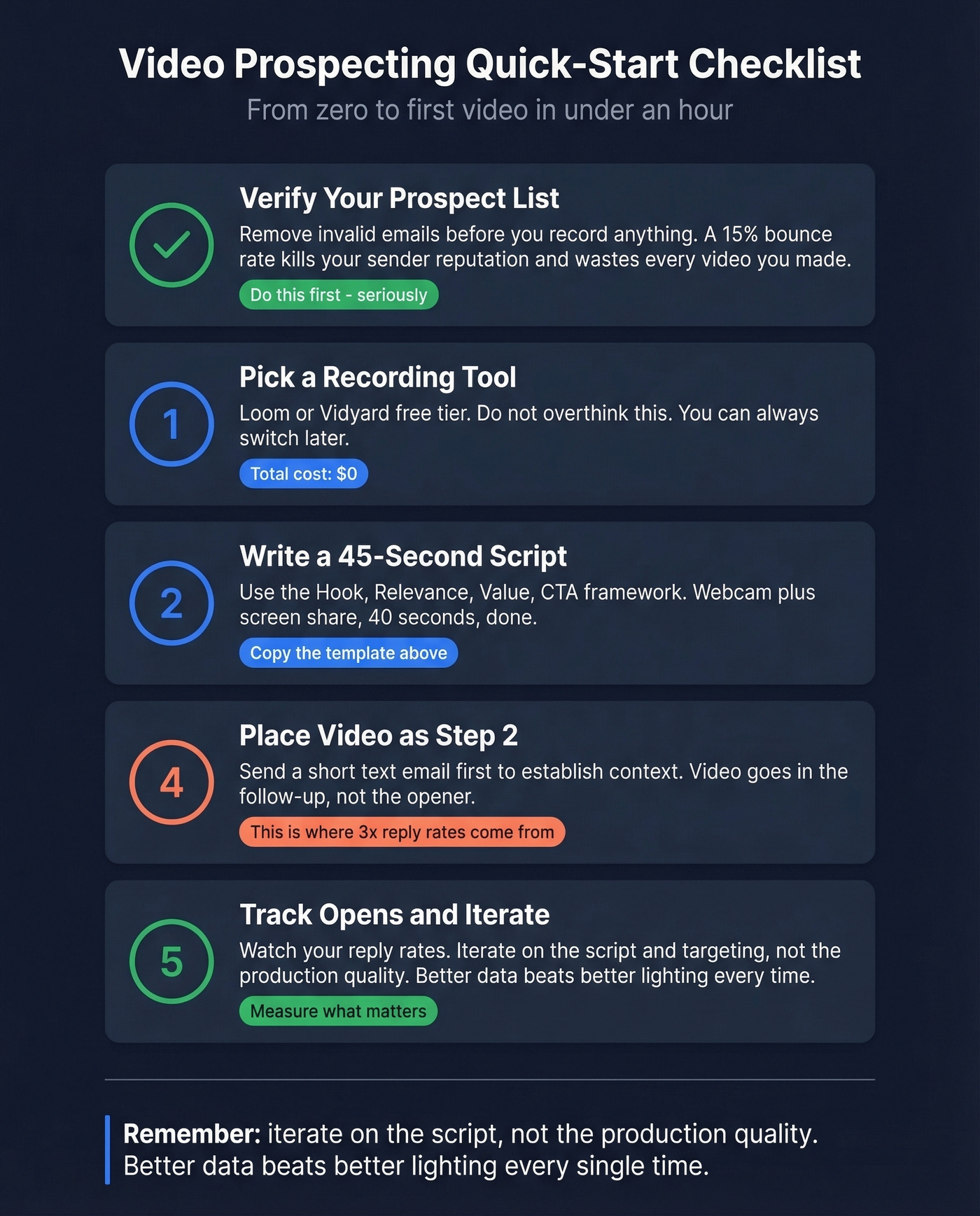
Quick-Start Checklist
- Verify your prospect list - remove invalid emails before you record anything. (If you're sourcing contacts, use a reliable email list providers workflow first.)
- Pick a recording tool - Loom or Vidyard free. Don't overthink this.
- Write a 45-second script using the Hook, Relevance, Value, CTA framework above. If you need follow-up copy, steal from these sales follow-up templates.
- Place video as Step 2 in your sequence, after a short text email.
- Track opens and replies - iterate on the script, not the production quality.
FAQ
How long should a prospecting video be?
Under 60 seconds. Vidyard's data shows 65% of viewers finish a sub-60-second video, and 30-45 seconds produces the best reply rates in practitioner tests. Anything over a minute loses most of your audience.
Does AI-personalized video actually work?
Yes. Practitioners report 15-20% positive reply rates with AI-personalized videos versus 4-6% with generic scripts. Tools like Sendspark produce 50 personalized videos in under 30 minutes, making the economics viable for deals under $10k.
What's the cheapest way to start?
Free. Use Loom or Vidyard's free plan for recording and verify your list with Prospeo's free tier at 75 emails/month. Total cost: $0. Upgrade to paid tools only after you've proven the lift on your first 25 videos.
Should I lead with video in cold outreach?
No. Place video as Step 2 in your sequence, after a short text email. The consensus on r/salesdevelopment is that this order delivers roughly 3x higher reply rates because the initial email gives prospects context before the video creates a pattern interrupt.