

30+ Voicemail Scripts for Business: Inbound & Outbound Templates
80% of cold dials hit voicemail, and most sit unplayed for three days. That's not a problem - it's a channel you're using wrong. A 300M+ cold call analysis found that leaving a voicemail more than doubled email reply rates, from 2.73% to 5.87%. Callbacks barely moved. So the real question isn't "what should I say?" It's "what should I say that makes them open my email five minutes later?"
Below: copy-paste templates for inbound greetings, outbound sales, and regulated industries - plus the compliance rules and tools to make them work.
The Quick Version
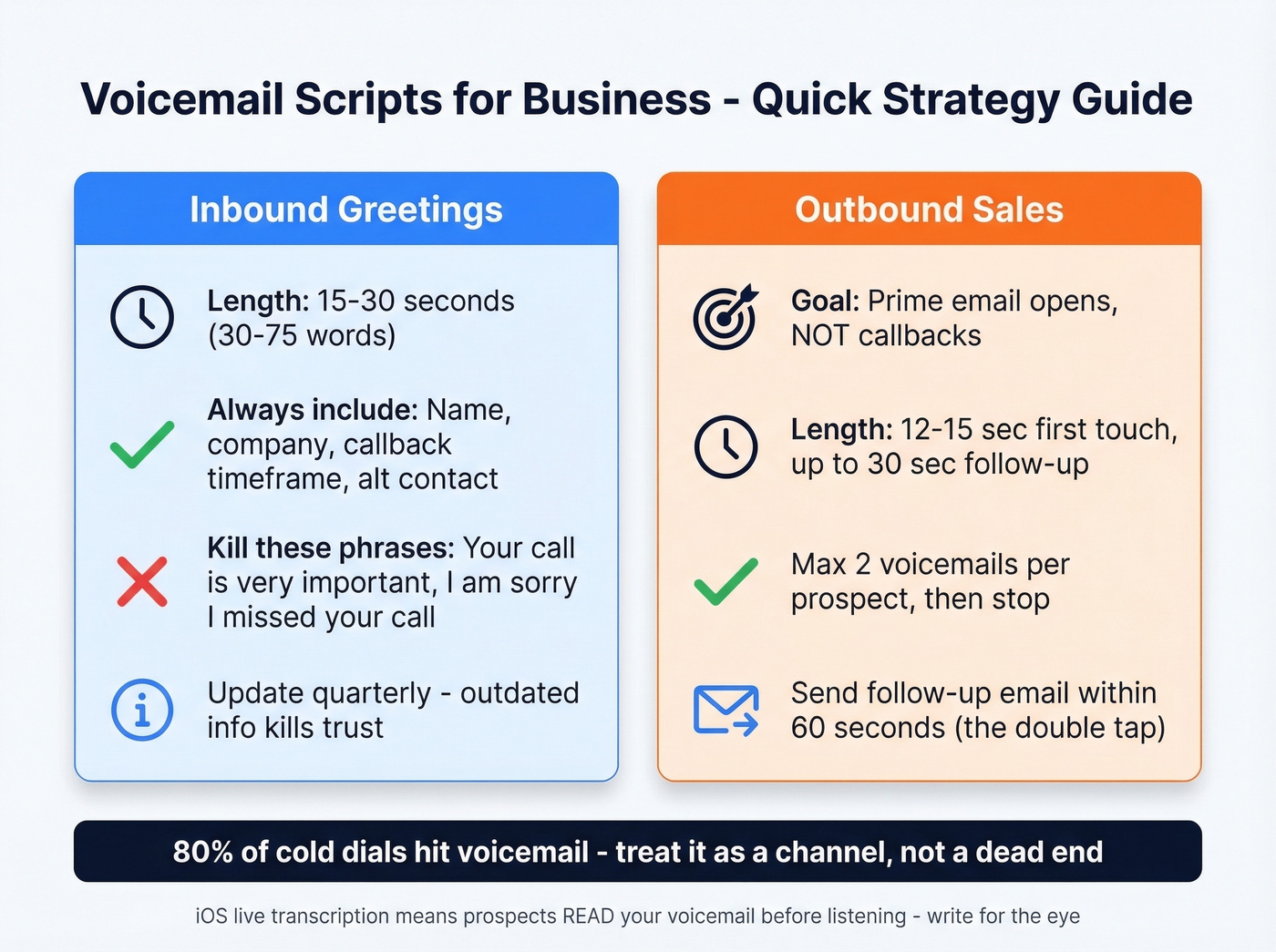
- Inbound greetings: 15-30 seconds. State your name, company, callback timeframe, and an alternative contact method.
- Outbound sales voicemails: Stop optimizing for callbacks. Voicemails prime email opens. Leave a max of 2 per prospect, then stop - 3+ voicemails drops reply rates below baseline.
- If you're leaving 10+ voicemails a day, get a voicemail drop tool and verify your numbers first. We've seen teams burn entire dial sessions on disconnected lines.
Inbound Business Voicemail Greetings
Keep every inbound greeting to 15-30 seconds. At conversational pace (120-150 WPM), that's roughly 30-75 words.
General Business Greetings
"You've reached [Name] at [Company]. I'm away from my desk - leave your name, number, and a brief message, and I'll return your call within [timeframe]. Thanks for calling."
"Hi, this is [Name] with [Company]. I can't take your call right now. Please leave a message or email me at [email]. I'll get back to you by end of business today."
"Thanks for calling [Company]. You've reached [Name] in [Department]. Leave a message after the tone, and I'll call you back within [X hours]."
None of these start with "I'm not here right now." That's intentional. Obviously you're not, or you'd have answered. Nancy Friedman, known as "The Telephone Doctor," has spent decades cataloging filler phrases like that one. Skip "Your call is very important to me" too - if it were important, you'd have a system to answer it.
After-Hours & Holiday Greetings
"You've reached [Company]. Our office hours are [hours], [days]. Leave a message and we'll return your call on the next business day. For urgent matters, email [email]."
"Thanks for calling [Company]. We're currently closed for [holiday] and will reopen on [date]. Leave a message or visit [website] for self-service options."
"Hi, you've reached [Company] after hours. Our team is available [hours] [timezone]. Leave your name and number, and we'll follow up when we're back."
Department-Specific Greetings
Sales: "You've reached the sales team at [Company]. We're with other customers right now - leave your name, number, and what you're looking for, and we'll call you back within [timeframe]."
Support: "Thanks for calling [Company] support. For faster help, open a ticket at [URL]. Otherwise, leave a message and we'll respond within [SLA timeframe]."
Billing: "You've reached [Company] billing. Leave your name, account number, and a brief description of your question. We'll return your call within [timeframe]."
Out-of-Office Greetings
"Hi, this is [Name]. I'm out of the office from [start date] through [end date]. For immediate help, contact [Colleague Name] at [number/email]. I'll return your call when I'm back."
"You've reached [Name] at [Company]. I'm currently traveling and have limited phone access until [date]. Email me at [email] for the fastest response."
"Thanks for calling. I'm away until [date] with no voicemail access. Please reach [Backup Name] at [number] - they can help with anything urgent."
Industry-Specific Greetings
Healthcare: "If this is a medical emergency, please hang up and dial 911. You've reached [Practice Name]. Our office hours are [hours]. Leave your name, number, and a brief message, and our staff will return your call within [timeframe]." Emergency routing always comes first.
Legal: "You've reached the office of [Attorney Name] at [Firm]. Please leave your name, number, and a brief message. For scheduling, contact [assistant] at [number]. Please do not leave confidential or sensitive details in your voicemail." This protects attorney-client privilege.
Dental: "If this is a dental emergency, call [emergency number]. You've reached [Practice Name]. Our hours are [hours]. To schedule or reschedule, leave your name and number, or book online at [URL]."
Real Estate: "Hi, you've reached [Name] with [Brokerage]. I'm likely showing a property right now. Leave your name, number, and the address you're calling about, and I'll call you back within [timeframe]."
If you want to eliminate voicemail entirely for inbound, consider an auto-attendant or IVR system that routes callers to the right person. For most small businesses, though, a well-crafted greeting does the job.
Outbound Sales Voicemail Templates
Here's the thing: outbound voicemails aren't about getting a callback. They're about priming the prospect to open your email. Send that follow-up email within 60 seconds of hanging up - the "double tap" - and your reply rate roughly doubles. (If you need the email side too, steal these sales follow-up templates.)
One detail most reps miss: iOS live transcription means prospects read your voicemail before they listen to it. Front-load your name and reason for calling. Keep sentences short. Write for the eye, not just the ear.
First-Touch Curiosity Scripts
- "Hey [Prospect Name], this is [Your Name] with [Company], calling about your oversight of the [department/team]. If you could give me a call back at your convenience at [number]." This script comes from a Reddit rep who left 25-35 voicemails per week, got ~15 callbacks, and closed 3-5 conversions. The key: he researched every target first and never mass-dialed.
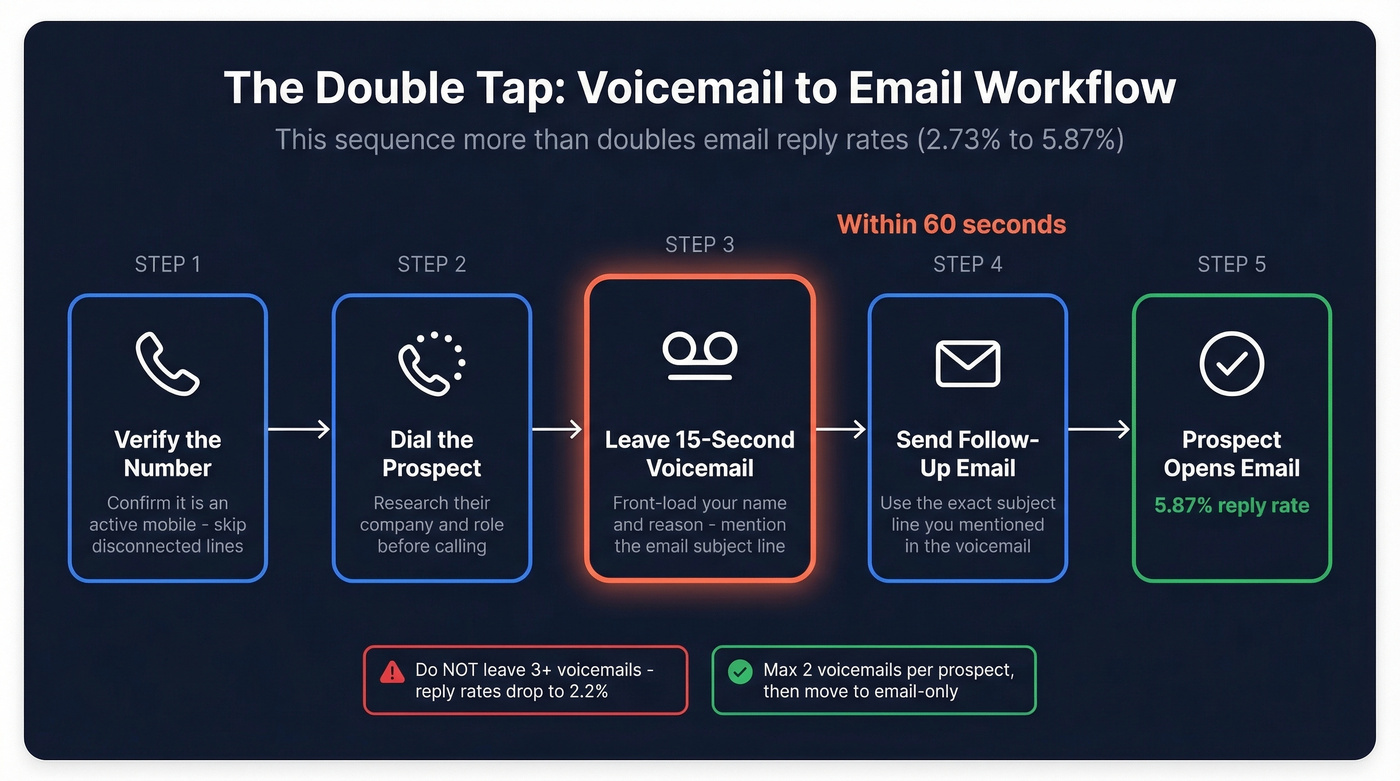
"Hi [Prospect Name], [Your Name] from [Company]. Quick question about how your team handles [specific pain point]. I'll shoot you an email with details - subject line is '[subject line].' Talk soon." (Need ideas? Use these email subject line examples.)
"[Prospect Name], it's [Your Name] at [Company]. I noticed [trigger event - new hire, funding round, expansion]. Wanted to share something relevant. Check your inbox - I just sent it over." (More ways to spot triggers: how to track sales triggers.)
First-touch voicemails should land around 15 seconds - roughly 30-38 words at conversational pace.
Follow-Up & Pain-Point Scripts
"Hey [Prospect Name], [Your Name] again from [Company]. [Peer company] cut their [metric] by [X%] using [solution]. Sent you a quick case study - subject line '[subject].' Worth 2 minutes."
"[Prospect Name], this is [Your Name]. Following up on my email from [day]. I know [specific pain point] is a headache for teams your size. Happy to walk through how we solve it - my number is [number], or just reply to that email."
"Hi [Prospect Name], [Your Name] from [Company]. [Mutual connection] suggested I reach out - they thought [specific value prop] would be relevant for your team. Details in your inbox, subject line '[subject].'"
Follow-ups can run up to 30 seconds - roughly 60-75 words at conversational pace.
Industry-Specific Outbound Scripts
SaaS: "[Prospect Name], [Your Name] from [Company]. Your team just posted a [role] opening - usually means [pain point]. We help teams like [similar company] solve that. Details in your inbox." (If you're building a full outbound motion, see these sales prospecting techniques.)
Real Estate: "Hi [Prospect Name], this is [Your Name] with [Brokerage]. I saw your listing on [street] - I may have a buyer. Give me a call at [number] or check the email I just sent." (Related: real estate phone scripts for internet leads.)
Agency: "[Prospect Name], [Your Name] from [Agency]. We just wrapped a campaign for [similar client] that drove [specific result]. Sent you a one-pager - subject line '[subject].' Worth a look."
These scripts only work if you're calling verified numbers. We've found that verifying mobiles before every campaign - using a platform like Prospeo with 125M+ verified numbers and a 30% pickup rate - means more live conversations per dial session. And when you do hit voicemail, it's an active inbox, not a dead line. (If you're evaluating providers, start with these data enrichment services.)

Your voicemail script is useless if you're dialing disconnected numbers. Prospeo gives you 125M+ verified mobile numbers with a 30% pickup rate - so every voicemail you leave actually reaches a real person's phone.
Stop burning dial sessions on dead lines. Verify before you call.
What the Data Says
The 300M+ cold call dataset tells a clear story. Leaving a voicemail reduced future connect rates by 28% (5.17% vs 7.18% without voicemails). But it more than doubled email reply rates, from 2.73% to 5.87%. Voicemails don't get people to pick up next time - they get people to open your email this time. (To tighten the rest of your calling motion, build a repeatable cold calling system.)
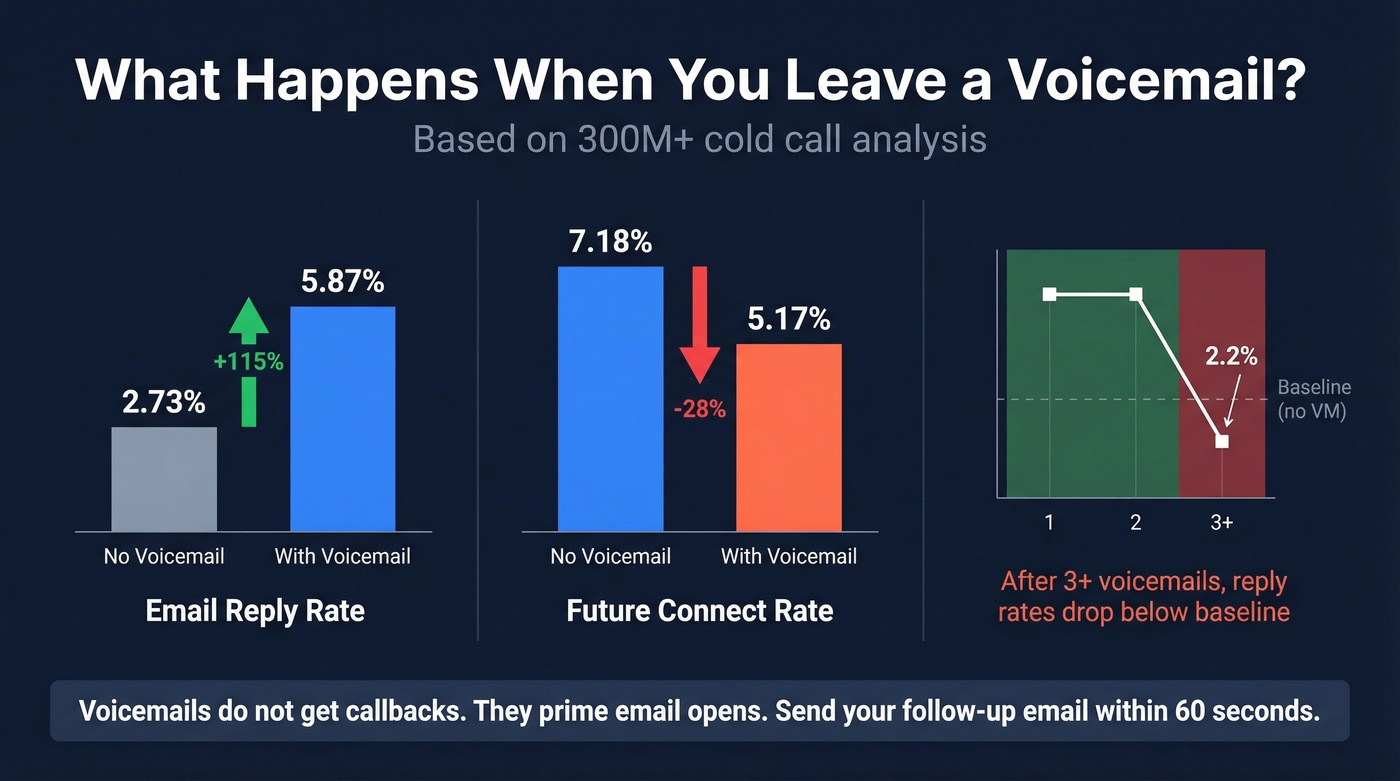
The cadence matters more than the script. Send your follow-up email within 60 seconds of leaving the voicemail. The voicemail creates name recognition; the email gives them a low-friction way to respond. (If you're unsure when to nudge, use this guide on when should you follow up on an email.)
There's a cliff, though. After 3+ voicemails to the same prospect, email reply rates drop to 2.2% - worse than if you'd never left a voicemail at all. Two voicemails, max. Then move on. The consensus on r/sales echoes this: researched, targeted messages outperform mass-dialed ones every time.
Research from InsideSales found that scripted voicemails lift callback rates by up to 22%. Scripts keep you under 30 seconds and force you to front-load value. Winging it leads to rambling, and rambling gets deleted.
Recording Tips & Common Mistakes
Record in a quiet room with no background noise, and speak at 120-150 WPM - slightly slower than normal conversation. Smile while recording; it changes your vocal tone more than you'd think. Review and re-record your greeting quarterly, because outdated info is the silent killer of caller trust.
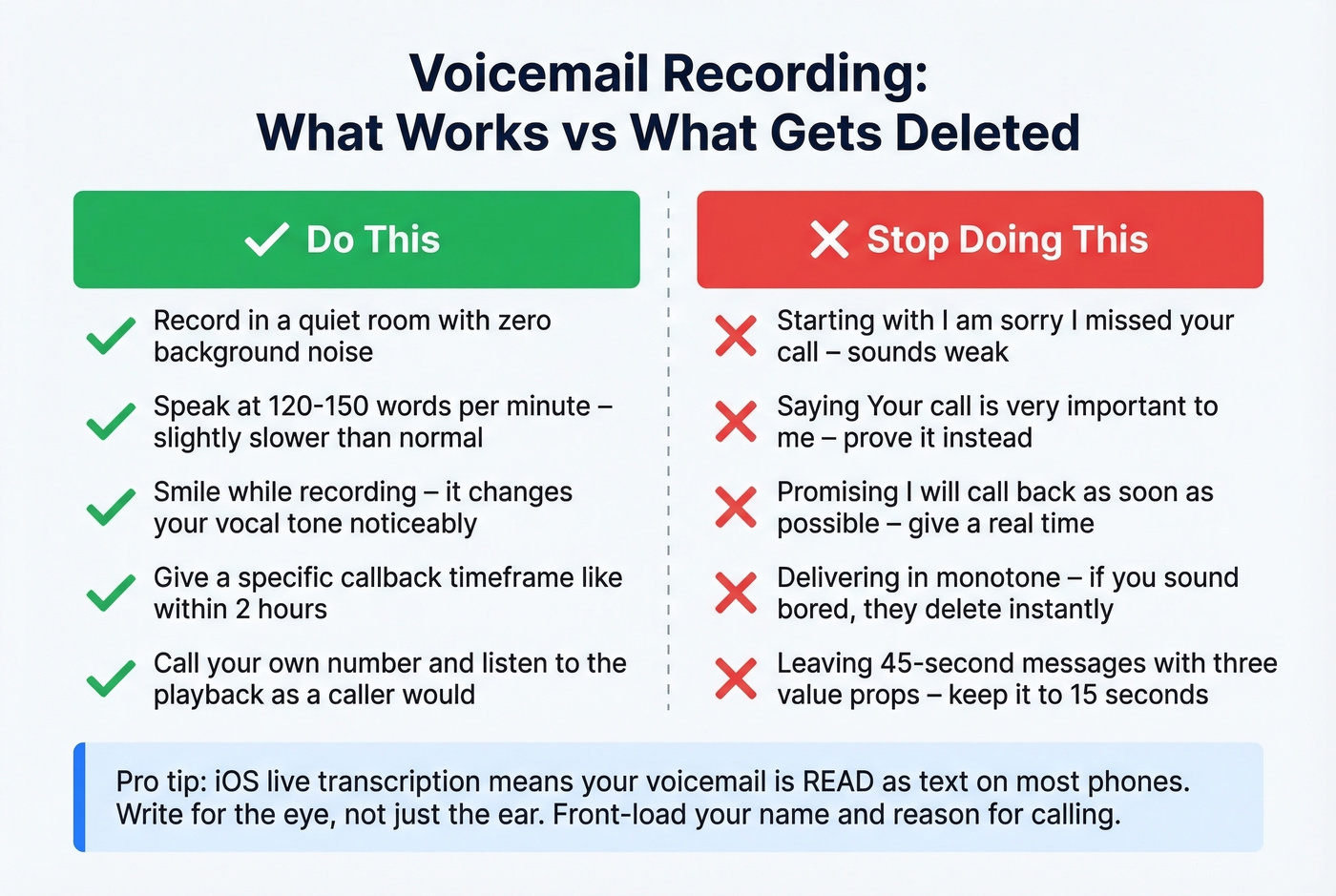
One trick worth stealing from Snap Recordings: call your own number after recording and listen to the playback as a caller would. You'll catch issues you'd never notice otherwise.
Let's be honest - if your deals typically close under five figures, you don't need a 45-second voicemail with three value props. A 12-second message that drives an email open will outperform a polished pitch every time. (For more talk-track structure, borrow these talk track examples.)
Phrases to kill immediately:
- "I'm sorry I missed your call" - sounds weak. Just tell them what to do next.
- "Your call is very important to me" - Nancy Friedman has been calling this out for years. Show it, don't say it.
- "I'll call you back as soon as possible" - a promise you probably won't keep. Give a specific timeframe instead.
Don't deliver in monotone. If you sound bored, they'll delete before the beep ends. The iOS transcription point from the outbound section applies to inbound greetings too - your greeting will be read as text on many phones, so make every word count.
Compliance Essentials
If you're leaving voicemails at scale - especially pre-recorded or ringless drops (messages delivered to voicemail without the phone ringing, via server-to-server delivery) - compliance isn't optional. (If you're also using SMS in your sequences, read up on cold texting.)
TCPA penalties: $500 per violation, $1,500 for willful violations. DNC violations run $53,088 each (2026 figure, adjusted annually for inflation). These add up fast on a 500-dial day.
Calling hours: 8 AM-9 PM in the recipient's local time zone. Not yours - theirs.
AI-generated voices: The FCC ruled in February 2024 that AI-generated voices count as "artificial voices" under TCPA. Same consent requirements apply. If you're using ElevenLabs or any voice cloning tool for voicemail drops, you need prior express written consent.
One-to-one consent rule: As of April 11, 2026, the FCC requires one-to-one consent - a consumer's consent applies only to the specific company they consented to, not to lead generators who resell that consent to multiple sellers. If you buy leads, verify that consent was granted directly to your company.
Opt-out handling: Consumers can revoke consent by any reasonable method - text, email, voicemail, verbal. Honor opt-outs within 10 business days.
Recording consent: States split between one-party and two-party consent. California, Florida, Illinois, and Pennsylvania are two-party consent states. When calls cross state lines, follow the strictest applicable law.
Skip this section if you're only doing manual one-to-one dials - standard B2B cold calling doesn't trigger the same TCPA provisions as pre-recorded or ringless drops. But the moment you automate, these rules apply in full.
Voicemail Tools Worth Knowing
Klenty handles voicemail drops inside multi-channel sequences - solid for teams already running email + call cadences. Our team tested it alongside Kixie and found the workflow integration smoother for reps who live in their sequencer. Kixie is a power dialer with one-click voicemail drop, popular with SMB sales floors. VoiceDrop.ai focuses purely on ringless voicemail delivery at scale. Expect voicemail drop tools to run $30-$200/month depending on volume, and dialers to land around $100-$300/seat/month. (If you're comparing sales stacks, start with these SDR tools.)
All three save reps 60-90 minutes per day versus manually recording each message.
For AI-generated voicemails, Phonzai and ServiceAgent.ai offer dynamic insertion - swapping in prospect names and company details automatically. ElevenLabs starts around $5/month for individual plans, with higher tiers for teams. Phonzai and ServiceAgent.ai run custom enterprise pricing. Remember: AI voices are TCPA-regulated as of February 2024. Get consent before deploying at scale.
Pair any voicemail tool with verified contact data. We've cut wasted dial time in half by verifying numbers before every campaign - at ~$0.01 per lead, it's cheaper than burning a single session on bad numbers.
The double-tap works - but only if your follow-up email lands. Prospeo's 98% email accuracy means your voicemail-to-email combo actually connects. At $0.01 per verified email, bad data stops costing you callbacks.
Nail the voicemail, then nail the inbox. Every single time.
FAQ
What makes a good business voicemail script?
Keep inbound greetings to 15-30 seconds and outbound messages to 15 seconds on first touch, 30 seconds max on follow-up. Front-load your name and reason for calling, give a specific callback timeframe, and always include an alternative contact method like email or a scheduling link. The best scripts tell the listener exactly what to do next - no filler.
Do voicemails actually generate callbacks?
Rarely on their own. The 300M+ cold call analysis shows voicemails double email reply rates (2.73% to 5.87%) rather than driving direct callbacks. The play is to send a follow-up email within 60 seconds of leaving the voicemail - the "double tap" - so name recognition converts into an inbox open.
How many voicemails should I leave before moving on?
Stop at two per prospect. After three or more voicemails, email reply rates drop to 2.2% - actually worse than leaving none. Two voicemails plus two emails, then move on to the next account.
Is ringless voicemail legal?
Yes, but it requires prior express consent, a clear opt-out mechanism, and a TCPA-compliant provider. Violations cost $500-$1,500 each. AI-generated voices have been covered under TCPA since February 2024. The one-to-one consent rule (effective April 11, 2026) adds another layer - consent must be granted directly to your company, not resold by a lead generator.
How do I verify phone numbers before a dial session?
Use a data platform with real-time verification. Prospeo verifies 125M+ mobile numbers on a 7-day refresh cycle and charges ~$0.01 per lead - far cheaper than burning rep time on disconnected lines. Kixie and Klenty also flag bad numbers mid-sequence, but they don't replace upstream data verification.