

How to Warm Up Your Inbox the Right Way in 2026
Five new Google Workspace accounts. Two hundred emails per account on day one. Every single message in spam within 48 hours. We've watched this SDR horror story play out more times than we can count, and it's entirely preventable. The problem isn't the tool or the ESP - it's failing to warm up your inbox before going live.
Reddit's full of conflicting advice on this. Some swear warmup tools are essential; others call them a scam that'll get your account flagged. One camp says manual warmup is the only safe path, another says it's a waste of time at scale. Meanwhile, Google and Microsoft keep tightening the screws on cold senders. Here's the thing most people miss: the warmup tool debate is a distraction. What actually matters is the system around it - DNS authentication, clean data, gradual volume increases, and real engagement signals.
What You Need (Quick Version)
- Timeline: 2-6 weeks depending on domain age and history. Most practitioners recommend a minimum of 14 days before sending real campaigns.
- Before anything else: Set up SPF, DKIM, and DMARC. Let new domains age 2-3 weeks before sending a single email.
- Tool route: Instantly (warmup included with plans starting at $30/mo) or TrulyInbox (starts at $29/mo) for standalone warmup
- Manual route: Works fine if you're sending under 100 emails/day - just requires discipline
- The TOS risk nobody talks about: GMass sent nearly 1.3 billion warmup emails before Google forced them to shut the feature down. Automated inbox warming violates Gmail's terms of service. Most teams accept the tradeoff, but go in with eyes open.
- The #1 thing that kills warmup progress: Sending to unverified email lists. A 10%+ bounce rate destroys weeks of reputation building.
What Is Email Inbox Warmup?
Inbox warmup is the process of gradually increasing your sending volume while generating positive engagement signals - opens, replies, messages moved out of spam - so mailbox providers learn to trust your address. Think of it as building a credit score. You don't get a high limit on day one.
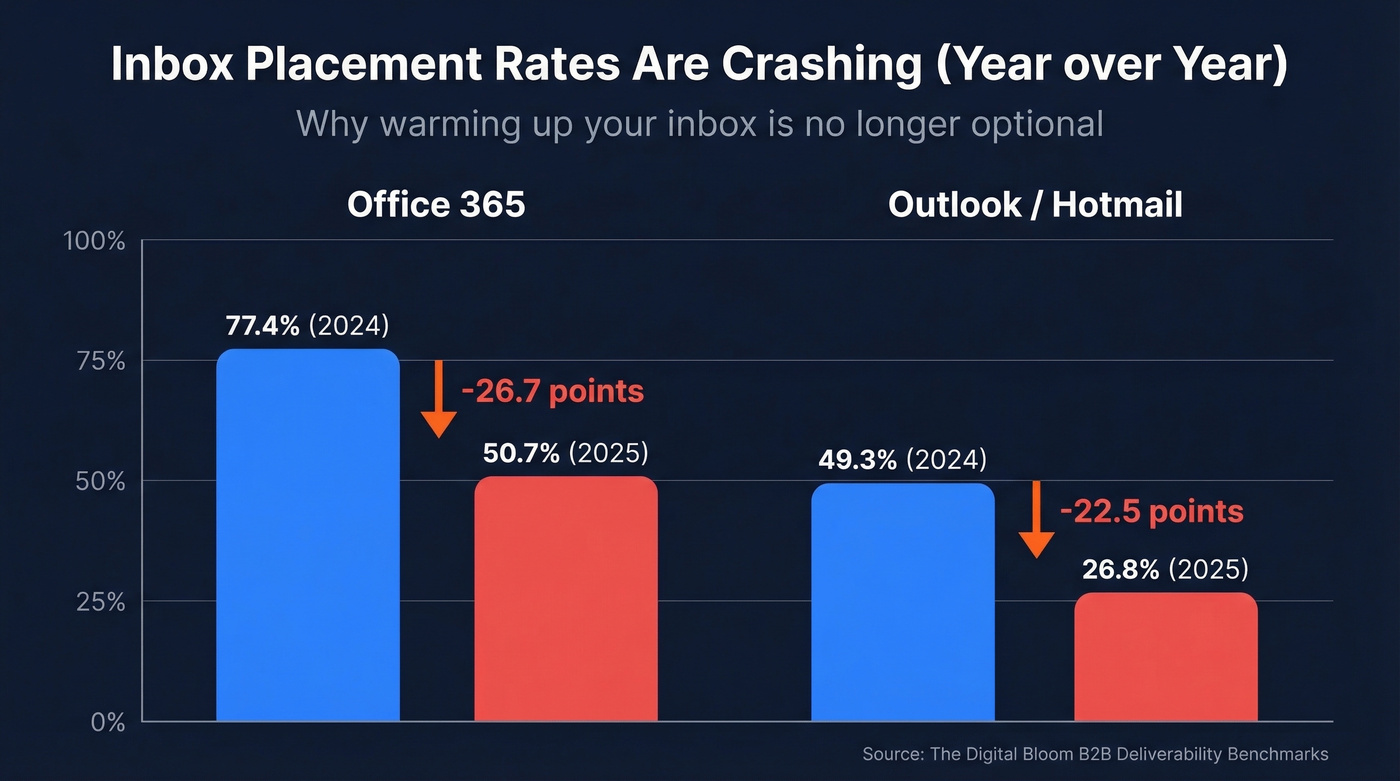
The reason this matters more in 2026 than it did two years ago is that deliverability has gotten measurably worse. Office 365 inbox placement dropped from 77.43% to 50.70% year-over-year. Outlook and Hotmail fell even harder - from 49.33% down to 26.77%. That's not a rounding error. That's a structural shift in how Microsoft treats cold senders.
Gmail isn't any friendlier. Google classifies anyone sending 5,000+ emails per day to personal Gmail accounts as a bulk sender - permanently. Your spam complaint rate needs to stay below 0.1%, and if you ever hit 0.3%, you lose mitigation support until you're back under for seven consecutive days. The consensus on r/coldemail is blunt: Gmail deliverability in 2026 is "AWFUL," with one user reporting a 12% delivery rate and everything going to spam, while Outlook has actually improved.
Warming up email accounts isn't optional anymore. It's table stakes. If you want the full system view (not just warmup), start with an email deliverability baseline.
Does Inbox Warming Actually Work?
There's a legitimate argument that automated warmup tools are snake oil. The skeptics aren't wrong about the risks. Warmup tools work by sending emails between a pool of accounts that automatically open, reply, and move messages out of spam. Gmail and Microsoft can detect these patterns. The behavior is artificial, and it violates Gmail's terms of service.
GMass learned this the hard way. They shut down their warmup feature after sending nearly 1.3 billion warmup emails for 236,084 accounts over two years. Google started issuing warnings, and GMass pulled the plug. That's not a hypothetical risk - it happened. If you're using GMass today, it's worth understanding the deliverability tradeoffs in GMass.
The Reddit skepticism is real, too. One user on r/SaaS described warmup tools as "junk emails from some pool of other users" and questioned whether they do anything useful at 50-100 cold emails per day. Fair question.
Here's our honest take: warmup tools work when they're part of a system, not a substitute for one. DNS authentication, clean data, gradual real sending, and consistent engagement patterns do the heavy lifting. The warmup tool just accelerates the engagement signal piece. If you skip the fundamentals and rely solely on a warmup pool, you're building on sand. Combine automated warmup with proper technical setup and verified contact lists, though, and the results are measurably better than going cold.
Domain Warmup vs. Inbox Warming
These terms get used interchangeably, but they're different things. Domain warmup builds reputation for a new or dormant domain. Inbox warming builds reputation for a specific email address on that domain.
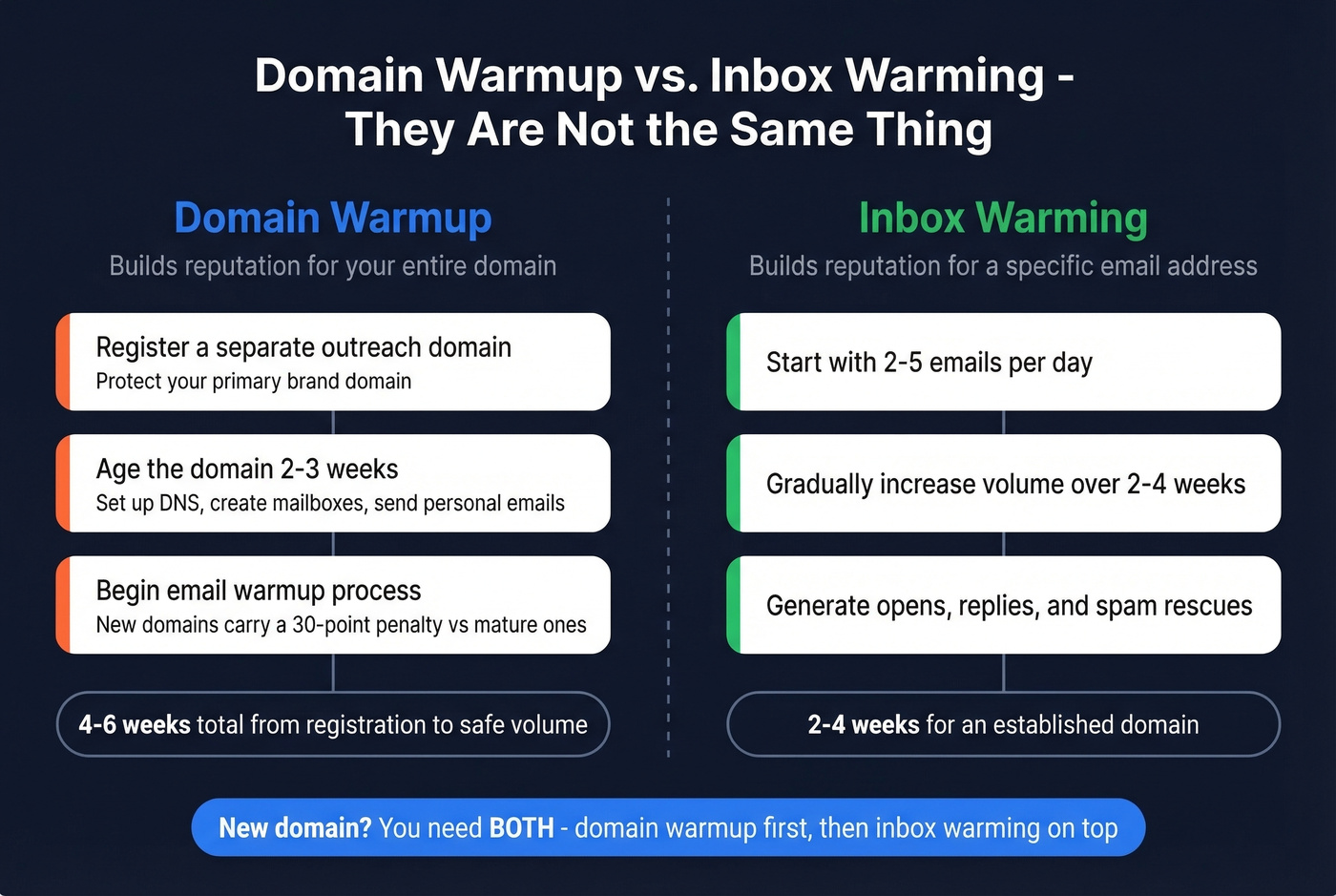
For new domains, the timeline is longer. Register a separate outreach domain to protect your primary brand domain, then let it age 2-3 weeks before sending anything. During that aging period, set up DNS records, create legitimate mailboxes, and send a few personal emails. New domains carry roughly a 30 percentage point penalty compared to mature ones - that's the gap you're closing.
Total timeline for a brand-new domain: 4-6 weeks from registration to safe outbound volume. Two to three weeks of aging, then two to four weeks of email warmup on top of that. Plan accordingly.
Technical Checklist Before You Start
Don't touch a warmup tool until these are in place:
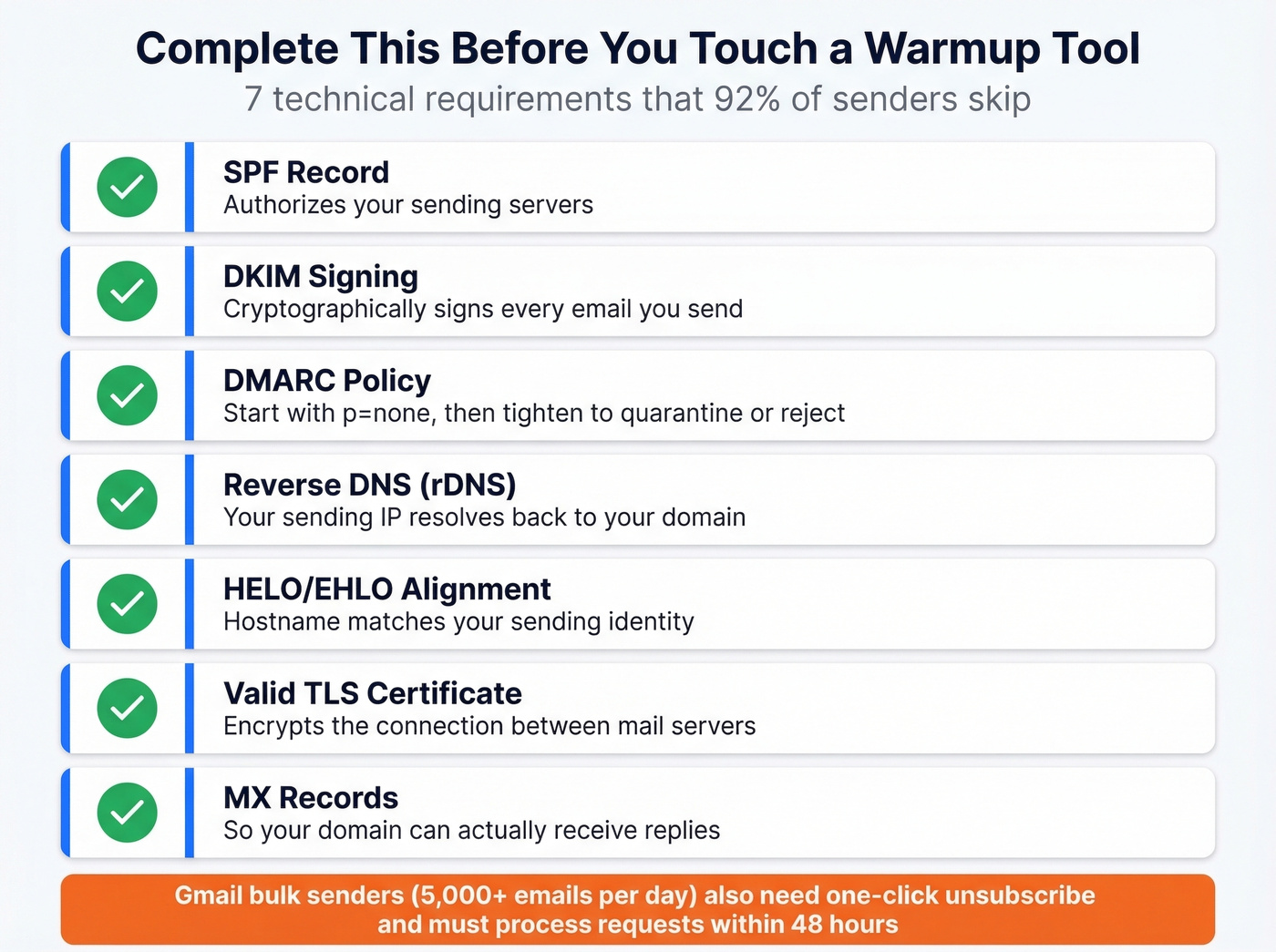
- SPF record - authorizes your sending servers (use these SPF record patterns to avoid syntax mistakes)
- DKIM signing - cryptographically signs your emails (and here’s how to verify DKIM is working)
- DMARC policy - start with
p=nonefor monitoring, then tighten toquarantineorrejectas reputation improves. Only 7.6% of domains actually enforce DMARC. Doing this right already puts you ahead of 92% of senders. (More on DMARC alignment if you’re troubleshooting.) - Reverse DNS (rDNS) - your sending IP resolves back to your domain
- HELO/EHLO alignment - hostname matches your sending identity
- Valid TLS certificate - encrypts the connection
- MX records - so your domain can receive replies
Gmail also requires one-click unsubscribe (RFC 8058) for bulk senders, and you need to process unsubscribe requests within 48 hours. Miss this and you're flagged before warmup even starts. Nailing this technical foundation is what separates successful deliverability from wasted effort.

You just spent 4-6 weeks warming up your domain. One send to an unverified list with a 10%+ bounce rate destroys all of it. Prospeo's 5-step email verification delivers 98% accuracy - so your carefully built sender reputation stays intact.
Don't let bad data undo weeks of warmup work.
Step-by-Step Warmup Schedule
Tool-Assisted Ramp
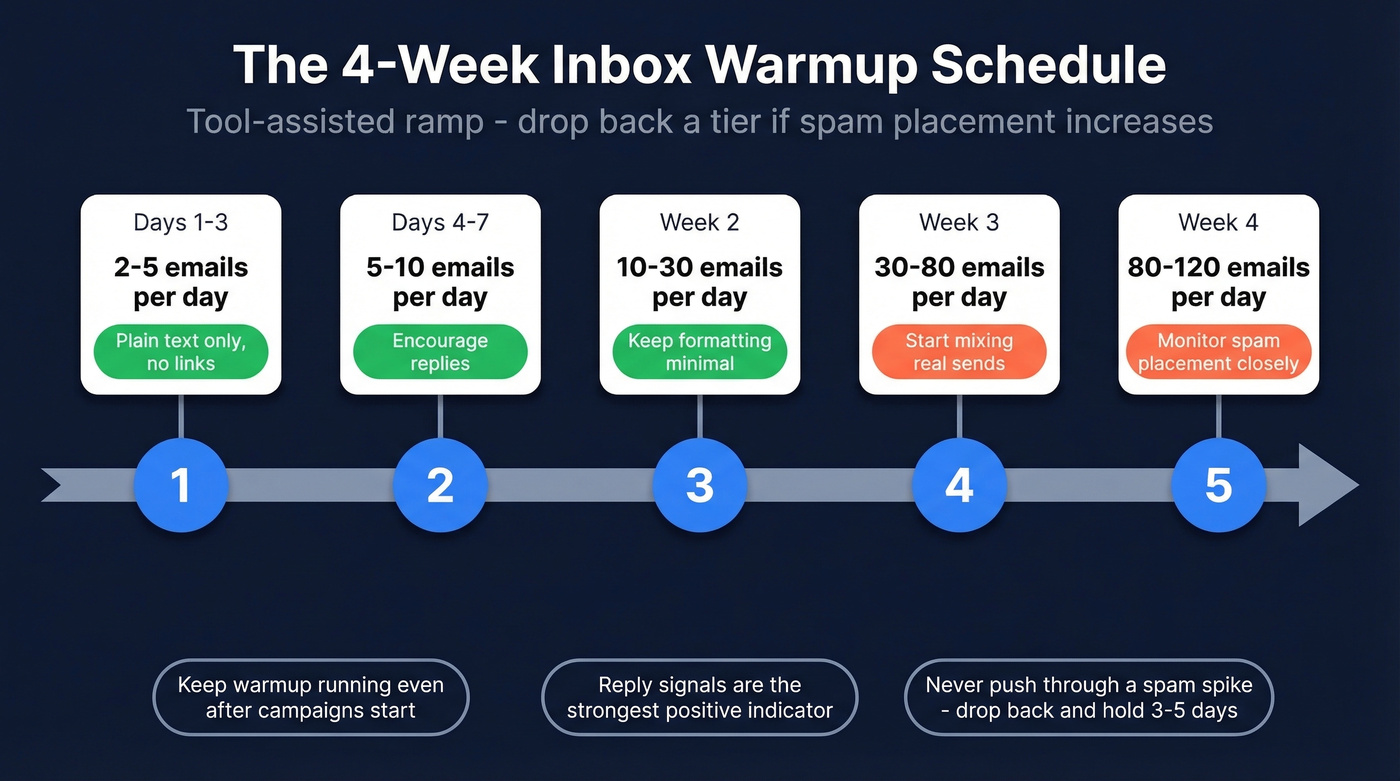
If you're using a warmup tool like Instantly or TrulyInbox, follow this progression:
| Timeframe | Daily Volume | Notes |
|---|---|---|
| Days 1-3 | 2-5 | Plain text only, no links |
| Days 4-7 | 5-10 | Encourage replies |
| Week 2 | 10-30 | Keep formatting minimal |
| Week 3 | 30-80 | Can start mixing real sends |
| Week 4 | 80-120 | Monitor spam placement |
The golden rule: if spam placement increases at any tier, drop back to the previous level and hold for 3-5 days. Don't push through it. Keep early emails plain text - no images, no tracking links, no heavy HTML. Reply signals are the strongest positive indicator mailbox providers use, so encourage brief responses. (If you’re scaling, keep an eye on email velocity so you don’t outpace your reputation.)
One thing most guides skip: keep warmup running continuously, even after you've started real campaigns. The engagement signals protect your reputation during low-send periods and campaign pauses.
Manual Warmup (No Tool)
Manual warmup works if you're disciplined and sending under 100 emails per day. It takes longer - 3 to 8 weeks - but avoids the warmup pool risks entirely.
| Timeframe | Daily Volume |
|---|---|
| Week 1 | 3-12 |
| Week 2 | 12-25 |
| Weeks 3-4 | 25-50 |
| Week 5+ | 50-100 |
Around week 3, start mixing warmup emails with real outreach at a 60/40 split - 60% warmup, 40% real sends. Gradually shift the ratio as your reputation stabilizes.
The engagement signals you're generating manually matter: move emails from spam to inbox, mark messages as important, reply to threads, and occasionally forward messages. These are the exact behaviors warmup tools automate, but doing them with real contacts carries more weight.
Monitor everything through Google Postmaster Tools. If your domain reputation drops to Low or Bad, or bounce rates exceed 2%, pause immediately and diagnose. If you’re unsure what “bad” looks like, compare against current email bounce rate benchmarks and failure modes.
Best Warmup Tools in 2026
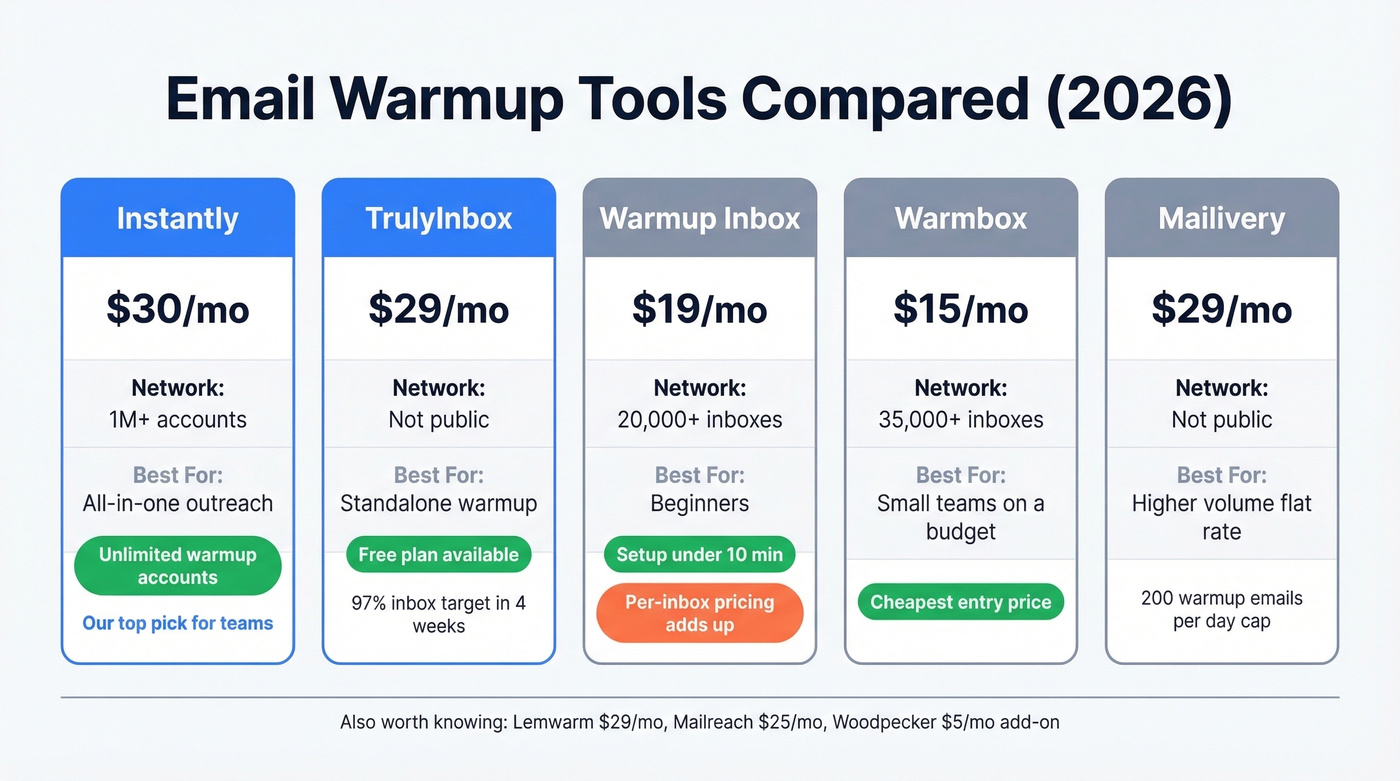
| Tool | Starting Price | Network Size | Best For |
|---|---|---|---|
| Instantly | $30/mo | 1M+ accounts | All-in-one outreach |
| TrulyInbox | $29/mo | Not public | Standalone warmup |
| Warmup Inbox | $19/mo | 20,000+ inboxes | Beginners |
| Warmbox | $15/mo | 35,000+ inboxes | Small teams on a budget |
| Mailivery | $29/mo | Not public | TrulyInbox alternative |
Instantly
Warmup is included with Instantly plans starting at $30/mo - unlimited warmup accounts across all tiers. If you're already running cold email sequences through Instantly, there's zero reason to pay for a separate warmup tool. The warmup network spans over 1 million accounts, generating meaningful engagement signals, and the dashboard shows warmup and inbox placement rates alongside your campaign metrics. For teams consolidating their outreach stack, this is the obvious pick. We've seen teams run 10+ sending accounts through Instantly without needing a separate warmup subscription, which is hard to beat on value.
TrulyInbox
A strong standalone option if you don't need an outreach platform attached. Plans start at $29/mo, and there's a forever-free plan with one account and 10 warmup emails per day. TrulyInbox markets a 97% inbox placement target within 4 weeks - enough to test whether the tool moves the needle before committing.
Warmup Inbox
Use this if you're new to warmup and want the simplest possible setup - typically under 10 minutes. The 20,000+ inbox network is decent for a smaller tool, and reporting is beginner-friendly. $19/mo per inbox, or $15/mo on annual billing.
Skip this if you're running more than 3-4 inboxes. Per-inbox pricing adds up fast, and long-term spam placement can still happen even if the warmup dashboard looks "good."
Warmbox vs. Mailivery
These two occupy similar territory. Warmbox starts at $15/mo for a single inbox ($49/mo for five, $99/mo for 25) and boasts a 35,000+ inbox network. Mailivery charges $29/mo and caps you at 200 warmup emails per day. For fewer than 5 inboxes and the lowest entry price, Warmbox wins. For higher volume with a simple flat rate, Mailivery is the better deal.
Other Tools Worth Knowing
Lemwarm runs $29/mo per account. Mailreach is $25/mo per account with 20 spam test credits included. Woodpecker offers warmup as a $5/mo add-on - the cheapest per-inbox option if you're already on their platform. Snov.io and GMass show up often as free/freemium options at low volumes for warming a single account.
Let's be honest: per-mailbox pricing is a ripoff if you're running 5+ sending accounts. Go with Instantly if you need outreach too, or TrulyInbox for standalone warmup. And if your deal sizes are under $15k, you probably don't need to spend more than $30/mo on warmup. Tools like Warmy.io at $49/mo per mailbox and Mailwarm at $69/mo per mailbox are enterprise-priced products chasing SMB buyers. Save the budget for better data.
Using Pre-Warmed Mailboxes
Some agencies and outreach platforms now sell pre-warmed mailboxes - accounts that have already gone through weeks of inbox warming before you ever touch them. The appeal is obvious: skip the 2-6 week ramp and start sending real campaigns immediately.
But there are caveats. You inherit whatever reputation the previous warmup activity built, and you have no visibility into the quality of the engagement signals used. If the provider cut corners with low-quality warmup pools or spammy patterns, you're starting on shaky ground. We'd recommend verifying the domain's reputation in Google Postmaster Tools before sending a single campaign, and ramping volume gradually anyway. A warmed account means nothing if the underlying data and authentication aren't solid. If you need a deeper playbook on reputation rehab, see how to improve sender reputation.
Mistakes That Kill Your Warmup
Sending 2,000+ emails on day one. Mailbox providers expect new senders to start slow. Blasting volume on a fresh inbox is the email equivalent of a brand-new driver doing 140 on the highway.
Sending to unverified lists. You just spent 3 weeks warming up your account. Don't blow it by sending to a list full of dead addresses and spam traps. A single campaign with a 10%+ bounce rate destroys weeks of progress. Run your contacts through Prospeo's email verification before you hit send - 98% accuracy with 5-step verification that catches spam traps, dead addresses, and catch-all domains. Stack Optimize built to $1M ARR using this approach and maintained 94%+ deliverability with bounce rates under 3% across all their clients. If you’re comparing vendors, start with these Bouncer alternatives.
Reusing identical creative. Sending the same subject line and body to hundreds of recipients triggers pattern detection. Vary your copy. (Pull from a tested bank of email subject line examples to keep variation high without losing quality.)
Inconsistent sending patterns. Sending 50 emails Monday, zero Tuesday through Thursday, then 200 on Friday looks suspicious. Keep volume steady and predictable.
Ignoring the right metrics. We've seen teams celebrate a 95% warmup score in their tool while Google Postmaster Tools shows Low reputation. The warmup tool's score is vanity. Postmaster Tools is reality. Monitor open rates, bounce rates, and spam complaints - not just the warmup dashboard.
Clean contact data is the #1 factor that keeps warmup progress alive. Prospeo refreshes 300M+ profiles every 7 days - not every 6 weeks like competitors - so you're never sending to stale addresses that bounce and tank your reputation.
Start sending to emails verified this week, not last quarter.
Already in Spam? How to Recover
Recovery follows a specific sequence. Skipping steps or rushing back to volume is how teams end up burning a second domain.
Pause all sending for 48-72 hours. Don't try to send your way out of spam placement. Then re-check your DNS setup - verify SPF, DKIM, DMARC, and rDNS are all correctly configured. A single misconfiguration can tank deliverability even with perfect warmup.
Strip your templates back to basics. Remove tracking links, images, and HTML formatting. Go back to plain text. Clean your list aggressively by removing every bounced address, every unengaged contact, and every catch-all domain you're unsure about.
When you resume, start at your last safe ramp tier. If you were sending 80/day when things went wrong, restart at 30/day and work back up. Focus on getting genuine replies - reach out to colleagues, partners, or existing contacts who'll actually respond. Real engagement signals are the fastest way to rehabilitate reputation. If reputation is truly compromised and recovery stalls after two weeks, it's sometimes faster to start fresh on a new outreach subdomain than to rehabilitate a burned one. Treat the new account like any fresh warmup - full ramp schedule from day one.
FAQ
How long does it take to warm up an inbox?
Two to four weeks for existing domains with clean history; four to six weeks for brand-new domains including two to three weeks of aging. Most practitioners cite 14 days as the absolute minimum before sending real campaigns. Keep warmup running continuously even after launching to maintain engagement signals.
Can I send real campaigns during warmup?
Yes, starting around week 3. Use a 60/40 split - 60% warmup emails, 40% real outreach - and gradually shift the ratio as sender reputation stabilizes. Jumping to 100% real sends overnight risks undoing your progress.
Is automated warmup against Gmail's TOS?
Yes. Automated warmup tools that generate artificial engagement violate Gmail's terms of service. Google has issued warnings, and GMass shut down its warmup feature after sending nearly 1.3 billion warmup emails. The risk is real but widely accepted - most cold email teams treat it as a calculated tradeoff.
Does data quality affect warmup results?
A bounce rate above 5% from unverified emails will tank your reputation faster than warmup can build it. Always verify your list before the first real campaign.
Are pre-warmed mailboxes worth buying?
They save time but aren't a shortcut you can trust blindly. Always verify domain reputation independently in Google Postmaster Tools before sending, and ramp volume gradually regardless. A pre-warmed mailbox with poor authentication or dirty warmup history can hurt more than starting fresh.