

Best Web Scraping Tools in 2026: Benchmarks, Pricing, Honest Picks
Your scraper worked perfectly on 200 pages. Then Cloudflare showed up, and now you're staring at a wall of 403s and empty JSON. The web scraping market hit $1.03B in 2025 and is headed toward $2B by 2030, and the anti-bot industry is growing just as fast - which means the gap between web scraping tools that work in a demo and tools that work in production keeps widening.
Most "best of" lists are written by the tools themselves. ScraperAPI's own blog lists 16 tools - that's not a recommendation, that's a directory. We've tested these tools against protected sites, compared independent benchmark data from Proxyway, and normalized pricing so you can make a real decision.
You don't need 16 tools. You need two or three, max. Let's figure out which ones.
Our Picks (TL;DR)
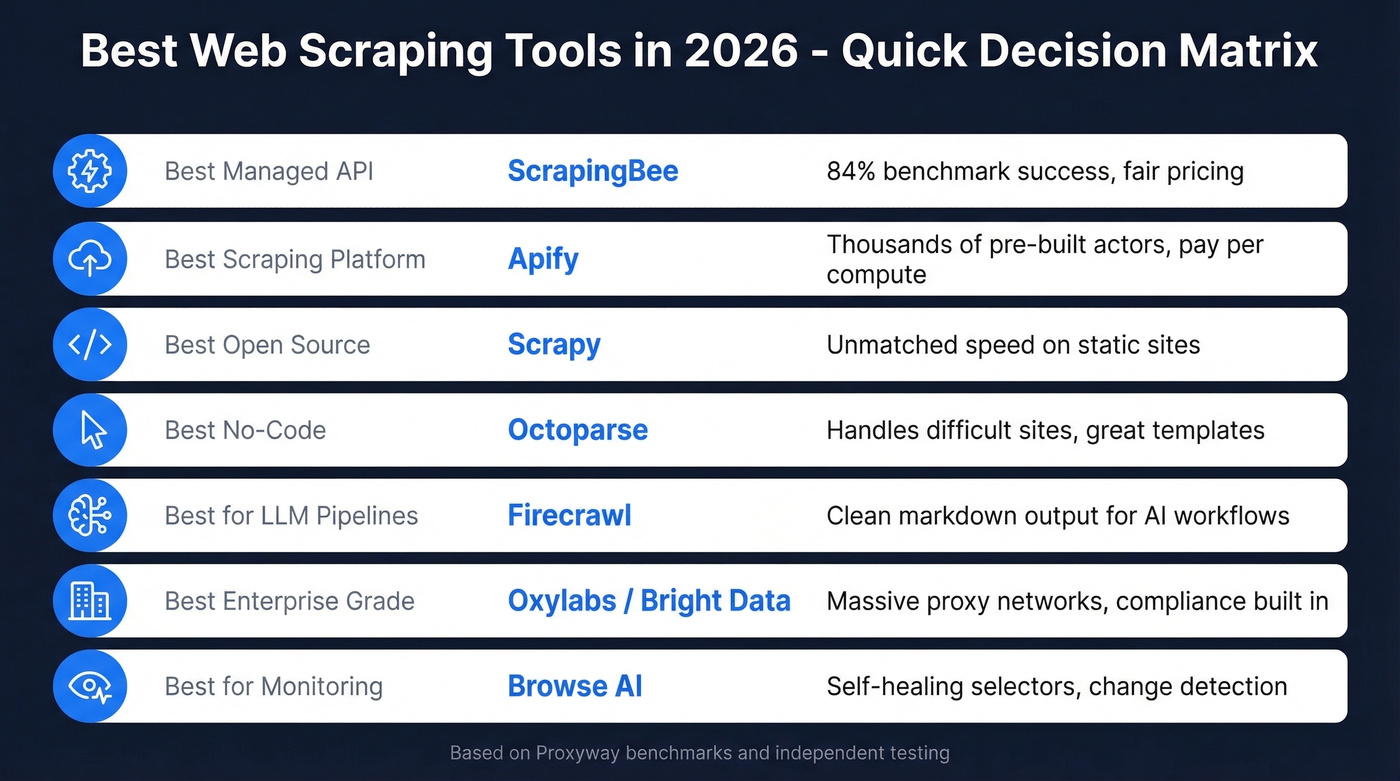
| Use Case | Pick | Why |
|---|---|---|
| Best managed API | ScrapingBee | 84% benchmark success, fair pricing |
| Best scraping platform | Apify | Thousands of pre-built actors, pay-per-compute |
| Best open-source | Scrapy | Unmatched speed on static sites |
| Best no-code | Octoparse | Handles difficult sites, great templates |
| Best for LLM pipelines | Firecrawl | Clean markdown output (weak on protected sites) |
| Best enterprise-grade | Oxylabs / Bright Data | Massive proxy networks, compliance features |
| Best for monitoring | Browse AI | Self-healing selectors, change detection |
Managed Scraping APIs
These are the "send a URL, get HTML back" services. You don't manage proxies, rotate headers, or solve CAPTCHAs - the API handles it. The tradeoff is cost per request, and the differences in success rate are bigger than most people expect.
ScrapingBee
Use this if you want a clean API that handles anti-bot without you thinking about proxy infrastructure. Skip this if you need the absolute highest success rates on heavily protected sites - Zyte and Oxylabs beat it there.
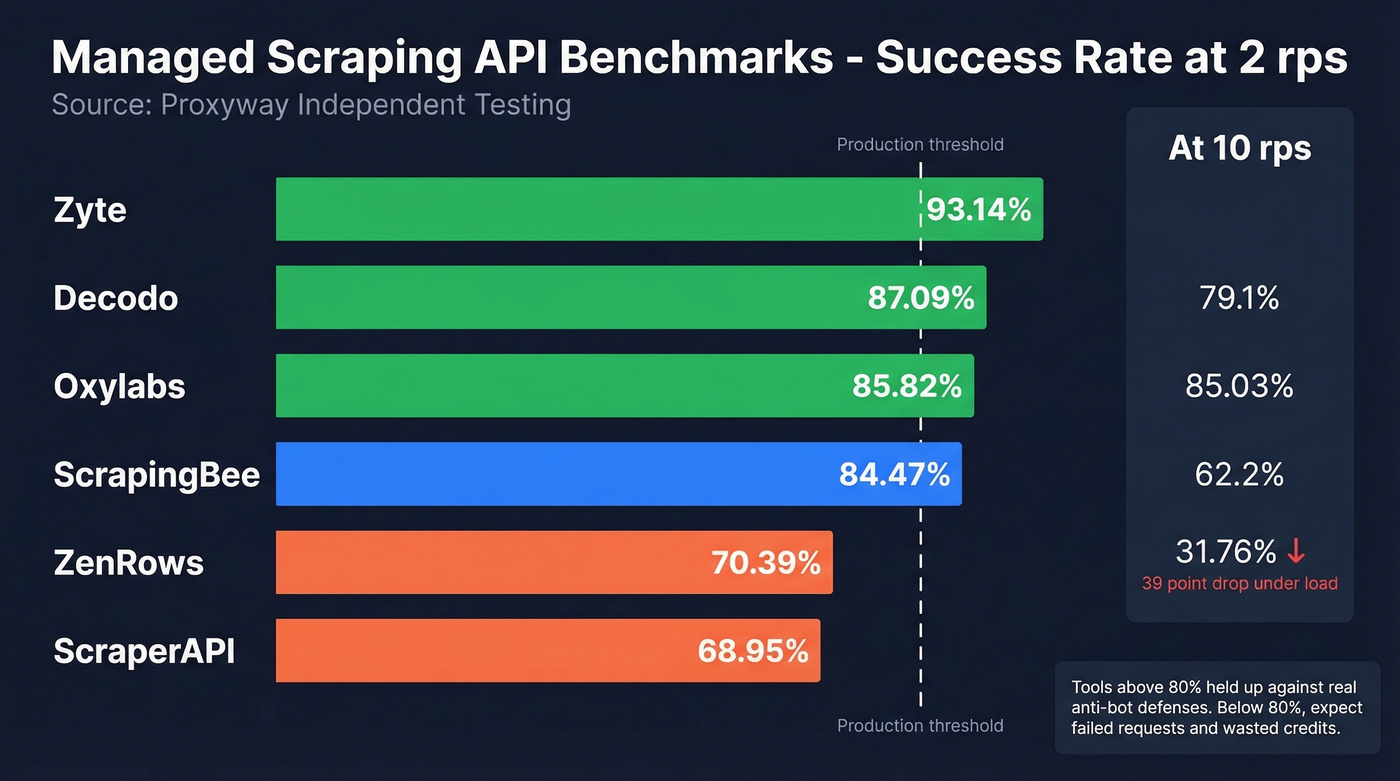
ScrapingBee hit 84.47% success at 2 requests per second in Proxyway's independent benchmark - solid, not spectacular, but consistent. Throughput landed at 4,755 results/hour with a 25.46s average response time. That response time is on the slower side, but the success rate holds up under real anti-bot pressure, which matters more than raw speed when you're scraping protected targets.
Pricing starts at $49/mo. One credit per standard request, more for JavaScript rendering. The documentation is clean, the SDKs cover popular languages, and you can be up and running in minutes. For teams that want a simple integration without managing rotating proxies or headless browsers, ScrapingBee is the obvious starting point.
If you want to compare it against other options, see our breakdown of ScrapingBee alternatives.

Apify
Use this if you want pre-built scrapers for specific sites without writing code from scratch. Skip this if you need raw unblocking power on heavily defended targets - Apify is a platform, not a proxy network.
Think of Apify as an app store for scrapers. The marketplace has thousands of pre-built "actors" covering everything from Google Maps to Amazon to social media platforms. Need to scrape a popular site? Someone has probably already built and maintained the actor for it. Practitioners on r/webscraping praise it for "solid infrastructure and prebuilt actors," and that reputation is earned - the platform handles scheduling, storage, proxy management, and monitoring so you focus on what to scrape, not how.
The compute-unit pricing model takes a minute to understand but scales well. Free tier gives you $5/mo in platform credits. Starter is $29/mo, Scale $199/mo, and Business $999/mo. Each plan includes a pool of compute units, and actors consume units based on memory and runtime. For teams that scrape multiple different sites, the pre-built actor library saves weeks of development time. The tradeoff: custom, heavily-protected targets still require building your own actor or pairing Apify with a residential proxy service.
If you're deciding between platforms, our Apify vs Octoparse comparison may help.
ScraperAPI
ScraperAPI's benchmark numbers tell the story: 68.95% success at 2 rps, dropping to 62.2% at 10 rps. That's a meaningful gap below ScrapingBee and Oxylabs. The value proposition is simplicity - append your API key to any URL and it handles proxies, headers, and retries. Entry pricing runs ~$49/mo. For lighter jobs on sites that aren't aggressively protected, it works fine. For anything with serious anti-bot defenses, you'll burn through credits on failed requests.
Oxylabs
Use this if you need enterprise-grade reliability and can justify the spend. Skip this if you're a solo developer or small team on a tight budget.
Oxylabs posted 85.82% success at 2 rps with an impressive 10,174 results/hour - more than double ScrapingBee's throughput. At 10 rps, it held at 79.1%, which shows real infrastructure depth. Pricing starts at $49/mo for usage-based plans, but enterprise contracts scale significantly higher. The proxy network is massive, compliance features are built in, and the support team actually knows what they're talking about. This is the tool for teams scraping millions of pages monthly.
Bright Data
Use this if you're an enterprise team that needs the full proxy + scraping + compliance stack. Skip this if your project is under 100K pages/month - it's overkill.
Bright Data's Web Scraper API starts from ~$1.50 per 1,000 records, which sounds cheap until you factor in the complexity of their pricing model. They operate one of the largest proxy networks in the world, offer compliance features for regulated industries, and provide pre-built scraping functions for common targets. Powerful but dense - expect a real onboarding curve.
Zyte
Formerly Scrapinghub, Zyte led Proxyway's benchmark with a 93.14% success rate at 2 rps. With a $500/month commitment, HTTP jobs run about $0.06-$0.61 per 1,000 depending on volume and features. If raw unblocking performance is your priority, Zyte is the benchmark leader. No contest.
Decodo
Formerly Smartproxy, Decodo hit 87.09% success at 2 rps and held at 85.03% at 10 rps - about a 2-point drop under load. Pricing starts around $0.30 per 1,000 requests and can dip below $0.10 per 1,000 at very high volume. Best price-to-performance ratio in the managed API category.
ZenRows
ZenRows looks decent at low concurrency - 70.39% at 2 rps - but collapses to 31.76% at 10 rps. That's a ~39-point drop when you scale up. Entry pricing is ~$49/mo. Here's the thing: a tool that collapses under load isn't a production tool.
No-Code & Visual Scrapers
Not everyone writes Python. These tools let you point, click, and extract - and the best ones handle anti-bot, pagination, and dynamic content without a single line of code.
Octoparse
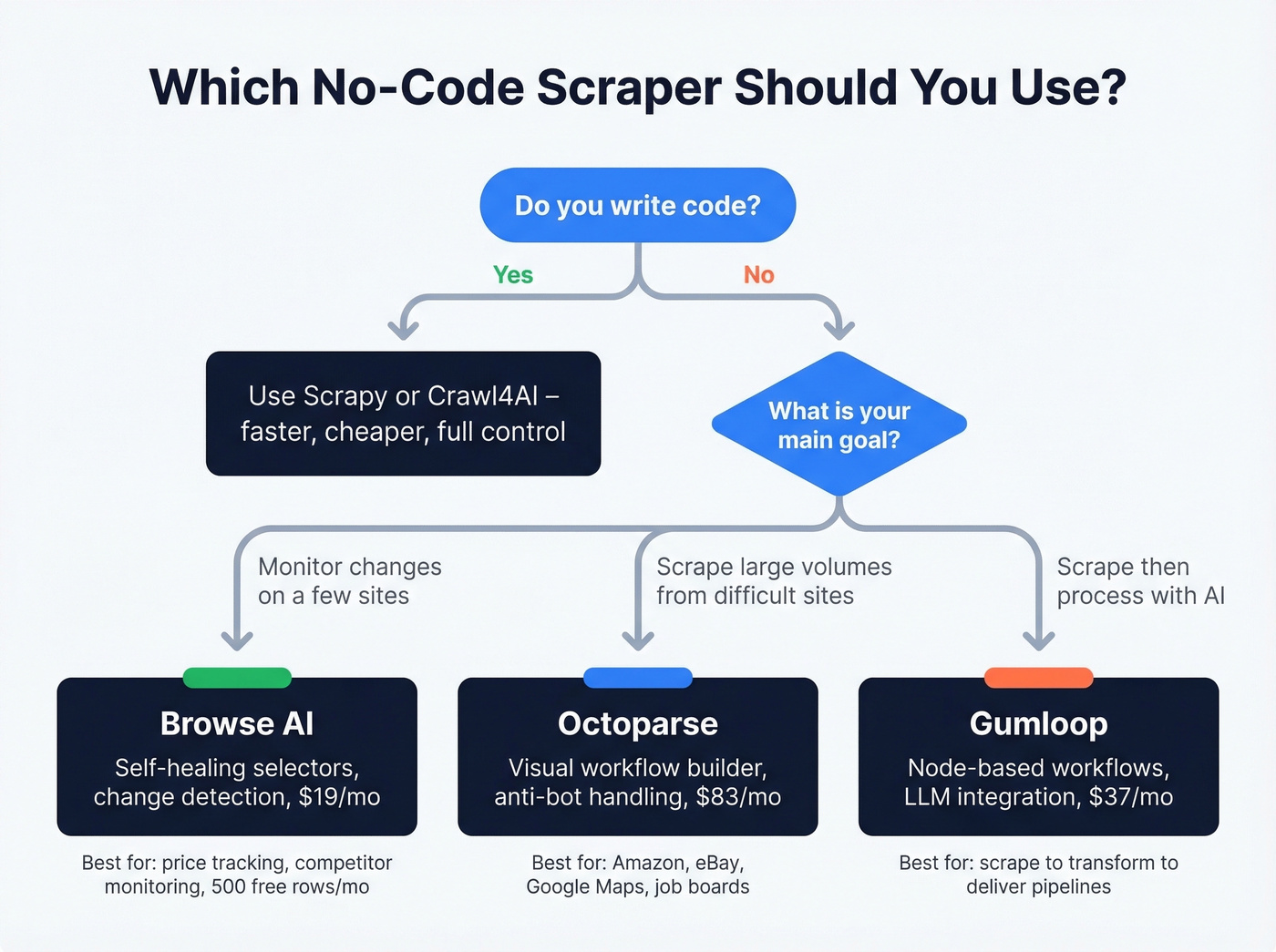
Octoparse is the no-code scraper we'd recommend to someone who's tried a browser extension and hit its limits. The template library covers common targets like Amazon, eBay, Google Maps, and job boards. The visual workflow builder handles infinite scroll, AJAX-loaded content, and anti-bot challenges that simpler tools choke on.
The consensus on r/webscraping is that Octoparse is a "heavy hitter" for difficult sites, and that matches our experience. The auto-detection feature does a surprisingly good job of identifying data fields on unfamiliar pages, though you'll want to manually refine selectors for anything complex.
Pricing: free tier gives you 10 tasks, Standard runs $83/mo, Professional $299/mo. The jump from free to paid is steep, but the free tier is genuinely useful for evaluating whether the tool fits your workflow. Skip Octoparse if you're comfortable writing code - Scrapy will be faster and cheaper. For non-technical teams that need power, though, it's the clear winner in this category.

Browse AI
Browse AI's record-and-replay model is clever: you show it what to extract by clicking through a page, and it builds a robot that repeats the process. The self-healing selectors automatically adapt when a site's layout shifts, which solves one of the most annoying problems in scraping - your perfectly working script breaking because someone moved a div.
This is a monitoring tool first, a scraper second. If you need to track pricing changes, watch competitor pages, or extract structured data from a handful of sites on a schedule, Browse AI is excellent. For scraping thousands of pages in a single run, look elsewhere.
Pricing: free tier gives you 50 credits/month (1 credit = 10 rows, so 500 rows of data). Personal plans start at $19/mo billed annually with 12,000 credits per year.
Gumloop
Node-based workflow builder that chains scraping into LLM processing and pushes results to Slack, sheets, or wherever. Free tier gives you 2,000 credits/month, Solo plan runs $37/mo. Good for AI pipeline builders who want scrape-to-transform-to-deliver in one visual flow. Not a serious extraction tool on its own - think of it as the glue between a scraper and an AI workflow.
Open-Source Frameworks
Free doesn't mean cheap. Open-source scrapers cost $0 in licensing and potentially thousands in engineering time, proxy infrastructure, and 3 AM debugging sessions. That said, if you have developers and need full control, these are the foundations everything else is built on.
Scrapy
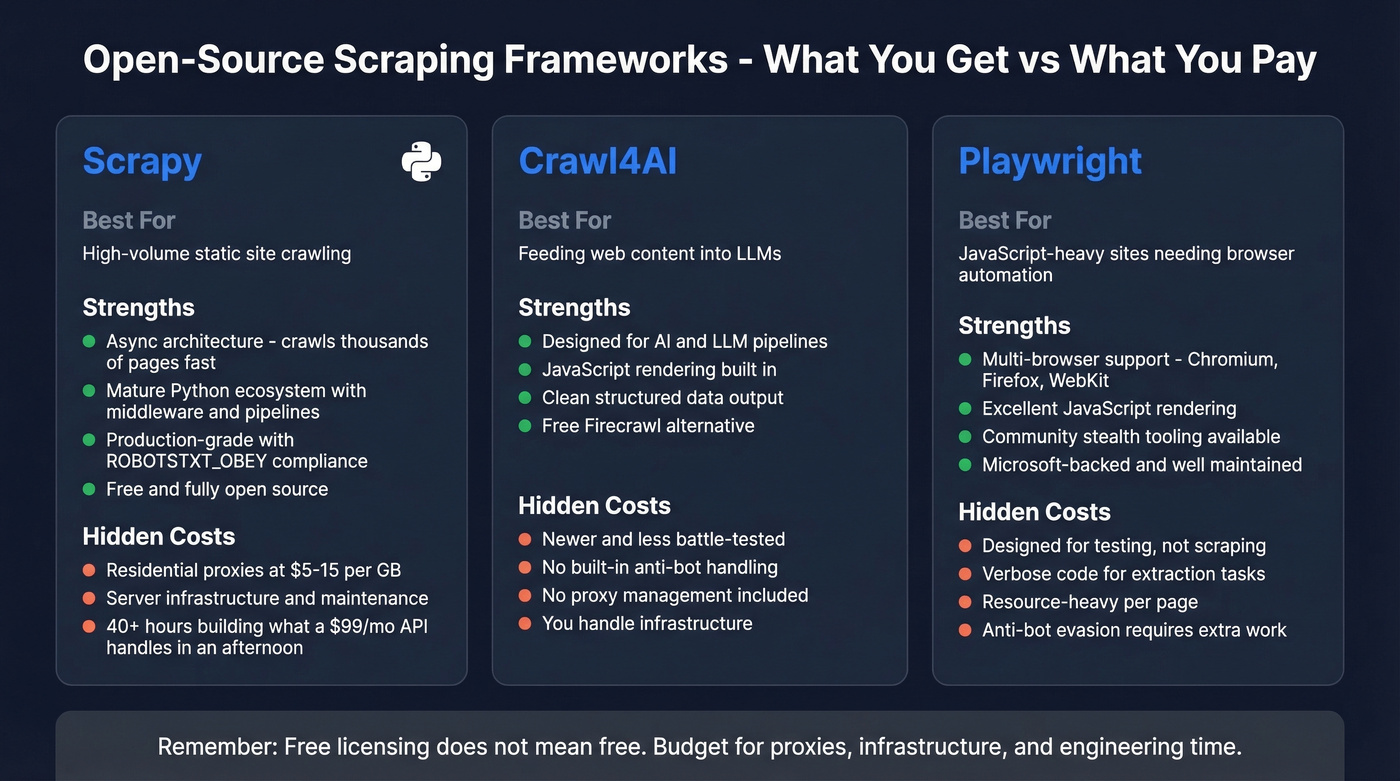
Scrapy is the gold standard for static-site scraping. Not close. The async architecture means it'll crawl thousands of pages while your Selenium script is still loading the first one. For well-structured HTML without JavaScript rendering requirements, nothing touches it.
The Python ecosystem around Scrapy is mature: middleware for proxies, pipelines for databases, extensions for monitoring. Set ROBOTSTXT_OBEY = True in your settings (please), and you've got a compliant, production-grade crawler.
The catch is that "free" is misleading. You'll need residential proxies at $5-15/GB, server infrastructure, and an engineer who knows how to handle anti-bot escalation. We've seen teams spend 40+ hours building and maintaining a Scrapy pipeline that a $99/mo managed API would've handled in an afternoon. Scrapy is the right choice when you need full control and have the engineering capacity. It's the wrong choice when you're trying to save money by avoiding a $49/mo subscription.
If you're scraping specifically to find emails, you may be better off with dedicated email crawlers or even a free email scraper for small jobs.
Crawl4AI
Use this if you're building LLM pipelines and want structured extraction without paying for Firecrawl. Skip this if you need anti-bot handling or proxy management built in.
Crawl4AI is the open-source answer to Firecrawl - designed specifically for feeding web content into language models. It handles JavaScript rendering, outputs clean structured data, and integrates naturally with LLM workflows. It's newer and less battle-tested than Scrapy, but the AI-native design means you spend less time writing parsing logic. For teams already deep in the Python AI ecosystem, it's worth evaluating as a Firecrawl alternative that doesn't charge per page.
Playwright
Playwright is Microsoft's browser automation framework, and it's excellent at what it was designed for: testing web applications. For scraping, it's powerful but verbose. You get multi-browser support across Chromium, Firefox, and WebKit, solid JavaScript rendering, and community "stealth" tooling commonly used to reduce bot detection.
The consensus on r/webscraping is that Playwright is "great for structured automation/testing" but "code-heavy for lightweight scraping." That's accurate. If you're already using Playwright for testing and want to add scraping to the same codebase, it makes sense. Starting from scratch and just need data? Scrapy for static sites or a managed API for protected sites will get you there faster. Available in Node.js and Python.
The Rest of the Stack
Selenium is where most people start and where many get stuck. Simple to learn, clunky at scale - the synchronous architecture means it crawls one page at a time unless you build parallelism yourself. Still useful for quick one-off jobs, but don't build a production pipeline on it.
Beautiful Soup isn't a scraper - it's a parser. You still need something to fetch the HTML. Beautiful Soup then makes it easy to navigate and extract data from that HTML. A companion tool, not a standalone solution.
Crawlee is Apify's open-source framework, solid if you're in the Node.js ecosystem. It handles browser management, proxy rotation, and queue management out of the box - essentially Scrapy for JavaScript developers.
Puppeteer is a Chromium-first automation library. It came first, it works fine, but Playwright has surpassed it in cross-browser support and developer ergonomics. New projects should default to Playwright.
| Framework | Language | JS Rendering | Async | Best For |
|---|---|---|---|---|
| Scrapy | Python | Needs add-on (Playwright/Splash) | Yes | High-volume static sites |
| Playwright | Node/Python | Yes | Yes | Dynamic sites, testing |
| Crawl4AI | Python | Yes | Yes | LLM pipelines |
| Selenium | Multi | Yes | No | Quick prototypes |
| Beautiful Soup | Python | No | No | HTML parsing only |
AI-Powered Scraping
Firecrawl
Firecrawl does one thing really well: it turns web pages into clean, LLM-ready markdown. If you're building RAG pipelines, training data workflows, or any system that needs to ingest web content into a language model, the output format alone saves hours of parsing work.
Pricing is credit-based: Free gets you 500 one-time credits, Hobby is $19/mo for 3,000 credits, Standard $99/mo for 100,000, and Growth $499/mo for 500,000. One credit per scraped page, two credits per 10 search results, two per browser minute. They don't charge for failed requests (except on their agent tier), which is a nice touch.
But let's talk about the elephant in the room. Firecrawl's Proxyway benchmark score was 33.69% success on protected sites. That's not a typo. At 10 rps, it dropped to 26.69%. For clean, unprotected pages - documentation sites, blogs, public content - Firecrawl is excellent. For anything behind Cloudflare, Akamai, or DataDome, it's unreliable. Know what you're buying: a markdown converter with a scraper attached, not a scraper with markdown output.
An emerging pattern we're watching: teams are pairing a dedicated scraping engine with an LLM layer for extraction. Crawl4AI and Gumloop both follow this "two-layer stack" approach, and for complex extraction tasks, it outperforms trying to do everything in one tool. For pure research and RAG use cases, semantic search APIs like Exa and Tavily skip scraping entirely by indexing the web for LLM consumption.
B2B Data - Skip the Scraper
Look, if your deal sizes are under $25K, you almost certainly don't need to build a scraper for lead generation. Half the people searching for data extraction tools are trying to build prospect lists. Your boss said "scrape some leads from these companies," and now you're three hours into a Selenium tutorial wondering why the page keeps returning blank data.
You don't need a scraper for this. You need a database that already has the data, verified and ready to export. Building a scraper to collect B2B contact information is like building a car to get groceries - technically possible, wildly inefficient, and there's a much simpler option.
Prospeo covers 300M+ professional profiles with 143M+ verified emails and 125M+ verified mobile numbers. Email accuracy sits at 98%, backed by a 5-step verification process with catch-all handling, spam-trap removal, and honeypot filtering. Every record refreshes on a 7-day cycle - the industry average is six weeks. Teams switching from scraper-built lists report bounce rates dropping from 35%+ to under 4%.
The search interface gives you 30+ filters including buyer intent via 15,000 Bombora topics, technographics, job changes, headcount growth, funding rounds, and revenue. The Chrome extension with 40,000+ users lets you pull verified contacts from any website in one click, and native integrations with Salesforce, HubSpot, Lemlist, Instantly, and Smartlead mean contacts flow directly into your workflow. Pricing starts free - 75 emails and 100 Chrome extension credits per month. Paid plans work out to roughly $0.01 per email with no contracts.
Compare that to building and maintaining a scraper with proxy costs, and the math isn't even close. If you're evaluating this use case specifically, see our guide to web scraping lead generation and the broader list of data enrichment services.


You're reading about web scraping tools because you need contact data. But scraping LinkedIn and company sites for emails means managing proxies, fighting anti-bot systems, and still getting unverified results. Prospeo gives you 143M+ verified emails and 125M+ mobile numbers with 98% accuracy - no scraping infrastructure required.
Get verified B2B contact data without a single 403 error.
Independent Benchmark Results
Opinions are cheap. Benchmark data isn't. Proxyway tested 12 providers against 15 well-protected sites, scraping 6,000 pages per site. Vendors couldn't influence the methodology and weren't told which sites would be targeted. That's about as close to objective as this industry gets.
| Tool | Success (2 rps) | Success (10 rps) | Results/Hour | Cost Tier |
|---|---|---|---|---|
| Zyte | 93.14% | 85.89% | 15,422 | Medium |
| Decodo | 87.09% | 85.03% | 7,403 | Low |
| Oxylabs | 85.82% | 79.10% | 10,174 | Low |
| ScrapingBee | 84.47% | 72.98% | 4,755 | Low |
| ZenRows | 70.39% | 31.76% | 8,865 | Medium |
| ScraperAPI | 68.95% | 62.20% | 6,600 | Low |
| Firecrawl | 33.69% | 26.69% | 2,276 | Medium |
A few things jump out. Zyte leads by a comfortable margin, and its 10 rps performance barely drops - that's real infrastructure. Decodo is the sleeper pick: second-best success rate, lowest cost tier, and the most stable performance under load with about a 2-point drop from 2 to 10 rps. ZenRows' collapse from 70% to 31% at higher concurrency is a dealbreaker for production workloads. And Firecrawl's 33.69% confirms what we said earlier - it's a markdown tool, not a scraping tool.
Benchmark data matters more than feature lists. A tool with 50 features and a 34% success rate is worse than a tool with 5 features and a 93% success rate.
Pricing Compared
Every scraping tool uses a different credit system, and it's genuinely frustrating. Firecrawl charges per page, Apify by compute units, Browse AI by credits that equal 10 rows each, and Bright Data by records. So we did the math to normalize everything to cost per 1,000 pages or equivalent output.
Managed APIs - Cost per 1K Pages
| Tool | Entry Price | ~Cost/1K Pages | Notes |
|---|---|---|---|
| Decodo | ~$20/mo | ~$0.30 (drops to $0.10) | Best value at scale |
| Zyte | Usage-based | ~$0.06-$0.61 | Varies by feature tier |
| ScrapingBee | $49/mo | ~$0.33 | Straightforward credits |
| ScraperAPI | ~$49/mo | ~$0.40 | Simple API model |
| Oxylabs | $49/mo | ~$0.50 | Enterprise reliability |
| Apify | Free / $29/mo | Compute-unit based | Platform + marketplace |
| Bright Data | Usage-based | ~$1.50/1K records | Enterprise features |
| Firecrawl | $19/mo (Hobby) | ~$6.33 | Markdown output premium |
No-Code Tools - Cost per Output
| Tool | Entry Price | ~Cost/1K Rows | Notes |
|---|---|---|---|
| Octoparse | Free / $83/mo | Varies by task | Template-based |
| Browse AI | Free / $19/mo | ~$1.60/1K rows | Credit = 10 rows |
| Gumloop | Free / $37/mo | Credit-based | AI workflow focus |
Open-Source
| Tool | License Cost | Real Cost |
|---|---|---|
| Scrapy / Playwright / Crawl4AI | $0 | Proxies ($5-15/GB) + eng time |
Even the cheapest managed API at $0.10/1K pages won't give you verified emails - you'll still need an email finder on top. For anyone scraping to build prospect lists, the total cost of "scrape + enrich + verify" is significantly higher than starting with a purpose-built B2B database.
If you're building lists for outbound, it also helps to understand the full stack: sales prospecting techniques, outbound lead generation tools, and best sales prospecting databases.
What Actually Blocks Your Scraper
If you've built a scraper that worked Monday and returned blank data by Thursday, this section explains why. Anti-bot systems have gotten dramatically more sophisticated, and understanding what you're up against determines which tool you actually need.
| System | What It Detects | Difficulty |
|---|---|---|
| Cloudflare | TLS fingerprint, JS challenge, behavioral signals | High |
| Akamai | Session cookies, device fingerprint | Very High |
| DataDome | ML behavioral analysis, device fingerprint | Very High |
| PerimeterX/HUMAN | Bot behavior patterns, canvas fingerprint | Very High |
| Kasada | Proof-of-work challenges, environment checks | Very High |
The practical bypass tactics that work in production come down to a few patterns. TLS fingerprint alignment is table stakes - your scraper's TLS handshake needs to match a real browser's, or you're blocked before the first byte loads. Behavioral simulation matters too: practitioners on r/webscraping report success with Bezier-curve mouse movement and sub-pixel navigation precision to mimic human interaction patterns.
Mobile endpoints are an underexploited angle. Many sites deploy lighter anti-bot defenses on mobile versions, making them easier targets. Concurrency randomization - varying your request timing and parallelism across browser contexts - helps avoid the pattern detection that ML-based systems like DataDome use. Session warming is another key tactic: visiting a few legitimate pages before hitting your target URL builds a cookie history that looks human. And limiting parallelism per IP to 2-3 concurrent requests avoids the most obvious rate-based detection.
Even the best scraping API tops out at 93% success - and that's before you verify the emails you extracted. Prospeo's 5-step verification and 7-day data refresh cycle deliver 98% accurate emails at $0.01 each. Why build and maintain a scraping pipeline when the data is already clean?
Stop paying per failed request. Pay $0.01 per verified email instead.
Is Scraping Legal in 2026?
"It's public data" isn't a defense anymore. The legal picture around data extraction has shifted significantly, and the risks are real - especially if you're scraping personal data in the EU.
The foundational US case is hiQ Labs v. LinkedIn (2017-2022), where the Ninth Circuit held that scraping publicly available data doesn't necessarily constitute "unauthorized access" under the Computer Fraud and Abuse Act. That sounds like a green light, but it's narrower than most people think. The case ended on contract and state law grounds, not a broad scraping permission.
Meta v. Bright Data (2024) showed that Terms of Service violations create contract liability even when the underlying data is public. And Reddit v. Perplexity AI (2025, ongoing) invokes DMCA Section 1201, arguing that circumventing rate limits and anti-bot measures constitutes circumvention of technical protection measures. That's a new and potentially significant legal theory.
In the EU, the stakes are higher. CNIL fined KASPR EUR 240,000 for scraping professional data without appropriate consent. Clearview AI racked up EUR 20M from Italy's DPA and EUR 30.5M from the Netherlands for scraping public images. Total GDPR fines have surpassed EUR 4B, and the penalty ceiling is EUR 20M or 4% of global revenue - whichever is higher.
GDPR Article 14 creates a particularly tricky obligation: when you collect personal data indirectly through scraping, you must notify the data subjects. The Polish DPA issued a EUR 220K fine to a company that argued notification would require "disproportionate effort" - the DPA rejected that argument.
Quick compliance checklist:
- Establish a lawful basis (Legitimate Interest Assessment is the most common path)
- Conduct and document a balancing test
- Respect robots.txt - regulators increasingly treat compliance as a factor in enforcement decisions
- Plan for Article 14 notification if scraping personal data in the EU
- Practice data minimization: collect only what you need
- Review target site Terms of Service for explicit prohibitions
Mistakes That Kill Scraping Projects
Ignoring robots.txt. Set
ROBOTSTXT_OBEY = Truein Scrapy. Beyond ethics, regulators increasingly treat robots.txt compliance as a factor in enforcement decisions.Missing or weak User-Agent headers. Sending requests with the default Python requests User-Agent is like wearing an "I'm a bot" sign. Use realistic, rotating User-Agent strings that match current browser versions.
Brittle absolute XPath selectors.
/html/body/div[3]/div[2]/table/tr[4]/td[1]will break the moment the site adds a banner. Use relative selectors, class names, or data attributes instead.Not handling pagination. Your scraper grabs page 1 beautifully and misses the other 47 pages. Always check for next-page links, infinite scroll triggers, or API-based pagination.
No error handling. A single
float(None)crash shouldn't kill a 10,000-page crawl. Wrap extraction logic in try/except blocks, log failures, and continue.Aggressive concurrency without rate limiting. Hammering a site with 50 concurrent requests is the fastest way to get IP-banned and trigger legal issues. Start slow, randomize delays, and respect the server.
Scraping data that already exists in a structured database. If you need B2B contacts - emails, phone numbers, company data - purpose-built data platforms have it pre-verified and ready to export. Building a scraper for data that's already available in a searchable, verified database is the most expensive mistake on this list.
How to Choose
Can you write code? If no, start with Octoparse for power or Browse AI for monitoring. If yes, keep going.
Are your target sites static HTML or JavaScript-rendered? For static sites, Scrapy is the fastest and cheapest option. For JavaScript-heavy sites, you'll need Playwright or a managed API.
Are the sites protected by anti-bot systems? When you're hitting Cloudflare, Akamai, or DataDome, skip the DIY approach. Use a managed API - ScrapingBee for mid-tier budgets, Oxylabs or Zyte for enterprise-grade reliability.
Do you need pre-built scrapers for popular sites? Apify's marketplace of thousands of actors covers most common targets. Check there before building from scratch.
What volume do you need? Under 10,000 pages/month, almost any tool works. Over 100,000, you need infrastructure that scales - managed APIs or a well-architected Scrapy deployment with proxy rotation.
The right answer for most teams is a combination: a managed API or open-source framework for general scraping, plus a purpose-built data platform for B2B contacts. Two tools, not sixteen.
FAQ
What's the best free web scraping tool?
Scrapy is the best free option for developers - it's open-source, async, and unmatched on static sites. For non-coders, Octoparse's free tier gives you 10 tasks. Firecrawl offers 500 one-time credits for LLM-ready markdown. Apify's free tier includes $5/mo in compute credits. All four are genuinely usable without paying, though Scrapy requires proxy costs at scale.
Is web scraping legal?
Scraping public data is generally permissible in the US under the hiQ v. LinkedIn precedent, but GDPR creates significant risk in the EU. CNIL fined KASPR EUR 240,000 for scraping professional data without consent, and Clearview AI faced EUR 50M+ in combined European fines. Always check Terms of Service and local privacy laws before scraping personal data.
How do I scrape a site protected by Cloudflare?
Use a managed API with built-in anti-bot handling - ScrapingBee, Oxylabs, or Zyte all handle Cloudflare's challenges. For DIY approaches, you'll need Playwright with stealth tooling, residential proxies, TLS fingerprint alignment, and behavioral simulation. Expect ongoing maintenance as Cloudflare updates its detection.
What's the cheapest way to scrape at scale?
Scrapy and Crawl4AI are free but require engineering time and proxy costs at $5-15/GB. For managed APIs, Decodo offers the lowest per-request pricing at ~$0.10/1K requests at volume. For B2B data specifically, Prospeo at ~$0.01/email is cheaper than building a scraper - and the data comes pre-verified with 98% accuracy.
Can I use scraping for lead generation?
Yes, but you probably shouldn't build a scraper for it. Purpose-built B2B data platforms provide verified emails and phone numbers from hundreds of millions of profiles without the complexity of managing proxies or handling anti-bot systems. You'll get better data quality in a fraction of the time.