

7 webCRM Alternatives Worth Switching To in 2026
webCRM's Trustpilot score sits at 1.7 out of 5 across 88 reviews. The recurring theme: support requests taking "a couple of weeks to eight to ten months" to resolve. If you're researching webCRM alternatives, that number alone tells you enough.
The G2 score looks better at 4.5/5, but that's from just 10 reviews, and 7 of those reviewers are based in Asia, not Europe. Not exactly a representative sample for a tool marketed to European SMBs.
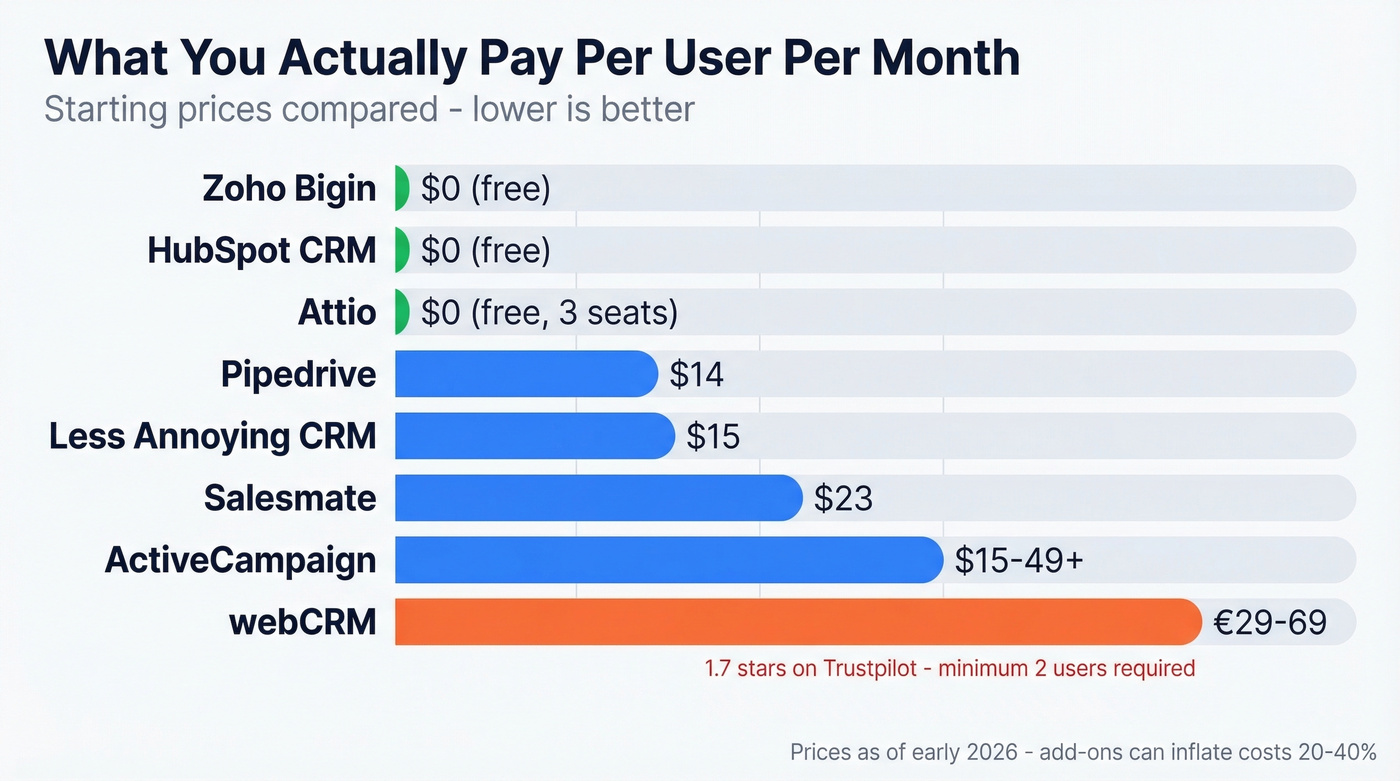
On pricing, webCRM plans start at €29/user/month (minimum 2 users) and climb to €69/user/month for Enterprise (minimum 5 users). The middle SMB tier at €55/user/month is where you actually get features like Open API access and Exchange/Gmail integration. If you're paying that much and still waiting months for a support reply, it's time to look elsewhere.
Our three quick picks: Pipedrive for sales-driven teams, Less Annoying CRM for simplicity, and HubSpot CRM if you want free.
| Tool | Best For | Starting Price | One-Line Verdict |
|---|---|---|---|
| Pipedrive | Sales teams (5-50) | $14/user/mo | Visual pipelines, fast setup |
| Less Annoying CRM | Tiny teams (<10) | $15/user/mo | Dead simple, one tier |
| HubSpot CRM | Free starting point | Free | Room to grow, big ecosystem |
| Attio | Modern EU teams | Free (3 seats) | Flexible, clean, generous free tier |
| Salesmate | All-in-one SMB | $23/user/mo | Transparent pricing, built-in dialer |
| Zoho Bigin | Budget-conscious | Free (single user) | Bare essentials, cheap |
| ActiveCampaign | Marketing-first teams | ~$15-$49+/mo + add-ons | CRM bolted onto email marketing |
Top CRM Alternatives Compared
Pipedrive
Pipedrive's visual pipeline is one of the best in the SMB CRM space - drag-and-drop deals, clear stage progression, activity-based selling baked into the workflow. It's also one of the highest-rated SMB CRMs on G2. If you want more context on what counts as a CRM (and what doesn't), see these examples of a CRM.
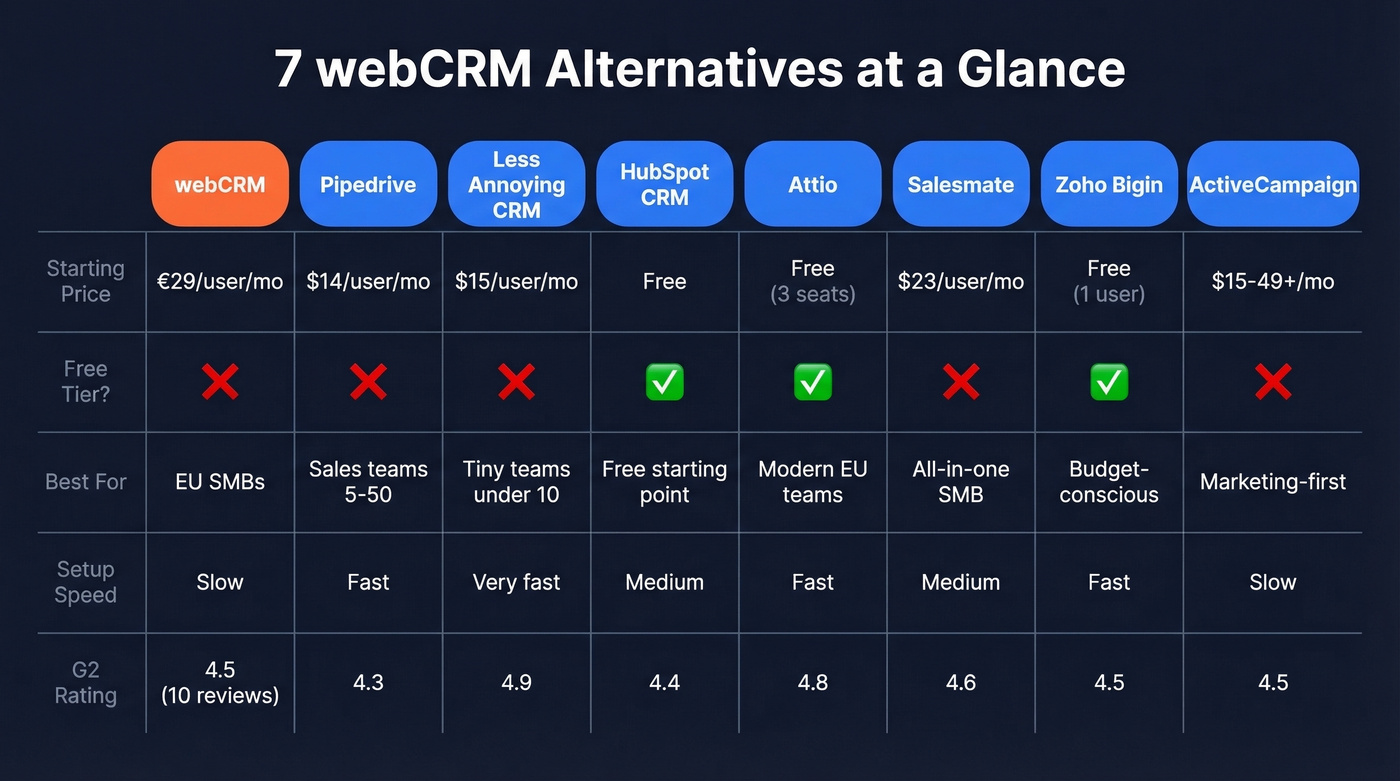
Pricing starts around $14/user/month, and most teams move up tiers once they need automation, reporting depth, and email features. We've tested dozens of CRM setups over the years, and Pipedrive is consistently the fastest to get productive in. A 5-person sales team can be fully operational within a day, which is something we can't say about most tools on this list.

Where it falls short: reporting on the lower tiers feels thin, and you'll pay extra for things like web visitor tracking. But for pure sales pipeline management, it's hard to beat. If you're trying to fix leaky stages, these sales pipeline challenges are the usual culprits.
Less Annoying CRM
$15/user/month. One price, no tiers, no hidden fees. That's it.
Setup typically takes about an hour. You get a one-month free trial with no limitations, a practical guideline to stay under about 50,000 total contacts/companies, calendar sync, and free phone and email support - even if you're not a paying customer yet. The mobile experience is still web-based, with a dedicated app in beta, but for teams under 10 who value simplicity over polish, nothing else comes close. Skip this if you need advanced automation or a serious API. If your main need is just keeping records tidy, compare it against other contact management software.

HubSpot CRM
The obvious "try first" option. Contact management, deal tracking, email templates, and basic reporting - all free to start. The ecosystem around it means you won't outgrow it quickly. If you're weighing HubSpot against other CRM stacks, this Bitrix24 vs HubSpot breakdown is a useful reference point.
Here's the thing, though: paid tiers get expensive fast once you add seats and advanced features. We've seen teams go from $0 to $800/month within six months of "just adding a few things." The free tools alone cover what most small teams need, but go in with eyes open about the upgrade path. Skip this if you want predictable costs at scale.
Attio
Attio is the most underrated CRM on this list. UK-based, free for up to 3 seats, and built with a flexible data model that feels like a structured database rather than a rigid pipeline tool. Paid plans start at $29/user/month for Plus and $69 for Pro.
One caveat for teams leaving webCRM for compliance reasons - Attio doesn't publicly guarantee EU-only data residency. Verify hosting location before committing.
Salesmate
| webCRM (SMB) | Salesmate (Pro) | |
|---|---|---|
| Price | €55/user/mo | $39/user/mo |
| Built-in dialer | No | Yes |
| Email sequences | No | Yes |
| API access | Yes | Yes |
| Onboarding | Unknown | From $1,999 |
Salesmate publishes pricing clearly - $23 Basic, $39 Pro, $63 Business - and includes calling and email outreach inside the CRM. Storage is tiered at 1GB on Basic, so heavy file users should check limits. For a 5-person team, the self-serve setup is plenty. Don't get upsold into enterprise onboarding unless you genuinely need white-glove migration. If calling is central to your workflow, you may also want to compare dedicated dialers and VoIP stacks like these Ringover alternatives.
Zoho Bigin
Bigin covers the basics: pipeline management, email, and light automation. If your CRM needs are genuinely simple - track deals, log activities, send a few emails - it does the job. Don't expect more. The free plan supports a single user, and paid tiers stay well under $10/user/month, making it the cheapest option here by a wide margin.
ActiveCampaign
Marketing automation platform first, CRM second. If you want pipelines and sales features, you'll need a Plus plan or higher and the Enhanced CRM add-on. Once you've added enough contacts and the right add-ons, costs commonly land around $15-$49+/month and scale up from there. Buy this only if marketing automation is your primary need and sales tracking is secondary. If you're building outbound sequences, a dedicated sequence management workflow can matter more than the CRM itself.
Pricing Side by Side
Add-ons and onboarding can inflate CRM costs by 20-40% beyond sticker price. We've seen it happen repeatedly.
| Tool | Starting Price | Free Tier? | Min. Users |
|---|---|---|---|
| webCRM | €29/user/mo | No (14-day trial) | 2 |
| Pipedrive | $14/user/mo | No (trial available) | 1 |
| Less Annoying CRM | $15/user/mo | No (one-month trial) | 1 |
| HubSpot CRM | Free | Yes | 1 |
| Attio | Free (3 seats) | Yes | - |
| Salesmate | $23/user/mo | No (15-day trial) | 1 |
| Zoho Bigin | Free (1 user) | Yes | 1 |
| ActiveCampaign | ~$15-$49+/mo + add-ons | No | 1 |

Migrating from webCRM with stale contacts is like pouring dirty water into a clean glass. Prospeo's enrichment engine verifies emails at 98% accuracy and fills in missing mobile numbers from 125M+ verified records - returning 50+ data points per contact.
Clean your CRM data before migration, not after the damage is done.
Before You Switch CRMs
Export your webCRM data as a full CSV - contacts, companies, deals, activity history. Test import with a small batch of 50-100 records first. Don't commit the full database until you've confirmed field mapping works. If you're doing list cleanup at the same time, these data enrichment services can help you compare options.
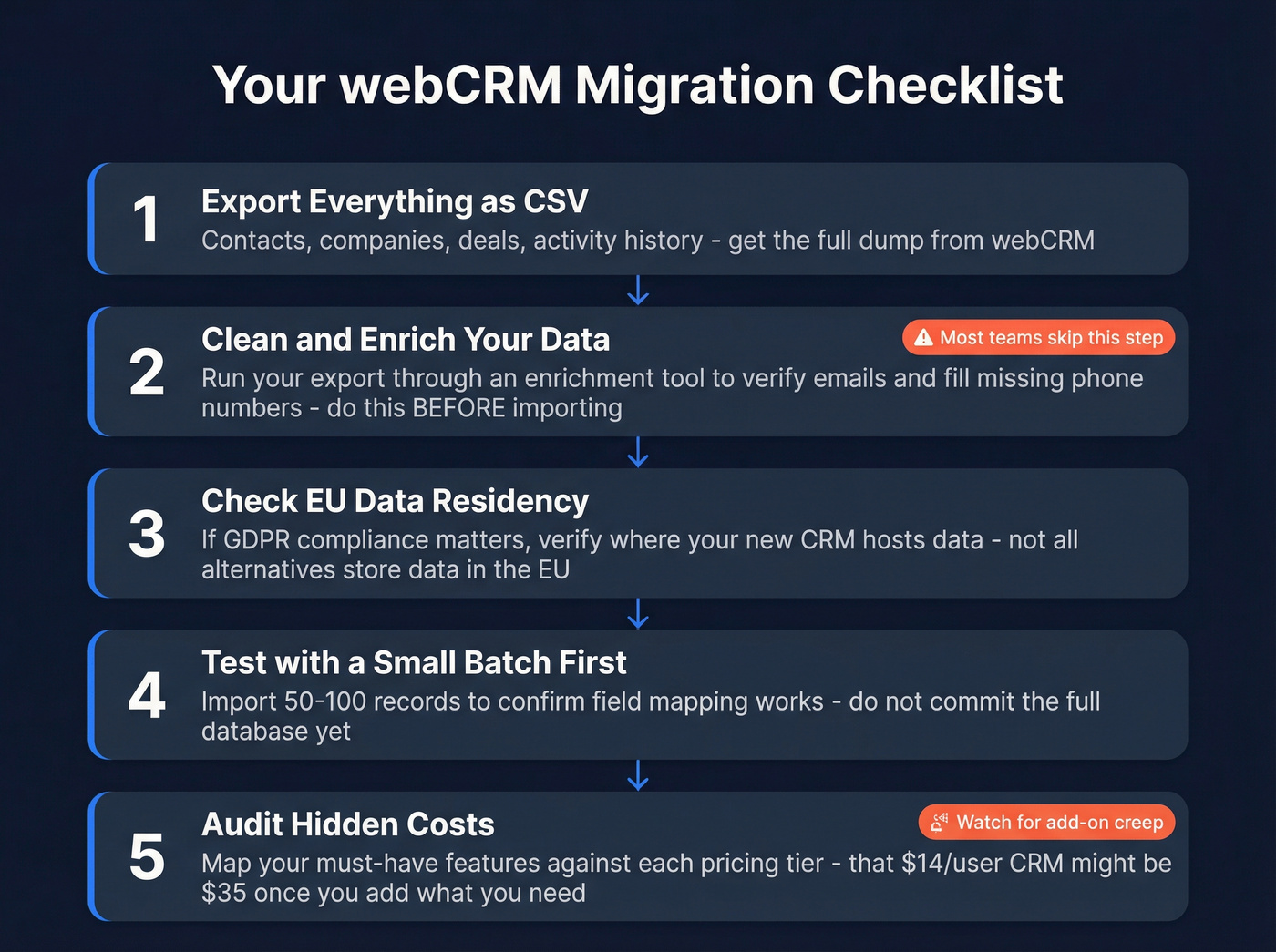
Check EU data residency. If you chose webCRM for GDPR compliance, verify your new CRM meets the same standard. Less Annoying CRM hosts on AWS North Virginia - worth knowing if EU hosting is a hard requirement.
Audit hidden costs. That $14/user/month CRM might be $35 once you add the features you actually use. Map your must-have features against each tier before signing up.
Clean your contact data before migrating. This is the step most teams skip, and it's the one that causes the most pain. Run your export through an enrichment tool like Prospeo to verify emails and fill missing phone numbers - stale records from webCRM will clog your new pipeline on day one. If email quality is a recurring issue, start with email bounce rate basics before you import anything.

Your CRM Is Only as Good as Its Data
Let's be honest: switching CRMs solves your workflow problems, but it doesn't fix your data. If your webCRM contacts are full of bounced emails and disconnected numbers, those same dead records follow you into the new system. This is where lead enrichment pays for itself quickly.
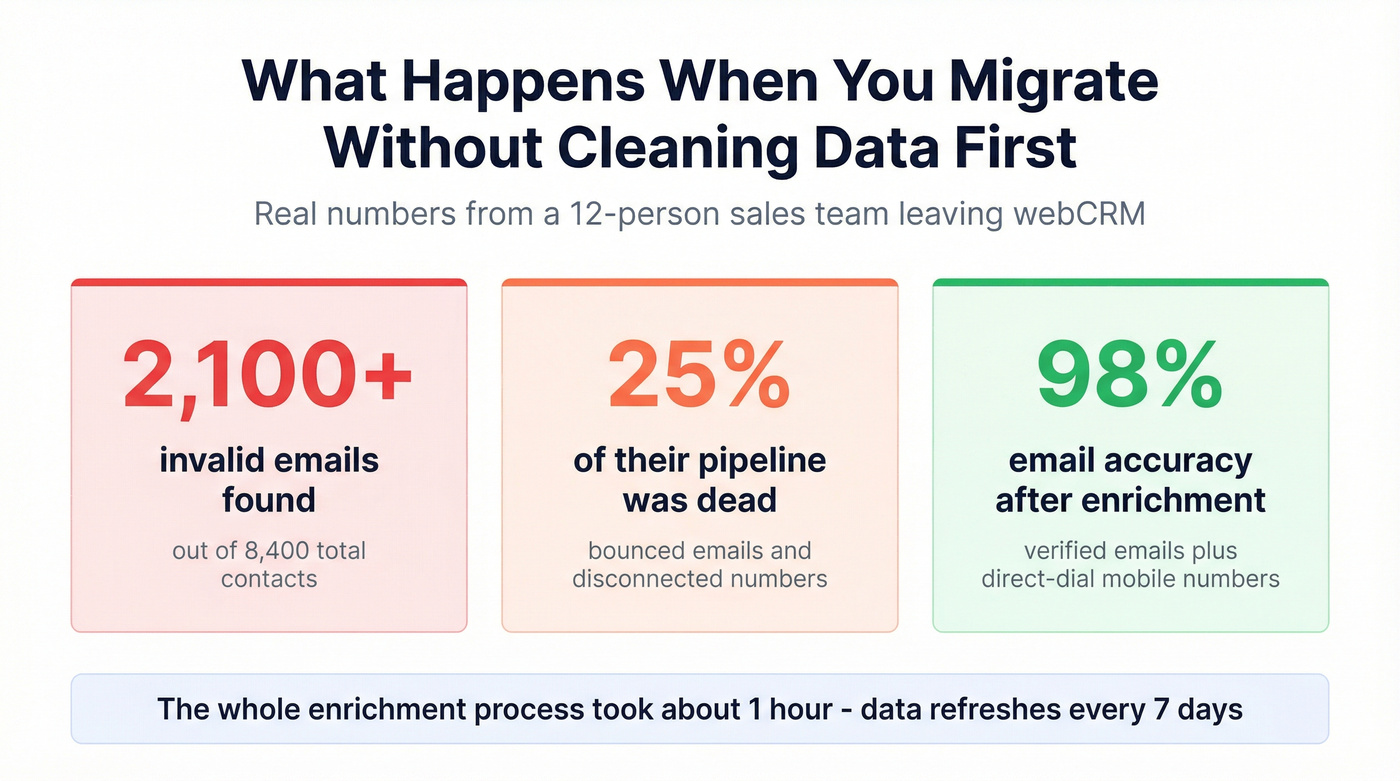
We ran a migration for a 12-person sales team last quarter that had been on webCRM for three years. Out of 8,400 contacts, over 2,100 had invalid emails. That's 25% of their pipeline - dead on arrival in the new CRM. They ran the export through Prospeo's bulk enrichment before importing, and came out the other side with verified emails at 98% accuracy, direct-dial mobile numbers, and 50+ data points per contact. The whole process took about an hour. Data refreshes every 7 days, which matters when you're working contacts that change jobs frequently.

A new CRM won't fix bad data. If your webCRM export is full of bounced emails and missing phone numbers, you're just moving the problem. Prospeo's CSV enrichment returns verified contact data for 83% of records at roughly $0.01 per email - no contracts, no sales calls.
Start your new CRM with contacts that actually connect you to buyers.
FAQ
Is webCRM good for small teams?
webCRM requires a minimum of 2 users, and Open API access is locked behind the €55/user/month SMB tier. Most small teams are better served by Less Annoying CRM at $15/user/month or HubSpot's free plan, both of which start at a single seat with no feature gates.
What's the cheapest webCRM alternative?
HubSpot CRM and Attio both offer genuinely free plans - HubSpot with unlimited users on basic features, and Attio free for up to 3 seats. For paid options, Pipedrive at $14/user/month is the lowest entry point with full pipeline functionality.
How do I migrate contacts from webCRM without losing data?
Export everything as CSV first - contacts, companies, deals, and activity history. Run the list through an enrichment tool to verify emails and fill missing numbers before importing into your new CRM. Always test with a small batch before committing the full database.