

7 Best Webscrape AI Alternatives in 2026
Webscrape AI charges $27-$87/mo and caps you at 250-1,000 URLs. Proxy support, JavaScript rendering, and pagination are locked behind the higher tiers. If you've hit those limits - or you're tired of paying $87 just to scrape pages that scroll - here are seven alternatives worth your time, sorted by what you actually need.
Here's the thing most people won't say out loud: most teams searching for a better scraper actually need better data. Scraping is a means to an end. If that end is B2B outreach, you can skip the scraping step entirely. (If that’s your use case, see web scraping lead generation and best B2B company data providers.)
Our Picks at a Glance
- Prospeo - if your real goal is verified B2B contact data, not raw HTML.
- Firecrawl - if you're a developer building LLM or RAG pipelines.
- Browse AI - if you want no-code "record and replay" simplicity.
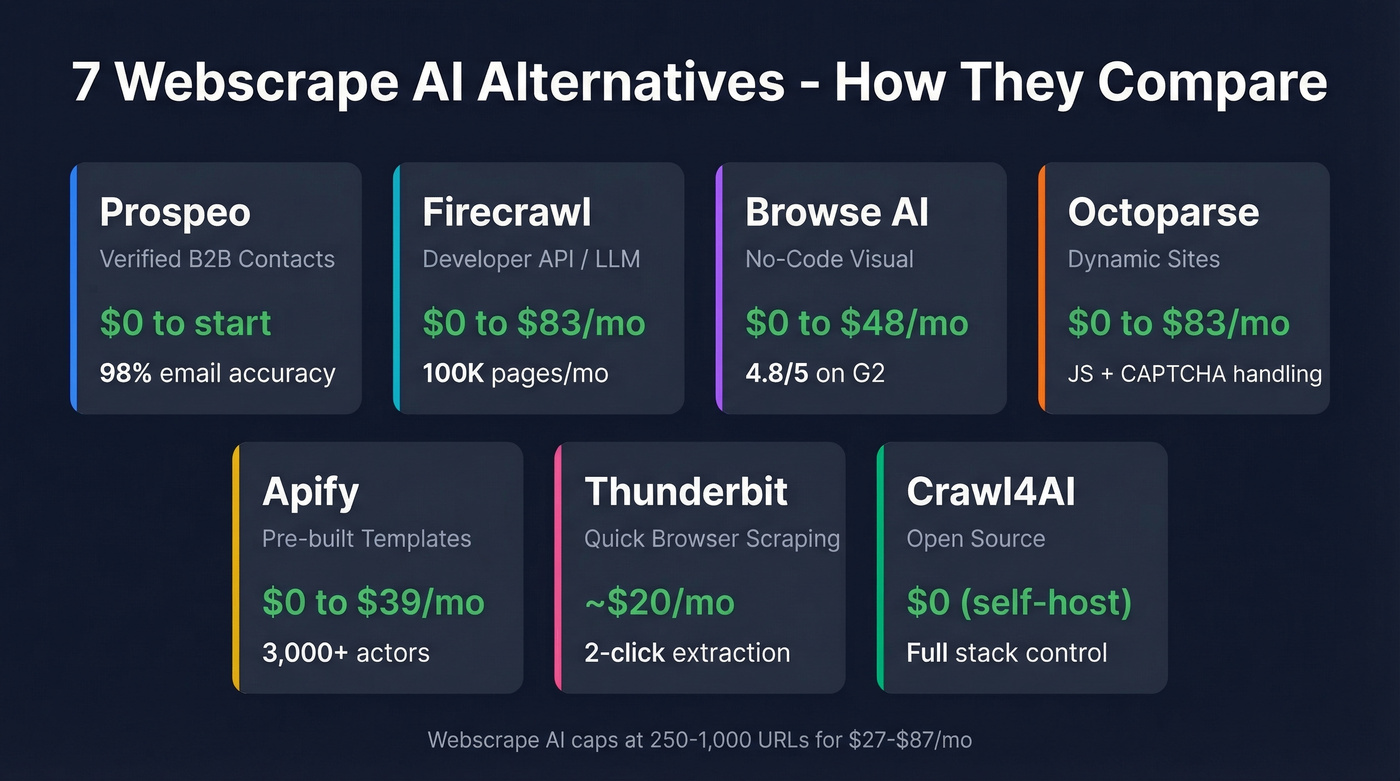
| Tool | Best For | Starting Price | Page/URL Limits | Key Feature |
|---|---|---|---|---|
| Prospeo | Verified B2B contacts | Free (75 emails/mo) | Contact-based | 98% email accuracy |
| Firecrawl | Developer API / LLM | Free (500 pages) | 100K/mo at $83/mo | Markdown + JSON output |
| Browse AI | No-code visual | Free (50 credits/mo) | Credit-based | Record-and-replay bots |
| Octoparse | Complex dynamic sites | Free (10 tasks) | ~$83/mo paid | Desktop + cloud runs |
| Apify | Pre-built workflows | Free ($5 credit) | Usage-based | 3,000+ actor templates |
| Thunderbit | Quick browser scraping | ~$20/mo | Extension-based | 2-click extraction |
| Crawl4AI | Open-source / free | $0 (+ LLM costs) | Unlimited (self-host) | Full stack control |
Quick cost comparison: Firecrawl runs about $666 per million pages. Open-source with LLM extraction? Roughly $3,025 per million. Paid tools earn their keep.

You're searching for a better scraper, but what you actually need is better data. Prospeo gives you 300M+ profiles with 98% email accuracy and 125M+ verified mobiles - refreshed every 7 days, not scraped and decaying. At $0.01 per email, it costs less than the proxy bandwidth you'd burn scraping the same contacts.
Stop scraping for contact data you can look up in seconds.
Top Webscrape AI Alternatives Compared
Prospeo - Best for Verified B2B Contacts
You scraped 500 company pages. Now you're staring at a list of names with no verified emails, no direct dials, and no way to tell which records are six months stale. That's the gap Prospeo fills.
Its database covers 300M+ professional profiles with 98% email accuracy and 125M+ verified mobile numbers. Data refreshes every 7 days - the industry average is 6 weeks, which means most scraped contact data is already decaying by the time you load it into a sequencer. The Chrome extension lets you pull verified contacts from any website in one click, and 30+ search filters including buyer intent, technographics, and job changes let you skip the scraping step entirely when contact data is what you're actually after. (For more on this workflow, see data enrichment services and lead enrichment.)
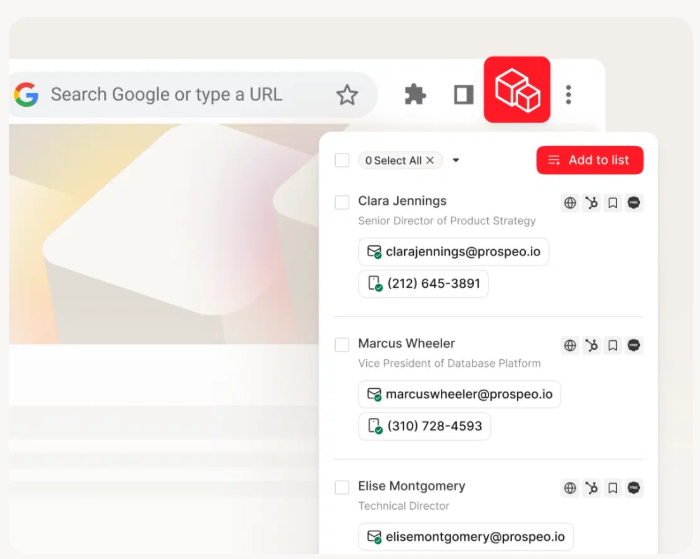
Pricing runs about $0.01 per email. The free tier gives you 75 verified emails and 100 Chrome extension credits per month. No contracts, no sales calls. If you’re comparing tools that find vs verify, you’ll also want best email search tools and Bouncer alternatives.
Use this if: your end goal is verified emails and direct dials, not raw HTML. Prospeo either replaces the scraper entirely or acts as the verification layer after you scrape.
Skip this if: you need to extract product listings, pricing tables, or non-contact structured data from websites.
Firecrawl - Best Developer-First API
Firecrawl backs up its hype with 350K+ developers, 70,000+ GitHub stars, and a $14.5M Series A. Feed it a URL, get back clean markdown or structured JSON ready for LLM ingestion. No selector maintenance, no parsing headaches. Traditional scrapers break when sites update their layout - Firecrawl sidesteps this by extracting semantically rather than relying on CSS selectors.
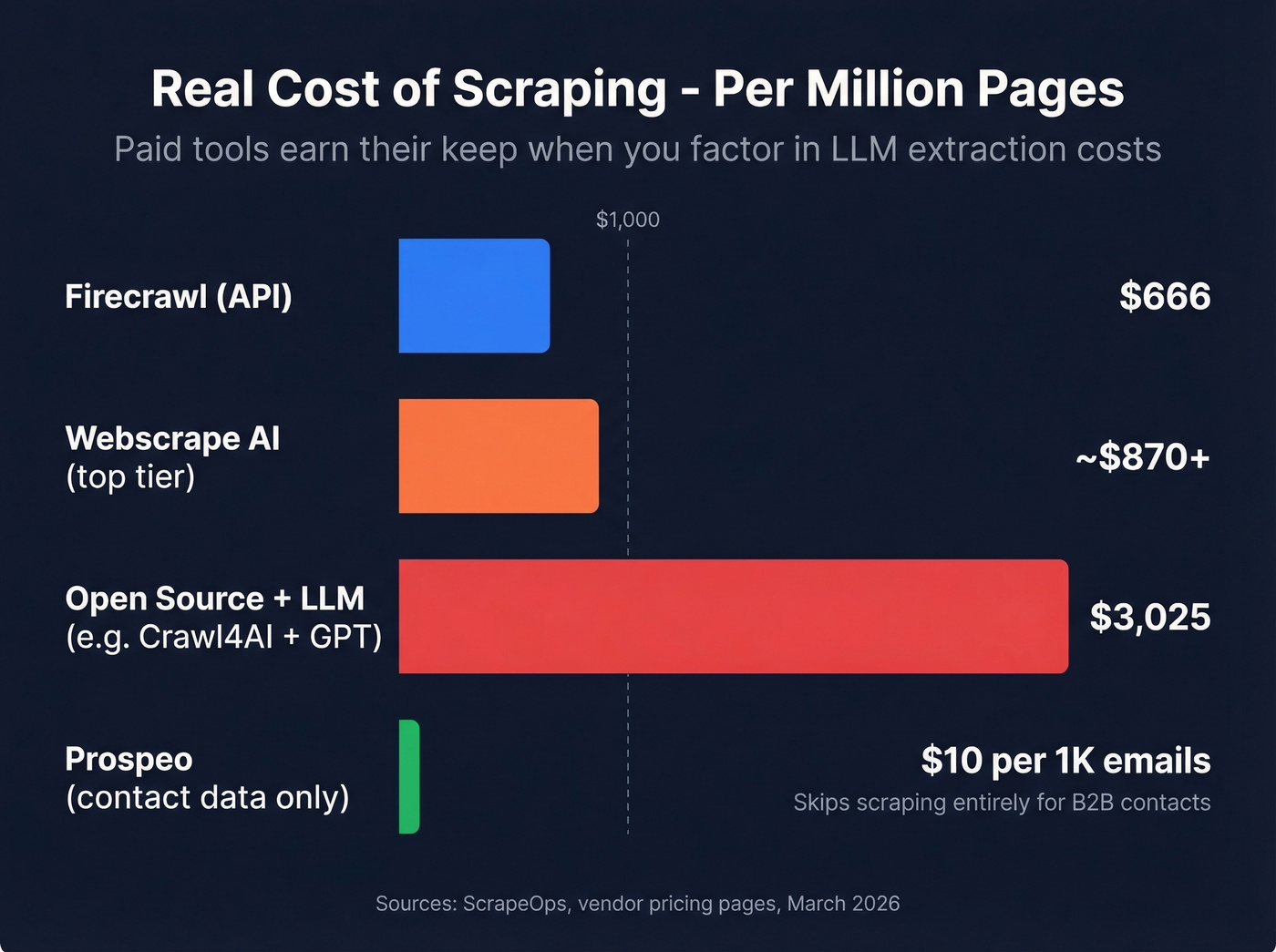
In our testing, the markdown output was clean enough to feed directly into a RAG pipeline without post-processing. That markdown also uses roughly 67% fewer tokens than raw HTML, which translates to meaningful savings when you're paying per token for LLM extraction. The Standard plan at $83/mo gives you 100K pages and 50 concurrent requests, working out to $0.83 per 1,000 pages. A Hobby tier at $16/mo covers 3,000 pages if you don't need the full capacity, and the free tier offers 500 pages as a one-time credit - enough to test a pipeline before committing. If you’re weighing other hosted scrapers, compare against ScrapingBee alternatives.
Use this if: you're building AI agents, RAG pipelines, or any workflow where you need structured data from the web at scale.
Skip this if: you don't write code. Firecrawl is an API, not a point-and-click tool.
Browse AI - Best No-Code Visual Scraper
Browse AI sits at 4.8/5 on G2 across 59 reviews, and the praise centers on one thing: you train a "robot" by clicking through a site, and it replays those actions on a schedule. No selectors, no code, no API calls. Setup genuinely takes minutes.
The free plan gives you 50 credits/month across 2 websites. Personal runs $19/mo on an annual plan for 2,000 credits, or $48/mo billed monthly. Professional is $69/mo annually for 5,000 credits. The most common G2 complaint? Users want a lower-priced tier between free and Personal - the jump feels steep for light usage.
Use this if: you're a marketer or ops person who needs recurring scrapes without touching code.
Skip this if: you're scraping sites with heavy anti-bot measures or infinite scroll. Browse AI struggles there.
Octoparse - Built for Pages That Break Everything Else
The consensus on r/webscraping is that Octoparse handles the pages other tools choke on - infinite scroll, login walls, CAPTCHA-protected content. It's a desktop app with optional cloud runs, and it handles dynamic loading natively. If you’re deciding between the two “heavyweight” options, see Apify vs Octoparse.
The free tier gives you 10 tasks. Paid plans start around $83/mo. Watch for add-on costs though: residential proxies run $3/GB and CAPTCHA solving is $1-$1.50 per thousand. Those extras add up fast on large jobs, and we've seen teams double their expected bill once they factor in proxy bandwidth for anything beyond a few hundred pages.
Best for: teams scraping JavaScript-heavy sites that simpler tools can't handle.
Watch out for: real setup overhead. This is a desktop application, not a lightweight browser extension. Budget time for the learning curve.
Apify - "There's a Template for That"
One Reddit user summed up Apify well: it's powerful but heavier than most teams need for basic jobs. That said, if your target site already has a pre-built "actor" in Apify's marketplace of 3,000+ actor templates, you'll be running in minutes instead of building a crawler from scratch.
The free tier includes $5 in compute credits. Paid plans start at $39/mo plus usage, scaling to $199/mo for heavier workloads. The compute-unit billing model takes some getting used to - I'd recommend running a few free-tier jobs first to understand how credits burn before committing to a paid plan.
Thunderbit - Lightweight Chrome Extension
Thunderbit is a 2-click browser extension for quick extractions - no selectors, no desktop app. It's used by 50K+ users and starts around $20/mo. Fine for ad-hoc scraping: grabbing a table from a page, pulling a list of names from a directory. If your real goal is emails (not tables), you’ll likely get more mileage from best email scraper Chrome extensions or a free email scraper.
Skip this if: you need pagination, scheduling, or anything beyond ad-hoc grabs. This is a pocket knife, not a power tool.
Crawl4AI - Best Free Open-Source Option
Crawl4AI is free and open-source, which sounds great until you factor in LLM API costs. Running GPT o3-mini tokens for extraction works out to roughly $3.03 per 1,000 pages. "Free" tools aren't free - they just move the cost to your OpenAI bill.
Still, if you want full control over your scraping stack and don't mind managing infrastructure, it's the most flexible option on this list. For teams with existing DevOps capacity and a preference for owning their pipeline end-to-end, Crawl4AI is hard to beat on customization.
What Happens After You Scrape
Look, most scraping articles skip this part entirely: scraped data is raw. Emails bounce. Phone numbers are dead. Job titles are six months stale. You've extracted data, but you haven't verified it. (If you’re seeing deliverability issues, start with email bounce rate and email deliverability guide.)
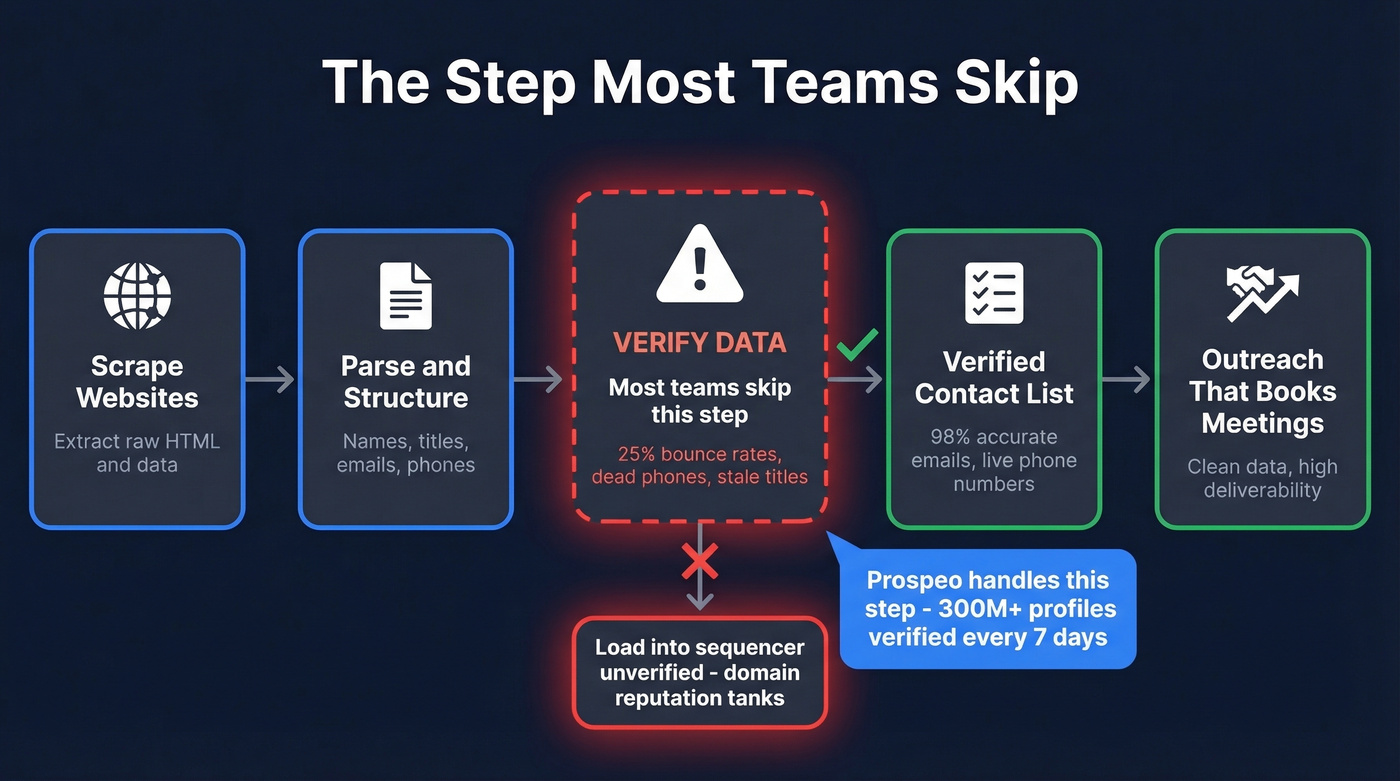
We've seen teams scrape thousands of records, load them straight into a sequencer, and wonder why their bounce rate hits 25%. The scraping was fine. The verification step was missing. That's the difference between a campaign that books meetings and one that tanks your domain reputation - and it's why pairing any scraper on this list with a verification layer isn't optional if you're doing outbound.

Every scraper on this list still leaves you with unverified names and stale emails. Prospeo's 30+ filters - buyer intent, technographics, job changes, funding - let you build targeted contact lists without writing a single selector. 75 free verified emails per month, no credit card required.
Replace your scraping pipeline with one search that returns verified data.
FAQ
Is there a free alternative to Webscrape AI?
Firecrawl's one-time 500-page credit and Crawl4AI (open-source, ~$3.03/1,000 pages in LLM costs) are both free to start. For B2B contact data specifically, Prospeo's free tier includes 75 verified emails and 100 Chrome extension credits monthly - no credit card required.
Do I need coding skills to use these tools?
Browse AI, Thunderbit, and Octoparse are fully no-code. Firecrawl and Crawl4AI require developer skills. Prospeo needs zero code - use the 30+ search filters or Chrome extension to find verified contacts directly from any website.
What's the cheapest way to scrape and verify contact data?
Combine Firecrawl's free tier (500 pages) with Prospeo's free plan (75 verified emails/month). Total starting cost: zero. That's enough to test a full pipeline from raw scrape to verified outreach list before spending a dollar.
Which alternative handles JavaScript-heavy sites best?
Octoparse handles infinite scroll, login walls, and CAPTCHA-protected pages natively. Firecrawl also renders JavaScript but works via API rather than a visual desktop app. Expect to pay ~$83/mo for either tool's full capabilities on dynamic sites.