

What Is Call Disposition? Codes, Setup, and Common Mistakes
It's Friday at 4:57pm. Your rep's trying to hit their activity number, the dialer's pushing the next call, and AHT is glaring at them from a dashboard. So they slam "No Answer" or "Not Interested" just to clear wrap-up and move on.
That's how call disposition data gets poisoned - quietly, one rushed click at a time. Understanding what call disposition actually means, how to design your codes, and where teams go wrong is the difference between a reporting system you trust and one that lies to you every Monday morning.
The Short Version
- A call disposition is the label that records the outcome of a call so you can report, route work, and coach consistently.
- Two types exist: system-generated (automatic call end status) and agent-generated (manual business outcome).
- Golden rule: keep it to max 10 codes per tier and make selection mandatory before the call can close.
- Fix the upstream input. Verify your contact data before you dial, or "Wrong Number" will dominate your reports.
What Call Disposition Actually Means
A call disposition is a short code or label applied at the end of a call to capture what happened. It turns a conversation into structured data your CRM, dialer, and reporting can actually use.
In practice, dispositions do three jobs: they summarize outcomes, they trigger next steps like callbacks, sequences, and escalations, and they create a coaching dataset. Without them, you're stuck with anecdotes and vibes. Dispositions like "Do Not Call" also feed compliance workflows - triggering automatic DNC list suppression so you don't dial someone who's opted out.
Here's the distinction that trips most teams up:
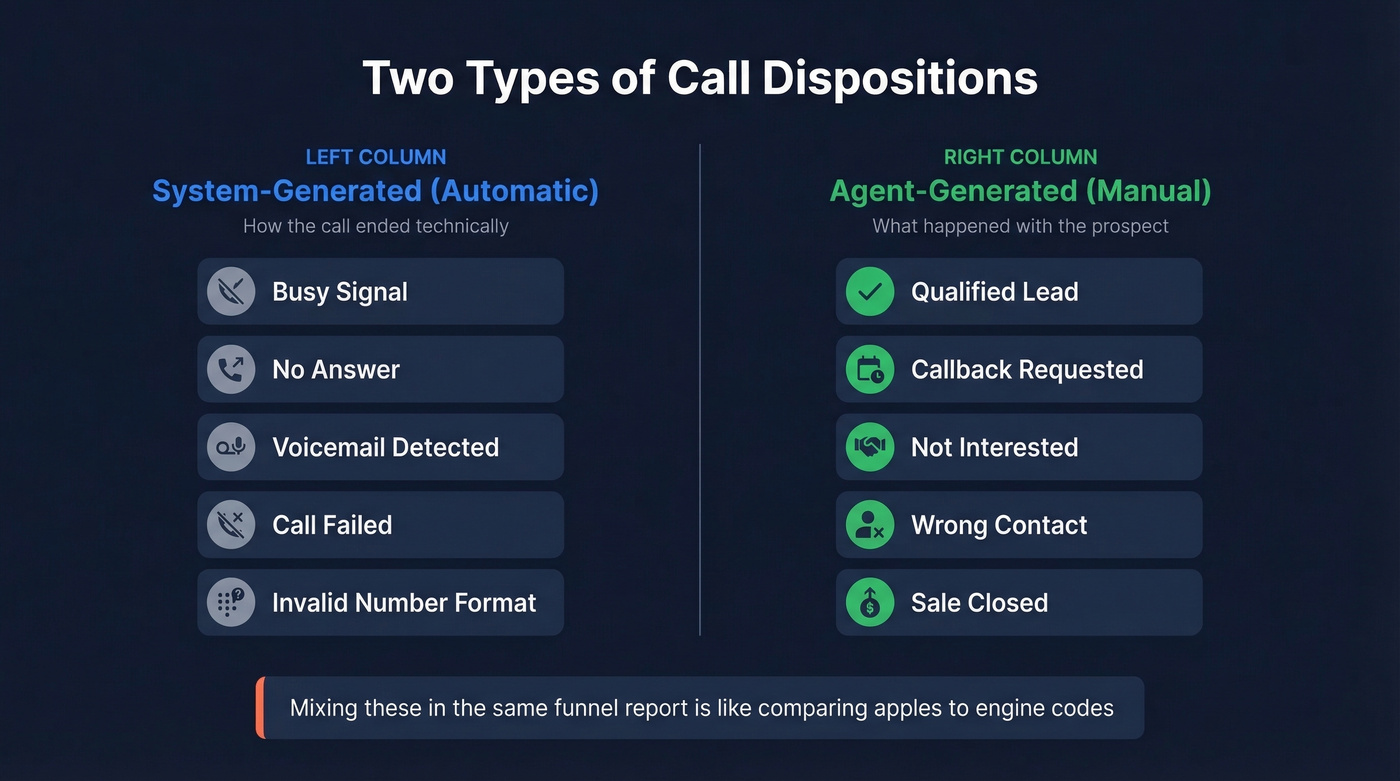
- System-generated dispositions are automatic: busy signal, no answer, voicemail detected, call failed, invalid number format. They describe how the call ended technically.
- Agent-generated dispositions are manual: qualified lead, callback requested, not interested, wrong contact, sale closed. They describe the business result.
Most teams mix these up and wonder why their "conversion rate by disposition" makes no sense. If you're counting system-level "No Answer" alongside agent-level "Not Interested" in the same funnel report, you're comparing apples to engine codes.
Disposition vs. Call Status
Call status is the network-level outcome. Disposition is the business-level result. Treating them as the same thing is how you end up coaching reps for carrier errors.
Some dialers map call outcomes using ITU-T Q.850 cause codes and SIP responses. Those codes are useful - but they aren't "what happened with the prospect." Here's a practical translation table using common Q.850/SIP mappings:
| Q.850 / SIP | Plain-English Meaning |
|---|---|
| 16 NORMAL_CLEARING | Call ended normally |
| 17 USER_BUSY / SIP 486 | Line/device was busy |
| 19 NO_ANSWER | Rang, no pickup |
| 28 INVALID_NUMBER_FORMAT / SIP 484 | Number format issue |
The thing to tattoo on your reporting layer: telephony status doesn't equal business outcome. A "NORMAL_CLEARING" call could be a great conversation, a hang-up, or a wrong person - unless an agent disposition captures the real result.
Disposition Codes by Industry
You don't need a "universal" disposition list. You need one that matches your workflow and compliance reality. The examples below, adapted from a VirtualPBX industry reference, are solid starting templates - adapt them to your process, not your vendor's defaults.
Sales
| Code | When to Use |
|---|---|
| Interested | Prospect engaged, open to next step |
| Not Interested | Clear "no" for now |
| Follow-Up Needed | Needs more info or timing |
| Call Back Later | Specific callback time agreed |
| LVM | Left voicemail |
| Wrong Number | Not the right line/person |
| Escalated | Needs manager or specialist |
| Sale Closed | Deal completed on call |
Resist the urge to create separate codes for every objection type at the primary level. Use secondary codes for that granularity instead (see objection type).
Customer Service
| Code | When to Use |
|---|---|
| FCR | Resolved on first contact |
| Escalated | Needs tier 2/manager |
| Transferred | Routed to another department |
| Pending Information | Waiting on customer details |
| Complaint Logged | Formal complaint recorded |
Healthcare
| Code | When to Use |
|---|---|
| Consented | Patient consent captured |
| Declined | Patient declined service |
| Callback Requested | Asked to call later |
| Not Eligible | Doesn't meet criteria |
| Need Follow-Up | Requires clinical follow-up |
| Completed | Task/appointment completed |
Debt Collection
| Code | When to Use |
|---|---|
| Payment Made | Payment collected |
| Payment Arrangement | Payment plan agreed |
| No Payment Commitment | Contact made, no commitment |
| LVM | Left voicemail |
| Callback Scheduled | Agreed to specific callback |
| Wrong Party | Reached someone else |

"Wrong Number" and "Bad Data" dispositions shouldn't dominate your reports. Prospeo's 125M+ verified mobile numbers deliver a 30% pickup rate - meaning your reps spend wrap-up coding real conversations, not carrier errors.
Fix the data before the dial and your dispositions finally tell the truth.
How to Design Your Categories
Most disposition projects fail for one boring reason: the taxonomy wasn't designed like an operational system. It was designed like a brainstorming exercise where every stakeholder got their pet code added.
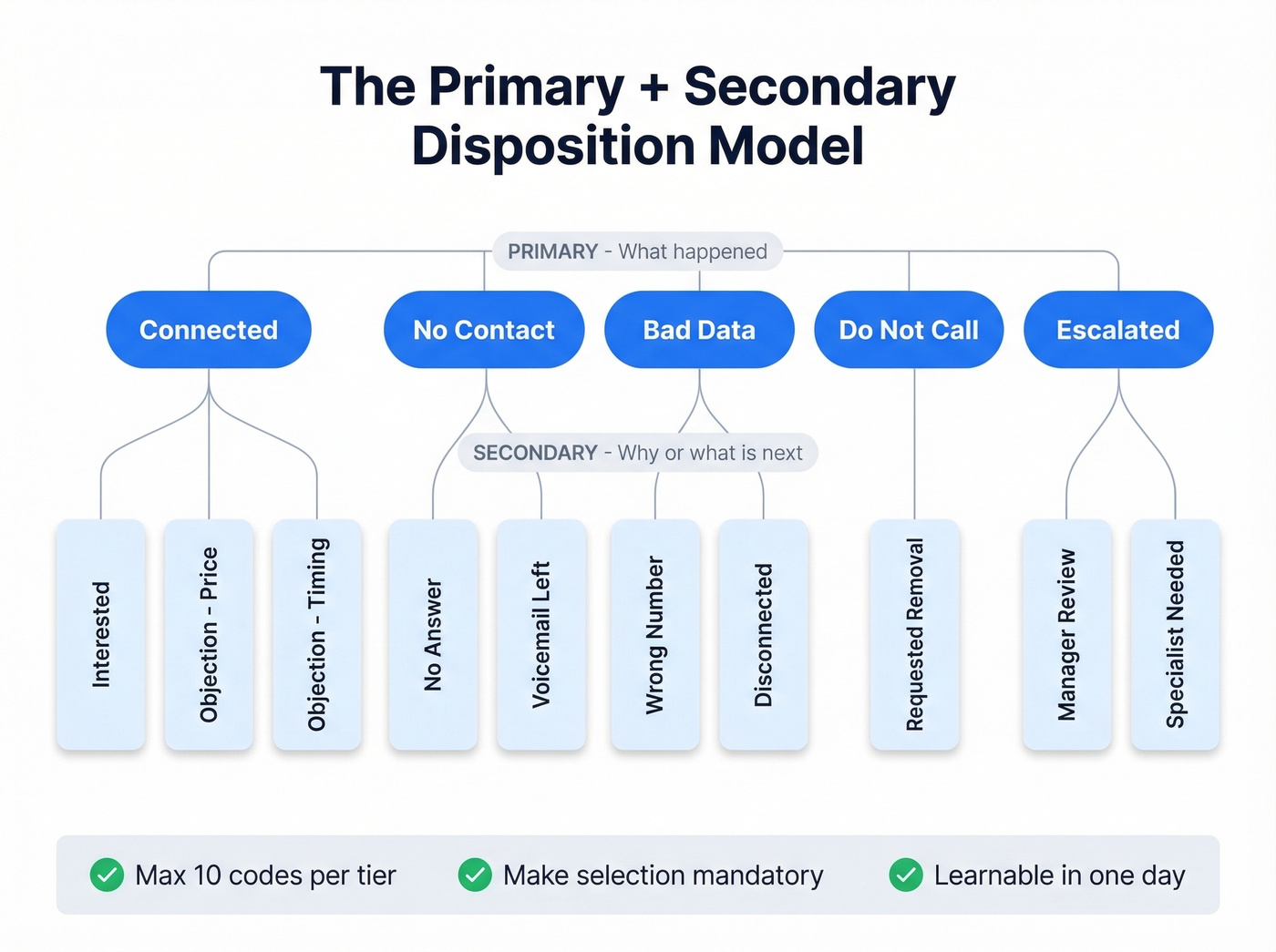
A clean approach is a primary + secondary model. Primary disposition captures what happened at a high level: Connected, No Contact, Bad Data, Do Not Call, Escalated. Secondary disposition captures why or what's next: Interested, Objection: Price, Callback Requested, Wrong Person, Not Eligible. This two-tier structure is what separates useful outcome codes from a flat list nobody trusts.
Here's the checklist that keeps you out of trouble:
- Max 10 codes per tier. Longer lists create "alphabetical bias" and agents default to favorites. We've seen teams with 30+ codes end up with 80% of calls tagged with the same two options because reps stop thinking.
- Make dispositions mandatory. If agents can close a call without selecting one, your dataset will always have holes - and the holes won't be random.
- Design for the UI you actually have. HighLevel, for example, has a hard cap of 10 dispositions total and uses a post-call picker in Settings > Phone System > Voice > Call Dispositions.
- Treat dispositions like dependencies. Renaming a disposition keeps workflows intact, but deleting one breaks any automation referencing it. That's not theory - it's how these systems are built.
One more thing: with only 54% of contact center agents lasting past two years, your disposition system needs to be learnable in a day, not a quarter. Every code you add is a decision point for someone who started last week.
CRM Setup: Salesforce and HubSpot
Disposition data only matters if it lands in the right CRM field, consistently, every time.
- Salesforce writes dispositions to the Task field
CallDisposition - HubSpot uses the property
hs_call_disposition
The operational gotchas are predictable and painful. You need one-to-one mapping between dialer dispositions and CRM dispositions, including capitalization and spaces--"No Answer" and "No answer" are different values to many integrations. Syncing dispositions can spike CRM API call consumption, especially if you're logging every call event instead of just wrap-up. And user identity has to match: your dialer users need corresponding CRM user accounts, usually the same email, or tasks won't attach correctly.
Let's be honest - this is the step most teams rush through and then spend months debugging. Get the field mapping right before you turn on the sync. Amplemarket's integration docs call this the most critical step in dialer-to-CRM setups, and they're right.
If you're building this into a broader outbound stack, it helps to standardize your cold call tracking and sales call tracking conventions early.
Benefits and KPIs to Track
Disposition codes are only useful if they roll up into metrics you'll actually manage. Otherwise you've built a tagging hobby. The real benefits show up when clean data powers coaching, routing, and forecasting decisions across your team.
The benchmarks below are anchored in SQM Group data compiled by Plivo, with measurement coverage from ICMI's survey.
| KPI | Standard | Good | World-Class |
|---|---|---|---|
| FCR | ~65% | 70-79% | 80%+ |
| CSAT | ~70% | 75-84% | 85%+ |
| AHT | ~12 min | ~10 min | ~7-8 min |
| Abandonment | ~6% | <5% | ~3% |
| Transfer rate | ~19% | ≤15% | ≤10-12% |
| Occupancy | ~70% | 75-85% | 85%+ |
ICMI's "what centers measure" snapshot is the reality check: 85% measure abandonment and 84% measure AHT, but only 38% measure agent satisfaction. That imbalance is why dispositions get weaponized for speed instead of used for coaching.
If you want to benchmark the top-of-funnel side too, track answer rate and connect rate alongside your disposition mix.
Typical Outbound Disposition Mix
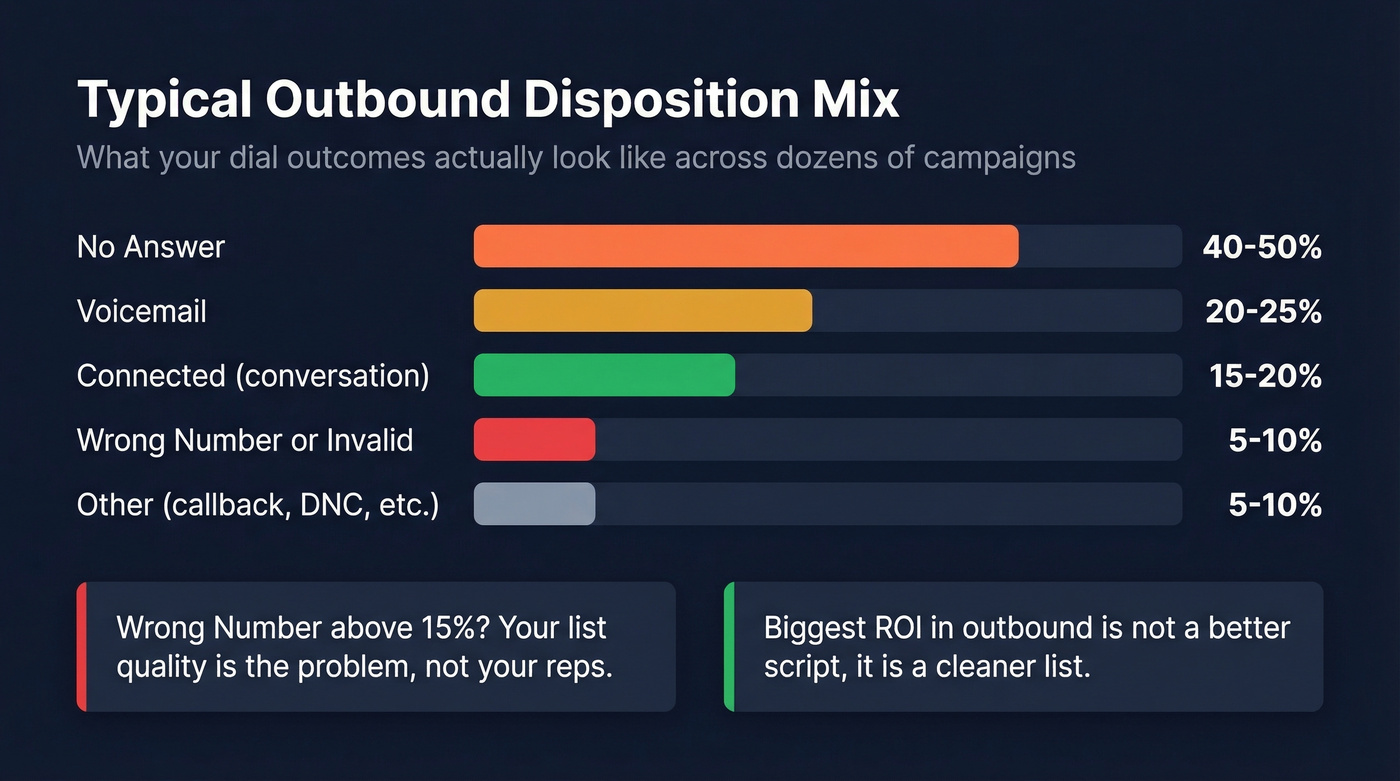
Nobody publishes this, so here's what we've seen across dozens of outbound sales campaigns:
| Disposition | Typical Range |
|---|---|
| No Answer | 40-50% |
| Voicemail | 20-25% |
| Connected (conversation) | 15-20% |
| Wrong Number / Invalid | 5-10% |
| Other (callback, DNC, etc.) | 5-10% |
If your "Wrong Number" rate exceeds 15%, your list quality is the problem - not your reps. And if "No Answer" is above 55%, you're either calling at the wrong times or your numbers are stale (see best time to cold call).
Look, most teams obsess over conversion rates from connected calls while ignoring that half their dials never reach a human. The biggest ROI in outbound isn't a better script - it's a cleaner list.
Five Mistakes That Corrupt Your Data
1) Too many codes, so agents guess. You ship 25 dispositions because every stakeholder wanted "their" edge case. Reps pick the first thing that looks close enough. Fix: collapse to max 10 per tier and use primary + secondary for detail without UI overload.
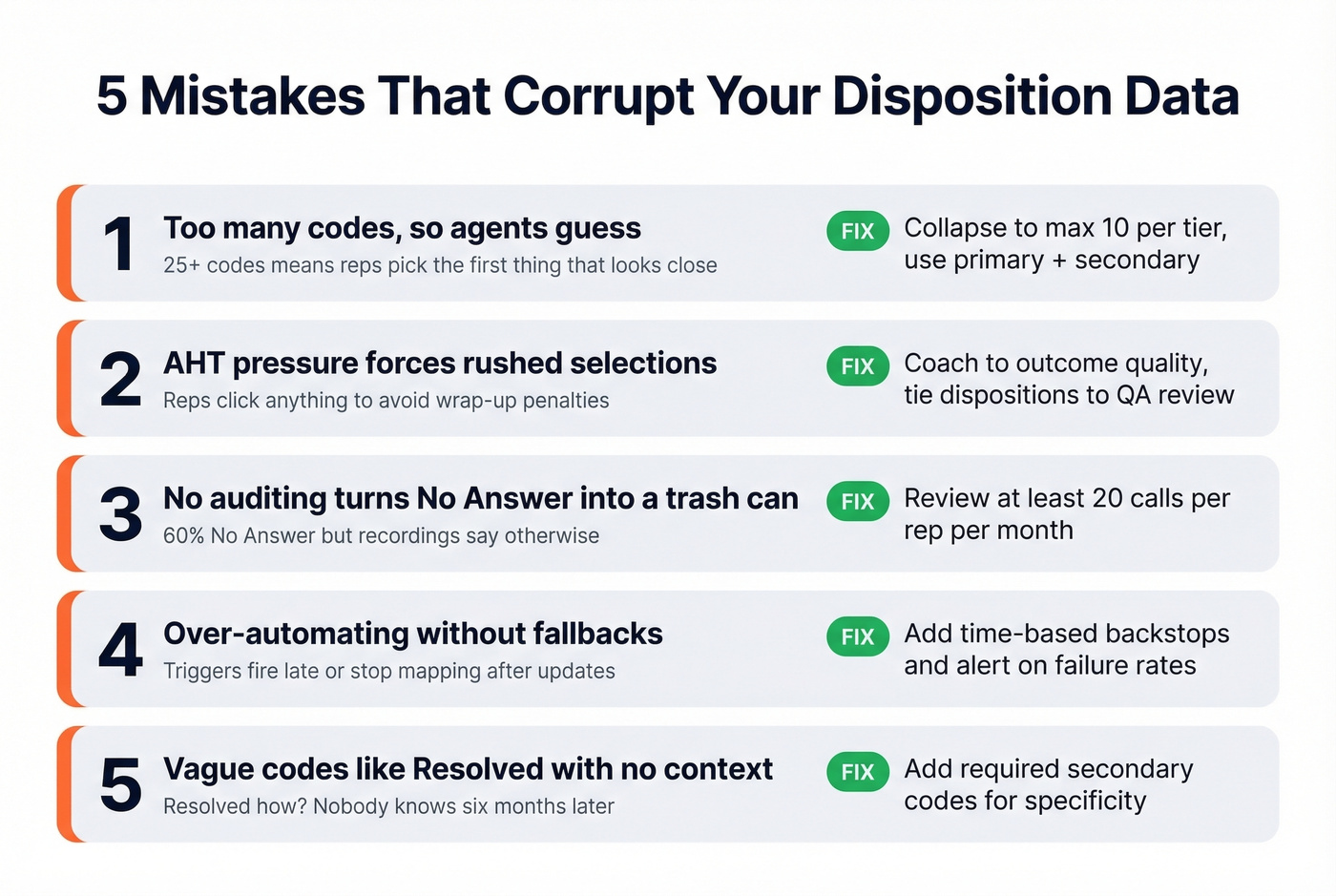
2) AHT pressure forces rushed selections. Reps learn that wrap-up time gets punished, so they click anything to get to the next dial. ICMI captured the ugly version of this incentive: an agent said they were "better off not helping people and getting them off the phone... callers had to call back, but his numbers looked good on a spreadsheet." Fix: coach to outcome quality, not just speed. Tie dispositions to QA review and reward correct tagging.
3) No auditing turns "No Answer" into a trash can. Your dashboard shows 60% "No Answer," but recordings tell a different story. A practical heuristic: if a call is dispositioned "No Answer" but lasted around 2 minutes, something's off. Industry QA teams typically sample 1-3% of calls for disposition accuracy. If you aren't reviewing at least 20 calls per rep per month, you're flying blind (build a repeatable sales call review process).
4) Over-automating without fallbacks. You build workflows that fire off dispositions - texts, tags, re-queues - then an update ships and everything drifts. One HighLevel user on Reddit watched disposition triggers fire 20+ minutes late or stop mapping correctly after a platform revamp. Fix: add time-based backstops and alert on trigger failure rates.
5) Vague codes like "Resolved" hide the truth. Support uses "Resolved" for everything, so you can't tell if it was a refund, a bug workaround, or a billing correction. Fix: split into resolution-based codes like "Billing - Refund Processed," "Tech - Reinstall Fixed," "Account - Password Reset." Your coaching and product feedback loops get sharper immediately.
The Upstream Data Problem
A sales manager sees 30% of calls marked "Wrong Number" and assumes reps aren't dialing carefully. So they run training. Nothing changes.
Here's the thing: that pattern usually isn't an agent problem - it's a list problem. If your contact data is stale, you'll inflate "Wrong Number," "Invalid Number," and "No Answer," and then you'll optimize the wrong thing. We've watched teams cut Wrong Number rates dramatically just by running their list through verification before loading the dialer.
Fix the input before you optimize the output. Prospeo verifies contact information against 300M+ professional profiles with 98% email accuracy and 125M+ verified mobile numbers. Cleaning your list before it hits the dialer eliminates wasted calls and gives your disposition analytics a foundation worth analyzing (compare options in our email verifier websites guide).
Fewer bad numbers means fewer fake negatives in your disposition reports, which means your coaching and routing decisions finally reflect reality.

Every disposition code in your CRM is only as good as the contact data behind it. Prospeo refreshes 300M+ profiles every 7 days and verifies emails to 98% accuracy - so reps stop burning dials on dead numbers and start logging outcomes that actually matter.
Clean data in, clean dispositions out. Start with 75 free verified emails.
FAQ
How many disposition codes should we use?
Keep each tier to a maximum of 10 codes. Longer lists cause agents to default to favorites or pick the first alphabetical option. Use a primary + secondary model if you need more granularity - primary "Sales" with secondary codes for product line or objection type.
Should dispositions be mandatory?
Yes. Always. Every undispositioned call is a gap in your reporting and breaks downstream workflows. Configure your dialer so agents must select a disposition before they can close the call or change status. No exceptions, or your dataset will slowly rot.
How do I reduce "Wrong Number" dispositions?
Run your contact list through a verification tool before loading it into your dialer. Teams like Meritt cut bounce rates from 35% to under 4% after switching to verified data - and their connect rate tripled to 20-25%. Even a small verification pass before each campaign shifts your disposition mix dramatically.
What's the difference between sales and support dispositions?
Sales dispositions track pipeline movement - interested, callback, closed - while support dispositions track resolution type and escalation path. The underlying taxonomy design is the same with primary + secondary tiers, but the codes reflect different business outcomes and trigger different workflows.