

What Is Email Tracking - and Does It Still Work in 2026?
You send 200 cold emails on Monday. Your tracking dashboard says 47% opened. You feel good - until you realize a big chunk of those "opens" were Apple's servers pre-fetching pixels, and a bunch of the "engagement" was corporate security automation scanning links before any human saw the message. The number that made your morning is fiction.
So what is email tracking, really - and can you still trust it?
Email Tracking Defined
Email tracking is the practice of monitoring what happens after you hit send: whether someone opened your message, clicked a link, or ignored it entirely. The technology behind it hasn't changed much in decades - invisible pixels, redirect links, and the occasional read receipt. But the environment it operates in has shifted dramatically, and most guides haven't caught up.
The Quick Version
- Tracking mechanisms use invisible pixels, link redirects, and (rarely) read receipts to monitor recipient behavior after delivery.
- Open rates are unreliable. Apple Mail Privacy Protection covers 49.29% of all email opens, inflating reported opens by 15-20 percentage points. You can't trust them for individual-level decisions.
- Track clicks, replies, and conversions instead. These reflect intentional human actions that privacy proxies can't reliably fake.
- Clean data is the prerequisite nobody mentions. If 15% of your list bounces, your sender reputation tanks, future emails land in spam, and tracking pixels never load. Verify your list first.
How Does Email Tracking Work?
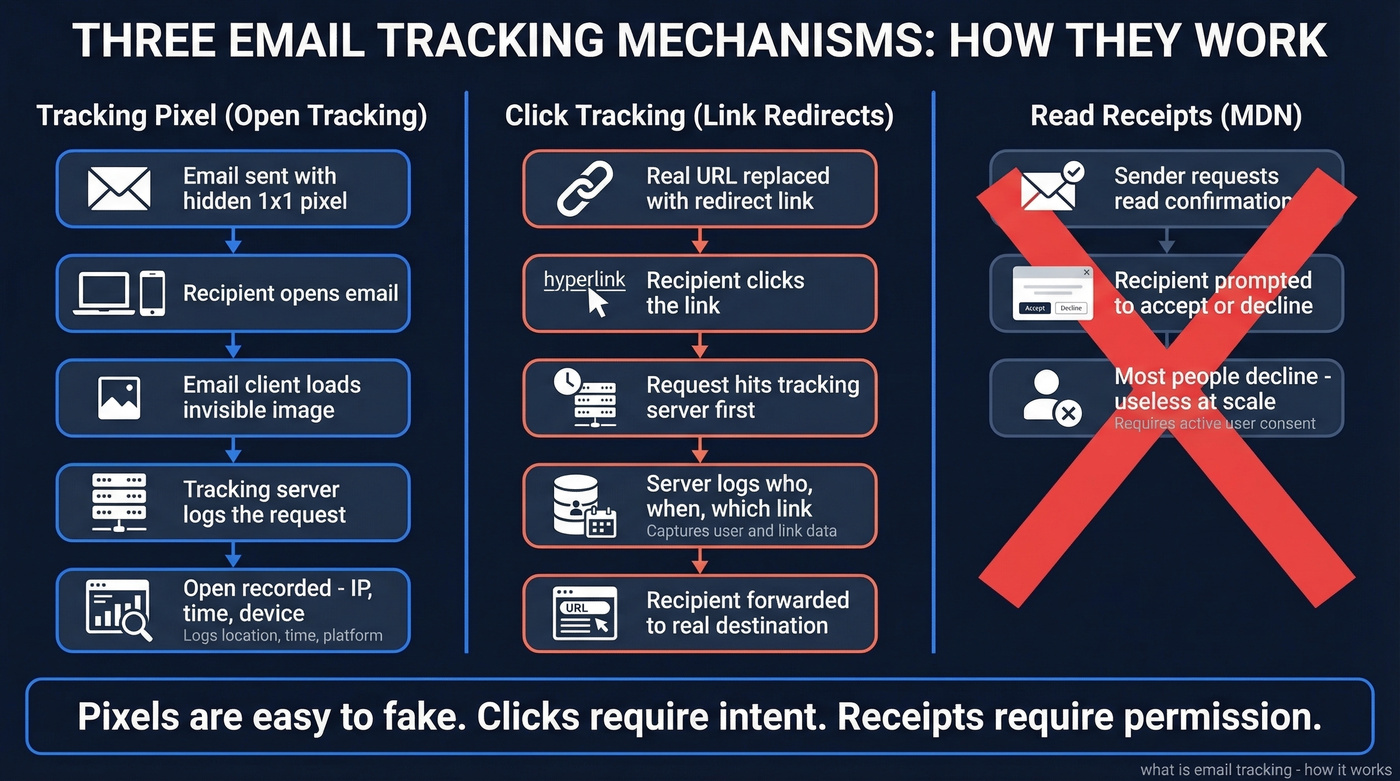
Email tracking relies on three distinct mechanisms, each with different strengths and failure modes. Understanding the technical layer helps you interpret your data correctly - and know when to distrust it.
Tracking Pixels (Open Tracking)
When you send a tracked email, your tracking tool embeds a tiny invisible image - typically a 1x1 transparent pixel - with a unique URL. When the recipient's email client renders the message and loads images, it makes an HTTP request to the tracking server to fetch that pixel. The server logs the request and records the "open."
That single request captures the recipient's IP address and timestamp, and often includes signals like approximate location and the device or email client being used. It's elegant and simple. It's also easy to break.
For a deeper technical breakdown, see our guide to tracking pixels.
Link and Click Tracking
Click tracking works differently. Instead of embedding your actual destination URL, the tracking tool replaces it with a redirect link that passes through its server first. When the recipient clicks, the server logs the event - who, when, which link - then forwards them to the real destination.
UTM parameters layer on top of this for analytics tools like Google Analytics, tagging the source, medium, and campaign so you can attribute downstream conversions. Click tracking is more reliable than open tracking because it requires an intentional action. Bots and privacy proxies can fake a pixel load, but a genuine click-through-to-conversion is much harder to spoof at scale.
If you’re building outbound sequences, it helps to pair click tracking with solid sequence management.
Read Receipts vs. Invisible Tracking
Read receipts - technically MDN (Message Disposition Notification) requests - are the old-school approach. The sender's email client asks the recipient's client to send back a confirmation when the message is opened.
The critical difference: read receipts require the recipient to opt in. Most email clients prompt users to accept or decline, and the overwhelming majority decline. In a B2B context, read receipts are useless at scale. That's why pixel-based tracking became the default - it doesn't ask permission.
Why Open Rates Are Broken
This is the section that matters most. If you're making decisions based on open rates - lead scoring, sequence branching, "re-engage inactive subscribers" campaigns - you're building on sand.
Apple Mail Privacy Protection
Apple introduced Mail Privacy Protection (MPP) in iOS 15 back in 2021. It pre-loads email content, including tracking pixels, through Apple's proxy servers regardless of whether the recipient ever reads the message. Emails delivered to an Apple Mail user can register as "opened" even when no human read happened.
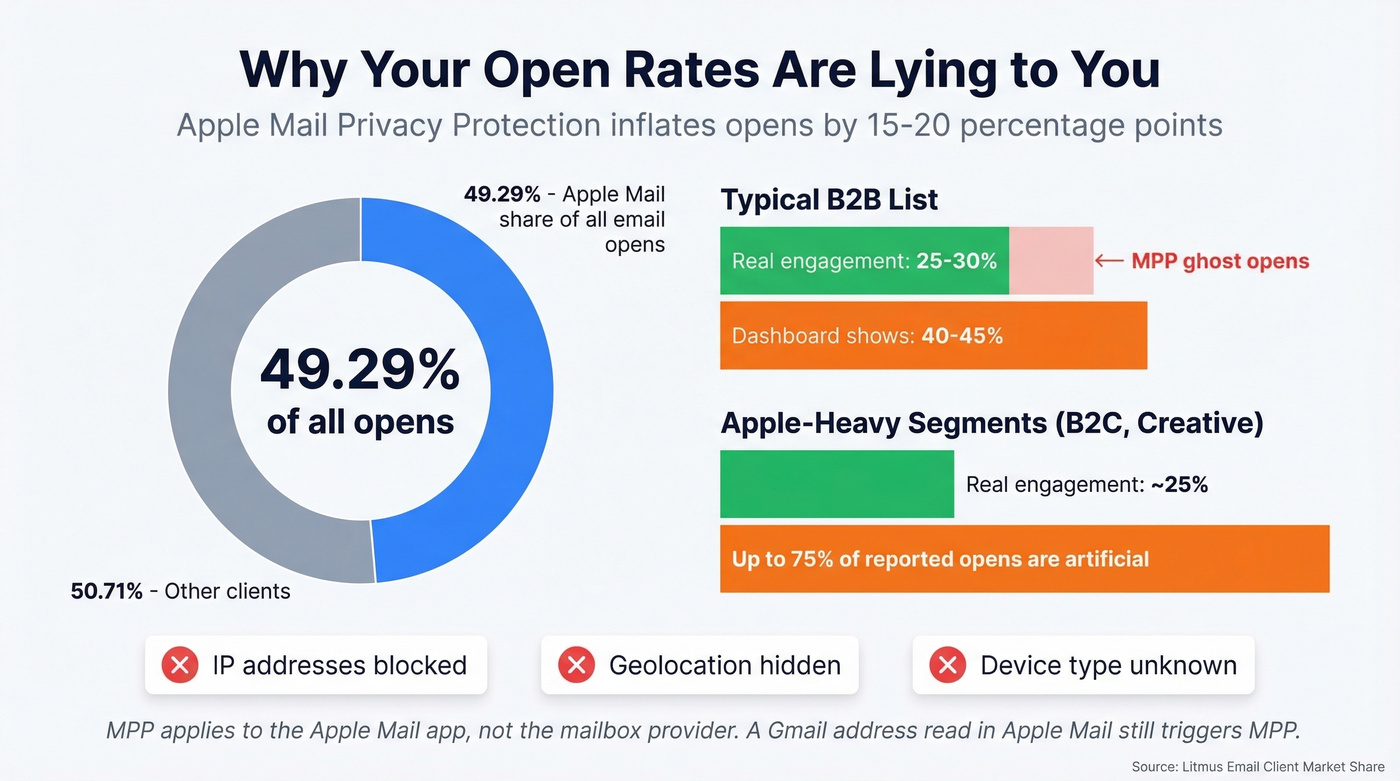
The scale of distortion is staggering. Apple Mail accounts for 49.29% of all email opens. MPP now affects over 55% of global email opens, inflating reported open rates by 15-20 percentage points. A list that genuinely gets 25-30% engagement will show 40-45% in your dashboard with no actual behavior change.
In Apple-heavy segments - B2C brands, creative industries, anyone targeting iPhone-dominant demographics - up to 75% of reported opens are artificial. MPP also blocks the sender's visibility into IP addresses, geolocation, timestamps, and device type. You don't just lose accuracy on opens; you lose the enrichment data that made opens useful in the first place.
One nuance worth flagging: MPP applies to the Apple Mail app on iPhone, iPad, and Mac. If someone has a Gmail address but reads it in Apple Mail, MPP still fires. It's about the client, not the mailbox provider.
If you’re using opens for scoring, you’ll want a more robust lead scoring model that prioritizes replies and conversions.
Bot Clicks and False Positives
Opens aren't the only corrupted signal. "Dark clicks" from security scanners and enterprise security controls can trigger link clicks before a human ever sees the email. Gmail, Yahoo, and Outlook link scanning can also corrupt click data.
In late 2024, Gmail changes led some users to see warnings like "Images in this message are hidden. This message might be suspicious or spam" - especially for emails with tracking pixels from low-reputation senders or unknown contacts. For cold outreach, disabling open tracking and measuring reply rate is often the cleanest approach.
To reduce false positives, it also helps to monitor your sender reputation alongside engagement.
False Negatives
The flip side is equally problematic. If a recipient's email client blocks remote images by default - common in Outlook desktop, many corporate environments, and privacy-conscious setups - the tracking pixel never loads. The email was read, but your dashboard shows nothing.
Tracker-blocking extensions like PixelBlock, Trocker, and Ghostery strip tracking pixels before they fire. Plain-text email renders no images at all. And group email aliases mean you might know "someone opened" but not who.
Open tracking simultaneously overcounts and undercounts. It's wrong in both directions, which makes it worse than useless for individual-level decisions.

Your email tracking data is only as good as your list. If 15% of your sends bounce, your sender reputation tanks, future emails land in spam, and tracking pixels never load. Prospeo's 98% email accuracy and 7-day data refresh cycle mean fewer bounces, better inbox placement, and tracking metrics you can actually trust.
Fix your data before you try to fix your open rates.
What to Track Instead of Opens
Opens still serve a narrow purpose as a trend line and deliverability signal - if your open rate drops off a cliff overnight, you probably have a spam placement problem. But for lead scoring, sequence logic, and performance measurement, you need better metrics.
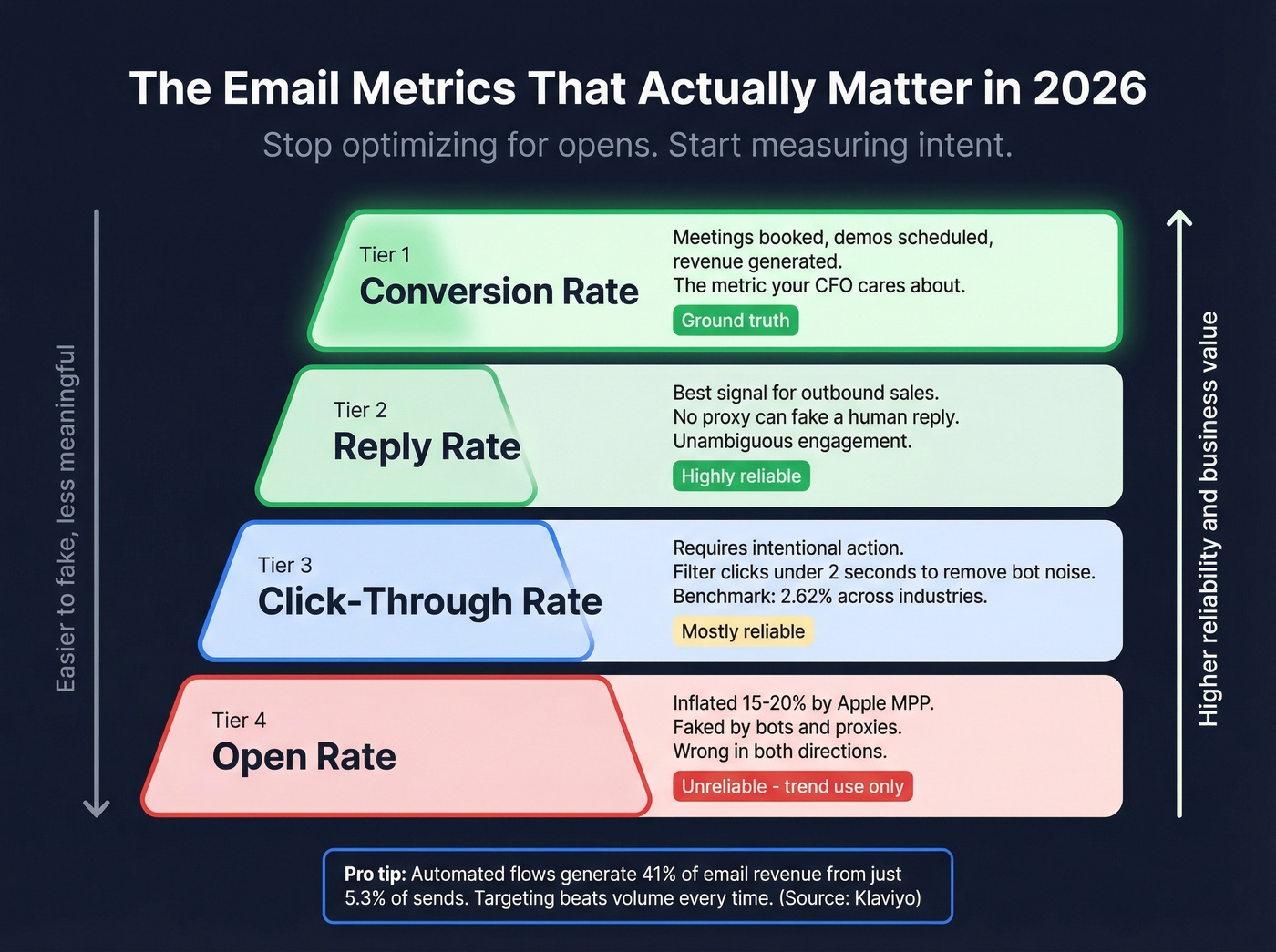
Here's what actually correlates with revenue:
- Reply rate - the single best signal for outbound sales. A reply is an unambiguous human action that no proxy can fake.
- Click-through rate - more reliable than opens because it requires intentional engagement. Still susceptible to some security scanning, but time-to-click heuristics (filtering clicks within 1-2 seconds of delivery) clean most of that up.
- Conversion rate - meetings booked, demos scheduled, purchases completed. The metric your CFO actually cares about.
- Inbox placement rate - what percentage of your emails land in the primary inbox vs. spam or promotions.
If you need copy that drives replies (not opens), use these cold email follow-up templates.
Klaviyo's benchmark data across 183,000+ ecommerce customers drives the point home. Automated flows generate 41% of total email revenue from just 5.3% of sends, with a 5.58% click rate vs. 1.69% for campaigns. Revenue per recipient runs nearly 18x higher for flows. The difference isn't open rates - it's targeting and engagement quality.
| Metric | All Industries | Note |
|---|---|---|
| Open rate | 35.63% | Includes MPP inflation |
| Click rate | 2.62% | More reliable signal |
| Unsub rate | 0.22% | Health indicator |
Those Mailchimp benchmarks cover billions of emails across all industries. The 35.63% open rate figure is inflated by MPP. The 2.62% click rate is closer to ground truth.
If you want to sanity-check engagement, pairing this with funnel metrics keeps email performance tied to pipeline outcomes.
Is Email Tracking Legal?
The rules have changed, and tracking pixels are now in the crosshairs.
EU and UK
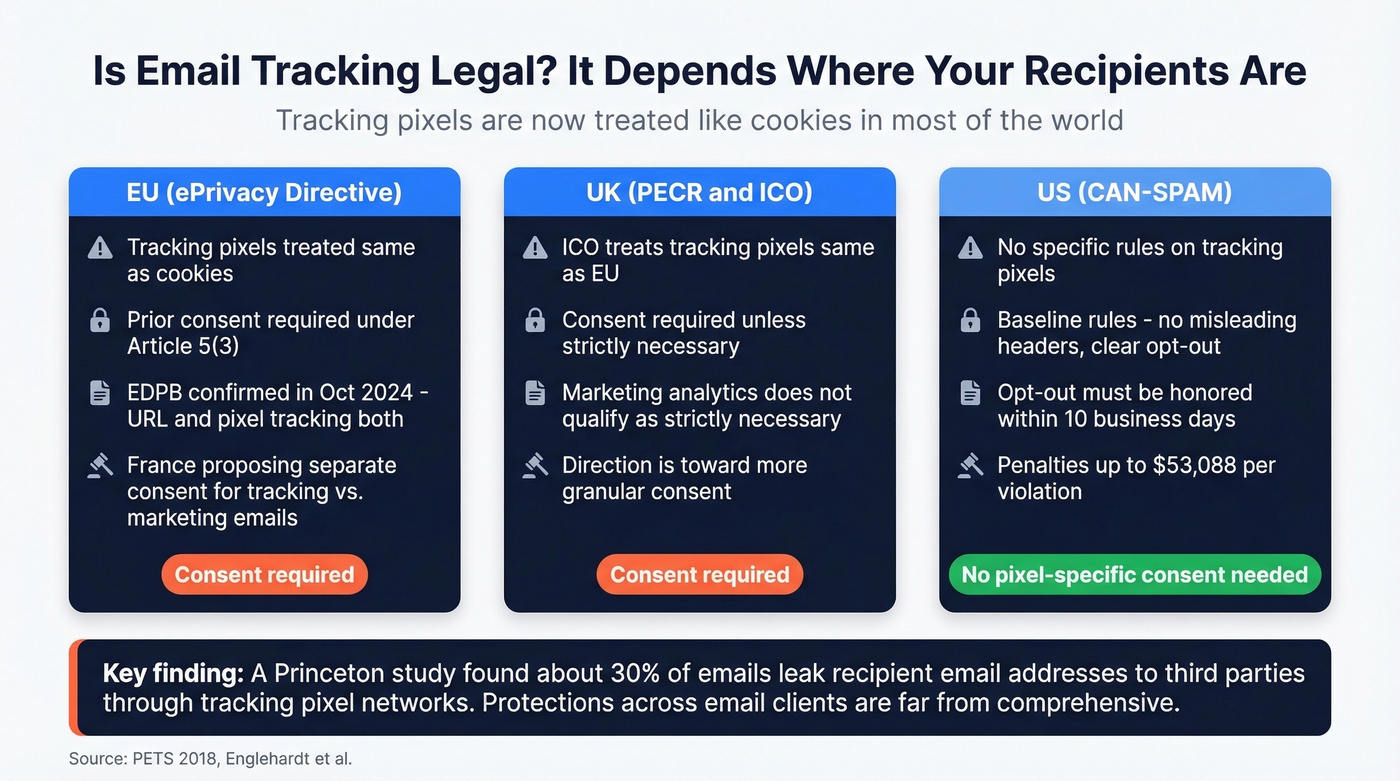
Under the ePrivacy Directive Article 5(3), email tracking pixels are treated the same as cookies - accessing or storing information on a user's device requires notice and, in most cases, prior consent. EDPB Guidelines 2/2023 (adopted October 2024) confirmed this interpretation with technology-neutral language: URL tracking and pixel tracking fall within Article 5(3) even if personal data isn't ultimately processed.
The UK's ICO takes the same position under PECR: email tracking pixels require prior consent unless they're "strictly necessary" - and marketing analytics doesn't qualify. France's CNIL published draft recommendations in June 2025 proposing separate consent for marketing emails vs. tracking pixels, with a potential carve-out for anonymized aggregate statistics. The direction is clear: more granular consent, not less.
US (CAN-SPAM)
CAN-SPAM applies to all commercial email, including B2B. It doesn't specifically regulate tracking pixels, but it sets the baseline: no misleading headers, clear opt-out mechanism honored within 10 business days, physical postal address included, and penalties up to $53,088 per violating email. If your tracking setup involves deceptive practices - hiding the commercial nature of an email, for instance - CAN-SPAM exposure is real.
What the Research Shows
A Princeton study published in PETS 2018 found that about 30% of emails leak the recipient's email address to one or more third parties when viewed, through a network of hundreds of third-party trackers embedded via pixels. The study evaluated defenses across 16 email servers and clients and found protections "far from comprehensive."
How to Block Email Tracking
If you're on the receiving end and want to limit tracking exposure, here's what works.
Disable remote image loading in your email client settings. This prevents tracking pixels from firing. In Gmail, go to Settings, then Images, then "Ask before displaying." Outlook and most desktop clients offer the same toggle.
Use tracker-blocking extensions. PixelBlock (Chrome) strips tracking pixels from Gmail. Trocker does the same for multiple providers. uBlock Origin catches many tracking domains at the network level.
Inspect the raw source. In Gmail, click the three-dot menu and select "Show original." Search for <img> tags with URLs containing strings like "track," "open," "pixel," or long alphanumeric IDs. A 1x1 image pointing to a third-party domain is your tracking pixel.
Switch to a privacy-focused provider. ProtonMail and Tuta block remote content by default and strip known tracking pixels automatically. There's also a security dimension: tracking pixel domains that change hands could serve malicious content or redirect to unexpected destinations.
Use a VPN to mask your IP address if you do load remote images. This prevents geolocation tracking even when pixels fire.
Best Email Tracking Tools in 2026
If you're going to monitor engagement - and most teams should, just with realistic expectations - here are the tools worth considering. We've tested several of these, and the consensus on r/EmailProspecting aligns with our experience.
| Tool | Best For | Starting Price | Key Feature |
|---|---|---|---|
| Hunter MailTracker | Solo Gmail users | Free / ~$20/mo | Simple open + click |
| Mailsuite | Freelancers | Free / EUR 14.99/user/mo | Real-time alerts |
| HubSpot Sales | Sales + CRM | Free | CRM-native tracking |
| Yesware | Mid-market sales | Free (limited) / $19/user/mo | Templates + analytics |
| Mixmax | Outbound sequences | Free / $12/user/mo | Scheduling + tracking |
| Streak | Gmail power users | Free / $59/user/mo (full CRM) | Full CRM in Gmail |
| Boomerang | Inbox management | Free / $4.98/mo | Send-later + receipts |
| Right Inbox | Budget-conscious | Free / $5.95/mo | Lightweight, cheap |
Solo Users - MailTracker or Mailsuite
If you just need "did they open it?" without CRM overhead, Hunter MailTracker is a popular pick for a reason. The free tier covers basic tracking for Gmail. Mailsuite adds real-time notifications and works well for freelancers managing a handful of client relationships. Neither will replace a proper sales stack, but they're not trying to.
Sales Teams - HubSpot or Yesware
HubSpot Sales Hub's free tier includes email tracking with CRM integration - hard to beat if you're already in the HubSpot ecosystem. Yesware targets mid-market teams who want email templates, analytics, and tracking without switching CRMs.
Here's where tracking earns its keep: a rep sees a prospect clicked the pricing link three times in two hours. That's a buying signal worth acting on immediately - not tomorrow, not after the next sequence step.
If you’re standardizing your stack, compare options in our roundup of SDR tools.
Skip Streak Unless You Live in Gmail
Mixmax combines scheduling, tracking, and basic sequencing at $12/user/mo - solid for small outbound teams running Gmail. Streak turns Gmail into a lightweight CRM with pipeline tracking built in, but at $59/user/mo for full CRM features, it's overpriced for what you get. If your workflow already extends beyond Gmail - Salesforce, HubSpot, Slack - Streak's walled-garden approach creates more friction than it solves. Mixmax is the better value for pure outbound.
If you’re evaluating alternatives, see our tested list of Mixmax alternatives.
Clean Data: The Step Every Tracking Guide Skips
Let's be honest: most tracking problems aren't tracking problems. They're data quality problems.
Every tracking guide focuses on what happens after the email arrives. Almost none address the upstream issue that makes tracking data meaningless in the first place - bad email addresses. We've seen this pattern dozens of times with teams who come to us frustrated that their "engagement metrics are broken."
Here's the chain reaction. You send to an unverified list. 15-20% of addresses are invalid. Those emails bounce. Your email service provider notices the bounce rate and dings your sender reputation. Future emails - even to valid addresses - start landing in spam. In the spam folder, tracking pixels never load, links never get clicked, and your dashboard shows zero engagement from people who would have replied if they'd ever seen your message.
If you’re diagnosing this, start with email bounce rate benchmarks and fixes.
Tracking tells you what happened after the email arrived. Verification makes sure it arrives.

Prospeo's 5-step email verification - including catch-all handling, spam-trap removal, and honeypot filtering - delivers 98% email accuracy across 143M+ verified addresses. The data refreshes every 7 days, not the 6-week industry average. Meritt cut their bounce rate from 35% to under 4% after switching, which meant their tracking data finally reflected actual prospect behavior instead of deliverability failures.
If you’re cleaning lists at scale, our spam trap removal guide can help prevent reputation damage.
Before you install a tracking pixel or debate open rates, verify your list. It's the one step that makes every other metric trustworthy.
The article makes it clear: replies and clicks are the only outbound metrics worth measuring in 2026. But replies require reaching real inboxes - and that starts with verified contact data. Prospeo delivers 143M+ verified emails with a 5-step verification process that strips spam traps and honeypots before they torch your domain.
Stop tracking phantom opens. Start generating real replies.
FAQ
Can you track emails in Gmail for free?
Yes. Hunter MailTracker, Mailsuite, and HubSpot Sales Hub all offer free Gmail tracking tiers. Free plans typically cap advanced features like click tracking and analytics, but basic open notifications work out of the box.
Do tracking pixels hurt deliverability?
They can. Gmail changes in late 2024 caused emails with tracking pixels to trigger "suspicious message" warnings for low-reputation senders. For cold outreach specifically, disabling open tracking and measuring reply rate produces cleaner signals and fewer spam flags.
Are email open rates accurate in 2026?
No - not for individual-level decisions. Apple MPP inflates open rates by 15-20 percentage points across roughly half of all email opens. Use opens only as a directional trend line and deliverability canary, never for lead scoring.
What should I track instead of opens?
Reply rate, click-through rate, conversion rate, and inbox placement rate. These reflect deliberate human actions that proxies and bots can't reliably distort. For outbound sales teams, reply rate is the gold standard.
How does bad data affect tracking accuracy?
Invalid emails bounce, damaging sender reputation and pushing future messages to spam - where pixels never load and clicks never happen. Verifying addresses before sending ensures your engagement data reflects real behavior instead of deliverability failures.