

Best Way to Personalize a Subject Line in 2026
A 5.5-million-email study found personalized email subject lines hit 46% open rates versus 35% without - and reply rates jumped from 3% to 7%. That's not a marginal lift. That's the difference between a campaign that books meetings and one that gets ignored.
So what's the best way to personalize a subject line? After reviewing thousands of cold email campaigns, we've landed on a clear answer: better data and smarter variable selection beat better copywriting every time.
The Framework (Quick Version)
- Fix your data first. A broken merge tag - "Hi {First Name}" sitting in someone's inbox - does more damage than a generic subject line ever would.
- Personalize beyond first name. Company name, trigger events, and role-specific pain points move reply rates. First name alone is table stakes that recipients now pattern-match as "sales email."
- Stop measuring opens. Apple Mail Privacy Protection drove an 18-point open-rate increase in the six months after it launched, based on a study of 80,000+ email marketing accounts. Track replies and clicks instead.
What the Data Actually Shows
Belkins analyzed 5.5M emails sent Jan 1 - Dec 31, 2024 with additional insights via a partnership with Reply.io. A few patterns held up consistently.
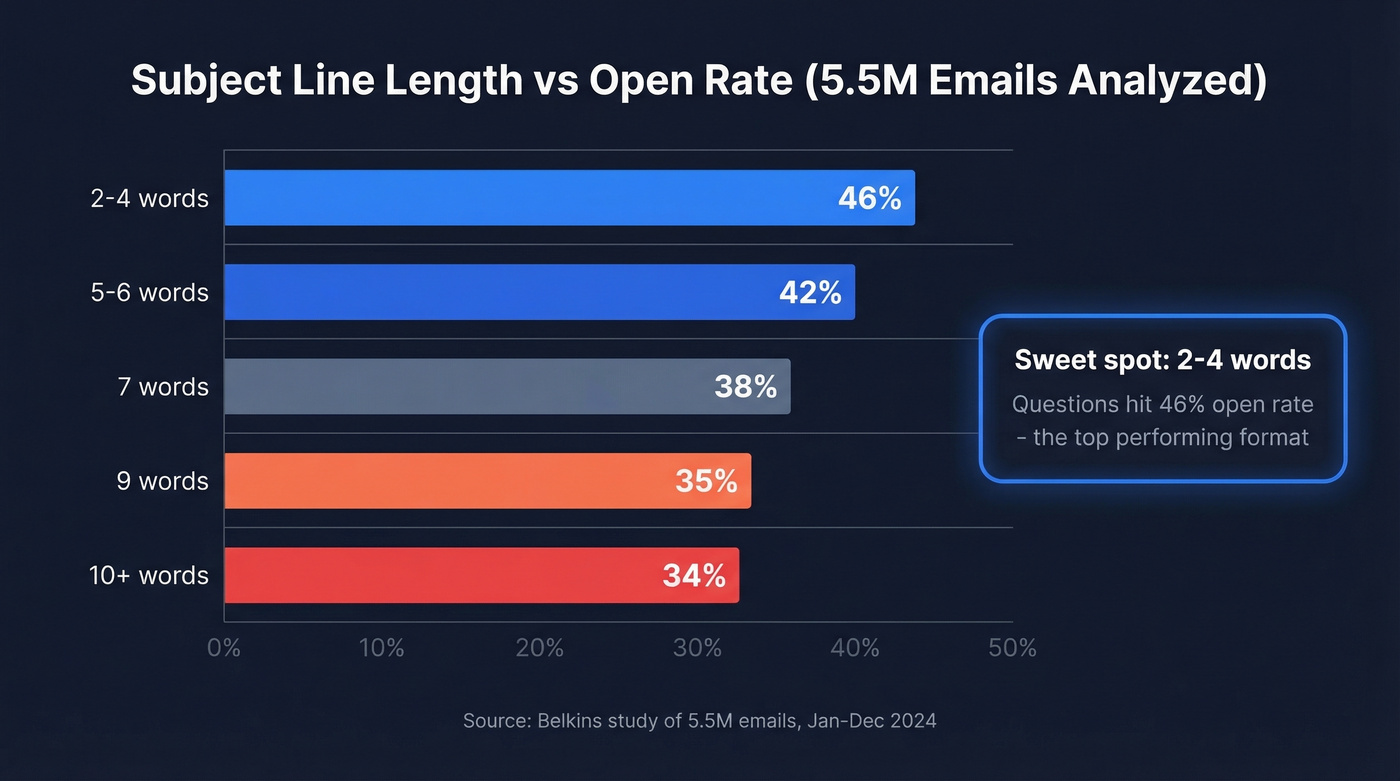
Short subject lines win. Two to four words hit that 46% open rate ceiling, and performance drops steadily after seven words - nine-word subject lines fell to 35%, ten-word lines to 34%. The takeaway isn't "be cryptic." It's "be precise and stop padding."
Questions matched that same 46% open rate, making them the top-performing format. A well-placed question triggers curiosity without feeling like clickbait. Numbers, on the other hand, didn't move the needle - 27% with numbers versus 28% without.
The reply rate data matters more than opens, though. Personalized subject lines pulled 7% reply rates versus 3% without - a 133% lift on the metric that actually correlates with pipeline.
Here's the thing: most teams obsess over subject line keywords and copy when the real bottleneck is data quality. The cleverest template in the world breaks when your CRM has the wrong job title. Fix the plumbing before you redecorate.
What to Personalize Beyond First Name
First name insertion used to feel novel. It's the minimum now - and for cold email, it can backfire. The consensus on r/sales is pretty clear: first name in the subject line from an unknown sender is a "quick delete" signal for savvy buyers.
| Variable Type | Cold Email | Marketing Email |
|---|---|---|
| First name | Table stakes | Table stakes |
| Company name | High impact | B2B only |
| Job title / role | High impact | Segmentation |
| Trigger event | Highest impact | Less common |
| Tech stack | Niche but powerful | N/A |
| Location | Contextual | Regional |
| Purchase history | N/A | High impact |
| Browsing behavior | N/A | Highest impact |
Cold Email Variables
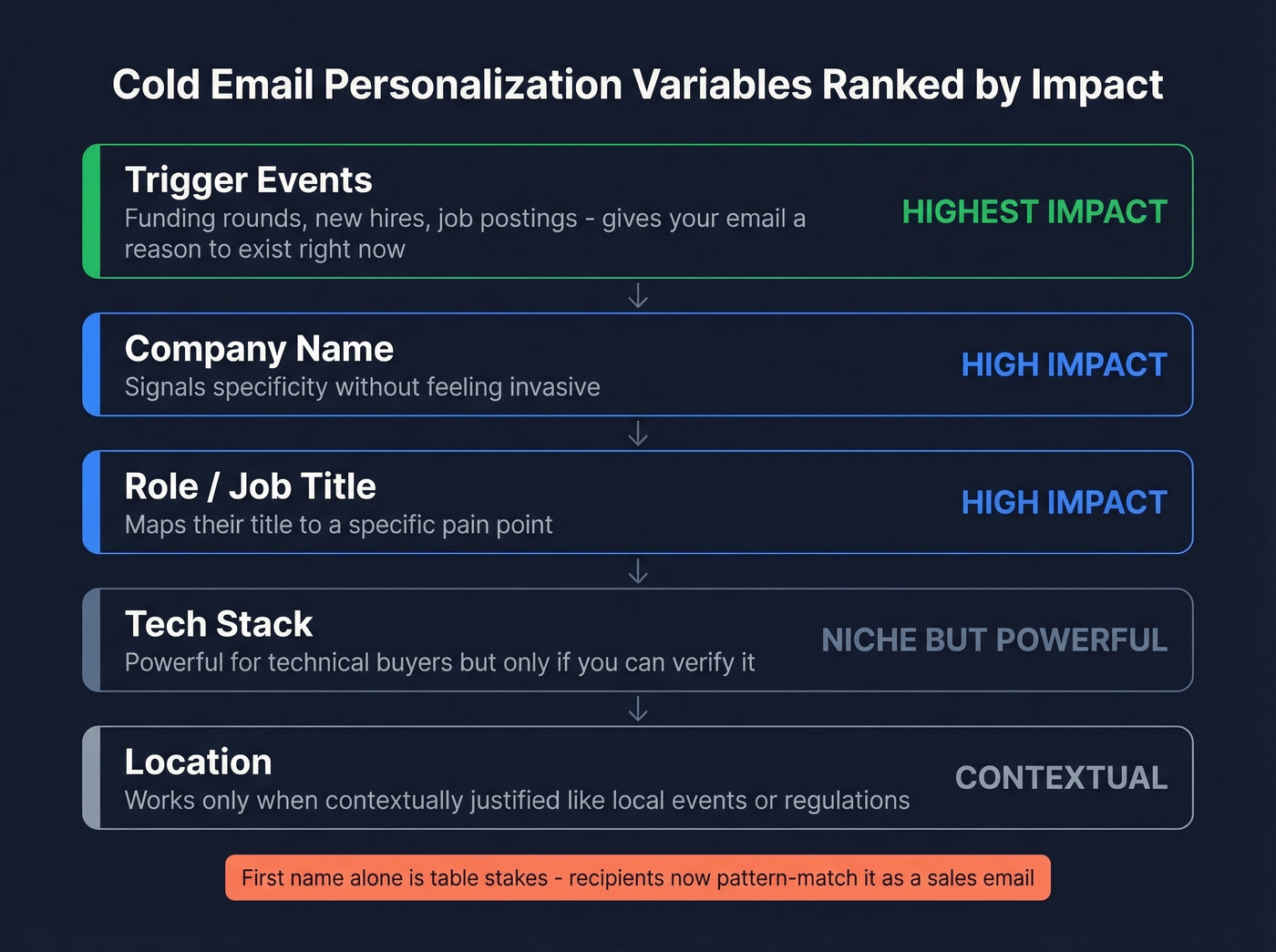
Five categories move cold email reply rates, ranked by impact.
Trigger events deliver the highest ROI. A funding round, a new executive hire, a job posting that signals a pain point - these give your subject line a reason to exist right now. "Re: your Series B" tells the recipient you've done homework. "Quick question" tells them you haven't.
Company name signals specificity without feeling invasive. "Question about Acme's outbound stack" reads like a relevant inquiry, not a mass blast.
Role-based personalization maps the recipient's title to a pain point. A VP of Sales cares about pipeline velocity. A RevOps lead cares about data hygiene. Same product, different subject line.
Tech stack is niche but powerful for technical buyers. If you know they run HubSpot, referencing it immediately narrows the conversation. Skip this variable if you can't verify the data - guessing wrong is worse than staying generic.
Location works when contextually justified, like referencing a local industry event or market-specific regulations. "Hey from Chicago" without a reason feels hollow.
Marketing Email Variables
Marketing emails have access to behavioral data that cold email doesn't. Browsing history, purchase patterns, and lifecycle stage let you trigger emails based on what someone actually did - not just who they are. A cart abandonment subject line with the product name will always outperform a generic "Don't forget!" because it's responding to a specific action.
Email marketing returns $36 per $1 spent on average, and behavior-triggered personalization is where most of that value concentrates. B2B cold email consistently sees the largest personalization lifts across industries, but e-commerce and SaaS marketing emails benefit significantly from behavioral triggers too.
The Creepy Line
If you can find the information in 30 seconds on a company website or professional profile, it's fair game. Funding rounds, job titles, tech stack, hiring patterns - all public, all relevant.
The moment you reference personal-life signals - travel, family, social media posts about their weekend - you've crossed from relevant to invasive. "Saw you were in Miami last week" isn't personalization. It's surveillance.
Subject Line Templates That Work
Copy-ready templates. Swap the bracketed variables with your data.
Trigger event templates:
- Re: [Company]'s [funding round / new hire / expansion]
- [Company] + [trigger event] - quick thought
- Noticed [Company] is hiring [role] - relevant?
Role-based templates:
- [First name], question for [mapped title category] leaders
- How [similar company] solved [role-specific pain point]
Tech stack templates:
- [Tool they use] + [your product category] - 2-min question
- Replacing [competitor tool] at [Company]?
Question-based templates (questions hit 46% opens):
- What's [Company]'s plan for [relevant challenge]?
- Still using [current tool] for [use case]?
- [First name] - open to a faster way to [outcome]?
Hybrid templates:
- [Trigger event] at [Company] - can we help?
- [First name], [Company]'s [metric] vs industry avg
- Saw [Company]'s [public move] - thought of this
- [Mutual connection] suggested I reach out about [topic]
Keep templates as short as possible. Two to four words is the performance sweet spot, but a five-to-six word template with a strong variable still outperforms a vague two-word generic.
If you want more copy patterns, start with these subject line templates and this library of subject line ideas.

Trigger events, company names, tech stack - every personalization variable in this article depends on accurate, fresh data. Prospeo refreshes 300M+ profiles every 7 days and verifies emails at 98% accuracy, so your subject lines render perfectly every time.
Stop writing clever subject lines on top of broken data.
Character Limits and Mobile
Mobile inboxes commonly truncate subject lines at about 30 characters. Web-based inboxes like Gmail and Yahoo usually cut around 55 characters. Aim for 40 to 50 characters total, but front-load your personalization token so it's visible before the cut.
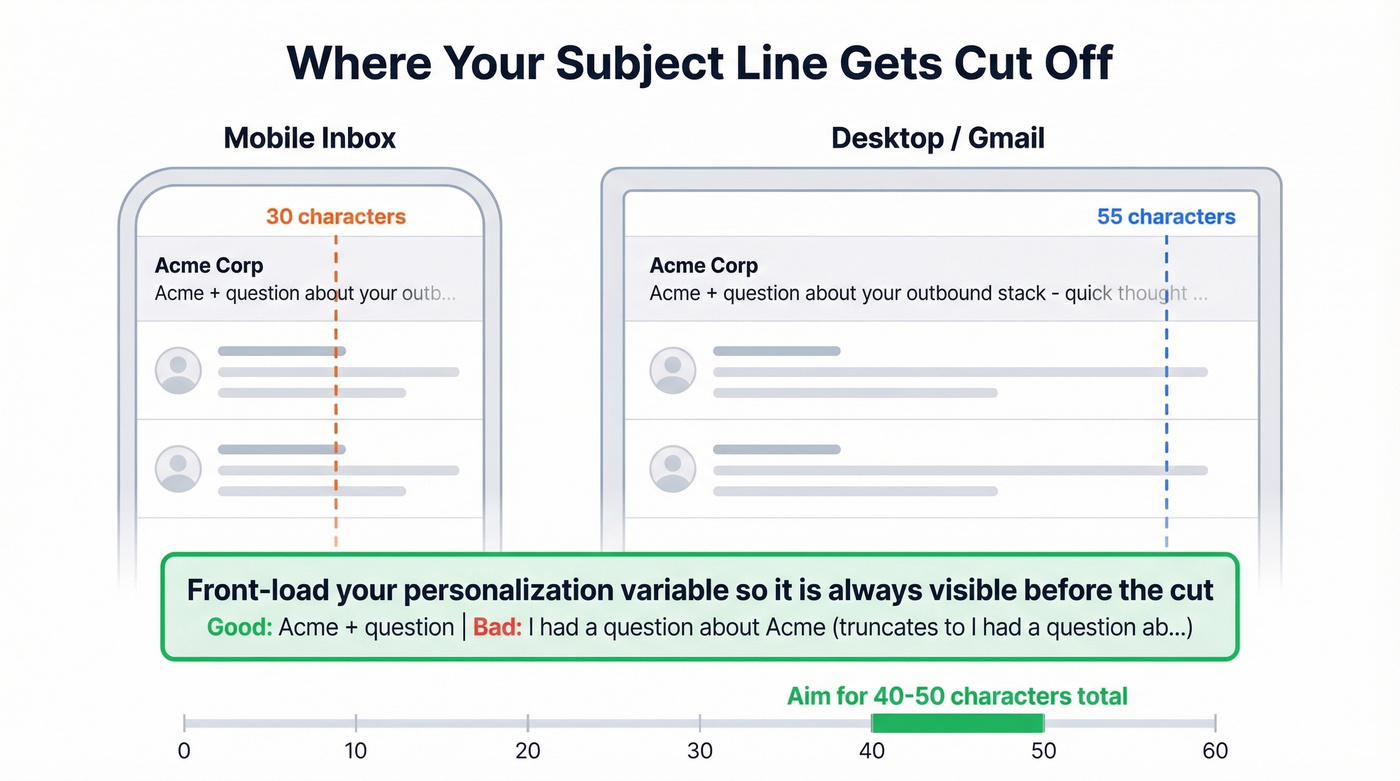
30 characters is what mobile users see. Your personalized variable and core hook must fit here. 55 characters is what desktop and webmail users see - use the extra space for context, not filler. Front-load always. "[Company] + question" beats "I had a question about [Company]" because the second version truncates to "I had a question ab..." on mobile.
Mistakes That Kill Deliverability
These aren't just engagement killers - they're deliverability risks. Every mistake here trains inbox algorithms to bury your domain.
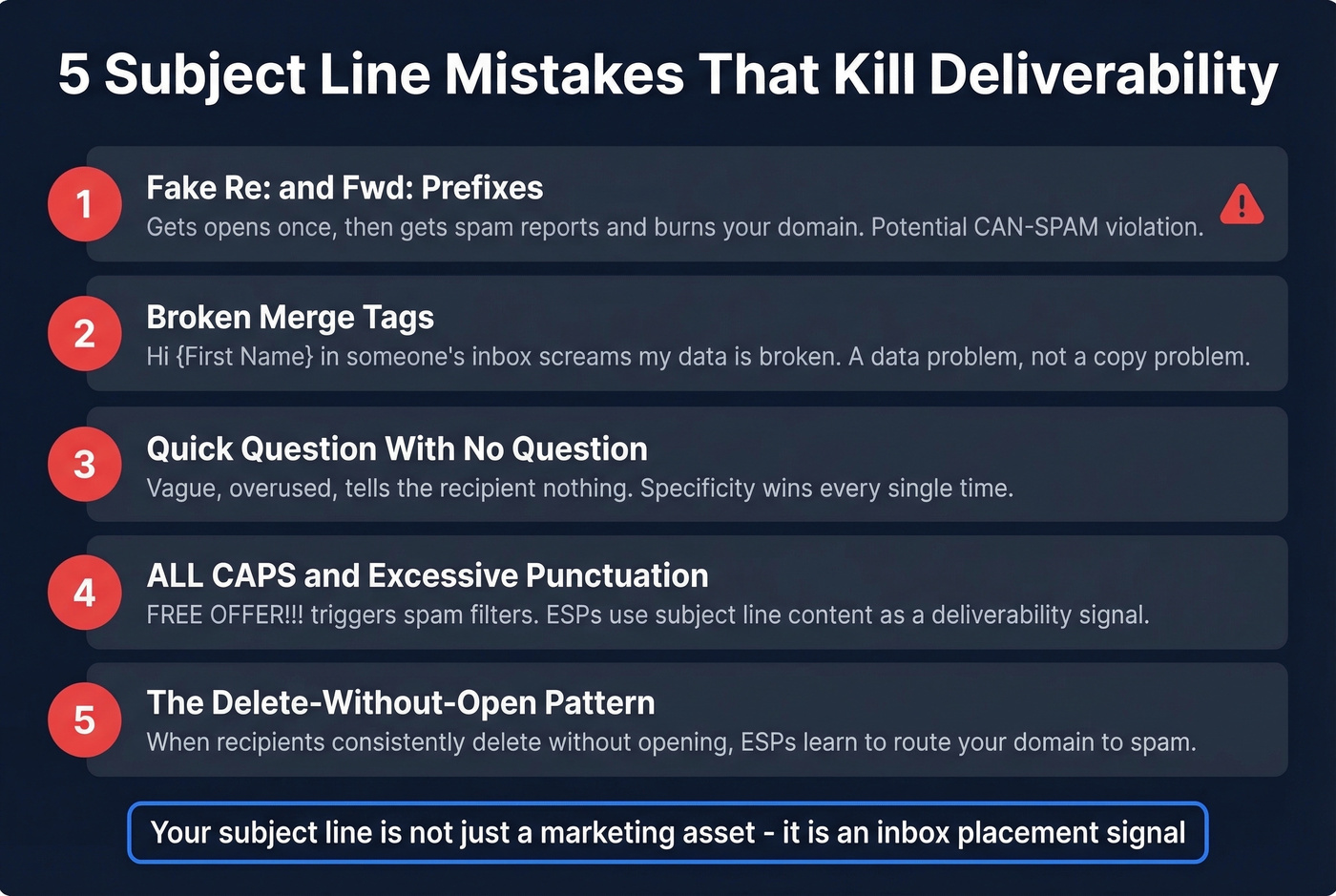
Deceptive "Re:" and "Fwd:" prefixes. This trick gets opens - once. Then it gets spam reports, trust destruction, and potential CAN-SPAM violations. We've seen teams burn domains they spent months warming because of this shortcut. It's not worth it.
Broken merge tags. "Hi {First Name}" sitting in someone's inbox is worse than no personalization at all. It screams "my data is broken." This is a data problem, not a copy problem, and it's entirely preventable with proper enrichment.

"Quick question" with no question. Vague, overused, and tells the recipient nothing about why they should open. Specificity wins every time - "Your size is back in stock" beats "Don't miss out!" because it references something concrete.
ALL CAPS and excessive punctuation. "FREE OFFER!!!" doesn't just annoy recipients - it triggers spam filters. ESPs use subject line content as a deliverability signal, and aggressive formatting is a red flag.
The delete-without-open pattern. When recipients consistently delete your emails without opening, ESPs learn to route your domain to spam. Your subject line isn't just a marketing asset. It's an inbox placement signal, and bad ones train algorithms to bury you.
If deliverability is slipping, start with domain blacklisting checks and a proper email domain spam check.
Why Open Rates Lie
You might be optimizing subject lines against a metric that's been broken since 2021.
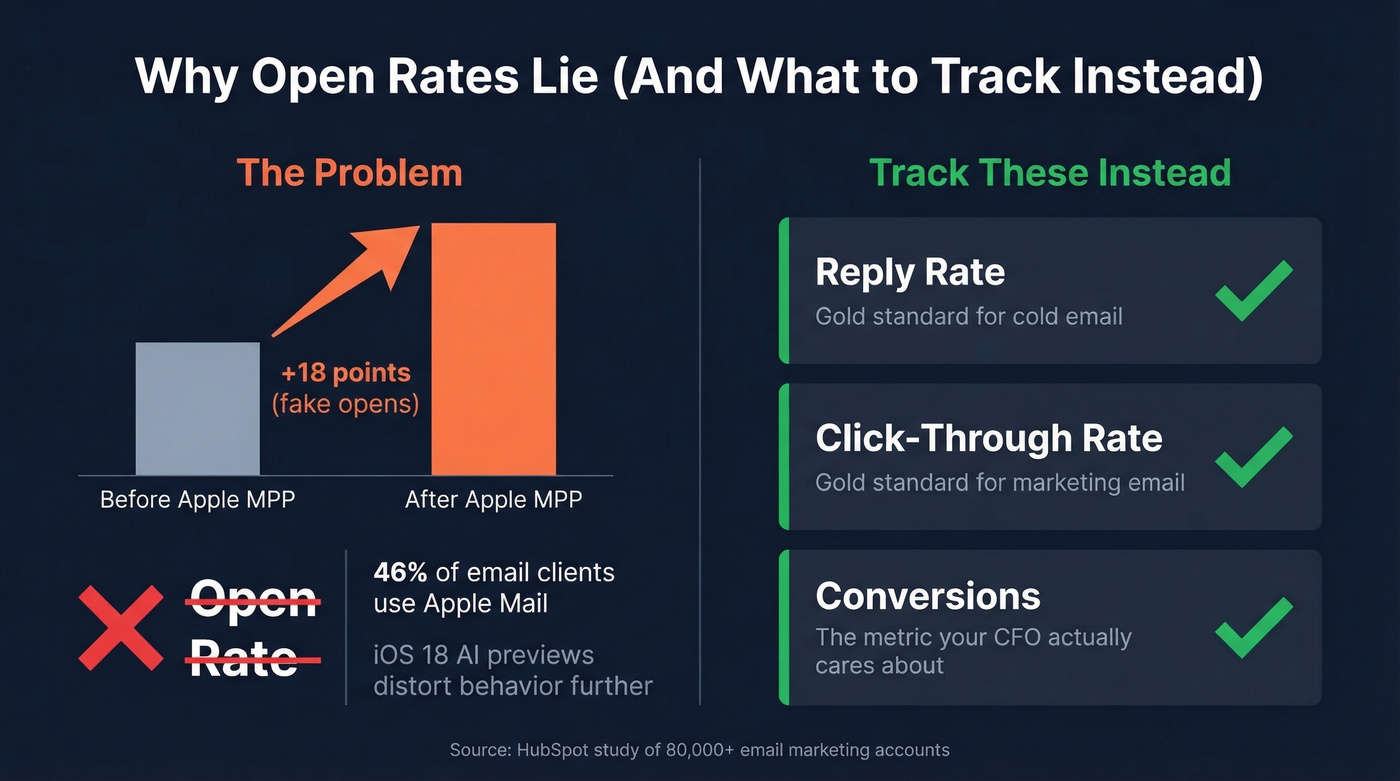
Apple Mail Privacy Protection preloads tracking pixels via Apple's proxy servers, firing "opens" even when nobody reads the email. A study of 80,000+ email marketing accounts found open rates increased 18 points in the six months after MPP launched. Apple Mail accounts for 46% of email clients, so the distortion is massive. And iOS 18 made things worse with AI-generated email previews and inbox categories that change how recipients encounter your subject line entirely.
Track these instead:
- Reply rate - the gold standard for cold email
- Click-through rate - the gold standard for marketing email
- Conversions - the metric your CFO actually cares about
If you're still running subject line A/B tests measured by open rate, you're optimizing against noise. Use a cleaner email marketing measurement framework instead.
Fix Your Data Before Your Copy
Let's be honest: the best personalized subject line breaks when your CRM has the wrong first name or an outdated job title. "Question about Acme's outbound stack" becomes embarrassing when the recipient left Acme six months ago. Broken merge tags aren't a copywriting failure - they're a data quality failure.
CRM data decays fast. People change jobs, get promoted, switch companies. If your enrichment refreshes every four to six weeks, your personalization variables can be stale by the time they hit an inbox. The upstream pipeline matters more than the downstream copy: accurate contact data, correct merge tags, effective personalization.
Prospeo handles this at the infrastructure level. With 143M+ verified emails at 98% accuracy and a 7-day data refresh cycle - versus the six-week industry average - your merge tags stay current. CRM enrichment returns 50+ data points per contact, and the API match rate sits at 92%, so variables like job title, company name, and department are accurate on send day. One team, Meritt, cut bounce rates from 35% to under 4% within weeks of switching their data source.

If you're building a data stack for this, compare data enrichment companies and follow a CRM database enrichment process.
Role-based and tech-stack personalization require data most CRMs don't have. Prospeo's 30+ search filters - including job title, technographics, funding, and hiring signals - give you the exact variables that turn generic subject lines into reply magnets.
Build subject lines worth opening at $0.01 per verified email.
How to A/B Test Subject Lines
- Test one variable at a time. Don't change the personalization token, the length, and the format simultaneously. You won't know what drove the result.
- Use reply rate or click rate as your primary metric. A subject line that gets 50% opens and 1% replies lost to one that gets 38% opens and 5% replies.
- Set realistic lift expectations. Personalization typically lifts opens 1-5% in controlled tests. That's meaningful at scale, but don't expect a single test to double your pipeline.
- Run sufficient volume. Aim for at least 200-300 per variant before drawing conclusions, and make sure your contact data is enriched before launching - otherwise you're testing data accuracy, not copy effectiveness.
For a deeper testing process, see how to A/B test email variations.
FAQ
Does first name still work?
It's table stakes, not a differentiator. First name alone can signal "automated sales email" to experienced buyers. Pair it with a second variable like company name or a trigger event, or test removing it entirely. The 5.5M-email dataset shows lifts come from relevance, not just name insertion.
What's the ideal subject line length?
Two to four words hit 46% open rates in the 5.5M-email study. Performance drops noticeably after seven words. On mobile, only about 30 characters display before truncation, so front-load your personalized element. Aim for 40-50 characters total.
How do you personalize subject lines at scale?
The bottleneck isn't your email platform - it's the data feeding your merge tags. A broken first name or outdated job title ruins any template. Start with a data enrichment tool that keeps variables current, then use any sequencing tool with merge fields and conditional logic for execution.