

How to A/B Test Email Variations That Actually Produce Valid Results
You ran an A/B test last month. Version B "won" with a 3% higher open rate. Your click rate didn't move. Conversions didn't budge. You optimized for noise - and most teams do this every single week without realizing it.
When you A/B test email variations, you're sending two versions of the same email - differing by one element - to separate audience segments and measuring which performs better. Simple concept. The gap between running a test and running one that tells you something real is enormous. Let's close it.
What You Need Before Testing
Three things most guides skip that determine whether your test produces a real answer or a coin flip:
~20,000 recipients per variation. That's the minimum for statistical significance at typical email conversion rates. Testing on 2,000 people and declaring a winner is guessing with extra steps.
Stop using open rate as your winner metric. Apple Mail Privacy Protection inflated open rates by 18 percentage points. Click-to-open rate (CTOR), straight CTR, and conversions are the metrics worth optimizing in 2026. (If you want a deeper breakdown, see open rate vs click rate.)
Clean your list before you test. If 10% of your emails bounce, you just removed 10% of your test audience from ever engaging. Dirty data corrupts results before the test even starts - especially when you’re dealing with invalid emails and hard bounces.
Know Your Baseline First
You can't measure lift if you don't know where you're starting. Before running any test, pull your current benchmarks and compare them against industry averages.
Mailchimp's benchmark data across billions of emails:
| Industry | Avg Open Rate | Avg Click Rate |
|---|---|---|
| Business & Finance | 31.35% | 2.78% |
| Nonprofit | 40.04% | 3.27% |
| Education & Training | 35.64% | 3.02% |
| E-Commerce | 29.81% | 1.74% |
| All Users | 35.63% | 2.62% |
HubSpot's 2026 benchmarks paint a rosier picture: 42.35% average open rate, 2.3% CTR, and 5.3% CTOR across industries. A big reason those opens look higher is Apple Mail Privacy Protection preloading tracking pixels - those open rates aren't reliable engagement anymore.
Why Open Rate Is Broken
Apple Mail Privacy Protection preloads tracking pixels via proxy servers, registering an "open" whether or not a human ever read your email. Apple Mail accounts for 46% of email clients. HubSpot's analysis of 80,000+ email marketing accounts found open rates jumped 18 points after MPP rolled out. That's not engagement growth - it's measurement noise.
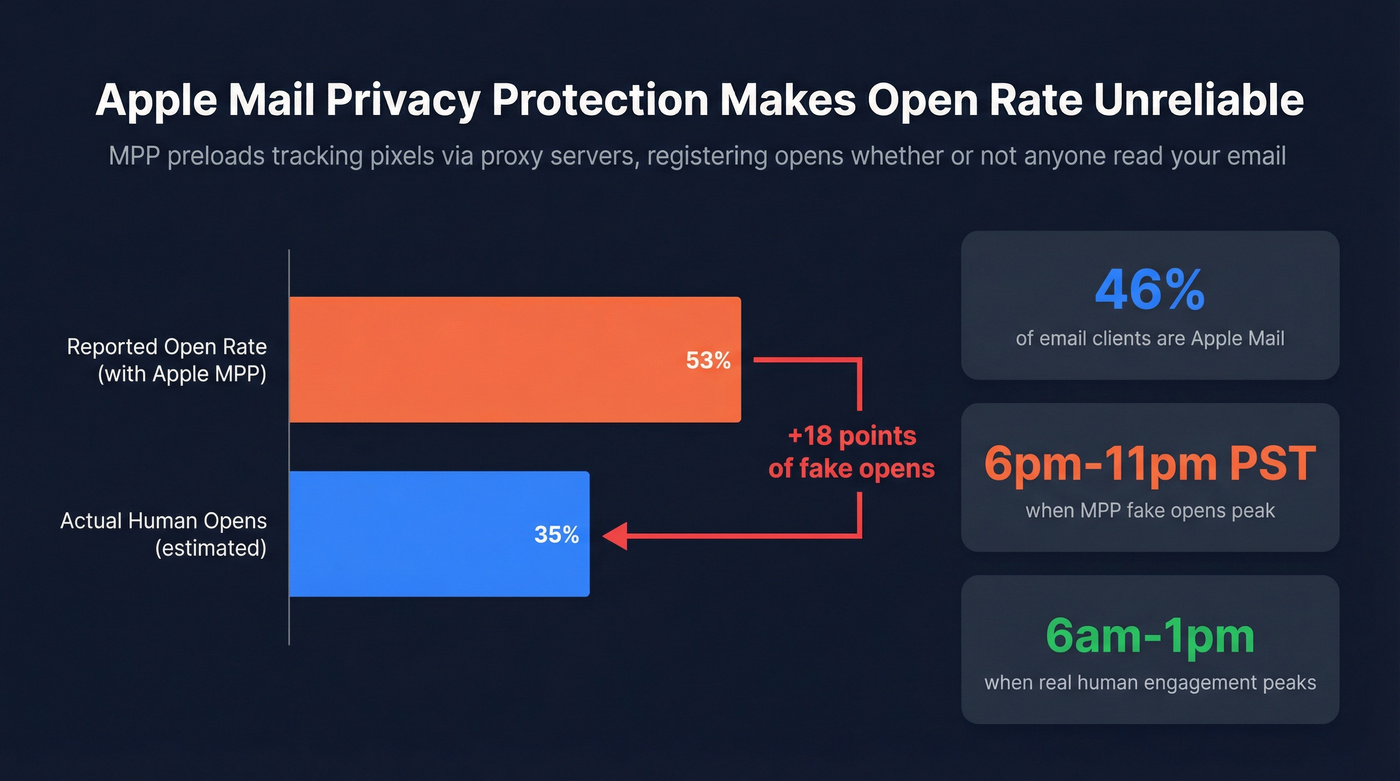
Apple's Link Tracking Protection now strips UTM parameters from links in Mail and Safari, degrading your attribution data too. Meanwhile, 77% of marketers still believe MPP is automatically activated on every Apple device - it's technically opt-in, but adoption is so high it doesn't matter. Early data from Twilio SendGrid showed MPP opens peaked between 6pm-11pm PST, hours after real human engagement typically peaks at 6am-1pm. Further proof these aren't real opens.
Here's the thing: many ESPs still default to open rate as the split test winner metric in 2026, five years after Apple MPP launched. That tells you how slowly this industry moves.
If a large share of your list uses Apple Mail, stop using open rate as your winner metric. Period. Use CTOR for content quality, straight CTR for action-driving tests, and conversion rate when you can track it downstream. (Related: real-time email tracking and what to measure instead.)

You just read it: dirty data corrupts A/B test results before the test even starts. Prospeo's 5-step email verification delivers 98% accuracy - so every recipient in your test is a real person who can actually engage. At $0.01 per email, cleaning your list costs less than one bad test cycle.
Stop optimizing for noise. Start testing on verified contacts.
8 Email Variations Worth Testing
Subject Lines (Highest Impact)
Subject lines have the highest impact-to-effort ratio of anything you can test. They're also the easiest to isolate as a single variable. Four proven pairs from MailerLite's testing guide, each built on a different psychological principle:
| Version A | Version B | Principle |
|---|---|---|
| 3 ways to boost your productivity | Are you using these 3 tricks to boost productivity? | Curiosity gap |
| 20% off sitewide, this week only! | Janet, we're giving you 20% off this week! | Name personalization |
| Lucky you, take 10% off for St Patrick's Day | Lucky you, take 10% off for St Patrick's Day ☘️ | Visual salience |
| Get your free sample box today | Last chance to get your free sample box! | Loss aversion |
Copy these. Swap in your brand and run them this week. You don't need 30 variants - you need one good hypothesis and enough volume to test it. If you need more ideas, pull from proven re-engagement email subject lines or these words to avoid in email subject lines.
CTAs, Send Time, and Beyond
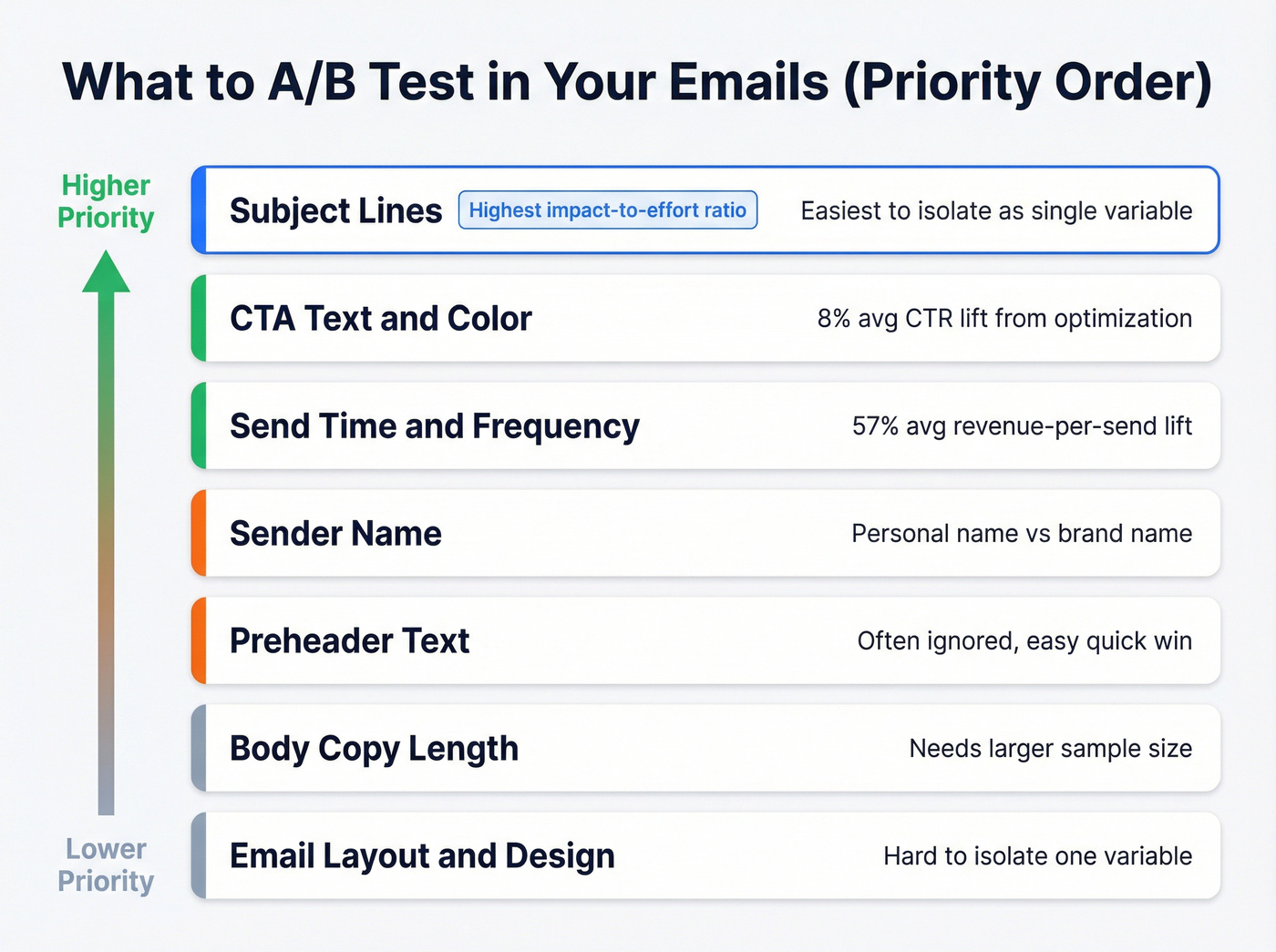
Beyond subject lines, here's what's worth your testing time in rough priority order: CTA text and color, send time, sender name, preheader text, body copy length, and layout.
Send time testing alone produces meaningful results. Attentive's aggregate data shows an 8% average CTR lift from send-time optimization and a 57% average revenue-per-send lift. JAXXON's holiday campaign test drove a 249% increase in overall ROI and 138% higher CTR - the key insight was that adding three more sends to the sequence drove the result, not just timing. For send-day testing, run a round-robin tournament: test Monday vs. Tuesday, then the winner vs. Wednesday, rather than testing all days at once. (More on timing: best time to send prospecting emails.)
Don't just test what's in the email. Test how often and when you send it.
AI-Assisted Testing: Useful, Not Magic
Platforms like Salesforce Marketing Cloud offer AI that can speed up variant creation and optimize send times based on past behavior. Klaviyo supports multi-variant testing and auto-winner selection to help you operationalize experiments faster. If you’re building a workflow around this, see AI in Email Marketing.
These features are genuinely useful for generating hypotheses. But AI doesn't eliminate the need for statistical rigor - you still need ~20,000 recipients per variant for a realistic shot at significance on typical email metrics. Use AI to generate candidates, then test them properly.
How to Run the Test Right
Pick Your Split Strategy
Your split strategy depends on list size. For lists under 10,000, use a straight 50/50 split - you need every recipient you can get for statistical power. For lists over 20,000, the 10/10/80 approach works better: send Version A to 10% of your list, Version B to 10%, wait 1-2 hours, then send the winner to the remaining 80%.
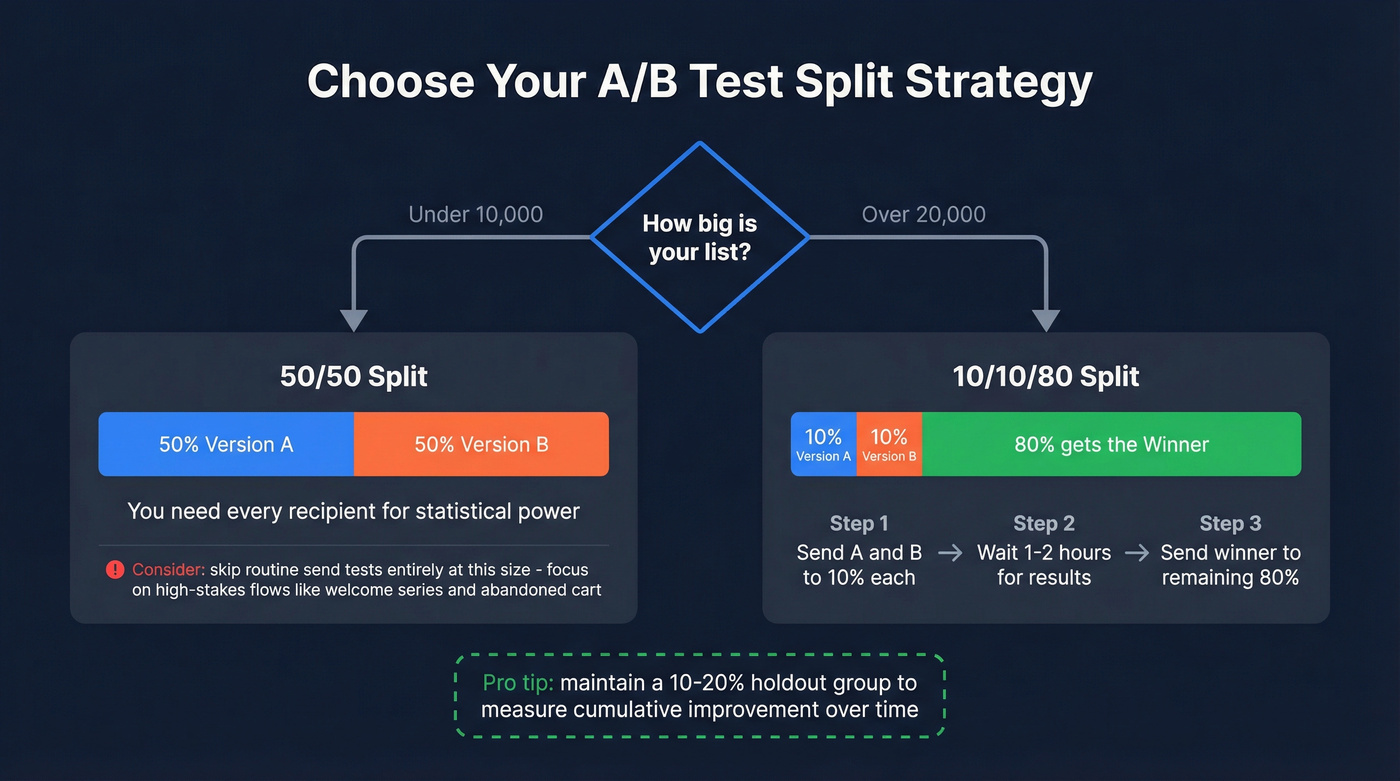
Holdout groups are also worth maintaining for ongoing optimization. A 10-20% holdout gives you a true baseline to measure cumulative improvement over time, not just individual test wins. (This pairs well with an email marketing audit so you know what to fix first.)
Calculate Your Sample Size
Say your baseline click-through rate is 2%. You want to detect a 20% relative lift - meaning you'd consider it a win if CTR rises to 2.4%. At 95% confidence, you need roughly 20,000 recipients per variation, or 40,000 total.
That's the 20,000 Rule: plan to send at least 20,000 recipients per version to have a realistic shot at significance for typical email metrics. Use free calculators from Evan Miller or Optimizely to run your own numbers with your actual baseline rates.
We've seen this scenario play out constantly: a marketing manager asks why the welcome series test has been running six weeks with no winner. The segment is 4,000 people. The math never worked. It was never going to work. You need to know that before you start, not after.
Know When to Stop
Don't stop early. This is the single most common way teams invalidate their tests.
A result that looks significant at hour two can completely reverse by hour 24 as different time zones engage. ESPs auto-declare winners after timed windows even without reaching statistical significance - that's a convenience feature, not a statistical guarantee. Bayesian methods calculate the probability one variant is better; frequentist methods test whether the difference is statistically significant. Either way, you need enough data. If you tested on 2,000 recipients and declared a winner after 45 minutes, you flipped a coin.
Hot take: If your list is under 10,000, stop A/B testing routine sends entirely. You rarely have enough power to detect meaningful differences. Focus testing on high-stakes flows - welcome series, abandoned cart, product launches - where downstream revenue justifies the effort. For your Tuesday newsletter, just send the better version based on what you've already learned.
5 Mistakes That Invalidate Results
1. Testing too many variables at once. Change the subject line, CTA, and hero image simultaneously and you can't attribute the result to any single element. One variable per test. Always.
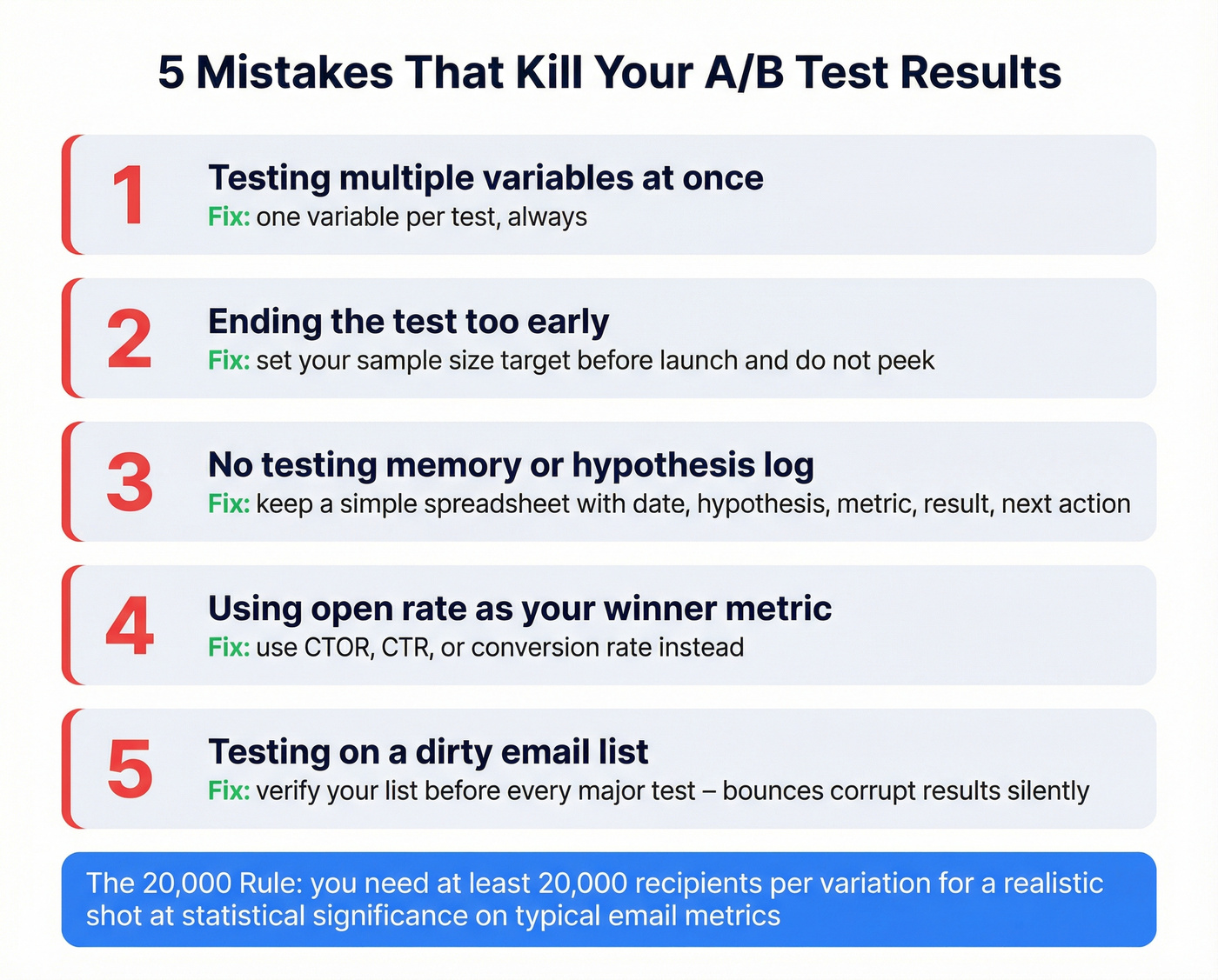
2. Ending tests early. False positives from premature stopping are the #1 reason teams "learn" things from A/B tests that aren't true. Set your sample size target before you launch and don't peek.
3. No testing memory. In our experience, teams that skip hypothesis logging end up re-testing the same things quarter after quarter. A simple spreadsheet is enough:
| Date | Hypothesis | Metric | Result | Next Action |
|---|---|---|---|---|
| 2026-03-12 | Urgency subject line lifts CTR by 15% | CTR | +11% (not significant at n=8,000) | Retest on next product launch with full list |
4. Using open rate as your winner metric. In 2026, optimizing for open rate is optimizing for Apple's proxy servers. Use CTOR, CTR, or conversion rate.
5. Testing on a dirty list. This is the mistake nobody talks about, and it corrupts everything else. If 10% of your list bounces, you've removed 10% of your test audience from ever engaging. Worse, high bounce rates tank your sender reputation, which means deliverability drops unevenly across your test variants. Run your list through a verification tool like Prospeo's email finder before every major test - its 5-step verification catches invalid addresses, catch-all domains, spam traps, and honeypots at 98% accuracy, so your test audience is actually the audience you think it is. (If you’re comparing tools, start with email checker tool and email ID validator roundups.)
You need 20,000+ recipients per variation for statistical significance. That's hard when your list is full of bounces and dead addresses. Prospeo gives you access to 143M+ verified emails refreshed every 7 days - build test-ready segments that actually reach inboxes.
Hit your sample size with contacts that don't bounce.
A/B vs. Multivariate Testing
A/B testing compares two versions with one variable changed. Multivariate testing evaluates multiple elements simultaneously and tests the interactions between them. The tradeoff is traffic: 2 subject lines x 2 CTA buttons = 4 combinations. At 20,000 recipients per combination, you need 80,000 total. Add a third element and you're at 160,000.
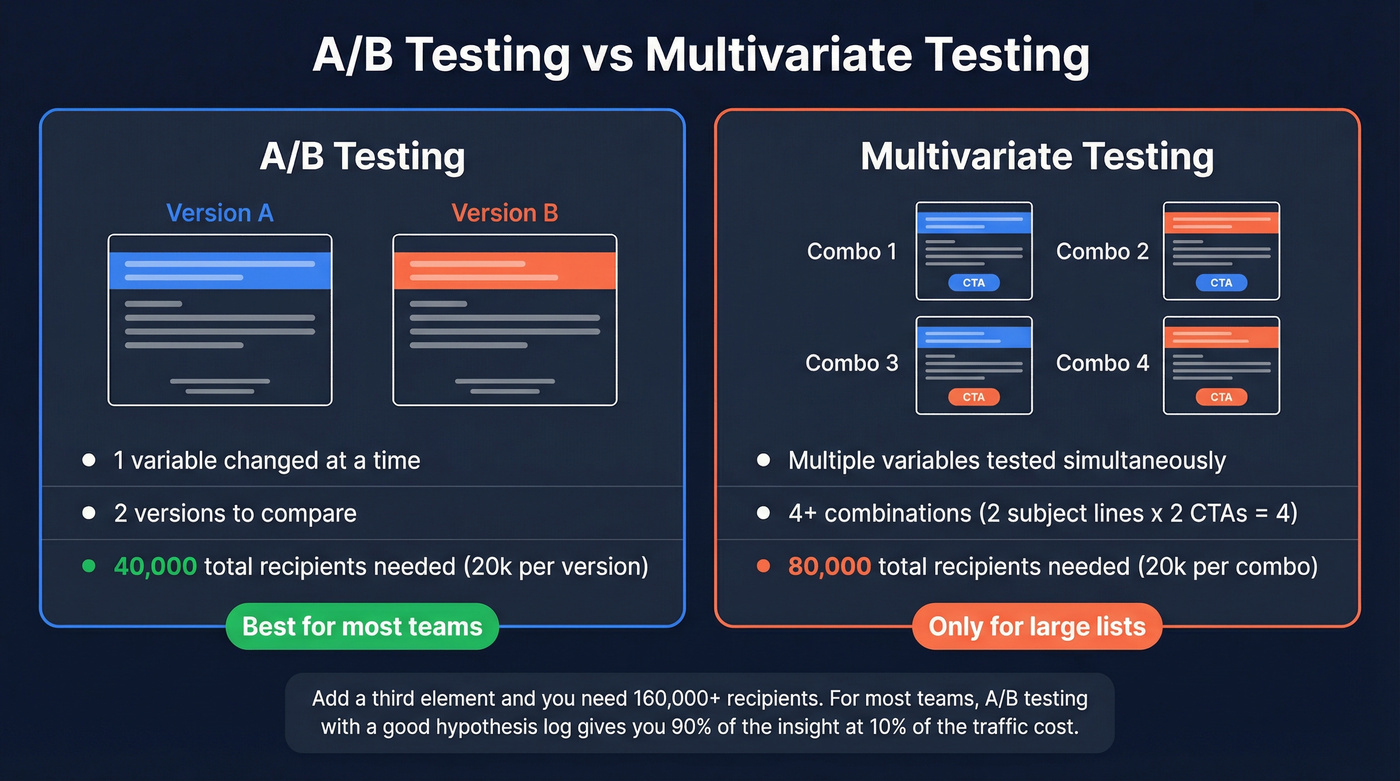
For most teams, A/B testing with a good hypothesis log gives you 90% of the insight at 10% of the traffic cost. Save multivariate for your highest-volume flows where you have the list size and the revenue justification. Skip it if your total list is under 100,000 - you'll burn months waiting for significance and learn nothing. This matches what practitioners consistently report in email marketing communities on Reddit: the teams that see real gains are the ones with enough volume and discipline to wait for significance, not the ones running the fanciest test types.
FAQ
How long should I run an email A/B test?
Wait until both variants reach at least 20,000 recipients each - most ESPs' 1-2 hour auto-winner windows aren't enough for statistical validity. For smaller lists using a 50/50 split, let the test run 24-48 hours to capture different time-zone engagement patterns before calling a winner.
Should I test subject lines or CTAs first?
Start with subject lines. They produce the highest impact-to-effort ratio and generate measurable differences even on moderately sized lists. Once you've optimized subject lines, move to CTA text and placement, then send time. Build sequentially so each test informs the next.
Can small lists still run meaningful split tests?
Lists under 5,000 rarely have enough statistical power to detect meaningful differences on routine sends. Focus testing on high-stakes flows - welcome series, abandoned cart, product launches - where downstream revenue justifies the effort and engagement rates are higher.
How does list quality affect testing accuracy?
Dirty lists inflate bounce rates, shrink your effective sample size, and damage sender reputation unevenly across variants - all of which corrupt results. Verifying addresses before testing ensures your measured audience matches your intended audience.
Does cold email variant testing follow the same rules?
The same statistical principles apply, but cold outreach comes with additional constraints. Your send volumes per day are typically capped by deliverability limits, so reaching 20,000 recipients per variation takes longer. Focus on testing one element at a time - usually the subject line or opening sentence - and track reply rate rather than CTR, since cold emails rarely include trackable links without hurting deliverability.