Real-Time Email Tracking: What Still Works, What's Broken, and What to Do About It
Your SDR swears the prospect opened the email seven times yesterday. "They're definitely interested - look at the tracking data." You call. The prospect has no idea what you're talking about. They use Apple Mail. Their inbox pre-fetched the pixel seven times while they were in a meeting, and they never saw your message.
Real-time email tracking isn't what it used to be. The mechanics haven't changed much, but the environment around them has shifted so dramatically that most of what your tracker reports is noise. Here's what still works, what's broken, and how to build a workflow around signals you can actually trust.
The Short Version
- Open tracking is unreliable in 2026. A huge share of "opens" are fake - generated by Apple Mail Privacy Protection and security bots. Shift your focus to click and reply tracking.
- Top free pick: Streak. Top paid picks: Mixmax or SalesHandy. Already in a CRM? HubSpot's native tracking is solid.
- Before tracking anything, verify your contact list. Tracking emails to dead addresses wastes time and tanks your sender reputation.
How Email Tracking Actually Works
When you send a tracked email, your tool embeds an invisible 1x1 pixel image. When the recipient's email client loads that image, it pings the tracking server - and you get a notification that the email was "opened." The whole round-trip happens in milliseconds.
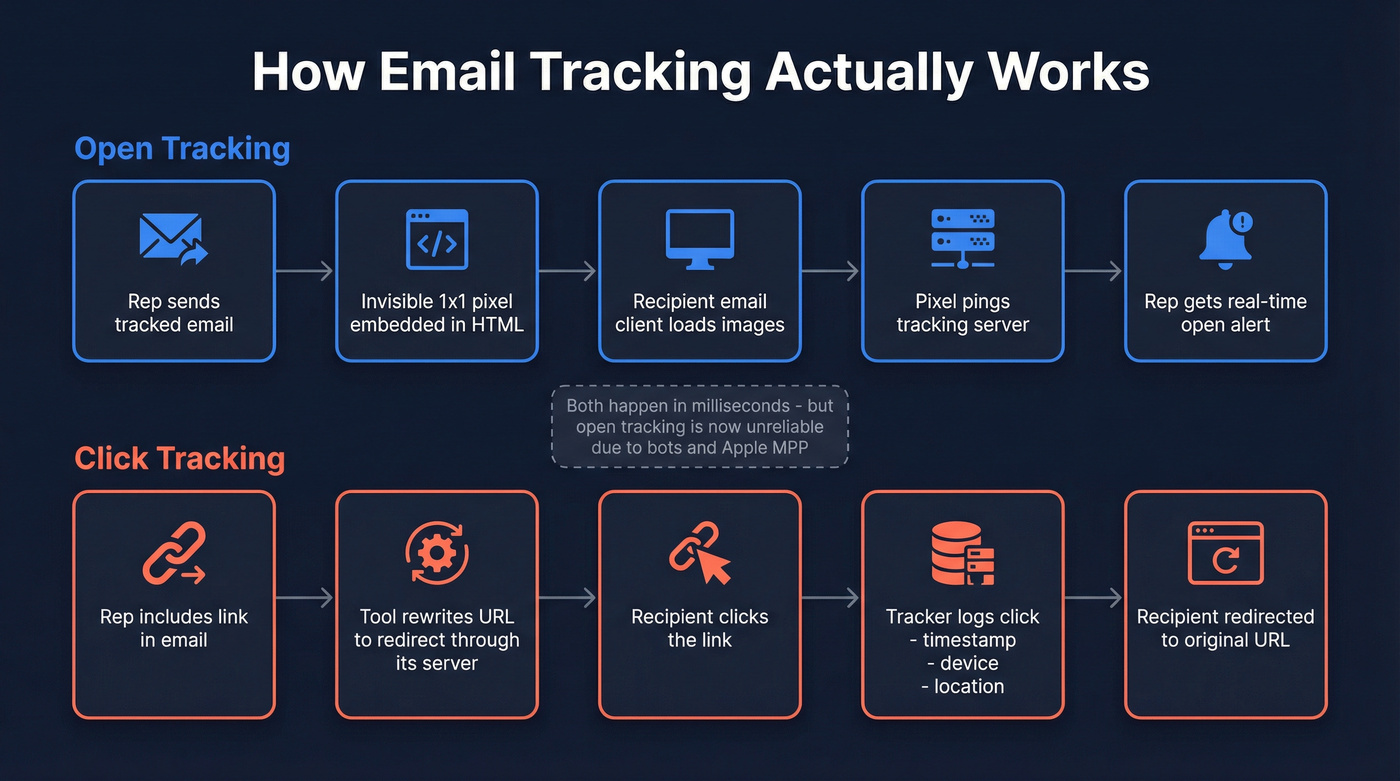
Click tracking works differently. Your tool rewrites every link to route through its own server first. When someone clicks, the tracker logs the event and redirects them to the original URL. This gives you data on which links got attention and when.
Most modern trackers layer on additional signals: approximate location from IP addresses (increasingly unreliable since Apple MPP and corporate proxies mask IPs), device type, engagement timelines, and notification alerts so reps can follow up while the prospect is still engaged. The promise is compelling - know exactly when someone reads your email and act on it instantly. The reality in 2026 is messier.
Why Half Your "Opens" Are Fake
The tracking pixel model was designed for a world where email clients faithfully loaded images only when a human opened the message. That world doesn't exist anymore.
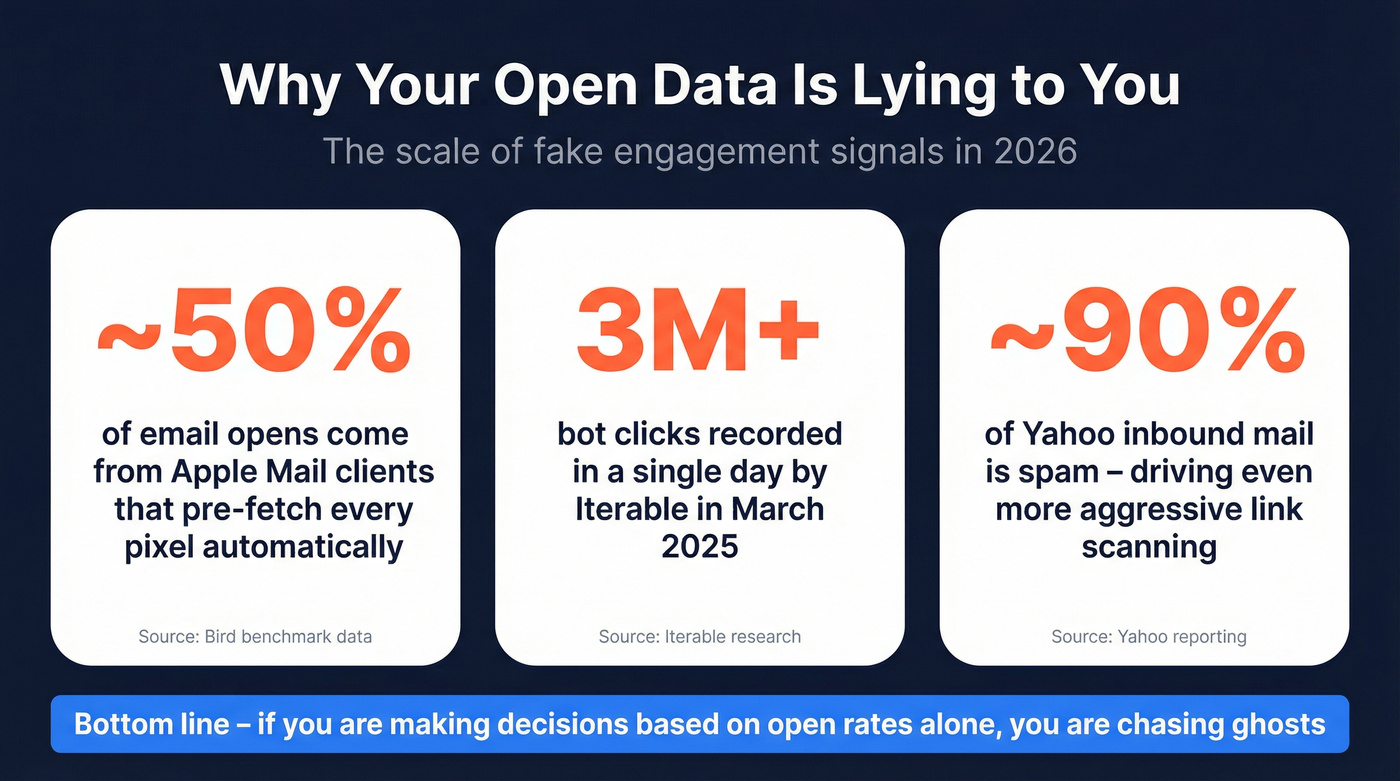
Apple Mail Privacy Protection, rolled out in 2021, pre-fetches and caches all images in incoming emails - including tracking pixels. The result: almost all messages appear "opened" regardless of whether anyone read them. In Bird's benchmark, 38.1% of opens and clicks came from Apple Mail clients, and that share has climbed toward 50%. Sales teams consistently report that Apple MPP has made their open-rate dashboards useless for prioritizing follow-ups.
Apple MPP isn't the only culprit. Security scanners and bot clicks distort click data too. Mailbox providers and corporate security tools routinely "click" every link in an email to check for malware before a human ever sees it. This is especially aggressive in finance, government, and education - exactly the verticals where B2B sellers spend the most time prospecting.
The scale is staggering. Iterable observed AI user agents appearing in click tracking data, with a spike peaking at more than 3 million bot clicks in a single day in mid-March 2025. With Yahoo reporting that roughly 90% of its inbound mail traffic is spam, aggressive scanning will only increase. Shortened URLs make things worse - security tools can't verify the destination without following the redirect, so bit.ly links in cold outreach practically invite false positives.
One technical detail worth knowing: MPP pre-fetches use a Mozilla/5.0 user-agent string, and some ESPs like Bird can flag these via their Events API. Ask your tracking provider if they filter MPP pre-fetches. Many don't by default, and it's the single easiest way to clean up your open data.
Which Engagement Signals Can You Trust?
Not all engagement signals are equally broken. Understanding which ones you can rely on is the difference between acting on data and chasing noise.
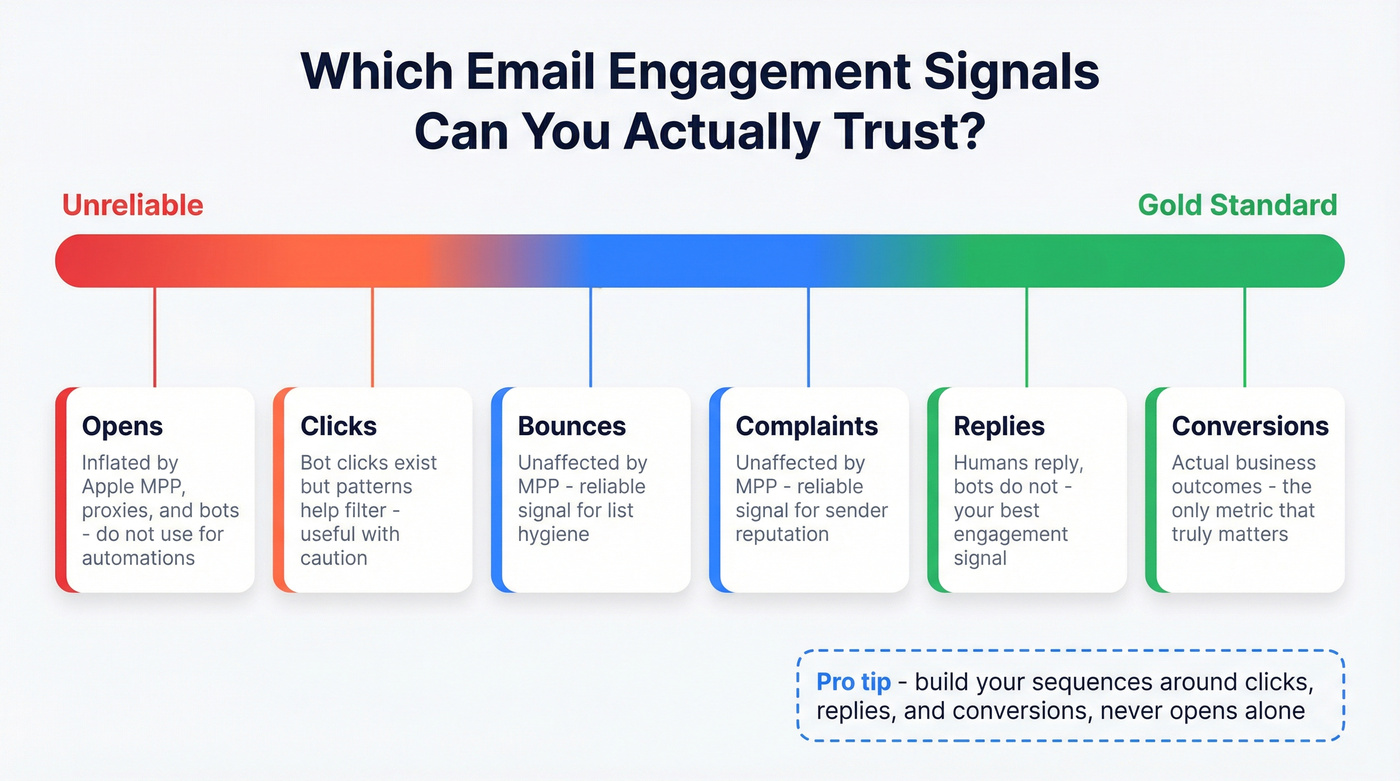
| Signal | Reliability | Why |
|---|---|---|
| Opens | Unreliable | MPP, proxies, bots |
| Clicks | Noisy but useful | Bot clicks exist, but patterns help filter |
| Replies | Reliable | Humans reply; bots don't |
| Conversions | Gold standard | Actual business outcomes |
| Bounces | Reliable | Unaffected by MPP |
| Complaints | Reliable | Unaffected by MPP |
Don't build automations triggered by opens alone. A sequence that sends a follow-up "since you opened my last email" will fire on phantom opens and annoy prospects who never saw your message. Build your workflows around clicks, replies, and conversions - signals that still require human action.
Here's the thing: if your average deal size is under $15k and your team is small, you probably don't need open tracking at all. Reply rate and click-through rate tell you everything that matters. Open tracking creates a false sense of insight that leads reps to waste time chasing ghosts.

Before you track a single open or click, make sure you're emailing real people. Bad data tanks sender reputation and turns every tracking signal into noise. Prospeo verifies emails through a 5-step process - 98% accuracy, refreshed every 7 days - so every engagement signal you see is worth acting on.
Stop tracking emails that bounce. Start with verified contacts.
Best Email Tracking Tools in 2026
We've tested or evaluated all of these. Here's where they land.
| Tool | Gmail / Outlook | Free Tier | Paid From | Best For |
|---|---|---|---|---|
| Streak | Gmail only | Unlimited tracking | ~$49/mo | Solo reps, CRM + tracking |
| Mixmax | Gmail only | Limited starter | ~$29/user/mo | Sales teams with sequences |
| SalesHandy | Both | Unlimited Gmail | ~$36/mo | Outreach-focused teams |
| HubSpot | Both | 200 emails/mo | ~$20/mo (Starter) | HubSpot CRM users |
| Mailsuite | Gmail | Limited | ~$4.99/user/mo | Budget-conscious individuals |
| Boomerang | Both | 10 message credits/mo | ~$4.98/mo (annual) | Privacy-forward tracking |
| Yesware | Both | 24-hour data only | ~$15/seat/mo | Skip it (see below) |
| GMass | Gmail only | Limited | ~$25/mo | Bulk Gmail campaigns |

Streak
Streak is the obvious starting point for individual reps who live in Gmail. Unlimited free email tracking - opens, clicks, notifications - with a lightweight CRM built right into your inbox. No tab-switching, no new interface to learn.
Where Streak earns its keep is the CRM integration. Tracked emails automatically attach to deal records, so you're building pipeline context while you prospect. The paid plan at ~$49/month unlocks link tracking, mail merge, and shared pipelines. For a solo rep or a two-person team, it's hard to beat.
Mixmax
Mixmax is the better pick for sales teams running structured sequences. It combines engagement tracking with email automation, scheduling, and workflow rules - all inside Gmail. The sequence builder lets you set follow-ups triggered by actual engagement like clicks and replies, not just opens, which matters enormously given the MPP problem we've been talking about.

Paid plans start around $29/user/month. The analytics dashboard gives managers visibility into rep activity and prospect engagement patterns. If you're running a 5-15 person SDR team and need more than basic tracking, Mixmax is the tool we'd test first.
SalesHandy
SalesHandy offers unlimited free tracking for Gmail and supports Outlook. The platform has evolved beyond pure tracking into cold outreach territory, with mail merge, auto follow-ups, and engagement analytics. Its live feed lets you watch clicks and replies roll in as they happen, which is useful for timing same-day follow-ups. Paid plans start around $36/month.
HubSpot
If you're already in HubSpot's CRM, their native email tracking is the path of least resistance. The free tier tracks up to 200 emails per month. Starter at ~$20/month unlocks unlimited tracking. The catch: link-level click tracking requires Sales Hub at $450/month, which is a steep jump. Use this if you're a HubSpot shop. Don't buy HubSpot just for tracking - that's overkill.
Mailsuite, Boomerang, Yesware, GMass
Mailsuite at ~$4.99/user/month is one of the cheapest paid options for Gmail. Basic open and click tracking without the bells and whistles - fine for freelancers who just want to know if a proposal was opened.
Boomerang at ~$4.98/month billed annually takes a fundamentally different approach: recipients see a visible embedded image and can opt out with one click, rather than being tracked by a hidden pixel. If you're selling into privacy-conscious industries, that transparency matters.
Yesware's free plan only shows tracking data for 24 hours. After that, it's gone. That's a dealbreaker. At $15/seat/month for paid, Mixmax and Streak offer more value. Skip it.
GMass at $25/month is built for bulk Gmail campaigns - mail merge, auto follow-ups, and tracking across large sends. The right choice if you're sending 500+ emails at a time from Gmail.
Other trackers worth knowing: Cirrus Insight at ~$14-21/user/month integrates deeply with Salesforce, and Right Inbox is another budget-friendly Gmail option.
How to Act on Tracking Data
Tracking data is only useful if you act on it correctly. Here's the workflow that actually works.
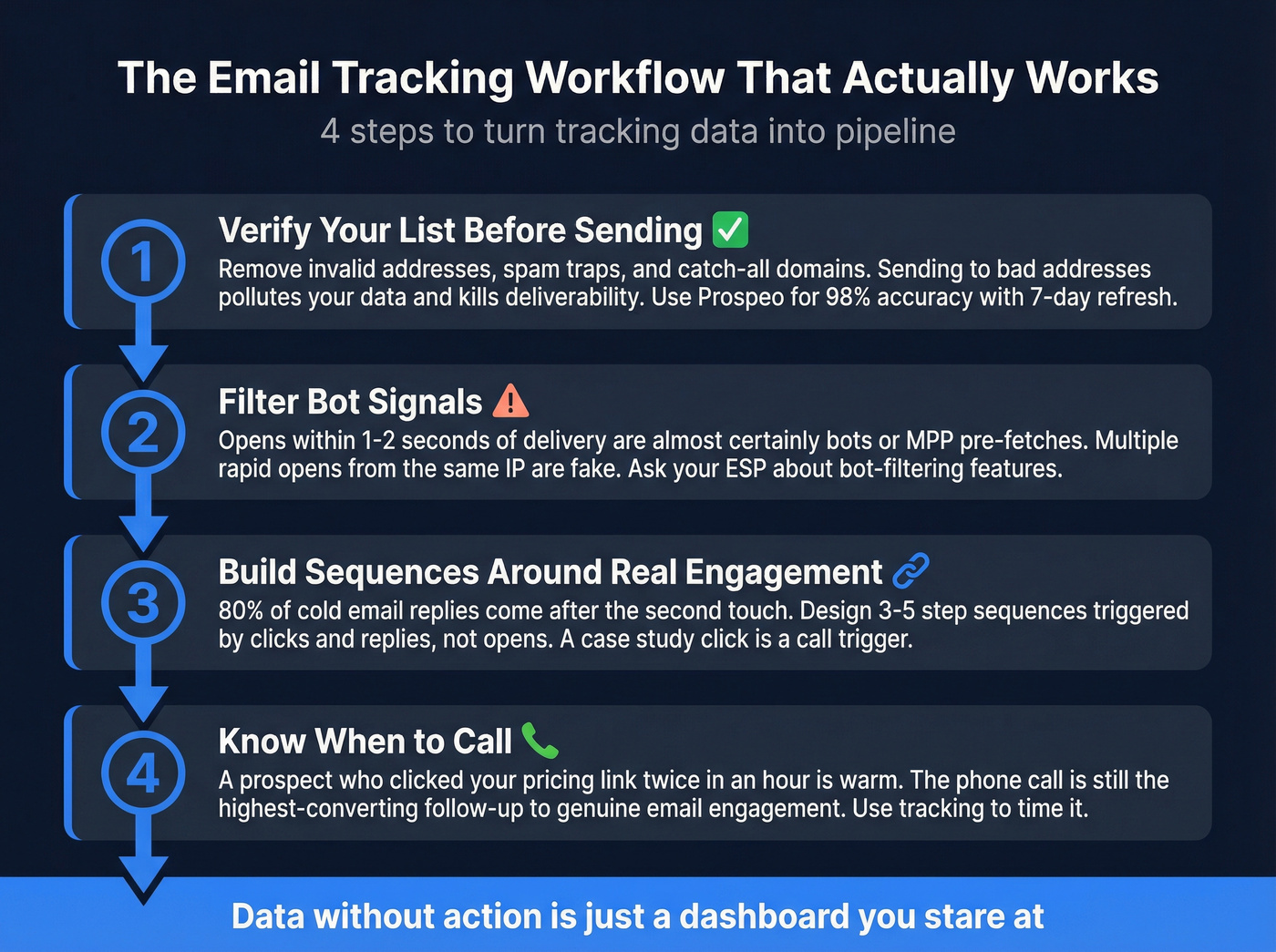
Step one: verify your list before sending. If you're tracking emails to addresses that bounce, you're polluting your data and hurting deliverability at the same time. Prospeo's 5-step verification catches invalid addresses, spam traps, and catch-all domains before they ever hit your outbox - and the 7-day data refresh cycle means you're not sending to addresses that went stale six weeks ago. If you need a stack comparison, start with an email ID validator or a dedicated email checker tool.
Step two: filter bot signals. An "open" that fires within 1-2 seconds of delivery is almost certainly a bot or MPP pre-fetch. Multiple opens from the same IP in rapid succession? Same thing. Many tracking tools don't filter these automatically - you need to eyeball the patterns or ask your ESP about bot-filtering features.
Step three: build sequences around real engagement. 80% of cold email replies come after the second touch. Design 3-5 step sequences triggered by clicks and replies, not opens. If someone clicks a case study link, that's a call trigger. If they reply with a question, that's a priority follow-up. For templates and cadence structure, use an outreach campaign framework or proven best sales sequences.
Step four: know when to call. A prospect who clicked your pricing link twice in an hour is warmer than one who "opened" six times. The phone call is still the highest-converting follow-up to genuine email engagement. Use tracking to time it, not to replace it - especially if you're building an outbound calling strategy.
Privacy and Compliance
Email tracking sits in an increasingly regulated space, and the trend line points one direction: more restrictions.
GDPR treats tracking pixels as personal data processing. You need consent that's freely given, specific, and informed. CNIL's 2025 draft recommendation calls for explicit prior consent for individual-level open tracking. In the US, enforcement is real - CPPA settlements have hit $632,500, $345,178, and $1,350,000 for privacy violations, and at least 19 states now have comprehensive privacy legislation. If you're operationalizing this, align with a practical GDPR for Sales and Marketing playbook.
On the technical side, Gmail, Yahoo, and Microsoft authentication mandates require SPF, DKIM, and DMARC. Without these, your emails won't arrive - let alone get tracked. Keep your spam complaint rate below 0.3% (Google recommends under 0.10%), and implement one-click unsubscribe per RFC 8058, processing requests within two days. If you need the setup details, follow a SPF, DKIM, DMARC Explained guide and keep an email deliverability checklist handy.
Let's be honest: individual-level pixel tracking is getting harder to do legally, especially in Europe. Aggregate engagement metrics and consent-based tracking are the safer long-term bet.
The Upstream Problem Nobody Talks About
Most tracking articles ignore this entirely. If a big chunk of your email list bounces, your tracking data is garbage - and your sender reputation is actively degrading. Every bounced email is a tracked email that never had a chance of reaching a human. If you're seeing this, start by diagnosing invalid emails and the root causes of B2B contact data decay.
We've seen this pattern over and over: teams invest in sophisticated tracking tools, build elaborate follow-up sequences, and then wonder why their deliverability craters. The problem isn't the tracker. It's the list.
Meritt, a Prospeo customer, dropped their bounce rate from 35% to under 4% after switching their data source. Their connect rate tripled to 20-25%. That's the difference between tracking phantom engagement and tracking real human behavior.

Your tracking tools can't fix bad contact data. If 35% of your list bounces, no amount of open or click tracking will save your pipeline. Prospeo's 143M+ verified emails keep bounce rates under 4% - so when a prospect actually clicks, you know it's real.
Clean data is the only tracking signal that never lies.
FAQ
Is email tracking legal?
Yes, with conditions. GDPR requires informed consent for individual-level pixel tracking, and CNIL's 2025 draft tightens this further in France. In the US, 19 states have comprehensive privacy laws with varying disclosure requirements. Always disclose tracking in your privacy policy and implement compliant consent mechanisms.
Can recipients detect tracking pixels?
Yes. Browser extensions like Ugly Email and PixelBlock flag or block tracking pixels automatically. Some email clients block remote images by default, which prevents pixel-based tracking entirely. Assume 20-40% of your B2B audience has some form of tracking protection active.
Why does my open rate look inflated?
Apple Mail Privacy Protection pre-fetches tracking pixels for all incoming emails, registering false opens even when the recipient never reads the message. Security bots do the same with links. If your list skews toward Apple Mail or enterprise recipients, your open rate could be inflated by 30-50%.
What's the most reliable engagement metric?
Replies and conversions - these require deliberate human action and can't be faked by bots or privacy features. Click tracking is second-best: noisy from bot clicks, but filterable with pattern analysis. Open tracking is the least reliable metric in 2026.
How do I improve tracking data accuracy?
Start with verified contact data - 98% email accuracy means you're not wasting tracking on bounced sends. Filter bot signals by flagging instant opens and rapid-fire clicks from the same IP. Build workflows around clicks and replies rather than opens, and authenticate your sending infrastructure with SPF, DKIM, and DMARC.