

When to Send a Reminder Email: The Data-Backed Timing Framework
One follow-up lifts reply rates from 9% to 13%. That's not a marginal gain - it's a 44% increase from a single extra email. The people who never send that reminder leave money, meetings, and momentum on the table every week.
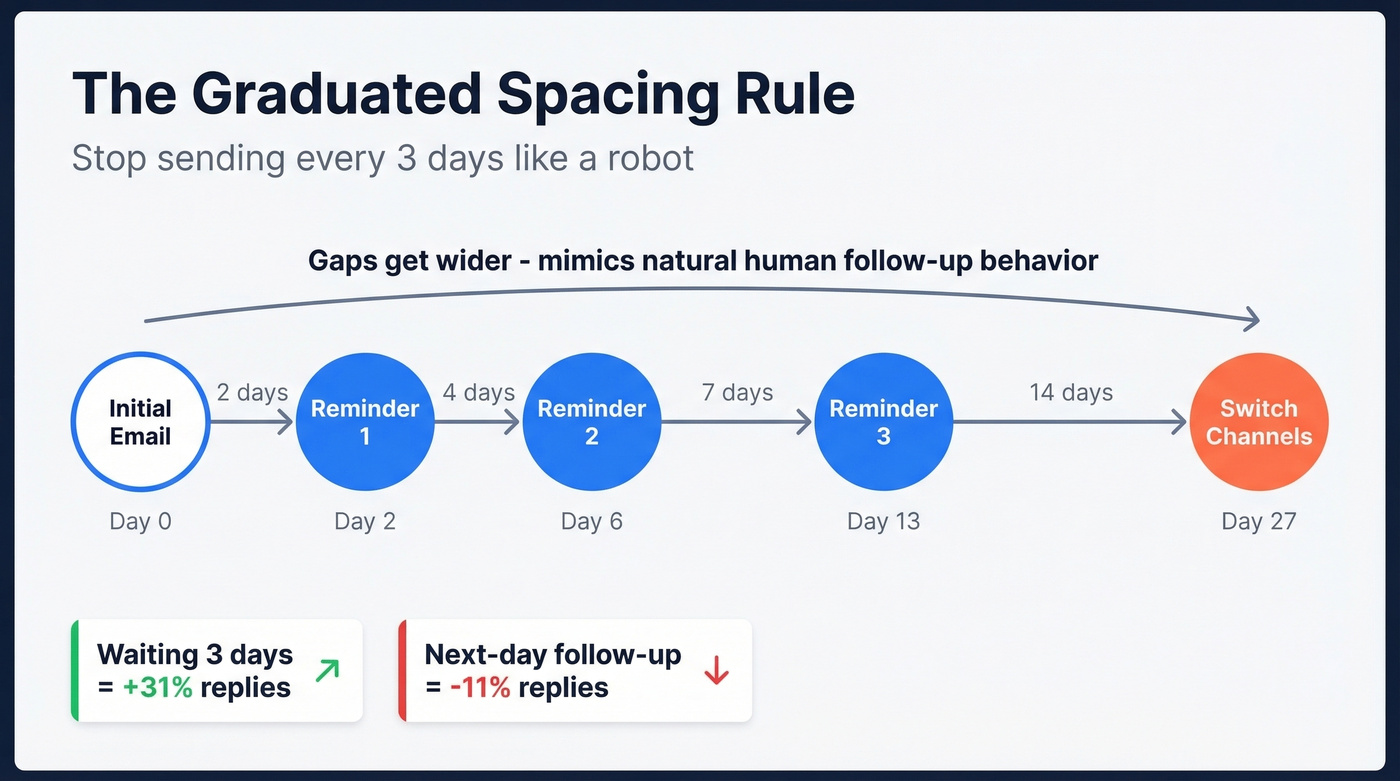
Knowing when to send a reminder email - and how to space your sequence - is the difference between a reply and a spam flag. The universal spacing rule is 2 → 4 → 7 → 14 days between reminders, with a hard floor of 24 hours before your first one. Tuesday through Thursday, 9-11 AM in the recipient's time zone, is the sweet spot for B2B.
Here's the full timing table by scenario. Bookmark it, then keep reading for the reasoning behind each number.
Master Timing Table
| Scenario | First Reminder | Spacing | Max Reminders | Key Tip |
|---|---|---|---|---|
| Cold outreach | 2-3 days | 2, 4, 7, 14 days | 3-4 | Switch channels after 3 |
| Meeting/appointment | 1-2 biz days before | 24h + 1h before | 2 | Add SMS for high-stakes demos |
| Event/webinar | 1 week before | 1wk, 24h, 1h, 15min | 4 | "Add to Calendar" button in every email |
| Overdue invoice | Day after due | 3, 7, 14, 30 days | 5-6 | SMS at 14+ days overdue |
| Internal request | 2 biz days | 4, 7 days | 2-3 | Tag them in a shared doc instead of email 3 |
| Job application | 5-7 biz days | 7, 14 days | 2 | Reference a recent company win |
The Graduated Spacing Rule
Static intervals - sending every three days like clockwork - feel robotic and get treated that way. The graduated model mimics how a real person would follow up: eager at first, then progressively more patient. Research from Instantly backs this up with hard numbers: next-day follow-ups reduce replies by 11%, while waiting three days increases them by 31%.
For send windows, Tuesday through Thursday between 9 and 11 AM local time consistently outperforms other slots in B2B. Mondays are noisy. Fridays are mentally checked out. We've watched teams obsess over the "perfect" send hour when the real difference-maker is just avoiding those two dead-zone days.
Timing by Scenario
Cold Outreach Follow-Ups
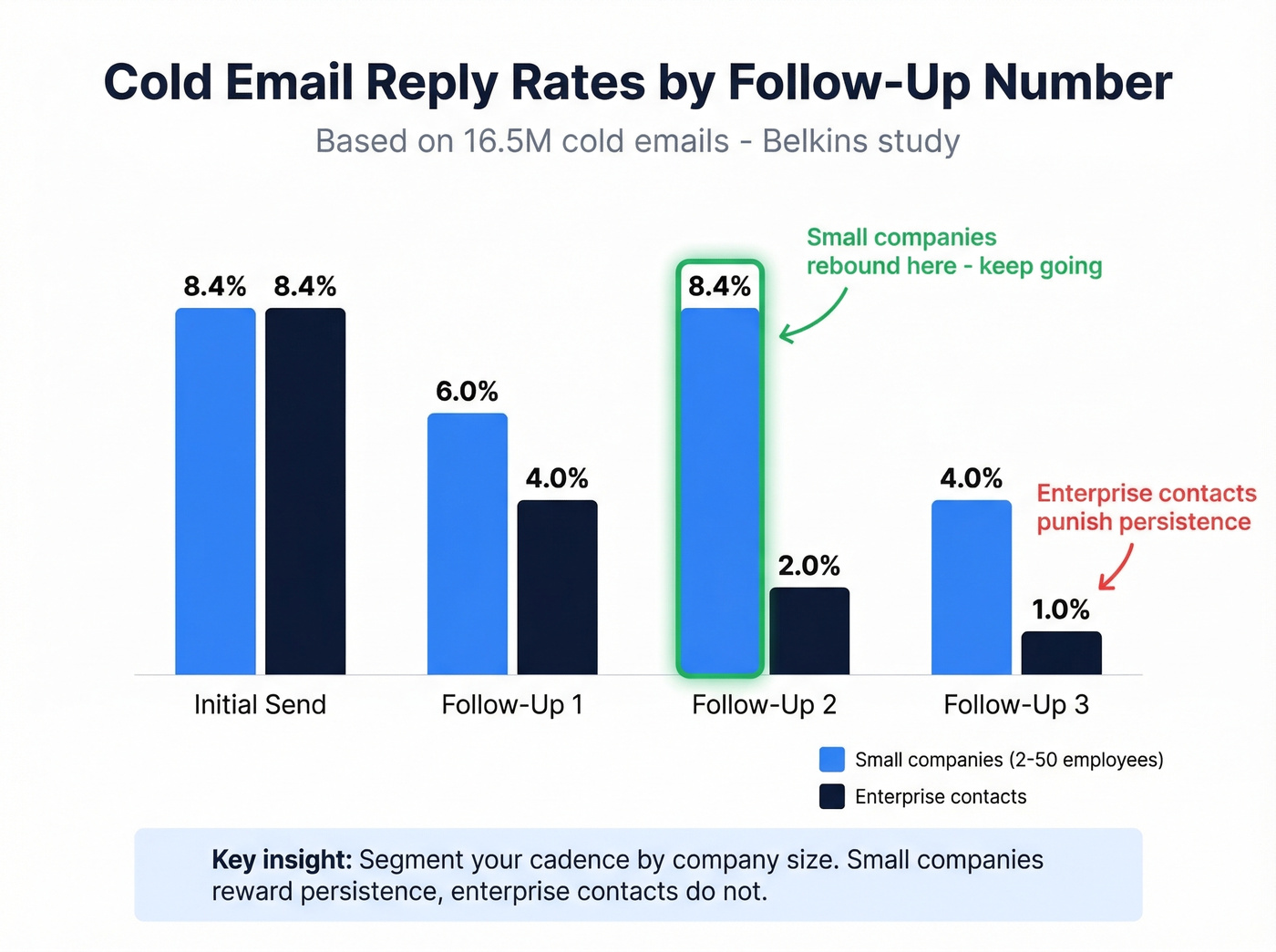
A Belkins study of 16.5 million cold emails found the highest reply rate at 8.4% on the initial send. Here's the nuance most guides miss: small companies with 2-50 employees actually rebound on the second follow-up, hitting 8.4% again, while enterprise contacts ghost quickly and punish persistence. Segment your cadence accordingly.
Send your first nudge at day 2-3, a second at day 7, and a third at day 14. After that, switch channels or move on. Every rep on this cadence should also be rotating the angle - a new case study, a relevant metric, or a timely industry insight. None of this matters if your emails bounce. A single bounce damages your domain reputation more than a late follow-up ever will, so verify your list with a tool like Prospeo before queuing a B2B cold email sequence.
Reminder Emails for Client Meetings
Brevo's guidance is straightforward: remind 1-2 business days before. Same-day appointments get a tighter cadence - one reminder 24 hours out, another no more than an hour before.
A common debate in project management communities is whether to remind the day before or the day of. For submissions due EOD, do both - 24 hours out plus a morning-of nudge. When writing a reminder to a client about an upcoming meeting, keep the tone warm and specific: restate the agenda, confirm the time zone, and include a reschedule link so they can adjust without a back-and-forth thread.
Events and Webinars
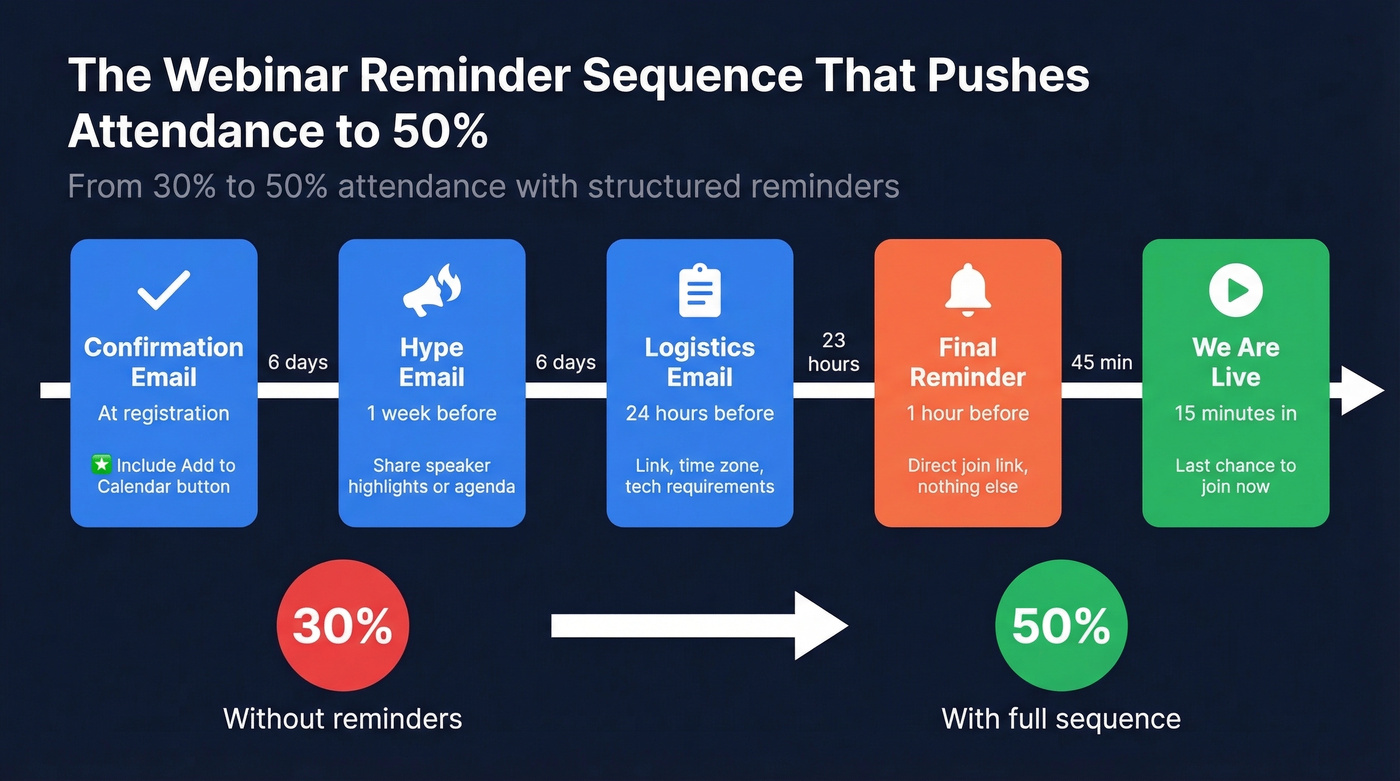
Webinar attendance rates hover around 40-50% of registrants, and a structured reminder sequence can push a 30% rate up to 50%. The cadence: confirmation at registration, a hype email one week out, logistics 24 hours before, a final reminder about an hour before, and a "we're live" nudge at 15 minutes. Include an "Add to Calendar" button in every reminder - it's one of the highest-impact elements you can add.
Overdue Invoices
55% of B2B invoices in the US are paid late, and workers spend roughly 10% of their workday chasing payments. The escalation that works: friendly heads-up 7 days before due, neutral reminder on the day, firm follow-up at 3 and 7 days overdue, then multi-channel urgency at 14 days with SMS. Past 30 days, reference contract terms and pick up the phone for anything over $5K.

You just mapped the perfect 2→4→7→14 day cadence. Now imagine every email in that sequence bouncing because the address is wrong. Prospeo's 5-step verification delivers 98% email accuracy with a 7-day refresh cycle - so your reminder hits a real inbox, not a dead end.
Fix the data before you fix the timing. Start free at $0.01/email.
When to Stop Sending Reminders
Here's the thing: if you've hit three reminders with silence, the email isn't the problem. Four or more emails in a cold sequence more than triples spam and unsubscribe rates. For enterprise contacts, two to three touches is the ceiling before you're flagged.
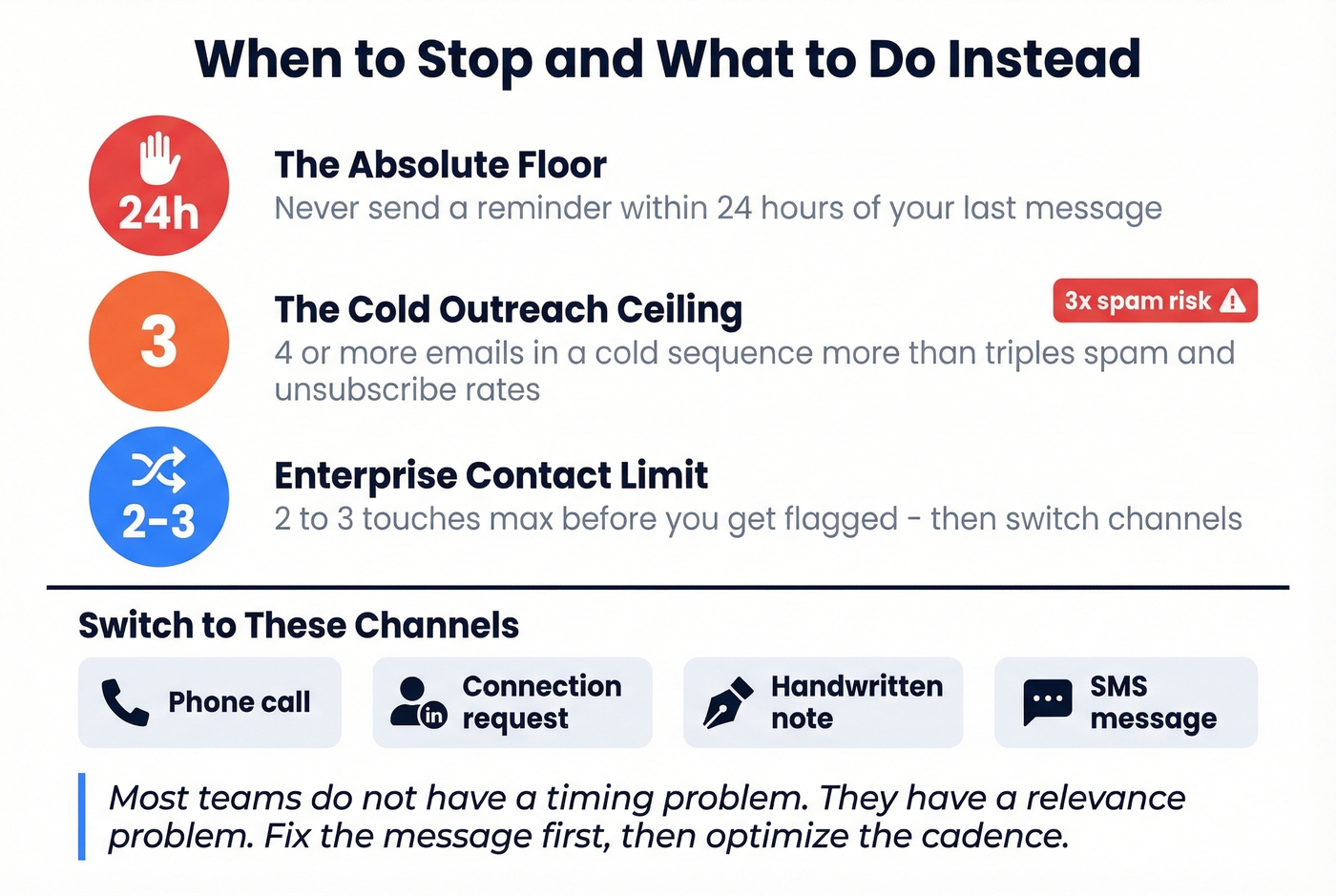
The 24-hour rule is the absolute floor. Never remind someone within 24 hours of your last message. After your third unanswered follow-up, switch channels - a phone call, a connection request, or a handwritten note if the deal warrants it.
Most teams don't have a timing problem. They have a relevance problem. We've seen reps agonize over whether to send on day 3 or day 4 while their actual email says nothing worth replying to. Fix the message first, then optimize the cadence.
Mistakes That Kill Reminder Emails
- "Just checking in" with no new info. Every follow-up needs a new angle, resource, or reason to reply. Look at any strong follow-up sample and you'll notice each message introduces something the recipient didn't have before.
- Using "follow-up" in the subject line. It screams "you ignored me." Reframe around value. (If you need ideas, pull from proven subject line examples.)
- Sounding like a template. Plain text, short paragraphs, reply-thread formatting. If it looks mass-produced, it gets deleted. Tighten your email copywriting before you touch timing.
- Skipping a clear next step. Every reminder needs one obvious action - a link, a specific time, a one-click button. A strong email call to action is usually the difference.
- "Just circling back" language. The corporate equivalent of throat-clearing. Say something specific or don't send it. If you're stuck, use a cleaner alternative from how to say just checking in professionally.
Get the Data Right First
The best-timed reminder in the world bounces if the email address is wrong. Let's be honest - knowing exactly when to send a reminder email only matters if it actually reaches the inbox. Get your contact data right, then let the cadence do its work. If you're seeing issues, start with your email bounce rate and then work through a full email deliverability guide.
One bounce damages your domain reputation more than a late follow-up ever will. Prospeo's proprietary verification catches spam traps, honeypots, and catch-all domains before your sequence fires. 15,000+ companies trust it to protect their sender reputation.
Send every reminder with confidence - verify your list first.