

How to Automate Cold Email Outreach Without Burning Your Domains
A founder on r/b2bmarketing shared the postmortem: 217,000 cold emails sent, reply rate started at 2.1%, then cratered to 0.7% as domains burned faster than he could warm new ones. By the end, he was spending more time managing SPF records and inbox rotation than actually selling. The whole operation collapsed under what he called "deliverability fatigue" - the point where infrastructure management becomes the full-time job and outbound becomes the side project. His fix? Pivoting to a multichannel system with social listening layered on top, which pulled a 12% reply rate and 34 meetings in 90 days.
That story captures why most teams fail when they try to automate cold email outreach. They buy a sending tool, load 50,000 contacts from a cheap database, blast sequences from their primary domain, and wonder why reply rates are in the basement within six weeks. The tool worked fine. The system around it didn't exist.
Here's the thing: cold email automation in 2026 isn't about picking the right sending tool. It's about building a system where verified data flows into warmed infrastructure through sequences that respect how inboxes actually work. Get the system right and you'll outperform 90% of outbound teams. Skip any piece and you'll burn domains, waste months, and end up writing your own Reddit postmortem.
Most teams spending $20K+/year on ZoomInfo-tier data don't need it. If your average deal size is under $15K, a $100/month stack will outperform an enterprise suite you'll never fully use.
What You Actually Need
The full-cycle automation framework:
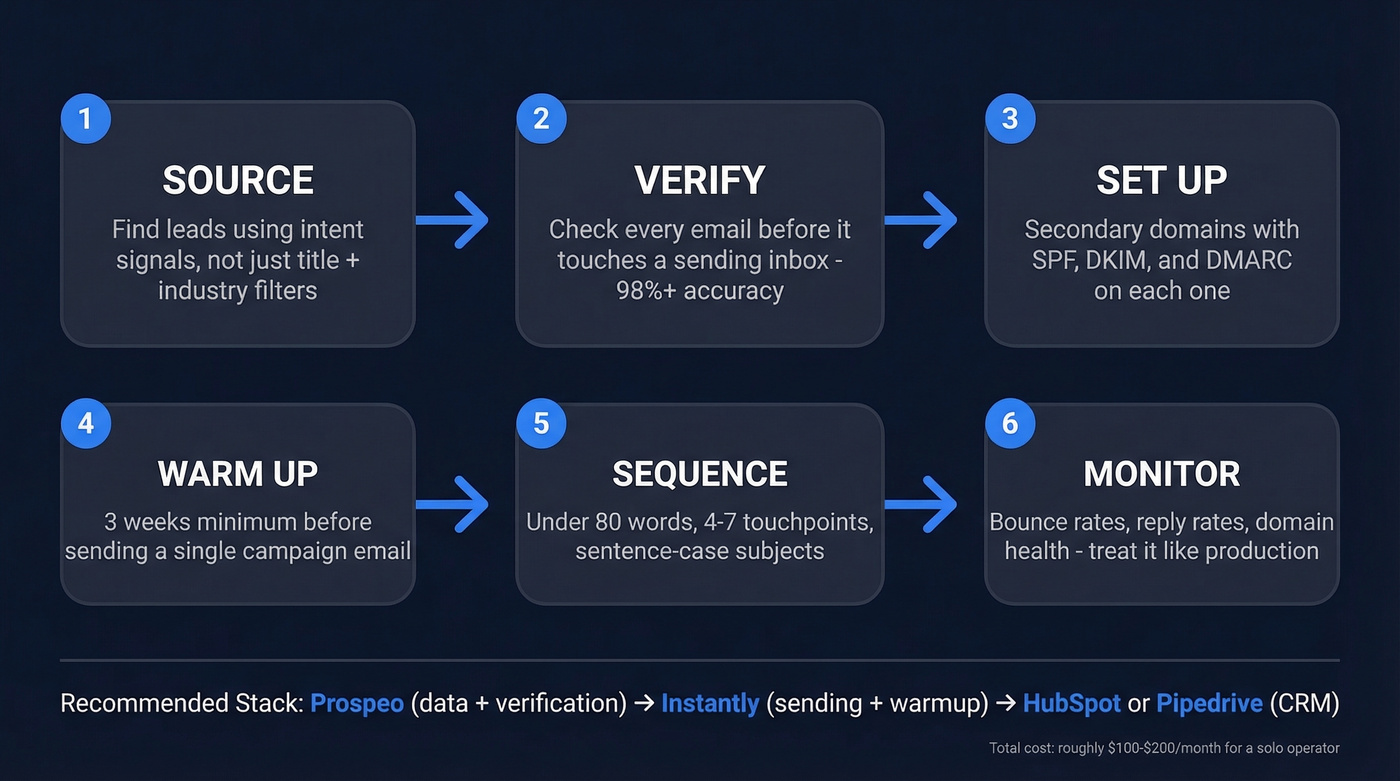
- Source leads using intent signals - not just title + industry filters
- Verify every email before it touches a sending inbox
- Set up secondary domains with SPF, DKIM, and DMARC on each
- Warm up for 3 weeks minimum before sending a single campaign email
- Build short sequences - under 80 words, 4-7 touchpoints
- Monitor like a production system - bounce rates, reply rates, domain health
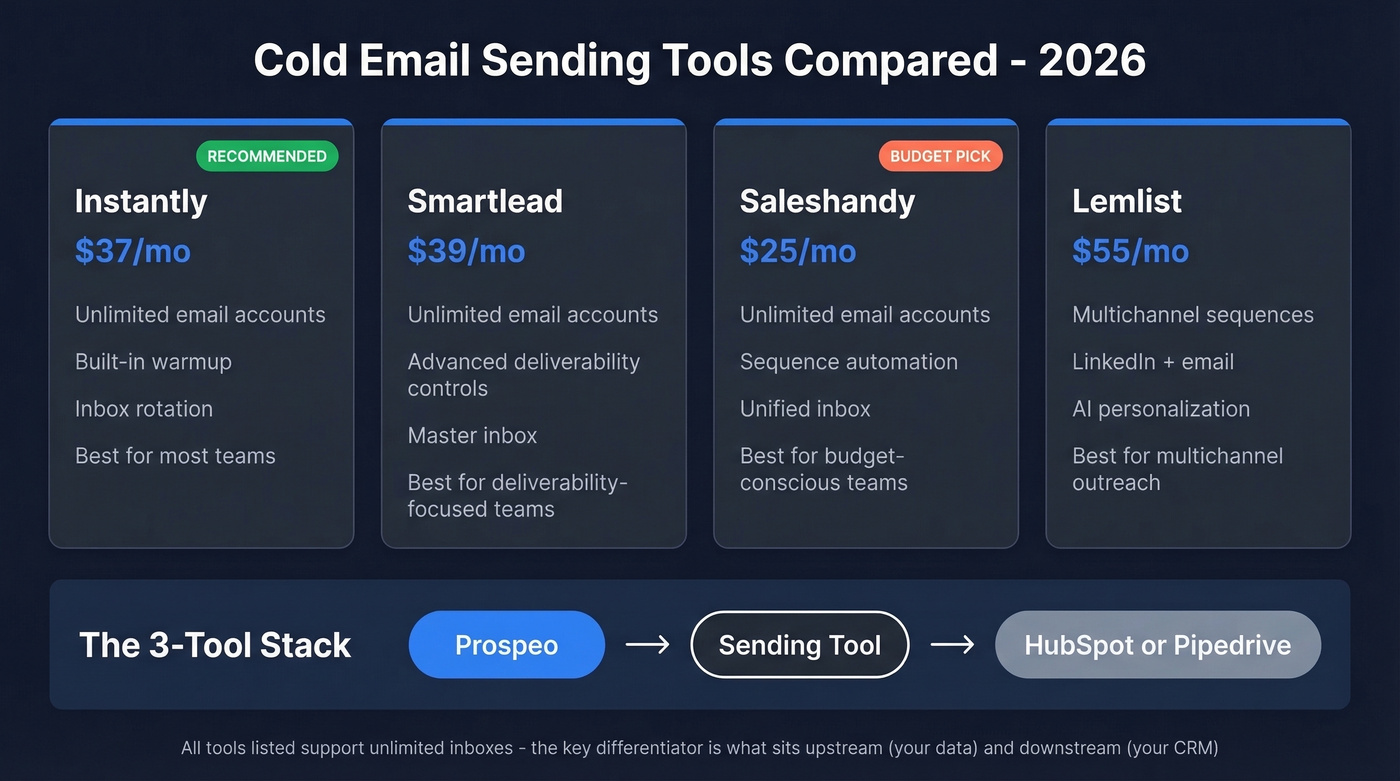
The recommended starter stack: Prospeo for data sourcing and email verification, Instantly for sending and warmup, and HubSpot or Pipedrive for CRM. Total cost for a solo operator typically lands around $100-$200/month depending on how many credits and inboxes you run. You don't need ten tools. You need three that actually connect.

The Automation Framework
Ten-tool listicles are useless. You need 3-4 tools that work together across the entire outbound cycle, and that cycle has expanded significantly since 2024. Automated email outreach used to mean scheduling follow-ups. Now it means the entire pipeline: sourcing contacts based on real-time signals, verifying data before it enters your system, rotating across warmed inboxes, personalizing with AI, and monitoring deliverability metrics the way an SRE monitors uptime.
The Instantly blog frames this well: modern automation covers sourcing, cleansing, sequencing, and follow-up triggers as a single workflow. The tools that win do one thing well and pass clean data to the next tool in the chain. Let's walk through each piece.
Build Your Prospect List Right
Static filters - "VP of Sales" + "SaaS" + "51-200 employees" - produce lists that look right and perform terribly. Everyone's targeting the same titles at the same companies. Your email lands in an inbox already drowning in identical pitches.
Signal-based targeting changes the math entirely. You're looking for triggers: a company just raised a Series B, a prospect changed jobs in the last 90 days, they adopted a competitor's tool, or they left a negative review of a product you replace. These signals mean the prospect has a reason to care about your email today, not someday.
The Cotera founder's story illustrates this perfectly. He sent 1,200 emails using standard filters - got four replies, two of which were removal requests. After adding a research layer that incorporated real buying signals, the same tools and budget produced a 12% reply rate. Same spend, wildly different results.
Prospeo's database covers 300M+ professional profiles with 30+ search filters including buyer intent across 15,000 Bombora topics, technographic signals, job changes, headcount growth, and funding events. At roughly $0.01 per email, the unit economics are a fraction of what ZoomInfo charges. Native integrations with Instantly, Smartlead, Lemlist, and Clay mean verified contacts flow directly into your sending tool - no CSV export step, no manual cleanup.

Verify Every Email Before Sending
Bad data is the silent killer of cold email campaigns. Every bounced email chips away at your sender reputation. Cross the 2% bounce threshold and mailbox providers start routing you to spam. Cross 5% and you're looking at domain reputation damage that takes weeks to recover from. (If you want the deeper mechanics, see our email deliverability guide.)
The catch-all domain problem makes this worse than most teams realize. A 10,000-email verification test found that 28% of B2B email lists consist of catch-all domains - addresses that accept everything at the server level but may not have a real person behind them. Most verification tools punt on these, labeling them "risky" or "unknown." The difference between tools shows up in how they handle this 28%.
| Tool | Cost per 1K | Catch-All Resolved | Accuracy |
|---|---|---|---|
| Prospeo | ~$10 | Handled natively | 98% |
| LeadMagic | ~$8 | 94.2% | 99.5% |
| ZeroBounce | ~$6.50 | 12% | 97.8% |
| NeverBounce | ~$5 | 8% | 96.9% |
| MillionVerifier | ~$0.60 | 5% | 95.8% |

Your cold email automation is only as good as the data feeding it. Prospeo gives you 300M+ profiles with intent signals, technographics, and job change filters - then verifies every email at 98% accuracy before it touches your sending infrastructure. Native integrations with Instantly, Smartlead, and Lemlist mean verified contacts flow straight into your sequences with zero CSV cleanup.
Build your entire outbound pipeline for ~$0.01 per verified email.
Set Up Sending Infrastructure
Domain and Inbox Math
Never send cold email from your primary domain. One spam complaint wave and your company's actual business email - the domain clients reply to, the domain your invoices come from - lands in spam folders. Use secondary lookalike domains instead.
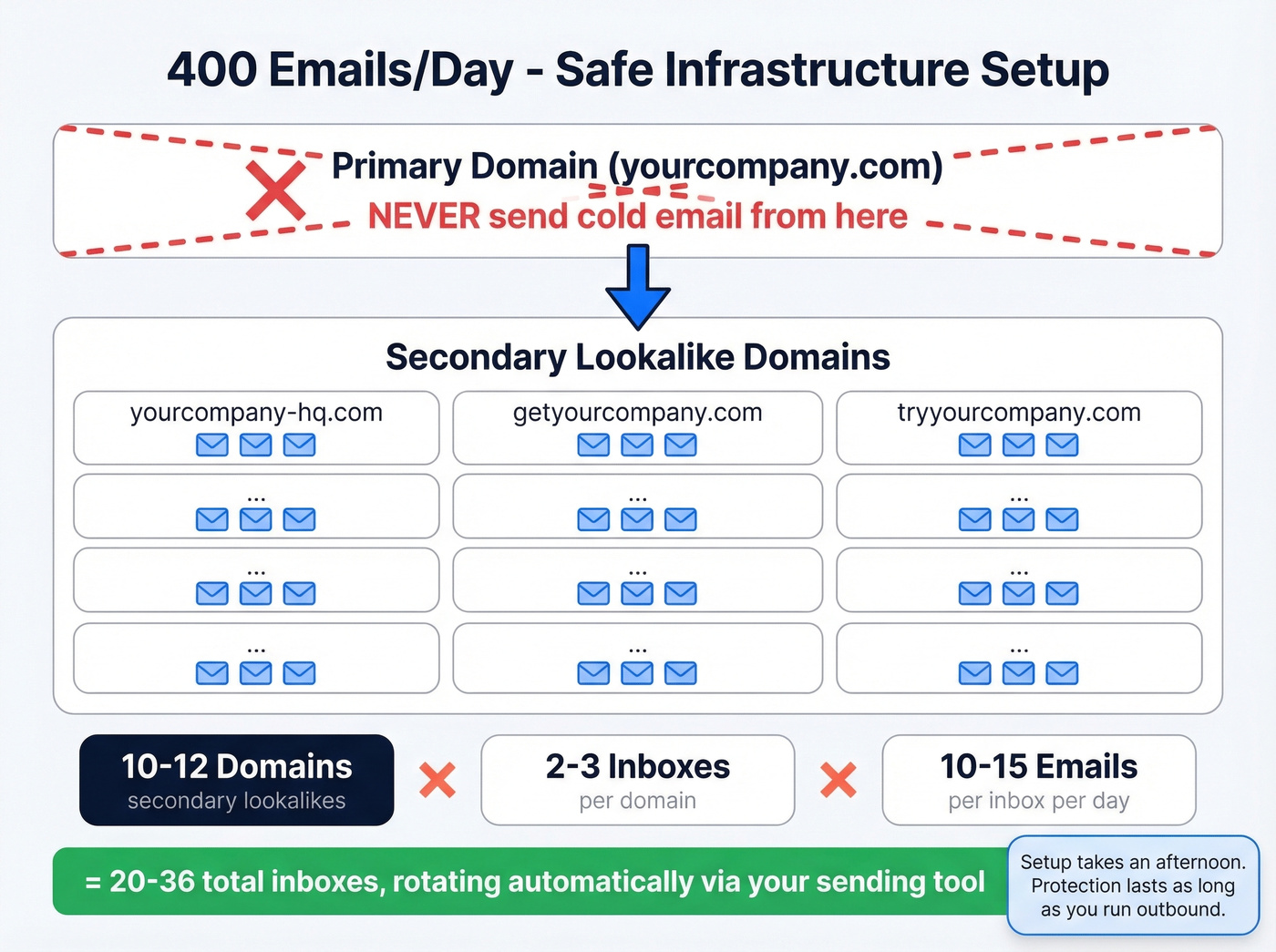
To send 400 emails per day at a safe pace, you need 10-12 secondary domains with 2-3 inboxes each, sending 10-15 emails per inbox per day. That's 20-36 inboxes total. It sounds like a lot of infrastructure, but tools like Instantly manage inbox rotation automatically. The setup takes an afternoon; the protection lasts as long as you're running outbound.
DNS Authentication
Since the May 2025 bulk-sender enforcement by Google and Yahoo, SPF, DKIM, and DMARC are mandatory on every sending domain. Not optional. Not "best practice." Missing any one of these and your messages get throttled or rejected outright. (If you need a quick implementation reference, use these SPF record examples.)
You also need RFC 8058 one-click unsubscribe headers on every message. Spam complaints must stay under 0.3%. Bounces under 2%. These aren't guidelines - they're hard thresholds that trigger automated penalties when crossed.
Warmup Schedule
Start warmup at least 3 weeks before your first campaign. Keep warmup running after launch - it maintains the engagement signals that protect your sender reputation.
| Week | Daily Volume per Inbox |
|---|---|
| 1-2 | 5-10 emails |
| 3-4 | 15-25 emails |
| 5-6 | 30-50 emails |
| 7+ | Up to 50 (steady state) |
Resist the urge to accelerate. We've watched teams try to compress warmup into one week and burn fresh domains before a single campaign email went out. Three weeks feels slow. It's faster than rebuilding from a blacklisted domain.
(For a broader view of safe ramping, see email velocity and unlimited email warmup tools.)
That 2% bounce threshold exists whether you're sending 400 or 4,000 emails a day. Prospeo's 5-step verification - including catch-all handling, spam-trap removal, and honeypot filtering - keeps bounce rates under 4% so your secondary domains stay healthy. Stack Optimize built a $1M agency on Prospeo data with zero domain flags across all clients.
Protect every domain in your rotation - verify before you send.
Build Sequences That Get Replies
2026 Benchmarks
The Instantly benchmark report - built on billions of cold email interactions - puts the average reply rate at 3.43% and the average open rate at 27.7%. Top-quartile campaigns hit 5.5%+. Elite campaigns crack 10.7%.
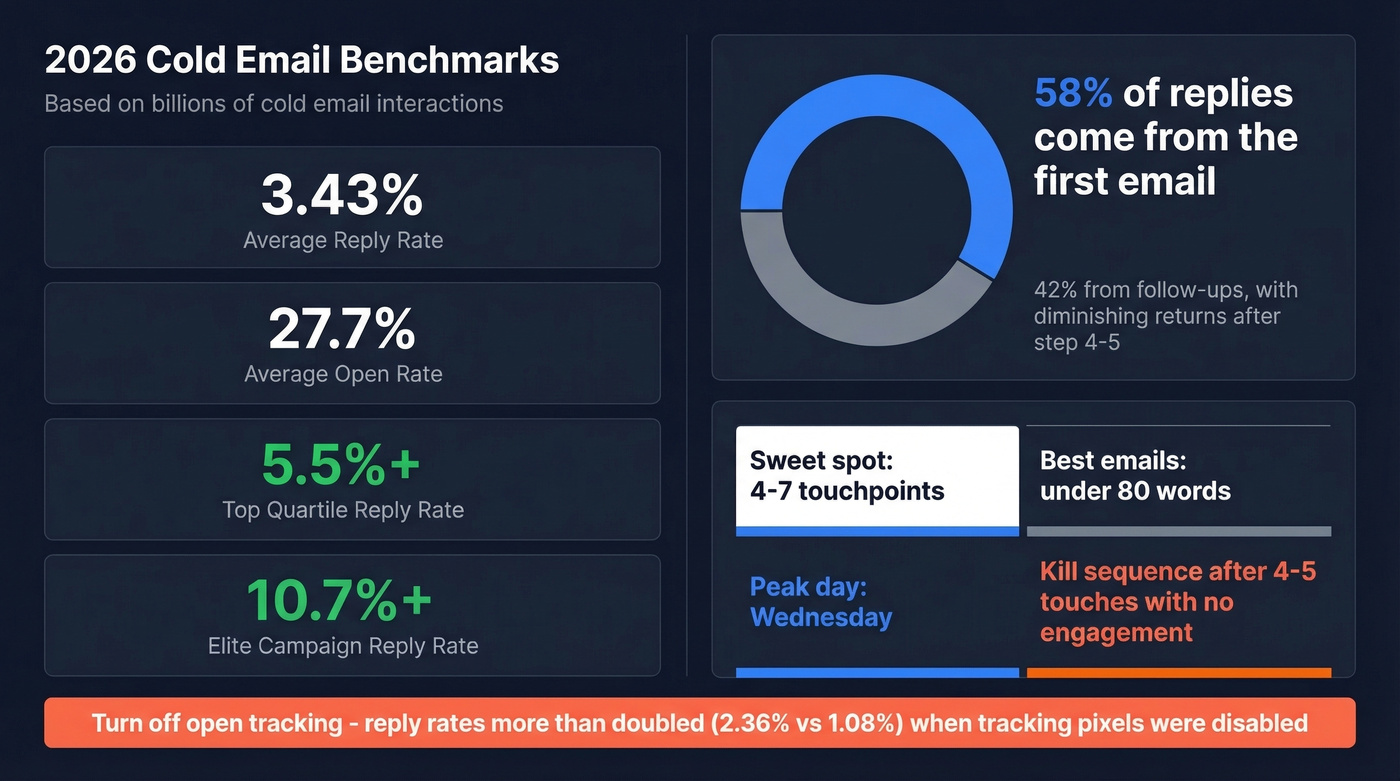
One number that should shape your sequence design: 58% of replies come from the first email. Follow-ups contribute the remaining 42%, but with diminishing returns after step 4-5. The sweet spot is 4-7 touchpoints. Best-performing emails run under 80 words. Peak sending day is Wednesday. Kill a sequence after 4-5 touches with no engagement - sending touch 6-7 to someone who hasn't opened a single email is how you rack up complaints. (If you want a structure you can copy, start with a B2B cold email sequence.)
AI Personalization at Scale
Generic personalization - "Hey {{first_name}}, I noticed {{company_name}} is growing fast" - is dead. Everyone's doing it. The bar has moved to contextual personalization based on what the prospect has actually said or done recently. (More examples: personalized outreach.)
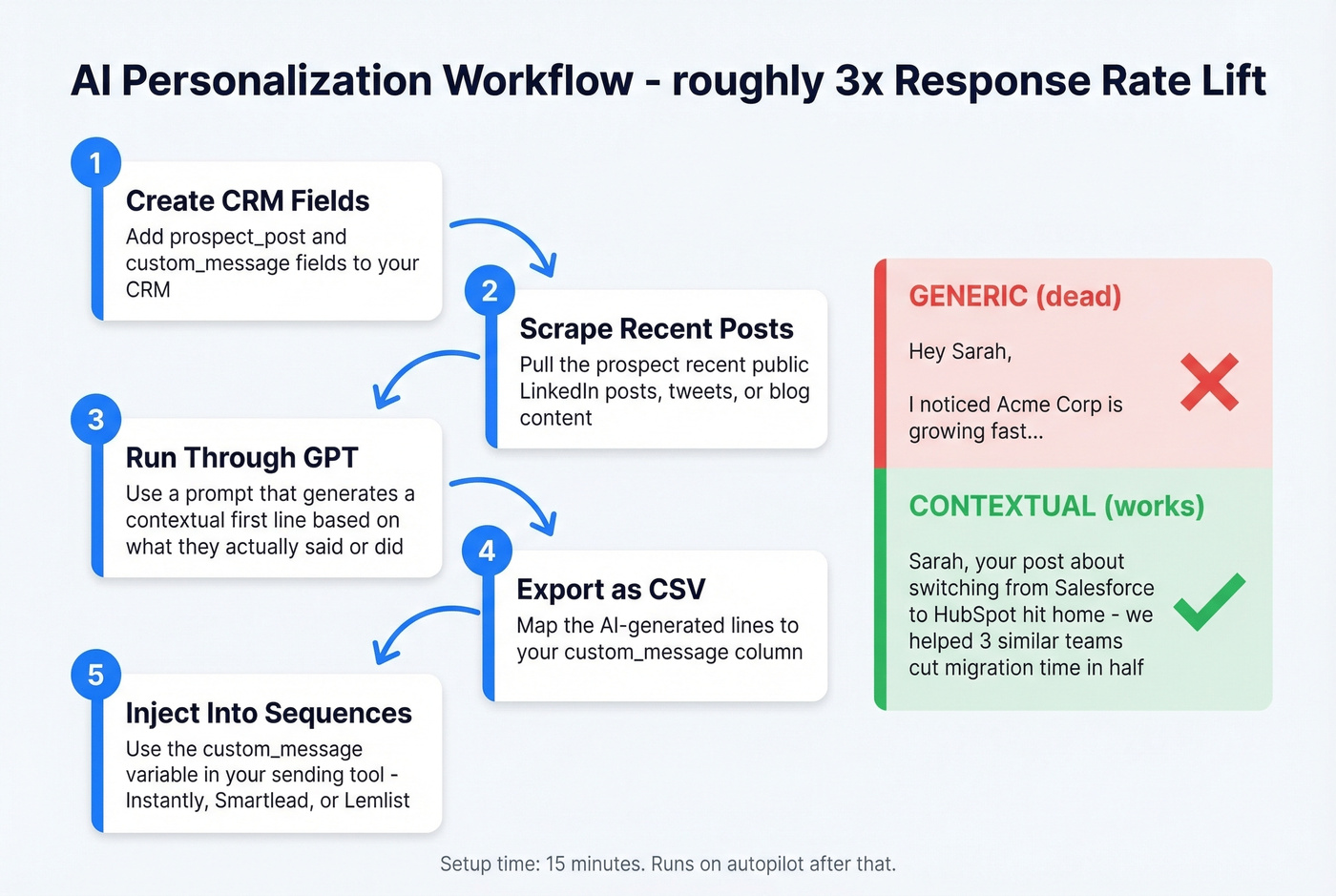
This workflow produces roughly 3x response rate lifts based on practitioner testing on r/SaaS: create CRM fields for prospect_post and custom_message, scrape the prospect's recent public posts, run them through GPT with a prompt that generates a contextual first line, export as CSV, and inject as a {{custom_message}} variable in your sending tool. Fifteen minutes to set up, runs on autopilot after that.
Copy That Converts
Sentence-case subject lines outperform title case - they look like a real email from a colleague, not a marketing blast. Low-commitment CTAs crush aggressive ones: "reply if this is relevant" beats "book a 30-minute demo" every time. (If you need a swipe file, use these cold email subject line examples.)
Turn off open tracking. A 44-million-email analysis found that reply rates more than doubled when open tracking was disabled - 2.36% vs. 1.08%. The tracking pixel triggers spam filters and adds invisible HTML that mailbox providers flag. The vanity metric isn't worth the deliverability hit.
Choose Your Sending Tool
| Tool | Starting Price | Best For | Unlimited Inboxes |
|---|---|---|---|
| Instantly | $37/mo | Most teams | Yes |
| Smartlead | $39/mo | Deliverability control | Yes |
| Saleshandy | $25/mo | Budget teams | Yes |
| Lemlist | $55/mo | Multichannel | No ($9/ea extra) |
| Woodpecker | $20/mo | Simple SMB setup | No |
Instantly
Instantly is the default recommendation for most teams. The Growth plan at $37/month covers 5,000 emails/month with unlimited inboxes - that's the key differentiator. The warmup network is large, which matters because warmup quality depends on network size. Hypergrowth ($97/mo) and Light Speed ($358/mo) scale volume and add features like A/B testing and API access. The UI is clean, onboarding takes about 20 minutes, and verified contacts from Prospeo flow directly into campaigns via native integration. If you're picking one sending tool and don't have unusual requirements, start here.
Smartlead
Best for teams that want granular control over deliverability settings. Smartlead's inbox rotation is more configurable than Instantly's - you can set per-inbox sending windows, delay patterns, and reputation-based routing rules. Starts at $39/month, with Pro at $94/month. The agency add-on at $29/client/month makes it popular with outbound agencies managing multiple client accounts.
Saleshandy
At $25/month for the Outreach Starter plan, Saleshandy is the cheapest entry point in the category. Pro ($69/mo), Scale ($139/mo), and Scale Plus ($299/mo) add volume and features. The interface is less polished than Instantly's, but the core sending and follow-up automation works. For solo founders watching every dollar, this gets the job done.
Skip Lemlist Unless You Need Multichannel
Lemlist's sequence builder handles email and social touches in a single workflow, which is genuinely useful for account-based plays. Plans run $55-$79/month on annual billing. But if you're email-only, the extra email accounts at $9/month each make scaling expensive compared to tools with unlimited inboxes. Email-only teams should look elsewhere.
Woodpecker
Straightforward SMB tool at ~$20/month per email slot. Warmup is an add-on ($5/inbox). Simple, functional, but per-slot pricing means costs climb fast past a handful of inboxes.
Apollo
Apollo doubles as a data source and sending tool, which appeals to teams wanting fewer logins. Free tier available, paid plans from ~$49/month. The all-in-one convenience comes at a cost: email accuracy sits around 79% compared to 98% from dedicated verification tools, so expect higher bounce rates if you skip a separate verification step.
Clay
Clay isn't a sending tool - it's an enrichment and workflow engine that sits between your data source and your sequencer. Starting at ~$149/month, it lets you build waterfall enrichment flows that pull from multiple data providers and enrich contacts with 50+ signals before they hit your sending tool. Powerful for teams running complex, multi-source prospecting workflows. Overkill for a two-person sales team. (If you're considering it, this Clay list building breakdown will save you time.)
CRM Sync
Whichever sending tool you choose, sync replies and booked meetings to your CRM automatically. Both Instantly and Smartlead integrate with HubSpot and Salesforce natively. Without this sync, your sales team ends up manually logging activity - which means they stop logging activity within a week. (If you want the exact wiring, follow this guide to connect outreach tool to CRM.)
Monitor Like a Production System
Launching a campaign isn't the finish line. It's the starting line. Treat your outbound system like a production application with dashboards and alert thresholds.
| Metric | Threshold | Likely Problem | Fix |
|---|---|---|---|
| Bounce rate | >3% | List quality | Re-verify list |
| Bounce rate | >5% | Domain damage | Pause, swap domains |
| Open rate | <40% | Spam or subject | Test subjects, check placement |
| Reply rate | <2% | Copy or targeting | Rewrite, narrow ICP |
| Unsub rate | >1% | Targeting | Tighten list criteria |
Check these daily for the first two weeks of any campaign. Weekly after that. When a metric crosses a threshold, pause the campaign and fix the root cause before resuming. Sending through a problem compounds it - a 4% bounce rate today becomes a blacklisted domain next week. (Related: email bounce rate.)
Compliance: CAN-SPAM and GDPR
CAN-SPAM (US)
CAN-SPAM applies to all commercial messages, including B2B. There's no exemption for "business emails." Penalties run up to $53,088 per email in violation. You must include a valid physical postal address, provide a clear opt-out mechanism, honor opt-out requests within 10 business days, and ensure the opt-out mechanism functions for at least 30 days after sending. No false headers, no deceptive subject lines, and you're responsible for vendors sending on your behalf.
GDPR (EU/UK)
In the EU, cold outreach is governed by GDPR plus ePrivacy rules. Legitimate interest is commonly used for cold B2B email when the message is relevant to the recipient's professional role. You must identify yourself, explain how you obtained their information, and include an opt-out in every message. A cold email to a VP of Engineering about a DevOps tool is fine. A cold email to that same person about office furniture isn't - relevance to the recipient's job function is the key legal test.
Mistakes That Kill Campaigns
Before you launch, run through this checklist. Every item here has cost someone a domain, a quarter's pipeline, or both.
- Sending from your primary domain
- Skipping email verification
- Not warming up new domains (3 weeks minimum)
- Missing SPF, DKIM, or DMARC on any sending domain
- No custom tracking domain (using the default shared one)
- Missing unsubscribe link
- Multiple CTAs in a single email
- Heavy HTML, images, or more than one link
- Sending 50+ emails per inbox before warmup is complete
- No professional email signature
Look, none of these are complicated. But skipping even one can tank an otherwise well-built campaign. The 217K-email story from the intro? That sender was doing most things right - the infrastructure overhead just compounded until the system collapsed. Prevention is always cheaper than recovery.
FAQ
What's the best way to automate cold email outreach?
Build a three-layer system: verified data feeding warmed sending infrastructure through short, personalized sequences. A $100/month stack with clean data and proper warmup will outperform a $2,000/month stack built on bad contacts and a single domain. The connections between tools matter more than any individual tool.
How many cold emails can I safely send per day?
Cap each inbox at 10-15 emails during ramp-up and 50 at steady state. With 10-12 secondary domains and 2-3 inboxes each, you can safely reach 300-500 emails per day. Never exceed 50 per inbox regardless of how healthy your domain looks - mailbox providers track per-sender volume.
What's a good reply rate in 2026?
The average cold email reply rate is 3.43% based on billions of sends. Top-quartile campaigns hit 5.5%+, and elite campaigns exceed 10.7%. If you're consistently above 3%, you're outperforming the majority of outbound teams.
Is cold email legal in the EU?
Yes. GDPR plus ePrivacy rules allow B2B outreach under legitimate interest when the message is relevant to the recipient's professional role. You must identify yourself, explain how you obtained their data, and include a working opt-out in every email.
How long should I warm up a new domain?
Minimum two weeks, ideally three. Start at 5-10 emails per day per inbox and ramp gradually to 50. Keep warmup running even after launching live campaigns - it maintains the engagement signals that protect your sender reputation. Compressing warmup to one week is the fastest way to burn a fresh domain.