

How to Automate Follow-Up Emails Without Killing Your Domain
You sent 200 cold emails on Monday. You meant to follow up Wednesday. It's Friday, and you haven't touched a single one.
That's why teams automate follow-up emails - but most do it wrong, torching their sender reputation in the process. Setting up automated sequences is easy. Doing it without annoying prospects, triggering spam filters, or getting your domain flagged? That's the part most guides skip. We've watched teams burn perfectly good domains because they skipped the boring stuff - authentication, list hygiene, volume caps - and jumped straight to "blast mode."
Here's what actually works.
What You Need (Quick Version)
- 2-3 follow-ups per sequence. A 16.5M-email study confirms this is the sweet spot. More than that triples unsubscribe and spam complaints.
- Authenticate your domain first. SPF, DKIM, and DMARC aren't optional - they're table stakes.
- Verify your email list before sending anything. Bounces compound and destroy your sender reputation fast.
- Track replies, not opens. Open-rate tracking pixels can hurt deliverability.
How Many Follow-Ups to Send
The conventional wisdom says "follow up until they say no." The data says something different.
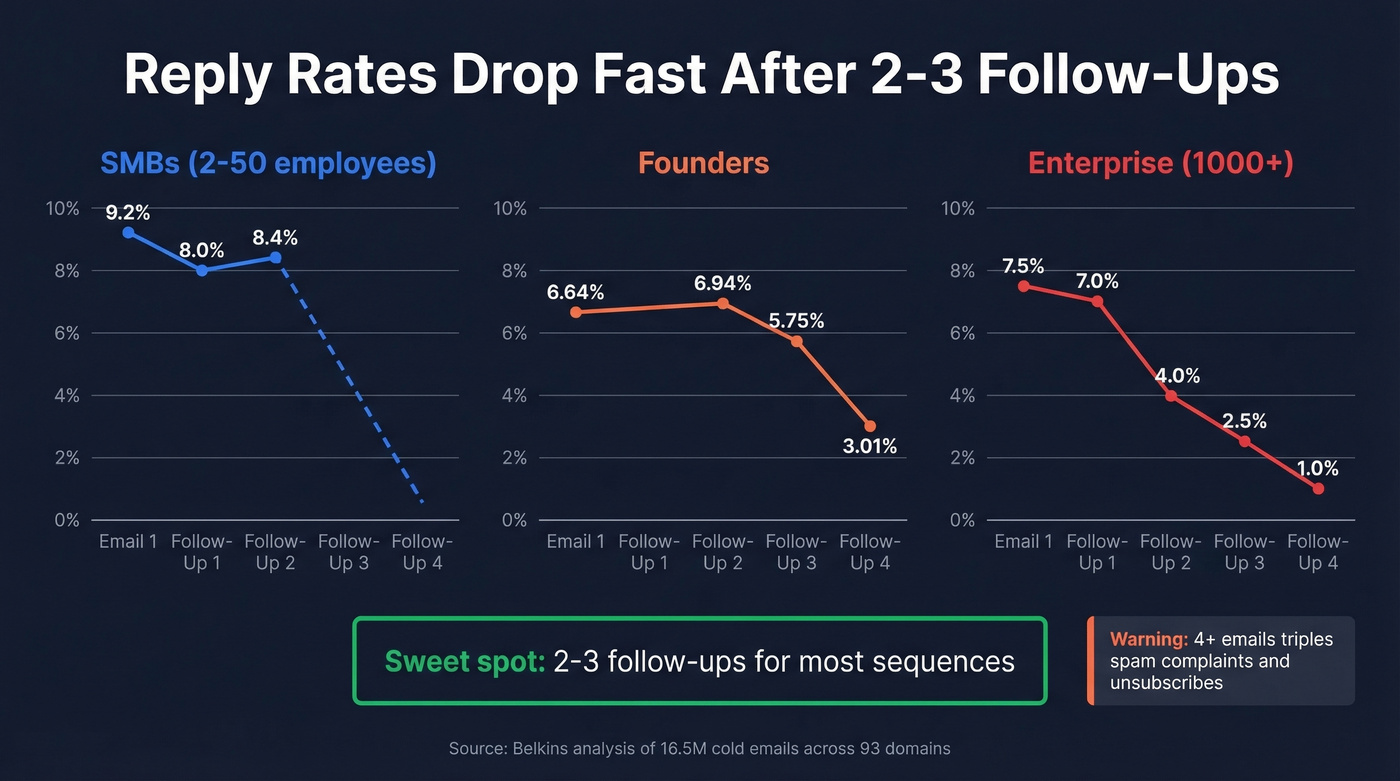
A Belkins analysis of 16.5M cold emails across 93 business domains found the highest reply rate - 8.4% - came from the first email alone. Every subsequent follow-up saw declining returns. Once sequences hit four or more emails, unsubscribe and spam complaint rates more than tripled.
The tolerance varies by audience. Small businesses with 2-50 employees are relatively forgiving - reply rates start at 9.2%, dip to 8% on the first follow-up, then bounce back to 8.4% on the second. Enterprise contacts with 1,000+ employees are allergic to persistence. Founders follow a more gradual pattern: 6.64% initial, peaking at 6.94% on the second follow-up, then declining to 5.75% before a sharp cliff to 3.01% by the fourth email.
Two to three follow-ups works for most sequences. Selling into enterprise? Lean toward two. Targeting SMBs? Three is safe. Four is where you start doing real damage.
Here's the thing: if your average deal size is under $10k, you probably don't need more than two follow-ups. The math just doesn't support burning domain health for a marginal reply.
The same dataset found LinkedIn nurture combos - message plus profile visit - hitting 11.87% reply rates, higher than any email-only sequence. If you're running email follow-ups without a multi-channel layer, you're leaving pipeline on the table.
Deliverability Rules Most Guides Skip
Automating follow-ups without nailing deliverability is like building a pipeline that leaks at every joint.
Authentication Is Non-Negotiable
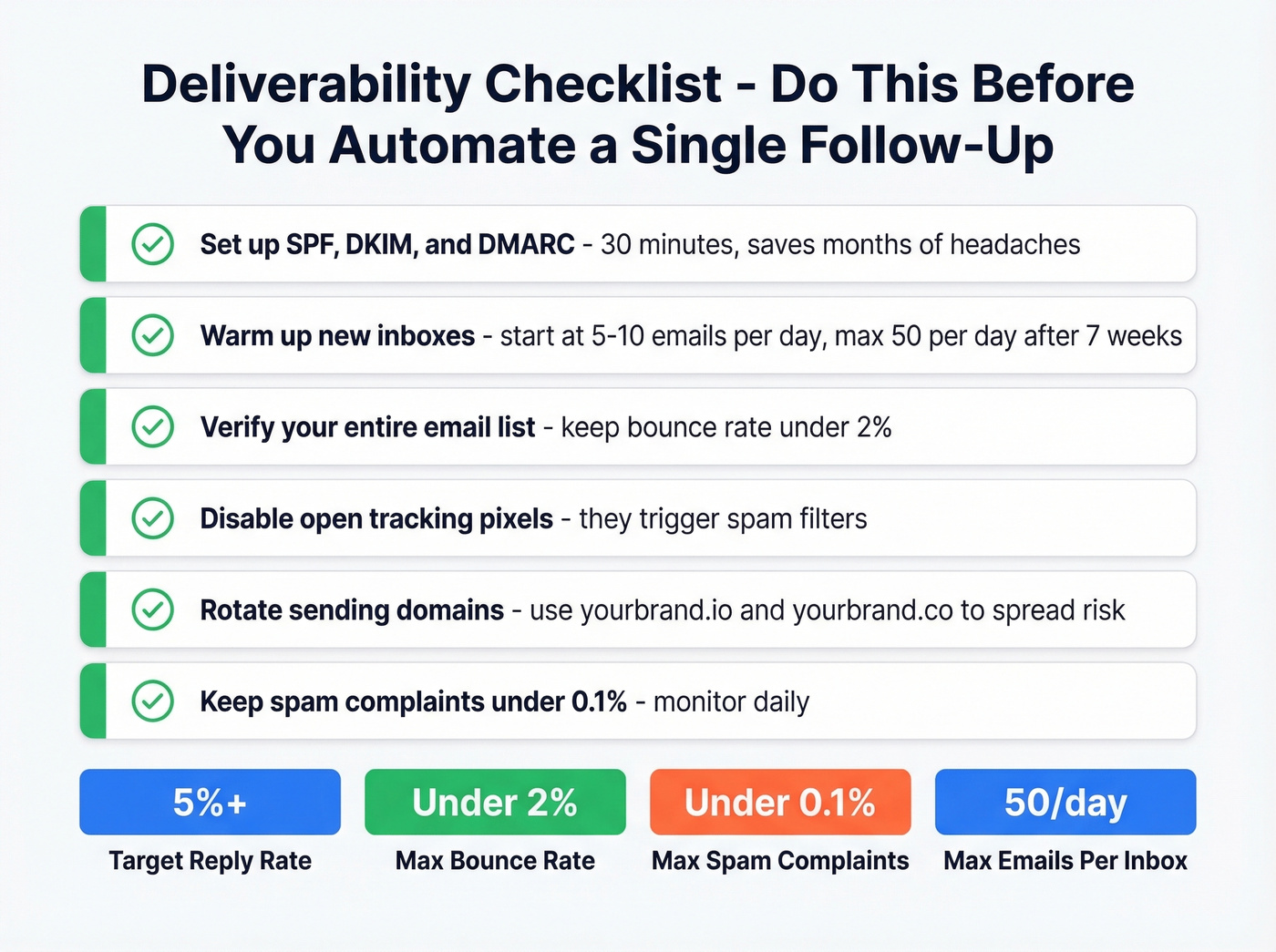
Set up SPF, DKIM, and DMARC before you send a single automated email. These protocols tell inbox providers you're legitimate. Without them, your follow-ups land in spam regardless of how good your copy is. This takes 30 minutes and saves months of headaches. (If you want a deeper deliverability baseline, start with this email deliverability guide.)
Warm Up Every New Inbox on a Schedule
Don't blast 50 emails on day one from a fresh domain.
| Week | Daily Volume | Notes |
|---|---|---|
| 1-2 | 5-10/day | Mix warm-up + personal |
| 3-4 | 15-20/day | Start adding cold sends |
| 5-6 | 30-40/day | Monitor bounce/spam |
| 7+ | Max 50/day | Hard cap per inbox |
Never exceed 50 emails per day from a single inbox. At max capacity, split it: 25 warm-up emails and 25 cold. If you need more volume, add inboxes and rotate domains - sending from multiple domains like yourbrand.io and yourbrand.co so no single domain absorbs all the volume and risk. (For a more detailed breakdown of safe sending limits, see email velocity.)
Stop Tracking Open Rates
Tracking pixels - the invisible images that measure opens - can trigger spam filters. Belkins stopped tracking opens entirely because it was hurting their deliverability. Focus on reply rate (target 5%+), bounce rate (keep under 2%), spam complaints (under 0.1%), and conversion rate measured by meetings booked per sequence. If you want the technical why, read our guide to email tracking pixels.
Watch Your Content
Spam trigger words like "guarantee," "act now," and excessive caps will get you flagged. Keep a roughly 80/20 text-to-image ratio in any email that includes visuals. Plain text usually performs better than heavy HTML templates for cold follow-ups. (If you need a copy baseline, start with email copywriting.)
Clean Your Data First
Automated follow-ups to bad email addresses don't just fail - they compound the damage. Every bounce chips away at your sender reputation. String enough bounces together and your entire domain gets flagged, which means even your follow-ups to good addresses start landing in spam.
This is the upstream problem that makes or breaks every sequence. Prospeo's email verification runs a 5-step process covering catch-all handling, spam-trap removal, and honeypot filtering, delivering 98% accuracy across 143M+ verified emails refreshed every 7 days instead of the 6-week industry average. (If you're troubleshooting bounce issues, this email bounce rate guide helps.)

One proof point worth sharing: Stack Optimize built from zero to $1M ARR running outbound campaigns with client deliverability consistently above 94%, bounce rates under 3%, and zero domain flags across all clients. That's what clean data looks like in practice.

Every bounce from an automated follow-up chips away at your domain. Prospeo's 5-step verification - with catch-all handling, spam-trap removal, and honeypot filtering - delivers 98% email accuracy across 143M+ verified addresses refreshed every 7 days.
Clean your list before you automate a single follow-up.
How to Automate Email Follow-Ups Step by Step
Define Your Triggers
Every follow-up sequence needs a clear trigger. The most common is "no reply after X days," but you can also trigger on no click or time-based intervals regardless of engagement. For most outbound sequences, "no reply" is the right trigger - it's the cleanest signal that the prospect hasn't engaged. (For timing benchmarks, see when should i follow up on an email.)
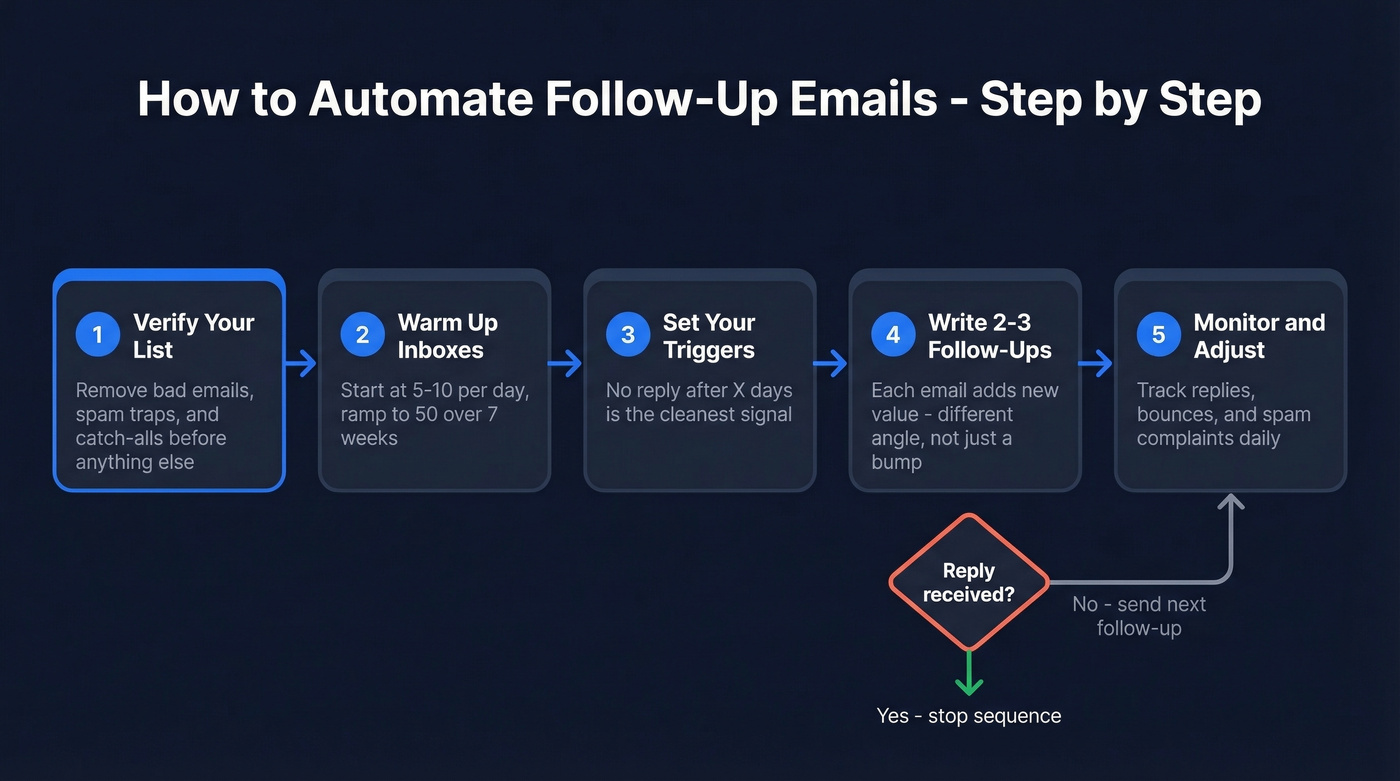
Decide your threading strategy upfront. Reply-in-thread keeps the conversation in one place and feels more natural. New subject lines work when you want to reframe the value proposition. Threading works better for follow-ups one and two, while a fresh subject on the third touch can recapture attention. (If you need options, pull from these email subject lines.)
Gmail Setup with GMass
If you live in Gmail, GMass is the fastest path to "send until reply" automation without leaving your inbox. Set up follow-up stages with specific day intervals, and GMass handles the rest. For anyone looking to set up automated sequences inside Gmail specifically, this is the lowest-friction option available.

One critical gotcha: if you type your follow-up text directly in the GMass compose box, it sends threaded as a reply. Select a template from the dropdown, and it sends as a standalone message with a new subject. Know which behavior you want before launching.
Another trap we've seen catch people: if you set a different Reply-To address, GMass can't detect replies to that address. Your "send until reply" logic breaks silently. Keep Reply-To matching your sending address.
You can also enable domain-level suppression - if anyone at a company replies, GMass stops follow-ups to everyone else at that domain. Smart for ABM-style outreach where you're multi-threading.
CRM Setup with Pipedrive or HubSpot
Both Pipedrive and HubSpot offer built-in follow-up automation through workflow builders. The setup pattern is similar: define a trigger like a deal stage change, form submission, or no activity after X days, then build the email sequence, set delays between steps, and add exit conditions for replies, meetings booked, or unsubscribes. You can also automate internal reminder emails - triggering a notification to a rep when a deal goes cold, alongside the external follow-up to the prospect.
Pipedrive's automation is simpler, but the principle is the same either way: define the trigger, write the emails, set the timing, let the CRM handle execution.
Follow-Up Templates You Can Steal
Each follow-up should add new value - not just "bumping this to the top of your inbox." Here's a three-email sequence built around the "Sending Value" framework, adapted from NetHunt's sequence templates:
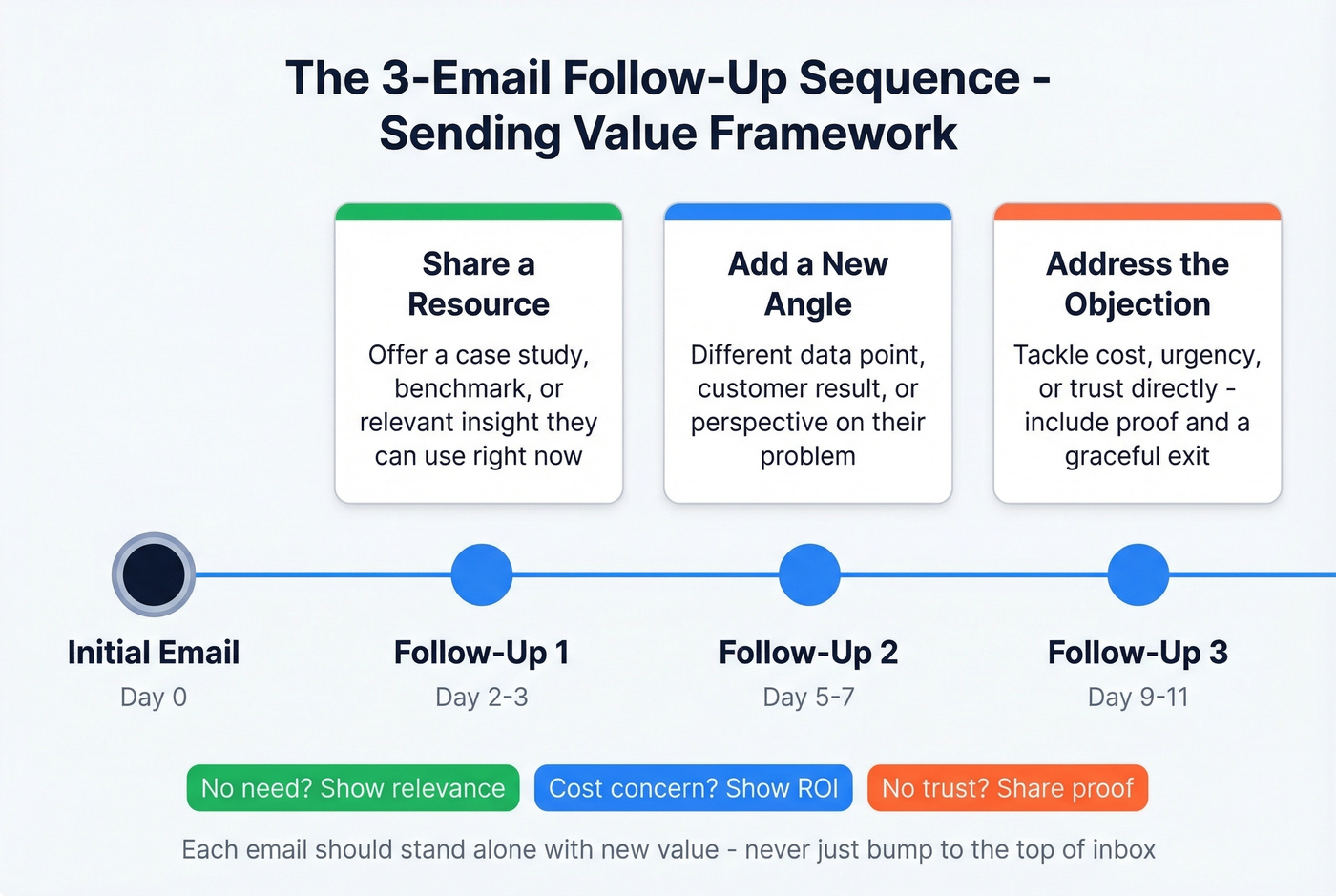
Follow-Up 1 (Day 2-3 after initial email)
Subject: Suggestions about [their goal/problem]
Hi [Name], I put together a quick [resource/case study/benchmark] that's relevant to [specific challenge]. [Link or one-line summary]. Worth a 15-minute call to walk through it?
Follow-Up 2 (Day 5-7)
Subject: Have you had a chance to think about...
[Name], wanted to share one more thing - [different angle, new data point, or customer result]. [One sentence connecting it to their situation]. Happy to jump on a call this week if the timing works.
Follow-Up 3 (Day 9-11)
Subject: Another idea about [problem]
[Name], last thought from me - [address a specific objection like cost, urgency, or trust]. [Brief proof point]. If now isn't the right time, no worries. But if it is, [calendar link].
Every email addresses a different reason they haven't replied. No need? Show relevance. Cost concern? Show ROI. No urgency? Create a deadline. Don't trust you? Share proof. Plain text, short paragraphs, zero fluff. (For more options, grab these sales follow-up templates.)
Best Tools for Email Follow-Up Automation
Comparison Table
| Tool | Best For | Starting Price | Key Limitation |
|---|---|---|---|
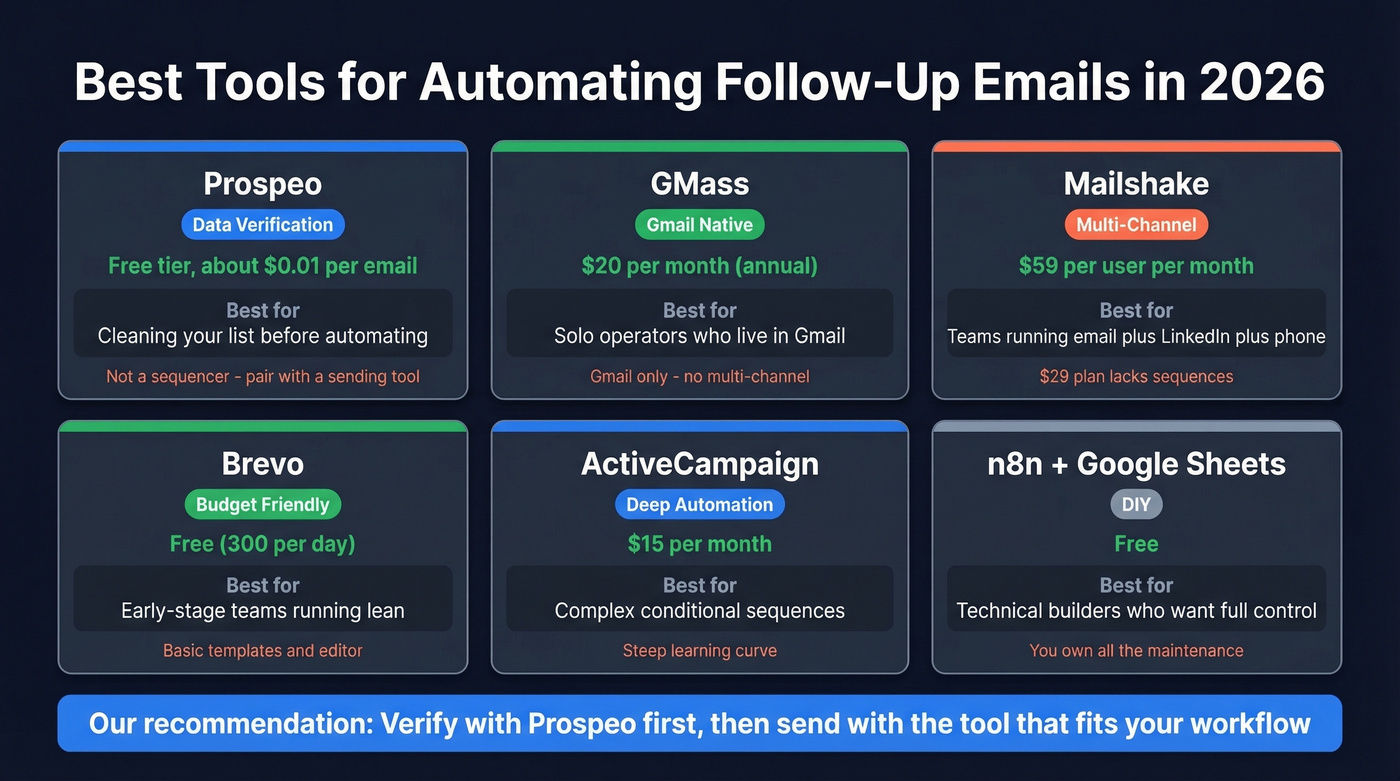
| Prospeo | Data verification | Free tier; ~$0.01/email | Not a sequencer |
| GMass | Gmail-native users | $20/mo (annual) | Gmail only |
| Mailshake | Multi-channel teams | $59/user/mo | $29 plan lacks sequences |
| Brevo | Budget teams | Free (300/day) | Basic templates |
| ActiveCampaign | Deep automation | $15/mo | Steep learning curve |
| n8n + Sheets | DIY builders | Free | You own maintenance |
If you're evaluating more platforms, this roundup of follow up email software is a good next step.
For Gmail Users: GMass
GMass is the obvious choice if your workflow lives in Gmail and you don't need multi-channel sequences. The "send until reply" logic works exactly how you'd expect - set stages, set delays, and GMass stops when the prospect responds. At $20/mo on an annual plan, it's hard to beat for solo operators and small teams. The Premium tier at $29/mo adds A/B testing and higher daily limits.
For Teams on a Budget: Brevo
Brevo's free tier gives you 300 emails per day - enough for early-stage outbound or marketing follow-ups. Paid plans start at $8/mo. The templates and editor are basic, but deliverability is solid. It won't win any design awards, but it sends emails that land in inboxes, and that's what matters when you're running lean.
Build Your Own: n8n
For technical teams who'd rather build than buy, n8n paired with Google Sheets is a legitimate option. The workflow reads a spreadsheet, checks status fields like FUP1, FUP2, and FUP3, then fires the next email in sequence automatically. It's free, flexible, and you own every piece of it. The tradeoff: you also own every bug, every edge case, and every maintenance hour. The consensus on r/n8n is that it's satisfying to build but time-consuming to maintain. If you just want follow-ups to go out, buy a tool.
Skip These Unless You Need Them
Mailshake is a solid multi-channel platform at $59/user/mo for the Email Outreach plan. But the $29 Starter plan doesn't include automated sequences - if you need sequences, you're paying $59 minimum.
ActiveCampaign at $15/mo offers deep automation builders but comes with a learning curve that Reddit users consistently describe as "brutal." It's overkill for simple follow-up sequences and better suited for marketing automation with complex branching logic. Skip it if all you need is a three-email cold outbound sequence.
Mistakes That Kill Your Reply Rate
"Just checking in" without new value. Every follow-up that doesn't add something new trains the prospect to ignore you. This is the single most common mistake, and it's the easiest to fix. (If you need alternatives, see how to say just checking in professionally.)
Sending 4+ emails in a sequence. The 16.5M-email dataset is clear - unsubscribe and spam complaints more than triple past three follow-ups. The marginal reply you might get isn't worth the domain damage.
No segmentation by company size. Enterprise contacts and SMB founders have completely different tolerance for persistence. A three-email sequence that works on a 20-person startup will get you flagged at a Fortune 500. We've seen this kill campaigns that were otherwise well-written.
Skipping authentication. No SPF/DKIM/DMARC means your emails land in spam before anyone reads them.
Sending to unverified addresses. Bounces compound. Each one erodes your sender reputation for every future email you send. Verify before you automate - always.
Stack Optimize hit $1M ARR with bounce rates under 3% and zero domain flags - because they verified every contact before automating outreach. At $0.01 per email, Prospeo costs less than a single wasted follow-up sequence to bad data.
Stop automating follow-ups to addresses that don't exist.
FAQ
Can I automate follow-ups in Gmail for free?
Gmail's native Scheduled Send and templates can't conditionally send based on whether a prospect replied. You need an add-on like GMass at $20/mo on an annual plan or a custom Apps Script for true "send if no reply" logic. There's no fully free built-in solution for conditional follow-up sequences.
How many follow-up emails is too many?
Data from 16.5M emails shows four or more follow-ups more than triples spam complaints. Stick to two or three for most sequences. Enterprise prospects tolerate even less - two is usually the ceiling before you risk being flagged.
What's a good reply rate for automated follow-ups?
Five percent or higher is healthy for cold outbound. The first email hit 8.4% reply rates in the Belkins dataset, and each follow-up declines from there. If you're consistently below 5%, audit your data quality and deliverability setup before blaming your copy.
How do I stop follow-up emails from going to spam?
Authenticate your domain with SPF, DKIM, and DMARC. Verify every email address before sending. Keep daily volume under 50 per inbox. Avoid tracking pixels, spam trigger words, and image-heavy templates. Let's be honest - most spam folder problems aren't about copy. They're about infrastructure.
How do I automate follow-ups without hurting sender reputation?
Combine clean data with conservative volume. Verify every address before it enters your sequence, cap sends at 50 per inbox per day, authenticate your domain, and limit sequences to two or three touches. Follow those rules and you can safely scale automated email follow-ups without risking your domain.