

Automatic Email Sender: How to Pick the Right Tool and Actually Reach the Inbox
Your marketing manager asks you to "set up automatic emails." Simple enough - until you realize that phrase means three completely different things depending on who's asking. A sales rep wants scheduled follow-ups to prospects who've never heard of you. The content team wants a drip sequence for newsletter subscribers. The founder wants a welcome email that fires the instant someone signs up.
Three workflows, three tool categories, three sets of compliance rules. Choosing the right automatic email sender starts with understanding which category you actually need - because picking the wrong one wastes more money than picking the wrong tool within a category.
With nearly 5 billion email users expected by 2027, the market has fragmented into dozens of specialized tools. Let's sort out the categories first, then get into specific recommendations.
What You Need (Quick Version)
Before you evaluate a single tool, figure out which bucket you're in:
- Just need send-later scheduling? Boomerang (from $4.98/mo) or Zoho Mail (from $1/user/mo). These queue emails for a specific time. No workflows, no sequences.
- Email marketing automation for subscribers? Brevo (free: 300 emails/day) or ActiveCampaign (from $19/mo). Drip campaigns, segmentation, and triggered workflows for people who opted in.
Which Type of Email Automation Do You Need?
The confusion starts because "automatic email sender" covers tools that do fundamentally different jobs.
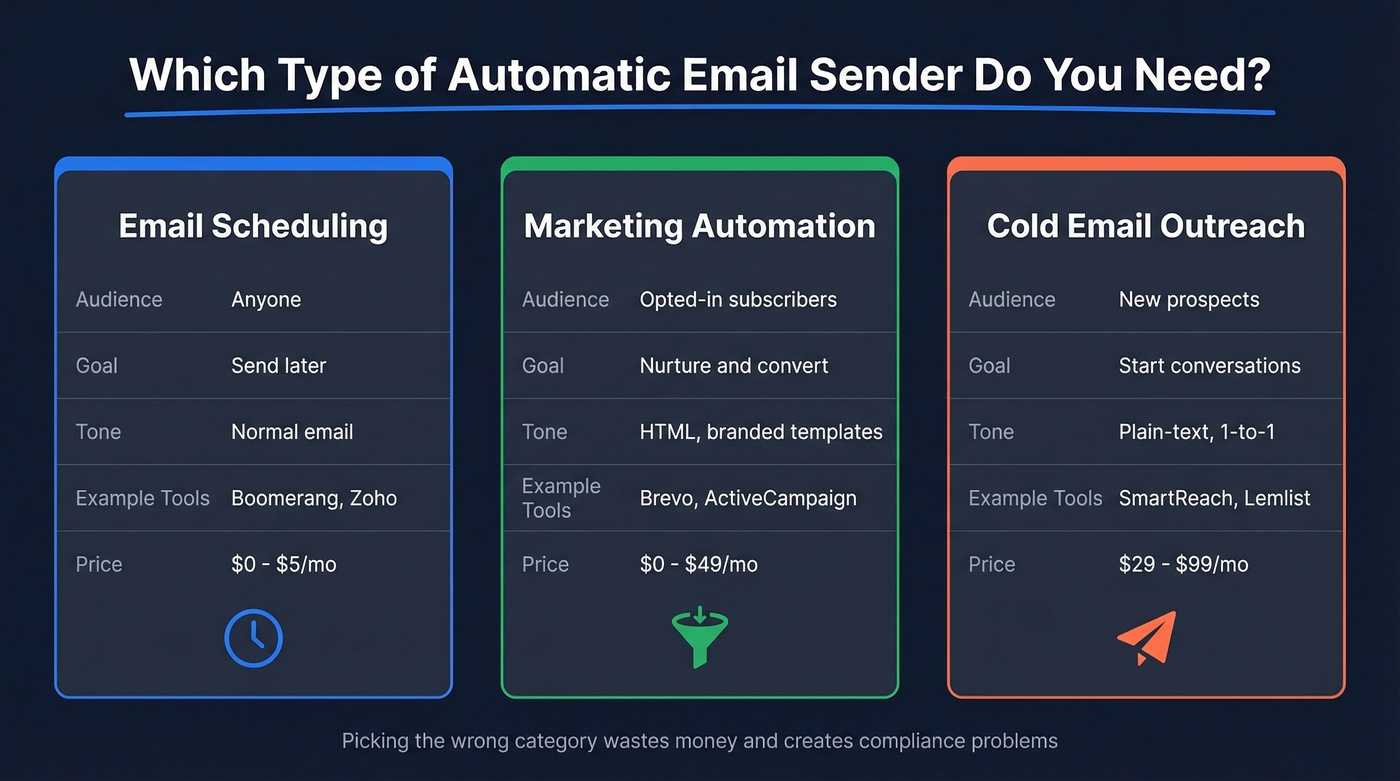
Email scheduling is the simplest version. You write an email, pick a send time, and the tool delivers it later. No automation logic, no sequences, no audience management. It's a "send later" button.
Email marketing automation targets opted-in subscribers and customers. The goal is nurture - welcome sequences, abandoned cart reminders, re-engagement campaigns. There's an important distinction here: email marketing sends messages, while marketing automation orchestrates workflows that pull in web behavior, purchase history, and engagement data to measure actual revenue impact.
Cold email automation reaches prospects with no prior relationship. The tone is plain-text, 1:1, and personalized. The goal is starting a conversation, not driving a click. CAN-SPAM requires accurate sender info and an unsubscribe link, GDPR requires consent for marketing emails to EU recipients, and you should only email verified, up-to-date contacts. Many teams in this category need a bulk email sender that can handle personalized sequences at scale without sacrificing deliverability.
| Category | Audience | Goal | Tone/Format | Example Tools | Price Range |
|---|---|---|---|---|---|
| Scheduling | Anyone | Send later | Normal email | Boomerang, Zoho | $0-$5/mo |
| Marketing | Opted-in subs | Nurture/convert | HTML, branded | Brevo, ActiveCampaign | $0-$49/mo |
| Cold email | Prospects | Start conversations | Plain-text, 1:1 | SmartReach, Lemlist | $29-$99/mo |
Here's the thing: picking a cold email tool when you need marketing automation (or vice versa) doesn't just waste money - it creates compliance problems. Marketing platforms don't have reply detection. Cold email tools don't have unsubscribe management built for GDPR opt-in lists. Match the tool to the job.
Authentication & Deliverability Basics
None of these tools matter if your emails land in spam. Before you automate a single send, get your authentication right.
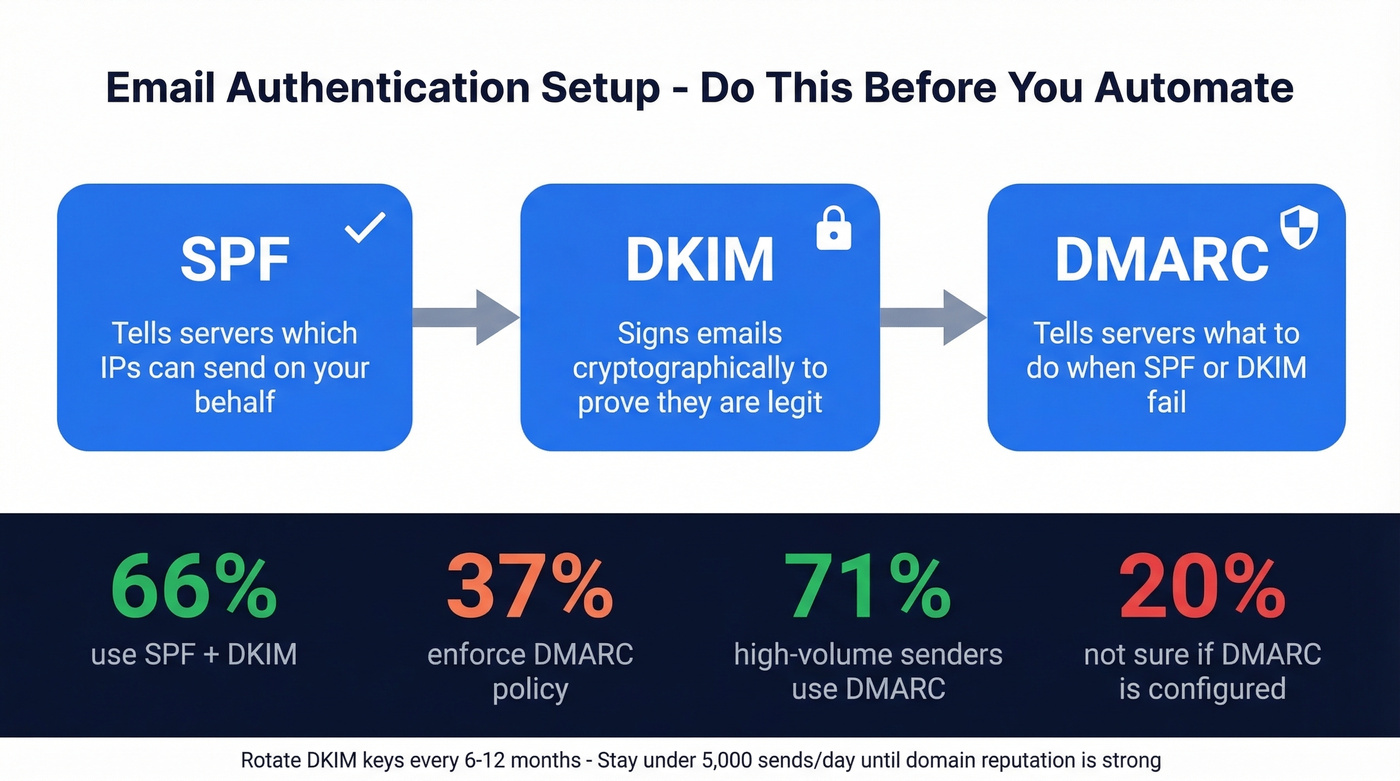
- SPF - tells receiving servers which IPs can send on your behalf
- DKIM - cryptographically signs your emails to prove they haven't been tampered with
- DMARC - tells servers what to do when SPF/DKIM fail and gives you reporting
Per Mailgun's deliverability research, 66% of senders use both SPF and DKIM, but only 37% of DMARC users enforce a reject or quarantine policy. Among high-volume senders (100K+ emails/month), 71% use DMARC - but 20% aren't even sure if they have it configured. That means the majority are leaving inbox placement on the table. Set all three before your first automated email goes out, and rotate your DKIM keys every 6-12 months. (If you want a quick checklist, see how to verify DKIM is working.)
Gmail and Yahoo rules get triggered at 5,000 sends per day. Stay under that threshold unless you've built serious domain reputation.
Gmail also weighs reply rates heavily in its spam algorithm - a list that doesn't engage trains the filter to suppress your future sends.
Here's what "good" deliverability actually looks like, based on EmailTooltester's analysis of 15 ESPs:
| Provider | Inbox Rate | Spam Rate | Missing |
|---|---|---|---|
| 89.8% | 6.4% | 3.8% | |
| Yahoo | 87.3% | 6.4% | 6.3% |
| Apple | 82.0% | 10.8% | 7.2% |
| Microsoft | 77.4% | 15.1% | 7.5% |
These four mailbox providers control roughly 77% of the market. The average across all providers is 83.1% inbox placement - meaning roughly 1 in 6 emails never reaches the inbox. Use these benchmarks: above 89% is good, above 95% is excellent, and below 80% means something is broken. If your prospect list skews corporate with lots of Outlook domains, authentication and list hygiene matter even more, since Microsoft misses nearly a quarter of incoming emails. For a deeper playbook, use this email deliverability guide.

Automated emails that land in spam waste your entire sequence. The fix starts before you hit send - with verified contact data. Prospeo delivers 98% email accuracy through 5-step verification, cutting bounce rates below 4% for teams like Snyk and Meritt.
Stop automating emails to addresses that bounce. Verify first.
Best Tools by Category
Email Scheduling Tools
If all you need is "send this email at 8 AM Tuesday," you don't need a $99/month platform.
| Tool | Free Plan | Paid From | Best For |
|---|---|---|---|
| Boomerang | Yes | $4.98/mo | Gmail power users |
| Zoho Mail | Yes | $1/user/mo | Budget teams |
Boomerang adds read receipts, follow-up reminders, and inbox pause on top of scheduling. Zoho Mail is the cheapest option if you're already in the Zoho ecosystem. Neither handles sequences or automation - they're "send later" buttons with a few extras.
Marketing Automation Tools
This is where most teams land. Businesses using automation software generate twice as many leads as those without it, so the ROI case writes itself.
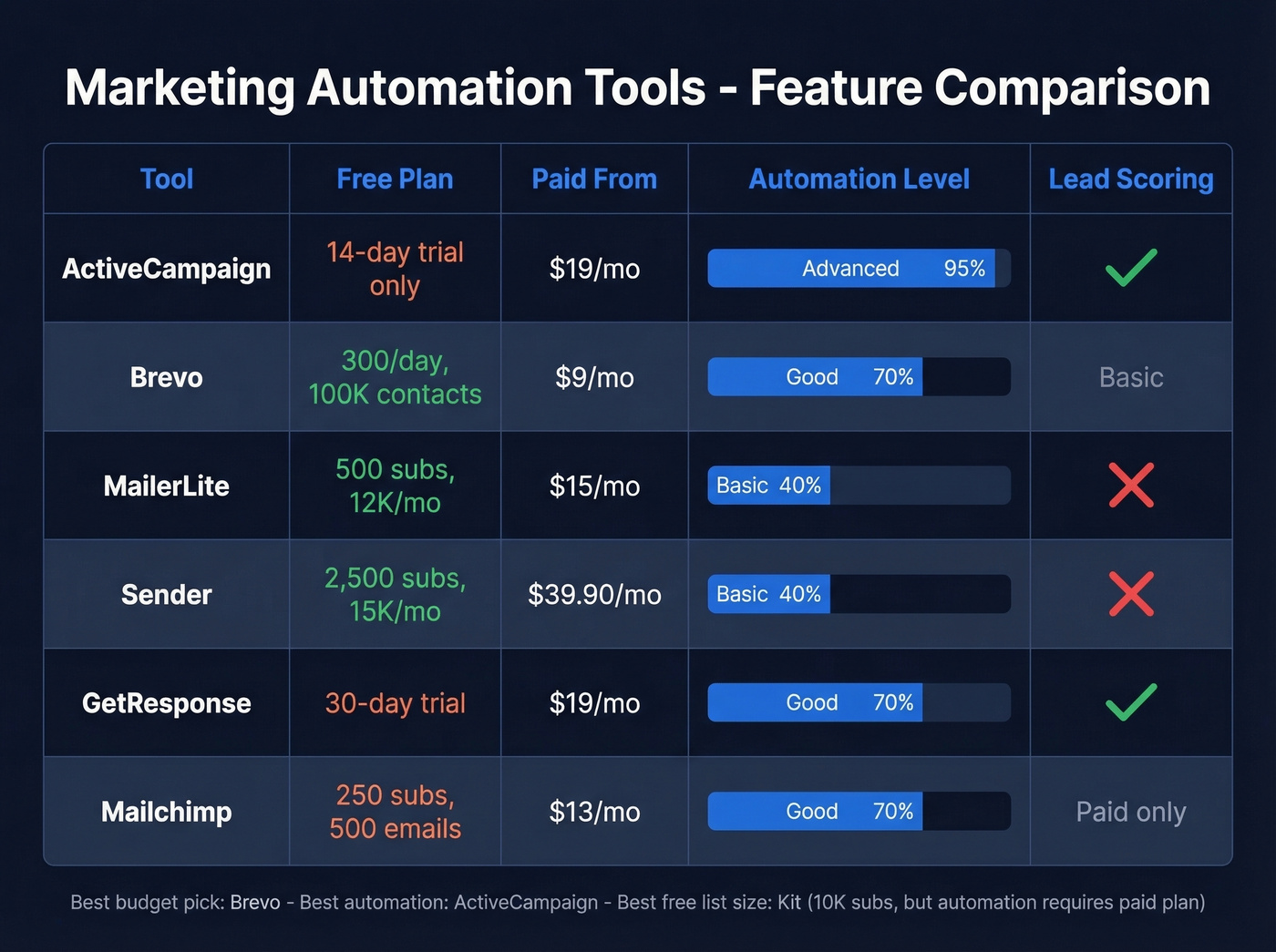
ActiveCampaign is the pick for teams that need serious automation logic - conditional branching, lead scoring, CRM integration, and multi-step workflows. It starts at $19/mo for 1,000 contacts and scales well for SMBs. Skip it if you just need to send a monthly newsletter. It's overkill for simple broadcasts.
Brevo has one of the strongest free tiers in email marketing: 300 emails per day to up to 100,000 contacts, generous enough for most early-stage companies. Paid plans start at $9/mo when you need higher volume. Skip it if you need deep ecommerce tracking or advanced lead scoring out of the box.

MailerLite is the simplest option for teams that want automation without complexity. Free for 500 subscribers and 12,000 emails/month, paid from $15/mo. The drag-and-drop builder is genuinely intuitive - it won't scale to complex multi-branch workflows, but for straightforward drip sequences, it's hard to beat.
Sender has one of the most generous free plans for mid-sized lists: 2,500 subscribers and 15,000 emails/month at $0. If you're bootstrapping and need to reach a decent-sized list without paying, start here. A common paid tier runs $39.90/month for 10,000 subscribers and 120,000 sends.
Mailchimp is the legacy option, paid from $13/mo. Klaviyo is excellent but ecommerce-focused; if you're not running a Shopify store, look elsewhere (from $20/mo). Kit (formerly ConvertKit) gives you 10,000 free subscribers with unlimited sends, but automation requires a paid plan. GetResponse rounds out the mid-tier at $19/mo for 1,000 recipients with a 30-day trial - solid if you want webinar hosting baked into your email platform.
| Tool | Free Plan | Paid From | Automation | Lead Scoring |
|---|---|---|---|---|
| ActiveCampaign | No (14-day trial) | $19/mo | Advanced | Yes |
| Brevo | 300/day, 100K contacts | $9/mo | Good | Basic |
| MailerLite | 500 subs, 12K/mo | $15/mo | Basic | No |
| Sender | 2,500 subs, 15K/mo | $39.90/mo (example tier) | Basic | No |
| GetResponse | 30-day trial | $19/mo | Good | Yes |
| Mailchimp | 250 subs, 500 emails/mo | $13/mo | Good | Paid only |
If you're building more complete profiles for segmentation and scoring, consider pairing your ESP with data enrichment services.
Cold Email & Bulk Sender Tools
Cold email is a different animal. You're reaching people who didn't ask to hear from you, so deliverability, personalization, and support quality matter more than template design.
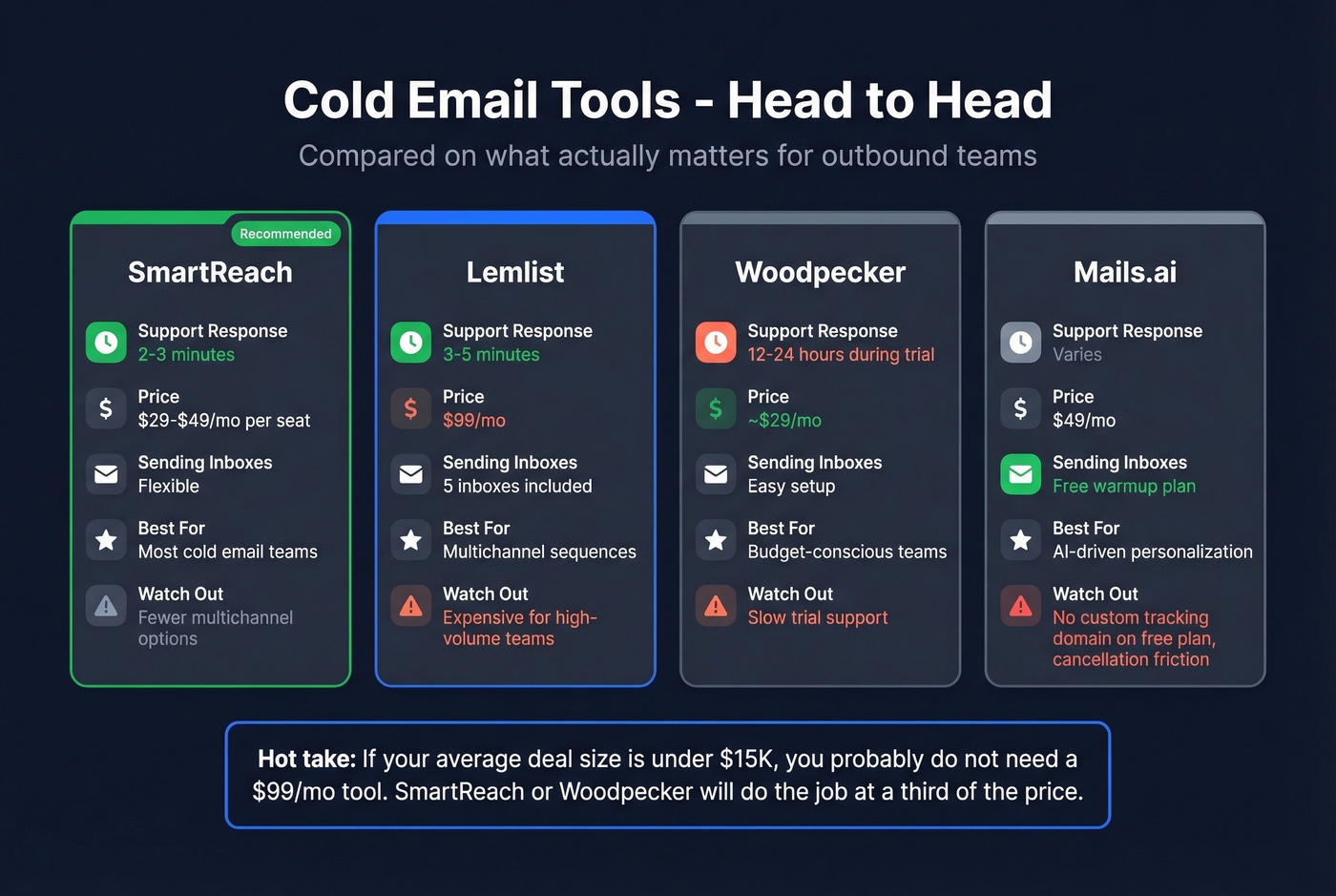
SmartReach is the tool we'd recommend for most cold email teams. Support responds in 2-3 minutes (not hours - minutes), reporting is clear and actionable, and the interface doesn't try to do too much. Pricing starts around $29-$49/mo per seat.
Lemlist wins on multichannel - you get email, phone tasks, and social touches in one sequence. Support is responsive (3-5 minutes per practitioner reports on r/coldemail). The catch is price: $99/mo gets you only 5 sending inboxes. For teams running high-volume outbound across multiple domains, that adds up fast.
Woodpecker (from ~$29/mo) offers clear pricing and easy email connection setup, but support during the trial period runs 12-24 hours - frustrating when you're evaluating. Mails.ai (from $49/mo) has a free warmup plan, but you can't set a custom tracking domain on the free workspace, which can land you on spam lists. Users also report cancellation friction - you have to email support to get a Stripe portal link.
Teams exploring an AI-powered mass email sender should note that Mails.ai and Lemlist both incorporate AI-driven personalization and send-time optimization, though the quality of those features varies significantly between platforms. If you're comparing options, start with these AI bulk email senders.
Hot take: If your average deal size is under $15K, you probably don't need a $99/mo cold email tool. SmartReach or Woodpecker will do the job at a third of the price. Save the budget for better data.
Look - cold email tools send. They don't verify. Every one of these platforms will happily blast a list full of dead addresses, spam traps, and honeypots. Run your list through Prospeo's verification first. With 98% email accuracy, catch-all handling, and spam-trap removal, it keeps bounce rates low and your domain reputation intact. (If you're troubleshooting bounces, see email bounce rate.)
Best Free Options Compared
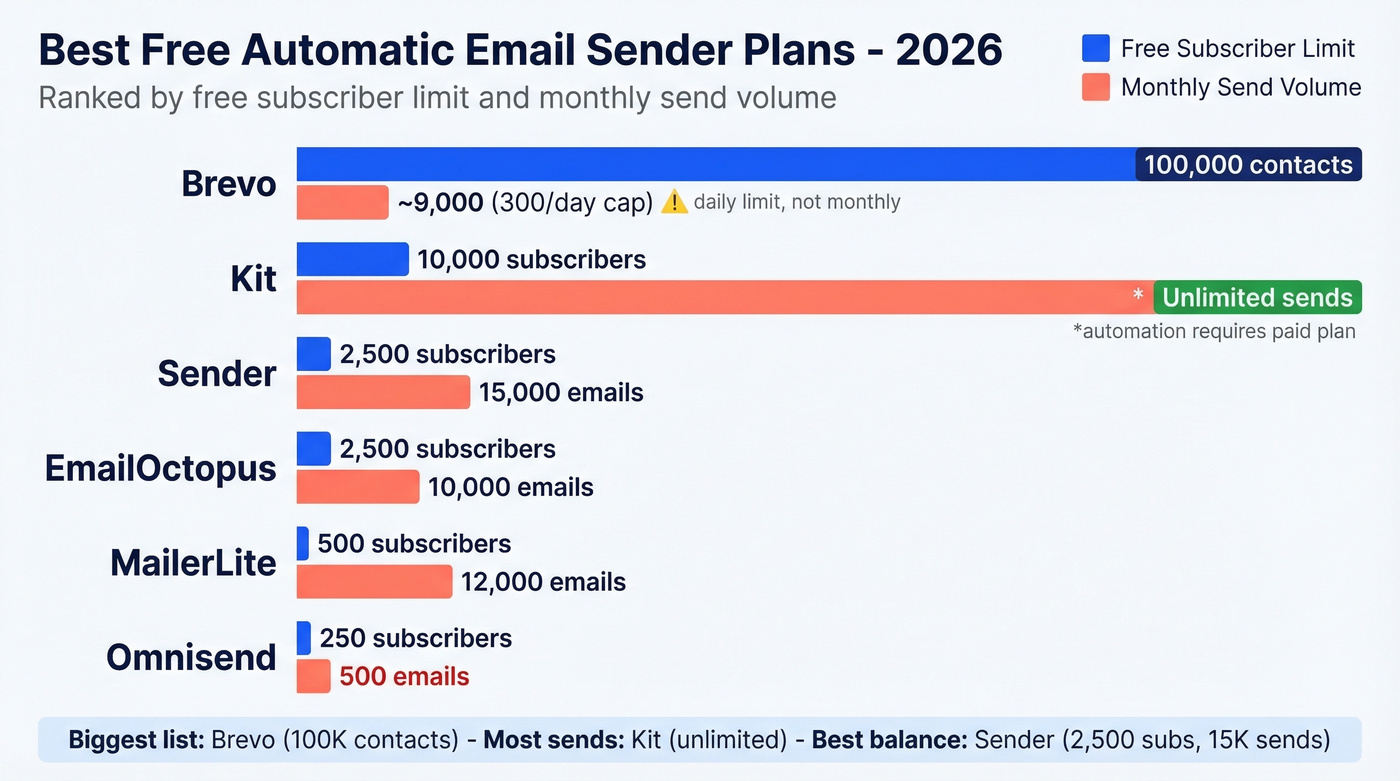
If budget is the primary constraint, here's every meaningful free plan in one place. The best free mass email sender for you depends on whether you prioritize list size, monthly volume, or automation features.
| Tool | Category | Subscribers | Monthly Sends | Key Limitation |
|---|---|---|---|---|
| Brevo | Marketing | 100,000 | ~9,000 (300/day) | Daily cap, not monthly |
| Sender | Marketing | 2,500 | 15,000 | Limited automation |
| MailerLite | Marketing | 500 | 12,000 | Low subscriber cap |
| Kit | Marketing | 10,000 | Unlimited | Automation = paid |
| EmailOctopus | Marketing | 2,500 | 10,000 | Basic templates |
| Omnisend | Marketing | 250 | 500 | Very low limits |
Brevo's 100,000 contact allowance is the most generous for list size, though the 300/day send cap means you can't blast your whole list at once. For most teams starting out, Brevo or Sender gives you the most room to grow before hitting a paywall.
Verify Before You Automate
That 83.1% average deliverability rate means roughly 17% of your emails never reach the inbox even under normal conditions. Send to an unverified list full of dead addresses and spam traps, and that number gets much worse. Bounces damage your domain reputation, spam traps can get you blacklisted, and once your sending reputation tanks, even your emails to valid addresses start hitting spam. If you need a remediation plan, start with spam trap removal.
We've seen this play out firsthand. One agency we talked to went from a 35% bounce rate to under 3% just by adding a verification step before loading lists into their sender - and their client deliverability jumped to 94%+. The fix isn't complicated; it's just a step most teams skip because they're in a rush to start sending.
Whether you picked a cold email tool or a marketing platform, bad data kills deliverability the same way. Prospeo refreshes 300M+ profiles every 7 days - not every 6 weeks - so your automated sequences always reach real inboxes at $0.01 per email.
Feed your email sender verified data and watch reply rates climb.
Mistakes That Kill Your Setup
1. Automating bad data. Every bounce chips away at your sender reputation. Hit enough spam traps and your domain gets blacklisted - not just for that campaign, but for everything you send. Verify before you automate. Always. (If you're trying to recover, here's how to improve sender reputation.)
2. Skipping authentication. No SPF, DKIM, or DMARC means mailbox providers have no reason to trust your emails. The fact that 63% of DMARC users still don't enforce a reject or quarantine policy tells you how many senders are leaving deliverability on the table.
3. Fake personalization. "Hi {{first_name}}, I noticed your company is doing great things in {{industry}}" fools nobody. If your personalization reads like a mail merge, it's hurting more than helping. Write like a human or don't personalize at all. If you want a better framework, use these sales follow-up templates.
4. Over-sending. Firing an email and an SMS at the same time is a fast path to unsubscribes. Use 6-12 hour delays between channels and add conditions like "email opened" before triggering the next touch.
5. Launch and disappear. We've seen teams build a 12-step automation sequence, turn it on, and never look at it again. Six months later, links are broken and reply rates have cratered. Review metrics weekly. Audit workflows quarterly. If you're running outbound sequences, tighten your sequence management.
FAQ
Is using an automatic email sender legal?
Yes, with guardrails. CAN-SPAM requires accurate sender info and a working unsubscribe link. GDPR requires explicit consent for marketing emails to EU recipients. Cold email has stricter rules - verified contacts, honest subject lines, and an opt-out mechanism in every message.
How many emails can I send per day?
Gmail and Yahoo enforce stricter filtering at 5,000 sends/day. For new domains, start at 50-100 per day and warm up over 2-4 weeks. Authenticate with SPF, DKIM, and DMARC before your first send - volume without reputation causes spam filtering.
What's the best free option for automated emails?
Brevo (300 emails/day to 100,000 contacts) and Sender (15,000 emails/month to 2,500 subscribers) offer the most usable free tiers for marketing. For cold outreach, Prospeo's free plan (75 email lookups/month) handles verification, while most free sending tools are too limited for real campaigns.
Do I need SPF, DKIM, and DMARC?
All three. Non-negotiable. Only 37% of DMARC users enforce reject or quarantine policies, which means the majority leave inbox placement to chance. Setup takes 30 minutes and pays dividends on every email you send afterward.
How do I stop automated emails from landing in spam?
Authenticate your domain, verify your list before sending, and avoid over-sending. Monitor reply rates closely - Gmail uses engagement signals to decide what's spam. A list that doesn't engage trains the algorithm to filter you out.