

Chaser Email: How to Write One That Gets Replies
The average worker receives [121 emails per day](https://www.inc.com/joy-gendusa/people-receive-121-emails-a-day/91162191). Your carefully crafted message isn't being ignored - it's being buried. Teams that send at least one follow-up see a [27% reply rate versus 16%](https://woodpecker.co/blog/follow-up-statistics/) for those who stop at a single email. That gap is the difference between a full pipeline and a quiet CRM.
A chaser email closes that gap. But most people write bad ones - vague subject lines, no clear ask, sent at the wrong time. Here's the thing: the chaser itself isn't hard to write. What's hard is resisting the urge to send a lazy "just checking in" and actually putting in the two minutes it takes to add something worth reading.
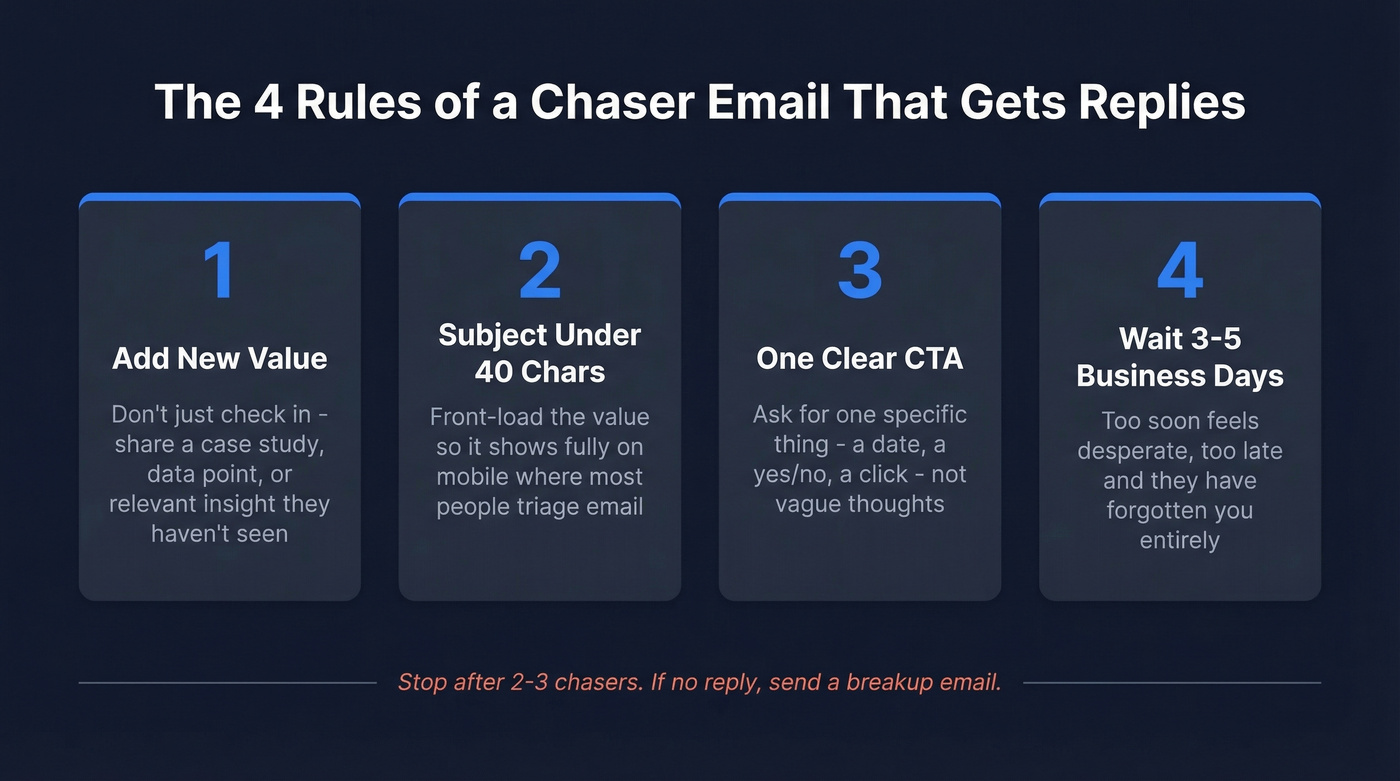
Quick version: A chaser email is a follow-up sent after no response. The formula: wait 3-5 business days, add new value (don't just "check in"), keep the subject line under 40 characters, and include one clear CTA. Stop after 2-3 chasers. If you're doing cold outreach, verify your contact data first - bounced chasers destroy your sender reputation.
What Is a Chaser Email?
"Chaser email" is the UK and Commonwealth business term for what Americans typically call a follow-up, reminder, or bump email. You'll hear it most often in British sales culture and accounts receivable departments, where "chasing" an invoice is standard vocabulary. The meaning is identical to "follow-up email," but the term carries a slightly more direct connotation - you're chasing a response, not just gently nudging.
Chaser emails fall into a few distinct categories. Sales chasers follow up after a demo, proposal, or cold outreach that went unanswered. Payment chasers remind clients about overdue invoices. Job application chasers check in after submitting a resume or completing an interview. Networking chasers re-engage a warm contact who went quiet. Meeting request chasers push for a time slot after the first ask got lost in someone's inbox.
The common thread: the recipient saw your original email (or didn't) and hasn't responded. Your chaser exists to surface the conversation again - ideally with something new to say.
The data supports persistence. [80% of sales require at least five follow-ups](https://calendly.com/blog/7-statistics-salespeople-might-not-know-but-should) to close, but most reps stop after one or two. That's a massive gap between what works and what people actually do.
How to Write One That Gets Replies
Start With Context, Not an Apology
Never open a chaser with "Sorry to bother you" or "Just following up." Both phrases signal that you don't think your email is worth reading - and the recipient will agree. Harvard Business Review's guidance is clear: avoid generic openers like "Following up" or "Checking in" entirely.
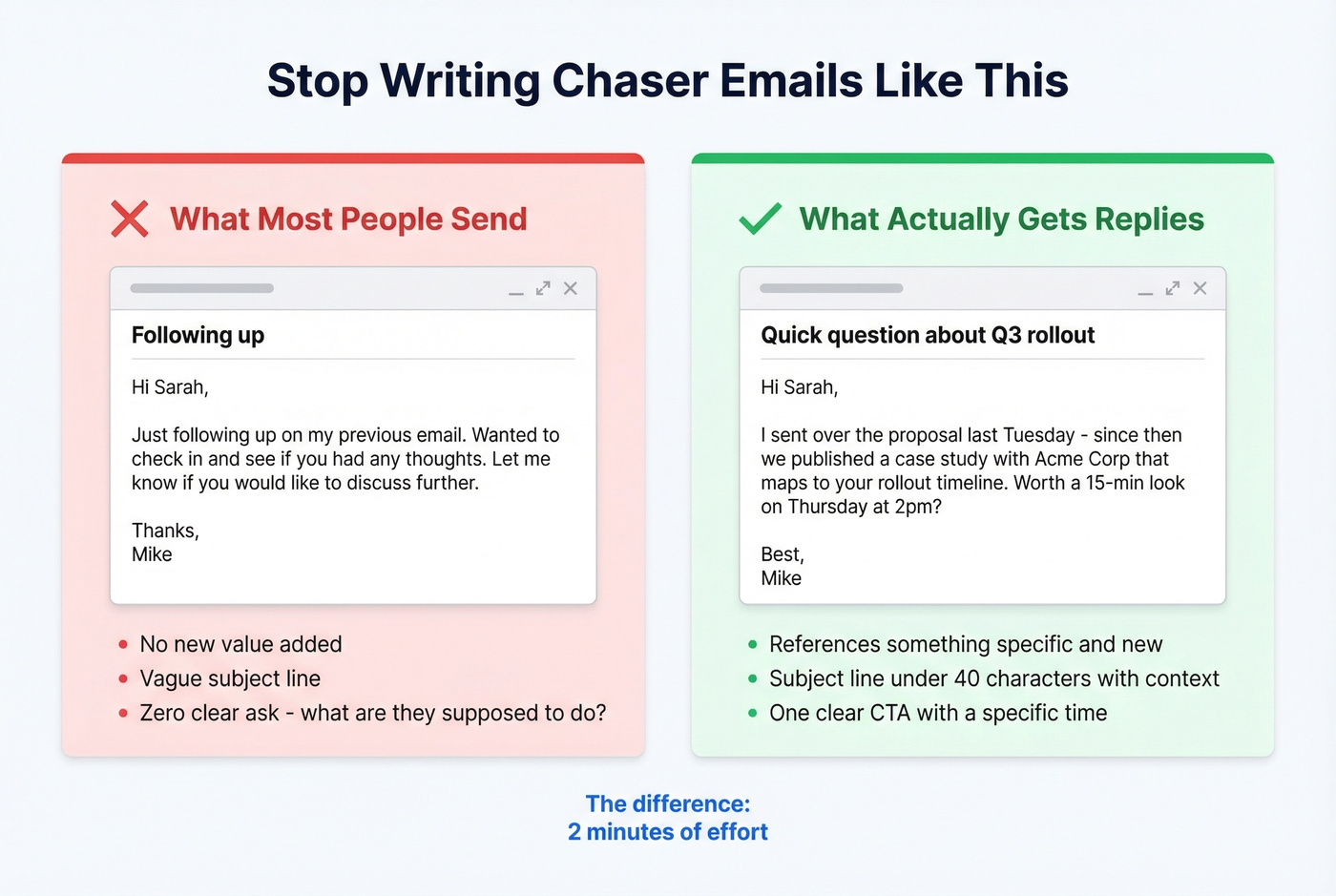
Instead, reference the original email and add something new. A fresh data point, a relevant article, a case study that maps to their situation. The structure is simple: remind them what you sent, give them a reason to care now, and make the next step obvious.
"I sent over the proposal last Tuesday - since then, we published a case study with [similar company] that's relevant to your rollout timeline. Worth a look?"
That's a follow-up with a reason to exist. If you're wondering how to follow up without saying follow-up that doesn't feel like spam, this value-first approach is the answer.
Keep Subject Lines Short
Subject lines under 40 characters get full visibility on mobile, which is where most people triage their inbox. Front-load the value and test 3-5 variations per campaign to find what resonates.
Across use cases, the best subject lines reference something specific (use these email subject line formulas as a starting point):
- Sales: "Quick question about [Project]" / "Thoughts on the proposal?" / "[First name] - one more thing"
- Payment: "Invoice #1234 - due Friday" / "Payment reminder: $2,400"
- Networking: "Great meeting you at [Event]" / "Following up from [Mutual contact]'s intro"
- Job application: "Checking in - [Role] application" / "Still interested in [Company]"
Notice what these have in common: they reference something real. They don't say "Following up" or "Touching base."
One CTA Per Email
Every chaser needs exactly one clear ask. Not two. Not "let me know your thoughts," which is zero asks disguised as one.
Compare these: "Does Thursday at 2pm work for a 15-minute call?" versus "Let me know if you'd like to discuss further." The first one takes three seconds to answer. The second requires the recipient to think about their calendar, decide if they want to talk, and compose a response. That's too much friction for someone who already didn't reply once.
Missing a CTA entirely is the single most common mistake. If you don't ask for something specific, you won't get anything. (More examples: email call to action.)
Timing That Works
The right timing depends on context:
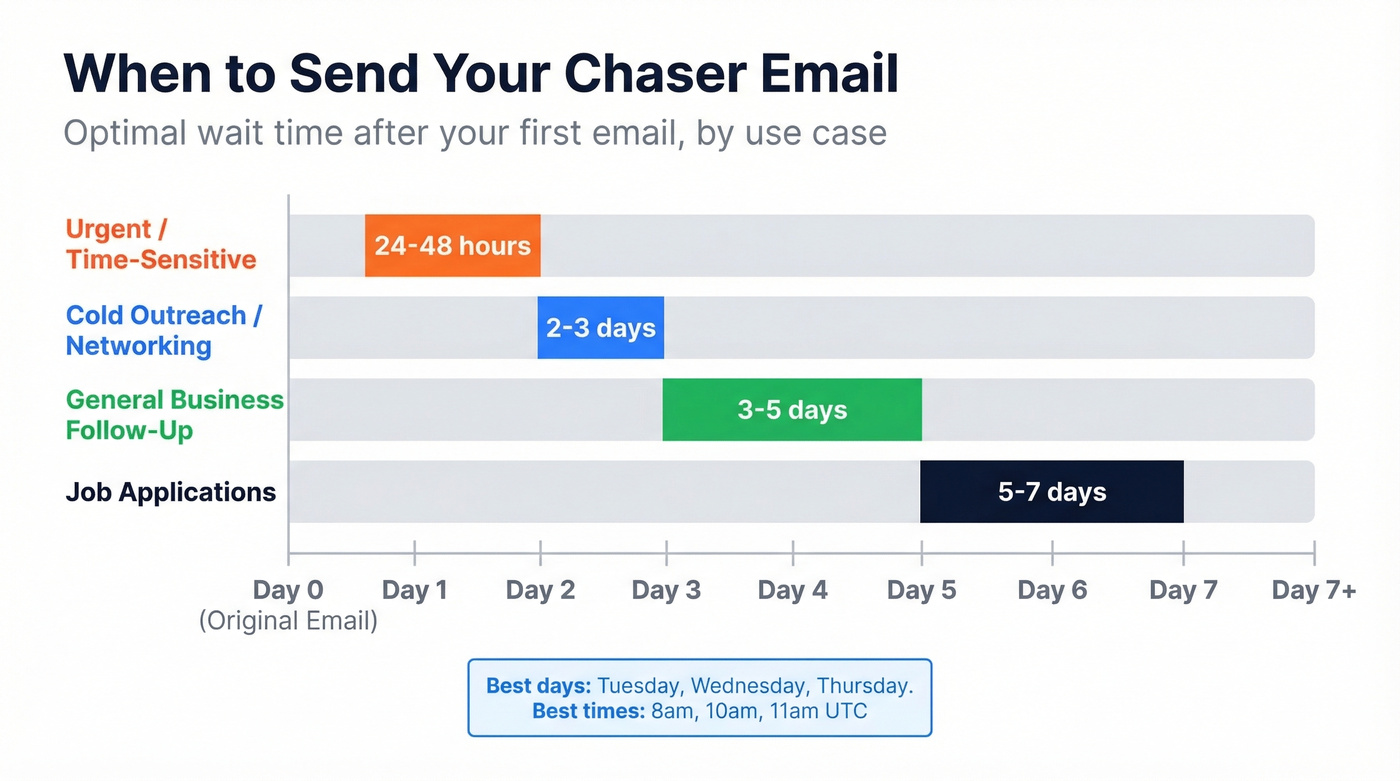
- General business follow-up: 3-5 business days
- Cold outreach or networking: 2-3 days
- Job applications: 5-7 business days
- Urgent matters (time-sensitive proposals, event RSVPs): 24-48 hours
Analysis of 15B+ emails shows Tuesday through Thursday as peak engagement days, with 8am, 10am, and 11am UTC among the strongest send times. We've tested Tuesday vs. Thursday sends across dozens of campaigns and the difference is marginal - both consistently outperform Monday and Friday. Mondays are inbox-clearing days. Fridays are wind-down days. Neither is ideal for a message that needs attention.
Templates by Use Case
Below are chase up email templates you can adapt for the most common scenarios. Each follows the same principle: add value, keep it short, end with a single clear ask. (If you want more options, start with these follow-up email templates.)
Sales: Chasing Email After No Response
Subject: Quick question about [specific topic]
Hi [First name],
I sent over [the proposal / pricing breakdown / demo recording] on [day]. Since then, I came across [relevant insight - a case study, industry stat, or product update] that's directly relevant to [their specific challenge].
Would it make sense to spend 15 minutes walking through it? I'm open [Tuesday or Wednesday] afternoon.
Best, [Your name]
The value-add in the middle is what separates this from a generic nudge. You're not "just checking in" - you're bringing something new to the table. Even a single relevant sentence transforms a forgettable reminder into a useful email, giving the prospect a reason to re-engage rather than just reminding them you exist.
Payment Reminder (Overdue Invoice)
Subject: Invoice #[number] - payment overdue
Hi [First name],
I wanted to flag that invoice #[number] for $[amount] was due on [date] and is currently [X days] overdue. I've attached the original invoice for your reference.
You can pay via [payment link / bank transfer details]. If there's an issue with the invoice or you need to adjust the payment schedule, just let me know - happy to work something out.
Thanks, [Your name]
Always attach the original invoice. Don't make them dig through their inbox to find it. Include the exact amount, invoice number, and due date - vague payment reminders get deprioritized.
Job Application Follow-Up
Subject: Checking in - [Role title] application
Hi [First name],
I submitted my application for the [Role] position on [date] and wanted to follow up. I'm particularly excited about [specific aspect of the role or company].
My background in [relevant skill/experience] maps closely to what you're building, and I'd welcome the chance to discuss how I could contribute. Is there a good time this week or next?
Best regards, [Your name]
Wait 5-7 business days before sending this. Hiring processes move slowly, and following up too early signals impatience rather than enthusiasm.
Networking or Warm Intro
Subject: Great connecting at [Event/Context]
Hi [First name],
Really enjoyed our conversation about [specific topic] at [event / through mutual contact]. I've been thinking about what you said regarding [specific detail] - it resonated.
Would love to continue the conversation over coffee or a quick call. Are you free [specific day] or [specific day]?
Cheers, [Your name]
Send this within 2-3 days while the interaction is still fresh. Reference something specific from your conversation - it proves you were actually listening.
Meeting Request Follow-Up
Subject: Still want to connect - [topic]
Hi [First name],
I reached out last [day] about [topic/meeting purpose] and wanted to circle back. I know calendars fill up fast.
Would any of these work? [Tuesday 10am / Wednesday 2pm / Thursday 11am]. Happy to adjust if none of those fit.
Thanks, [Your name]
Offering three specific time slots removes the back-and-forth. It's a small thing that dramatically increases the chance of getting a reply. One popular approach from r/sales takes this even further: "I'm trying to finalize my schedule for next week - wanted to know if [specific date] worked for you?" It creates gentle urgency without being pushy.
The Breakup Email (Final Chaser)
Subject: Should I close this out?
Hi [First name],
I've reached out a couple of times about [topic] and haven't heard back - totally understand if the timing isn't right.
If this isn't a priority right now, no hard feelings. I'll close the loop on my end. If anything changes, just reply to this thread and we'll pick it back up.
Best, [Your name]
The breakup email works because it flips the dynamic. Instead of asking for something, you're giving the recipient permission to say no - which, counterintuitively, often prompts a reply. Use this as your final follow-up in any sales or networking sequence. (More examples: breakup email.)
Payment Chaser Cadence
87% of businesses struggle with late payments. A single reminder won't cut it. You need a structured cadence that escalates in tone over time.
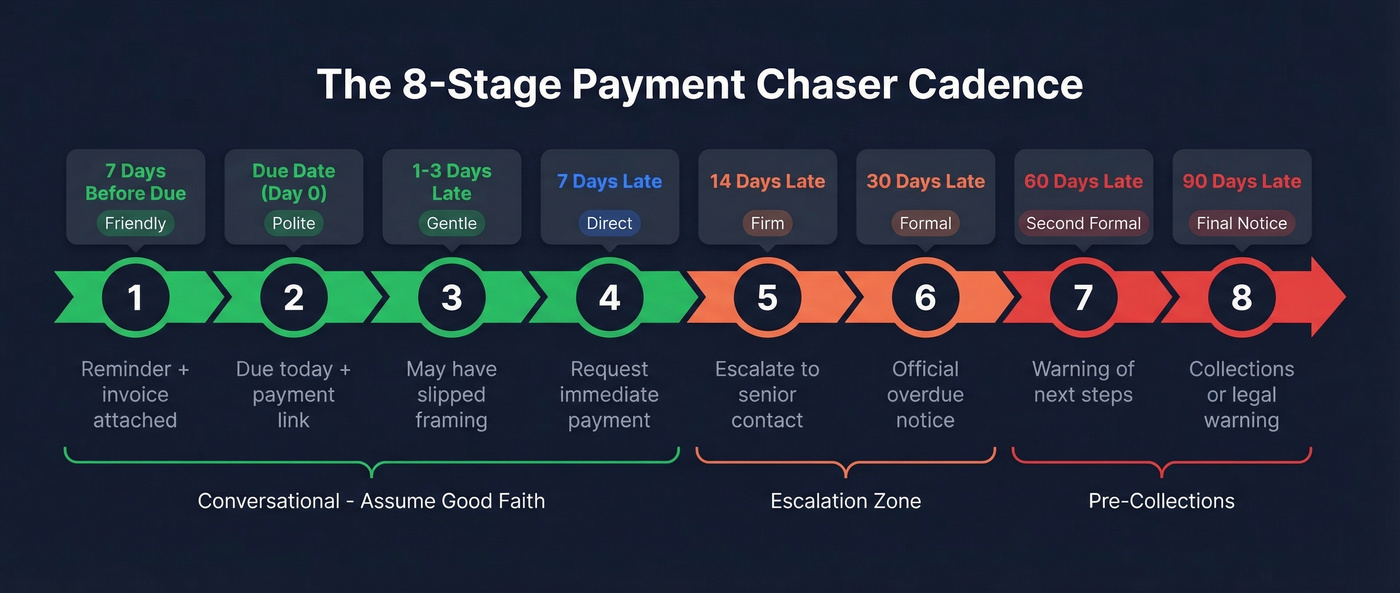
Here's the 8-stage AR sequence that covers the full cycle from friendly heads-up to final notice:
| Stage | Timing | Tone | Action |
|---|---|---|---|
| 1 | 7 days before due | Friendly heads-up | Reminder + invoice attached |
| 2 | Due date (Day 0) | Polite reminder | "Due today" + payment link |
| 3 | 1-3 days late | Gentle nudge | "May have slipped" framing |
| 4 | 7 days late | Direct | Request immediate payment |
| 5 | 14 days late | Firm | Escalate to senior contact |
| 6 | 30 days late | Formal overdue | Official overdue notice |
| 7 | 60 days late | Second formal | Warning of next steps |
| 8 | 90 days late | Final notice | Collections/legal warning |
The tone shift matters. Stages 1-4 are conversational and assume good faith - the invoice got lost, the client forgot, their AP team is backed up. Stage 5 is where you start escalating to a more senior contact at the company. By stage 6, you're shifting from friendly to formal. Stages 7-8 are pre-collections language.
Tools like ChaserHQ automate this sequence and integrate with accounting software like Xero and QuickBooks. If you're chasing more than a handful of invoices per month, automation pays for itself in recovered revenue and saved time.

Bounced chaser emails don't just fail to get replies - they destroy your sender reputation. Prospeo delivers 98% verified email accuracy across 143M+ contacts, so every follow-up lands in a real inbox instead of triggering a hard bounce.
Stop chasing dead addresses. Start chasing real replies.
Cold Outreach Follow-Up Cadence
For cold email, less is more. The optimal sequence is three emails total: one initial outreach plus two follow-ups. Chasing email after no response is where most pipeline gets built - but only if you do it right.
- Day 0: Initial cold email
- Day 3: First follow-up - reference the original, add a new angle or proof point
- Day 9-10: Second follow-up - shorter, direct, with a clear "yes or no" CTA
That first follow-up is where the magic happens. It boosts reply rates by nearly 50% compared to a single-send approach. The second captures the stragglers. After that, stop. Wait 2-3 months before re-engaging the same prospect.
Let's be honest: most teams don't need more emails. They need better data. If your bounce rate is above 3%, adding a fourth or fifth touch won't save you - it'll accelerate the damage to your sender reputation. Fix your list first, then worry about your cadence. (If you're seeing deliverability errors, start here: bounced email meaning.)
Over-emailing carries real consequences: 27% of people unsubscribe when they feel a brand is sending too much. In cold outreach, "unsubscribe" means "mark as spam" - which is worse.
On the deliverability side, respect your mailbox limits. Google Workspace and Microsoft 365 cap cold outreach at roughly 100 emails per mailbox per day. New domains should start at 20-30 per day and ramp gradually. Push past these limits and you'll land in spam regardless of how good your templates are. (If you're starting fresh, use a domain warm-up tool.)
Mistakes That Kill Replies
Opening with "Just following up." It adds zero value and signals you have nothing new to say. Lead with context or a new insight instead.
No clear CTA. If you don't ask a specific question, you won't get a specific answer. End every follow-up with one concrete ask.
Waiting too long. Ten days between emails means your original message is ancient history. Follow up within 3-5 business days while the context is still warm.
Not adding new value. A reminder that restates the original email is a waste of everyone's time. Include a new data point, case study, or angle with every follow-up.
Generic subject lines. "Following up" and "Checking in" get ignored. Reference the specific topic or include the recipient's name.
Sending from an unwarmed domain. New domains without proper warm-up get flagged as spam immediately. Warm up for 2-3 weeks before sending cold outreach, and use a dedicated subdomain.
2026 Deliverability Checklist
Your follow-ups can't get replies if they don't reach the inbox. Only 83.1% of emails actually make it there. Lock down every item on this list:
- SPF, DKIM, and DMARC authentication - non-negotiable. If these aren't configured, you're sending from an untrusted domain.
- Spam complaint rate below 0.3% - Google and Yahoo enforce this as a hard threshold for bulk senders.
- One-click unsubscribe in every cold email - required by Google/Yahoo since 2024 and still actively enforced.
- Custom tracking domain - shared tracking domains are spam magnets. Set up your own.
- Dedicated subdomain for cold outreach - protect your primary domain's reputation.
- Plain text over heavy HTML - fewer images, fewer links, fewer spam triggers.
- Domain warm-up for new accounts - start at 20-30 emails/day and ramp over 2-3 weeks.
- Contact list verification before every campaign - this is where most teams fail. A 5-step verification process that handles catch-all domains, spam-trap removal, and honeypot filtering keeps your bounce rate under 3%. (If you're getting Gmail errors, see: 550 Too Many Invalid Recipients.)
Best Tools for Sending Chasers
Your follow-up sequence is only as good as your contact data and your sending infrastructure.
| Tool | Category | Best For | Starting Price | Free Tier? |
|---|---|---|---|---|
| Prospeo | Data verification | Email/mobile accuracy | ~$0.01/email | Yes (75/mo) |
| Lemlist | Cold sequencing | Multi-channel outreach | $59/mo | No |
| Saleshandy | Budget sequencing | Multi-account sequencing | $25/mo | No |
| Mailshake | Cold sequencing | Simple UI, new teams | $58/mo | No |
| Instantly | Cold sequencing | Mailbox rotation | $30/mo | No |
| Hunter.io | Email finding | Quick lookups | ~$49/mo | Yes (25/mo) |
| GMass | Gmail sending | Solo senders | $19.95/mo | Limited |
| Mixmax | Email sequences | Gmail/Outlook users | $29/mo | Limited |
| Reply.io | Multi-channel | Full-stack outreach | $60/mo | No |
| ChaserHQ | Invoice chasing | AR automation | ~$50+/mo | 14-day trial |
Prospeo sits at the foundation of any outreach stack. It's not a sequencing tool, but it's what keeps your sequences healthy. With 98% email accuracy, 143M+ verified emails, and a 7-day data refresh cycle vs. the 6-week industry average, it ensures your follow-ups actually reach real inboxes. The free tier gives you 75 verified emails per month to test before committing.
Lemlist is the go-to for teams that want multi-channel sequences with deep personalization - email, calls, and social touches in a single workflow. At $59/mo it's not the cheapest option, but the personalization features justify the price for teams running high-volume outreach.
Saleshandy is the budget pick. At $25/mo, it's hard to beat for teams that need basic sequencing without the bells and whistles. We've seen early-stage teams run effective cadences here without upgrading for months.
Skip Mailshake if you already have sequencing experience - the UI is built for beginners and you'll outgrow it fast. For teams new to cold outreach, though, the straightforward onboarding gets you sending within an hour.
Instantly is the choice when mailbox rotation is your priority. Unlimited rotation across accounts keeps deliverability high, and the $30/mo price point makes it accessible for solo operators and small teams alike.
GMass and Mixmax are lightweight options for individuals sending from Gmail or Outlook - think solo consultants or freelancers who need sequences without a full platform. Reply.io covers the full multi-channel stack if you need calls, social, and email in one place. ChaserHQ is purpose-built for invoice chasing and integrates directly with Xero and QuickBooks.
Your chaser email cadence is only as good as your contact data. Prospeo refreshes 300M+ profiles every 7 days - not every 6 weeks like competitors - so the email you're chasing actually belongs to someone who still works there.
Bad data kills follow-ups before they send. Fix it at $0.01 per email.
Chaser Email FAQ
Is a chaser email the same as a follow-up?
Yes - "chaser email" is the UK and Commonwealth term for a follow-up or reminder email. It's especially common in accounts receivable and British sales culture. The best practices are identical regardless of which term you use. You'll also hear "bump email" in American sales slang - same concept.
How many should I send before stopping?
Two to three for cold outreach and networking. For overdue invoices, extend to six to eight over 90 days with escalating tone. After 2-3 attempts with no reply in a sales context, stop and wait 2-3 months before re-engaging.
What's the best day and time to send?
Tuesday through Thursday between 8-11am UTC consistently outperforms other windows. Wait 3-5 business days after your initial email before the first follow-up. For job applications, extend to 5-7 business days.
How do I keep follow-ups out of spam?
Authenticate your domain with SPF, DKIM, and DMARC. Keep spam complaints below 0.3%, use a custom tracking domain, and verify your contact list before sending. A 5-step verification process that catches spam traps and invalid addresses before they damage your sender reputation is the single best insurance policy you can buy.
Should I use a template or write from scratch?
Start from a proven chase up email template to save time and nail the structural basics - context, value-add, and a single CTA. Then personalize the specifics for each recipient. A template that references the prospect's company, challenge, or previous interaction will always outperform a generic copy-paste.