

How to Check an Email Address for Spam (and What That Actually Means)
"Check an email address for spam" means three completely different things depending on who's typing it. One person just got a sketchy invoice from "amaz0n-support.com." Another is sweating over whether their cold outreach is landing in spam folders. The third has a 10,000-row CSV and needs to know which addresses are real before hitting send.
Each problem has a different fix, and mixing them up wastes time.
What "Check for Spam" Actually Means
Three intents, three fixes. Most guides blur them together.
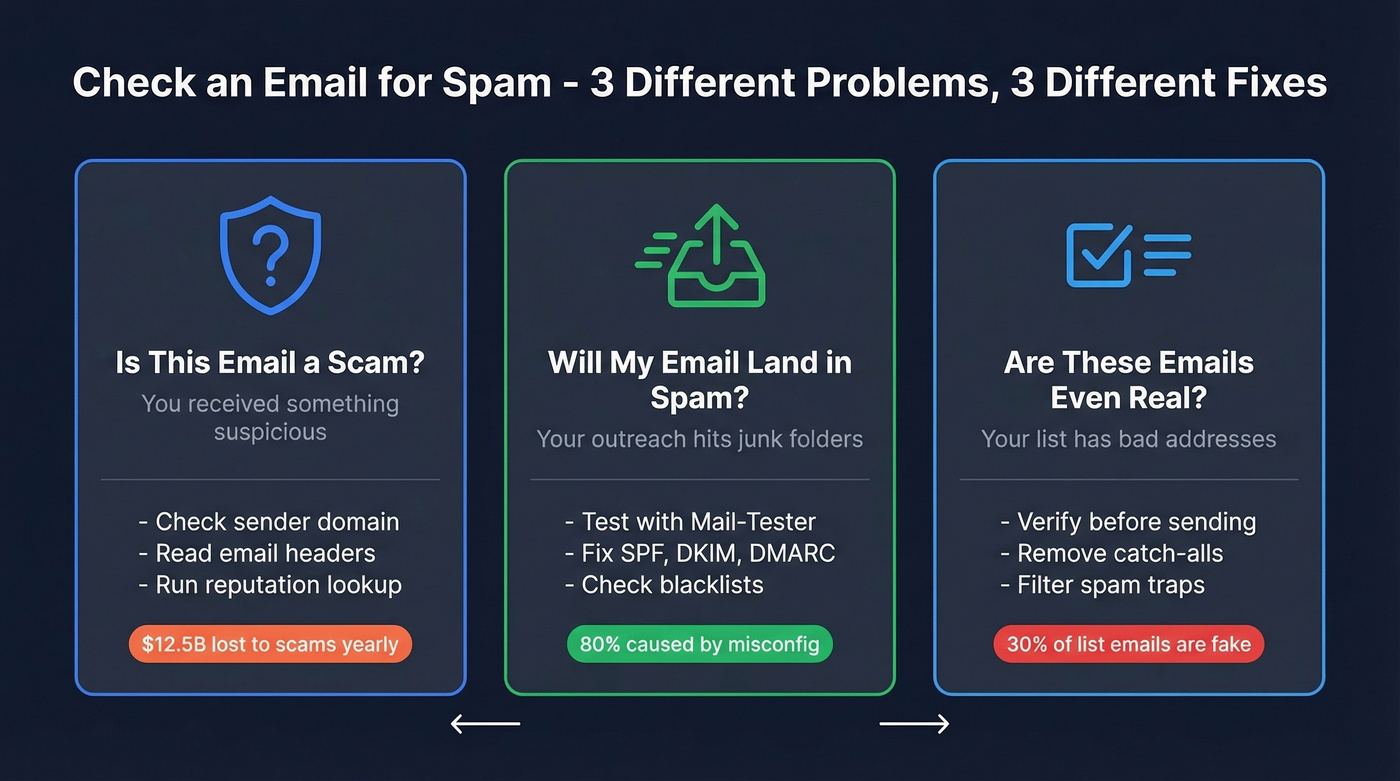
Intent 1: Is this incoming email a scam? You received something suspicious and want to know if the sender is legitimate - spotting phishing, impersonation, and fraud. Impersonation scams drove $12.5 billion in losses in recent years, and the number keeps climbing.
Intent 2: Will my outgoing email land in spam? You're sending campaigns or outreach and want to test whether recipient mail servers will flag you. This is a deliverability problem - authentication, reputation, and content scoring.
Intent 3: Are the email addresses on my list even real? You've got a prospect list or signup form data and need to verify which addresses are valid before you send anything. Roughly 30% of email addresses used to spam websites are fake, and another 15% of emails collected via lead gen forms contain typos. Sending to them tanks your sender reputation.
What You Need (Quick Version)
- Suspicious incoming email? Check the sender's domain and email headers. Run a reputation lookup on CleanTalk or MxToolbox.
- Worried your own email lands in spam? Send a test to [Mail-Tester](https://www.mail-tester.com/). Fix SPF, DKIM, and DMARC first - technical misconfigurations cause about 80% of deliverability issues.
- Cleaning a list before a campaign? Use a verification tool. Prospeo verifies emails at the source with 98% accuracy. ZeroBounce and Bouncer handle standalone bulk cleaning.
Here's the hot take most deliverability consultants won't give you: if your average deal size is under five figures and you're sending fewer than 5,000 emails a month, you don't need a complex tech stack. Fix your authentication, verify your list, and move on.
Spotting Incoming Scam Emails
The Nigerian prince emails are dead. Modern phishing is polished, personalized, and increasingly AI-generated. If you need to determine whether an incoming sender is fraudulent, here's what to actually look for.
Lookalike domains are the biggest tell. Attackers register domains that look nearly identical to real brands - saneb0x.com instead of sandbox.com, spot1fy.com instead of spotify.com. Homograph attacks use characters from different alphabets that render identically in most fonts, which means you can stare right at a malicious URL and not notice anything wrong. Always hover over the sender address and check the actual domain, not just the display name.
Executable attachments disguised as documents remain a classic vector. A file named Invoice_Q4_2026.PDF.exe looks like a PDF in most email clients but runs code when opened. If an attachment has a double extension or you weren't expecting it, don't open it.
Urgency combined with vague personalization is the formula. "Your account will be suspended in 24 hours" paired with "Dear valued customer" instead of your actual name. Legitimate companies rarely threaten account closure via email with a 24-hour deadline.
For a quick reputation check on a sender's address, CleanTalk's email checker cross-references against a global spam database built from millions of websites. MxToolbox runs domain and email health checks. Neither catches everything, but they flag the obvious offenders in seconds.

Cleaning a bad list is damage control. Building a verified list from the start is the fix. Prospeo's 5-step verification - with catch-all handling, spam-trap removal, and honeypot filtering - delivers 98% email accuracy before you ever hit send.
Skip the spam checks. Start with emails that are already clean.
Checking Your Outbound for Spam Signals
This is where most outbound teams and marketers should spend their time. Around 80% of deliverability issues come from technical misconfigurations, not content. That stat surprises people, but it's consistent with what we've seen across dozens of email audits.
How to Use Mail-Tester
Mail-Tester is the fastest free way to test your spam score before a real campaign:
- Go to mail-tester.com. You'll see a randomly generated email address.
- Send your actual email - the one you plan to use in your campaign - to that address, from the same domain and tool you'll use in production.
- Go back to Mail-Tester and click "Then check your score."
- You'll get a detailed report: your [SpamAssassin score](https://spamassassin.apache.org/full/3.4.x/doc/Mail_SpamAssassin_Conf.html), authentication status for SPF/DKIM/DMARC, blocklist checks, and content analysis.
A score of 9/10 or higher means you're in good shape. Below 7 needs attention. One quirk worth knowing: the URI_WP_HACKED_2 rule in SpamAssassin can trigger false positives if your email contains social media icon links or certain WordPress shortcodes. You can safely ignore that one.
You get three free tests per day, which is enough for most pre-campaign checks.
Fix Your Authentication First
If Mail-Tester flags authentication issues, start here. SPF, DKIM, and DMARC are the three pillars, and getting them right solves the majority of spam folder problems.
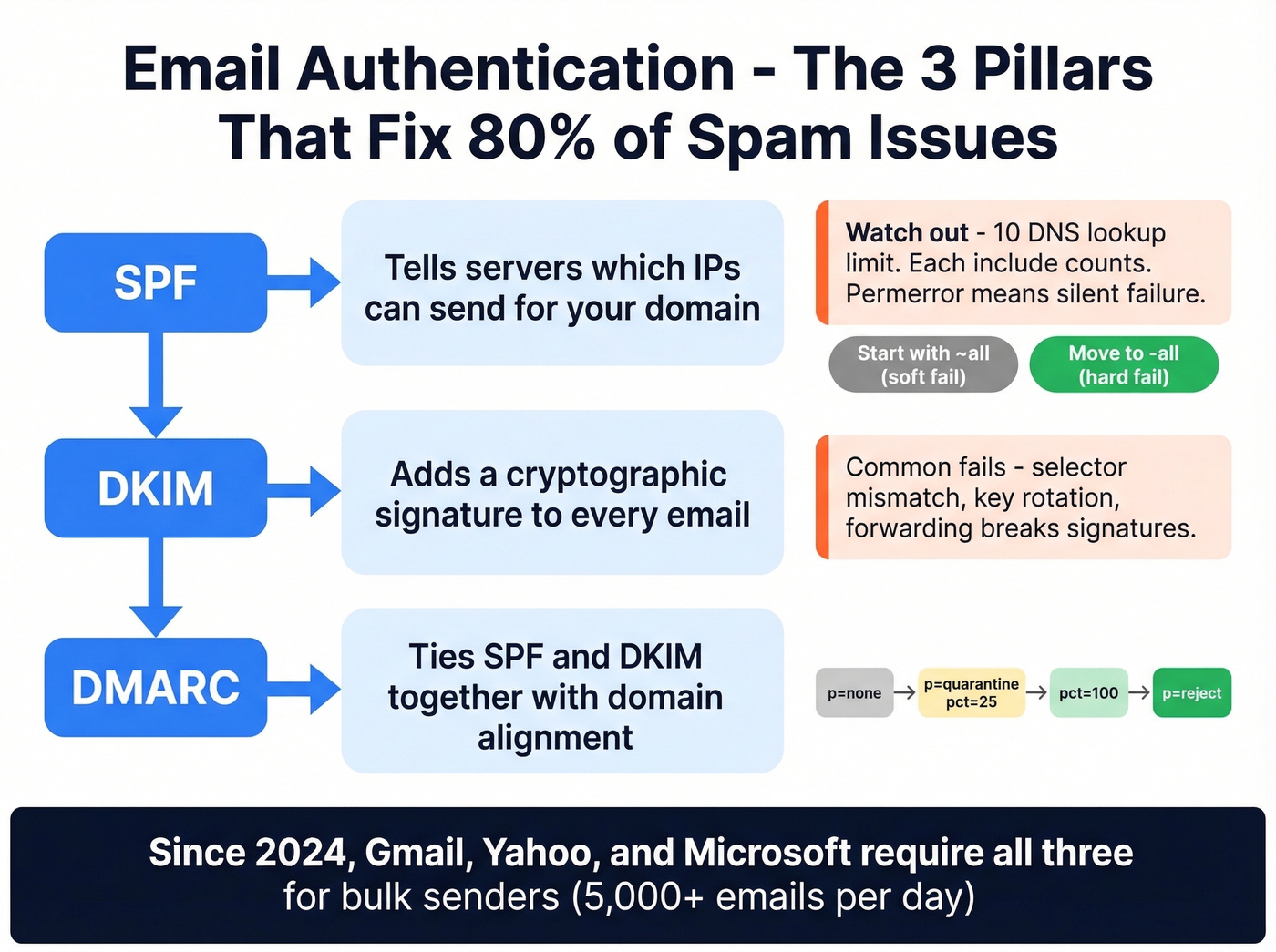
SPF tells receiving servers which IPs are authorized to send on behalf of your domain. The critical gotcha: SPF has a 10 DNS lookup limit. Every include: mechanism counts toward that cap. If you're using Salesforce, HubSpot, Google Workspace, and a cold email tool, you can hit that limit fast - and an SPF "permerror" means authentication fails silently. Start with ~all for soft fail while testing, then move to -all for hard fail once you've confirmed everything works. (If you want examples you can copy/paste, see SPF record formats by provider.)
DKIM adds a cryptographic signature to your emails. Common failures include selector mismatches, key rotation timing issues, and the classic "double domain" mistake in DNS host fields. If DKIM fails intermittently, check whether mailing lists or forwarding services are modifying your message body - that breaks the signature. (If you're troubleshooting, use this checklist to verify DKIM is working.)
DMARC ties SPF and DKIM together. The critical requirement is alignment: your SPF and DKIM domains must match the visible "From" domain. Both can pass individually, but if the domains don't align with your From address, DMARC still fails. The safe rollout path is to start with p=none to monitor, move to p=quarantine with pct=25, increase to pct=100, then switch to p=reject. (More detail on DMARC alignment if you’re stuck.)
As of 2026, Gmail, Yahoo, and Microsoft all require proper authentication for bulk senders pushing more than 5,000 messages per day. This isn't optional anymore.
Blacklist Checks
If your authentication is clean but emails still land in spam, you're probably on a blacklist. MxToolbox scans 100+ DNS-based blacklists in one check. DNSChecker cross-references 50+ anti-spam lists and can pull your sending IPs from MX records automatically. Run both - they don't check identical lists. If you’re already listed, follow a step-by-step Spamhaus blacklist removal process before you ramp volume again.
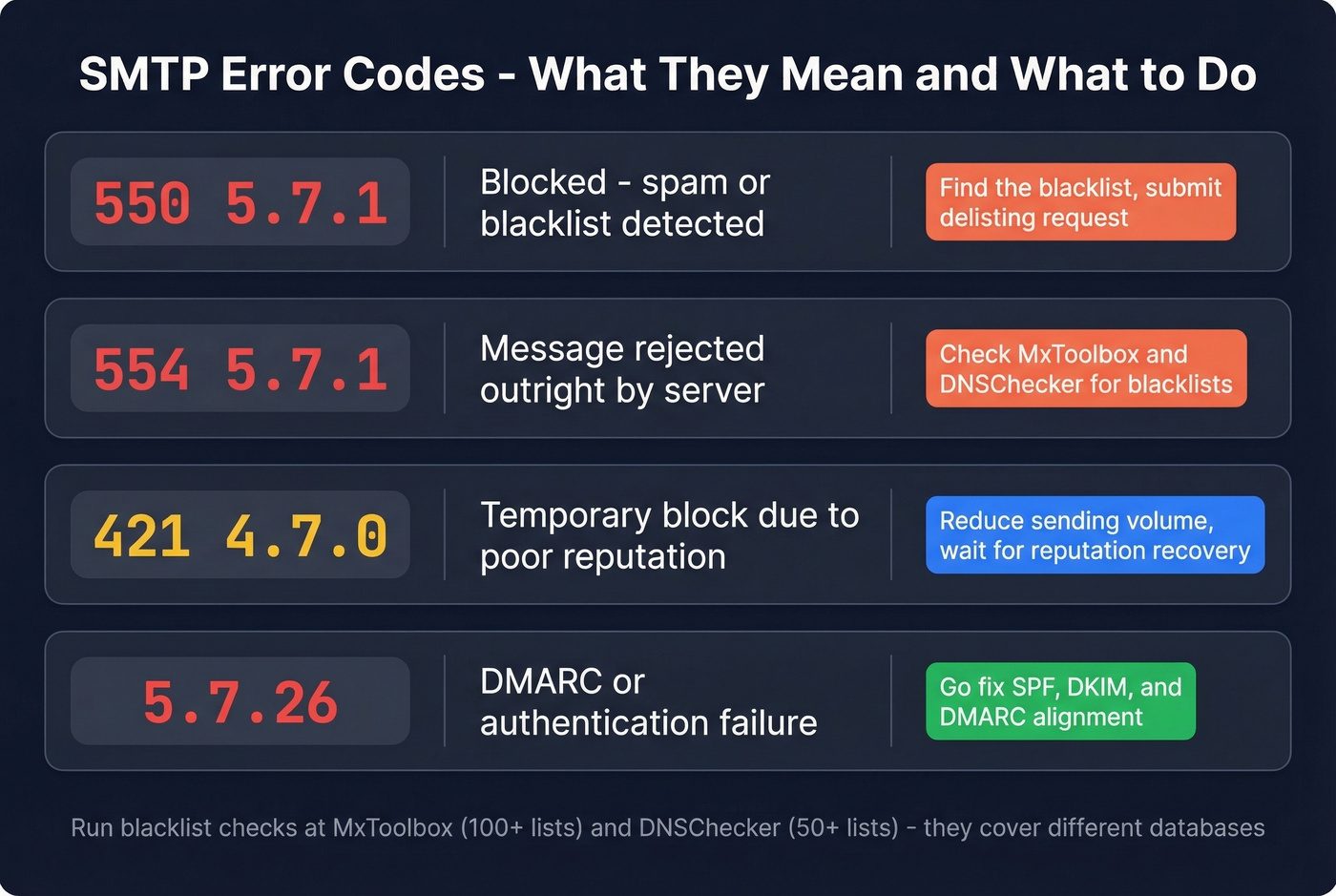
When emails bounce or get rejected, the SMTP error codes tell you what happened:
| SMTP Code | Meaning |
|---|---|
| 550 5.7.1 | Blocked - spam or blacklist |
| 554 5.7.1 | Message rejected outright |
| 421 4.7.0 | Temp block, poor reputation |
| 5.7.26 | DMARC/auth failure |
A 550 or 554 means you need to find which blacklist you're on and submit a delisting request. A 421 is usually temporary - back off your sending volume and let your reputation recover. A 5.7.26 sends you straight back to the authentication section above.
Verify Email Addresses Before Sending
This is the third intent - and the one that prevents the other two problems from getting worse. Sending to invalid addresses inflates your bounce rate, damages your sender reputation, and eventually lands you on blacklists.
Prevention beats cure every time. (If you’re deciding between methods, here’s a deeper guide on check if an email exists.)
How Verification Works
Email verification runs through a predictable sequence. Syntax checking catches obvious formatting errors - missing @ symbols, spaces, invalid characters. This alone catches a surprising number of bad addresses, given that 15% of form-collected emails contain typos.
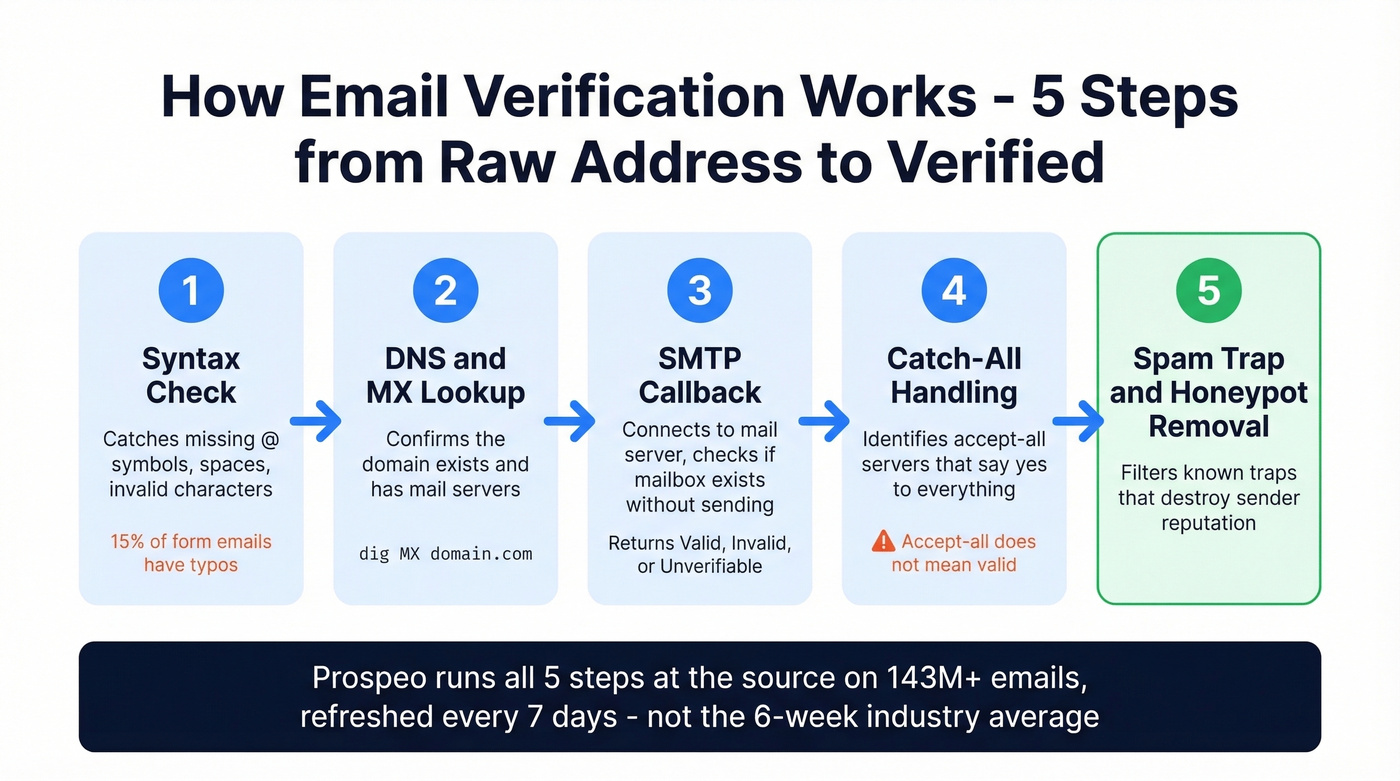
DNS and MX record validation confirms the domain exists and has mail servers configured. You can do this manually: nslookup -type=MX domain.com on Windows, or dig MX domain.com on macOS/Linux.
Then comes the SMTP callback - the verification tool connects to the recipient's mail server and issues a RCPT TO command to check whether the specific mailbox exists, without actually sending a message. Results come back as Valid, Invalid, or Unverifiable. The consensus on r/sales and r/coldemail is that the tool you pick for this step matters more than people think, because false positives at scale destroy sender reputation just as fast as never verifying at all.
Why Verification Isn't Perfect
Accept-all servers are the blind spot. Some mail servers accept every incoming address at the domain level, regardless of whether the specific mailbox exists. An accept-all response doesn't mean the address is valid - it means the server won't tell you either way.
Greylisting adds another wrinkle: some servers temporarily reject the first connection attempt as a spam-filtering tactic, which can cause false "invalid" results if the verification tool doesn't retry. There's also a reputational risk - some RBLs flag IPs that perform high-volume callback verification, treating it as suspicious probing. Better tools handle these edge cases gracefully. Worse ones just pass accept-all addresses through as "valid" and call it a day. If you suspect traps are part of the issue, prioritize spam-trap removal before you send again.
Best Verification Tools
| Tool | Free Tier | Cost per 1,000 | Accuracy | Best For |
|---|---|---|---|---|
| Prospeo | 75 emails/mo | ~$10 | 98% | Pre-verified prospecting data |
| ZeroBounce | 100/mo | ~$7.50 | 99.6% | Bulk list cleaning |
| Bouncer | 1,000 free credits | $7 | 99.5%* | One-off list jobs |
| NeverBounce | 1,000 free credits | $8 | 99.9%* | High-volume one-time cleans |
| Hunter | 100/mo | Paid plans vary | - | Small spot checks |
*Vendor-reported figures; independent benchmarks vary.
Prospeo takes a fundamentally different approach. Instead of buying a list and then running it through a cleaner, its 5-step verification happens at the source - every email in the 143M+ verified database goes through syntax validation, DNS/MX checks, SMTP verification, catch-all handling, and spam-trap/honeypot removal before it ever reaches your export. The database refreshes on a 7-day cycle, compared to the 6-week industry average. Meritt cut their bounce rate from 35% to under 4% after switching to Prospeo-sourced data, tripling their pipeline in the process.

ZeroBounce is the tool you want when you've inherited a messy list from marketing and need to clean it before loading it into Outreach or Salesloft. The free tier gives you 100 verifications per month, and at scale you'll pay around $7.50 per 1,000 emails. It's reliable and well-documented.
Bouncer is the simplest option for occasional jobs. Upload a CSV, get results. The first 1,000 verifications are free, then $7 per 1,000. If you clean lists twice a year and don't want a subscription, this is your pick. (If you’re comparing options, see Bouncer alternatives.)
NeverBounce and Hunter round out the field. NeverBounce charges $8 per 1,000 with 1,000 free credits - solid for high-volume one-time cleans. Hunter offers 100 free verifications per month and doubles as an email finder, making it useful for small-volume spot checks. If you need more finder options, check Hunter alternatives.
Skip Hunter if you're doing anything above a few hundred verifications a month. The free tier runs out fast and the paid plans aren't competitive at scale.
How Often to Re-Verify
Email addresses decay faster than most teams realize. After just four weeks, roughly 2% of a verified list becomes invalid - people change jobs, companies restructure, domains expire. For active outbound campaigns, re-verify your lists every 3-6 months at minimum.
In our testing, lists that go 6+ months without re-verification see bounce rates spike above 5%, which is the danger zone for sender reputation. Your target bounce rate should stay below 2%, ideally under 1%. (Benchmarks and fixes: email bounce rate.)
Mistakes That Send You to Spam
Five patterns we see repeatedly:
- Skipping authentication entirely. 80% of deliverability issues trace back to technical misconfigurations. Fix SPF, DKIM, and DMARC before you touch anything else.
- Treating accept-all as valid. An accept-all response means the server won't reject anything - it doesn't mean the mailbox exists. Sending to these addresses blindly inflates your bounce rate.
- Never re-verifying stale lists. A list that was clean in January isn't clean in July. Email decay is constant and silent.
- Sending to purchased or unverified lists. This is the fastest way to land on a blacklist. Every address should be verified before it enters your sending workflow.
- Obsessing over content while ignoring infrastructure. Removing "free" from your subject line won't help if your SPF record has 14 DNS lookups and your DKIM key expired three months ago.
Let's be honest - we've watched teams spend weeks A/B testing subject lines while their DKIM was broken the entire time. Infrastructure first, always.

Roughly 30% of scraped emails are fake, and every bounce chips away at your sender reputation. Prospeo refreshes 300M+ profiles every 7 days - not every 6 weeks - so your lists stay current and your domain stays off blacklists.
Protect your domain reputation at the source for $0.01 per email.
FAQ
How Do I Check if an Email Address Is Spam?
Inspect the sender's domain for lookalike characters (e.g., amaz0n vs amazon), run a reputation lookup on CleanTalk or MxToolbox, and review the email headers for SPF/DKIM/DMARC failures. If you're the sender worried about being flagged, use Mail-Tester to score your message before launch and confirm your authentication records are properly configured.
Can I Tell If My Email Went to Spam?
No - you won't get a notification when a recipient's server routes your message to the spam folder. The closest option is inbox placement testing with tools like GlockApps, which send to seed addresses across Gmail, Yahoo, and Outlook and report where each message landed. For pre-send testing, Mail-Tester gives you a spam score before your campaign goes out.
What's the Difference Between Spam and Phishing?
Spam is unsolicited bulk email - annoying and often commercial, but not necessarily malicious. Phishing is targeted deception designed to steal credentials, payment details, or personal data using lookalike domains and urgency tactics. All phishing is spam, but most spam isn't phishing.
Do Free Email Verification Tools Actually Work?
For spot-checking, yes. Mail-Tester for spam scoring, MxToolbox for blacklist checks, and CleanTalk for reputation lookups are all genuinely useful at zero cost. For bulk verification at scale, free tiers are too limited - expect to pay $7-15 per 1,000 emails with standalone verifiers, or use Prospeo's free tier for pre-verified prospecting data that doesn't need a second cleaning pass.