

How to Check Domain Spam Score (And Actually Fix It)
If you've ever tried to check your domain spam score, you've probably noticed the results are a mess. Half the tools measure your backlink risk profile. The other half measure whether Gmail trusts you enough to deliver your emails. These are completely different systems solving completely different problems, and most guides blur them together - which leads people to check the wrong tool and fix the wrong thing.
Nearly 70% of email senders never monitor their domain reputation. They find out something's broken when half their outbound sequence lands in spam, or when a PR agency rejects their guest post pitch because of a Moz score they've never heard of.
Here's the thing: most teams obsessing over "domain spam score" are checking the wrong metric entirely. If you're running outbound email, your Moz score is irrelevant. If you're doing SEO, your sender reputation doesn't matter. Let's untangle the two.
What You Need (Quick Version)
- For SEO spam score: Check Moz Link Explorer - free, 3 reports per day. Anything under 30% is fine.
- For email domain reputation: Set up Google Postmaster Tools - free. It shows exactly how Gmail sees you. If you need a broader stack, see our guide to email reputation tools.
- For both: Don't panic until you've checked the right type. A high Moz Spam Score won't tank your email deliverability, and a bad sender reputation won't hurt your backlink profile.
SEO vs Email: Two Different Scores
A common misconception conflates Moz Spam Score with some secret Google algorithm that determines your domain's trustworthiness. They're two distinct metrics tracked by different systems for different purposes.
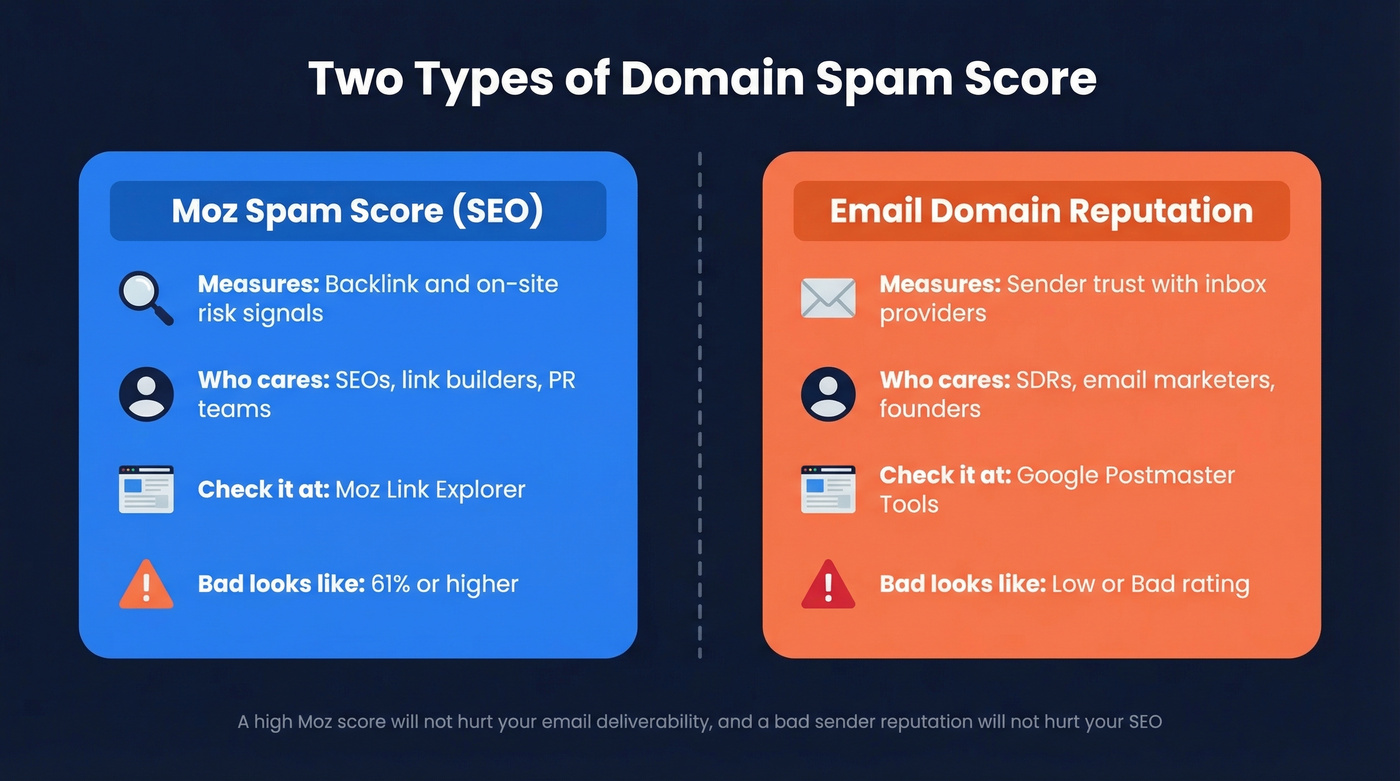
| Moz Spam Score (SEO) | Email Domain Reputation | |
|---|---|---|
| Measures | Backlink/on-site risk signals | Sender trust score |
| Who cares | SEOs, link builders | Email marketers, SDRs |
| Where to check | Moz Link Explorer | Google Postmaster Tools |
| What "bad" looks like | 61%+ (high risk) | "Bad" or "Low" rating |
If you're running outbound email campaigns and someone tells you to "check your spam score," they almost certainly mean email reputation. If you're doing link building or SEO audits, they mean Moz. The fix for each is completely different.
One thing neither system tells you: your reputation varies by inbox provider. Gmail, Outlook, and Yahoo each maintain their own scores. A "High" rating in Google Postmaster Tools doesn't guarantee the same standing with Microsoft.
How to Check With Moz
Moz Spam Score is a proprietary metric - not a Google metric. It represents the percentage of sites with similar features that have been penalized or banned by Google, based on 27 on-site signals spanning domain patterns, site structure, trust signals, and technical footprint markers.
Thresholds:
- 1-30% - Low risk. No action needed.
- 31-60% - Medium risk. Worth investigating.
- 61-100% - High risk. Audit your backlinks and on-site signals.
Go to Moz Link Explorer and enter your domain. You get 3 free reports per day; Moz Pro starts at ~$99/mo for ongoing monitoring. Moz updates quarterly, so don't expect real-time changes after cleanup.
A critical clarification that trips people up constantly: Moz Spam Score isn't a score of the spam quality of sites linking to you. It's a score of your own domain's characteristics compared to known-penalized sites.
How to Interpret Your Score
A high Moz Spam Score doesn't mean you've been penalized. It means your domain shares characteristics with sites that have been penalized. Correlation, not causation.
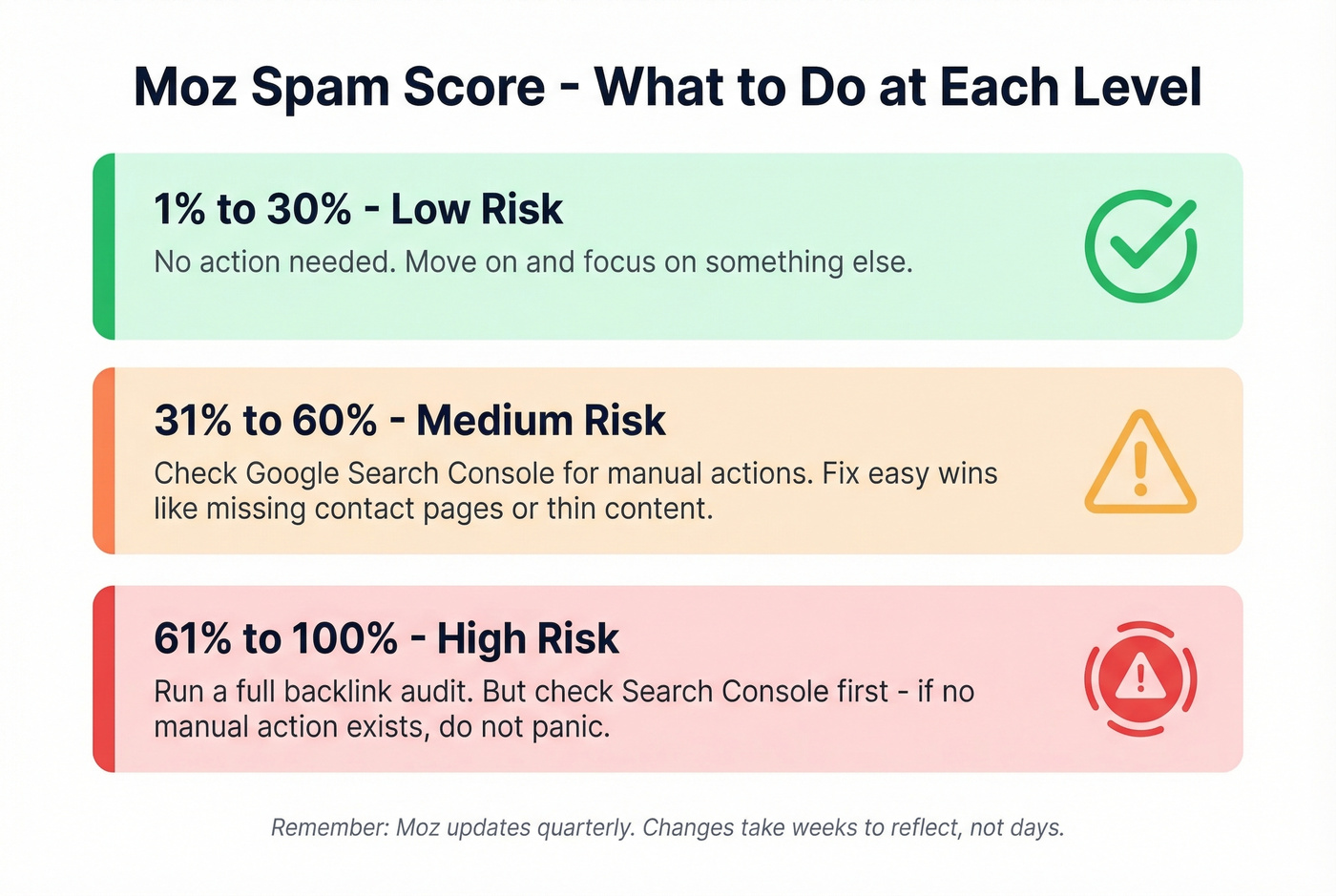
Under 30%: Move on. Seriously. Don't waste time optimizing a metric that isn't causing problems.
31-60%: Check Google Search Console for manual actions. If there are none, your site is fine. Look at the specific signals Moz flags - thin content, missing contact pages, suspicious TLD - and fix what's easy.
Over 60%: Worth a deeper audit. But even here, check Google Search Console first. If Google hasn't issued a manual action, the Moz score is a warning signal, not a verdict.
We see this pattern on r/SEO constantly: someone's score jumps from 2% to 22% overnight and they panic. That spike almost always reflects a single quarterly batch update, not a sudden crisis. Cross-reference with Search Console before you start disavowing links or tearing apart your site.
There's also a growing trend in outreach communities where PR agencies and guest post editors use Moz Spam Score as a gatekeeping metric - rejecting pitches from domains above an arbitrary threshold. If that's happening to you, know that the score is one data point, not a definitive judgment.

Most domain reputation problems start with bad email data. Bounces above 2% tank your sender score fast. Prospeo's 5-step verification and 98% email accuracy keep bounce rates under 4% - so your domain stays out of spam folders.
Fix your domain reputation at the source - start with verified data.
How to Check Email Domain Reputation
This is the side most outbound teams actually need to worry about. Your email domain reputation determines whether Gmail, Outlook, and Yahoo deliver your messages to the inbox or route them to spam. If you’re building a full program, start with an email deliverability guide.
Google Postmaster Tools
Google Postmaster Tools is free and gives you the most direct view of how Gmail evaluates your sending domain.
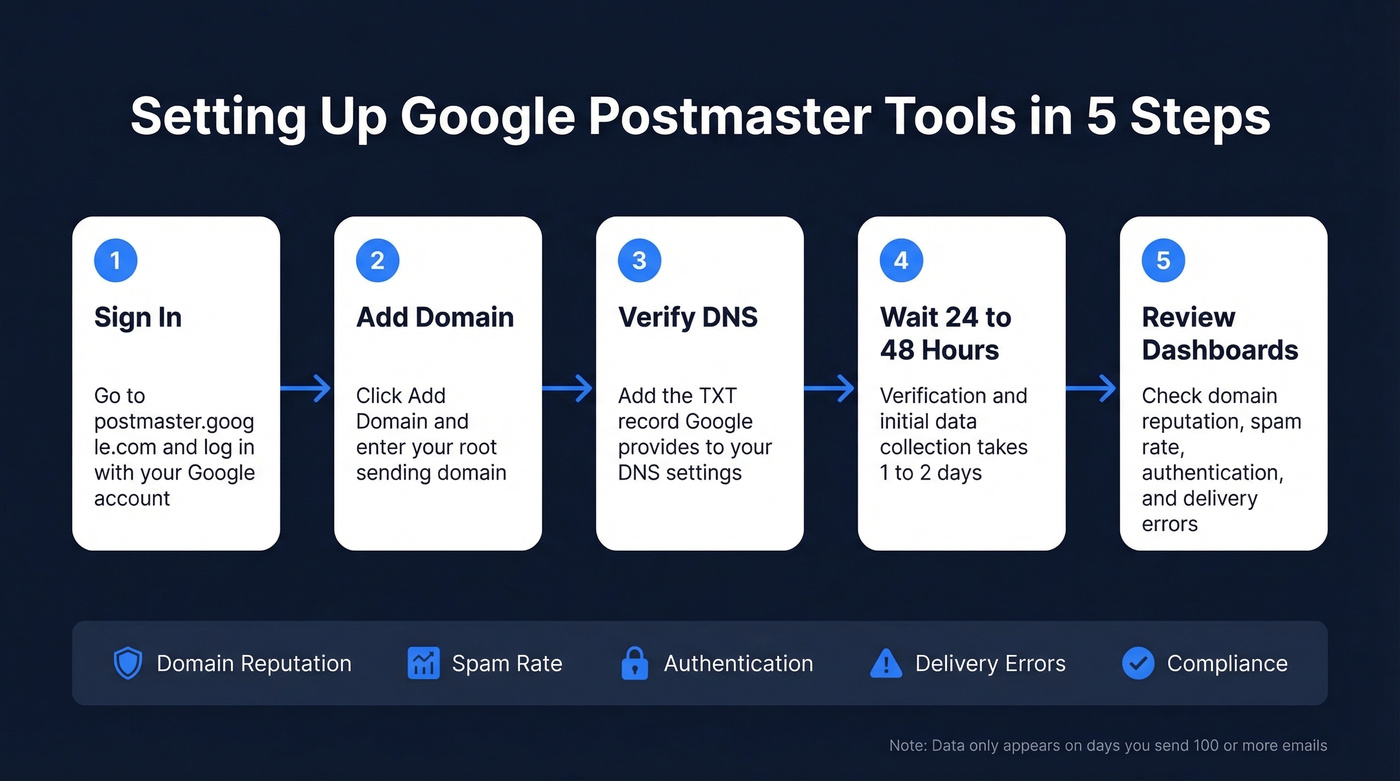
- Go to postmaster.google.com and sign in with your Google account.
- Click "Add Domain" and enter your sending domain. Use the root domain to aggregate data across subdomains, or add subdomains separately for segmented diagnostics.
- Verify ownership by adding a TXT record to your DNS. Google provides the exact record.
- Wait 24-48 hours for verification.
- Dashboards appear showing domain reputation, IP reputation, spam rate, authentication status, encryption, delivery errors, and compliance status.
Data isn't real-time - it updates within ~24 hours. Google won't show data on days when you send fewer than 100-200 emails, and the compliance dashboard can take up to 7 days to reflect fixes.
Other Free Tools
Spamhaus Reputation Checker is the industry standard for blocklist lookups. If your domain or IP appears on a Spamhaus list, many mailbox providers and corporate filters will block or heavily filter your mail. Check it first - it's the most consequential single check you can run. If you’re already listed, follow a dedicated Spamhaus blacklist removal process.
Beyond Spamhaus, Cisco Talos Intelligence gives a quick reputation rating (a Neutral reputation can simply mean low volume or limited data), Barracuda's reputation lookup shows whether you're listed, SenderScore by Validity scores your sending IP from 0-100, Microsoft SNDS shows how Outlook views your reputation, and Yahoo Sender Hub is Yahoo's equivalent of Postmaster Tools. All free.
For content-level spam filtering rather than domain reputation, SpamAssassin evaluates individual message content against spam patterns - useful if your domain reputation is clean but specific emails still get flagged. For more on that layer, see our email spam checker.
Paid Monitoring Tools
| Tool | Starting Price | Best For |
|---|---|---|
| MxToolbox Delivery Center | $129/mo | Blocklist monitoring |
| GlockApps | $85/mo | Inbox placement testing |
| mail-tester.com | $27/mo | Quick spam checks |
| SendForensics | From $39/mo | Deliverability analytics |
Most teams don't need paid tools until they're sending at serious volume or managing multiple sending domains. Skip these if you're under 10,000 emails per month.
IP vs Domain Reputation
These two get confused constantly, and the distinction determines how you diagnose and fix problems.
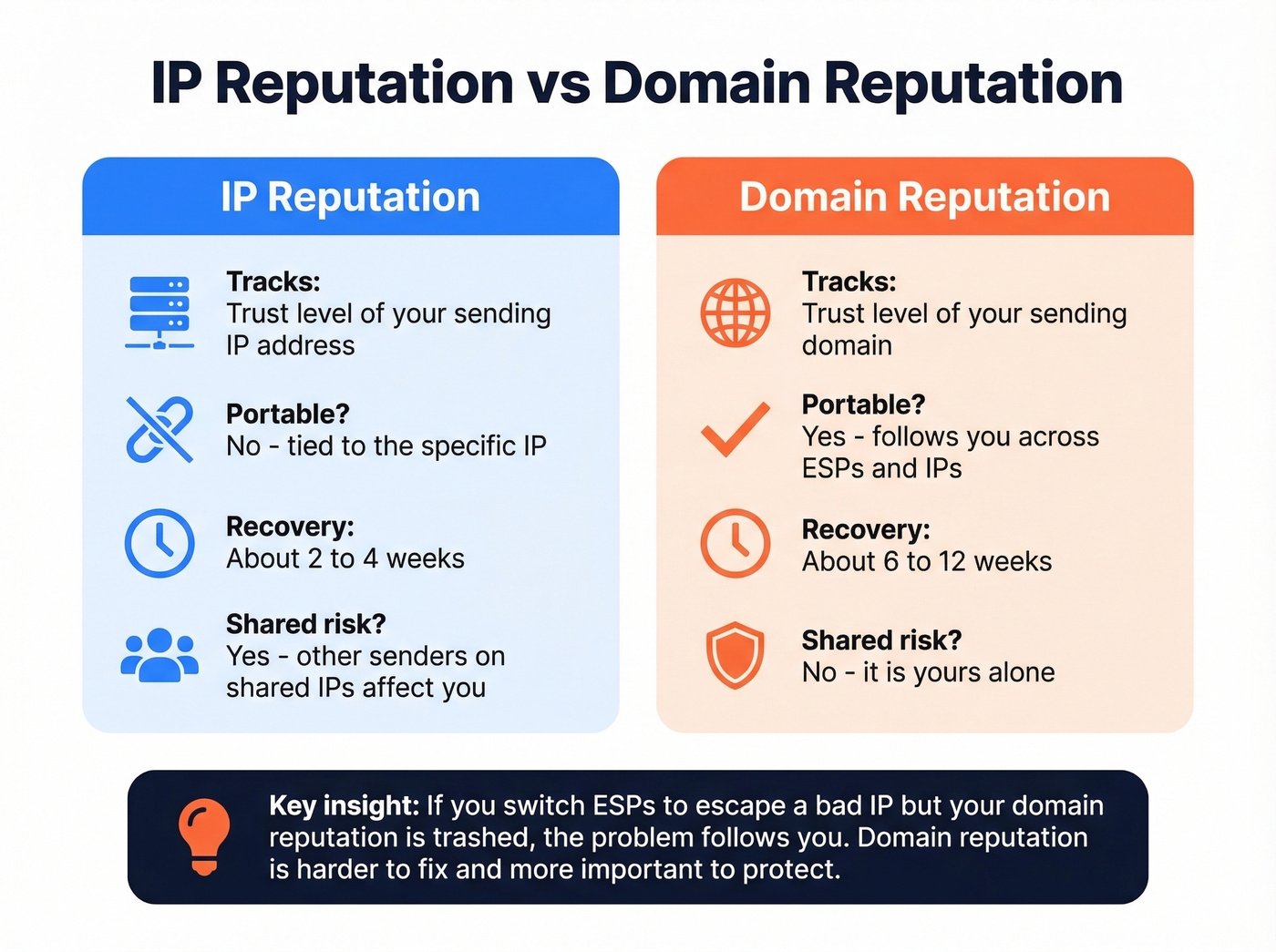
| IP Reputation | Domain Reputation | |
|---|---|---|
| What it tracks | Sending IP trust | Sending domain trust |
| Portable? | No - tied to the IP | Yes - follows you across IPs |
| Recovery time | ~2-4 weeks | ~6-12 weeks |
| Shared risk | Yes, on shared IPs | No - it's yours alone |
If you're on a shared IP with a lower-tier ESP plan, other senders' bad behavior can drag your reputation down. Domain reputation is portable - it follows your domain regardless of which ESP or IP you send from. Modern inbox providers increasingly weight domain reputation over IP reputation because authentication makes domain-level scoring reliable.
Real talk: if you switch ESPs to escape a bad IP reputation but your domain reputation is trashed, you'll carry the problem with you. Domain reputation is the harder one to fix and the more important one to protect.
Email Authentication Basics
SPF, DKIM, and DMARC are the three DNS records that prove you're a legitimate sender.
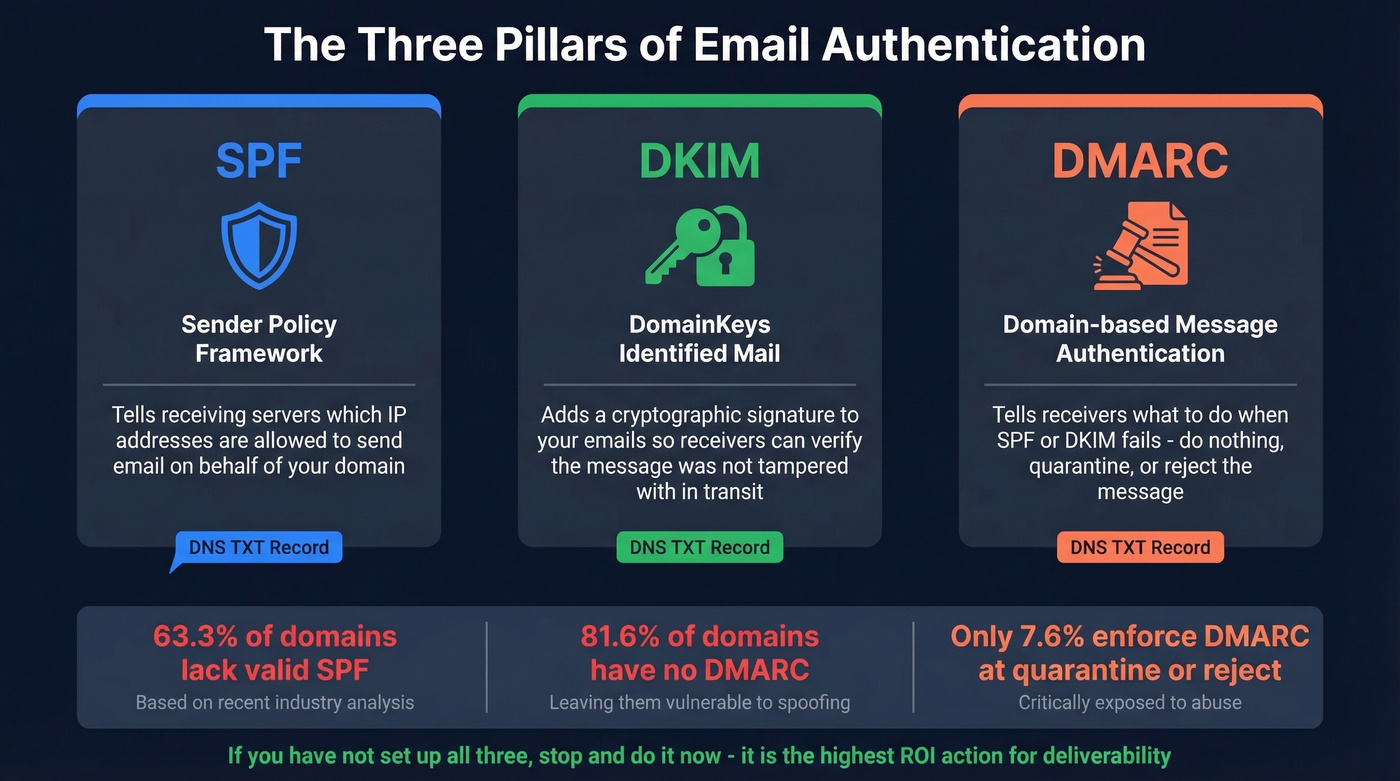
- SPF tells receiving servers which IPs are authorized to send email for your domain. (If you need syntax help, use these SPF record examples.)
- DKIM adds a cryptographic signature so receivers can verify your emails weren't tampered with. If you’re troubleshooting, here’s how to verify DKIM is working.
- DMARC tells receivers what to do when SPF or DKIM fails: nothing, quarantine, or reject. For deeper setup, see DMARC alignment.
The numbers are sobering. Across the top 10 million domains, only 36.7% have a valid SPF record. For DMARC, 81.6% of domains lack it entirely, and only 7.6% enforce it at quarantine or reject level.
Gmail and Yahoo now require bulk senders to keep spam complaint rates below 0.3%, with a target of under 0.1%. Without proper authentication, you're fighting that battle with one hand tied behind your back. If you haven't configured all three records, stop reading and do it now. It's the single highest-ROI action for email deliverability.
How to Fix a High Spam Score
Fixing SEO Spam Score
Start with a backlink audit. Moz Link Explorer shows which linking domains have high spam scores. Ahrefs from ~$99/mo gives a second perspective with its own toxicity metrics.
If you find genuinely toxic backlinks - link farms, PBNs, hacked sites - try contacting the webmaster for removal first. If that fails, use Google Search Console's disavow tool. But treat disavow as a last resort. Disavowing legitimate links by mistake hurts more than it helps.
On-site, address the signals Moz flags: add a contact page with a real phone number, beef up thin content, and check your domain for TLD or naming-pattern red flags. Then wait. Moz updates quarterly, so changes can take weeks or months to reflect. Moz's own community emphasizes patience repeatedly.
Fixing Email Domain Reputation
Step 1: Clean your contact data before sending. This is where most domain reputation damage starts. Sending to unverified lists generates bounces, which trigger spam complaints, which tank your reputation. It's a predictable cascade and entirely preventable. Prospeo's 5-step email verification catches spam traps, dead addresses, and catch-all domains before they generate the bounces that destroy your sender reputation. If you’re diagnosing the damage, start with email bounce rate benchmarks and fixes.
Step 2: Configure SPF, DKIM, and DMARC if any are missing. Check with EasyDMARC's domain scanner for a quick audit.
Step 3: Reduce sending volume temporarily. If your reputation is damaged, more volume makes it worse. Cut back to your most engaged segments and warm back up over 2-4 weeks. If you need guardrails, use an email velocity framework.
Step 4: Use a secondary domain for cold outbound. For high-volume cold email, send from a dedicated subdomain or secondary domain - not your primary corporate domain. This protects your main domain's reputation from the inherent risk of cold outreach. (More on setup in our guide to a tracking domain.)
Step 5: Monitor weekly. Watch Google Postmaster Tools for the domain reputation rating to climb from Bad/Low toward Medium/High. Keep spam complaints under 0.1% and never cross 0.3%. For a full playbook, see how to improve sender reputation.
In our experience, teams that verify contact data before sending recover domain reputation 2-3x faster than those who try to fix it after the damage is done. Recovery still takes 6-12 weeks of consistent clean sending - there's no shortcut. But fixing data quality at the source stops the bleeding immediately.
Outbound teams burning their domain reputation are almost always sending to unverified contacts. Prospeo refreshes 300M+ profiles every 7 days - not every 6 weeks - so you're never emailing stale, invalid addresses that trigger spam filters.
Clean data at $0.01/email costs less than rebuilding a burned domain.
FAQ
What's a good domain spam score?
For Moz Spam Score, anything under 30% is low risk and requires no action. For email reputation, Google Postmaster Tools rates you High, Medium, Low, or Bad - aim for "High." These metrics measure completely different things, so check both if you run SEO and outbound email simultaneously.
Does Moz Spam Score affect Google rankings?
No. Moz Spam Score is a proprietary metric based on 27 on-site signals correlated with penalties - Google doesn't use it as a ranking factor. The only place to confirm actual Google penalties is the Manual Actions report in Google Search Console.
How long does email domain reputation take to fix?
IP reputation typically recovers in 2-4 weeks with improved sending behavior. Domain reputation takes 6-12 weeks of consistent clean sending before scores meaningfully improve. Verifying your list before resuming sends accelerates the process by eliminating the bounces that caused the damage in the first place.
Should I check my domain spam score regularly?
Yes. SEO teams should review Moz quarterly since that's how often it updates. Email teams should monitor Google Postmaster Tools weekly during active campaigns - catching a reputation dip early gives you time to pause, clean your list, and recover before deliverability craters.
Can bad email data damage my domain?
Absolutely. Sending to unverified lists generates bounces and spam complaints that directly tank your sender reputation. One agency, Stack Optimize, kept client deliverability above 94% and bounce rates under 3% with zero domain flags by verifying every contact through a rigorous process before sending.