

How to Check If an Email Address Is Real - And Why Most Tools Get It Wrong
Your bounce rate just hit 4%. The sequence you spent two weeks building is torching your sender reputation, and half the "verified" list you bought last month is already dead. Here's the uncomfortable truth: an analysis of nearly 1 billion email addresses across 23 industries found only 80.94% were valid. That's roughly one in five contacts that won't reach a human inbox.
We've spent years testing verification tools, watching bounce rates climb and sender scores crater, and the pattern is always the same - teams trust a "verified" label that doesn't mean what they think it means. Let's fix that.
What You Need (Quick Version)
- Single email check: Use a free checker. Emailable gives you 250 free credits, plenty for spot-checking.
- List of 1,000+: Pay for accuracy. NeverBounce tested at 99.1% accuracy in a 47,000-email benchmark, and EmailListVerify runs just $24/10K if budget matters most.
How Email Verification Actually Works
Every verification tool runs the same basic pipeline, whether it costs $0 or $500/month. The differences are in execution quality. Some tools advertise 30+ verification steps, but the core stages are always these four.
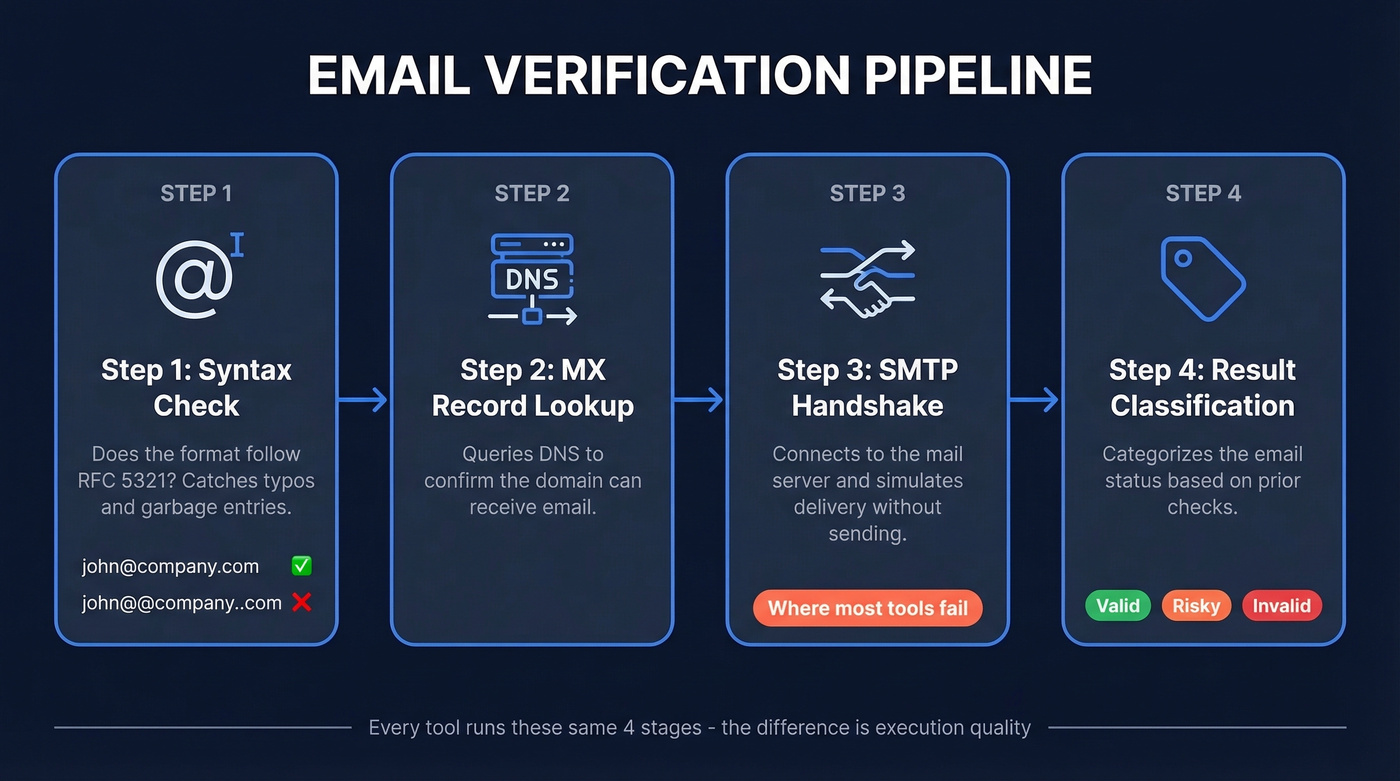
Step 1 - Syntax check. Does the address follow RFC 5321 format? john@company.com passes. john@@company..com doesn't. This catches typos and garbage entries - nothing more. (If you need a deeper breakdown of address rules, see email format.)
Step 2 - MX record lookup. The tool queries DNS for the domain's mail exchange records, confirming the domain is configured to receive email.
Step 3 - SMTP handshake. The tool connects to the mail server and simulates the beginning of an email delivery without actually sending anything. This is where real verification happens, but it's also where things break down - historical bounce data and controlled inbox testing are more reliable, though they require actual sending. (More on SMTP verification if you want the technical details.)
Step 4 - Result classification. The tool categorizes the address as valid, invalid, risky, or unknown based on the server's response.
The SMTP Handshake Up Close
Here's what the conversation between the verification tool and the mail server looks like:
Tool:   EHLO verify.example.com       → "Hello, I'm connecting"

Server: 250 OK                        → "Go ahead"

Tool:   MAIL FROM:<test@verify.com>   → "I want to send from this address"

Server: 250 OK                        → "Accepted"

Tool:   RCPT TO:<john@target.com>     → "Is this mailbox real?"

Server: 250 OK  or  550 User unknown  → The answer
A 250 means the server accepted the recipient - the address likely exists. A 550 means the mailbox doesn't. A 450 means "try again later," usually greylisting designed to slow down verification probes. The tool disconnects without sending any actual email.

Why verify emails after the fact when you can get them right the first time? Prospeo's 5-step verification - catch-all handling, spam-trap removal, honeypot filtering - runs before the email ever hits your list. 98% accuracy across 143M+ verified addresses, refreshed every 7 days.
Skip the cleanup. Start with emails that are already real.
Best Tools to Verify an Email Address
| Tool | Tested Accuracy | Free Tier | Price / 10K | Standout Trait |
|---|---|---|---|---|
| NeverBounce | 99.1% | 1,000 on signup | $50-80 | Best catch-all detection |
| Prospeo | 98% | 75 emails/mo | ~$100 | Email finder included |
| Bouncer | 97.8% | 100 credits | $45-49 | Capterra 4.9 (233 reviews) |
| EmailListVerify | Not public | 100 credits | $24 | Cheapest bulk option |
| ZeroBounce | 96.5% | 100/month | $64-80 | 49 native integrations |
| Emailable | 97.2% | 250 credits | $50-69 | Fastest processing |
| Hunter | ~90-95% | 50/month | $149 | Can't verify webmail |
If you want a broader comparison beyond this shortlist, see our full breakdown of email verification tools and email validation tools.
NeverBounce
NeverBounce earned the top accuracy score - 99.1% in a 47,000-email test - with 94% catch-all detection accuracy, which is where most tools fall apart. Pricing ranges from $8 per 1,000 on pay-as-you-go to $50-80 per 10K on subscription tiers. The 1,000 free credits on signup are enough to run a real test against your own data. If pure verification accuracy is your only metric, this is the tool to beat.
Prospeo
Here's the thing: if you're verifying scraped or purchased emails, you've already lost a step. Prospeo finds and verifies emails in one workflow. Its 5-step verification pipeline - including catch-all handling, spam-trap removal, and honeypot filtering - delivers 98% accuracy across 143M+ verified emails, refreshed every 7 days. At roughly $0.01 per email with 75 free emails monthly, it replaces standalone verification for most prospecting workflows. One of our agency clients, Stack Optimize, built to $1M ARR while maintaining 94%+ deliverability and sub-3% bounce rates across all their client campaigns using this approach. (If you're still building lists manually, start with a B2B email finder.)
EmailListVerify
Use this if you're running bulk verification on a budget. At $24 per 10K, nothing else comes close on price. Skip this if you rely on native CRM syncs - only 11 integrations means you'll be exporting CSVs manually. If you're doing this regularly, consider a dedicated email list cleaning service.
Bouncer
Bouncer tested at 97.8% accuracy with a 4.9 Capterra score across 233 reviews. Pricing lands at $45-49 per 10K. Bulk uploads handle up to 250,000 emails at once, but the UI gets sluggish during large batch processing - something we noticed when testing lists over 100K.
ZeroBounce
96.5% tested accuracy. 49 native integrations. $64-80 per 10K. Best fit for teams running complex marketing stacks that need plug-and-play connections everywhere. For simpler setups, you're paying a premium for integrations you won't use.
Hunter
$149 per 10K makes Hunter the most expensive verification option by far. Worse, it can't verify webmail addresses like Gmail or Yahoo. Skip this unless you're already paying for Hunter's email finder and want everything in one dashboard. (If you're comparing options, see Hunter.io competitors.)
Emailable
Best free tier at 250 credits and the fastest bulk processing we've seen - 10K addresses in 2-3 minutes. It struggles with Yahoo domains, though, which is a real problem if your list includes personal or small-business contacts. Paid plans run $50-69 per 10K. (If Yahoo is a big chunk of your list, read validate Yahoo email addresses.)
Why No Tool Is 100% Accurate
30-40% of B2B email domains are configured as catch-all servers. A catch-all domain accepts mail sent to any address - ceo@company.com, asdfgh@company.com, doesnotexist@company.com - all return a 250 OK during the SMTP handshake. The verification tool simply can't distinguish real mailboxes from fabricated ones.
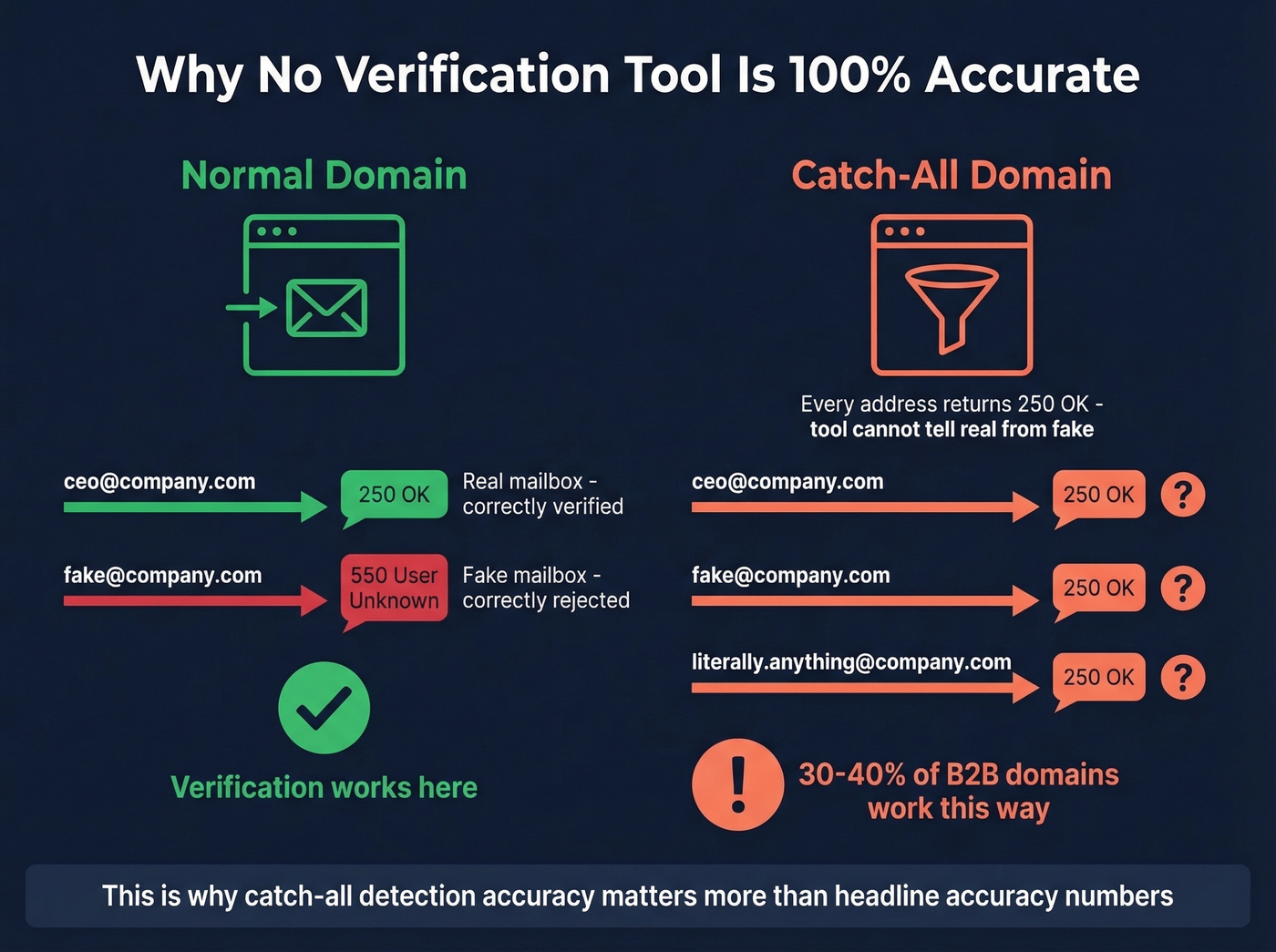
Enterprise security gateways like Proofpoint, Mimecast, and Microsoft Defender actively block verification probes through greylisting and rate limiting. A perfectly valid email can come back as "unknown" because the gateway refused to cooperate. The old VRFY SMTP command - literally designed to verify users - is disabled on virtually every modern mail server to prevent address enumeration.
In cold email communities on Reddit, the single most common frustration is catch-all domains returning "unknown" - which is exactly why catch-all detection accuracy matters more than headline accuracy numbers. NeverBounce's 94% catch-all detection rate is the benchmark here.
"Verified" is a probability score, not a guarantee. The best you can do is layer multiple signals - SMTP probing, historical bounce data, catch-all detection - and accept that some addresses will always be uncertain. (For a more complete SOP, see email list hygiene.)
Look, if your average deal size is under $15K and you're sending fewer than 5,000 emails a month, you probably don't need a standalone verification tool at all. Source your contacts from a platform that verifies on the way in, and you'll save both the money and the workflow headache.
What Bounce Rate to Aim For
| Threshold | What It Means |
|---|---|
| < 1% | Ideal - clean list |
| < 2% | Good - industry standard |
| > 5% | Danger zone - likely hitting spam |
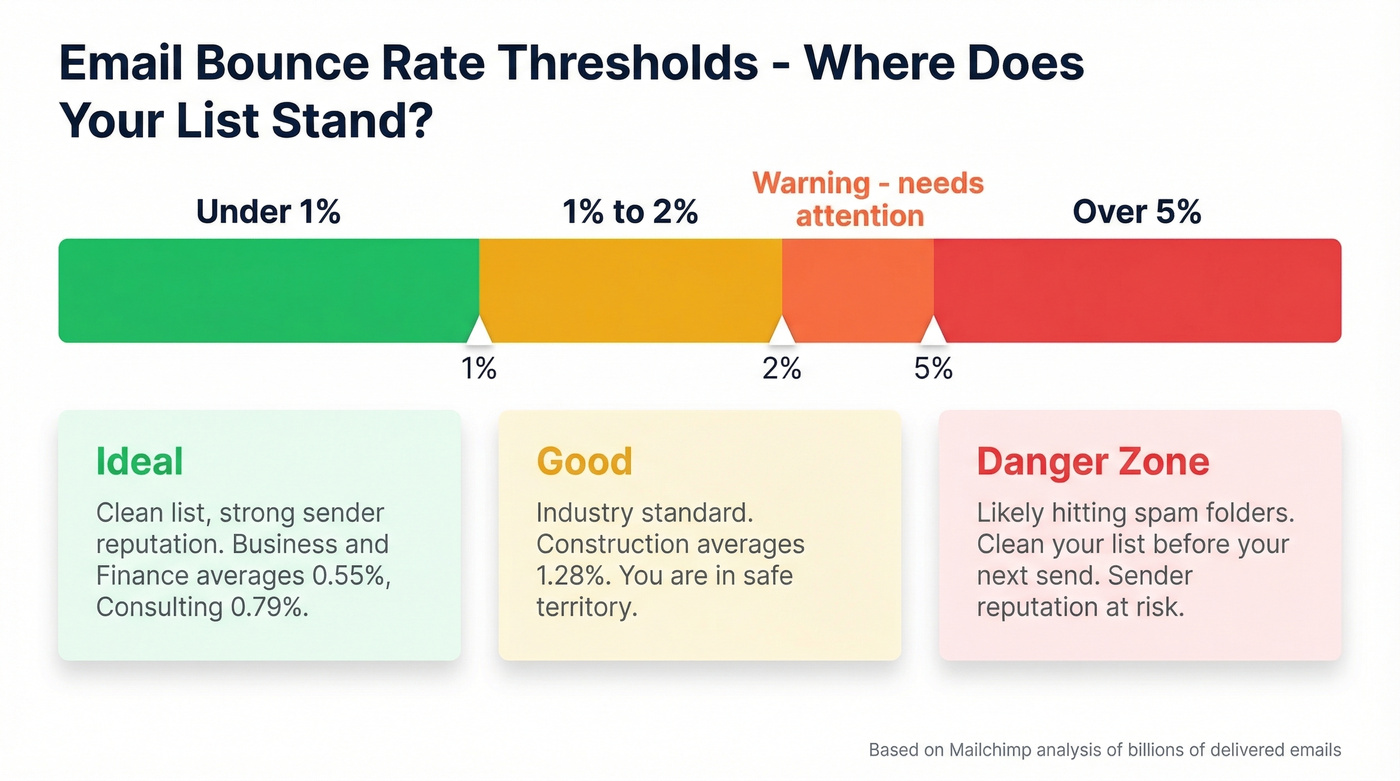
Mailchimp's analysis of billions of delivered emails confirms these thresholds hold across industries. Business & Finance averages 0.55%, Consulting 0.79%, and Construction 1.28%. If you're consistently above 2%, your list needs cleaning before your next send. (If you're diagnosing bounces, use this bounced email checker guide.)
How Often to Re-Verify
Email lists decay faster than most teams realize. Average professional turnover hit 41% in recent years, and roughly 38% of new hires leave within their first year. A list verified in January can have 10-15% dead addresses by May.
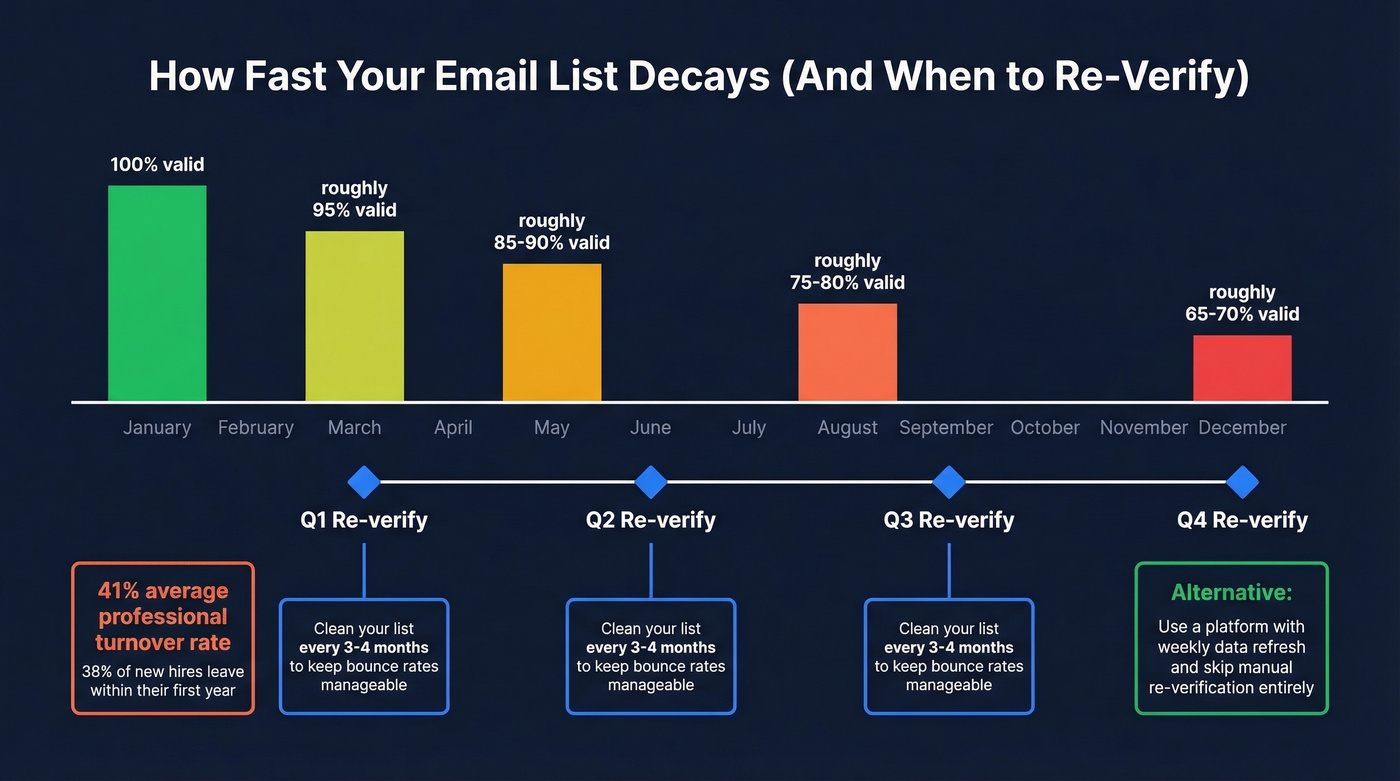
We run quarterly re-verification as a baseline - every 3-4 months keeps bounce rates manageable. For teams sourcing contacts through a platform with a weekly data refresh cycle rather than maintaining static lists, this problem largely solves itself. (If you need a repeatable workflow, follow a verify email addresses in bulk process.)
Catch-all domains fool every standalone verifier on this list. Prospeo's proprietary infrastructure doesn't just ping SMTP servers - it cross-references 300M+ profiles and historical deliverability data to flag risky addresses before they torch your sender reputation. Stack Optimize kept bounce rates under 3% across every client campaign.
Get 75 free verified emails and see the difference yourself.
FAQ
How do I know if an email address is real?
Run the address through an SMTP verification tool - it probes the recipient's mail server without delivering a message. A 250 response code means the mailbox likely exists; a 550 means it doesn't. For one-off checks, free tools like Emailable or ZeroBounce work well. For lists over 1,000, NeverBounce gives you higher accuracy and catch-all detection.
Can I verify an email without sending a message?
Yes. SMTP verification probes the mail server without delivering anything - the connection closes before an email is sent. It isn't foolproof: catch-all domains and greylisting produce false results, and enterprise security gateways can block the probe entirely. For higher confidence, use a tool that layers multiple validation methods beyond basic SMTP.
What does "unknown" or "risky" mean?
The domain is catch-all, meaning it accepts all addresses regardless of whether the mailbox exists, or the server blocked the verification probe. 30-40% of B2B domains produce this result. Don't send to "unknown" addresses in bulk - they'll inflate your bounce rate unpredictably.
Should I verify emails before importing into my CRM?
Always. Run your list through a bulk verification service before any import - tools like NeverBounce and EmailListVerify accept CSV uploads and flag invalid, risky, and unknown addresses so you can strip them out first. This keeps your CRM data clean and protects sender reputation from day one.
Are free email checkers accurate enough?
For a handful of addresses, yes. Emailable's 250 free credits or ZeroBounce's 100 monthly credits handle spot checks fine. For lists over 1,000, free tiers run out fast and accuracy drops on catch-all domains. To skip standalone verification altogether, sourcing pre-verified contacts through a platform like Prospeo eliminates the extra step - 75 free emails monthly to test it.