

How to Check If an Email Is Correct (2026 Guide)
The global inbox placement rate sits at roughly 83.5%. That means about one in six emails you send never reaches the inbox. If you need to check if an email is correct before hitting send, here's what most people get wrong: unverified addresses don't just waste sends. They torch your sender reputation and get your domain flagged. Verification isn't a checkbox. It's infrastructure.
Why Verification Matters More Than You Think
Picture this: you've spent two weeks building a prospect list, written a killer sequence, and hit send on 5,000 emails. By morning, 400 have hard-bounced. Your ESP flags the domain. Your deliverability tanks for the next three campaigns - not just this one.
The industry rule of thumb is clear. Keep total bounces below 2%, and target hard bounces under 1%. That's the line between "healthy sender" and "spam folder resident." One bad send can take weeks to recover from, and some ESPs won't give you a second chance.
Every email you send to a dead address signals Gmail, Outlook, and every other mail server that you don't know who you're emailing. Validating an address before you send isn't optional hygiene - it's the foundation your outreach runs on. (If you’re also monitoring reputation issues, see blacklisted.)
What You Need (Quick Version)
Three paths depending on what you're doing right now:
- Checking a single email? Paste it into any free tool below. Verifalia, Email Hippo, or Hunter all work for one-offs.
- Verifying a list for outreach? Use Prospeo - 98% accuracy with catch-all handling and spam-trap removal, 75 free verifications per month, no credit card required. (More on email verification for outreach.)
- Want to understand the mechanics? Keep reading. What happens under the hood matters more than most people realize.
How Email Verification Actually Works
Every verification tool - free or paid - runs some version of the same underlying process. The difference is how many steps they include and how well they handle edge cases.
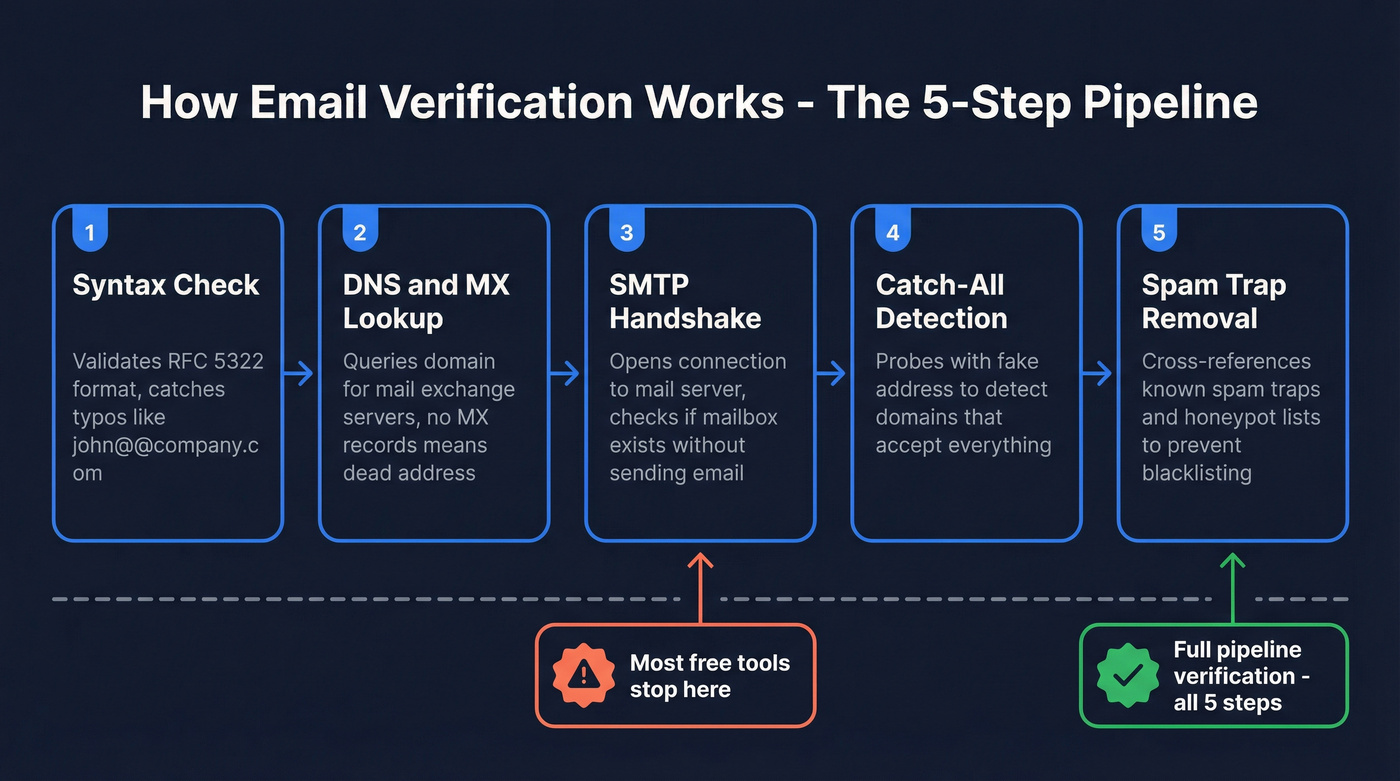
Step 1: Syntax check. The tool parses the email address against RFC 5322 formatting rules. Does it have an @ symbol? Is the local part valid? Is the domain structured correctly? This catches typos like john@@company.com or john@company instantly - the simplest filter before anything else runs.
Step 2: DNS and MX lookup. The tool queries the domain's DNS records to find its MX (mail exchange) servers. No MX records means no mail server to receive email. The address is dead regardless of what comes after the @.
Step 3: SMTP handshake. Here's where it gets interesting. The tool opens a TCP connection to the mail server and initiates an SMTP conversation: EHLO, then MAIL FROM, then RCPT TO with the target address. The server's response code tells the story - a 250 means it accepts the recipient, a 550 means the mailbox doesn't exist, and a 450 usually means greylisting or a temporary issue. No actual email is sent during this process. The tool disconnects before transmitting any content. (If you’re tightening your setup, review SMTP authentication.)
Step 4: Catch-all detection. Some domains accept email for every possible address - anything@company.com gets routed to a central inbox. These catch-all configurations make SMTP probing unreliable because the server returns 250 for addresses that don't actually exist. Detecting this requires probing with a known-fake address and comparing responses.
Step 5: Spam-trap and honeypot removal. The best tools cross-reference addresses against known spam-trap databases and honeypot lists. Sending to a spam trap is one of the fastest ways to get blacklisted. (Related: how to prevent email blacklisting.)
Many free tools stop at step 3. That gap between basic SMTP checks and full-pipeline verification is exactly where bounces hide.
Understanding Your Results
What Each Status Means
Verification tools return more than just "valid" or "invalid." Here's what each status actually tells you:
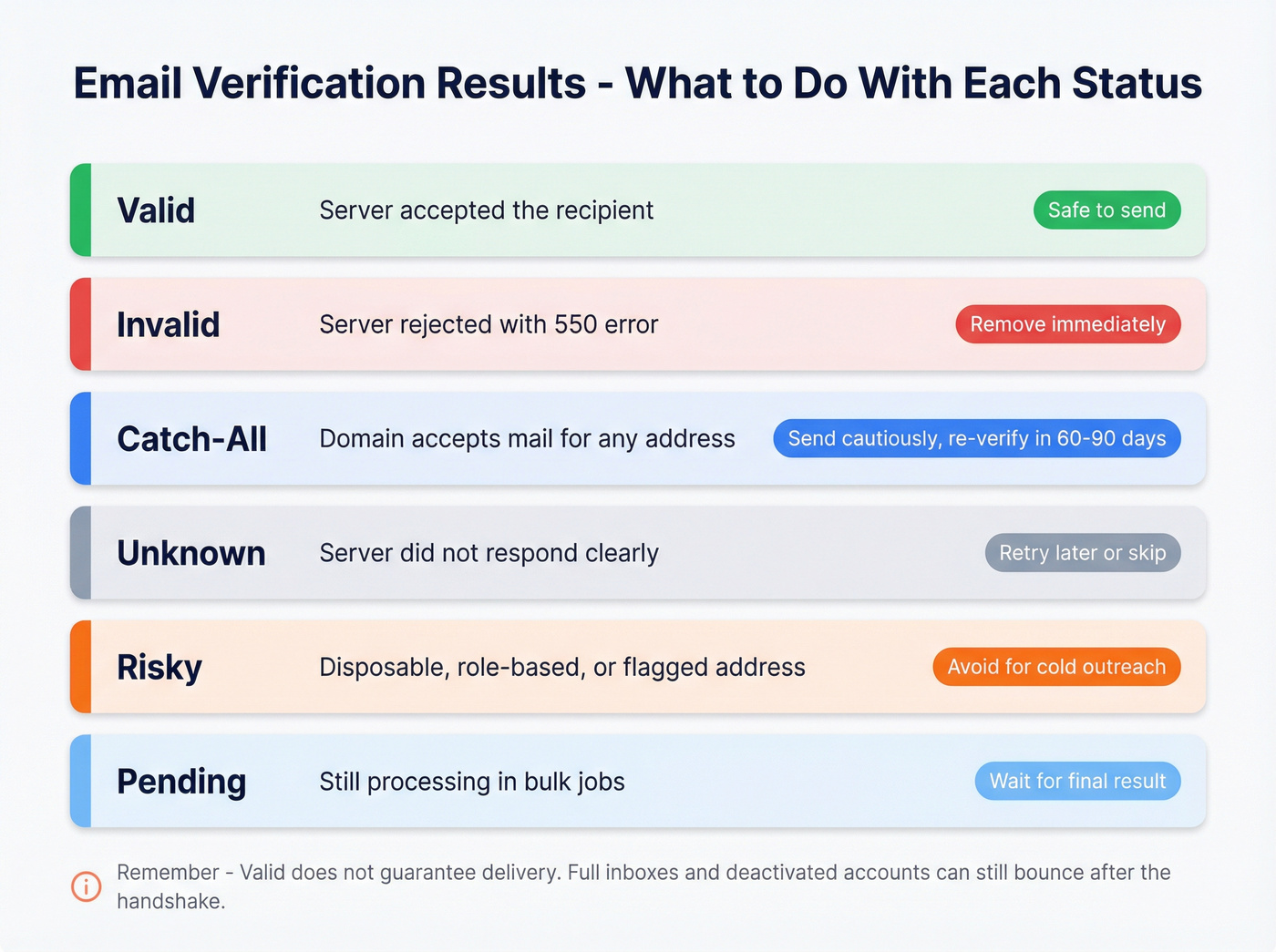
| Status | What It Means | What to Do |
|---|---|---|
| Valid | Server accepted the recipient | Safe to send |
| Invalid | Server rejected (550) | Remove immediately |
| Catch-All | Domain accepts everything | Send cautiously; re-verify in 60-90 days |
| Unknown | Server didn't respond clearly | Retry later or skip |
| Risky | Disposable, role-based, or flagged | Avoid for cold outreach |
| Pending | Still processing (bulk jobs) | Wait for final result |
One caveat: "valid" doesn't guarantee delivery. A server can accept an address at the SMTP level and still bounce it internally - full inboxes, deactivated accounts, and internal routing failures all happen after the handshake. (If you’re diagnosing bounce types, see hard bounces.)
The Catch-All Problem
Catch-all domains are one of the biggest sources of false positives in email verification. When a domain accepts mail for any local-part - literally-anything@company.com - every address at that domain comes back as "valid" during SMTP probing. You can't distinguish real.person@bigcorp.com from fake.garbage@bigcorp.com using standard SMTP checks alone, and catch-all configurations show up frequently on larger company domains.
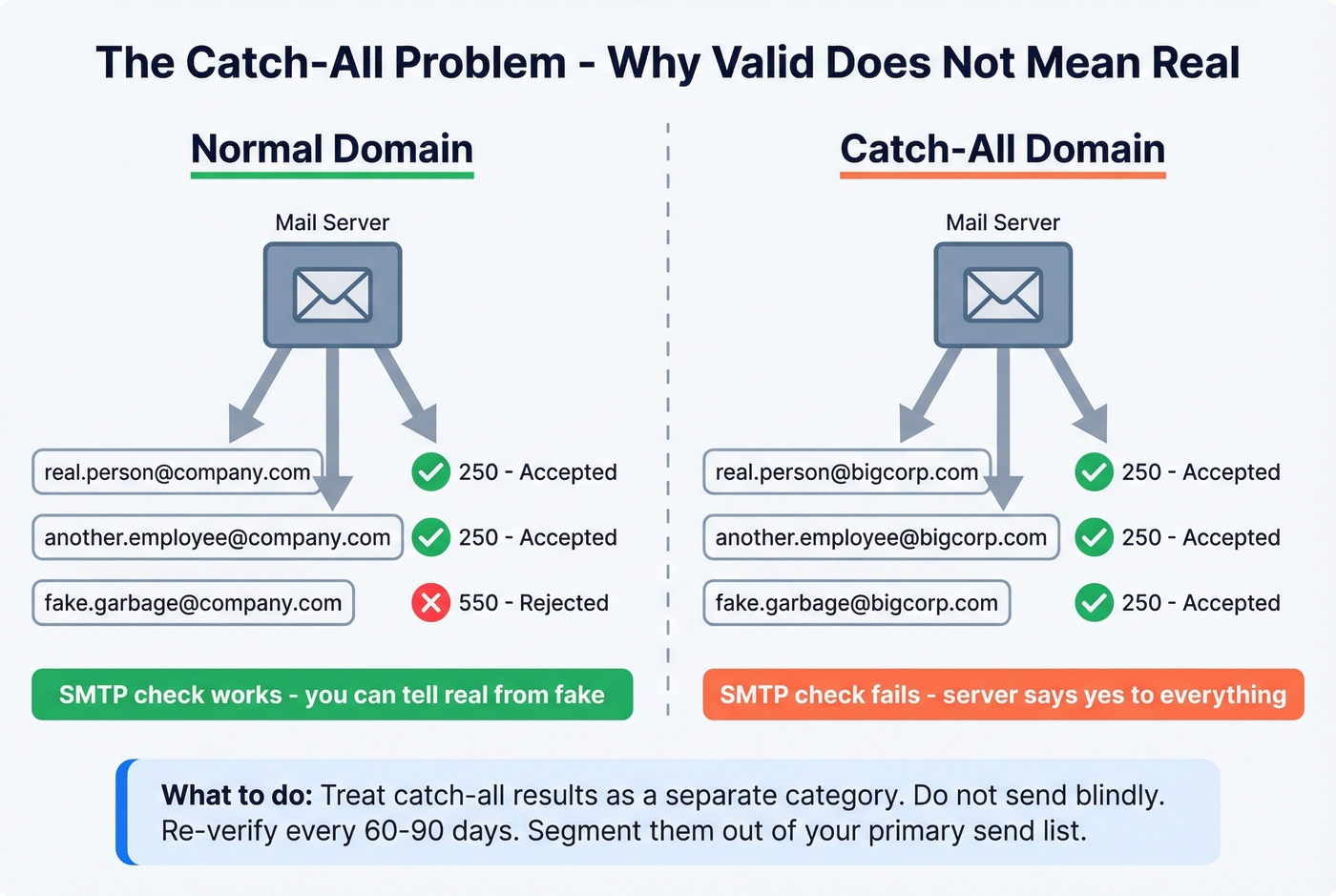
The practical fix: treat catch-all results as a separate category. Don't send to them blindly. Re-verify every 60-90 days since companies change their mail server configurations regularly. Segment catch-all addresses out of your primary send list and handle them with appropriate caution. (For a deeper deliverability playbook, use the email deliverability checklist.)

Most free tools stop at step 3. Prospeo runs all five - syntax, DNS, SMTP, catch-all detection, and spam-trap removal - on every address. That's how 15,000+ companies keep bounce rates under 2% and their domains off blacklists.
Get 75 free verifications per month. No credit card required.
Best Free Tools to Verify an Email Address
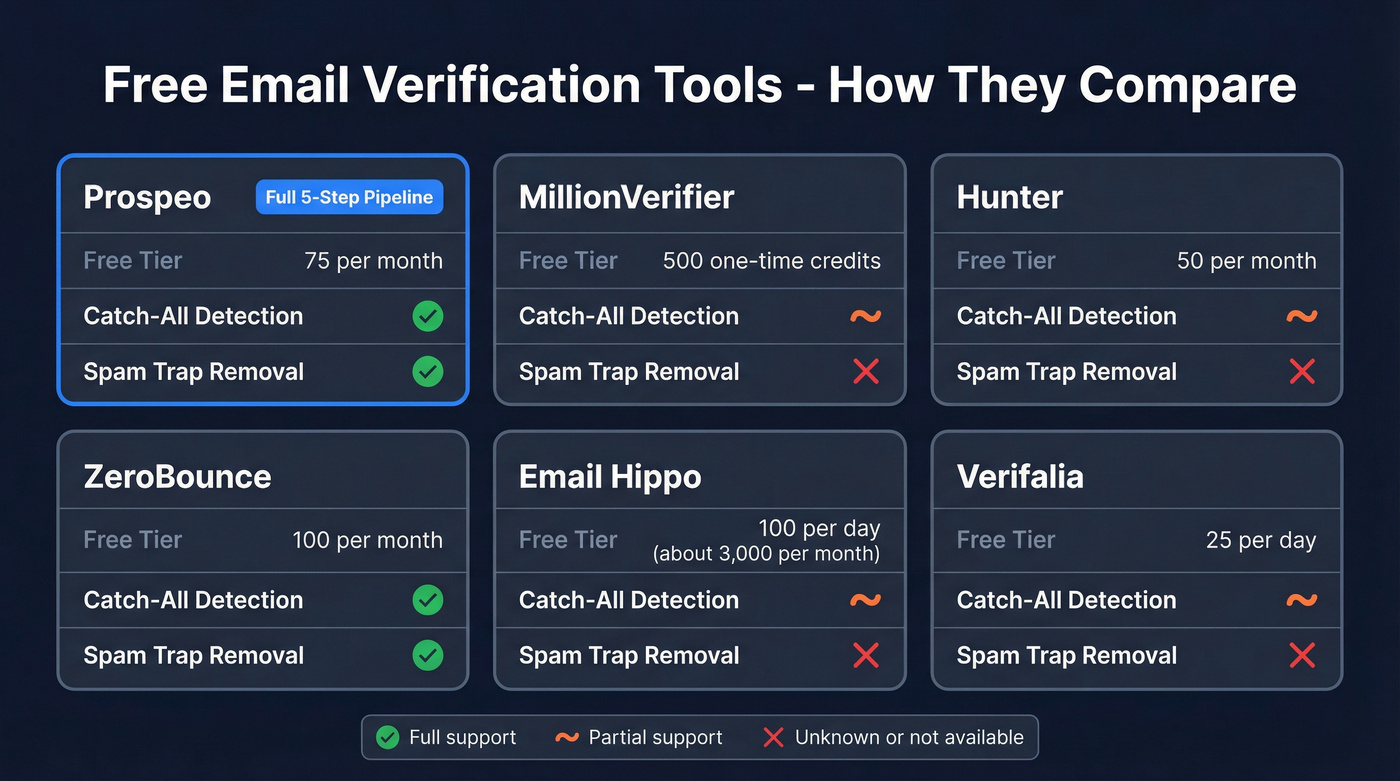
| Tool | Free Tier | Catch-All | Spam-Trap | Best For |
|---|---|---|---|---|
| Prospeo | 75/mo | Yes | Yes | Accuracy-first outreach |
| MillionVerifier | 500 credits | Partial | Unknown | Highest one-time volume |
| Hunter | 50/mo | Partial | Unknown | Developers / API |
| ZeroBounce | 100/mo | Yes | Yes | Marketing list cleaning |
| Email Hippo | 100/day | Partial | Unknown | Quick daily checks |
| Verifalia | 25/day | Partial | Unknown | Lightweight one-offs |
| NeverBounce | 10 credits | Yes | Unknown | Pay-as-you-go bulk |
| Mailmeteor | Fair-use | Unknown | Unknown | Google Sheets users |
| Emailable | 250 credits | Partial | Unknown | One-time list cleans |
| Skrapp | 100/mo | Partial | Unknown | Light prospecting + verify |
Prospeo
Prospeo's email verifier runs the full 5-step pipeline - syntax, DNS/MX, SMTP, catch-all detection, and spam-trap removal - on every single address. That's the verification flow behind 98% email accuracy across 143M+ verified addresses. (If you’re comparing categories, see email checker tools.)
The free tier gives you 75 verifications per month with no credit card. Paid plans work on credits at roughly $0.01 per email, which makes bulk verification absurdly cheap compared to tools charging $5-15 per thousand.
What sets it apart is the 7-day data refresh cycle. The industry average is six weeks. That matters because email addresses decay fast - people change jobs, companies restructure, inboxes get deactivated. We've run verification on the same list across three tools and gotten three different results; data freshness was the differentiator every time. For outbound teams and agencies, the spam-trap removal alone justifies using a paid tool over a free one. (More on B2B contact data decay.)
Email addresses decay fast. Prospeo refreshes its 143M+ verified emails every 7 days - not the 6-week industry average. At $0.01 per email, you get the freshest verification data at a fraction of what other tools charge.
Stale data is the #1 reason your bounces spike. Fix it now.
MillionVerifier
Use this if you've got a large list and want the most free verifications in a single allotment without paying anything. MillionVerifier's 500 free credits are the highest one-time free drop on this list.
Skip this if you need ongoing verification or care deeply about catch-all handling. The free credits are a one-time allotment, not a monthly refresh. If you're running weekly outbound, you'll be better off with a tool that has a recurring free tier and stronger catch-all logic. Email Hippo's daily-reset model can yield about 3,000 free checks per 30-day month if you batch them daily - worth considering as an alternative.
Hunter
Hunter's email verifier is the developer's choice. The API is clean, well-documented, and easy to integrate into custom workflows. You get 50 free verifications per month, and paid plans bundle verification into the broader email-finding platform.
Here's the thing about Hunter's accuracy: they published their own benchmark of 15 tools testing 3,000 real business emails, and Hunter came in at 70% overall accuracy - the highest in their test. They also disclosed that their dataset was built from Hunter activity patterns, which gives them a natural edge. Credit to them for the transparency, but take the ranking with that context. The API and developer experience are genuinely best-in-class for the price point.
ZeroBounce
ZeroBounce gives you 100 free verifications per month and includes both catch-all handling and spam-trap detection - a combination most free tiers skip. In Hunter's benchmark, ZeroBounce scored 60.70% overall accuracy, which is middle-of-the-pack. The spam-trap detection is the real draw. If you're cleaning a marketing list that's been sitting in a CRM for six months, ZeroBounce is a solid pick for catching the addresses that can get you blacklisted.
Email Hippo
Email Hippo offers 100 free verifications per day, resetting at midnight UTC. That's effectively about 3,000 free checks per 30-day month if you're patient enough to batch them daily - the highest free monthly volume on this list by a wide margin. The verifier identifies fake emails and possible bounces without ever sending an email. Reliable when you need high volume at zero cost.
Verifalia
Verifalia is one of the most recognized free single-email checkers, and for good reason - the interface is dead simple. Paste an address, get a result. The free tier caps at 25 verifications per day. It's lightweight and reliable for one-off checks, but it's not built for the kind of bulk verification outbound teams need. Think of it as a quick sanity check, not a production tool.
The Rest
NeverBounce gives you just 10 free credits - barely enough to test the tool. The catch-all handling is solid, though. Worth considering for pay-as-you-go bulk jobs if you don't need a recurring free tier.
Skrapp offers 100 free email credits per month with clear status definitions. The verifier doesn't send test emails; it checks directly with the email server using a multi-step process. The Chrome extension doubles as an email finder, making it a decent two-in-one for light prospecting.
Mailmeteor runs as a Google Sheets add-on with a free single-email checker on their site. No sign-up required for one-offs, but there's a fair-use policy that limits automated or heavy usage. Convenient if your workflow lives in Sheets. Limited otherwise.
Emailable offers 250 free credits (one-time, not monthly). Clean, no-frills verifier that works well for a one-time list clean but doesn't stand out in any particular dimension.
How Accurate Are These Tools, Really?
Let's be honest - accuracy claims in this space are all over the map, and most are self-reported. The closest thing to an independent benchmark is Hunter's test of 15 tools against 3,000 real business emails. The results are sobering:
- Hunter: 70.00%
- Clearout: 68.37%
- Kickbox: 67.53%
- NeverBounce: 63.17%
- ZeroBounce: 60.70%
Hunter disclosed that their dataset may favor their own tool, which is unusually honest for a vendor benchmark. But even with that caveat, the range tells you something important: most verification tools get it right about two-thirds of the time on real-world business emails. Accuracy drops significantly on mid-market and enterprise domains, where stricter mail server configurations, greylisting, and catch-all setups make SMTP probing less reliable.

Our take: If you're selling something low-ticket, you can usually get away with a basic verifier and a 2% bounce rate. But the moment you're sending to enterprise domains - where catch-all configs and greylisting are common - cheap verification costs you more in burned domains than you save on tool subscriptions.
Why do tools disagree on the same address? Three reasons. Greylisting causes temporary rejections that some tools interpret as "invalid." Catch-all configurations mean some tools flag them while others call them "valid." And disabled VRFY commands force tools to rely entirely on RCPT TO responses that don't always reflect reality.
How to Verify an Email Manually
If you want to understand what's happening under the hood - or you're a developer building your own verification - here's the manual method using command-line tools.
Step 1: Find the MX records.
nslookup -q=mx example.com
This returns the mail server(s) responsible for the domain. You'll see something like mail.example.com with a priority number.
Step 2: Connect and run the SMTP handshake.
telnet mail.example.com 25
EHLO mydomain.com
MAIL FROM:<test@mydomain.com>
RCPT TO:<target@example.com>
QUIT
A 250 2.1.5 OK response to the RCPT TO command means the server accepts that recipient. A 550 5.1.1 means the mailbox doesn't exist.
Two warnings here. Doing this repeatedly or automating it will get your IP blacklisted - mail servers treat SMTP probing as suspicious activity. And catch-all domains will return 250 for literally any address, so a positive result doesn't prove the mailbox is real.
This is why tools exist. They rotate IPs, handle edge cases, and interpret ambiguous responses at scale. The manual method is educational, not operational. If you just want to confirm an address before sending a campaign, use a dedicated tool instead. (If you’re building a workflow, start with email validity check.)
Why Verification Isn't Perfect
Even the best tools can't guarantee every result. The reasons are structural, not just technical.
VRFY is dead. The SMTP VRFY command was designed to confirm mailbox existence, but virtually every mail server disables it now to prevent enumeration attacks. This forces every tool to rely on indirect signals.
RCPT acceptance doesn't mean existence. Some servers accept at the edge and reject internally. Others accept everything and silently discard unknown addresses. There's no way to distinguish these behaviors from outside the mail server.
Greylisting breaks one-shot checks. Greylisting intentionally rejects the first connection attempt, expecting legitimate servers to retry. Verification tools that don't retry interpret this as "invalid" or "unknown."
Data decays fast. An address that's valid today can be deactivated next month when someone changes jobs. We've seen lists go from 97% valid to 88% valid in under 90 days - especially in industries with high turnover. Keeping accurate contact data requires ongoing effort, not a one-time scrub.
The only true validation is sending a confirmation email with a unique link - double opt-in. For marketing lists, that's the gold standard. For cold outreach, it's obviously not an option, which is why re-verifying every 60-90 days is non-negotiable. Treat verification as ongoing maintenance, not a one-time task.
FAQ
Can I check if an email is correct without sending a message?
Yes. Verification tools simulate the SMTP handshake without transmitting any content - they connect to the mail server, issue commands up to RCPT TO, read the response code, and disconnect. No email reaches the inbox, and the recipient never knows a check occurred.
Why did my verified email still bounce?
Catch-all domains, greylisting, and temporary server acceptance can all produce false "valid" results. Some servers accept at the SMTP level but reject internally during routing. No tool is 100% accurate - double opt-in is the only guaranteed confirmation for marketing contexts.
How often should I re-verify my email list?
Every 60-90 days at minimum. People change jobs, inboxes get deactivated, and domains reconfigure their mail servers. For high-volume outbound teams, monthly re-verification is worth the cost.
What's the best free email verification tool in 2026?
It depends on your use case. For sheer free volume, Email Hippo's 100/day reset gives you around 3,000 checks per month. For a one-time bulk clean, MillionVerifier's 500 credits go furthest in a single batch. For full catch-all and spam-trap coverage on a free tier, Prospeo's 75 monthly verifications run the most thorough 5-step pipeline at no cost.