

7 Client Check-In Email Templates That Actually Get Replies
Your clients get 70+ messages a day . Your "just checking in" email is competing with Slack pings, calendar invites, and a dozen follow-ups that all sound the same. B2B reply rates have dropped to around 4.0%, and a generic check-in is a fast way to land in the ignored majority.
One team on r/business replaced their generic sequence with value-driven check-ins and saw replies jump from 3% to 31%. Same audience, same product, completely different approach.
Here's the framework and seven templates that make that possible.
Why "Just Checking In" Kills Replies
"Just checking in" signals you have nothing meaningful to say. Grammarly's writing team calls it out as passive-aggressive, impatient, or both - and your clients read it the same way. (If you need alternatives, see how to say "just checking in" professionally.)
B2B reply rates have slid from 8.5% in 2019 to roughly 4.0% in 2026. That's not random. Inboxes got noisier and follow-ups got lazier. One A/B test showed "just checking in" pulling a 13% reply rate, but the phrase wasn't the driver - the surrounding context was. Strip the context away and the phrase is dead weight.
Here's the thing: your client doesn't owe you a reply. You have to earn it.
The 3-Part Check-In Framework
Every template below follows this structure:
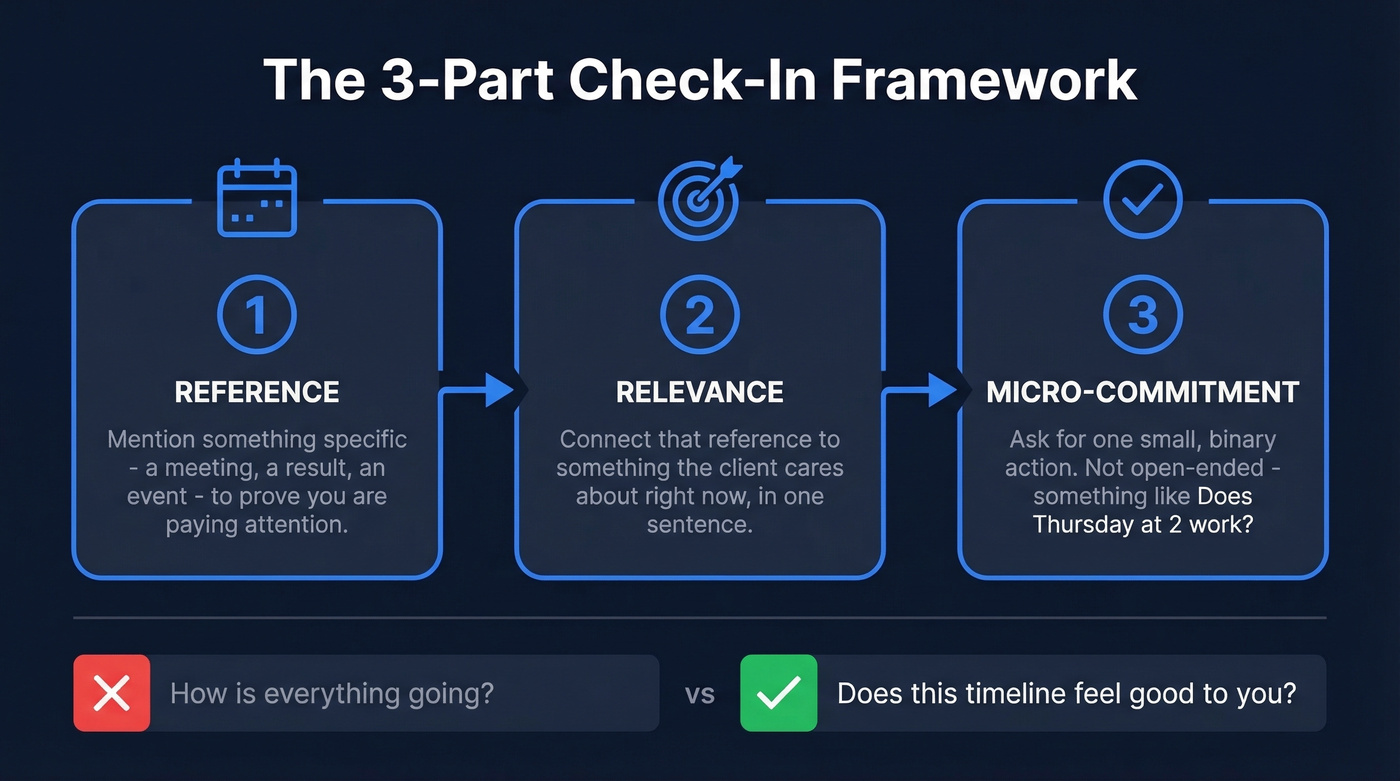
- Reference - Mention something specific (a meeting, a result, an industry event) to prove you're paying attention.
- Relevance - Connect that reference to something the client cares about right now, in one sentence.
- Micro-commitment - Ask for one small, binary action. Not "let me know your thoughts" but something like "does Thursday at 2 work?" (More examples: email call to action.)
The gap between "how's everything going?" and "does this timeline feel good to you?" is the gap between a reply and silence.
7 Check-In Email Templates for Clients
1. Post-Meeting Follow-Up
Send within 24 hours of any call. This is the easiest reply you'll ever earn - clients will correct or confirm your recap almost reflexively. (If you want more variations, use these sales meeting follow-up email templates.)
Subject: Action items from our [date] call
Hi [Name], thanks for the time today. Quick recap: [1-2 key action items with owners]. I'll have [deliverable] to you by [date]. Does anything need adjusting before we move forward?
2. Project Milestone Check-In
Subject: Quick update on [project/deliverable]
Hi [Name], we just hit [milestone] on [project]. [One sentence on what's next.] Before we move into the next phase, does anything need to shift on your end?
A concrete milestone replaces the vague "any updates?" and gives the client something specific to respond to. That specificity is what triggers the reply.
3. Value Recap
We've tested dozens of check-in angles, and leading with a result or timely insight consistently outperforms leading with pain. The data backs this up - according to Backlinko's email outreach study, timeline-based hooks pull 10.01% reply rates versus 4.39% for problem-focused hooks. (For more reply-focused copy patterns, see emails that get responses.)
Subject: [Result or insight] for [company]
Hi [Name], wanted to flag this - [specific result, metric, or industry news relevant to their business]. It connects to what we discussed about [their goal]. Worth a 10-minute call to explore? I'm open [two specific times].
4. The Calendar Lock
Subject: Finalizing my calendar - does [date] work?
Hi [Name], I'm locking in my schedule for next week. Does [specific date and time] work for a quick sync on [topic]? If not, what's better?
Borrowed from an r/sales thread - the binary ask (date works or doesn't) makes replying effortless. These templates adapt to Slack DMs and SMS too. Shorten the body to two sentences and keep the micro-commitment. (If you're building a full cadence, start with these sales follow-up templates.)
5. QBR or Renewal Scheduling
Subject: Q[X] review - [date] at [time]?
Hi [Name], it's time for our quarterly review. I've pulled together [results/metrics] and have a few recommendations. Does [specific date] at [time] work? I'll keep it to 30 minutes.
Proactively scheduling with a specific date and time cap removes friction. Clients appreciate not having to initiate, and the 30-minute cap tells them you respect their calendar. (If you need a tighter agenda, use these QBR questions to ask.)
6. The Permission-Based Check-In
In our experience, this template outperforms every other one on this list for re-engaging silent clients. Giving someone an explicit out paradoxically triggers replies - reducing pressure makes responding feel low-stakes.
Subject: Should I keep following up?
Hi [Name], I've reached out a couple of times and haven't heard back - totally understand if the timing isn't right. Would you let me know if this is worth revisiting now, or if I should circle back in a few months?
7. The Breakup Email
Subject: Closing the loop on [project/topic]
Hi [Name], it's been a while since we connected on [topic]. This'll be my last note unless I hear back. If [original goal] is still on your radar, I'd love to reconnect. If not, no hard feelings.
The breakup email works because people respond to the fear of losing access more than to another nudge. Make it genuinely final. Don't send a "just kidding, one more thing" email two days later.

A perfectly crafted check-in email is worthless if it bounces. Prospeo's 98% email accuracy and 7-day data refresh mean your templates land in real inboxes - not dead ones. Stop wasting follow-ups on outdated contacts.
Verify every client email before you hit send.
Subject Lines That Get Opened
The average open rate across industries sits at 37.72%, which means roughly six in ten emails won't get opened. Keep yours to 5-9 words and under 50 characters for mobile screens. Pair every subject line with preview text of 80-100 characters that extends the hook. (For more ideas, swipe from these email subject line examples and subject lines that get opened.)
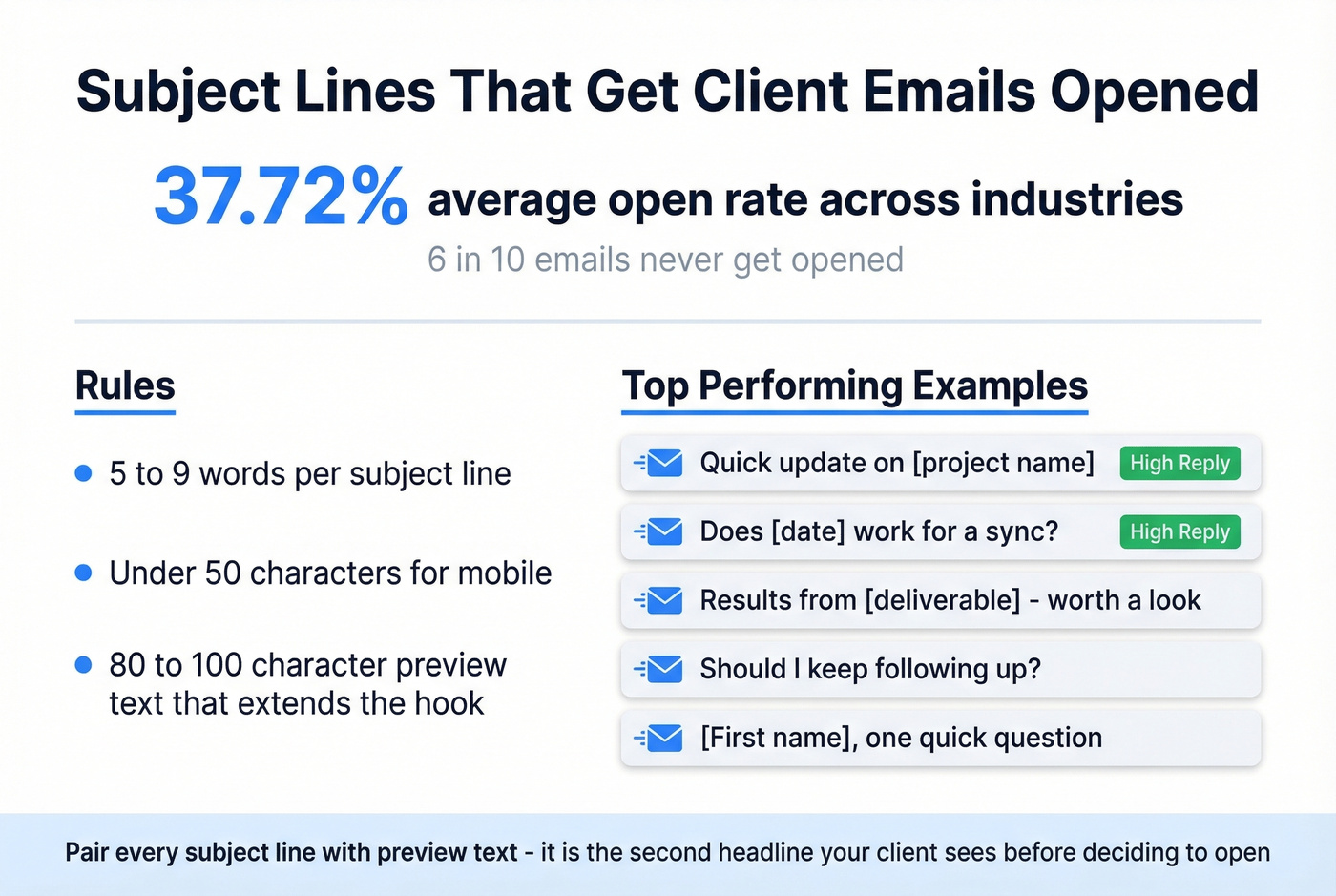
Strong client check-in subject lines: "Quick update on [project name]" / "Does [date] work for a sync?" / "Results from [deliverable] - worth a look" / "Should I keep following up?" / "[First name], one quick question"
When to Send
55% of replies come from follow-ups, not the initial email. The first follow-up boosts reply rates by 49%. A second adds another 3.2%. But three or more follow-ups have a negative effect on reply rates, so for existing clients, two to three is the ceiling. (More timing guidance: when should I follow up on an email.)
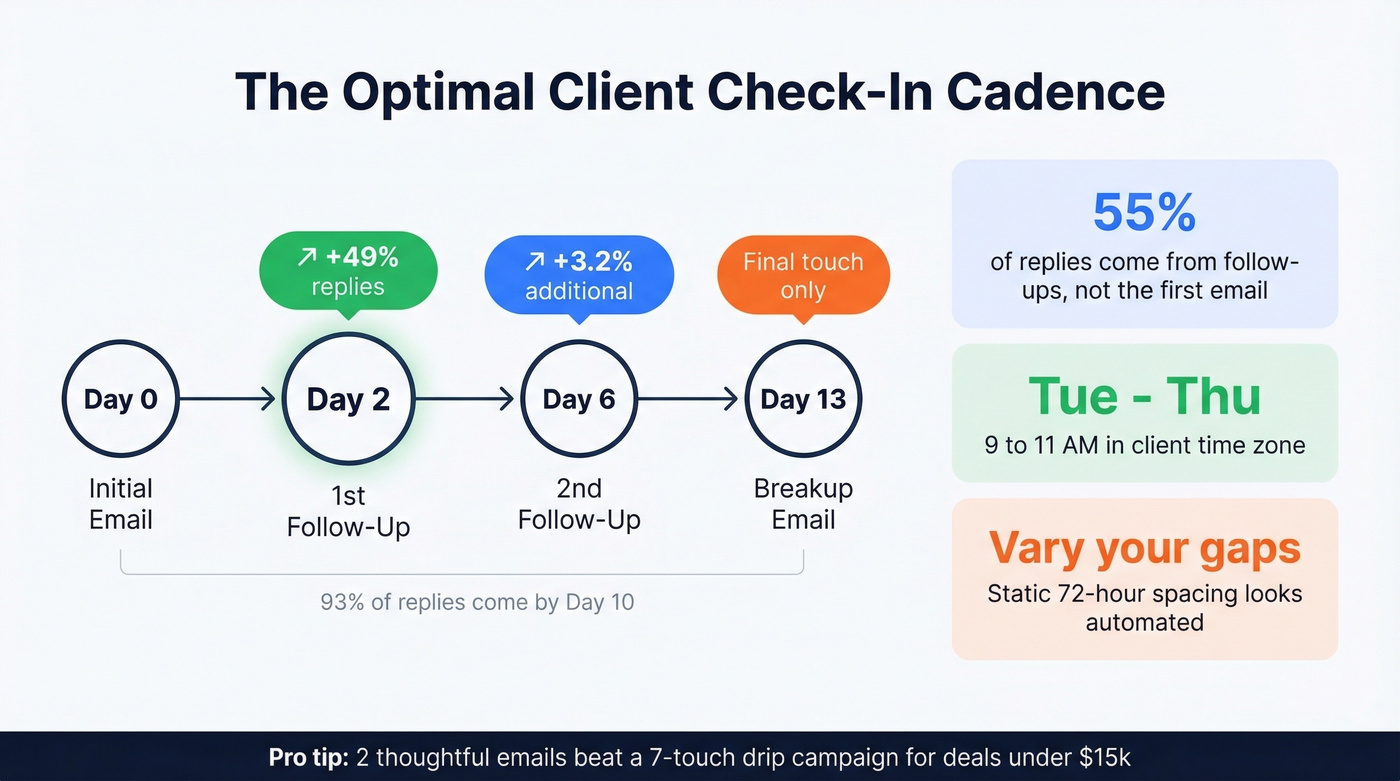
| Follow-up | Spacing | Cumulative effect |
|---|---|---|
| 1st | +2 days | +49% replies |
| 2nd | +4 days | +3.2% additional |
| 3rd (breakup) | +7 days | Negative - use only as final touch |
A 3-7-7 cadence captures 93% of replies by Day 10. Send Tuesday through Thursday, 9-11 AM in the client's time zone. And vary your gaps - static spacing (every 72 hours exactly) looks automated and feels like a sequence, because it is one.
5 Mistakes That Kill Check-In Emails
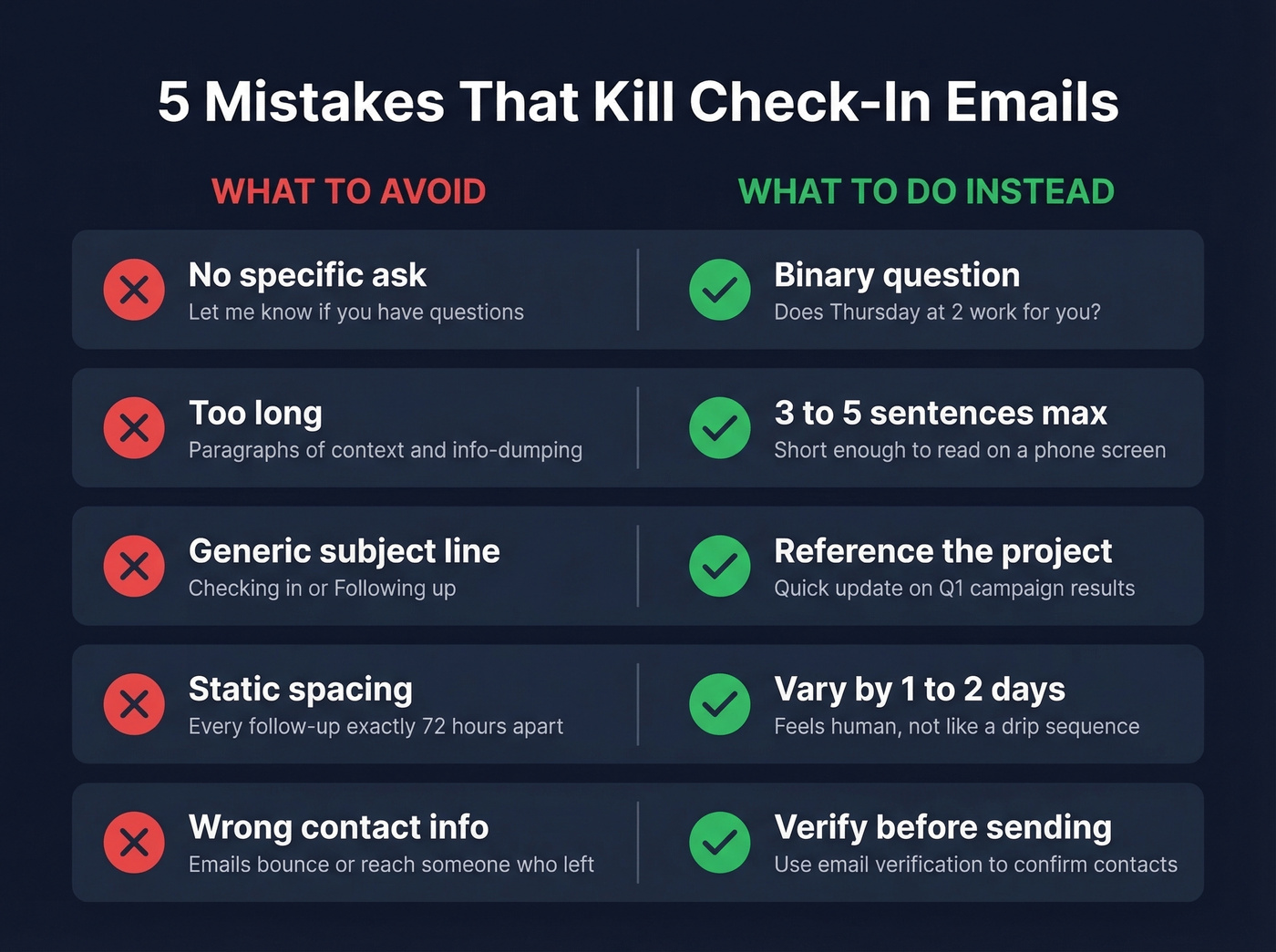
- No specific ask. "Let me know if you have questions" isn't a CTA. Ask something binary: "Does Thursday work?"
- Too long. Three to five sentences max. Info-dumping guarantees a skim-and-archive.
- Generic subject line. "Checking in" and "Following up" blend into noise. Reference the project or the ask.
- Static spacing. If every follow-up lands exactly 72 hours apart, your client knows it's automated. Vary your timing by a day or two.
Let's be honest: if your average deal size is under $15k, you probably don't need a seven-touch automated sequence for client check-ins. Two thoughtful emails with specific asks will outperform a drip campaign every time. Save the automation for prospecting. (If you're systematizing outreach, see sequence management.)
Before you send that breakup email, make sure you're reaching the right person. Prospeo enriches your CRM with 50+ data points per contact - verified emails, direct dials, job changes - so your check-ins reach decision-makers who are still in-seat.
Dead data kills reply rates faster than bad copy ever will.
FAQ
How many follow-ups should I send a client before stopping?
Two to three. The first follow-up boosts replies by 49%, but after three messages, reply rates decline. Use a breakup email as your final touchpoint - it often generates the response the earlier emails didn't.
What can I say instead of "just checking in"?
Reference something specific - a meeting, a result, industry news - then connect it to value and ask one clear question. The framework is reference, relevance, micro-commitment. That structure alone separates your client check-in email from every other follow-up in their inbox.
How do I make sure my check-in emails actually reach clients?
Verify contact data before sending any sequence. Bounced emails damage your sender reputation and tank future deliverability. Tools like Prospeo and NeverBounce let you clean lists before a single email goes out.