

Closed Lost Deals: Definition, Tracking, and the Playbook Most Teams Skip
Your VP of Sales just pulled the quarterly loss report. It says 40% of deals were "lost to price." But you listened to the Gong recordings - half those deals never got past a second call, and the prospect ghosted because the rep was single-threaded to a manager with no budget authority. That's not a pricing problem. That's a data problem disguised as a dropdown.
The 60-second version: Closed lost means a deal is over in your CRM - it's no longer being pursued. But roughly 79% of opportunities end up here, so if you're not tracking why and building a system to re-engage, you're ignoring most of your market intelligence. Below: the taxonomy, the CRM setup, and the win-back playbook.
What "Closed Lost" Actually Means
Closed lost is a terminal CRM stage - in Salesforce, HubSpot, or any pipeline tool - indicating a deal ended without a sale. The prospect said no, went dark, chose a competitor, or the opportunity simply evaporated. It's the mirror of closed won, where revenue gets booked.
Here's the number that should change how you think about this stage: average B2B win rates sit around 20-21%. Four out of five deals in your pipeline will land in this bucket. If you're treating it as a graveyard instead of an intelligence source, you're ignoring the majority of your sales data and the missed opportunities hiding inside it.
Why Your CRM Loss Data Is Probably Wrong
If your only loss analysis is reading CRM dropdowns, you don't have analysis. You have guesswork.
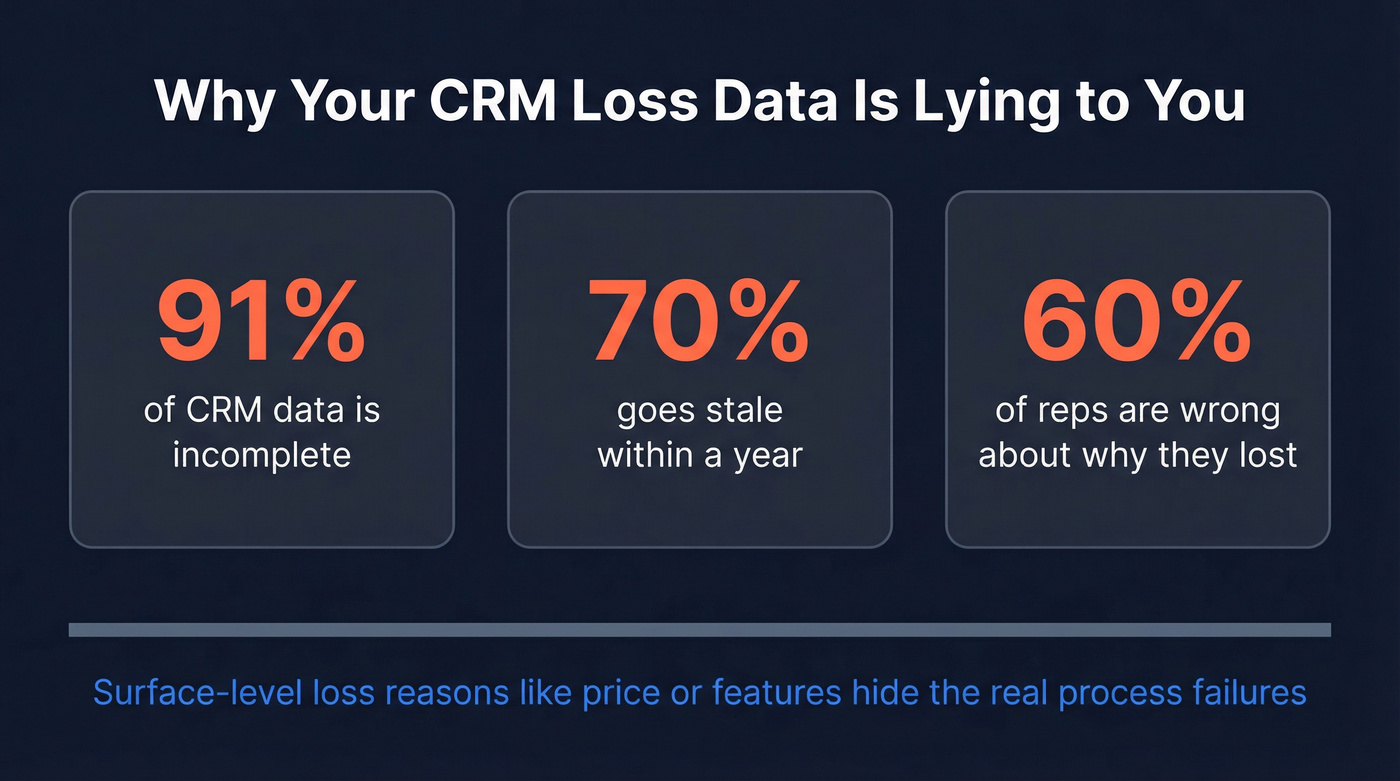
91% of CRM data is incomplete, and 70% becomes inaccurate within a year. Worse, 60% of sellers are partially or completely wrong about why they lost a deal, per Anova Consulting research cited by Klue. In the real world, reps pick whatever gets them past the modal fastest. The surface-level explanations - "price" or "features" - hide the actual process failures: inadequate discovery, poor demo execution, weak multithreading, or never reaching the economic buyer.
The fix isn't better dropdowns. It's building a win/loss program that matures over time:
| Maturity Stage | What It Looks Like |
|---|---|
| Sales-Sourced | Sporadic CRM dropdowns; biased, incomplete |
| Siloed | One team runs analysis; insights stay local |
| Integrated | Dedicated owner; cross-touchpoint collection |
| Action-Oriented | Leadership-backed; systematic; drives real change |
Most teams are stuck at Stage 1. We've seen it firsthand - even well-funded orgs with 100+ reps running on nothing but a free-text "loss reason" field. The goal is Stage 4, where loss data actually changes how you sell, how you build product, and how you position against competitors.
Choosing Your Loss-Reason Taxonomy
Five loss reasons is enough for most teams. Once your list gets long, reps start picking whatever option is "close enough" just to move on.
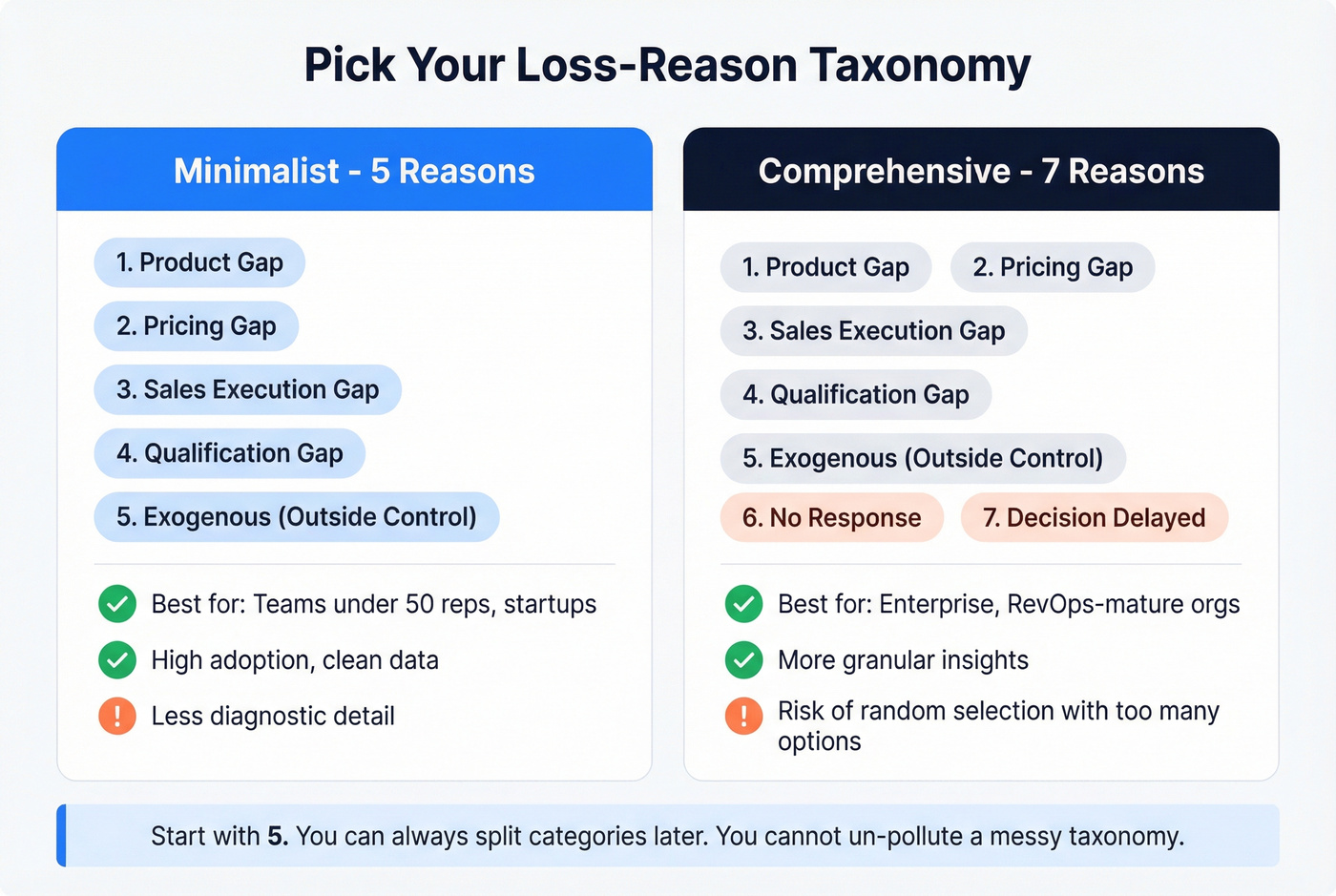
| Minimalist (5 reasons) | Comprehensive (7 reasons) | |
|---|---|---|
| Best for | Teams under 50 reps, startups | Enterprise, RevOps-mature orgs |
| Categories | 5: product, price, execution, qualification, exogenous | 7: adds No Response, Decision Delayed |
| Pros | High adoption, clean data | More granular insights |
| Cons | Less diagnostic detail | Random selection risk |
| Win-rate impact | Up to 15% lift over time from systematic tracking | Up to 15% lift over time (Gartner) |
The minimalist taxonomy comes from Kevin Cohn's framework, which boils every loss down to a product gap, a pricing gap, a sales execution gap, a qualification gap, or something outside anyone's control. The comprehensive version, based on Rick Koleta's model, adds "No Response" and "Decision Delayed" - useful if buyer indecision is a major pattern for your team.
Start with five. You can always split categories later once you have clean data. You can't un-pollute a messy taxonomy.


"Couldn't reach the decision-maker" shouldn't be a loss reason. Prospeo gives your reps 98% accurate emails and 125M+ verified mobile numbers - refreshed every 7 days, not every 6 weeks. When your team can actually connect with the economic buyer, fewer deals end up in the closed lost column.
Fix the data problem before it becomes a pipeline problem.
CRM Setup for Tracking Lost Opportunities
HubSpot
HubSpot's native "Closed Lost Reason" property is text by default. Useless for analysis - replace it on day one.
Create a new Deal property called "Loss Reason" as a Dropdown select with your chosen taxonomy, then create a second multi-line text property for "Loss Context." Go to Settings > Objects > Deals > Pipelines > Closed Lost stage and add both as conditional stage properties. This forces a pop-up when reps move a deal to the terminal stage - no more silent dispositions.
Route notifications by reason: Product team gets "Missing Features," pricing owner gets "Beat on Price," sales leadership gets "Outsold." Without routing, loss data just sits in a dashboard nobody checks.
Salesforce
Create a required picklist field on the Opportunity object for loss reasons, then add a validation rule: if Stage = "Closed Lost" and Loss Reason is blank, block the save. The detail most teams miss is dependent picklists for sub-reasons. Under "Outsold," for example, distinguish between "Unconvinced" (your pitch didn't land) and "Risked Out" (the buyer defaulted to the safer choice). That distinction changes your coaching entirely. Build a Flow to notify the right stakeholder based on the selected reason.
Re-Engaging Closed Lost Deals
Stop treating lost deals as a failure metric. They're your best source of future pipeline.
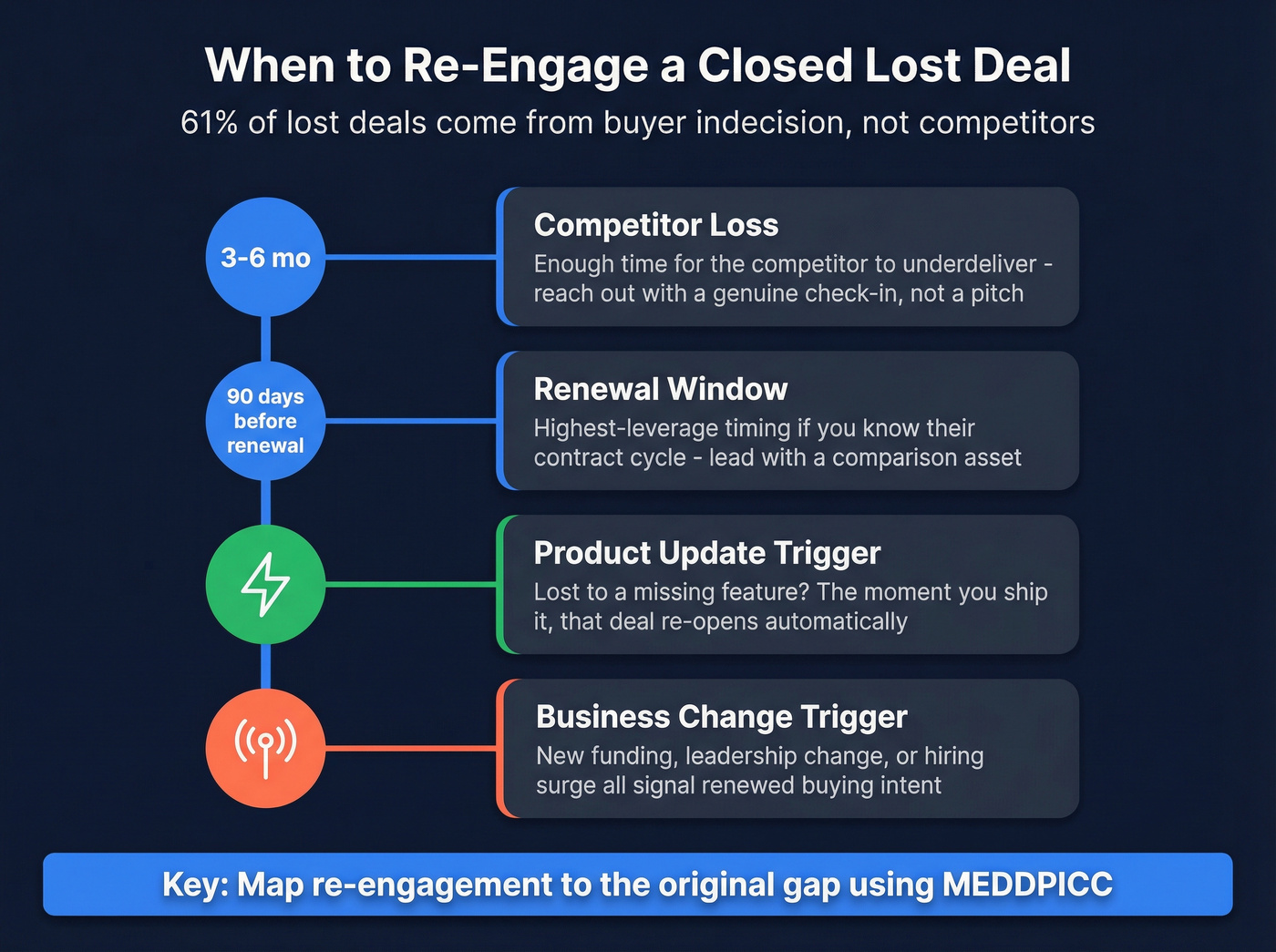
61% of lost deals come from buyer indecision - not price, not product, not a competitor win. Most of your "lost" deals aren't gone. They're stalled. These accounts represent warm prospects who already understand your product, and reactivating them costs a fraction of acquiring net-new leads.
Let's be honest: if your team isn't systematically working lost accounts, you're spending more to acquire net-new pipeline than to reactivate warm prospects who already know what you sell. That math never makes sense.
The timing matters more than the message:
- 3-6 months post-competitor loss - enough time for the competitor to underdeliver. Reach out with a genuine check-in, not a pitch.
- 90 days before competitor renewal - if you know the contract cycle, this is the highest-leverage window for recovering deals.
- Product update trigger - lost to a missing feature? The moment you ship it, that deal re-opens.
- Business change trigger - new funding round, leadership change, or a hiring surge all signal renewed buying intent.
In HubSpot, trigger a workflow 90 days post-loss to resurface the deal, and use lead scoring to alert reps when a lost contact re-engages with your content. For teams using MEDDPICC, map your re-engagement to the original gap. Missing Economic Buyer? Go in with exec-level outreach. Lost to Competition? Re-engage before renewal with a comparison asset. A structured win-back approach turns each loss into a future opportunity instead of a dead end.
The Data Problem Upstream
One of the most preventable loss reasons is "couldn't reach the decision-maker." Bounced emails, wrong phone numbers, missing direct dials - your rep did the discovery, identified the right stakeholder, and then hit a wall because the contact data was garbage. We've talked to teams where 15-20% of their closed lost deals trace back to this exact scenario. Those opportunities didn't die because of product fit or pricing. They died because of a completely avoidable data gap.
Fixing your data upstream prevents deals from dying downstream. Prospeo covers 300M+ professional profiles with 98% email accuracy and 125M+ verified mobile numbers, all refreshed on a 7-day cycle. When your reps can actually reach the people they need to reach, fewer deals stall from single-threading to the wrong contact - and fewer end up marked as lost because of a data gap that never should've existed.

Re-engaging lost deals only works if your contact data is still valid. With 91% of CRM data going stale within a year, your win-back workflows are firing into the void. Prospeo's CRM enrichment returns 50+ data points per contact at a 92% match rate - so when that 90-day reactivation trigger fires, your reps reach a real person.
Enrich your closed lost list and turn dead deals into live pipeline.
FAQ
What's the difference between closed lost and closed won?
Closed won means the deal signed and revenue is booked; closed lost means it ended without a sale. Both are terminal CRM stages - the deal leaves your active pipeline and stops affecting your forecast. The key difference is what happens next: won deals enter onboarding, while lost deals should enter a structured re-engagement workflow.
When should you mark a deal as lost?
Mark it when the prospect explicitly says no, goes dark after exhausted follow-ups, or the opportunity is clearly dead. Don't hoard dead deals in open stages - a clean pipeline beats an optimistic one. Disposition promptly so your forecast stays accurate and your re-engagement workflows can trigger on time.
How do you handle "no decision" deals?
"No decision" is a sub-category of closed lost, not a separate stage. Mark it lost with "Decision Delayed" as the reason, then route it into a timed re-engagement workflow - 90 days is a good default. Keeping it open destroys forecast accuracy and gives everyone a false sense of pipeline health.
What tools help prevent deals from going dark?
The top cause of deals going dark is bad contact data - reps can't reach the right stakeholder. Tools like Prospeo (98% email accuracy, 125M+ verified mobiles refreshed every 7 days) help reps multithread into accounts reliably. Pair that with conversation intelligence tools like Gong and a solid MEDDPICC framework to catch at-risk deals before they stall.