

Closed Lost Meaning: Track, Analyze, and Revive Lost Deals
47 deals closed lost last quarter. 27 tagged "Other." The VP of Sales asks what "Other" means. Nobody knows.
That's not a reporting problem - it's a revenue problem. And it starts with treating closed lost as a trash bin instead of what it actually is: the most actionable dataset in your CRM.
What "Closed Lost" Actually Means
Closed lost is a CRM stage indicating a sales opportunity has ended without a purchase. The prospect explicitly declined, chose a competitor, or otherwise decided not to buy. It's the opposite of closed won, where the deal converts to revenue. Salesforce, HubSpot, and most other CRMs use a "Closed Lost" stage to mark an opportunity as no longer active in the pipeline.
Here's what most teams miss: lost-deal data is more valuable than closed-won data. Wins tell you what's working. Losses tell you what's broken, what competitors are doing better, and where your next $1M in pipeline is hiding.
Quick orientation:
- Closed lost = a deal that ended without a sale
- How common? Roughly 4 out of 5 B2B deals end this way
- Three things most teams get wrong: vague reason codes, no win/loss interviews, and no re-engagement playbook for high-value losses
How Common Are Lost Deals?
More common than most sales leaders want to admit. The average B2B win rate sits around 20-21%, meaning roughly 79-80% of deals end without a purchase. Even top performers pushing 30%+ still lose more than they win.
Speed is the strongest predictor. Opportunities closed within 50 days carry a 47% win rate - after that threshold, it drops to 20% or lower. Part of the reason: typical B2B purchases now involve 6-10 stakeholders, with enterprise deals ballooning to 15+. More people means more chances for someone to say no.
The upside? One practitioner documented over $1.1M in closed-won revenue generated entirely from reviving deals already sitting in closed lost. That pipeline is already in your CRM. You just need a system to mine it.
Closed Lost vs. No Decision vs. Disqualified
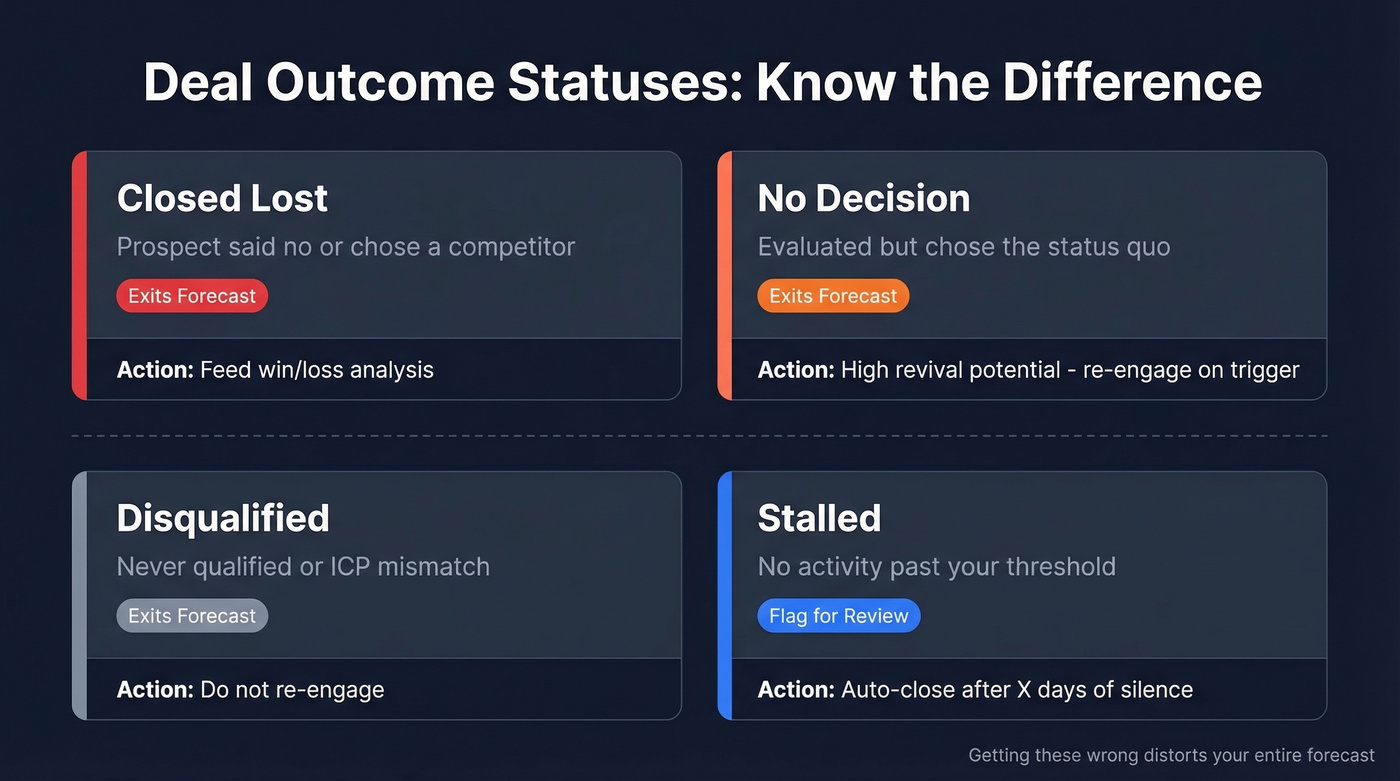
If your reps can't tell the difference between a lost deal and a no-decision outcome, your forecast is fiction.
| Status | Definition | When to Use | Forecast Impact |
|---|---|---|---|
| Closed Lost | Prospect said no or chose a competitor | Explicit rejection received | Exits forecast; feeds win/loss analysis |
| No Decision | Evaluated but chose status quo | Went dark after active evaluation | Exits forecast; high revival potential |
| Disqualified | Never qualified or ICP mismatch | Bad fit discovered during sales | Exits forecast; don't re-engage |
| Stalled | No activity past X days | Deal went silent mid-cycle | Flag for review; auto-close after threshold |
Salesforce ties default probability percentages to each stage - Prospecting at 10%, Negotiation at 90%. When reps dump stalled deals into closed lost instead of no decision, those probability calculations distort your entire funnel. Get the definitions right, enforce them, and your forecast improves immediately.
Common Reasons Deals End Lost
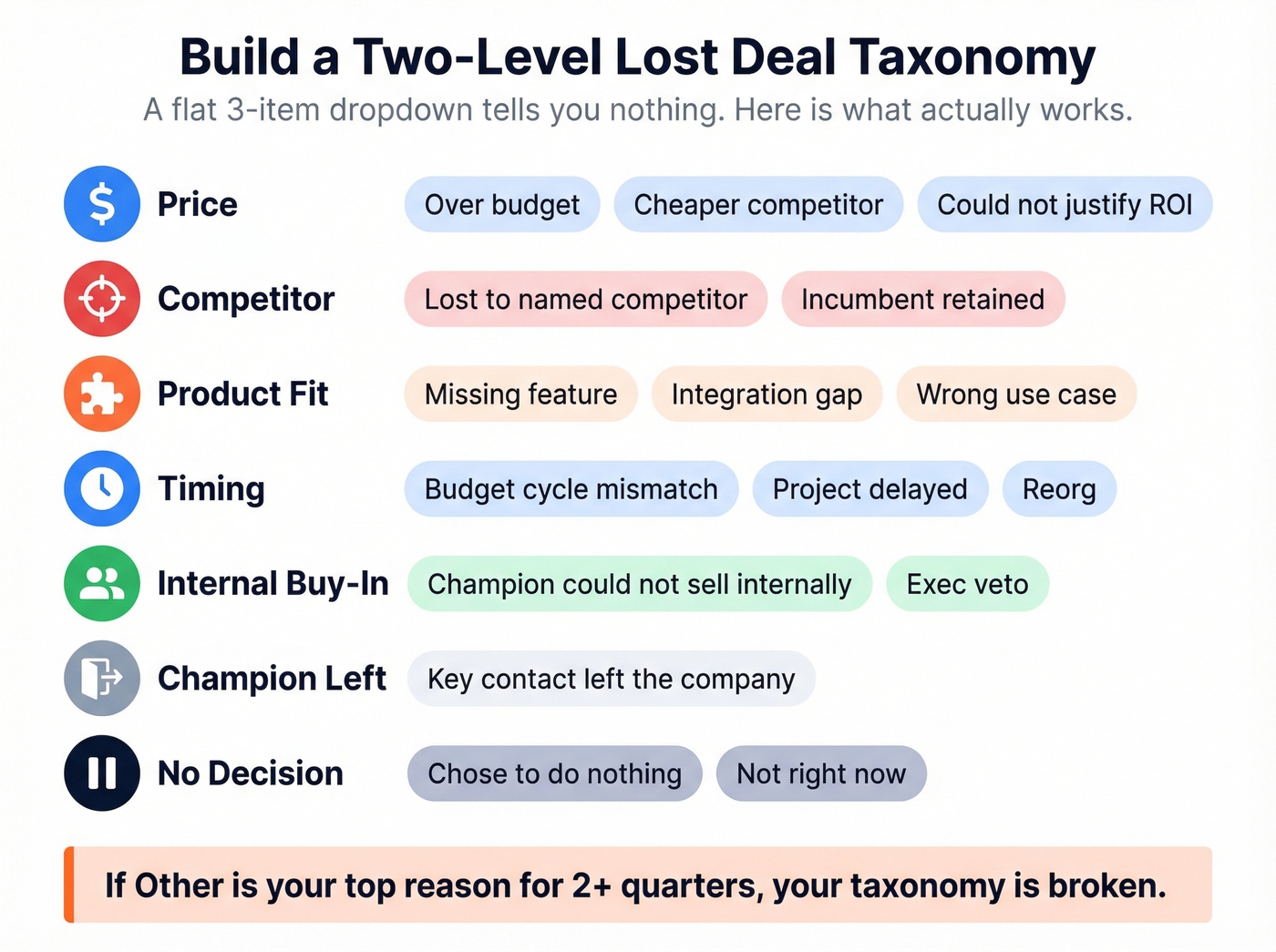
The biggest mistake in closed-lost tracking is a flat three-item dropdown: "Price," "Competitor," "Other." That tells you nothing. A two-level taxonomy - broad category plus subreason - gives you data you can actually act on.
| Category | Subreason Examples |
|---|---|
| Price | Over budget; cheaper competitor; couldn't justify ROI |
| Competitor | Lost to named competitor; incumbent retained |
| Product Fit | Missing feature; integration gap; wrong use case |
| Timing | Budget cycle mismatch; project delayed; reorg |
| Internal Buy-In | Champion couldn't sell internally; exec veto |
| Champion Departure | Key contact left the company |
| No Decision / Status Quo | Chose to do nothing; "not right now" |
If "Other" consistently ranks as a top reason, your taxonomy is broken. We've seen teams where "Other" held the #1 spot for three straight quarters. That's not data - it's a shrug emoji in a dropdown field.

When a champion leaves and kills your deal, most teams mark it closed lost and move on. Prospeo tracks job changes across 300M+ profiles so you can find that champion at their new company - with a verified email (98% accuracy) and direct dial - before your competitor does.
Turn every champion departure into a new pipeline opportunity.
How to Set Up Tracking in Your CRM
Salesforce
Salesforce doesn't include a dedicated closed-lost reason field by default. You need a custom field plus enforcement. Here's the approach we recommend:
- Create a Picklist field on Opportunity called "Reason Lost." Use a picklist, not a text field - field dependencies don't work with text fields.
- Add a field dependency: Stage (controlling) → Reason Lost (dependent), so reason options only appear when Stage = Closed Lost.
- Add a Validation Rule requiring Reason Lost when an opp moves to Closed Lost. No reason, no save. Non-negotiable.
Start with around 8-10 picklist values matching the taxonomy above. Resist the urge to build 30 options on day one. Reps will default to the first three anyway.
HubSpot
HubSpot uses Deal properties instead:
- Create a Deal property called "Closed Lost Reason" as a Dropdown select with values matching your taxonomy.
- Create a second Deal property called "Closed Lost Notes" as Multi-line text for nuance that dropdowns can't capture.
- In Deals → Pipelines, require both properties when a deal moves to Closed Lost.
Reps skip optional fields. Make them mandatory.
Reports Worth Building
Four reports that earn their dashboard space:
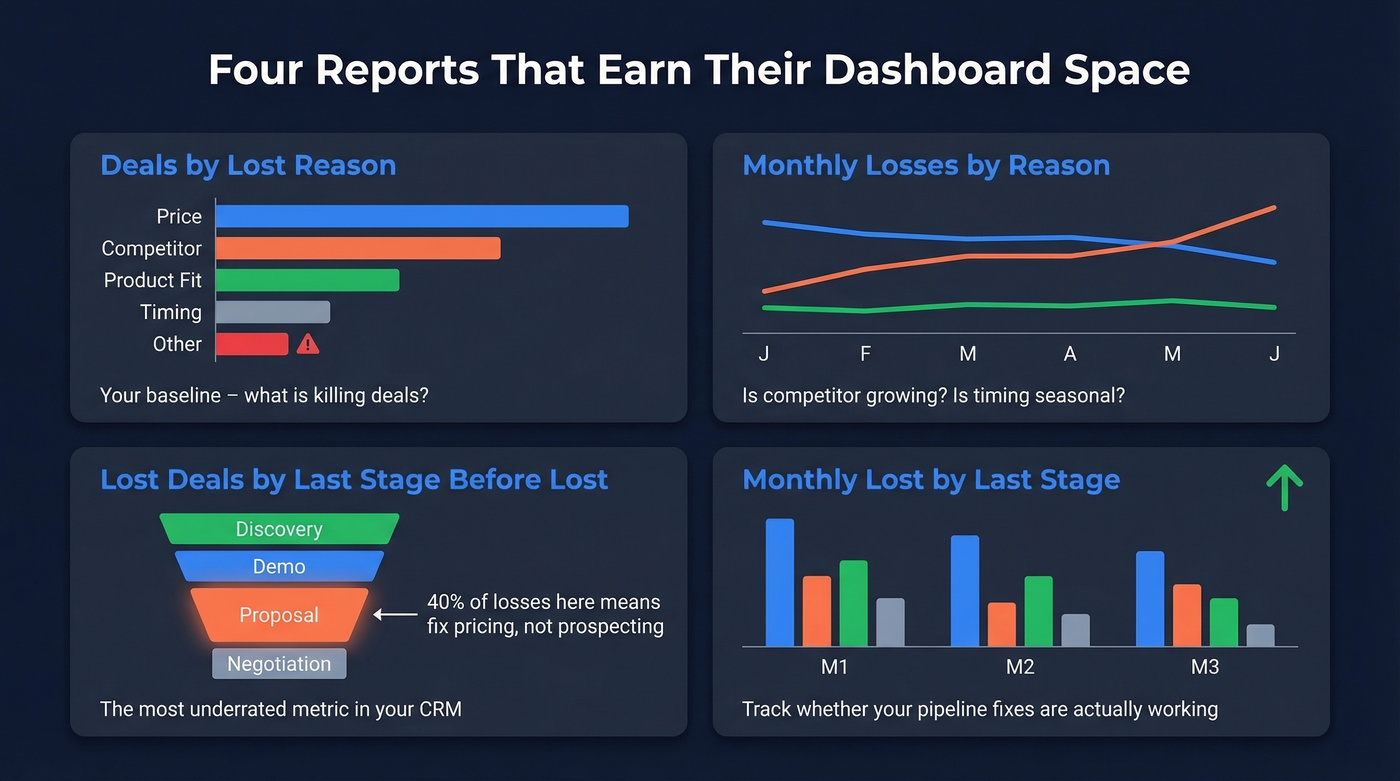
- Deals by lost reason - your baseline. What's killing deals?
- Monthly losses by reason - trend lines. Is "competitor" growing? Is "timing" seasonal?
- Lost deals by last stage before lost - the most underrated metric. It tells you exactly where your pipeline leaks. If 40% of losses happen at the proposal stage, your pricing needs work, not your prospecting.
- Monthly lost deals by last stage - tracks whether pipeline fixes are actually working over time.
The "Last Stage Before Lost" report requires a workflow automation in HubSpot to stamp the previous stage before a deal moves to Closed Lost. Fifteen minutes of setup for a report you'll reference every pipeline review.
How to Run a Win/Loss Analysis
Most win/loss spreadsheets die from over-engineering. We've seen templates with 23 columns where only 4 rows out of 80 deals were actually filled in. Keep it to seven columns:
| Deal Name | Outcome | Primary Competitor | Top Reason | Source | Deal Size | Date Closed |
|---|---|---|---|---|---|---|
| Acme Corp | Lost | Status Quo | Couldn't justify ROI internally | Buyer interview | $45K ARR | 2026-02-14 |
The "Source" column is critical. There's a massive quality difference between a buyer interview, a rep debrief, CRM notes, and an assumption - tag it so you know how much to trust each data point.
Target 5-8 buyer interviews per month. Prioritize meaningful wins and competitive losses. Keep calls to 20-30 minutes. And the rule that matters most: never have the rep who lost the deal conduct the interview. Buyers won't be honest with the person they just rejected. Use someone from RevOps, CS, or marketing instead. The consensus on r/sales is that third-party interviewers get 3-4x more candid feedback than the original rep ever would.
How to Reopen Lost Deals
Don't "check in." Re-engage when something changed.
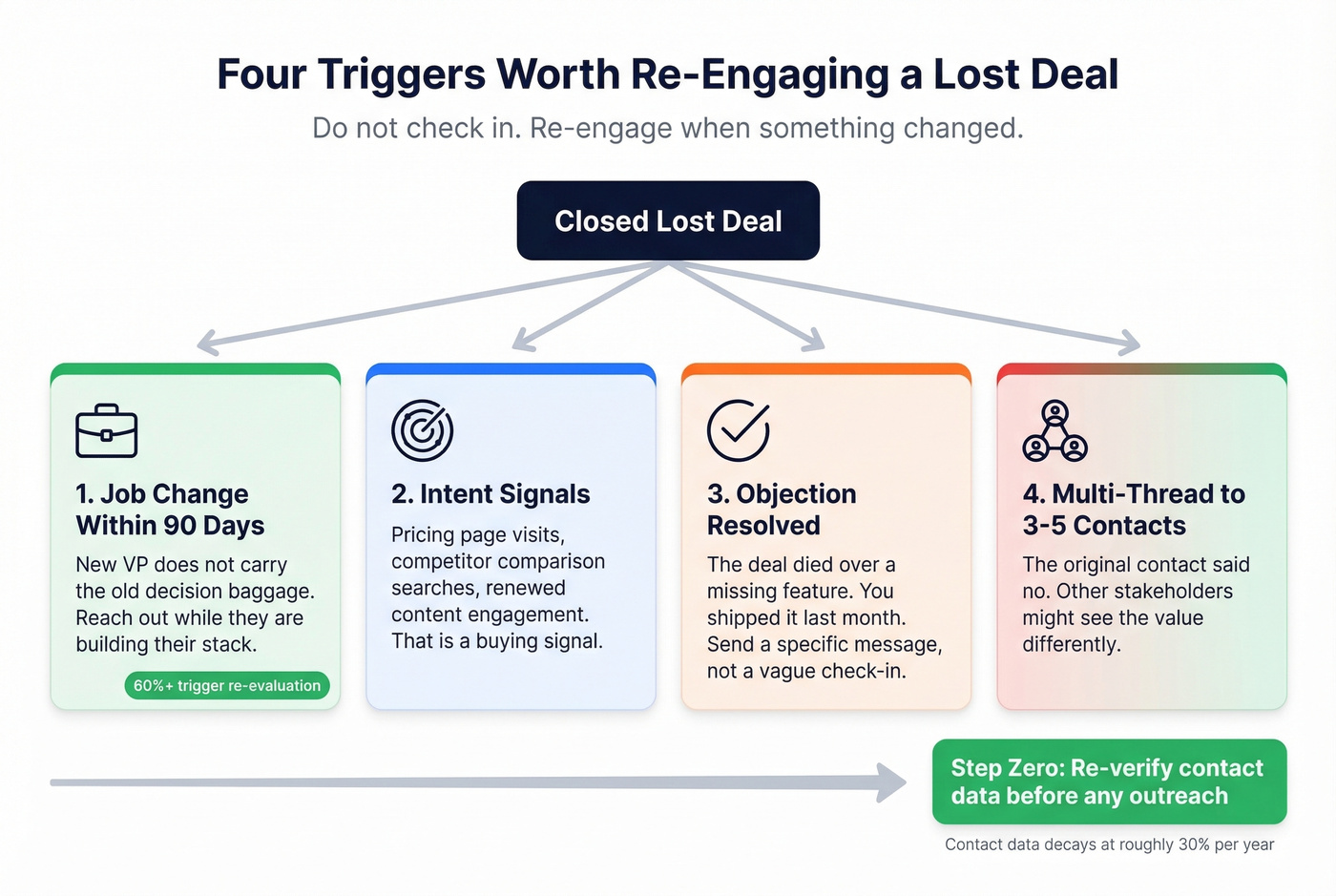
Generic follow-ups signal that nothing's different, and the prospect already said no once. Here's the thing: most teams sit on six figures of revivable pipeline and do nothing because they treat closed lost as a graveyard instead of a greenhouse. The $1.1M revival figure above wasn't luck - it was a system built on four specific triggers worth acting on:
1. Job change within 90 days. A new VP of Sales at the account doesn't carry the baggage of the old decision. Reach out while they're building their stack. According to sales triggers, new leadership triggers re-evaluation of existing vendor decisions in over 60% of cases.
2. Intent signals. The account starts researching your category again - pricing page visits, competitor comparison searches, renewed content engagement. That's a buying signal, not a coincidence. If you need a framework, start with identifying buying signals.
3. Objection resolved. The deal died because you lacked a Salesforce integration? You shipped it last month? That's a reason to re-engage with a specific message, not a vague "just circling back." If your reps still default to that language, use this guide on how to say just checking in professionally.
4. Multi-threading to 3-5 additional decision-makers. The original contact said no. Other stakeholders at the account might see the value differently. This is a core account-based selling motion.
Let's be honest about the practical blocker most teams hit: you inherit 200 closed-lost opps from the last rep, and half the contact data is dead. Emails bounce, phone numbers ring out, and your revival campaign stalls before it starts. Contact data decays at roughly 30% per year, so if those deals went cold 6-12 months ago, a meaningful chunk of your outreach will fail before anyone reads it.
Step zero of any revival campaign is re-verifying your contact data. Run your lost-deal list through an enrichment tool like Prospeo - with an 83% enrichment match rate and emails verified at 98% accuracy, you're not burning sender reputation on bounced addresses from stale records.
Skip this step if your deals are less than 60 days old and you've confirmed the contacts are still at the same company. For anything older, verification isn't optional - it's the difference between a revival campaign and a domain reputation disaster. If you want to go deeper, start with an email deliverability guide and a checklist for improve sender reputation.
You just identified $1M+ in closed-lost deals worth reviving. Now you need current contact data - not the stale emails sitting in your CRM. Prospeo refreshes every record every 7 days and returns 50+ data points per contact, so your re-engagement campaigns actually reach real buyers.
Stop re-engaging dead emails. Get fresh data at $0.01 per contact.
FAQ
Can a closed-lost deal be reopened?
Yes - when the right trigger fires. Job changes, renewed intent signals, and resolved objections are all valid reasons to re-engage. One practitioner documented over $1.1M in revenue from reviving deals already marked as lost. The key is trigger-based outreach, not calendar-based "checking in."
What's the difference between closed lost and no decision?
Closed lost means the prospect explicitly rejected your solution or chose a competitor. No decision means they evaluated but chose the status quo. No-decision deals carry higher revival potential because the underlying need still exists; competitive losses require a different angle entirely.
How do you calculate your closed-lost rate?
Divide closed-lost deals by total closed deals, then multiply by 100. If you closed 100 deals last quarter and 78 were losses, your rate is 78%. The average B2B rate runs around 79-80%. Once you know your number, prioritize re-engaging high-value losses - and make sure you're working with verified contact data so you don't torch sender reputation on bounced emails.
What are the most common closed-lost reasons in B2B?
Price, competitor selection, and timing account for roughly 60-70% of losses across most B2B pipelines. The remaining 30-40% splits between product-fit gaps, internal buy-in failures, and champion departures. If "Other" ranks in your top three reasons, your CRM taxonomy needs work - revisit the two-level framework in the section above.