

Cold Email Setup Guide: Domain to First Send (2026)
Your CEO asks why the campaign isn't generating replies. You pull the logs. 40% of emails never reached an inbox - the DNS records were wrong from day one, and nobody caught it during a warmup that never happened. One misconfigured SPF record can blacklist a domain permanently, and you won't know until the damage is done.
This is the cold email setup manual that prevents that.
Setup Checklist (Quick Version)
- Buy 2+ secondary domains (never use your primary)
- Set up 2-3 mailboxes per domain on Google Workspace
- Configure SPF, DKIM, and DMARC
- Add a custom tracking domain
- Warm up inboxes for 14+ days
- Build and verify your contact list
- Pick a sending platform
- Handle CAN-SPAM compliance
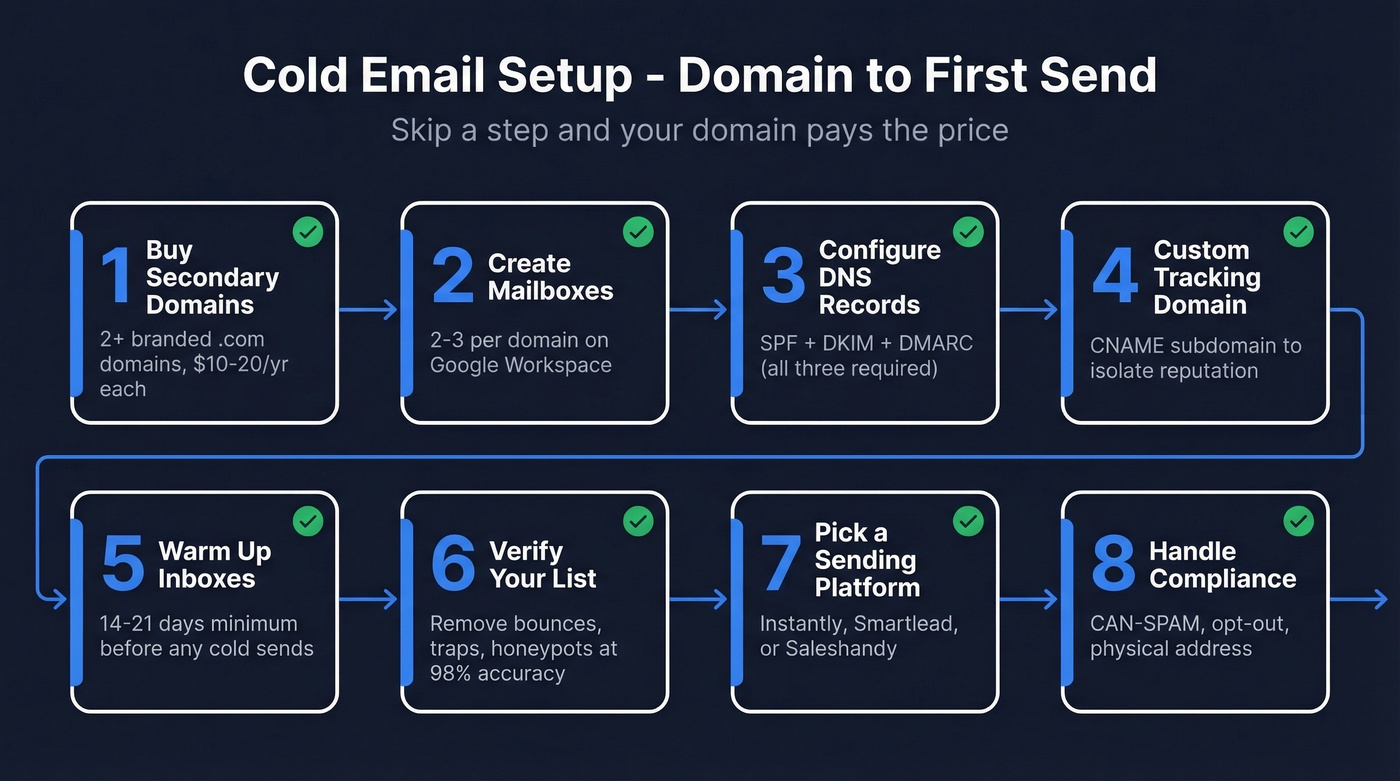
The rest of this article walks through each step with copy-paste DNS records and a day-by-day warmup schedule. Whether you're building from scratch or tightening an existing system, every step below applies.

You're about to spend 14+ days warming up domains. Don't waste that effort on bad data. Prospeo's 5-step verification catches spam traps, honeypots, and invalid addresses at 98% accuracy - with a 7-day refresh cycle so your list never goes stale.
Start verifying 75 emails free - no credit card, no sales call.
The Full System, Step by Step
Buy Secondary Domains
Do this: Buy 2+ alternate domains that look like your brand. If your company is Acme Corp at acme.com, grab tryacme.com, getacme.com, or acmehq.com. Stick to a clean, brandable .com when you can. Budget around $10-20/year per domain at Cloudflare, Porkbun, or Namecheap.
Don't do this: Never send cold email from your primary domain. One spam complaint wave and your entire company email reputation is toast - client emails, invoices, everything. The consensus on r/coldemail treats this as gospel, and they're right. Skip GoDaddy promo pricing too, unless you're fine with renewals being much higher than the intro deal.
Use person-name mailboxes (john@tryacme.com) rather than role accounts (sales@tryacme.com). Recipients respond better to a human name, and it consistently performs better for outreach.
Set Up Mailboxes
Create 2-3 mailboxes per domain. Google Workspace at ~$6/user/month is the default choice - Google Postmaster Tools gives you real visibility into spam rate and domain reputation signals. Microsoft 365 also works (typically $6-12/user/month depending on plan), but Postmaster Tools is a big advantage at scale.
Here's the scaling math: targeting 10,000 emails/month at a safe 40/day per account means roughly 9 domains with 3 mailboxes each - 27 sending accounts total. Start with 2 domains and scale as you validate messaging.
Configure DNS Authentication
This is the step most people rush through and regret. It's the core of any deliverability-focused cold email setup. Gmail has required SPF + DKIM + DMARC since February 2024, and Outlook.com enforced the same for high-volume senders as of May 2025. Skip any of these and you're sending straight to spam. If you want the full foundation, start with an email deliverability audit mindset, not a “checklist” mindset.
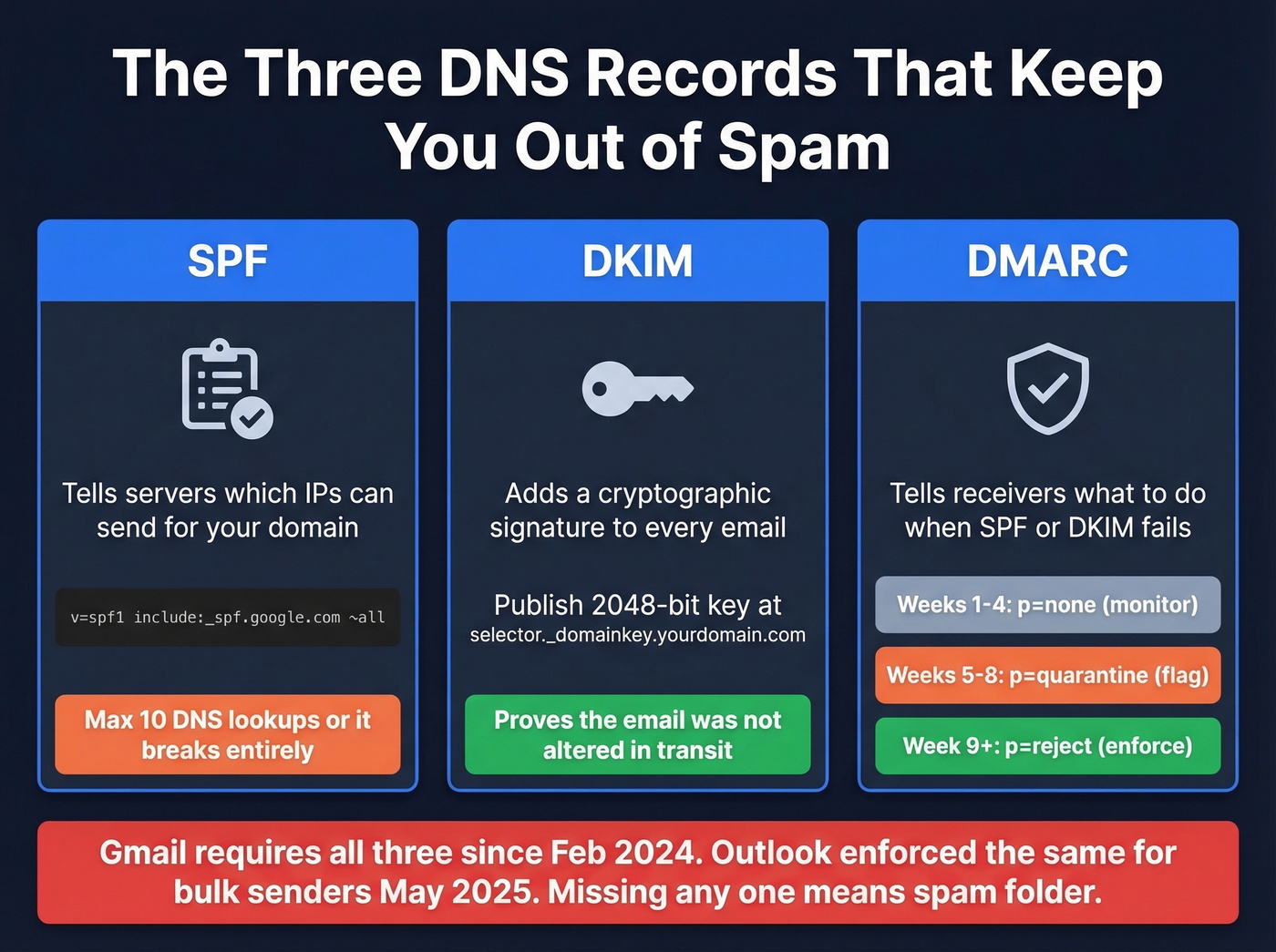
SPF - Add a single TXT record to your domain's DNS. One record per domain, no exceptions. Duplicates cause failures.
For Google Workspace:
v=spf1 include:_spf.google.com ~all
For Microsoft 365:
v=spf1 include:spf.protection.outlook.com ~all
Watch the SPF 10-lookup limit. Every include: counts toward it. Exceed 10 lookups and SPF breaks entirely - providers treat it like you have no SPF at all. If you need more examples and common mistakes, use these SPF record patterns as a reference.
DKIM - Generate 2048-bit keys through your email provider's admin console. For Google Workspace, publish a TXT record at selector._domainkey.yourdomain.com. For Microsoft 365, publish two CNAME selector records instead. If you’re unsure it’s actually passing, follow a quick verify DKIM check before you scale volume.
DMARC - Publish a TXT record at _dmarc.yourdomain.com. Start permissive and tighten over time. If you want to avoid alignment pitfalls, read up on DMARC alignment before moving to p=reject:
| Timeframe | DMARC Policy | Purpose |
|---|---|---|
| Weeks 1-4 | p=none |
Monitor, fix issues |
| Weeks 5-8 | p=quarantine |
Flag failures |
| Week 9+ | p=reject |
Full enforcement |
Allow 48 hours for DNS propagation. Verify everything through MxToolbox before moving on. After launch, monitor sender reputation through Google Postmaster Tools. Keep spam complaints under 0.3% - that's Gmail's threshold. To stay safe as you ramp, track your email velocity and increase gradually.
Add a Custom Tracking Domain
Shared tracking domains link your sender reputation to every other user on that platform - including spammers. Create a subdomain like click.tryacme.com, add a CNAME record pointing to your sending tool's tracking server, and verify it inside the platform. Five minutes of work. Separates your reputation from the crowd. If you want the deeper “why” and the exact setup logic, see this guide on a tracking domain.
Warm Up Your Inboxes
Warmup isn't optional, and it isn't fast. Follow this 14-day protocol before sending a single cold email. If you’re comparing tools, start with these unlimited email warmup options and pick based on control + reporting, not hype.
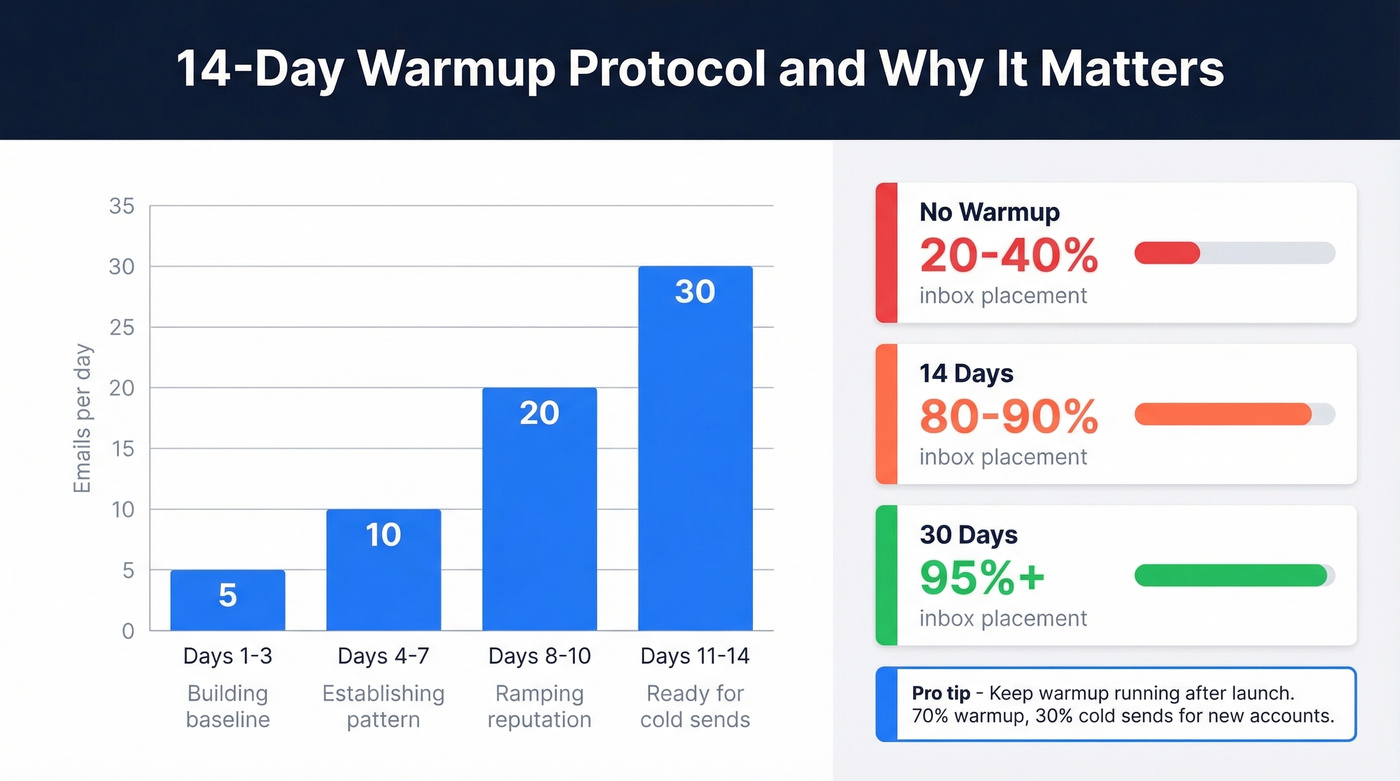
| Days | Emails/Day | What's Happening |
|---|---|---|
| 1-3 | 5 | Building baseline |
| 4-7 | 10 | Establishing pattern |
| 8-10 | 20 | Ramping reputation |
| 11-14 | 30 | Ready for cold sends |
The inbox placement difference is dramatic. Zero warmup gets you 20-40% inbox placement. Fourteen days pushes that to 80-90%. A full 30 days hits 95%+.
Reddit's r/coldemail debates whether 14 days or a full month is the right warmup duration - the answer depends on your volume targets, but we'd push for 21 days if you can afford the wait. For new accounts, run a 70/30 split: 70% warmup emails, 30% cold sends. Keep warmup running after launch. Turning it off is like stopping your gym routine and expecting to keep the results.
Here's the thing though - everyone obsesses over warmup duration. The real campaign killer is list quality. Fourteen days of warmup with a bad list will still land you in spam.
Build and Verify Your List
This is where most setups actually fail, and we've seen it happen over and over. Teams invest weeks in infrastructure, then upload a stale CSV and watch their sender score crater overnight. A perfectly warmed domain sending to 20% invalid emails tanks your reputation faster than a domain with 10 days of warmup sending to a verified list.
Verification isn't a nice-to-have - it's the step that protects everything you just built. Prospeo catches invalid addresses, spam traps, honeypots, and catch-all domains before they touch your sender score, running a 5-step verification process at 98% accuracy with a 7-day data refresh cycle. Stack Optimize built from $0 to $1M ARR using that verification pipeline - client deliverability stayed above 94%, bounces under 3%, zero domain flags across all clients. If you’re sourcing contacts, use a repeatable lead generation workflow so list quality doesn’t depend on one-off exports.
Verification runs ~$0.01 per email, with a free tier of 75 emails/month. You didn't spend three weeks warming up domains just to upload a stale list. If you’re troubleshooting bounce spikes, benchmark against normal email bounce rate ranges and fix upstream.
Pick a Sending Platform
| Feature | Instantly | Smartlead | Saleshandy |
|---|---|---|---|
| Price | $37/mo | $39/mo | From $25/mo (billed annually) |
| ESP matching | No | Yes | No |
| Variable volume sending | No | Yes | No |
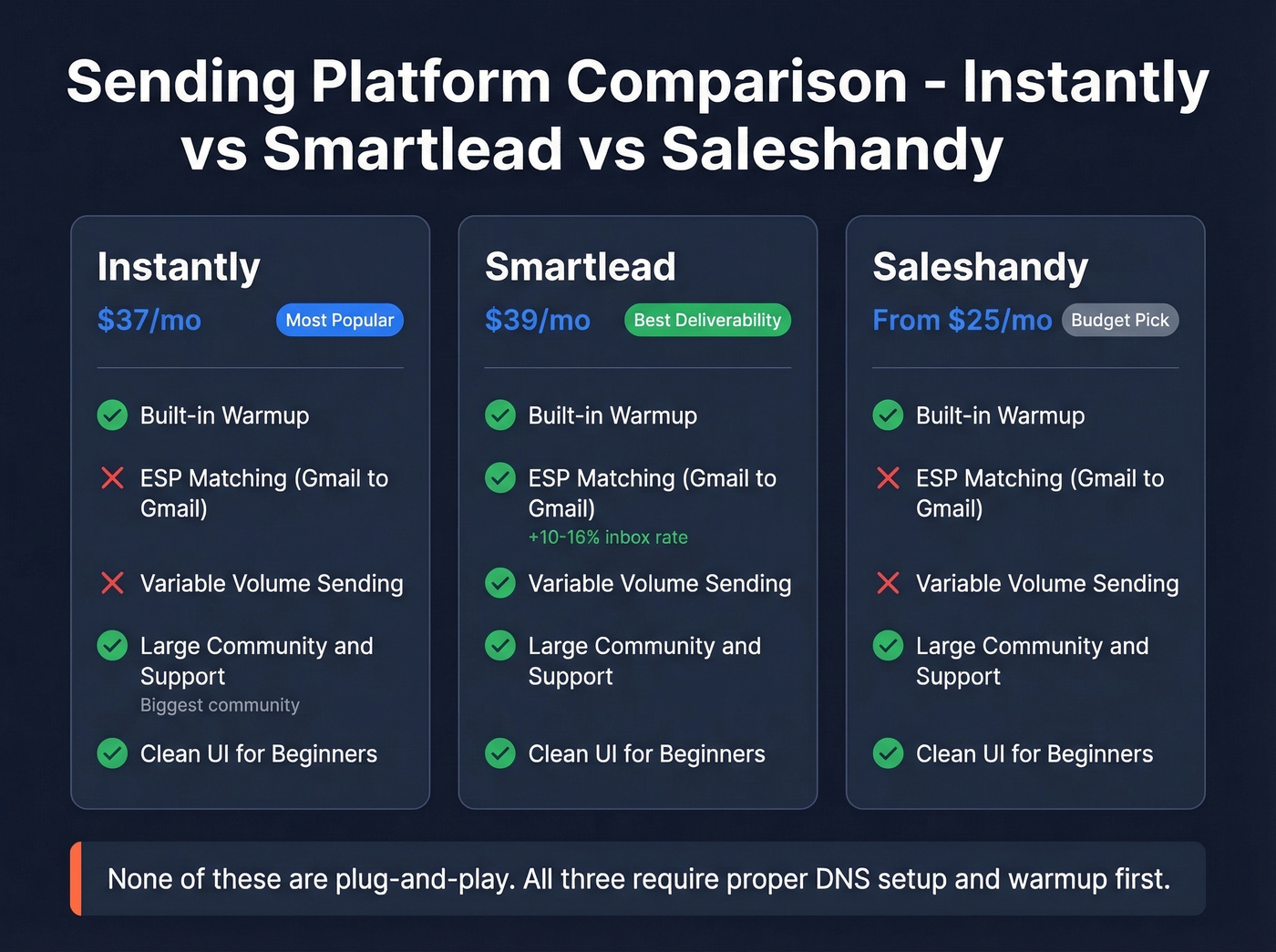
Instantly at $37/month is the default for most teams - clean UI, solid warmup built in, and the largest community for troubleshooting. We've tested all three, and Instantly's community alone makes it the safer bet for first-time senders. Smartlead at $39/month is the pick if you want ESP matching (routing Gmail-to-Gmail, Outlook-to-Outlook), which practitioners report improves inbox placement by 10-16%. Saleshandy starting at $25/month works on a tighter budget. If you want more options (including $0 tools), compare against free cold email software before committing.
Let's be clear: none of these are plug-and-play. All three require proper DNS and warmup first. Skip this if you're looking for a "just press send" solution - cold email doesn't work that way.
Handle Compliance
CAN-SPAM applies to B2B email. No exception. The FTC penalty is up to $53,088 per email in violation.
- Accurate "From," "To," and "Reply-To" headers - no spoofing
- No deceptive subject lines
- Identify the message as an ad
- Include a valid physical postal address
- Provide a clear, easy opt-out mechanism (no fees, no multi-step friction)
- Honor opt-outs within 10 business days
- You're responsible even if a third party sends on your behalf
Keep emails plain text or minimal HTML - heavy formatting triggers spam filters. Sending to EU contacts? GDPR adds consent requirements beyond CAN-SPAM. Research your obligations before targeting European prospects.
2026 Benchmarks Worth Knowing
According to Instantly's 2026 benchmark report covering billions of cold email interactions, the average reply rate sits at 3.43%. Top quartile campaigns hit 5.5%+, and the top 10% exceed 10.7%. To improve outcomes, pair infrastructure with a solid B2B cold email sequence instead of relying on a single touch.
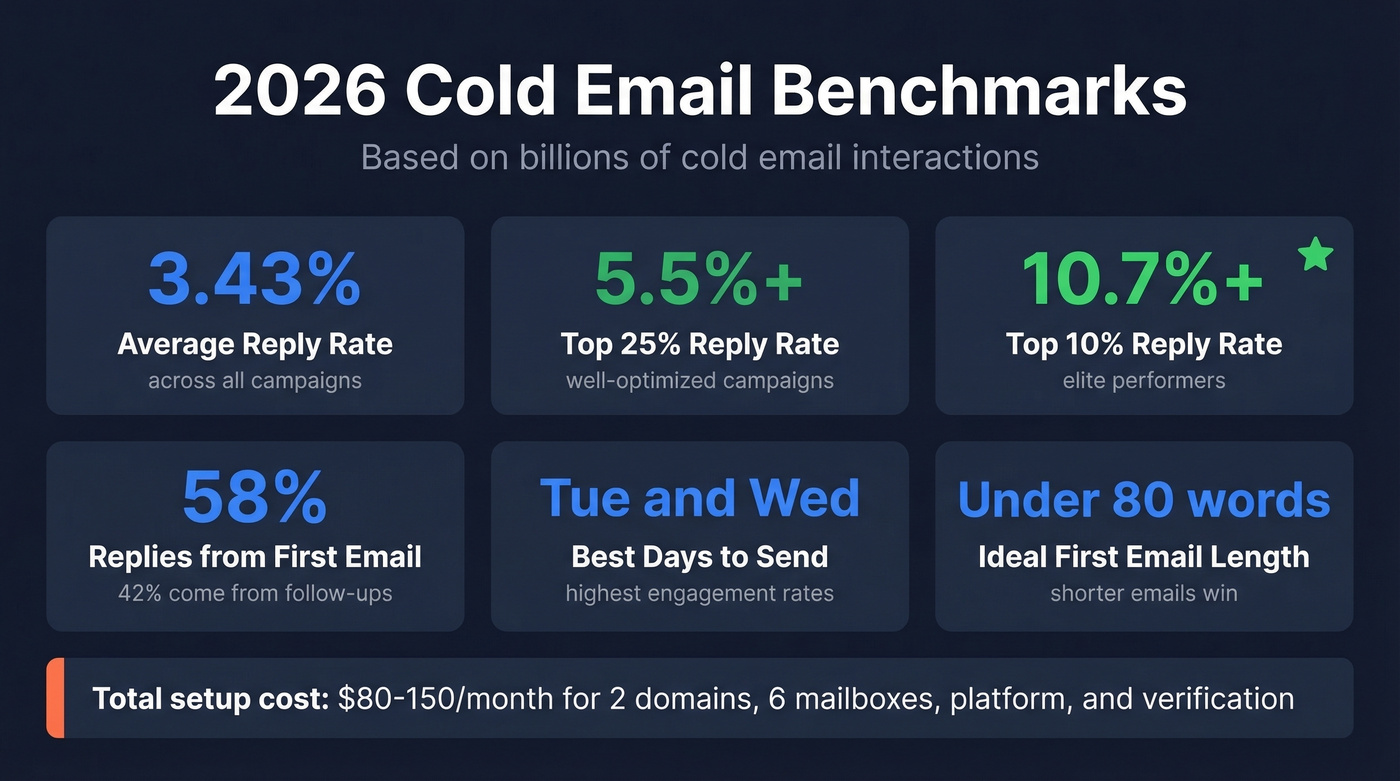
58% of replies come from the first email. The other 42% come from follow-ups, which means your sequence needs 4-7 touchpoints, not one-and-done. Best days are Tuesday and Wednesday. Keep first-touch emails under 80 words and A/B test weekly.
Total infrastructure cost for a basic cold email setup - 2 domains, 6 mailboxes, sending platform, verification - runs around $80-150/month before list volume scales. That's a rounding error compared to the pipeline it generates when the infrastructure is right.
Stack Optimize ran this exact cold email setup and scaled to $1M ARR with zero domain flags. The difference: every email hit a verified address. Prospeo verification at $0.01/email protects the infrastructure you just spent weeks building.
Your warmup is only as good as your list. Fix that now.
FAQ
How do I set up cold email from scratch?
Buy secondary domains, create mailboxes, configure SPF/DKIM/DMARC, add a custom tracking domain, warm up for 14-21 days, verify your contact list, and connect a sending platform like Instantly or Smartlead. Each step builds on the previous one - skipping ahead is how domains get blacklisted.
How many domains do I need?
At 40 emails/day per sending account with 3 mailboxes per domain, you need roughly 9 domains to safely send 10,000 emails/month. Start with 2 and scale as campaigns prove out. More domains means more reputation isolation if one gets flagged.
How long should I warm up before sending?
Fourteen days is the minimum for acceptable inbox placement (80-90%). For best results, warm up 21-30 days to reach 95%+ inbox rates. Keep warmup running alongside your cold sends permanently - stopping it degrades the reputation you built.
What's the best free tool for verifying cold email lists?
Prospeo's free tier includes 75 verified emails per month with full catch-all handling, spam-trap removal, and honeypot filtering at 98% accuracy. Hunter offers 25 free searches monthly but caps enrichment features. For teams running real campaigns, Prospeo's free credits go further because every verification includes the full 5-step process.