

The Cold Email Signature That Gets Replies - Not Spam Flags
An SDR we worked with had a 12-line cold email signature. Company logo, headshot, three social icons, a Calendly link, a webinar banner, and an inspirational quote. His emails looked like a newsletter footer. His deliverability was in the gutter, and he couldn't figure out why.
Your cold email signature sits at the intersection of credibility and deliverability. You need enough identity to prove you're a real person, and little enough clutter that spam filters leave you alone. Here's the uncomfortable stat: 70% of emails show at least one spam-related issue, and an overbuilt signature is often the culprit. With inbox providers tightening filters and practitioners shifting to lower-volume sending, getting your sign-off right matters more than ever (see our full email deliverability breakdown).
What to Include (and What to Cut)
Three to four lines, one link, plain text. That's the whole rule.
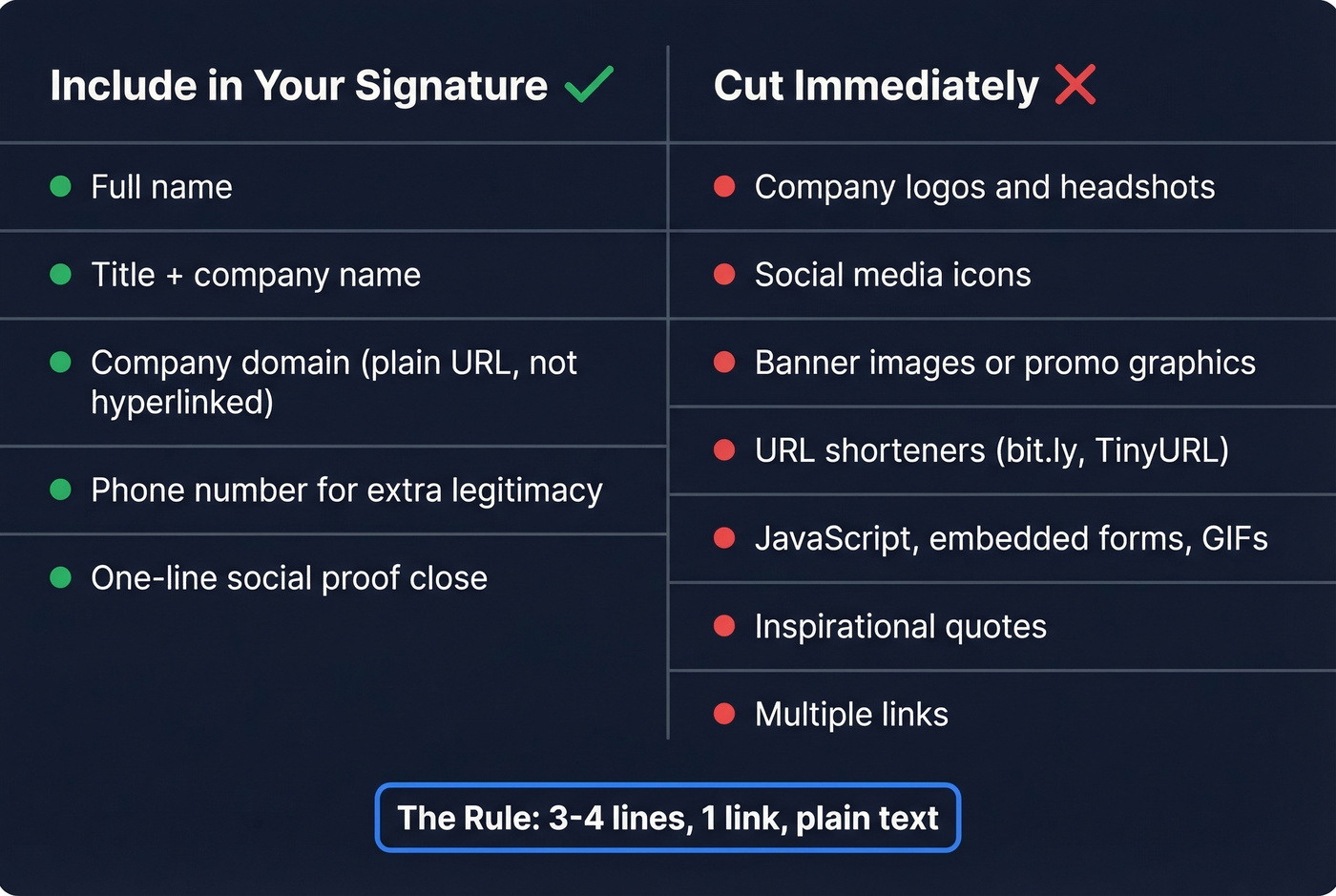
Include:
- Full name
- Title and company name
- Company domain as a plain URL - not hyperlinked
- Phone number if you want extra legitimacy
- A one-line social proof close if you have one worth sharing
Cut immediately:
- Company logos and headshots
- Social media icons
- Banner images or promotional graphics
- URL shorteners like bit.ly - they trigger spam filters
- JavaScript, embedded forms, GIFs, animated elements
- Inspirational quotes
- Multiple links
Gmail can clip large emails around 102KB, and your signature contributes to that total. If you're embedding images for some reason, keep individual files under 50KB and total signature weight under 150KB. But the better move? Skip images entirely for cold outreach.
Templates That Work
These are plain text, copy-pasteable, and built for cold outreach. One link max.
SDR / BDR:
Jane Smith
Account Executive, Acme Corp
acmecorp.com
(415) 555-0192
Founder / CEO:
Mike Chen | CEO, LaunchPad
Helped 200+ SaaS teams cut CAC by 30%
launchpad.io
Agency Owner:
Sarah Torres - Founder, OutboundLab
We've booked 12,000+ meetings for B2B clients since 2021
outboundlab.com | (512) 555-0147
The second template uses a one-sentence authority close - a micro-proof line that builds credibility without adding a paragraph. That single line does more work than a logo ever could. If you're looking for more cold email signature examples, the pattern is always the same: name, role, one proof point, one URL (and it pairs well with strong email copywriting).
The Calendly Debate
This one comes up constantly in cold email communities, and the consensus on r/sales is pretty clear: skip the booking link on first touch.
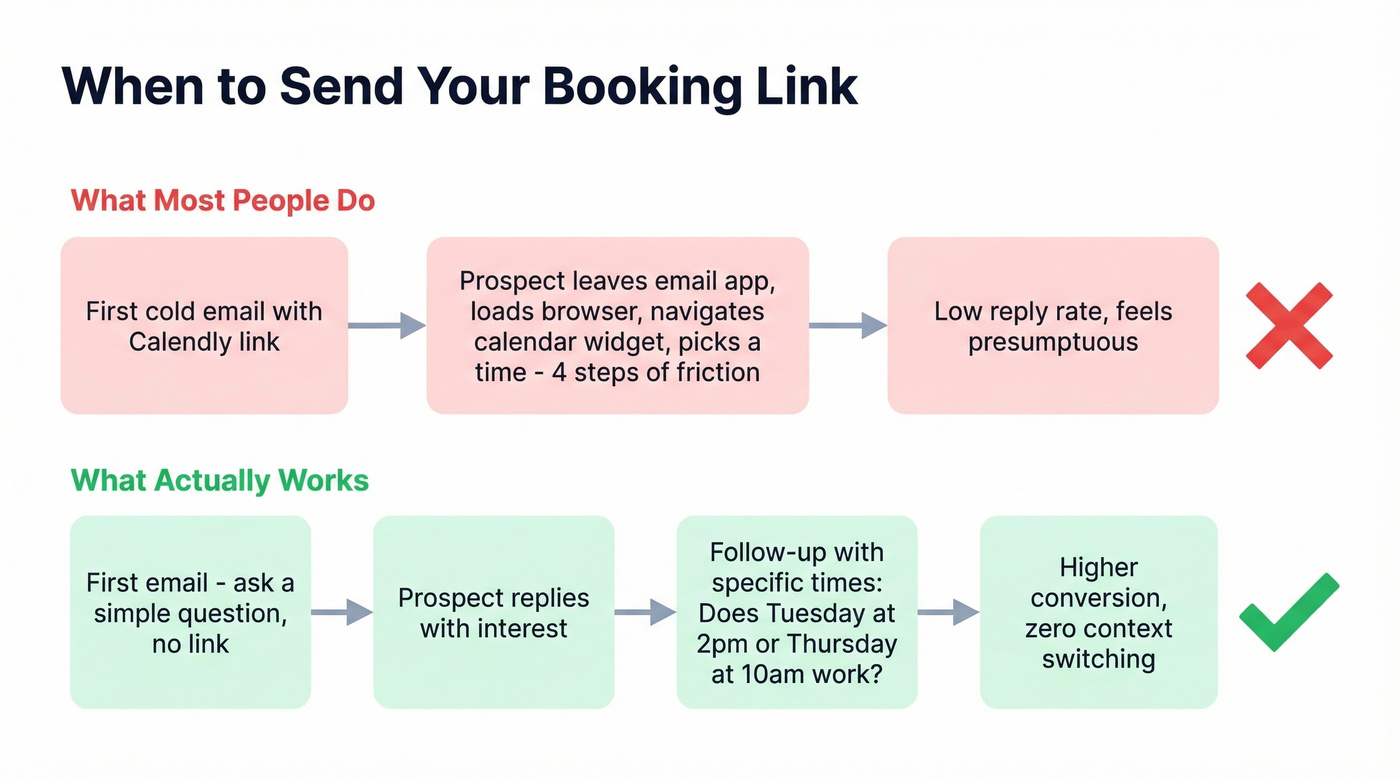
Dropping a scheduling link before someone's agreed to talk feels presumptuous. It's also friction-heavy on mobile - the recipient leaves their email app, loads a browser, navigates a calendar widget, and picks a time. That's four steps when you haven't earned a reply yet.
The better play is getting the reply first, then sending the link. Or offer specific time slots directly in your follow-up: "Does Tuesday at 2pm or Thursday at 10am work?" That converts better than a cold Calendly URL because it requires zero context switching (more options in these sales follow-up templates).
Save the booking link for after someone says yes.
Plain Text vs. HTML - Not a Debate
For cold outreach, plain text wins. Full stop.
HTML signatures are fine for newsletters and warm contacts. But spam filters scrutinize complex HTML, external resources like tracking pixels, and image-heavy formatting. Base64 encoding alone inflates image size by roughly 33% - a 50KB headshot becomes a 66KB encoded string that adds zero credibility.
Some practitioners argue that embedded images are safer than hosted ones, and technically they're right. But for cold outreach, the simplest path is skipping images entirely. We've seen teams switch from HTML to plain-text signatures and watch inbox placement improve within days. It's one of the lowest-effort, highest-impact changes you can make (especially alongside a clean email velocity strategy).
Here's the thing: if your signature has more HTML than your email body, you've already lost the deliverability game before writing a single word of copy.

Your signature is clean. Your copy is tight. But none of it matters if you're sending to invalid addresses. Prospeo's 5-step verification catches spam traps, catch-all domains, and dead inboxes before they wreck your sender reputation - at 98% accuracy and $0.01 per email.
Fix your data before you fix your signature.
What the Law Requires
Most cold emailers get compliance wrong. "Just add 'reply unsubscribe'" isn't enough.
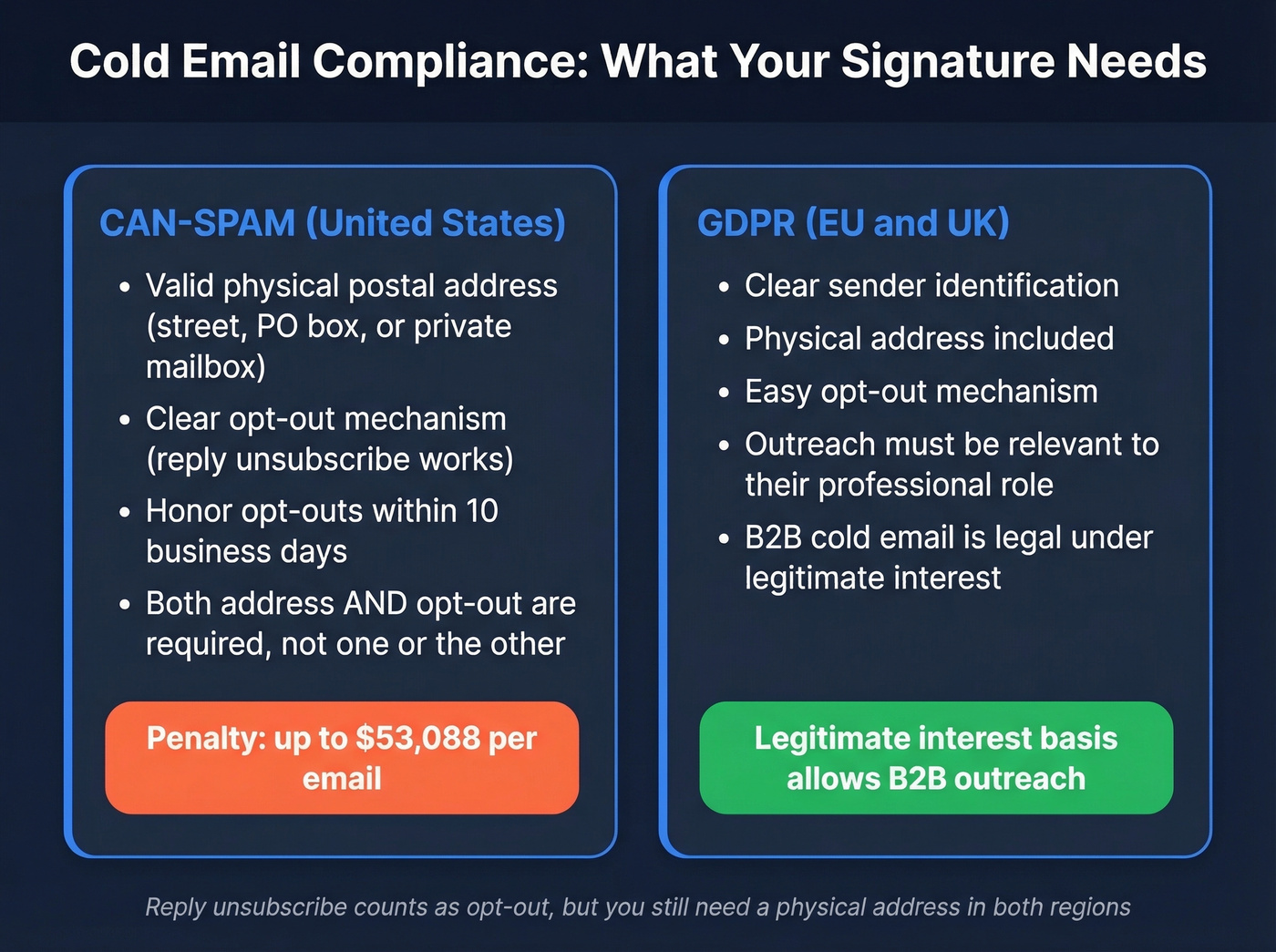
CAN-SPAM (US) - applies to all commercial email, including B2B:
- Valid physical postal address - street address, PO box, or registered private mailbox
- Clear, easy-to-use opt-out mechanism
- Honor opt-out requests within 10 business days
- Penalty: up to $53,088 per email in violation
"Reply unsubscribe" works as your opt-out mechanism, but you still need a physical address. Both are required - not one or the other.
GDPR (EU/UK): B2B cold email is generally legal under legitimate interest, but you must include clear sender identification, a physical address, and an easy opt-out. The outreach should be relevant to the recipient's professional role - not a spray-and-pray blast to a purchased list (if you're unsure, start with this guide on buy email lists).
Mistakes That Tank Deliverability
Let's be honest - most deliverability problems aren't caused by one big mistake. They're caused by a stack of small ones, and your signature is often in the pile.
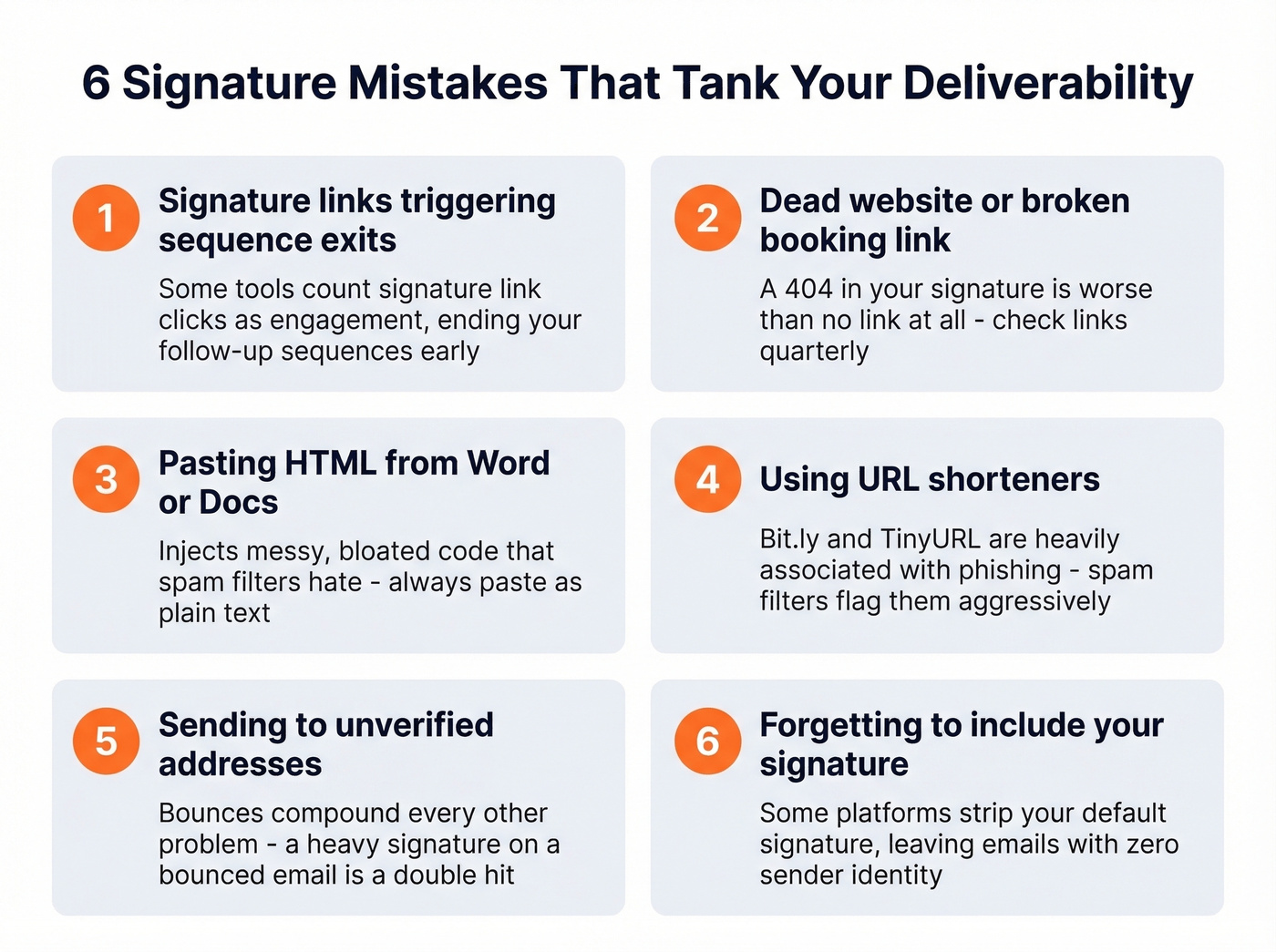
Signature link clicks triggering sequence exits. Some automation tools treat any link click as engagement, including clicks on your signature links. That can prematurely end follow-up sequences and kill your campaign (related: sequence management).
Linking to a dead website or broken booking link. Check your links quarterly. A 404 in your signature is worse than no link at all.
Pasting HTML from Word or Google Docs. This injects messy, bloated code that spam filters hate. Always paste as plain text.
Using URL shorteners. Bit.ly, TinyURL, and similar services are heavily associated with phishing. Spam filters flag them aggressively.
Sending to unverified email addresses. This is the one that frustrates us most, because it's so preventable. Bounces compound every other deliverability problem - a heavy signature on an email that bounces is a double hit to your sender reputation. Verify every address before you send. Prospeo's real-time verification catches invalid addresses, spam traps, and catch-all domains before they tank your domain (benchmarks and fixes: email bounce rate).
Forgetting to include your signature in campaigns. If you're using Gmail-based sending tools, double-check that your signature actually appends. Some platforms strip or override your default signature, leaving emails without any sender identity - which hurts both trust and compliance.
Cold Email Signature Optimization Tips
Once you've nailed the basics, small refinements push reply rates further.
A/B test your social proof line by swapping metrics, client names, or outcomes to see what resonates. Match your signature tone to your email body; a casual email with a corporate sign-off feels disjointed, and prospects notice. Keep your signature consistent across all sequences so people recognize you in follow-ups, and audit quarterly to update titles, phone numbers, and proof points (you can also A/B test email preview text to lift opens).
Skip this if you're just starting out - get the fundamentals right first, then optimize. Tweaking a social proof line won't help if you're still embedding a company logo and three tracking links.
Your Signature Is Ready - Now Fix Your List
You've trimmed the signature, gone plain text, added your physical address, and cut the logo. Good. That handles one piece of the deliverability chain.
But a perfect cold email signature means nothing if you're emailing addresses that don't exist. We see this constantly: teams obsess over copy and sign-offs while ignoring the list underneath, then wonder why a double-digit bounce rate on their first send undoes every optimization they just made (start here: how to generate an email list).
The teams booking the most meetings from cold email aren't obsessing over signatures - they're obsessing over data quality. Prospeo refreshes 300M+ profiles every 7 days so you never send to a stale address. Bounce rates under 4% aren't aspirational - they're standard.
Stop losing deliverability to bad contact data.
FAQ
Does a bold name hurt deliverability?
A bold name in an otherwise plain-text signature has negligible impact on inbox placement. The real deliverability risks are embedded images, multiple hyperlinks, and complex HTML. Keep the rest of your signature clean and a single bold name won't cause problems.
Should I include a headshot?
No. Images increase signature size, trigger spam filters, and render inconsistently across email clients. Some clients block images by default, leaving an ugly broken-image icon where your face should be. Your name, title, and domain establish identity without the risk.
How many links can I safely include?
One - your company domain. Every additional link increases spam-filter scrutiny and distracts from your actual CTA. Save booking links for follow-ups after the prospect replies.
How do I verify my list before sending?
Use a verification tool that checks addresses in real time before you hit send. Prospeo runs 5-step verification - catching invalid addresses, spam traps, and catch-all domains - keeping your bounce rate under control. The free tier includes 75 email credits per month, enough to test a first campaign.