

12 Cold Sales Email Templates That Actually Get Replies (2026)
You sent 500 emails last month. Three replies - two were unsubscribe requests. The problem isn't your writing. Reply rates dropped 15% year-over-year to 5.8% across 16.5 million cold sales emails analyzed, and the decline has nothing to do with finding the right cold sales email template. It's infrastructure, list quality, and send strategy - the stuff nobody pastes into a Google Doc.
What follows: 12 templates that work right now, the benchmark data behind each decision, and the operational playbook that determines whether your email lands in the inbox or the void.
TL;DR
- Best-performing cold emails: 40-60 words, specific offer, soft CTA
- Templates are ~20% of the equation - deliverability and verified data are the rest
- Thursday gets the highest reply rates (6.87%); evenings (8-11 PM) peak at 6.52%
- Target 1-2 contacts per company, not 10
Cold Email Benchmarks Worth Knowing
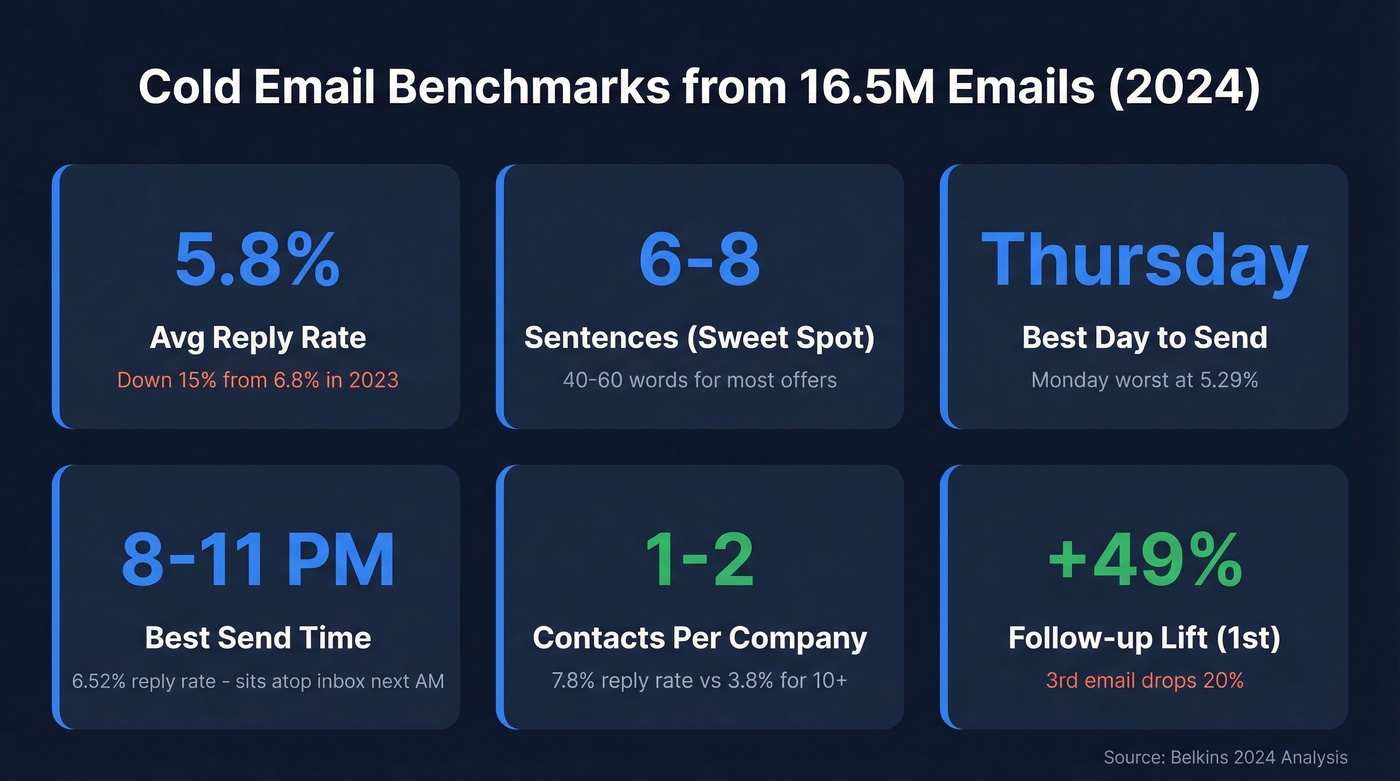
Before you touch a template, ground yourself in data. Belkins analyzed 16.5 million cold emails across 93 business domains from January through December 2024. Here's what the numbers say:
| Metric | 2023 | 2024 | Takeaway |
|---|---|---|---|
| Avg reply rate | 6.8% | 5.8% | 15% YoY decline |
| Best email length | 6-8 sentences | 6-8 sentences (6.9%) | 40-60 words for most offers |
| Best day | Thursday | Thursday (6.87%) | Monday worst (5.29%) |
| Best time | Evening | 8-11 PM (6.52%) | Sits atop inbox next AM |
| Targeting depth | - | 1-2 contacts/co = 7.8% | 10+ contacts = 3.8% |
| Follow-up lift | - | Up to 49% after first | 3rd email drops 20% |
The targeting depth stat is the one most teams miss. Spray 10+ contacts at the same company and your reply rate gets cut in half. Precision beats volume every time.
12 Templates That Work Now
Before the templates, a reality check on personalization. One rep on r/coldemail reported scraping 10 posts and reading 40+ pages per prospect - 30 emails, 3 replies, 2 ghosted. Deep personalization without a strong offer is wasted effort. A specific, low-friction offer beats deep research with a weak ask every single time. (If you want more on this, see cold email personalization.)
One writing rule for every template below: keep your "I/my" to "you/your" pronoun ratio at roughly 1:2. If you're talking about yourself more than the prospect, rewrite.
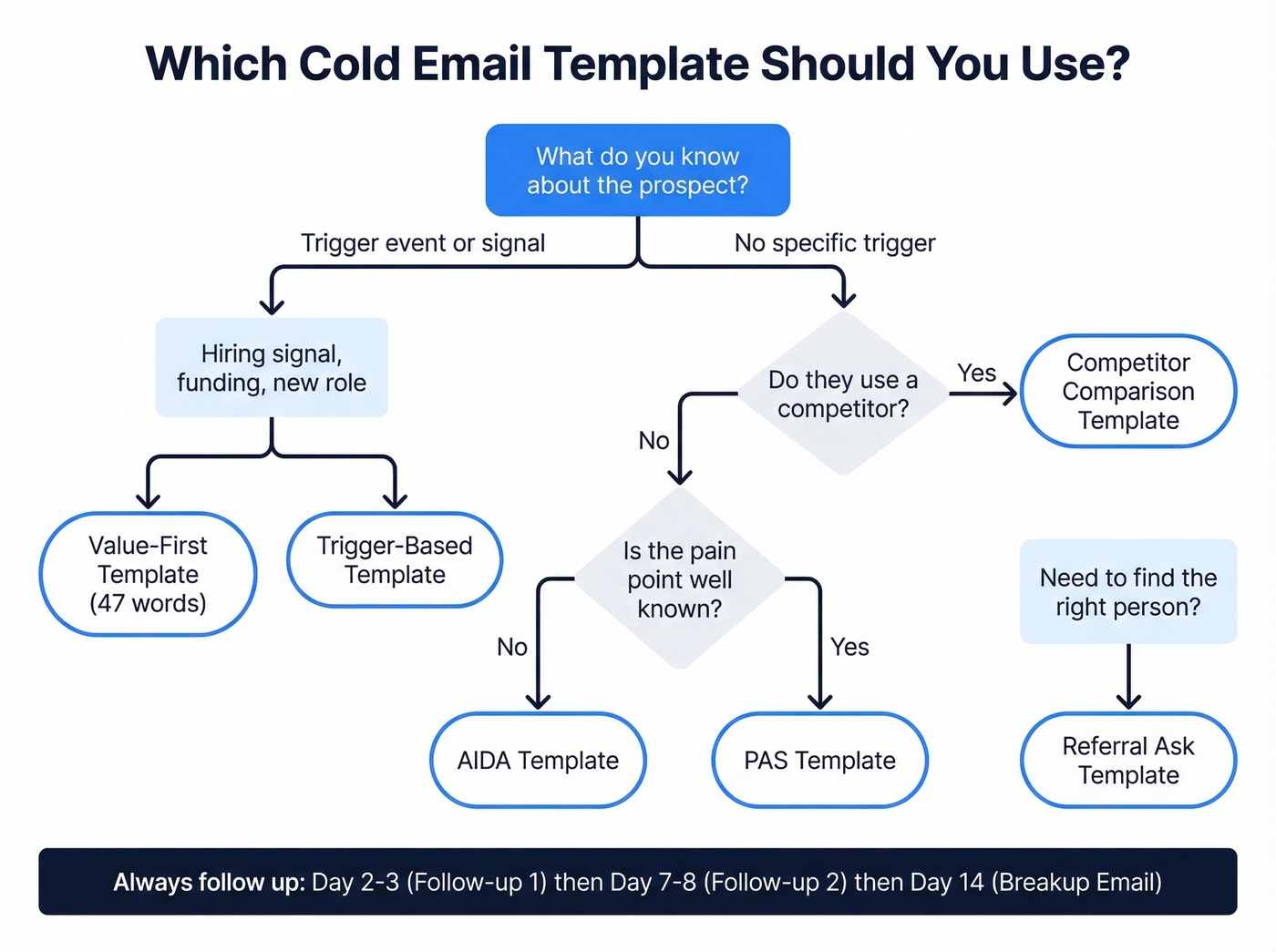
The 47-Word Value-First Template
Subject: {{first_name}} - quick idea
Hi {{first_name}},
Saw {{company}} is hiring {{role}}. That usually means {{pain point}} is top of mind.
We helped {{similar company}} cut {{metric}} by {{result}} in {{timeframe}}. Happy to show you how in a 3-min Loom.
Worth a look?
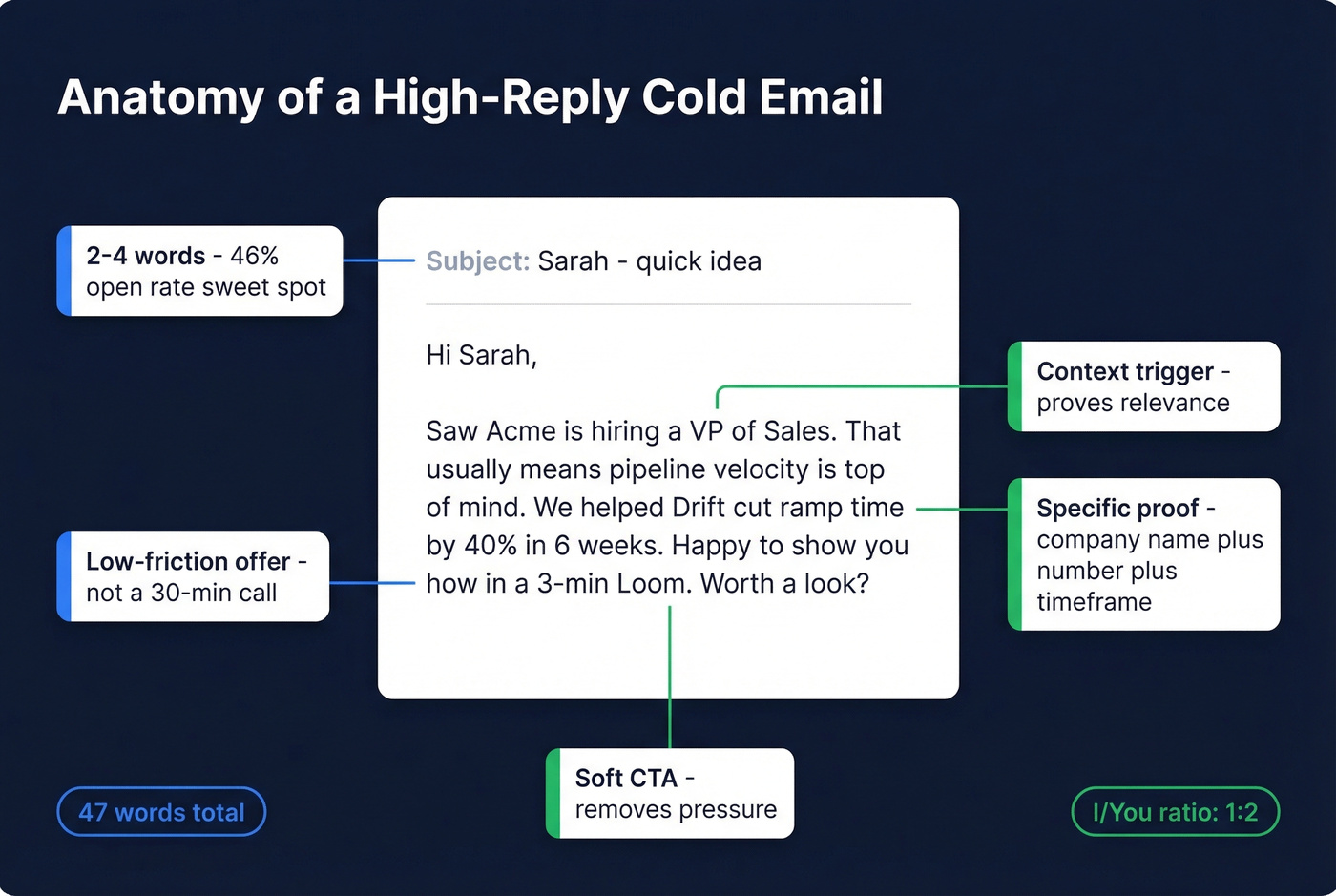
This is the default template we'd start with for any cold prospect where you can spot a hiring signal or trigger event. It's 47 words. It leads with a specific outcome, not a meeting request. The soft CTA removes pressure. Context trigger, specific outcome with proof, soft ask - that's the format pulling the highest reply rates right now. For more frameworks like this, see cold email frameworks.
PAS (Problem-Agitate-Solve) Template
Use this when the pain point is well-known in the industry and you don't need to educate. Skip it if the prospect's problem requires explanation - you'll waste the agitate step on confusion instead of tension.
Subject: {{pain point}} at {{company}}?
Hi {{first_name}},
Most {{role}}s at {{industry}} companies tell us {{problem}} eats 5-10 hours a week.
That's time your team could spend on {{desired outcome}} instead of {{frustrating task}}.
We built {{product}} specifically for this - {{one-line proof point}}.
Interested in a quick walkthrough?
Keep it under 75 words. The agitate step should be one sentence, not a paragraph.
The AIDA Template)
Subject: {{specific result}} for {{company}}
Hi {{first_name}},
{{Attention: surprising stat or observation about their industry}}.
{{Interest: how this connects to their specific situation}}.
{{Desire: what the outcome looks like - with a number}}.
Would a 15-minute call next week make sense to explore this?
Best for complex offers where you need to build a logical case - enterprise software or multi-stakeholder deals. For simpler offers, the 47-word template outperforms this every time. In our testing, AIDA only justifies its length when the prospect genuinely needs context they don't already have.
The Observation-Bridge-Vision Template
Skip it if you haven't done real research. A generic "observation" will backfire.
Subject: noticed something on {{company website/product}}
Hi {{first_name}},
Observation: I noticed {{specific thing you observed about their business}}.
Bridge: That usually means {{implication/problem this creates}}.
Vision: Imagine if {{ideal outcome}} - {{proof: "We helped X achieve this in Y weeks"}}.
Offer: Want me to send over how we'd approach this for {{company}}?
This framework comes from a practitioner who analyzed 10K cold emails and found relevance matters more than length. The observation proves homework. The bridge creates urgency. The vision sells the outcome, not the product.
The Competitor Comparison Template
Subject: {{competitor}} vs alternatives
Hi {{first_name}},
Noticed {{company}} uses {{competitor}}. No shade - it's solid for {{what competitor does well}}.
Where teams usually hit a wall: {{specific limitation}}.
We solve that differently - {{one-line differentiator + proof point}}.
Worth comparing? I can send a side-by-side in 2 minutes.
Use when technographic data shows they're running a competitor you can genuinely beat on a specific dimension. You're not bashing - you're contrasting. The "no shade" framing disarms defensiveness, and offering a side-by-side is low-commitment.
The Case Study Template
A/B test insight: We've found that leading with the metric ("cut churn by 34% in 90 days") in the subject line outperforms leading with the company name. Numbers do the heavy lifting.
Subject: how {{similar company}} fixed {{problem}}
Hi {{first_name}},
{{Similar company}} was dealing with {{same problem you suspect prospect has}}.
After switching to {{your solution}}, they {{specific metric improvement}} in {{timeframe}}.
If {{company}} is seeing something similar, happy to share the full breakdown.
Interested?
If you want more examples in this style, pull from these B2B cold email examples.
The Trigger-Based Template
Subject: congrats on the {{funding round / new hire}}
Hi {{first_name}},
Saw {{company}} just {{raised Series B / hired 3 new AEs / opened a London office}}.
That usually means {{implied pain: scaling outbound / entering a new market / ramping reps fast}}.
We help teams at that stage {{specific outcome}} - {{proof point}}.
Worth a quick chat this week?
Send within 2 weeks of the trigger event. Stale triggers feel creepy, not relevant. The trigger proves timeliness and implies a specific need without you having to guess - it's one of the cold email examples that consistently outperforms generic outreach because the timing does half the persuasion for you.
The Referral Ask Template
Subject: quick question
Hi {{first_name}},
I'm trying to reach whoever handles {{function}} at {{company}} - is that you, or could you point me to the right person?
Context: we help {{type of company}} with {{one-line value prop}}.
Appreciate the nudge either way.
This works surprisingly well because it's low-effort for the recipient - forwarding an email takes 5 seconds. Skip it if you already know who the decision-maker is. Going through a gatekeeper when you don't have to just adds friction.
The Mutual Connection Template
| Scenario | Example phrasing | Expected lift |
|---|---|---|
| Same event | "We both attended SaaStr" | Moderate |
| Same community | "We're both in RevOps on Slack" | Strong |
| Shared connection | "{{name}} suggested I reach out" | Strongest |
Subject: {{shared context}} - quick intro
Hi {{first_name}},
We both {{attended X event / are in Y community / follow Z person}}.
I noticed {{company}} is {{relevant observation}}, and thought {{your solution}} might be worth a look - we helped {{similar company}} {{result}}.
Open to a quick conversation?
The connection must be genuine. Fabricating shared context is the fastest way to get flagged as spam.
The Breakup Email
Subject: should I close your file?
Hi {{first_name}},
I've reached out a couple of times about {{value prop}} - no worries if the timing isn't right.
If {{problem}} becomes a priority down the road, I'm here. Otherwise, I'll stop filling your inbox.
Either way - good luck with {{something specific about their business}}.
Final touch in a 3-email sequence. It gives the prospect an easy out and an easy in. The "close your file" subject line creates just enough urgency without being manipulative.
Follow-Up #1 (Day 2-3)
Subject: Re: {{original subject}}
Hi {{first_name}},
Quick follow-up - wanted to share {{new piece of value: article, case study, or specific insight}} that's relevant to {{their situation}}.
{{One sentence connecting the new value to your original offer}}.
Worth discussing?
Send 2-3 days after your initial email. Don't just "bump" - add something new. 60% of replies come after the second follow-up, so this email matters more than your first one.
Follow-Up #2 (Day 7-8)
Subject: different angle on {{topic}}
Hi {{first_name}},
Tried a couple of times - last note, I promise.
{{Completely different angle: new use case, different pain point, or a relevant stat}}.
If this resonates more, happy to chat. If not, no hard feelings.
This is your last follow-up. The 16.5M-email dataset shows a third email drops reply rates by up to 20%, so make it count and stop. If you led with ROI in your first email, try operational pain here. If you led with a case study, try a stat.
How to Customize These Templates
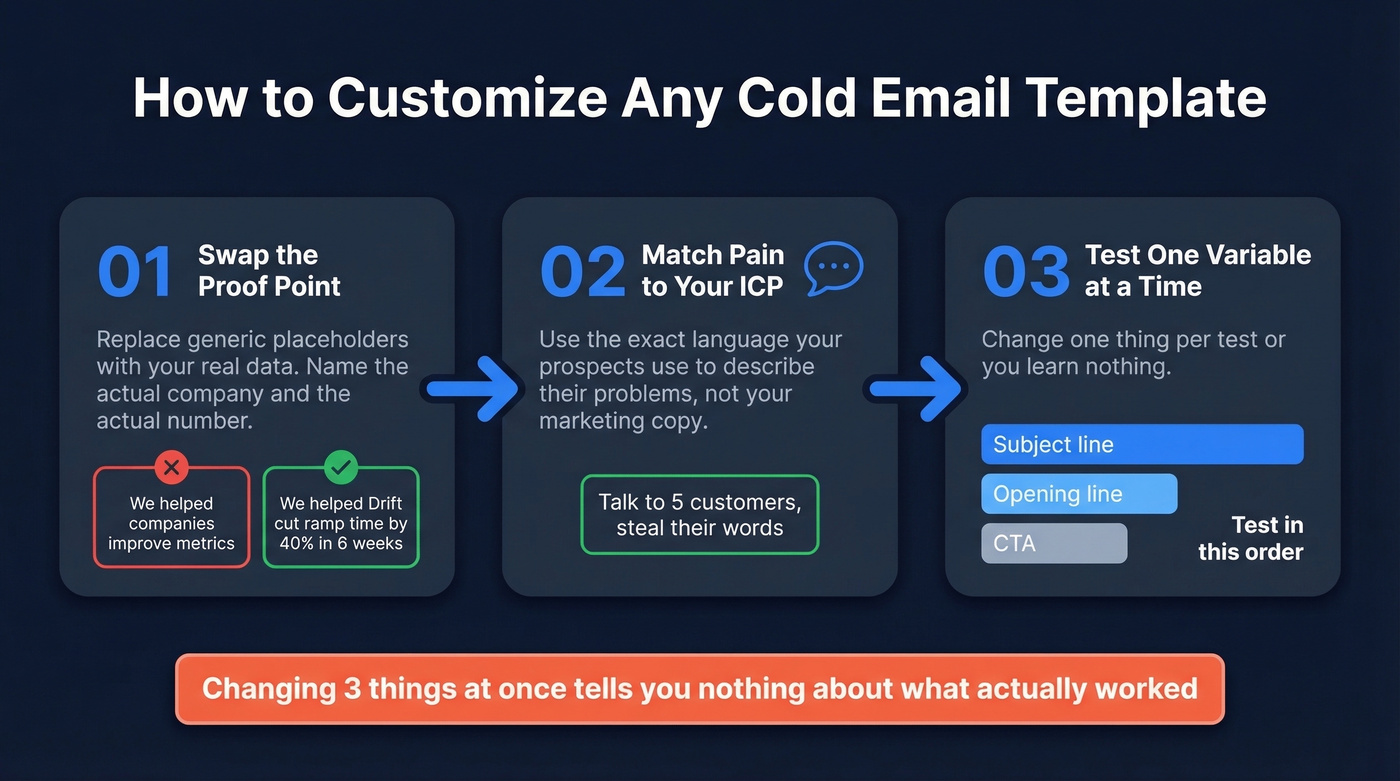
Don't copy-paste blindly. Swap the proof point for your own data - "We helped {{similar company}}" means nothing if you can't name the company and the number. Match the pain point to your specific ICP, not a generic placeholder. Then test one variable at a time: subject line first, then opening line, then CTA. Changing three things simultaneously tells you nothing about what actually worked. (For a full sequencing approach, see cold email cadence.)
Subject Lines That Get Opens
Personalized subject lines produce a 133% lift in reply rates - from 3% to 7%. That's the stat that matters most. Open rates tell a similar story: personalized lines hit 46% versus 35% without, based on an analysis of 5.5 million emails.
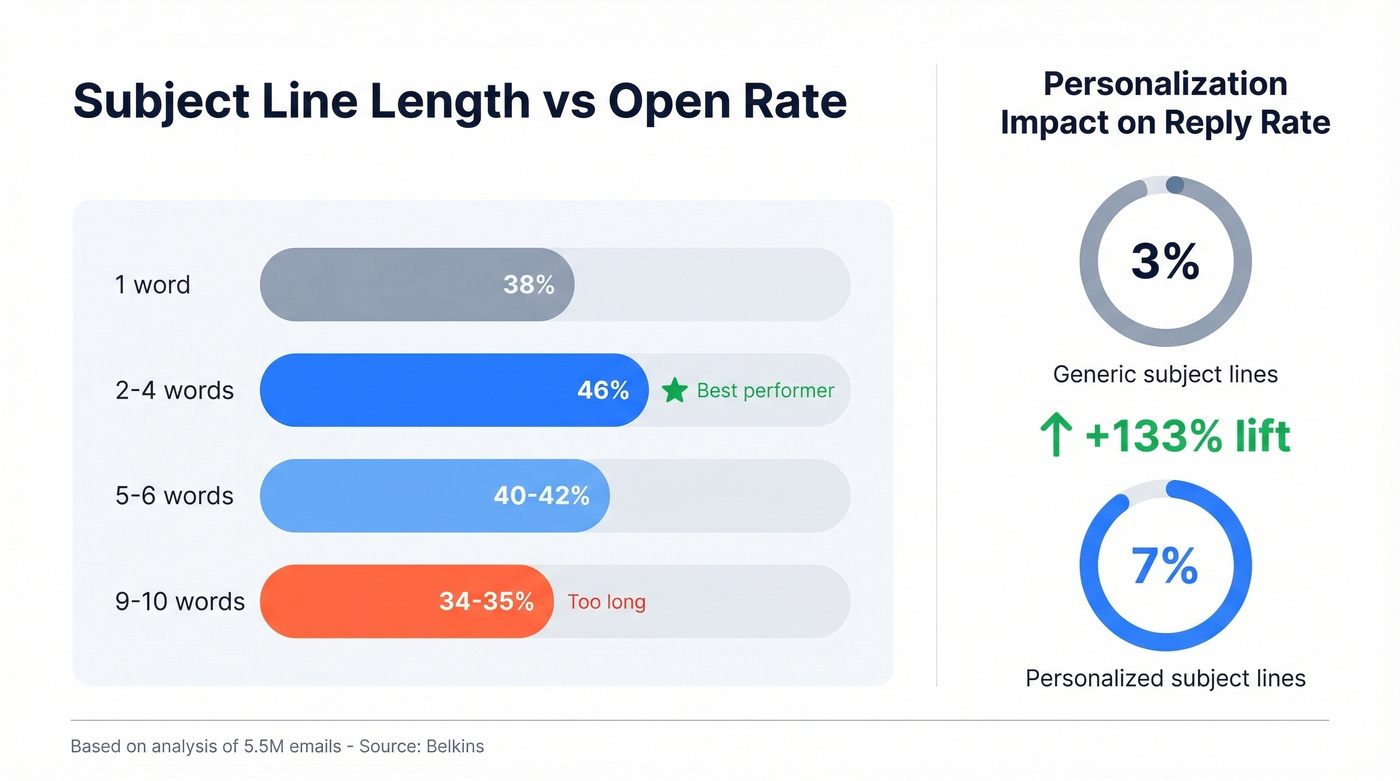
| Length | Open Rate | Verdict |
|---|---|---|
| 1 word | 38% | Underperforms |
| 2-4 words | 46% | Best performer |
| 5-6 words | 40-42% | Solid |
| 9-10 words | 34-35% | Too long |
Here's the thing: urgency and hype terms ("ASAP," "limited time," "exciting opportunity") drag open rates below 36%. Question formats match the top tier at 46%.
Subject lines worth stealing:
{{first_name}} - quick ideaquestion about {{company}}{{mutual connection}} suggested I reach outsaw your {{trigger event}}{{competitor}} alternative?
Keep subject lines to 25-45 characters to avoid mobile truncation. Most phones cut off around 33-43 characters. If you want more data-backed timing guidance, see best time to send cold emails.

Templates get you 20% of the way. The other 80%? Verified contact data that doesn't bounce. Prospeo delivers 98% email accuracy with a 7-day refresh cycle - so your cold emails actually reach the inbox instead of destroying your domain reputation.
Stop perfecting templates that land in spam. Fix the data first.
Why Templates Fail Without Infrastructure
Let's be honest - this is where most cold email advice falls apart. A team on r/Entrepreneur watched their reply rate slide from 8% to 3% over 18 months. Same templates, same offer, same ICP. What changed? Everything around the email. Their bounce rate had crept to 11%. They were sending from 3 domains with no daily caps. Their emails were 141 words of corporate fluff.
They rebuilt from scratch and hit 6% reply rate in 62 days. (If you're troubleshooting this, start with why cold emails don't work.)
Authentication (Non-Negotiable)
SPF, DKIM, and DMARC configured on every sending domain. Google, Yahoo, and Microsoft now enforce these under the 2024 bulk-sender rules - no authentication means the spam folder. You also need a one-click unsubscribe header (RFC 8058). For SPF specifics, see SPF record DNS.
Sending Infrastructure
- Warm up new mailboxes at 5-10 emails/day, ramping over 4-6 weeks
- Cap at 25-30 emails/day per mailbox
- Use a custom tracking domain (CNAME) - shared tracking domains tank your reputation
- Multiple sending domains (the case study went from 3 to 7)
- Send from a separate domain, never your primary
- Avoid HTML-heavy formatting - plain text outperforms (more on this in plain text vs HTML emails)
- One CTA per email, not three
- Skip the word "free" in your email body - use "complimentary" or "on the house" instead
- Send Tuesday through Thursday, 8-11 AM recipient timezone
Thresholds That Kill Campaigns
Spam complaints under 0.3%. Bounce rate under 2%. Email length under 60 words. The case study team's bounce rate going from 11% to under 2% was the single biggest driver of their improvement - which brings us to the most overlooked step in the entire cold email stack.
Verify Your List Before You Send
That 11% bounce rate from the case study above? It was destroying their sender reputation with every batch. Bounce rate is the #1 infrastructure killer because it's cumulative - each bounced email makes your next send more likely to land in spam.
We've run verification on lists that looked clean and still found 8-12% invalid addresses, including catch-all domains that basic syntax checkers pass right through. Prospeo handles this with a 5-step verification process covering catch-all domains, spam traps, and honeypots - delivering 98% email accuracy across 143M+ verified addresses. Stack Optimize built their agency to $1M ARR using that verification workflow, maintaining 94%+ deliverability, bounce rates under 3%, and zero domain flags across all clients. For a broader view of tooling and process, see email list validation.
Targeting 1-2 contacts per company gets 7.8% reply rates - but only if you're reaching the right person. Prospeo's 30+ filters let you pinpoint decision-makers by intent signals, job changes, and tech stack, then hand you verified emails at $0.01 each.
Precision targeting starts with data you can trust.
What It Actually Costs
The Reddit case study spent ~$420/month and generated 16 qualified leads/month. Here's a realistic monthly stack:
| Component | Monthly Cost |
|---|---|
| Domains (5-7 at ~$0.83/mo each) | $4-6 |
| Mailboxes (Google Workspace) | $30-50 |
| Sending platform (Instantly, etc.) | $30-97 |
| Email verification | $0-39 |
| Data / list building | $0-99 |
| Total | $100-400/mo |
That's $6-25 per qualified lead at the case study's conversion rate. Compare that to the $50-200 per lead most teams pay for paid channels. If you're evaluating platforms, compare options in our cold email outreach tools guide.
Hot take: If your average deal size is under $5k, you don't need a $500/month sending platform or a $15k/year data provider. The stack above at $100-200/month will outperform most enterprise setups because you'll actually maintain it. The teams with the fanciest tools and the worst reply rates are the ones who never verified a list or warmed up a domain.
How to Test and Improve
Don't A/B test everything at once. Isolate one variable - subject line, opening line, CTA, or email length - and run it against a single variant. You need 250+ contacts per variant to get meaningful data, and 500+ is better. For a deeper testing workflow, see split testing cold emails.
Measure positive reply rate, not opens. Open rate data is increasingly unreliable due to Apple Mail Privacy Protection and similar features. Worse, clickbait subject lines can boost opens while tanking deliverability through negative engagement signals.
Your testing loop: pick one cold sales email template from this article, create a variant with one change, send 500 each, compare positive reply rate after 7 days, keep the winner, test the next variable. Aim for 5%+ positive reply rate. If you're consistently below 3%, stop testing templates and fix your infrastructure first.
Is Cold Email Legal?
Cold email is legal. Lazy cold email is expensive.
| Law | Region | Key Requirements | Penalty |
|---|---|---|---|
| CAN-SPAM | US | Physical address, opt-out in 10 days | Up to $50,120/email |
| GDPR | EU | Legitimate interest or consent | Up to EUR 20M or 4% revenue |
| CASL | Canada | Express/implied consent, 60-day unsub | Up to $10M/violation |
| PECR | UK | More B2B flexibility, opt-out required | Up to GBP 500,000 |
These aren't theoretical. Canada's CRTC received 208,083 spam complaints between October 2024 and March 2025. Australia collected AU$14M+ in spam-related penalties between 2023 and 2025.
The practical checklist: include your physical business address, make unsubscribe easy and functional, don't use misleading sender names or subject lines, and process opt-outs within 10 business days. For GDPR, document your legitimate interest basis and why the outreach is relevant to the recipient's role before you send. For more detail, see GDPR cold email B2B.
Real talk: if you're following the templates and infrastructure guidance in this article, you're already 90% compliant. The remaining 10% is documentation and process.
FAQ
What reply rate should I expect?
The industry average is 5.8% based on 16.5M emails analyzed. Well-optimized campaigns targeting 1-2 contacts per company hit 7-8%. Below 3% means your infrastructure - not your cold sales email template - needs work first.
How long should a cold email be?
Under 60 words for prospecting emails. The 16.5M-email dataset shows 6-8 sentences hit the sweet spot at 6.9% reply rate. Current practitioner consensus: 40-60 words with a specific offer and a soft CTA outperforms longer pitches.
How many follow-ups should I send?
Two. The first follow-up boosts replies by up to 49%, and 60% of replies come after the second touch. A third email drops reply rates by up to 20%. Use a Day 1 / Day 3 / Day 7 cadence, then stop.
What's the best day and time to send?
Thursday is the best-performing day at 6.87% reply rate. Evenings between 8-11 PM recipient timezone peak at 6.52% - your email sits at the top of the inbox the next morning. Monday is the worst day at 5.29%.
How do I keep cold emails out of spam?
Verify your list first - keep bounces under 2%. Authenticate your domain with SPF, DKIM, and DMARC. Warm up new mailboxes over 4-6 weeks, and cap sends at 25-30/day per mailbox. Tools like Prospeo catch spam traps and catch-all domains that basic checkers miss, which is the fastest fix for deliverability issues.