

Plain Text vs HTML Emails: What Works in 2026
Your last campaign underperformed. Open rates dipped, clicks flatlined, and now you're staring at your email builder wondering if the design itself is the problem. We've run this experiment across hundreds of client campaigns and dug into the research - the 1,000+ campaign studies, a massive accessibility audit, and Apple's privacy changes all point in the same direction. Here's what actually works.
The Short Answer
Three scenarios, three answers:
- Most marketers: Send hybrid emails - minimal HTML that looks like plain text. You keep links, basic formatting, and click tracking without the baggage of fully designed templates.
- Cold outreach: Plain text, no exceptions. Verify your list before you send. (If you’re building sequences, pair this with proven sales follow-up templates.)
- Ecommerce brands: Mix both. Designed HTML for product launches, plain text for lifecycle flows like cart abandonment and thank-you emails.
Format Comparison Table
| Plain Text | HTML | Hybrid (Minimal HTML) | |
|---|---|---|---|
| Formatting | None | Full (images, CSS) | Light (links, bold) |
| Click tracking | Not natively | Yes | Yes |
| Open tracking | No | Yes (pixel-based) | Yes (pixel-based) |
| Deliverability risk | Lowest | Higher if coded poorly | Low |
| Accessibility | Excellent | Usually broken | Good if tested |
| Promotions tab risk | Very low | High | Low |
| Rendering consistency | Perfect everywhere | Varies by client | High |
| Best use case | Cold email, transactional | Product launches, promos | Newsletters, lifecycle |
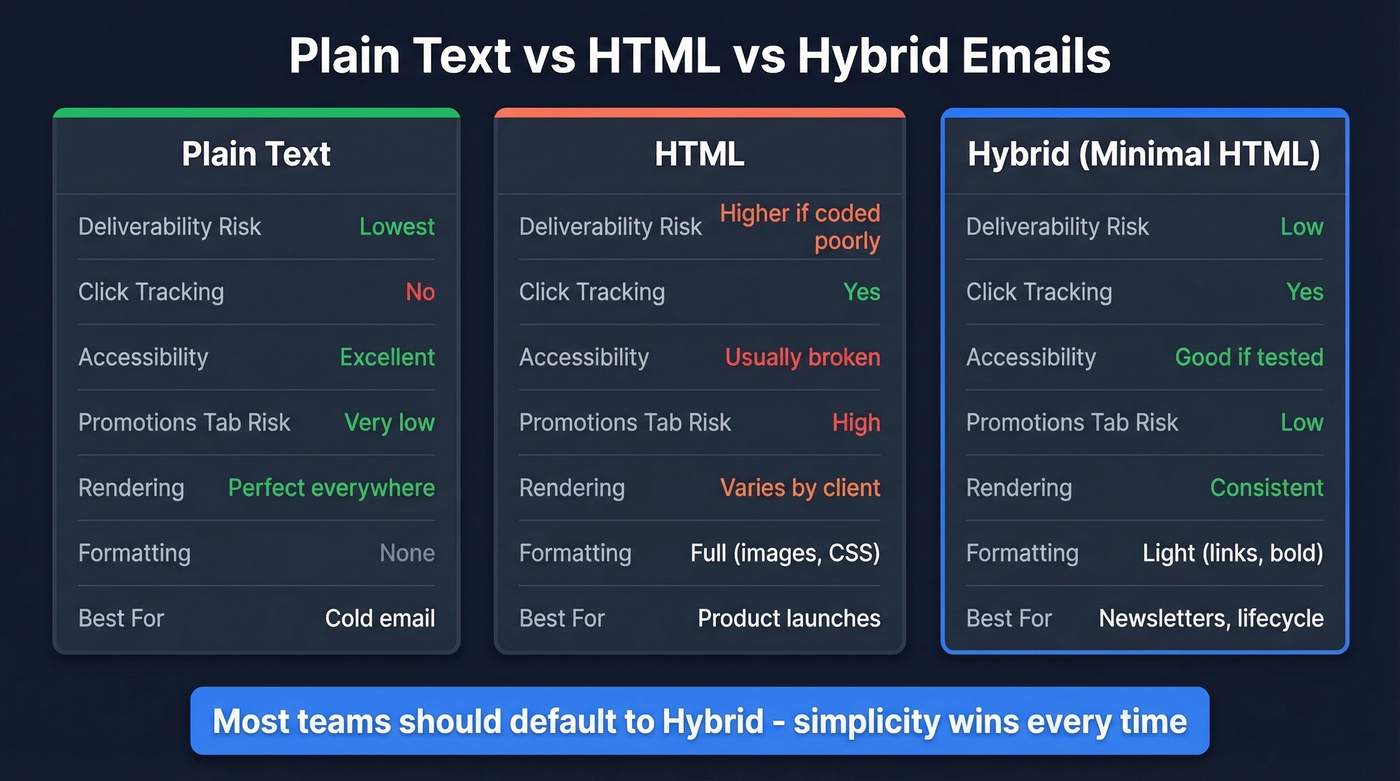
The hybrid column is where most teams should live.
Performance Data From 1,000+ Campaigns
An analysis of 1,000+ campaigns found that plain text captured 60% of conversions from existing customers and 49% from non-customers, with higher open rates across the board. The detail that should make every designer pause: adding even a simple GIF to a plain-text message reduced opens by 37%.
If you’re optimizing for clicks (not just opens), it helps to track the right KPI - here’s the click rate formula most teams should standardize on.
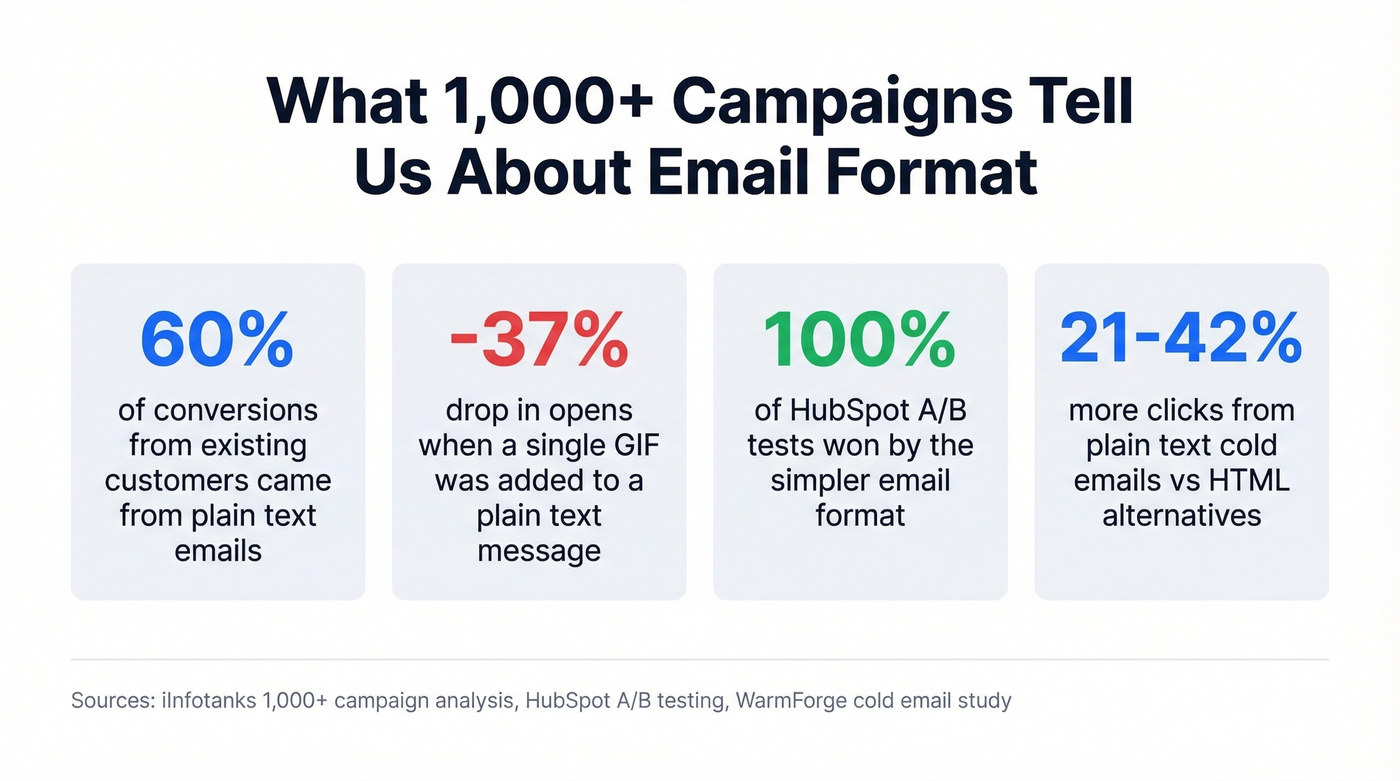
HubSpot's widely cited A/B testing reached a similar conclusion - in every single test, the simpler email won with statistical significance. But here's the nuance most articles miss: HubSpot's "plain text" emails weren't actually plain text. They were minimal HTML - stripped-down templates that retained tracking pixels and hyperlinks. The takeaway isn't "plain text beats HTML." It's that simplicity beats complexity, regardless of the underlying format.
Practitioners confirm this. One marketer on r/Emailmarketing tested plain text against designed templates and reported that plain text "won significantly" - faster mobile load times, a more personal feel, fewer spam filter triggers. They moved to minimal design, mostly text.
Simpler emails feel like messages from a person. Designed emails feel like marketing. Recipients respond to the former.
The 2026 Tracking Reality Check
Even if you choose HTML specifically for open tracking, that metric is broken.
Apple Mail Privacy Protection pre-loads tracking pixels, masks IP addresses, and generates machine opens - meaning a huge share of your "opens" aren't real people reading your email. Apple Mail represents a large share of opens on many B2C lists, so a big chunk of your open data is machine-generated noise. Twilio's analysis makes the case clearly: open tracking is unreliable, and teams should prioritize click-through rate and reply rate instead.
It gets worse. Apple's Link Tracking Protection strips UTM parameters in Mail and Safari, complicating attribution even for clicks. If you're building your email strategy around open rates, you're optimizing for a ghost metric.
If you still need measurement, focus on what’s technically happening under the hood (pixels, redirects, domains) with email tracking pixels and a dedicated tracking domain.

Plain text emails win on format - but they still bounce if your data is stale. Prospeo's 5-step verification and 7-day refresh cycle keep bounce rates under 4%, so your simple, personal emails actually land in real inboxes. At $0.01 per verified email, clean data costs less than one bounced send costs your domain.
Stop perfecting copy that bounces. Fix the list first.
The Accessibility Crisis
Here's a number that stopped us cold: a report analyzing 443,870 emails found that 99.89% of HTML emails had accessibility issues rated Serious or Critical. Only 21 emails - from just two brands - passed all automated accessibility checks. Out of nearly half a million emails. Twenty-one.
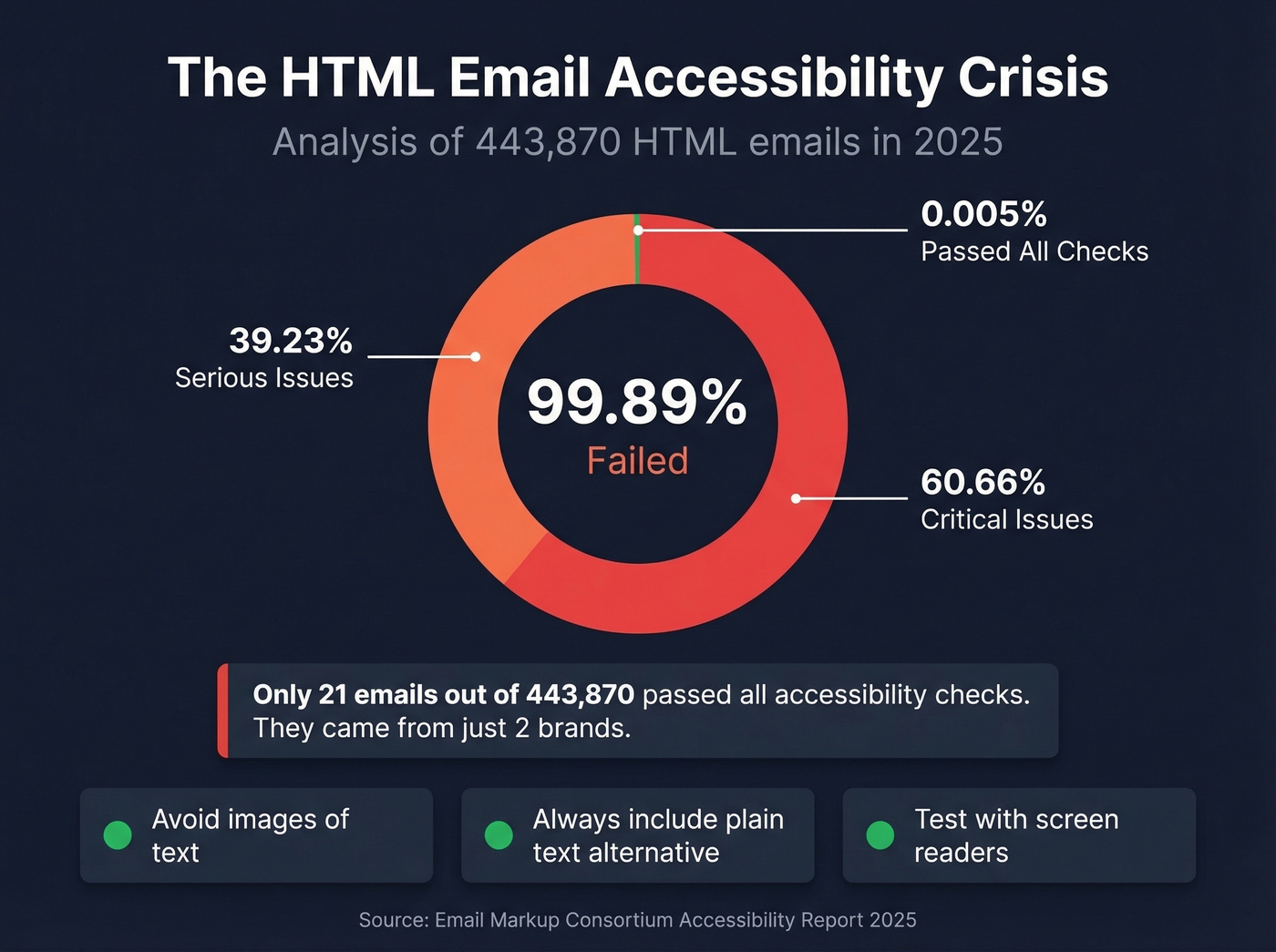
The breakdown: 60.66% Critical, 39.23% Serious. For screen reader users, the experience is what one accessibility expert described as "quite universally poor."
If you're sending HTML, avoid images of text entirely. Include a complete plain-text equivalent via multipart messages so email clients can fall back to the text version. Test with NVDA + Outlook and VoiceOver on mobile. These aren't edge cases - they're basic due diligence that almost nobody does.
Always Send Both - Multipart
Every HTML email you send should include a plain-text alternative via multipart messages /MIME. This isn't optional - it's a deliverability and accessibility baseline. Email clients that can't render HTML fall back to the plain-text part. Missing or nonsensical plain-text parts look suspicious to spam filters and can push mail toward spam placement.
The trap is auto-generated plain text. Most ESPs generate a text version automatically, but the results can backfire. Some generators convert bold formatting to ALL CAPS, which Microsoft's spam filters flag as aggressive. Others strip content unevenly, leaving nonsensical fragments. Manually review your auto-generated plain text before sending, maintain content parity between HTML and text versions, and use HTTPS links. Takes five minutes per campaign. Prevents a class of deliverability problems most teams don't know they have.
If you’re troubleshooting placement issues, start with the fundamentals in an email deliverability guide and then validate your list against current email bounce rate benchmarks.
When to Use Each Format
Cold Outreach
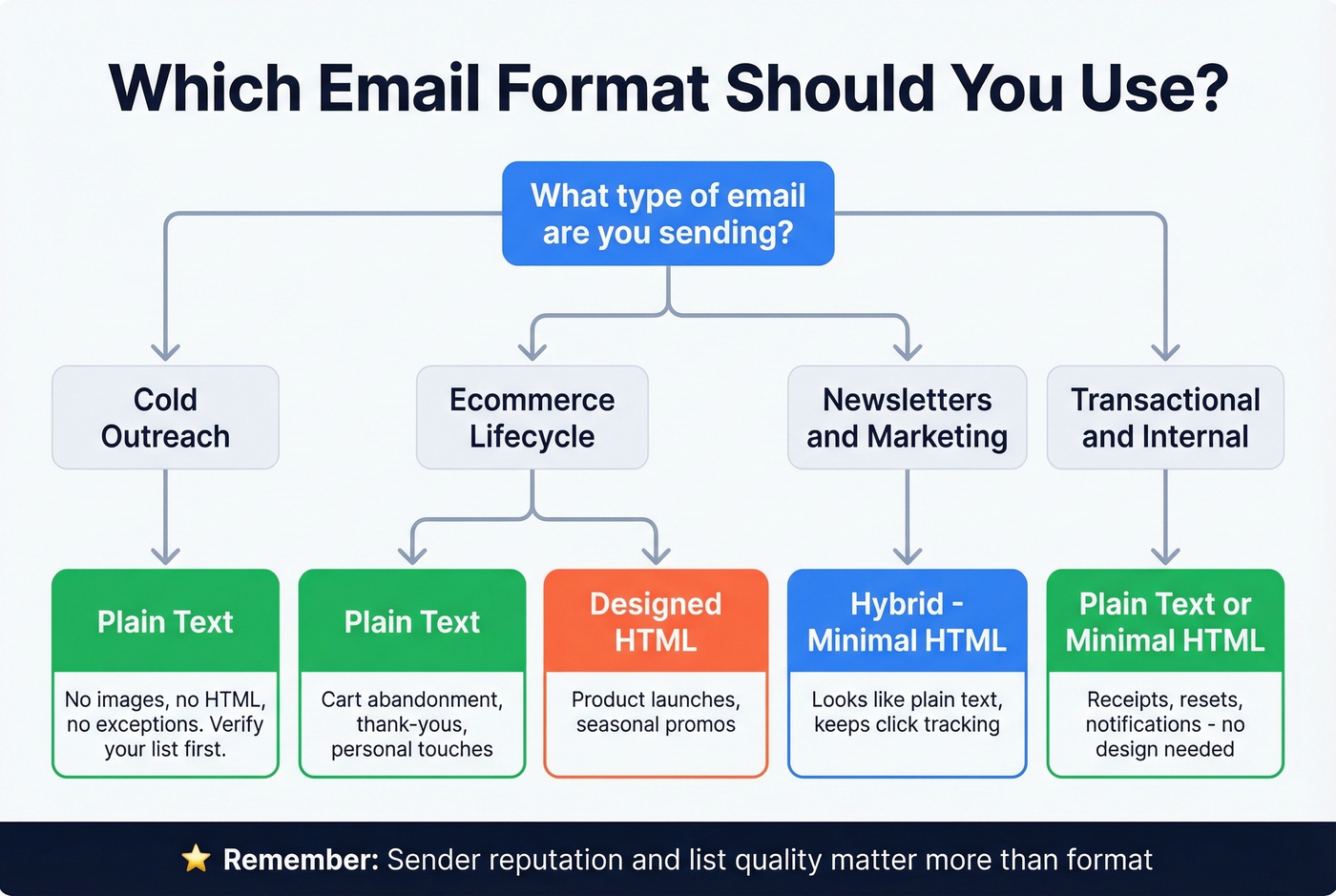
Plain text, every time. The data is unambiguous: plain text cold emails generate 21-42% more clicks, and HTML with images causes a 23-37% drop in open rates. HTML elements in cold emails trigger spam filters and signal "marketing" to recipients who don't know you.
If you’re building a full outbound motion, align format with your cold email marketing plan and your best time to send cold emails testing.
But format is only half the equation. Plain text gets you past the format filter - but if your list is bouncing at 5-10% because the data is stale, your sender reputation takes the hit regardless. We've watched teams nail their copy, nail their format, and still crater their domain because they skipped verification. Prospeo's 5-step verification with a 7-day data refresh cycle keeps bounce rates under control so your plain text actually reaches real inboxes.
Ecommerce Lifecycle Flows
Designed HTML works for product launches and seasonal promos where visuals drive clicks. Plain text works for everything that should feel personal - cart abandonment, browse abandonment, post-purchase follow-ups.
One ecommerce operator on r/ecommerce reported that across all their brands, the single highest-revenue email is a plain-text Q4 thank-you "from the CEO." Another on r/Emailmarketing sent a plain-text correction email to cart abandoners and got more responses and sales than their standard designed flow. Let's be honest: if your average order value is under $50, you probably don't need designed HTML emails at all. The "personal feel" of plain text drives more revenue per send than any hero image ever will.
Newsletters and Marketing
Hybrid/minimal HTML. You want something that looks like a personal email but retains click tracking and basic formatting - hyperlinks, maybe bold or italic, no images or heavy CSS. Promotions tab sorting responds to signals like HTML richness, image-to-text ratio, link density, and bulk-mail headers. Even plain text sent via bulk ESPs can land in Promotions if unsubscribe headers are present, but fully designed templates are far more likely to get sorted there.
If you want the “personal email” feel without losing conversions, tighten your email copywriting and test against proven email subject line examples.
Transactional and Internal
Plain text or minimal HTML. Receipts, password resets, internal updates, system notifications - none of these need design. Maximum deliverability, zero rendering issues. Nobody's judging your brand aesthetics on a shipping confirmation.
Format Is Third, Not First
Look - format matters, but it's not the most important variable in your email performance. Sender reputation and list quality come first. Authentication (SPF, DKIM, DMARC) comes second. Format is third.
If you’re auditing auth, start with SPF record examples and a practical guide to DMARC alignment.
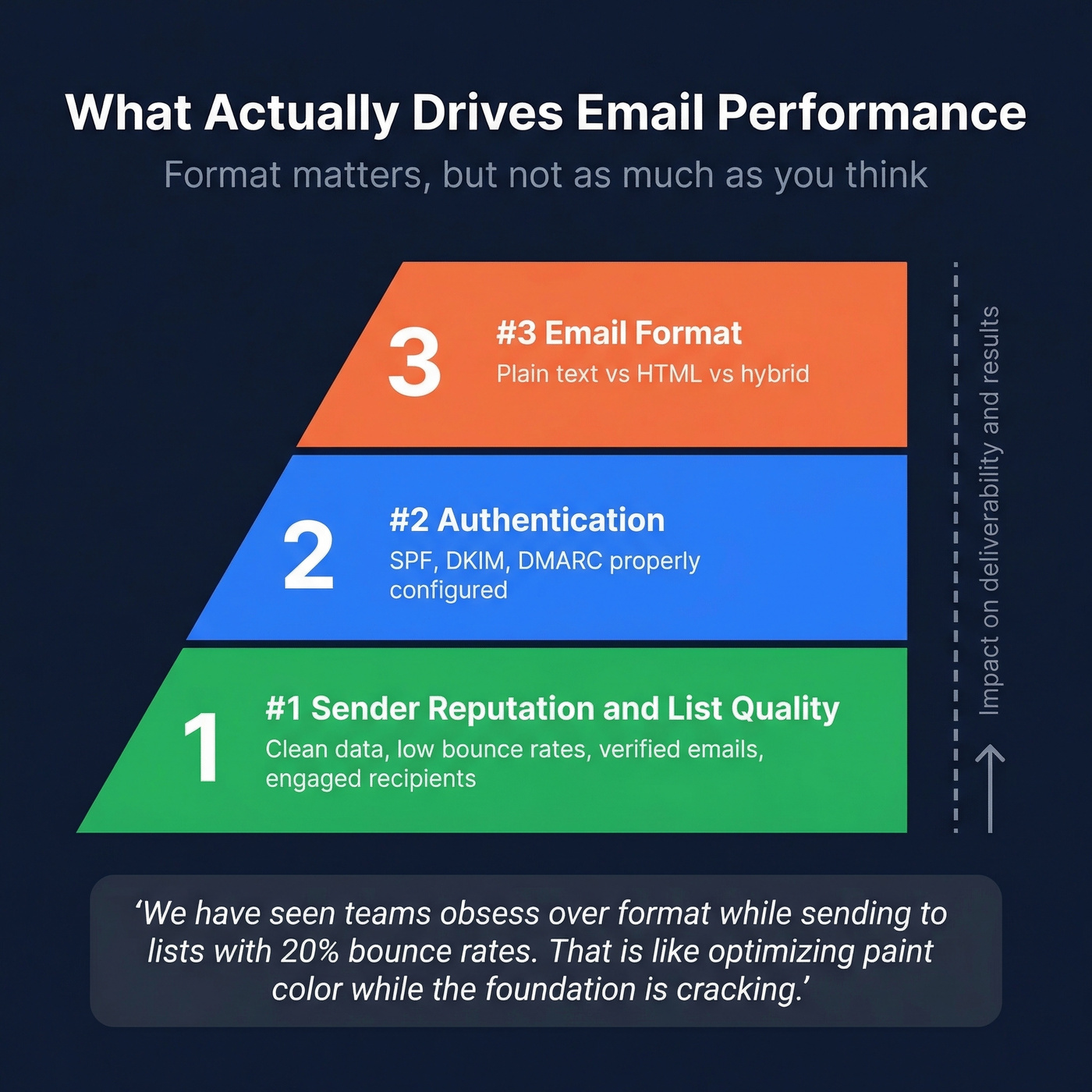
We've seen teams obsess over choosing between plain text and HTML while sending to lists with 20% bounce rates. That's optimizing the paint color while the foundation is cracking. If your data is bad, no format will save you.
You just learned that open tracking is broken and simplicity wins. The only metrics left that matter are replies and clicks - and both require reaching real people at real addresses. Prospeo delivers 98% email accuracy across 300M+ profiles so your plain text cold emails connect with actual buyers, not dead inboxes.
Great format means nothing without great data behind it.
FAQ
Does plain text have better deliverability than HTML?
Not inherently. Properly coded HTML with a clean plain-text alternative delivers fine. The real deliverability factors are sender reputation, authentication (SPF, DKIM, DMARC), and list quality. Plain text avoids certain spam triggers like image-heavy layouts, but a well-built hybrid email performs equally well with strong domain health.
Can you track opens and clicks in plain text emails?
No - open tracking requires a tracking pixel and click tracking requires redirect links, both HTML elements. True plain text supports neither. Hybrid/minimal HTML retains click tracking, and with Apple Mail Privacy Protection inflating open rates, click-through rate is the more reliable metric anyway.
What's the best email format for cold outreach?
Plain text, without exception. HTML elements trigger spam filters and signal "marketing" to people who don't know you. Pair plain text with verified contact data and keep your bounce rate under control so messages reach real inboxes instead of damaging your domain reputation.
What is a hybrid or minimal HTML email?
An email coded in HTML but designed to look like a plain-text message - no images, no heavy formatting, just text with hyperlinks and maybe bold or italic. It gives you click tracking while avoiding the Promotions tab signals that fully designed HTML triggers. Most ESPs support this format natively.