

Cold Email Personalization: The Practitioner's Playbook for 2026
You just spent four hours researching 30 prospects - reading their posts, scanning their company pages, crafting custom openers. You sent every email. Three people replied, which sounds great until you realize all three ghosted after the first exchange. That's a real story from r/coldemail, and it captures the cold email personalization paradox perfectly.
The problem isn't that personalization doesn't work. It's that most people personalize the wrong thing at the wrong stage. They polish the subject line while their bounce rate sits at 11%. They write custom openers while sending from a single domain that's already flagged. This is an operations problem disguised as a copywriting problem, and the teams hitting 10%+ reply rates in 2026 know the difference.
The Quick Version
Most guides tell you to personalize your subject line and opener. That's step 5. The actual order: fix deliverability, clean your data, nail your targeting, sharpen your offer, then personalize.
The benchmarks that matter: average reply rate across billions of emails is 3.43%. Top quartile hits 5.5%+. Elite senders crack 10.7%. Anyone promising you 40-60% reply rates is selling something.
What's a Good Reply Rate?
Let's kill the fantasy numbers. Saleshandy's guide claims "hyper-personalized cold emails are hitting 40-60% reply rates." There's no methodology behind that number, and it doesn't match anything we've seen in production.
The data from the 2026 benchmark report analyzing billions of cold email interactions across thousands of workspaces:
| Performance Tier | Reply Rate |
|---|---|
| Average | 3.43% |
| Top Quartile | 5.5%+ |
| Elite (Top 10%) | 10.7%+ |
If you're consistently above 5%, you're outperforming most senders. Above 10%, you're elite. That's the honest baseline - whether you're emailing 50 prospects a week or segmenting 300,000 leads across seven categories and five languages.
The gap between 3.43% and 10.7% isn't about writing better subject lines. It's about the entire system underneath the copy - deliverability, data quality, targeting, and offer. Personalization is the final layer, not the foundation.
The Order of Operations
This framework separates operators hitting 10%+ from everyone stuck at 2-3%. Each layer only works if the one below it is solid.
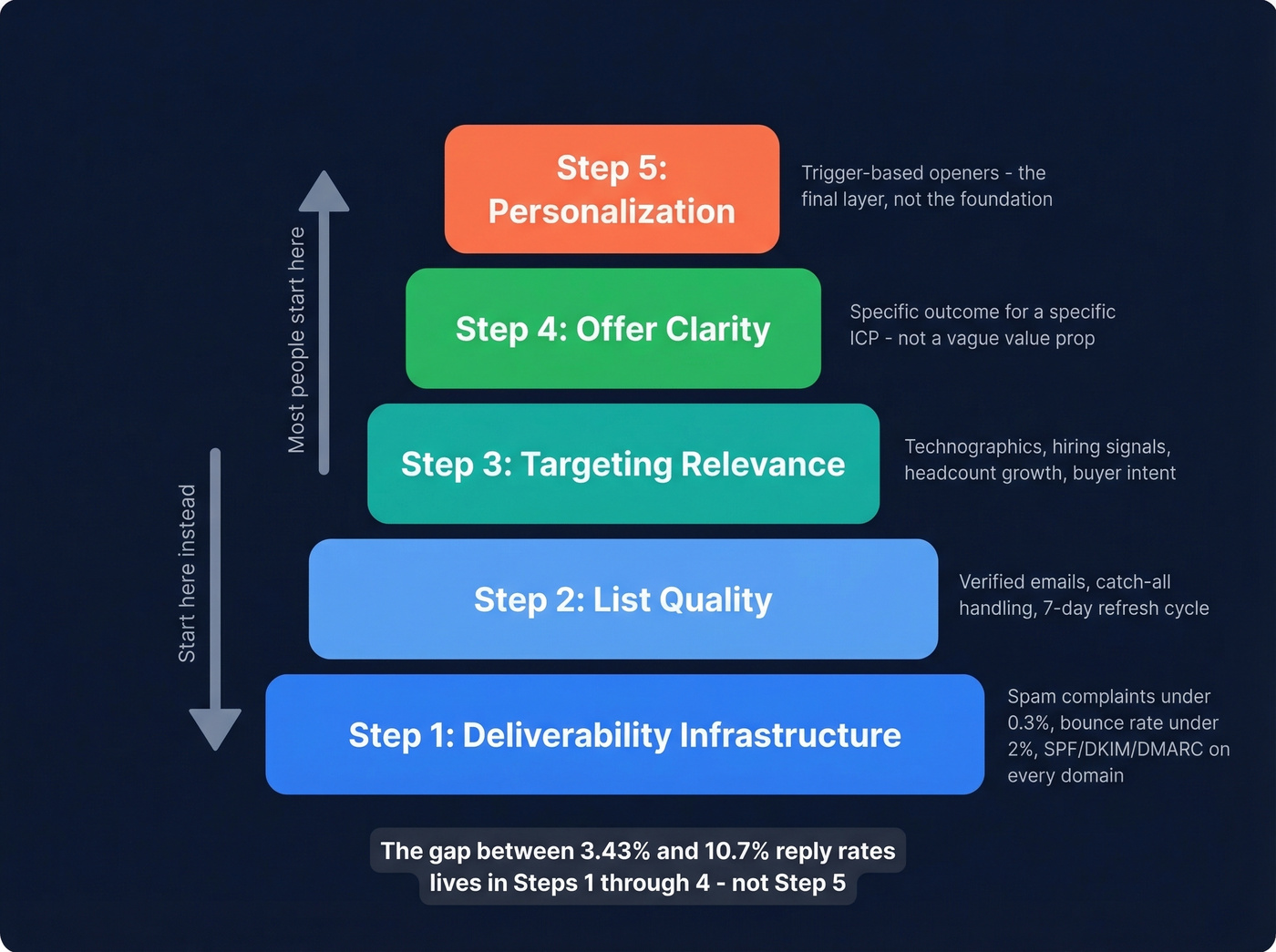
Step 1: Deliverability infrastructure. Nothing else matters if your emails don't reach the inbox. The thresholds are non-negotiable: spam complaints under 0.3%, bounce rate under 2%, and proper domain authentication (SPF, DKIM, and DMARC) on every sending domain. If you're sending 5,000+ emails per day to Gmail or Yahoo, you're subject to bulk sender rules. Use multiple domains (typically 3-7), cap sends at around 26 per domain per day, and warm every inbox before you touch a prospect.
Step 2: List quality. This is where most campaigns quietly die. An 11% bounce rate doesn't just waste sends - it torches your domain reputation. A proper verification process with catch-all handling and spam-trap removal can take bounce rates from danger zone to under 2%. One operator shared an 11% to sub-2% turnaround after cleaning and verification alone. Data decays fast, so a 7-day refresh cycle matters. If you need a deeper breakdown of bounce codes and fixes, see our guide on bounce rate.
Step 3: Targeting relevance. Are you emailing the right people about the right problem? A perfectly personalized email to someone who doesn't have the problem you solve is still a waste. Filter by technographics, headcount growth, hiring signals, and buyer intent before you write a single word. If you want a repeatable way to define and score this, use an ideal customer profile.
Step 4: Offer clarity. Your offer does the heavy lifting, not your opener. "We help Series B SaaS companies reduce churn by 15% in 90 days" beats "I loved your recent post about customer success" every time. If you’re tightening your messaging, our email copywriting guide can help.
Step 5: Personalization. Now - and only now - does the first line matter. A split test that proves the order: generic AI personalization with company name and industry tokens pulled a 1% reply rate. Trigger-based personalization referencing a specific hiring signal or tech stack change hit 9%. Same sender, same offer category. The input quality determined the output.
Triggers vs. Compliments
"Loved your post on leadership" is dead. It was never great, and now that every AI tool generates it, prospects see through it instantly. The consensus on r/sales and r/coldemail is the same - compliment-based openers feel hollow.
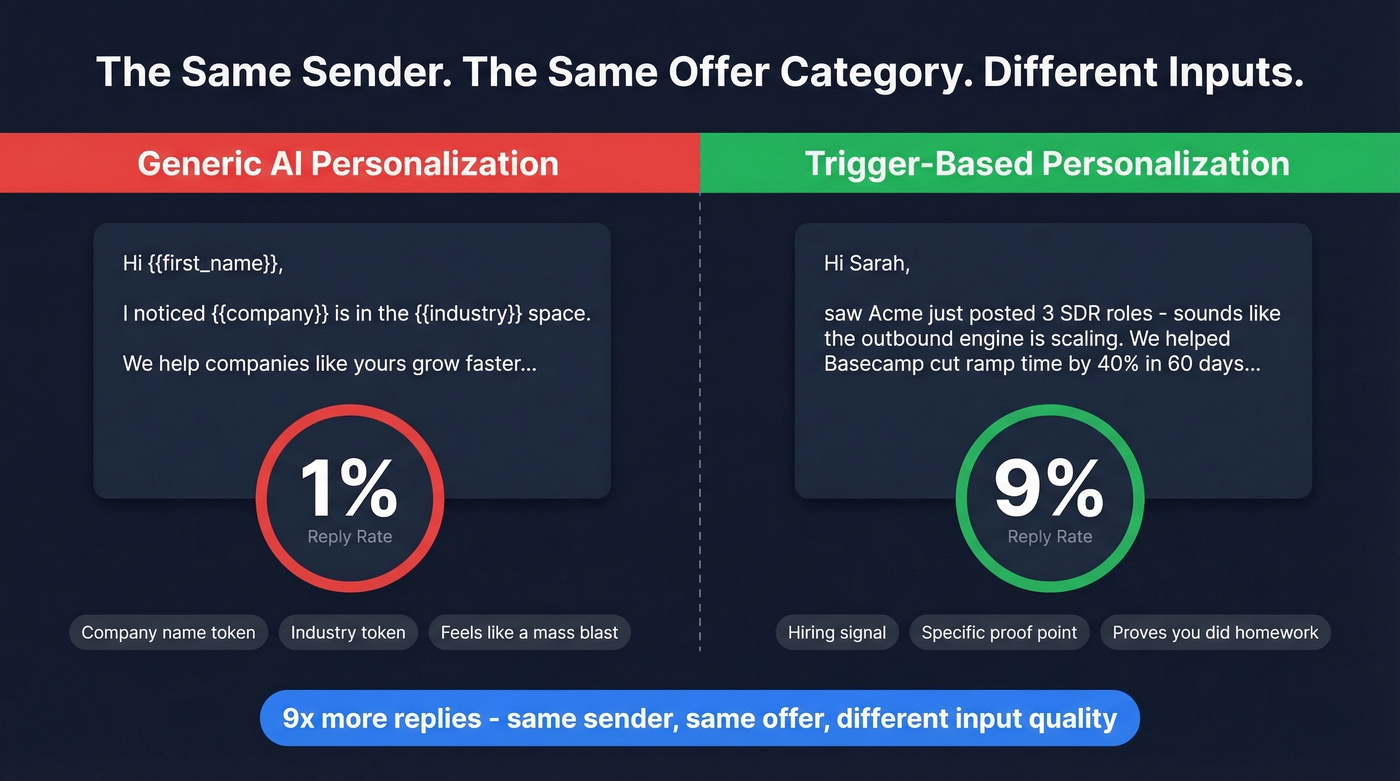
Here's the thing: personalization has three tiers. Merge tags like {{company}} are basic and barely count. Company-level context - referencing industry or size - is intermediate. Real-time situation triggers are advanced, and they're where the results live. For more on building this into your outbound, see personalized outreach.
Trigger-based personalization references something happening at the company right now:
- Hiring signals - "Saw you're hiring 3 SDRs" implies growth and potential pain
- Tech stack changes - a new tool adoption or migration signals budget and initiative
- New office or market expansion - geographic growth creates operational gaps
- Funding rounds - capital means new priorities and faster buying cycles
That 1% vs. 9% split test tells the whole story. Trigger-based openers work because they demonstrate you understand the prospect's situation, not just their identity. "Noticed you're migrating to Snowflake" is relevant. "Great insights on data strategy" is noise.
One line to respect: reference professional signals, never personal ones. Mentioning someone's vacation photos crosses from relevant to creepy. Stick to company news, job postings, and public business moves.
Stop trying to personalize and start being relevant. Relevance at the targeting and offer level does 80% of the work. The first line just proves you did your homework. If your deal size is under $10k and you're spending minutes per prospect on custom research, you're losing money on every email - even the ones that convert.

The article says it clearly: list quality is where campaigns quietly die. Prospeo's 5-step verification with catch-all handling and spam-trap removal keeps bounce rates under 2%. Data refreshes every 7 days - not 6 weeks - so your trigger-based personalization hits real inboxes, not dead ones.
Stop personalizing emails that bounce. Start with 98% accurate data.
Writing the Email
Subject Line
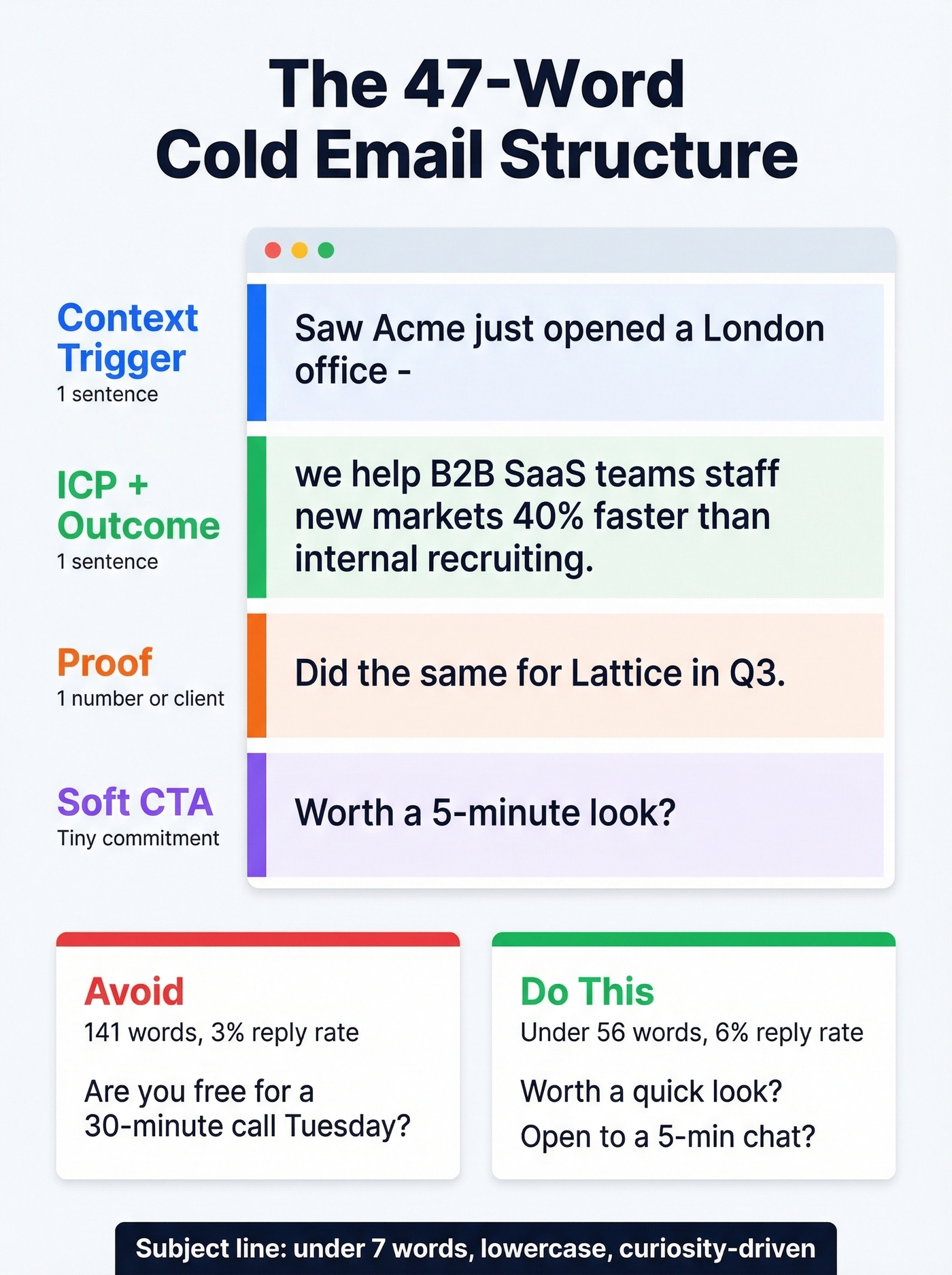
Keep it under seven words. In one operator's breakdown, "Quick question" pulled ~39% open rates while subject lines with the company name hit ~33%. Anything salesy - "Partnership opportunity," "Exclusive offer" - dropped below 19%. Short, curiosity-driven, lowercase. If you want more tested options, browse these cold email subject line examples.
Opener
Your first line has one job: prove this isn't a mass blast. Reference a specific situation trigger in under 20 words. "Saw [Company] just opened a London office" or "Noticed you're hiring your first RevOps lead" - concrete, verifiable, and directly tied to why you're reaching out. Don't stack two personalization signals. One trigger, then pivot to the offer.
Body and CTA
The sweet spot is 40-60 words total. One campaign cut email length from 141 words to under 56 words and took reply rate from 3% to 6%. The structure that works in 47 words or fewer:
- Context trigger - one sentence referencing the situation signal
- ICP/outcome - who you help and what changes
- Proof - one number or client reference
- Soft CTA - "Worth a conversation?" or "Open to a quick look?"
If you want more CTA patterns and phrasing rules, see email call to action.
The CTA matters more than people think. "Are you free for a 30-minute call Tuesday?" is a big ask from a stranger. "Worth a 5-minute look?" converts better because the commitment is tiny.
Scaling Personalized Outreach
Here's the actual workflow that scales personalization without burning 4 hours per 30 leads.
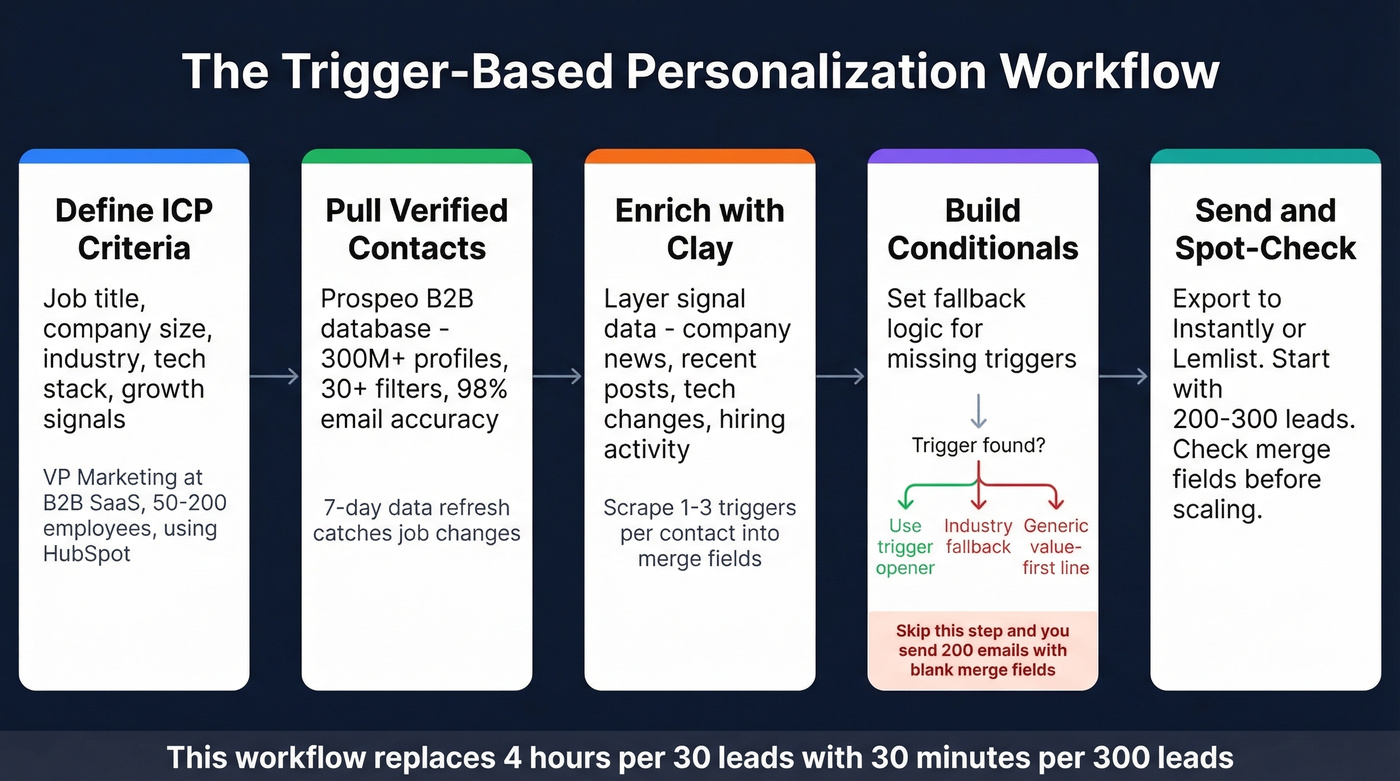
Define ICP criteria. Job title, company size, industry, tech stack, growth signals. Get specific - "VP of Marketing at B2B SaaS companies with 50-200 employees using HubSpot" is a filter set, not a wish list. If you’re building this as a repeatable system, start with these sales prospecting techniques.
Pull verified contacts. Use Prospeo's B2B database to search 300M+ professional profiles with 30+ filters. Filter by buyer intent, technographics, headcount growth, and job change signals. The 7-day data refresh cycle catches job changes that would otherwise wreck your targeting, and 98% email accuracy keeps your bounce rate well under 2%.

Enrich with Clay. Clay takes your verified contact list and layers on signal data - latest company news, recent posts, tech stack changes, hiring activity. Use Clay's recipes to scrape the 1-3 most recent signals per contact into merge fields like {{latest_trigger}}. For a cost/steps breakdown, see our Clay list building guide.
Build conditionals and fallbacks. This is where most workflows break. If Clay can't find a trigger, your email reads "Loved your post on ." - worse than no personalization at all. Set fallback logic: if no trigger exists, default to an industry-relevant opener. If no industry data, use a generic value-first line. We've seen campaigns tank because someone skipped this step and sent 200 emails with blank merge fields.
Export to your sending tool. Push enriched, personalized contacts to Instantly or Lemlist. Start with 200-300 leads and spot-check the merge fields before scaling. If you’re scaling volume, keep an eye on email velocity.
Trigger-based personalization pulled 9% reply rates - but only when targeting was dialed in first. Prospeo's 30+ filters let you segment by hiring signals, tech stack, headcount growth, and buyer intent across 15,000 topics. Find the right prospects before you write a single word.
Layer intent data and hiring signals at $0.01 per lead.
Follow-Up Sequence Design
58% of replies come from email #1 - but that means 42% of your results come from follow-ups. The sweet spot is 4-7 touchpoints total.
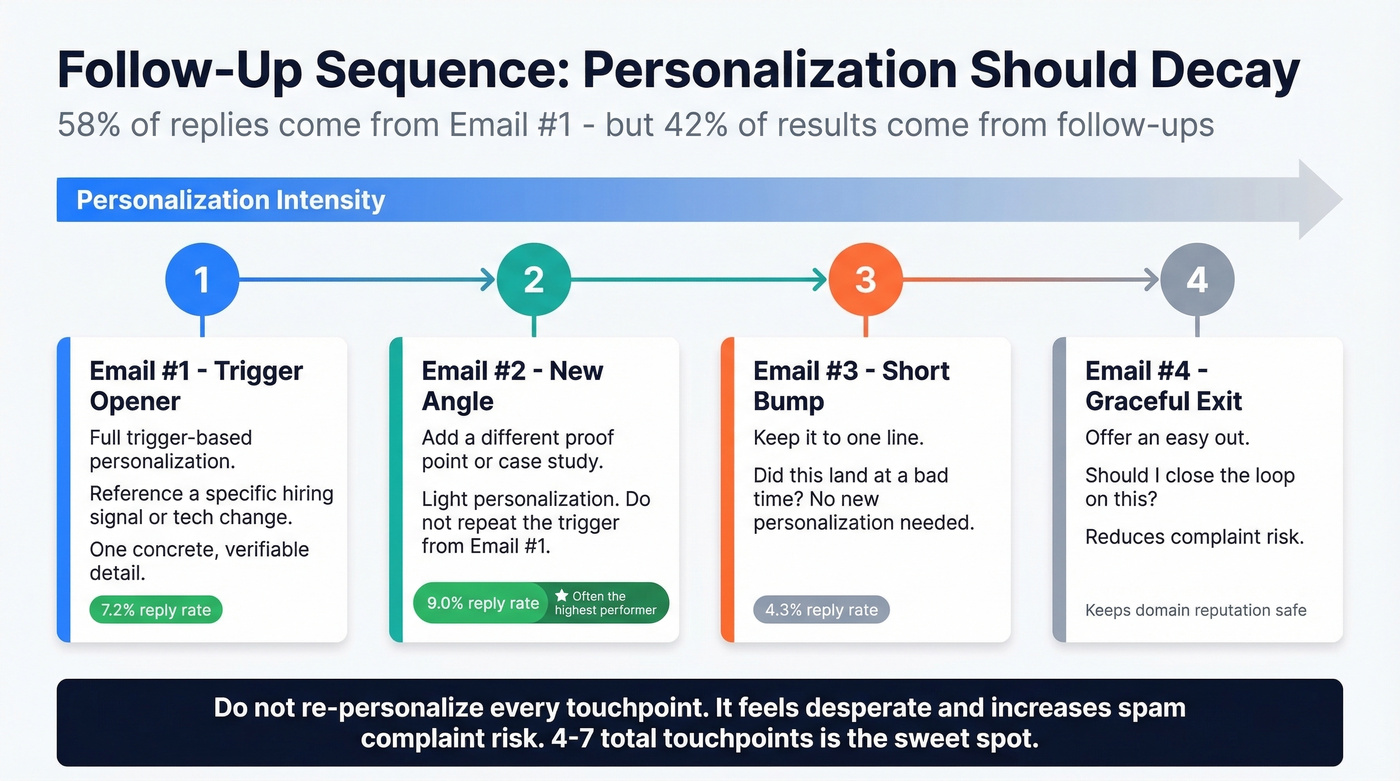
A real sequence from a case study targeting WordPress/WooCommerce companies with 843 contacts:
| Step | Recipients | Replies | Reply Rate | Interested |
|---|---|---|---|---|
| Email #1 | 843 | 61 | 7.2% | 10 |
| Email #2 | 775 | 70 | 9.0% | 6 |
| Email #3 | 690 | 30 | 4.3% | 1 |
| Total | - | ~160 | - | 17 leads |
Email #2 actually pulled the highest reply rate. Follow-ups work - but personalization should decay across the sequence. Email #1 gets the trigger-based opener. Email #2 adds a new angle or proof point. Email #3 is a short bump: "Did this land at a bad time?" By email #4, you're offering a graceful exit. Don't re-personalize every touchpoint. It feels desperate and increases complaint risk. If you want ready-to-use sequences, use these cold email follow-up templates.
Case Study: 3% to 6% in 62 Days
One operator on r/Entrepreneur shared a full rebuild that took their reply rate from 8% down to 3% over 18 months - then back up to 6% in 62 days. The changes tell you everything about what to prioritize:
They scaled from 3 to 7 domains, capping at 26 emails/day per domain. Bounce rate dropped from 11% to under 2% through bulk verification and list cleaning. Email length got cut from 141 words to under 56. Personalization shifted from "company name + industry" tokens to referencing a specific announcement or post in the first line. Timing moved to Tuesday-Thursday, 8-11am recipient timezone, with Wednesday peaking highest - opens jumped 16%.
Total stack cost: ~$420/month. Output: 16 qualified leads per month. That's roughly $26 per qualified lead - hard to beat with any other channel at that price point.
The lesson isn't any single tactic. Personalization only worked after deliverability, data quality, and targeting were fixed. The clever first lines were the last thing they changed.
Tools and Stack Cost
| Tool | Role | Starting Price | Best For |
|---|---|---|---|
| Prospeo | Data + verification | Free (75 emails/mo); ~$0.01/email | Clean data, bounce prevention |
| Clay | Signal enrichment | ~$149-349/mo | Enrichment workflows |
| Instantly | Sending + warmup | ~$37/mo | High-volume agencies |
| Lemlist | Sending + deliverability | ~$55-79/mo/seat | Deliverability-focused teams |
| Saleshandy | Sending | ~$25-30/mo | Lower-volume operators |
| Smartreach | Sending + domains | ~$29/mo | Teams wanting domain buying in-platform |
| Apollo | Database + sending | Free tier; ~$49-59/mo/seat | Solo operators who want one tool |
Starter stack (Prospeo free tier + Clay + Instantly): ~$180-250/month. Enough to run 500-1,000 personalized emails per month with verified contacts, enriched signals, and warmup.
Scaled operator stack (Prospeo paid + Clay + Instantly + 7 domains): ~$420/month. This is the case study setup - 16 qualified leads per month at ~$26 each.
Clay is the enrichment glue that makes trigger-based personalization possible at scale. Without it, you're either manually researching every prospect or sending generic tokens. At ~$149-349/month depending on credit usage, it pays for itself if it lifts your reply rate even half a percentage point.
Apollo works if you're just starting out, but Reddit threads consistently flag its deliverability as weaker than dedicated sending tools. Skip it once you're sending more than a few hundred emails per week. If you’re evaluating providers, start with data enrichment services and sales prospecting databases.
FAQ
Does AI personalization actually improve reply rates?
Generic AI personalization - inserting company name and industry - gets ~1% reply rates. AI that references specific triggers like hiring signals, funding rounds, or tech stack changes hits ~9%. The model matters less than the input data quality.
How many cold emails should I send per day?
Cap at around 26 per domain per account. Scale by adding domains, not increasing volume per domain. Running 7 domains at 26 emails each gives you ~180 sends per day with much lower spam risk than blasting 180 from one domain.
What's the ideal cold email length?
Under 80 words. One campaign cut from 141 to under 56 words and took reply rate from 3% to 6%. One idea, one CTA, no fluff.
How do I keep my bounce rate under 2%?
Use a verification tool with multi-step validation, catch-all handling, and spam-trap removal. A 5-step verification process with 98% accuracy and a 7-day data refresh cycle keeps bounce rates well under 2% - compared to the 6-week refresh cycle most providers offer.
Is personalized cold email still worth it in 2026?
Yes, but only with clean infrastructure. Elite senders still hit 10.7%+ reply rates. The channel isn't dead - bad stacks are. If your deliverability, data, and targeting are solid, cold email remains one of the cheapest ways to generate qualified pipeline.