

The Best Company Email Address Lookup Tools in 2026
A user on r/coldemail ran a "verified" list through their sequencer, hit send, and woke up to a 20%+ bounce rate. Their domain reputation tanked overnight. This isn't an edge case - it's the predictable outcome of trusting the wrong company email address lookup tool.
Email lists decay by roughly 22.5% per year. Nearly a quarter of the contacts you found last January are already dead. The tool you use to find company email addresses and verify them isn't a nice-to-have - it's the foundation your entire outbound motion sits on.
Here's what actually delivers, what overpromises, and where your money is best spent.
Our Picks (TL;DR)
| Pick | Use Case | One-Liner |
|---|---|---|
| Prospeo | Best accuracy & freshness | 98% email accuracy, 7-day refresh, ~$0.01/email. Free tier available. |
| Hunter.io | Best verification + trust | Industry standard with strong verification. Free plan (50 credits/mo). |
| Snov.io | Best international + automation | Strong global coverage, built-in sequences, affordable credits (plus 50 free searches/mo). |
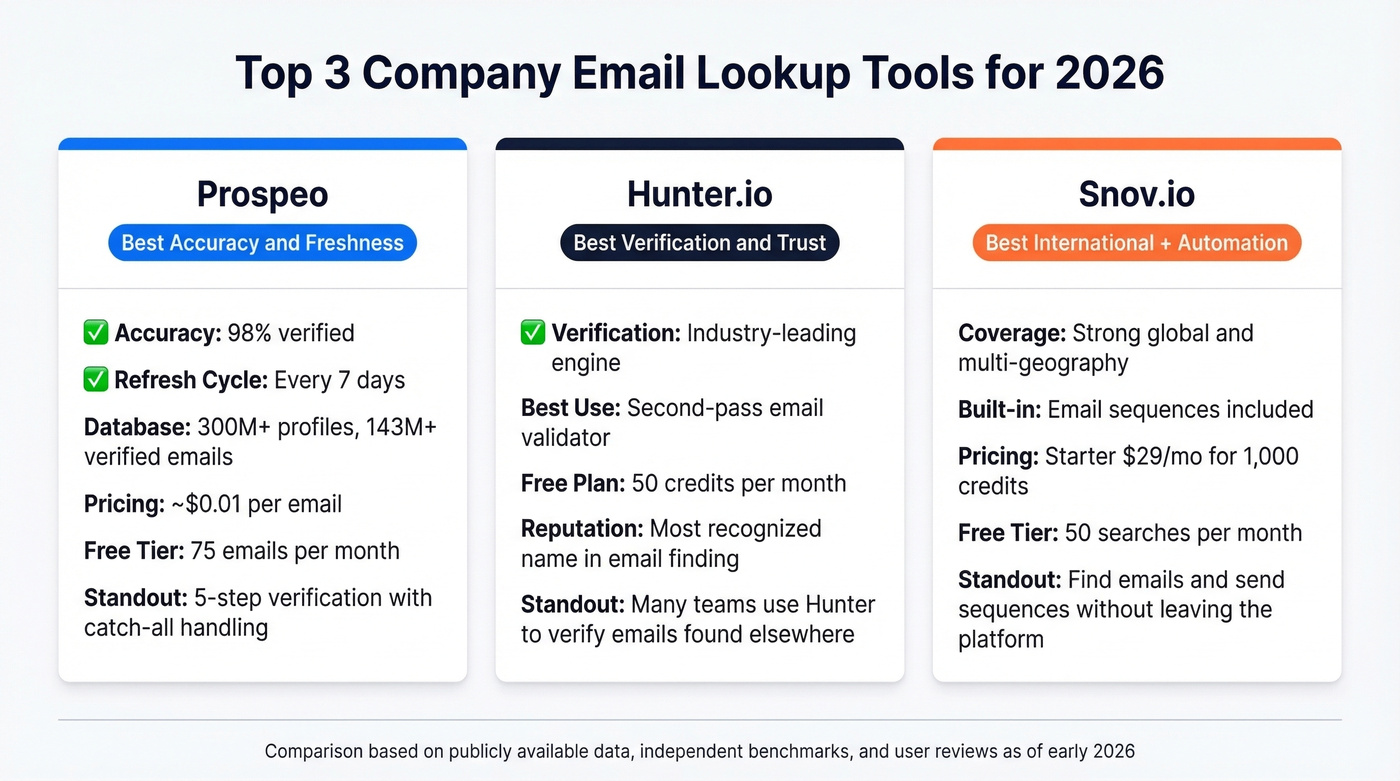
Prospeo wins on raw data quality - 98% verified emails on a weekly refresh cycle is unmatched. Hunter is the safe, well-known choice with excellent verification mechanics. Snov.io is the pick if you're prospecting internationally and want email sequences baked in.
What Matters in a Company Email Search
Feature lists on pricing pages hide the metrics that actually matter. Here's what separates the tools that work from the ones that waste your budget.
If you're building a broader outbound stack, it helps to map these criteria to your overall SDR tools and workflow.
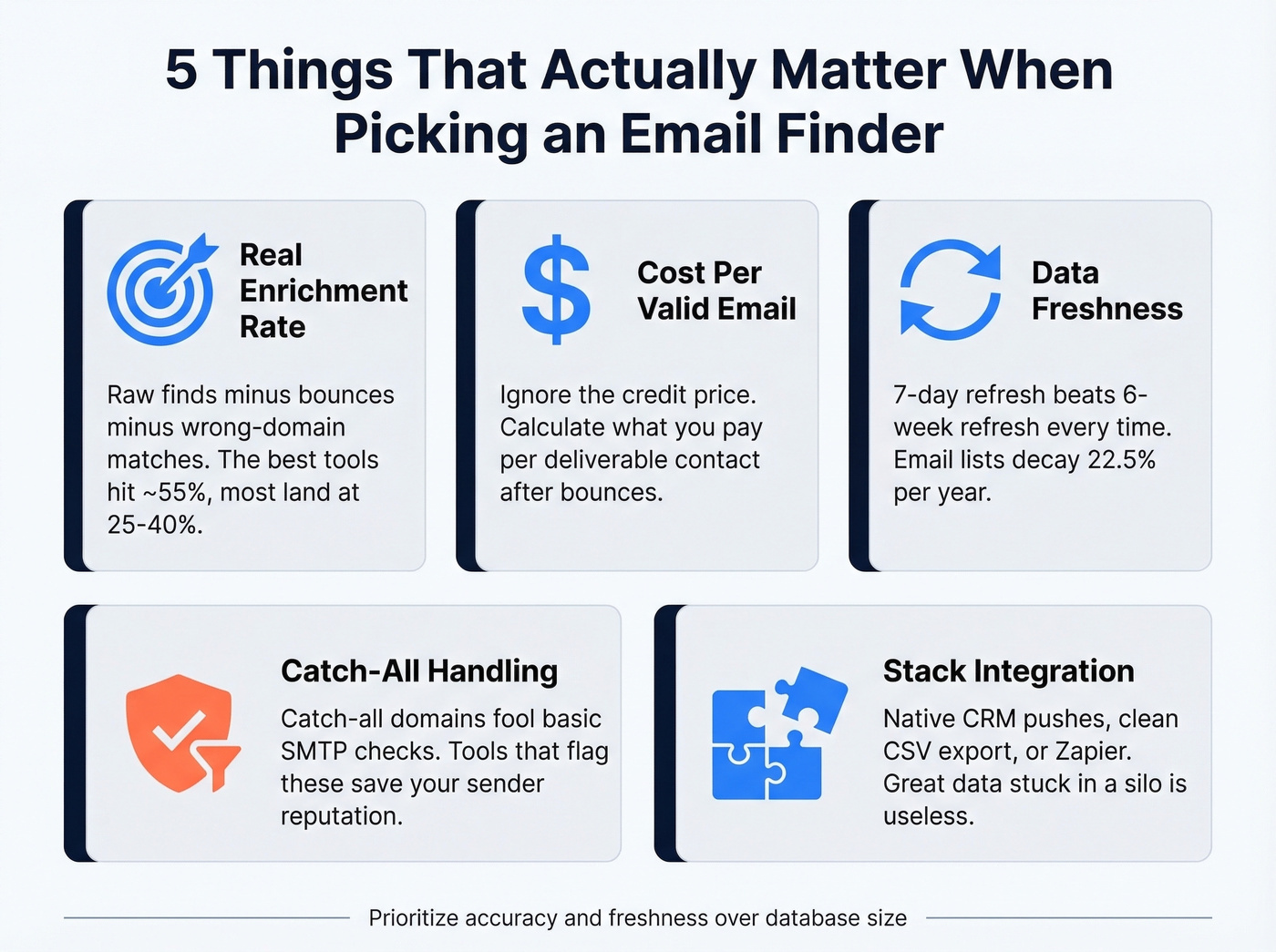
Real enrichment rate vs. raw find rate. Every tool will tell you they "found" an email. The question is whether that email is correct, deliverable, and attached to the right person at the right company. The Dropcontact benchmark draws a sharp line between these: raw enrichment rate minus hard bounces minus wrong-domain matches equals your real enrichment rate. The best tool in that test hit 54.9%. Most landed between 25-40%. That gap is where your bounce rate lives.

Cost per valid email, not cost per credit. A tool charging $0.03/credit sounds cheap until you realize half the emails bounce. Your real cost just doubled. Always calculate what you're paying per deliverable contact, not per lookup.
Data freshness and refresh cycles. This is the most underrated criterion. A database with 300M contacts refreshed every 7 days will outperform one with 500M contacts refreshed every 6 weeks - people change jobs, companies rebrand domains, and catch-all servers get turned off. If the tool isn't re-verifying regularly, you're sending to ghosts.
Catch-all handling. Catch-all domains accept every email sent to them, which means SMTP verification says "valid" even when the specific mailbox doesn't exist. Tools that flag or separately verify catch-all addresses save you from silent bounces that wreck sender reputation.
Integration with your stack. The best data in the world is useless if it takes 45 minutes to get it into your sequencer. Look for native pushes to your CRM and outreach tools, or at minimum a clean CSV export and Zapier connection.
If deliverability is a priority, pair your finder with an email deliverability guide and a dedicated email reputation tools workflow.
Independent Accuracy Benchmarks
Vendor accuracy claims are marketing. Independent benchmarks are closer to truth - though even those come with caveats. Three benchmarks stand out.
The Dropcontact 20K-Contact Benchmark
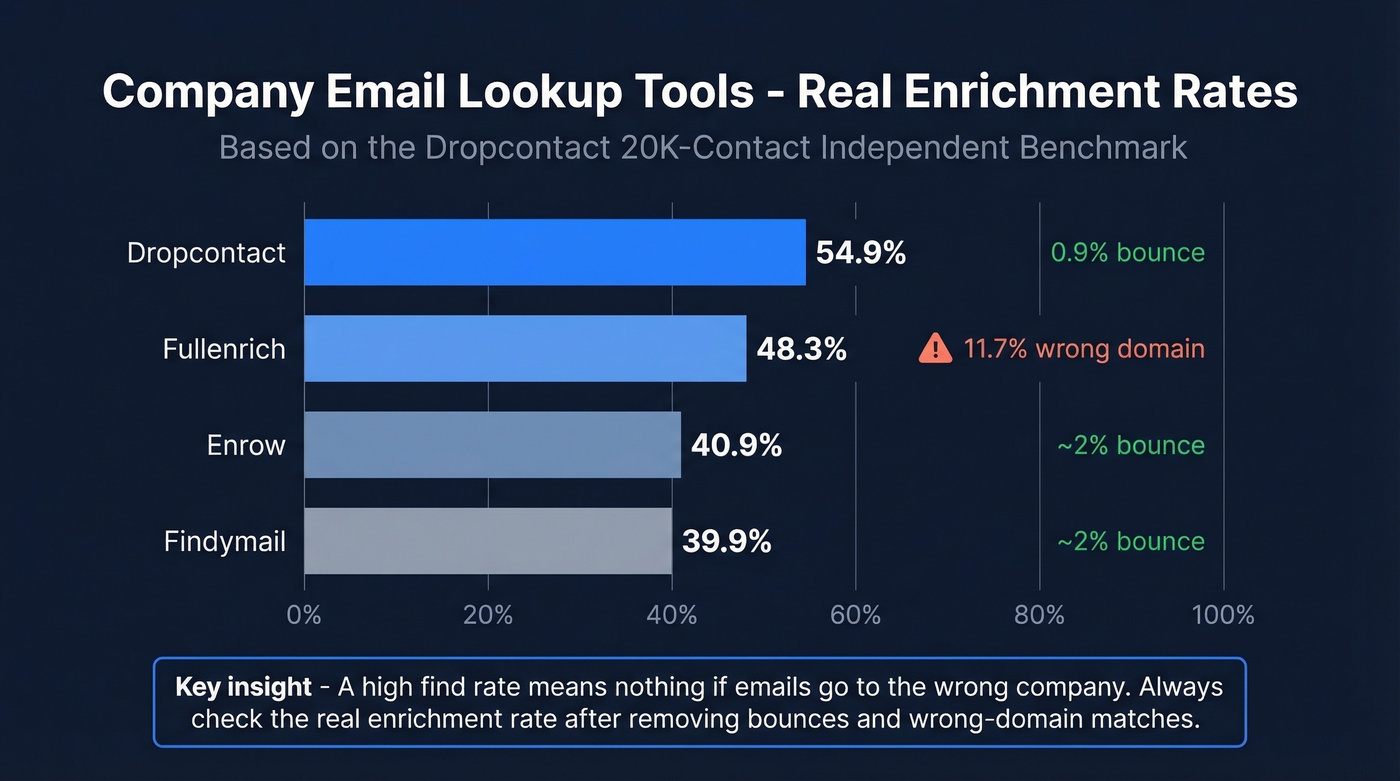
Dropcontact tested 15 tools against 20,000 real contacts - 9,800 US, 9,700 Europe, 500 rest of world. The inputs were bare-bones: first name, last name, company name. No domains, no profile URLs. They then sent real emails to every address found, measuring hard bounces and wrong-domain matches.
The sobering headline: the best real enrichment rate was 54.9%. Most tools clustered between 30-50%.
| Tool | Raw Find Rate | Hard Bounce | Wrong Domain | Real Enrichment |
|---|---|---|---|---|
| Dropcontact | ~57% | 0.9% | 1.0% | 54.9% |
| Fullenrich | ~64% | 3.6% | 11.7% | 48.3% |
| Enrow | ~44% | ~2% | ~1% | 40.9% |
| Findymail | ~43% | ~2% | ~1% | 39.9% |
Fullenrich's raw find rate looks impressive at 64%, but that 11.7% wrong-domain rate is a red flag - nearly 1 in 8 emails went to the wrong company entirely. High find rates mean nothing if they're padded with bad matches.
One caveat worth noting: Dropcontact published this benchmark and also won it. The live-send methodology is genuinely rigorous, but keep the incentive structure in mind.
The Clay/Bounceban Financial Services CEO Test
A separate benchmark run through Clay targeted Financial Services CEOs - a notoriously hard segment due to security-conscious domains. Results were validated through Bounceban, a third-party verifier.
If you're building lists in Clay, this pairs well with a more detailed Clay list building workflow.
| Tool | Find Rate | Accuracy | Price/Valid |
|---|---|---|---|
| Kitt AI | 42.5% | 97.0% | $0.0025 |
| Findymail | 49.6% | 76.0% | $0.011 |
| Leadmagic | 53.0% | 63.5% | $0.013 |
| Dropcontact | 54.0% | 58.0% | $0.038 |
Why Results Vary So Much
A third benchmark from Anymail Finder tested 5,000 contacts sourced from Sales Navigator - a fundamentally different input type than name-and-company lookups. Results diverged dramatically from the other two tests.
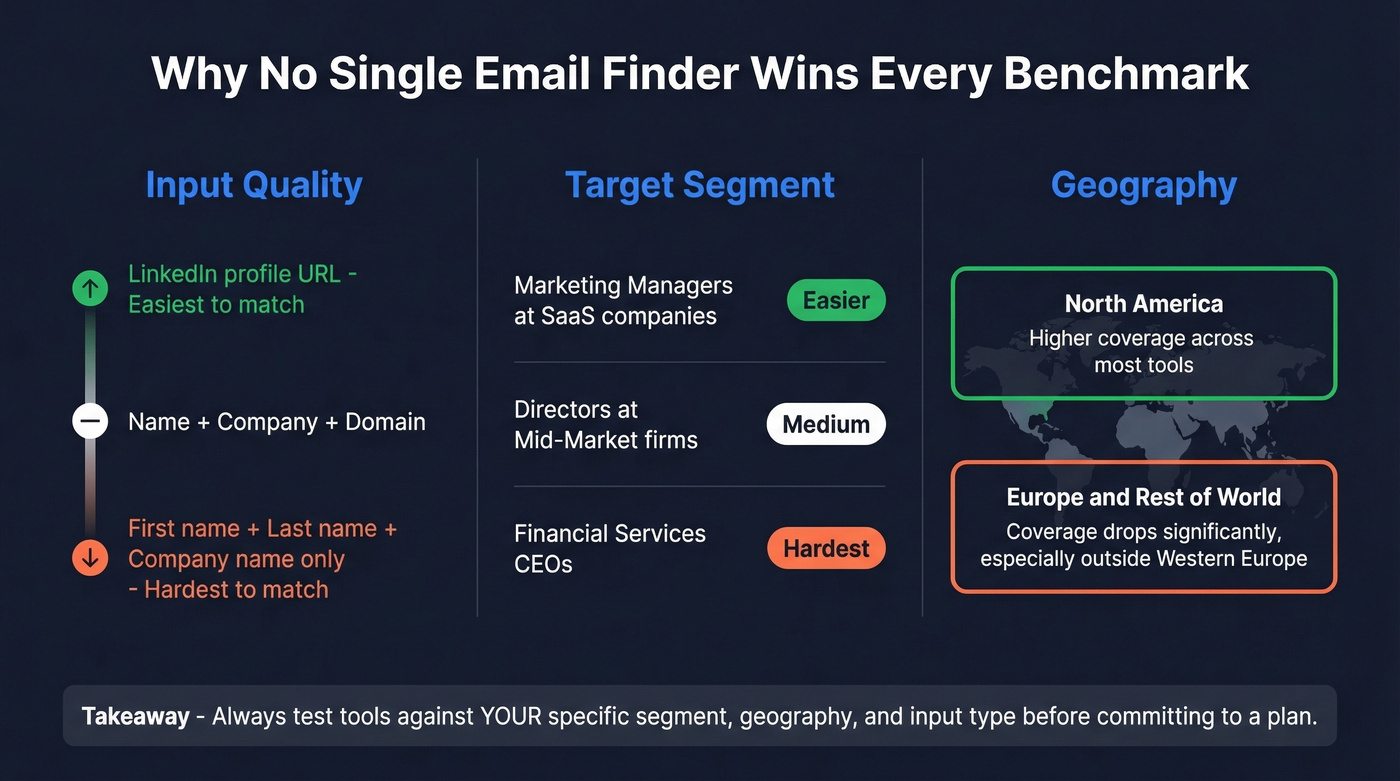
The takeaway: benchmark results shift based on input quality, target segment, and geography. Financial Services CEOs are harder than marketing managers at SaaS companies. European contacts are harder than US ones. No single tool wins every test, but the ones with higher accuracy consistently waste less of your money and protect your domain.
10 Best Email Lookup Tools
1. Prospeo
Use this if you've been burned by stale data and need emails you can actually send to without watching your bounce rate climb.
Prospeo's database covers 300M+ professional profiles with 143M+ verified emails, all on a 7-day data refresh cycle. That weekly refresh is the headline differentiator - the industry average is roughly 6 weeks. The verification pipeline runs a 5-step process including catch-all handling, spam-trap removal, and honeypot filtering, all on proprietary infrastructure. The result is 98% email accuracy.
If you're comparing providers at a category level, see our breakdown of data enrichment services and B2B company data providers.

Snyk's team saw their bounce rate drop from 35-40% to under 5% after switching, generating 200+ new opportunities per month. Stack Optimize built to $1M ARR using it with 94%+ deliverability across all clients - zero domain flags.
Search filters include buyer intent powered by Bombora, technographics, job changes, headcount growth, and funding signals. The Chrome extension (40K+ users) pulls verified contacts from any website or CRM in one click. Pricing is credit-based at roughly $0.01 per email, with a free tier of 75 emails and 100 Chrome extension credits per month. No contracts, cancel anytime.
Best for: SDR teams, agencies, and anyone whose domain reputation has taken a hit from bad data.
2. Hunter.io
Use this if you want the most trusted name in email finding with rock-solid verification mechanics.
Skip this if you need a large database for cold prospecting at scale - Hunter's strength is verification, not volume.
Hunter is the tool most people think of first when they hear "email finder," and for good reason. The verification engine is excellent - many teams use Hunter as a second-pass validator even when they source emails elsewhere. On Reddit, practitioners consistently describe it as "very popular" with "solid verification accuracy." The consensus on r/sales is that Hunter is best treated as a verification layer rather than a primary prospecting database.
If you're weighing options, our Hunter alternatives roundup goes deeper on tradeoffs.

Best for: Teams that already have a contact source and need a reliable verification step before sending.
3. Snov.io
Snov.io bundles more functionality into one platform than any other mid-market email finder. It's also a common pick for teams prospecting across multiple geographies.

The built-in email sequences are a genuine differentiator. Most email finders make you export to a separate tool for outreach - Snov.io lets you go from finding to sending without leaving the platform. The Starter plan runs $29/mo (billed annually) for 1,000 credits, Pro is $74/mo for 5,000 credits, and the LinkedIn automation add-on is $69/mo extra per slot, which adds up fast for multi-channel teams. Snov.io also includes 50 free email searches per month when you sign up.
Best for: International prospecting teams and solo operators who want finding + sequencing in one tool. Skip this if you only target North America and don't need built-in automation - you'll pay for features you won't use.
4. RocketReach
| Pros | Cons |
|---|---|
| Strong accuracy, especially for North America | $80-$300/user/month |
| Direct dials included on higher tiers | Additional lookups cost $0.30-$0.45 each |
| Solid tech sector coverage | Opaque pricing page |
One Reddit user testing multiple finders chose RocketReach because it was "most accurate so far" with a meaningful bounce rate reduction. The data quality is genuinely strong for North American contacts in tech and professional services. But the pricing is 3-4x what you'd pay with Hunter for comparable volume. If your average deal size is modest, the math probably doesn't work.
Best for: Teams with budget who prioritize accuracy above all else.
5. GetProspect
GetProspect's standout feature is credit rollover - unused credits carry forward up to one month's allowance. That's a small thing that matters a lot for teams with uneven prospecting volume. You won't lose credits during slow months.
The platform also includes proprietary catch-all email verification, which most competitors either skip or charge extra for. Pricing starts at $49/mo for 1,000 valid emails, with verification add-on packs as low as $29 for 10,000 verifications. No charge for duplicates.
Best for: Teams with variable prospecting volume who hate losing unused credits.
6. Anymail Finder
You only pay for verified emails. No results, no charge. Their domain search is particularly generous - one credit gets you up to 20 valid emails from a single domain. That's exceptional value for account-based prospecting where you need multiple contacts per company.
Pricing starts at $9/mo (billed annually) for 600 credits/year. The Standard plan at $32/mo gets you 12,000 credits/year. Unused credits roll over up to 2x your plan size. The database is mid-sized, so don't expect it to compete on raw coverage - but for targeted domain-level searches, the value is hard to beat.
Best for: Account-based teams who need multiple contacts per company without burning through credits.
7. Skrapp.io
Lightweight email finder with a clean interface and straightforward pricing. Free tier gives you 100 credits, paid plans start around $50/mo. It's a solid option if you need a basic business email search without the complexity of a full prospecting platform, but it won't compete on database depth or verification sophistication with the top-tier tools.
Best for: Teams needing basic email lookup without platform complexity.
8. Apollo.io
Apollo's database covers 250M+ contacts and the free tier is generous, making it the default starting point for many teams. The catch: data staleness is a recurring complaint on Reddit, especially for contacts outside the US. Multiple threads describe finding outdated job titles and defunct email addresses for European and APAC contacts. Paid plans start at ~$49/user/mo, and per-seat pricing gets expensive fast for larger teams - a 5-person SDR team is looking at $250/mo before you've sent a single email.
If you're using Apollo heavily, it's worth understanding lead enrichment and how staleness shows up in downstream metrics.
Best for: Early-stage teams who need a free starting point and primarily target US contacts.
9. Mailmeteor
Free, no-signup email finder tool that works for occasional one-off lookups. It's not a database or a prospecting platform - think of it as a quick utility when you need to find someone's corporate email and don't want to create an account anywhere. It's built for professional/business email addresses tied to company domains, not personal inboxes like Gmail or Yahoo.
Best for: One-off lookups when you don't want to sign up for anything.
10. Cognism
Enterprise-grade data with exceptional EU/UK coverage and GDPR-first compliance. If you're selling into Europe, Cognism's mobile and email data for that region is among the best available. The price reflects it - expect custom pricing starting around $1,000+/mo, which puts it firmly in enterprise territory. Not worth it for teams under 10 reps. But for large orgs with European pipeline targets, it's the gold standard for hard-to-reach contacts.
Best for: Enterprise teams selling into EU/UK markets with compliance requirements.

The benchmarks show the best tools hit ~55% real enrichment. Prospeo's 98% email accuracy and 7-day refresh cycle mean fewer bounces, fewer wrong-domain matches, and more emails that actually land. At $0.01/email, your cost per valid contact stays low.
Find company emails that don't bounce. Start with 75 free lookups.
Stale data is the #1 reason company email lookups fail. Prospeo refreshes 300M+ profiles every 7 days - not every 6 weeks. Snyk dropped their bounce rate from 35% to under 5% and added 200+ opportunities per month.
Stop paying for emails that were valid last quarter. Switch to weekly-refreshed data.
Pricing Comparison
The sticker price means nothing if half your emails bounce. A tool charging $0.03/credit that delivers 50% valid emails actually costs $0.06 per usable contact. Always think in terms of cost per valid email.
If you want the math behind bounce-driven cost inflation, see our email bounce rate breakdown.
| Tool | Free Tier | Paid Start | Credits Included | ~Cost/Email | Notable |
|---|---|---|---|---|---|
| Hunter | 50 credits/mo | $49/mo | 2,000 credits | ~$0.025 | 0.5 credit per verify |
| Snov.io | 50 searches/mo | $29/mo (annual) | 1,000 credits | ~$0.03 | Sequences included |
| GetProspect | 50 emails | $49/mo | 1,000 emails | ~$0.049 | Credits roll over |
| Anymail Finder | 100 credits (7-day expiry) | $9/mo (annual) | 600/year | ~$0.18 | Pay only for verified |
| RocketReach | - | ~$80/user/mo | Varies | $0.30-$0.45 extra | Premium accuracy |
| Skrapp | 100 credits | ~$50/mo | Varies | ~$0.05 | Basic and clean |
| Apollo | Free tier | ~$49/user/mo | Per-seat | ~$0.07 | Per-seat adds up |
| Mailmeteor | Free (no signup) | - | - | Free | Not a full platform |
| Cognism | - | ~$1K+/mo | Custom | Not public | Enterprise, strong EU/UK |
Which Tool for Which Use Case
Here's the thing: most teams don't need the biggest database. They need the freshest one. If you're running lean outbound with smaller deal sizes, you're better off with a smaller, accurate tool than an enterprise platform you'll use 20% of.
Here's how we'd match tools to scenarios.
Solo founder or SMB on a tight budget: Start with Hunter's free plan (50 credits/month) or Mailmeteor for one-off lookups. Both let you validate your ICP before spending money.
If you're still building pipeline from scratch, these pair well with sales prospecting techniques and a shortlist of free lead generation tools.
Agency running multi-client campaigns: A self-serve model with no contracts means you can spin up and down without annual commitments. Stack Optimize built to $1M ARR with 94%+ deliverability across all clients - zero domain flags.
International prospecting (EMEA/APAC): Snov.io for finding + sequencing in one tool, or Cognism if you have the budget and need enterprise-grade EU compliance.
Enterprise with strict compliance needs: Cognism for EU/UK. Both Cognism and Prospeo are GDPR compliant with documented data sourcing, so layer them if you need coverage plus verification.
Account-based teams: Anymail Finder's one-credit-for-20-emails domain search is purpose-built for this. GetProspect's credit rollover also works well for teams with uneven campaign cadences.
Why Data Freshness Beats Database Size
Let's be honest - a smaller, fresher database will outperform a larger, staler one every single time. We've seen this validated repeatedly in our own testing and across every independent benchmark we've reviewed.
Email lists decay by ~22.5% per year, roughly 2% per month. If a tool refreshes its data every 6 weeks (the industry average), about 3% of contacts have already gone stale between refreshes. Scale that to a 250M-contact database and you're looking at millions of dead emails sitting in the system, marked as "verified." A 7-day refresh cycle cuts that decay window dramatically - instead of sending to contacts verified 6 weeks ago, you're working with data that's at most a week old.
The difference shows up directly in bounce rates. Teams regularly cut bounces from 35%+ to under 5% simply by switching to a tool with a faster refresh cycle.
When someone pitches you on database size as the primary differentiator, ask them how often they re-verify. That single question will tell you more about data quality than any feature comparison ever will.
How to Find Emails Without Paid Tools
Before committing to a paid corporate email lookup tool, there are a few manual methods worth knowing. Check the company's website for a team or about page - many companies list email addresses for key contacts directly. Professional profiles sometimes reveal email patterns when combined with a company's domain. You can also try common email formats (first.last@domain.com, firstinitiallast@domain.com) and verify them through a free tool like Hunter or Mailmeteor.
If you need a more systematic approach, our name to email guide covers patterns and validation steps.
These approaches work for occasional lookups, but they don't scale. Once you're sending more than a handful of emails per week, the time cost of manual research eclipses what you'd spend on a paid tool - which is exactly where the tools above earn their keep.
Staying Compliant
Finding business emails is legal. Sending to them irresponsibly isn't. The practical checklist:
- Document the source of every email in your CRM. Record where you found it and when. If a regulator or prospect asks, you need an answer.
- Verify before you send. GDPR fines have reached EUR 5.88B across 2,245 cases since 2018. Running a verification pass isn't optional - it's insurance.
- Honor opt-outs immediately. Not within 10 days, not at the end of your sequence. Immediately. CAN-SPAM requires processing opt-outs within 10 business days, GDPR expects prompt compliance, and your reputation depends on it.
- Use tools with GDPR-compliant data sourcing. Ask your vendor where their data comes from and whether they enforce opt-outs globally. If they can't answer clearly, that's your answer.
- Keep your lists current. Re-verify any list older than 30 days before sending. Between job changes and domain expirations, a month-old list is already degrading.
For deeper compliance and risk context, see our guide on is it illegal to buy email lists.
FAQ
Are email lookup tools legal?
Yes - finding publicly available business email addresses is legal in most jurisdictions. The legal risk comes from how you use those emails, not from finding them. Document your data sources, follow GDPR and CAN-SPAM rules when sending outreach, and honor opt-outs immediately.
How accurate are email finders really?
Most vendors claim 95-99% accuracy, but independent benchmarks tell a different story. The Dropcontact benchmark showed real enrichment rates topping out around 55%. The gap comes from stale data, wrong-domain matches, and catch-all addresses that pass SMTP checks but still bounce in production.
What's a good free company email address lookup tool?
Hunter offers 50 free credits per month with strong verification, while Mailmeteor requires no signup at all. Prospeo's free tier includes 75 emails and 100 Chrome extension credits monthly - the most generous allowance for teams running real outbound tests before committing to a paid plan.
Why do "verified" emails still bounce?
Most verification is SMTP-level - it checks if the mailbox exists at that moment. But people change jobs, domains expire, and catch-all servers accept everything regardless. Only tools with frequent data refreshes catch these changes before you hit send. A tool refreshing weekly will catch far more drift than one refreshing every 6 weeks.
How do I find a decision-maker's email?
Use a company email address lookup tool with job title filters - Prospeo, Apollo, and Snov.io all let you search by seniority and department. Combine the company domain with the decision-maker's name, then run the result through verification before sending. For hard-to-reach executives, layering two tools (one for finding, one for verifying) typically yields the best results.