

Contact Lists: The Complete Guide for 2026
You're an SDR trying to hit 60 dials a day, and half your evening disappears building tomorrow's call sheet. The actual selling takes less time than finding people to sell to. Most guides on contact lists are Outlook help docs and Gmail tutorials - so let's skip that and talk about what actually matters: building, maintaining, and using them to drive revenue.
What You Need (Quick Version)
If you're here for personal contacts, Google Contacts or Outlook handles it. For B2B sales or marketing lists, you need three things: a data source, a CRM (HubSpot's free tier works fine to start), and a verification step before any campaign goes out. That's the whole stack. Everything below is the detail behind those three pieces.
What Is a Contact List?
A contact list is a structured collection of people's details organized for a specific purpose - reaching out, following up, or staying in touch. At its simplest, it's names and phone numbers. In a B2B context, it's a targeted database of decision-makers you want to engage.
You probably already have lists you didn't intentionally build. Gmail auto-populates contacts from people you've emailed. Your phone syncs records across devices. These passive collections are different from a deliberate contact network - a curated set of relationships you actively maintain and segment for outreach.
Typical fields in a useful B2B list: name, email address, phone number, company, job title, tags or segments, and notes. Some teams add firmographic data like company size, industry, and revenue. Others layer in intent signals or technographic data to prioritize who gets contacted first.
Here's the concept most people miss: you don't want one giant master list. You want a master database that feeds purpose-specific segments - organized by campaign, persona, buying stage, or territory. A single unsegmented file is just a spreadsheet. Segmented lists are what actually drive results.
Types and Use Cases
Contact lists serve two fundamentally different purposes: personal management and B2B list building. The rules, tools, and best practices differ dramatically across types.
| Type | Use Case | Key Fields | Typical Tool |
|---|---|---|---|
| Personal | Family, friends | Name, phone, email | Google Contacts |
| Sales/Prospect | Outbound outreach | Title, company, email, phone | B2B data platform |
| Marketing/Newsletter | Opt-in campaigns | Email, preferences, segments | Mailchimp, ConvertKit |
| Customer/CRM | Existing clients | Full history, deals, notes | HubSpot, Salesforce |
| Phone/Mobile | Call campaigns | Direct dials, mobiles | Dialer + data provider |
Personal lists are straightforward - Google Contacts syncs across devices, Outlook integrates with Microsoft 365, and Apple's iCloud handles the iOS ecosystem. For most people, the built-in tools work fine.
Marketing lists require opt-in consent and live inside your email platform. Customer lists sit in your CRM with full interaction history attached. The category that causes the most confusion and the most compliance headaches is the sales prospect list - contacts you've identified as potential buyers but who haven't opted in to hear from you. How you source, verify, and use these lists determines whether your outreach lands in inboxes or spam folders.
What Makes a Good List
A strong contact list has four characteristics. It's targeted - built around your ICP, not a generic industry dump. It's actionable - verified emails and direct dials, not info@ addresses. It's prioritized - segmented by intent, fit, or engagement level. And it's dynamic - regularly updated as people change jobs and companies evolve.
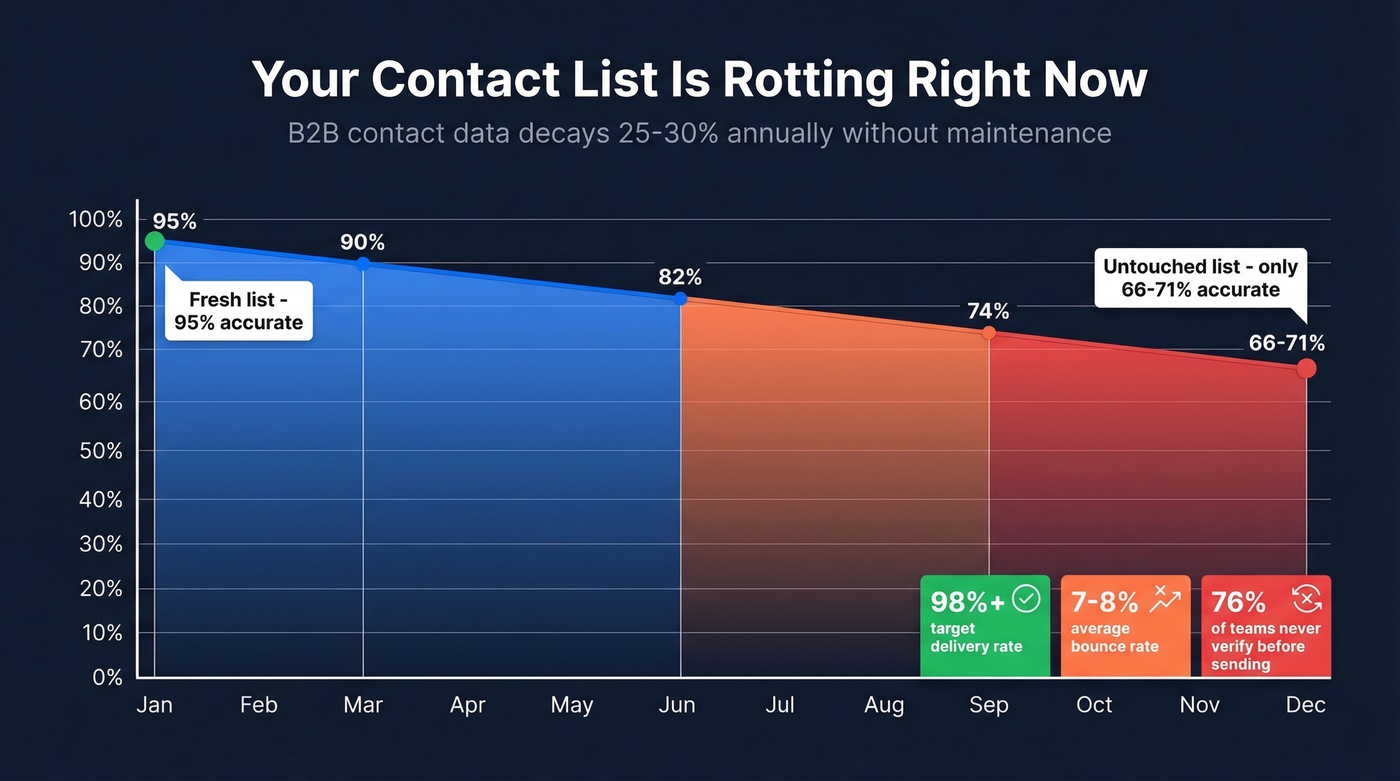
The biggest problem isn't building lists. It's maintaining them.
B2B contact data decays 25-30% annually. People change jobs, companies get acquired, email domains shift. A list that was 95% accurate in January drops to 66-71% by December if you don't touch it. That gap is what separates teams that scale outreach from teams that watch deliverability crater quarter after quarter.
| Metric | Target | What Most Teams Actually Hit |
|---|---|---|
| Email delivery rate | 98%+ | 90-94% |
| Bounce rate | Under 2% | 7-8% |
| Practitioner rule of thumb | Under 5% | Per r/b2b_sales |
| Lists verified pre-send | 100% (ideal) | Only 23.6% actually do it |
That last stat is staggering. Over three-quarters of B2B marketers send campaigns without verifying their lists first. Then they wonder why deliverability tanks.
Even clean lists can land in spam if your domain authentication is weak. Only 7.6% of B2B senders enforce DMARC policies. Fully authenticated and warmed domains can hit 85-95% inbox placement, while everyone else gambles with every send.
How to Build Contact Lists
The process looks completely different depending on whether you're building an opt-in marketing list or a B2B prospecting list.
For Email Marketing (Opt-In Lists)
- Create a lead magnet worth exchanging an email for - a template, checklist, benchmark report, or free tool. Generic "subscribe to our newsletter" forms convert at a fraction of the rate.
- Place signup forms where traffic already exists: blog posts, landing pages, exit-intent popups, webinar registration pages.
- Use double opt-in. Yes, it reduces signups by 20-30%. It also eliminates fake emails, bots, and spam traps. Your deliverability will thank you.
- Segment from day one. Tag subscribers by source, interest, or persona at the point of capture. Retroactive segmentation is painful. Mailchimp and Campaign Monitor make this straightforward with form fields and automation rules.
For B2B Sales Prospecting
This is where most teams burn time - and where the "too noisy" problem lives. Practitioners on Reddit consistently flag tools like Apollo as requiring heavy manual filtering to get usable output. The workflow below eliminates that noise at the source.
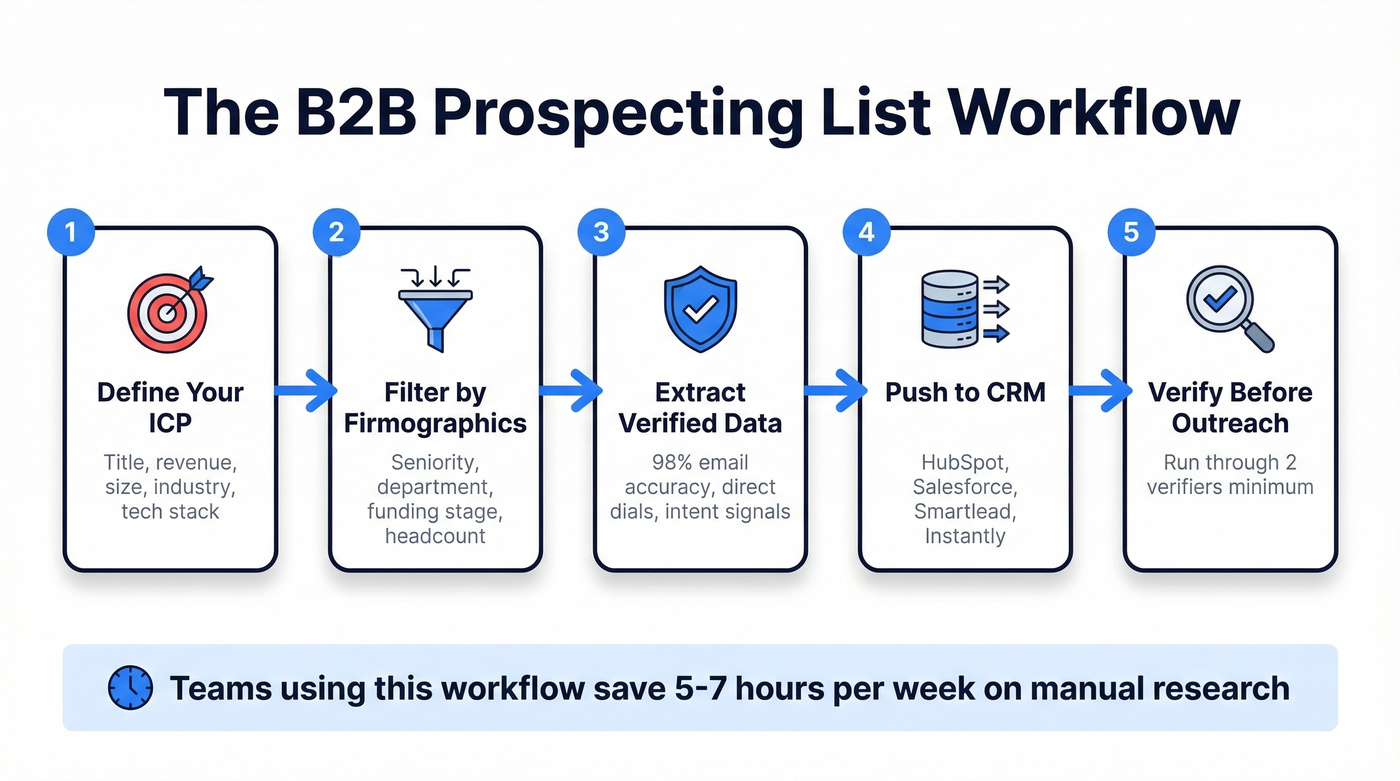
1. Define your ICP. Be specific. "VP of Sales at mid-market SaaS companies" isn't enough. Add firmographics: $10M-100M revenue, 50-500 employees, US-based, using Salesforce. The tighter your filters, the less noise in your output. If you need a starting point, use an Ideal Customer Profile Template to score fit consistently.
2. Filter by firmographics and demographics. Job title, seniority, department, company size, industry, tech stack, funding stage. The more dimensions you filter on, the higher your conversion rates downstream.
3. Extract verified contact data. This is where your data platform choice matters most. Prospeo covers 300M+ professional profiles with 30+ search filters - including buyer intent on 15,000 topics, technographics, job change signals, and headcount growth. Email accuracy runs 98%, and the data refreshes every 7 days versus the six-week industry average. The free tier gives you 75 emails per month to test before committing. If you're comparing vendors, start with a shortlist of email list providers and validate accuracy before you scale.

4. Push to your CRM. Native integrations with HubSpot, Salesforce, Smartlead, Instantly, and Lemlist mean you're not manually exporting CSVs. Contacts flow directly into your sequences. If you're still stitching tools together, follow a simple guide to connect outreach tool to CRM.
5. Verify before outreach. Even with a high-accuracy source, run a verification pass. One RevOps practitioner on r/salesdevelopment runs lists through two verifiers minimum before any campaign goes out. If you're troubleshooting bounces, use an email bounce rate breakdown to pinpoint the root cause.
Teams using this workflow save 5-7 hours per week that previously went to manual research. That's the difference between an SDR who makes quota and one who spends half their day copying names from web pages.

Your contact lists decay 25-30% every year. Prospeo refreshes its 300M+ profiles every 7 days - not the 6-week industry average. With 98% email accuracy and 30+ ICP filters including buyer intent and technographics, you build lists that actually connect.
Start with 75 free verified emails and see the difference clean data makes.
Should You Buy a List?
The buy-vs-build debate comes up constantly on Reddit, and the answer is almost always the same: build your own.
Buying a list is faster. Services like ContactLists.com sell pre-built lists for $199-$595 depending on size and targeting. You get contacts immediately. The problem is what comes next - stale data, unverified emails, no consent documentation, and bounce rates that torch your domain reputation.
Some vendors argue that buying lists can be CAN-SPAM compliant if the provider obtained proper consent. That's technically true for US-only email outreach. But under GDPR, you need documented proof of explicit opt-in for EU contacts, and purchased lists almost never provide that. The compliance risk alone makes buying a losing bet for any team with European prospects. If you want the full breakdown, see Is It Illegal to Buy Email Lists?
Here's the thing: if your deal sizes are small enough that volume matters more than precision, you probably don't need a purchased list - you need a better prospecting workflow. The teams that buy lists are usually the ones who haven't invested 30 minutes setting up proper ICP filters in a data platform. The upfront time investment pays for itself within the first campaign.
Compliance Essentials
Email addresses are personal data under GDPR - full stop. That single fact changes how every B2B team in the world should think about their contact data. Cumulative GDPR fines have hit roughly EUR 5.88 billion across 2,245 enforcement actions, and regulators aren't slowing down.
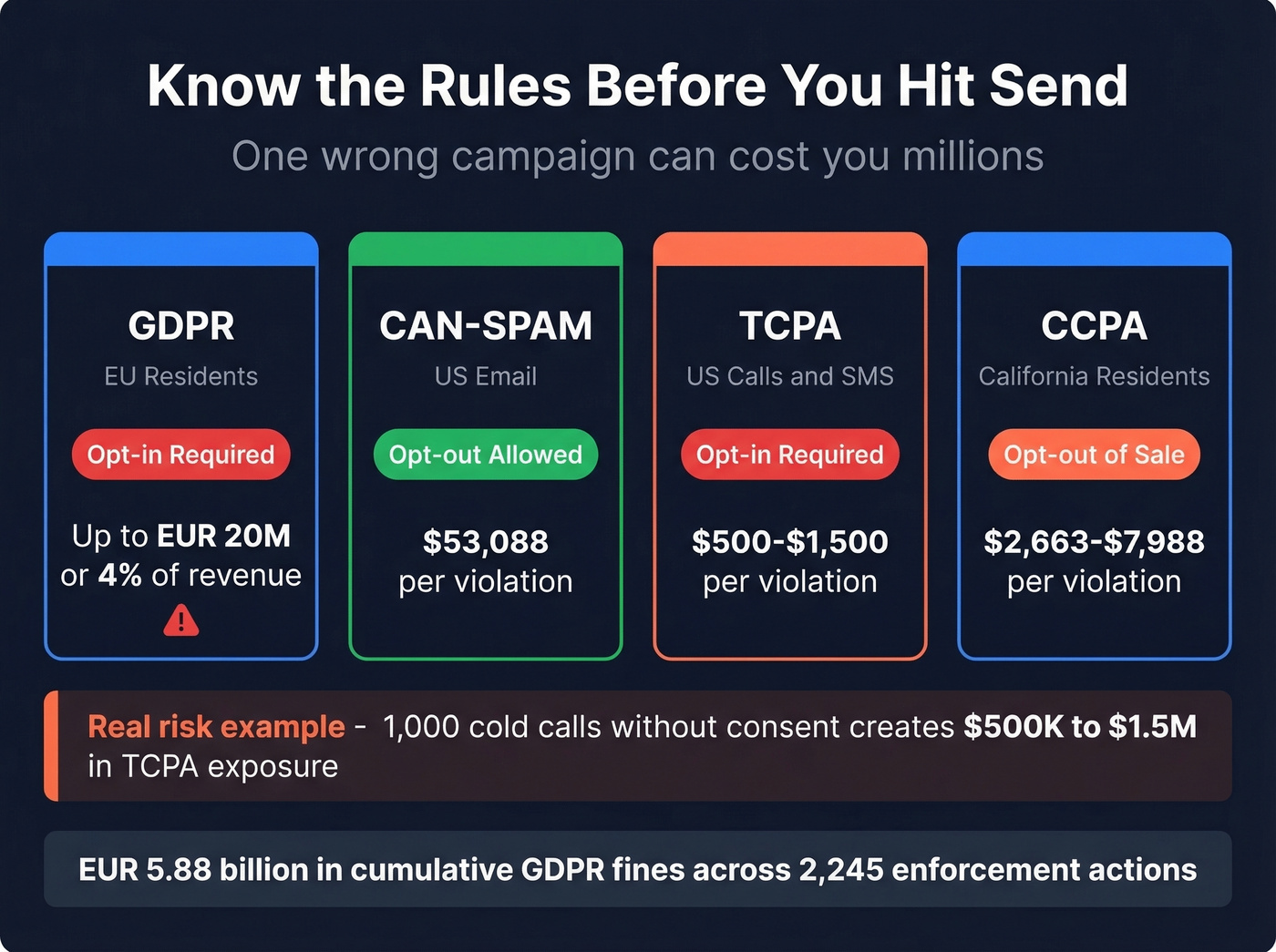
| Regulation | Scope | Consent Model | Penalty Range |
|---|---|---|---|
| GDPR | EU residents | Opt-in required | Up to EUR 20M or 4% revenue |
| CAN-SPAM | US email | Opt-out allowed | Up to $53,088 per violation |
| TCPA | US calls/SMS | Opt-in required | $500-$1,500 per violation |
| CCPA | California residents | Opt-out of sale | $2,663-$7,988 per violation |
Let's make the risk concrete. A cold call campaign to 1,000 contacts without proper consent creates $500K-$1.5M in potential TCPA exposure. That's not theoretical - it's the math regulators use.
The practical compliance checklist is shorter than most people think: document consent for every contact, honor opt-outs within 10 business days, maintain clean and current lists, include your physical address and unsubscribe mechanism in every email, and train your team on what's allowed. Most violations happen because someone on the team didn't know the rules, not because they deliberately broke them.
How to Keep Your List Clean
B2B contact data decays 25-30% per year. People change jobs every 2.7 years on average, companies rebrand, domains expire. If you're not actively maintaining your records, you're actively degrading them.
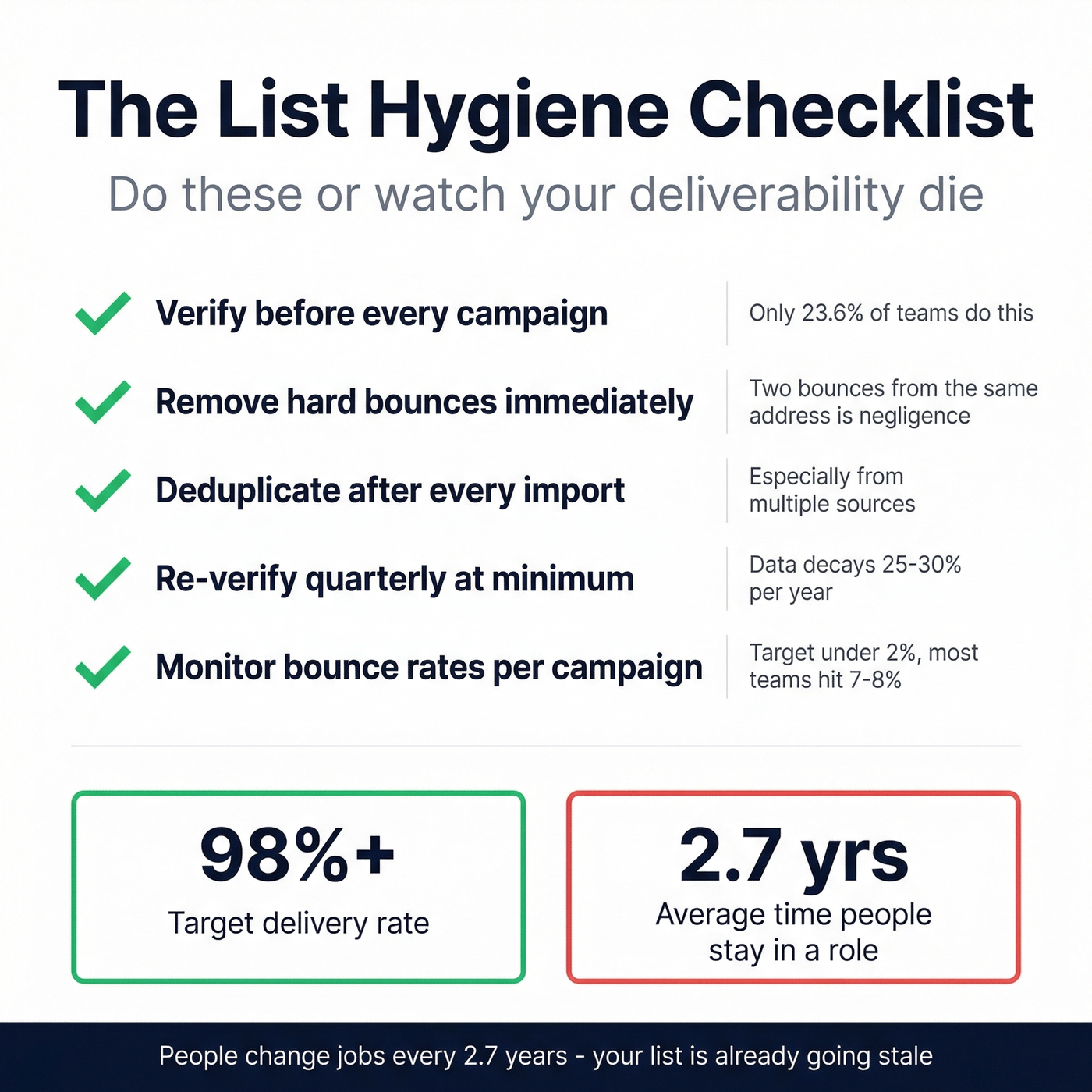
Verify before every campaign. Not quarterly. Every time. Only 23.6% of B2B marketers do this, which is why average bounce rates run 7-8% instead of the sub-2% target. If you need a deeper playbook, start with an email deliverability guide that covers authentication, list quality, and sending practices.
Remove hard bounces immediately. One bounce is data. Two bounces from the same address is negligence.
Deduplicate regularly. Especially after importing from multiple sources. Duplicate contacts create duplicate outreach, which creates annoyed prospects.
Flag disengaged contacts. Anyone who hasn't opened or clicked in 6+ months gets re-verified or removed.
Use a refresh cycle, not a one-time scrub. A 7-day data refresh cycle - with catch-all handling, spam-trap removal, and honeypot filtering - is the standard your data should meet. One customer, Meritt, saw bounce rates drop from 35% to under 4% after switching to continuously verified data, and their pipeline tripled from $100K to $300K per week.
We've seen teams run a single verification pass on import day and then wonder why deliverability craters three months later. The data doesn't stay clean on its own. Treat list hygiene like a recurring process, not a one-time project.
How to Organize Business Contacts
Once your list grows past a few hundred records, finding the right person at the right time becomes its own challenge. The goal is to centralize business contacts in a single source of truth and then layer on structure so every rep can pull the exact segment they need in seconds.
Pick one system of record. A CRM like HubSpot or Salesforce is ideal. If you're pre-CRM, a shared Google Sheet with enforced column formats works temporarily - but you'll outgrow it fast. If you're evaluating options, use these examples of a CRM to map features to your stage.
Standardize fields at the point of entry. Job title formats, company name casing, phone number formatting - inconsistency here makes deduplication and filtering nearly impossible later.
Tag by persona and buying stage. At minimum, every contact should carry an ICP segment tag and a lifecycle stage. This lets you build targeted lists in minutes instead of hours.
Use a tool with automation. Platforms like HubSpot auto-enrich records, flag duplicates, and update lifecycle stages based on engagement - removing the manual overhead that causes most lists to decay. If you need more than basic enrichment, compare data enrichment services before you commit.
Share across the team. Siloed contact data means reps duplicate effort and sometimes contact the same prospect twice. A shared CRM with role-based visibility solves this while keeping sensitive data appropriately restricted.
The teams that organize well don't spend more time on data entry - they spend less, because their systems handle enrichment, deduplication, and segmentation automatically.
Contact List vs CRM vs Database
A contact list is a flat file. A database adds structure. A CRM adds intelligence.
| Tool | What It Does | When You Need It |
|---|---|---|
| Contact list | Stores names + details | Day one |
| Database | Stores structured records | When spreadsheets get messy |
| CRM | Adds context + workflows | When you miss follow-ups |
A flat list is where you start - a spreadsheet, a CSV, a Google Sheet. A database adds searchable fields, filters, and deduplication. A CRM layers on interaction timelines, deal stages, task reminders, and pipeline reporting.
The switch triggers are predictable: you're missing follow-ups, leads are slipping through cracks, or you're spending hours on manual updates that software should handle. When that happens, HubSpot's free CRM is the obvious starting point. Salesforce is the enterprise standard but overkill for teams under 20 reps.
Best Tools for 2026
| Tool | Best For | Verified Emails | Starting Price |
|---|---|---|---|
| Prospeo | B2B prospecting + verify | 143M+ (98% accuracy) | Free (75 emails/mo) |
| Apollo | Large-scale prospecting | ~85% (user-reported) | Free / ~$49/mo |
| HubSpot | CRM + marketing lists | N/A (CRM) | Free |
| Mailchimp | Newsletter lists | N/A (ESP) | Free (~500 contacts) |
| Kickbox | Standalone verification | Verification only | $5 for ~500 checks |
B2B Data and Prospecting
Apollo has a massive database and a generous free tier, which makes it the default starting point for many teams. Paid plans run around $49-99/mo per user. But practitioners on r/revops consistently call it "too noisy," requiring significant manual filtering to get usable output. Good for volume, less reliable for accuracy. If you're building a stack, compare a few sales prospecting techniques before you default to brute-force volume.
Prospeo is the tool we'd pick if we could only choose one. 300M+ profiles, 143M+ verified emails, 125M+ verified mobile numbers, 98% email accuracy - all on a 7-day refresh cycle. At roughly $0.01 per email, it's 90% cheaper than ZoomInfo with higher accuracy. The free tier lets you test with 75 emails per month, no contract required.

Skip Clay unless your enrichment needs are genuinely complex. It takes a waterfall approach - pulling from multiple data sources and layering results. Plans start around $149/mo. Powerful for multi-source workflows, but one RevOps user described it as "trying to do too much" for straightforward list building.
LeadIQ handles dynamic list building with real-time CRM sync, starting from ~$39/mo per user. Built for reps who prospect in real time rather than batch-building lists.
Verification
Kickbox is a clean, pay-as-you-go verifier at $5 for around 500 checks. If you source contacts from multiple platforms and need a standalone verification layer, it's reliable and simple. If you're shopping around, start with these Bouncer alternatives to compare verification accuracy and pricing.
CRMs
HubSpot offers a free CRM tier with contact management, deal tracking, and basic automation. Marketing Hub starts around $20/mo. Best starting point for most teams without an existing CRM.
Salesforce starts around $25/user/month and scales to enterprise complexity. It's the standard for large sales organizations, but the implementation overhead makes it overkill for smaller teams.
Email Marketing
Mailchimp is free for around 500 contacts, with paid plans from $13/mo. For newsletter and marketing opt-in lists, it's the path of least resistance.
Over 76% of B2B teams send to unverified contact lists. Prospeo's 5-step verification - with catch-all handling, spam-trap removal, and honeypot filtering - keeps bounce rates under 2%. At $0.01 per email, clean lists cost less than a single bounced opportunity.
Stop gambling with deliverability. Verify every contact before it touches your CRM.
FAQ
How often should I clean my contact list?
Verify emails before every campaign - not quarterly. B2B data decays 25-30% per year, meaning 2-3% goes stale each month. Remove hard bounces immediately and flag contacts who haven't engaged in 6+ months for re-verification or removal.
Is it legal to buy a contact list?
Under CAN-SPAM, yes - if the provider obtained proper consent. Under GDPR, practically no - you need documented proof of explicit opt-in for EU contacts, which purchased lists rarely provide. The deliverability risk usually outweighs the time savings either way.
What's the fastest way to build a B2B contact list?
Use a B2B data platform with ICP filters (job title, industry, company size, intent signals) and export verified contacts directly to your CRM. With 30+ filters and native CRM integrations, most teams go from zero to a working list in under an hour versus days of manual research.
What fields should a B2B contact list include?
At minimum: full name, verified email, job title, company name, and company size. High-performing lists add direct dial phone numbers, industry, revenue range, tech stack, and intent signals. More data points per contact means better segmentation and prioritization.