

CRM API Integration: The Practitioner's Guide to Building Integrations That Don't Break
It's Monday morning. Your sales team is complaining that half the contacts synced from HubSpot to Salesforce bounced overnight. The integration worked - technically. It moved data from point A to point B exactly as designed. The problem isn't the plumbing. It's what's flowing through it.
The average enterprise now runs 897 applications, and 95% of IT leaders report integration challenges. That's assuming your CRM even has documented endpoints - plenty of teams are stuck connecting custom-built CRMs with no docs and nonstandard auth. Most CRM API integration guides focus on the mechanics: auth flows, endpoints, pagination. They skip the part where your perfectly architected pipeline syncs invalid emails, disconnected phone numbers, and stale job titles across every downstream system you've connected.
Let's fix that.
Prerequisites Before Writing Code
Before you touch a single endpoint, nail these three foundations:
Understand your CRM's auth model and rate limits. OAuth 2.0 is the standard, but every CRM implements it differently. Some enforce daily request ceilings, others enforce burst limits, and some use credit-based systems. Build your architecture around the tightest constraint.
Choose webhooks vs polling based on your sync volume. Webhooks for real-time event-driven updates. Polling for bulk historical syncs and CRMs with weak webhook support. Most production systems need both.
Verify your contact data quality first. A perfectly architected integration syncing bad emails is just efficient garbage distribution. Enrich and verify your CRM data before it flows through your pipeline - tools like Prospeo deliver 98% email accuracy and a 92% API match rate, so downstream systems inherit clean data instead of propagating someone else's mess. (If you need a framework for ongoing hygiene, see how to keep CRM data clean.)
A single custom integration takes 3-6 months of engineering time, plus ongoing maintenance. Getting these foundations right saves you from rebuilding later.
CRM API Types Compared
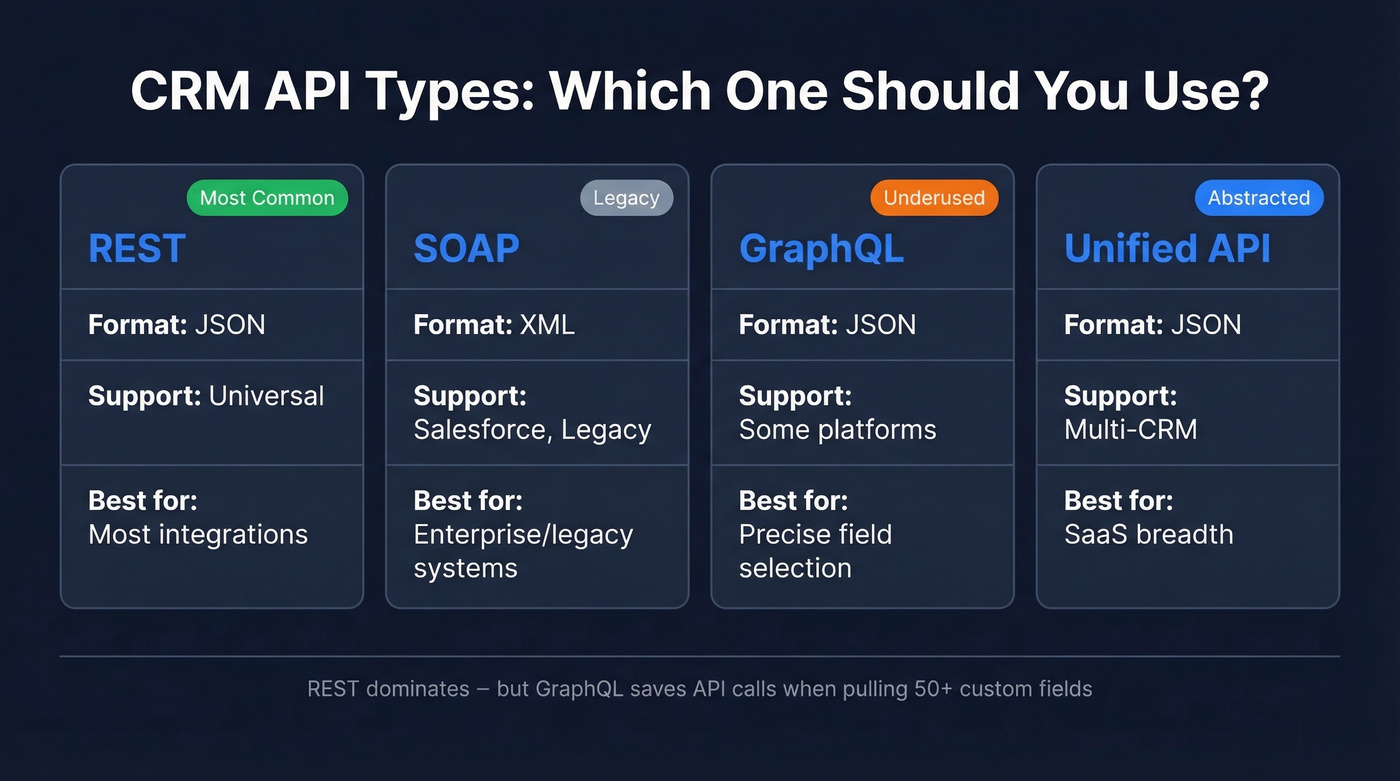
Not all CRM APIs speak the same language. Here's what you're working with:
| Protocol | Data Format | CRM Support | Best For |
|---|---|---|---|
| REST | JSON | Universal | Most integrations |
| SOAP | XML | Salesforce, legacy | Enterprise/legacy |
| GraphQL | JSON | Some platforms | Precise field selection |
| Unified API | JSON | Multi-CRM | SaaS breadth |
REST dominates. Every major CRM - Salesforce, HubSpot, Pipedrive, Zoho - offers REST endpoints, and JSON payloads are straightforward to parse in any language. SOAP still exists in Salesforce's ecosystem and in legacy on-prem CRMs, but you'll only reach for it when REST isn't available.
GraphQL is the option most teams miss. If you're pulling contacts with 50+ custom fields, GraphQL lets you request exactly the fields you need instead of downloading the entire object and discarding 80% of the payload. That matters when you're making thousands of calls against rate limits.
Unified APIs from Merge, Apideck, and Knit normalize schemas across multiple CRMs into a single interface. They're powerful for SaaS companies building customer-facing integrations across dozens of CRM platforms, but they abstract away custom objects and fields - which is exactly where enterprise complexity lives. This distinction between internal integrations (your team's data pipeline) and customer-facing integrations (letting your users connect their CRMs) shapes every architectural decision downstream.
Authentication That Won't Lock You Out
OAuth 2.0 is the standard for production integrations. Salesforce, HubSpot, Zoho, and Pipedrive all support it, and for good reason - it provides delegated access without exposing user credentials, supports token refresh, and enables granular permission scoping.
The typical OAuth flow for Zoho, which is representative of many CRMs: create a self-client application, grab your client ID and secret, generate an authorization code, exchange it for a refresh token, then use that refresh token to generate access tokens that expire hourly. The refresh token is your lifeline - store it securely, and your integration can run indefinitely without human intervention.
# Zoho OAuth token refresh (simplified)

response = requests.post("https://accounts.zoho.com/oauth/v2/token", data={
    "refresh_token": REFRESH_TOKEN,
    "client_id": CLIENT_ID,
    "client_secret": CLIENT_SECRET,
    "grant_type": "refresh_token"
})
access_token = response.json()["access_token"]
API keys are tempting for quick scripts and prototyping. They work. But they're a single point of compromise with no expiration, no scope limitation, and no audit trail. Use them for local testing, then migrate to OAuth before anything touches production.
Two more patterns worth knowing. First, create a dedicated API user in your CRM - a service account with only the permissions your integration needs. This follows the principle of least privilege and prevents your integration from breaking when someone changes their personal password. Second, enforce TLS 1.2+ on every connection. This isn't optional - it's a Salesforce requirement and a baseline security expectation across every major CRM.
One more thing most guides skip: if you're syncing personal data across systems, GDPR applies. Every integration that moves contact records between platforms is a data processing activity. Document your data flows, ensure you have a lawful basis for processing, and make sure your integration respects opt-out flags. A technically flawless sync that violates data privacy regulations is worse than no sync at all. (If you’re operationalizing this, align with GDPR sales automation requirements.)
Webhooks vs Polling
Polling is the brute-force approach: call the CRM's list endpoint with an updated_since timestamp, process any changed records, store a checkpoint, repeat. It's simple, predictable, and works with every CRM. It's also wasteful - most polling cycles return zero changes, and each empty call still counts against your rate limit. Multiply that across multiple objects (contacts, deals, companies) and multiple customers, and you're burning API calls on nothing.
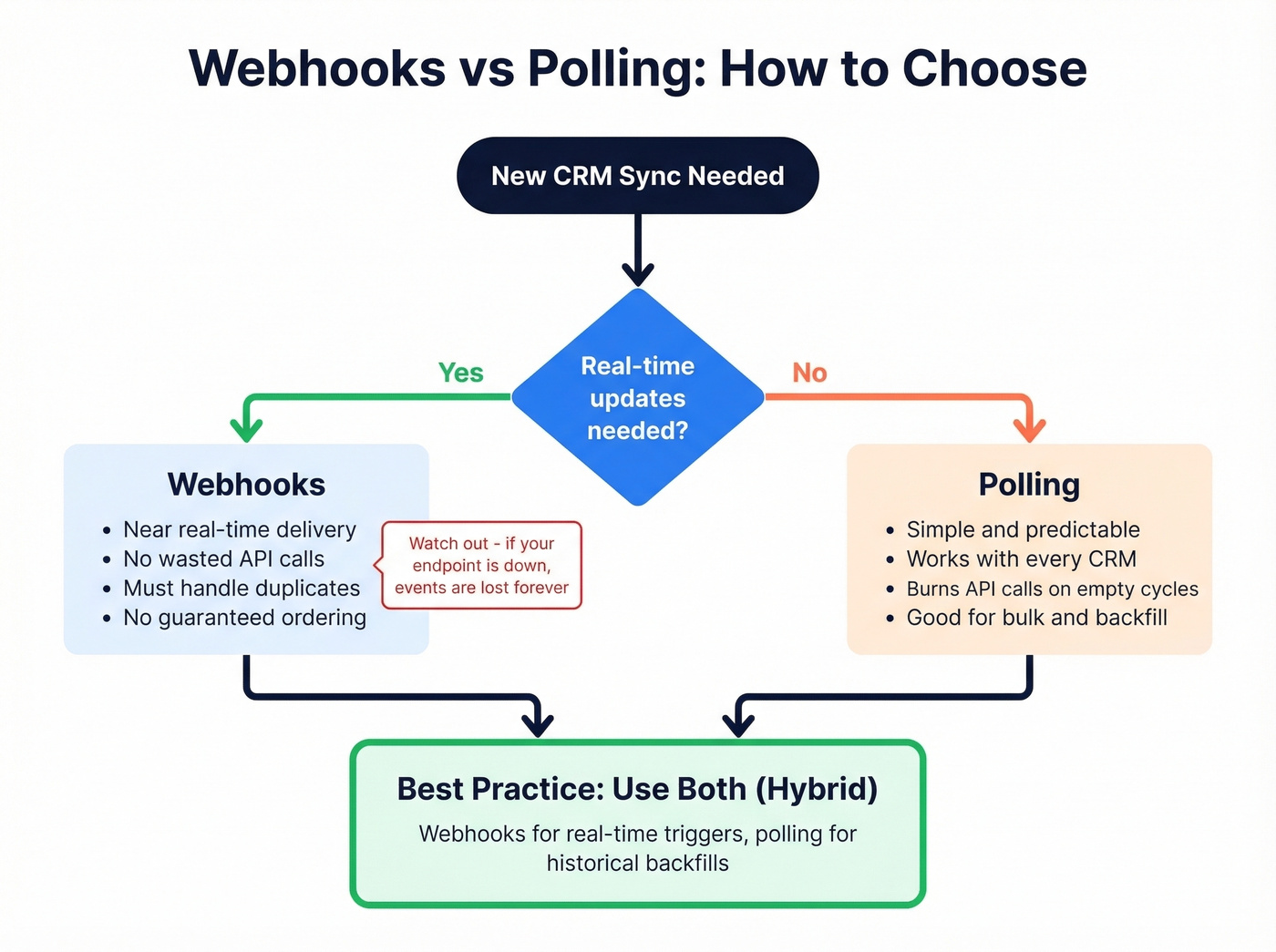
Webhooks flip the model. The CRM pushes events to your endpoint when something changes. No wasted calls, near-real-time data. But webhooks come with their own problems that most guides gloss over.
Webhook failure modes you need to design for:
- Delivery isn't guaranteed - vendors retry on their own schedule, if at all
- Duplicate events are normal (at-least-once semantics)
- Ordering isn't reliable - you might receive an update before the create
- Payloads are often partial - you'll need an API callback for full records
- No built-in replay - if your endpoint was down, those events are gone
The practical answer for most teams is a hybrid. Use webhooks for real-time triggers like new deal creation or contact updates, then follow up with an API call to fetch the full record. For historical backfills and bulk syncs, use polling with cursor-based pagination.
One concept worth knowing: virtual webhooks. Some CRMs don't support native webhooks at all. Unified API platforms handle this by polling the CRM on your behalf, detecting changes, and emitting webhook-style events to your endpoint. It's polling under the hood, but your code only sees events.
Build your webhook consumers to be idempotent. Compare updated_at timestamps before writing, use atomic upserts, and deduplicate by event ID. For initial data loads, many unified API platforms support a backfill trigger and emit a completion marker event before switching to incremental mode.
Rate Limits Across Major CRMs
Here's the thing nobody tells you upfront: every CRM has different rate limits, they're buried in different places in the docs, and they change without warning.
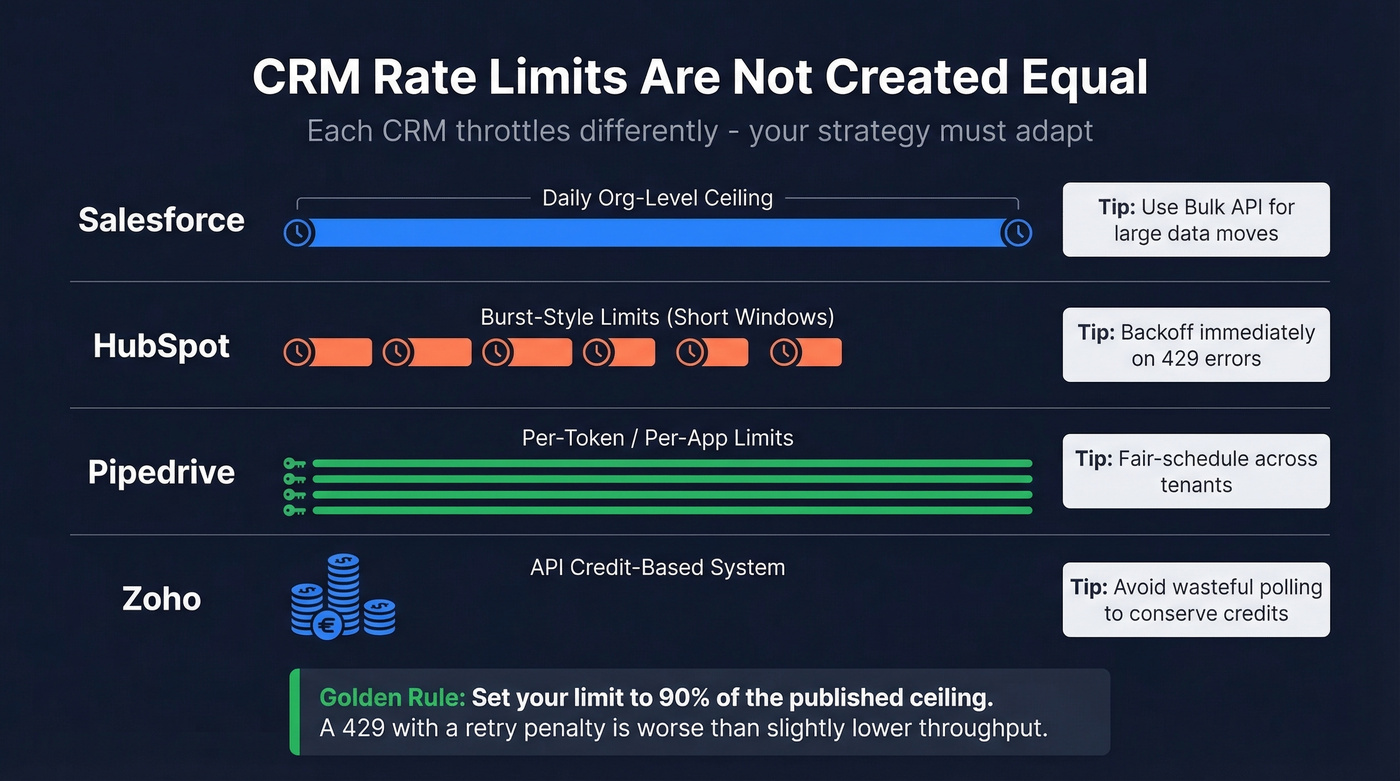
Instead of memorizing one "universal" limit table, design for the shape of limits you'll encounter:
| CRM | Limit Model | What It Means |
|---|---|---|
| Salesforce | Daily/org-level API request ceilings (varies by edition) | Long-window throttling; use bulk/async patterns for large moves |
| HubSpot | Burst-style limits (short windows) | Burst throttling; backoff on 429s |
| Pipedrive | Token/app-scoped limits | Per-token throttling; fair scheduling across tenants |
| Zoho | API credit-based system | Budget credits per operation; avoid wasteful polling |
The fact that some CRMs measure in 24-hour windows while others measure in short bursts means your throttling strategy can't be one-size-fits-all. A sliding-window rate limiter handles both patterns gracefully:
// Sliding-window rate limiter (Node.js)
const RATE_LIMIT = 90; // stay under the ceiling
const WINDOW_MS = 10000;
const requestLog = [];

async function throttledRequest(fn) {
  const now = Date.now();
  while (requestLog.length && requestLog[0] < now - WINDOW_MS) {
    requestLog.shift();
  }
  if (requestLog.length >= RATE_LIMIT) {
    const waitMs = requestLog[0] + WINDOW_MS - now;
    await new Promise(r => setTimeout(r, waitMs));
  }
  requestLog.push(Date.now());
  return fn();
}
Set your limit to 90% of the published ceiling. APIs don't always count the same way you do, and a 429 error with a retry penalty is worse than a slight throughput reduction. (This is also where RevOps automation teams usually standardize shared throttling + observability patterns.)

Every CRM API integration inherits the quality of its source data. Prospeo's enrichment API returns 50+ data points per contact at a 92% match rate - so your pipelines sync verified emails (98% accuracy), valid mobiles, and fresh job titles instead of propagating stale records across every connected system.
Stop building perfect plumbing for dirty data.
Pagination and Bulk Sync
Pagination sounds trivial until you're staring at 800K rows of CRM data. As one r/dataengineering poster described it, per-record API calls at 100 requests per second will take days to complete at that scale.
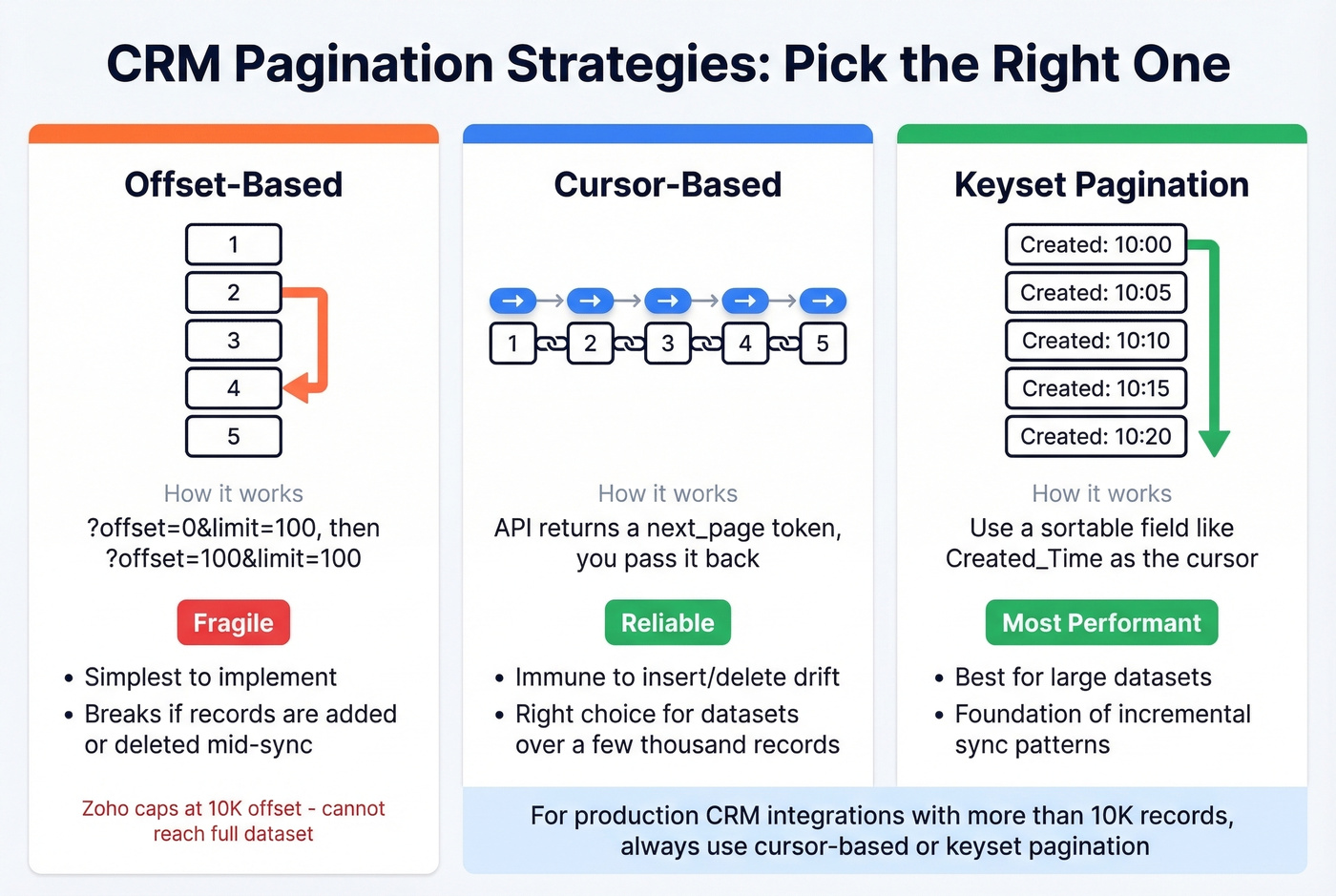
Three pagination strategies, in order of reliability:
Offset-based is the simplest - ?offset=0&limit=100, then ?offset=100&limit=100. It works until it doesn't. If records are inserted or deleted mid-pagination, you'll skip or duplicate entries. Zoho's COQL endpoint caps at 2,000 records per page and a maximum 10,000 offset, which means offset pagination literally can't reach your full dataset if you have more than 10K records.
Cursor-based pagination uses an opaque token returned by the API to fetch the next page. It's immune to insert/delete drift and is the right choice for any dataset over a few thousand records.
Keyset pagination uses a sortable field like Created_Time or Id as the cursor. It's the most performant option for large datasets and the foundation of incremental sync patterns:
# Zoho COQL incremental extraction

query = f"""
SELECT Full_Name, Email, Created_Time
FROM Contacts
WHERE Created_Time > '{watermark}'
ORDER BY Created_Time
LIMIT 0, 2000
"""

response = requests.post(
    "https://www.zohoapis.com/crm/v5/coql",
    headers={"Authorization": f"Zoho-oauthtoken {access_token}"},
    json={"select_query": query}
)
For large Salesforce data moves, skip the standard REST API and use the Bulk API. It's designed for high-volume operations - you submit a job, Salesforce processes it asynchronously, and you poll for results. More complex to implement, but dramatically more efficient for initial loads and large incremental syncs.
Code Example: Salesforce in Python
The simple_salesforce library is the fastest path to a working Salesforce integration:
pip install simple_salesforce requests
from simple_salesforce import Salesforce

# Username/password for simplicity - use OAuth 2.0
# with refresh tokens in production
sf = Salesforce(
    username='you@company.com',
    password='yourpassword',
    security_token='your_security_token'
)

# Query contacts
results = sf.query("SELECT Id, Name, Email FROM Contact LIMIT 10")
for record in results['records']:
    print(record['Name'], record['Email'])

# Create a contact
sf.Contact.create({
    'FirstName': 'Jane',
    'LastName': 'Doe',
    'Email': 'jane@example.com'
})

# Update a contact
try:
    sf.Contact.update('003XXXXXXXXXXXXXXX', {'Title': 'VP Sales'})
except Exception as e:
    print(f"Update failed: {e}")
This gets you from zero to reading and writing Salesforce data fast. For production, swap the username/password auth for OAuth 2.0, add retry logic with exponential backoff, and wrap everything in proper error handling. (If you’re standardizing this across teams, it helps to document CRM features you rely on - custom objects, field history, validation rules, etc.)
For quick endpoint testing against any CRM before you build the full integration, start with cURL to understand the response shape:
curl -X GET "https://api.hubapi.com/crm/v3/objects/contacts?limit=10" \
  -H "Authorization: Bearer YOUR_ACCESS_TOKEN" \
  -H "Content-Type: application/json"
Then build your programmatic client around it.
Data Quality: The Part Most Guides Skip
We've seen teams spend months building sophisticated integrations, only to discover that the root cause of their deliverability problems was never the architecture. It was the data.
You can build the most elegant OAuth flow, the most resilient retry logic, the most efficient cursor-based pagination - and none of it matters if 15-20% of your emails bounce and 35% of your phone numbers are disconnected. You're just syncing garbage at scale, faster.

CRM enrichment isn't an afterthought. It's a prerequisite. For programmatic workflows, an enrichment API lets you verify and enrich contacts in bulk before they ever hit your integration pipeline - 50+ data points per contact including job title, direct dial, and company firmographics. Your downstream systems inherit clean data instead of propagating errors. (If you’re evaluating vendors, compare against dedicated email ID validators and broader B2B email verification workflows.)
Hot take: If your average deal size is under $25K, you probably don't need a MuleSoft deployment. You need clean data flowing through a well-built REST integration. Most integration failures aren't architecture problems - they're data quality problems wearing an architecture costume.
Building integrations that move CRM data between Salesforce, HubSpot, and downstream tools? Prospeo refreshes all 300M+ profiles every 7 days - not the 6-week industry average. Native integrations with Salesforce, HubSpot, Clay, Zapier, and Make mean your enrichment pipeline stays current without custom maintenance.
Enrich your CRM at $0.01 per email - no contracts, no sales calls.
Build vs Buy
At a $150K fully loaded engineer cost, a single 3-6 month integration build runs $37,500-$75,000 before you factor in maintenance. That's the real cost of "custom."
| Approach | Tools | Best For | Cost Range |
|---|---|---|---|
| No-code connectors | Zapier, Make | Prototyping, simple triggers | $10-$70/mo |
| Unified APIs | Merge, Apideck | SaaS multi-CRM breadth | $150-$2,000/mo |
| Embedded iPaaS | Workato, Paragon | Complex customer-facing | $10K-$50K/yr |
| Enterprise iPaaS | MuleSoft, Boomi | On-prem, compliance | $15K-$200K/yr |
| Custom build | Your engineers | Full control | $37K-$75K + maint. |
No-code tools like Zapier and Make are perfect for prototyping and low-volume trigger-action workflows. New lead in HubSpot triggers a Slack notification - done. But for high-volume syncs and complex data pipelines, code gives you more control over retries, idempotency, and monitoring. Task-based pricing also gets expensive fast when you're syncing thousands of records daily.
Unified APIs normalize multiple CRM schemas into a single interface. They're the right call if you're a SaaS company building integrations for your customers across Salesforce, HubSpot, Pipedrive, and Zoho simultaneously. The tradeoff: enterprise customers with custom objects and fields will hit the limits of normalized schemas quickly.
Enterprise iPaaS platforms like MuleSoft and Boomi handle on-prem systems, legacy protocols, and compliance requirements that lighter tools can't touch. If you're integrating SAP with Salesforce in a regulated industry, skip everything else - this is your lane.
The AI agent angle. CRM integrations are increasingly the data layer for AI agent workflows - autonomous systems that read CRM data, make decisions, and write back results. Whether you're building internal automations or customer-facing agentic features, the quality of your API integration determines whether your AI agents operate on reality or hallucinate from stale data. This makes getting the foundation right even more critical than it was two years ago. (Related: AI pipeline inspection for catching bad inputs before they cascade.)
For most teams, the answer is a hybrid: use a no-code tool for simple workflows, build custom for your core data pipeline, and invest in data quality tooling so whatever you build is syncing contacts worth reaching.
Why Integrations Break Silently
Here's a scenario we see constantly. You inherit a CRM integration - a 400-line Python script with hardcoded API keys, a comment that says # TODO: add retry logic, and no monitoring. It's been silently failing for three weeks. Nobody noticed because it returns 200 OK on every call. The data just stopped mapping correctly after a field rename.
A 200 OK doesn't mean success. It means the server received your request. Whether the data actually mapped correctly, landed in the right object, and didn't create duplicates - that's a different question entirely.
Only 17% of organizations use contract testing to catch schema drift before it hits production. The other 83% find out when sales complains. That number should terrify you if you're running integrations without automated schema validation. (This is also why teams run a recurring CRM data audit and implement CRM deduplication as part of the pipeline.)
API deprecations are the other silent killer. Slack removed files.upload for new apps in May 2024. Microsoft retired Teams Office 365 connectors on 31 March 2026. These deadlines are published months in advance, but if nobody's tracking them, your integration breaks on a Tuesday morning with no warning.
Build your monitoring around outcomes, not HTTP status codes:
- Outcome-based alerts - Did the contact actually appear in the destination CRM with the correct field mapping?
- Schema drift detection - Are the fields you're reading still present and the same data type?
- Mapping failure alerts - Catch transformation errors, not just transport errors
- API version tracking - Subscribe to your CRM's developer changelog and deprecation notices
The integrations that survive aren't the most cleverly architected. They're the ones with monitoring that catches problems before the sales team does.
FAQ
How long does a CRM API integration take to build?
A single custom integration typically takes 3-6 months of engineering time, plus ongoing maintenance for API changes, auth refresh, and rate limit adjustments. No-code tools like Zapier can get a basic sync running in hours but lack the error handling and monitoring needed for production workloads.
REST vs SOAP vs GraphQL - which should I use?
REST for most integrations - it's universally supported and JSON payloads are simple to work with. GraphQL if your CRM supports it and you need precise field selection to reduce payload size. SOAP only for legacy systems that require it.
What's the biggest mistake teams make with CRM integrations?
Skipping data quality. If your CRM contacts have invalid emails and disconnected phone numbers, your integration syncs bad data across every connected system. Verify and enrich first - your downstream systems need to start clean, not inherit someone else's data rot.
Can I use Zapier for production CRM syncs?
For prototyping and low-volume workflows, absolutely. For bulk sync, custom error handling, retry logic, or monitoring, a custom integration or a more robust platform is a better fit. Task-based pricing also gets expensive fast at scale.