

The Best Free CRM Excel Templates - Plus How to Build Your Own
You've got 30 customers, a founder who thinks Salesforce is overkill, and a sales process that lives in your head. So you open Excel and search for a CRM template. That's not a bad instinct - 29% of small businesses still manage relationships with spreadsheets, and for early-stage teams, a well-built template genuinely works.
The problem isn't starting in Excel. It's starting with the wrong template, tracking the wrong fields, and not knowing when to stop.
Our Picks (TL;DR)
Short on time? Three templates worth downloading right now:
- HubSpot template - Best overall. Free, includes a dashboard tab, and handles 25-50 contacts with about 1-2 hours of weekly maintenance. Grab it here.
- OnePageCRM template - Best for follow-up tracking. Conditional formatting turns overdue tasks red and today's tasks orange. Not gated behind an email form.
- Salesflare template - Best for pipeline visibility. Includes "next steps" and "last interaction date" fields, plus a video tutorial to get you set up. Download link.
One thing before you import contacts into any of these: verify the emails first. Bad data kills spreadsheet CRMs faster than anything else.
Free CRM Excel Templates Compared
Not all "free" templates are actually free. Some require an email to download, which means you're trading your inbox for a spreadsheet. Here's how the most popular options stack up:
| Template | Format | Follow-Up Alerts | Dashboard | Best For |
|---|---|---|---|---|
| HubSpot | Excel + Sheets | No | Yes | All-rounder |
| OnePageCRM | Excel + Sheets | Yes (conditional) | No | Follow-ups |
| Salesflare | Excel + Sheets | No | No | Pipeline tracking |
| Smartsheet | Excel + Sheets | Yes (next-contact fields) | Yes | Structured teams |
| Close | Excel | No | Yes (simple) | Quick start |
| Reddit (community) | Sheets + Excel | No | No | Vendor-free starting point |
HubSpot's template is the most complete free option - it includes a dashboard and is designed to get you set up in about 15 minutes. OnePageCRM takes a different approach: single-tab simplicity with conditional formatting that highlights overdue follow-ups in red and today's tasks in orange. That small detail makes a real difference when you're scanning 40 rows at 8 AM.
Salesflare's template includes sheets like Settings & Instructions, Sales Funnel, and Insights. The standout is the auto-updating Insights sheet, which forecasts revenue and summarizes performance based on what you enter. The limitation: it tracks "next steps" and "last interaction date" but doesn't calculate follow-up reminders from those dates.
One popular option shared on r/CRM includes a free Sales CRM spreadsheet for both Sheets and Excel - no email capture, no paywall. If you just need a starting point without vendor branding, it's worth a look.
What Your Template Should Track
Most templates ship with 20+ columns. You need 10. Here's the practitioner schema that actually gets used:
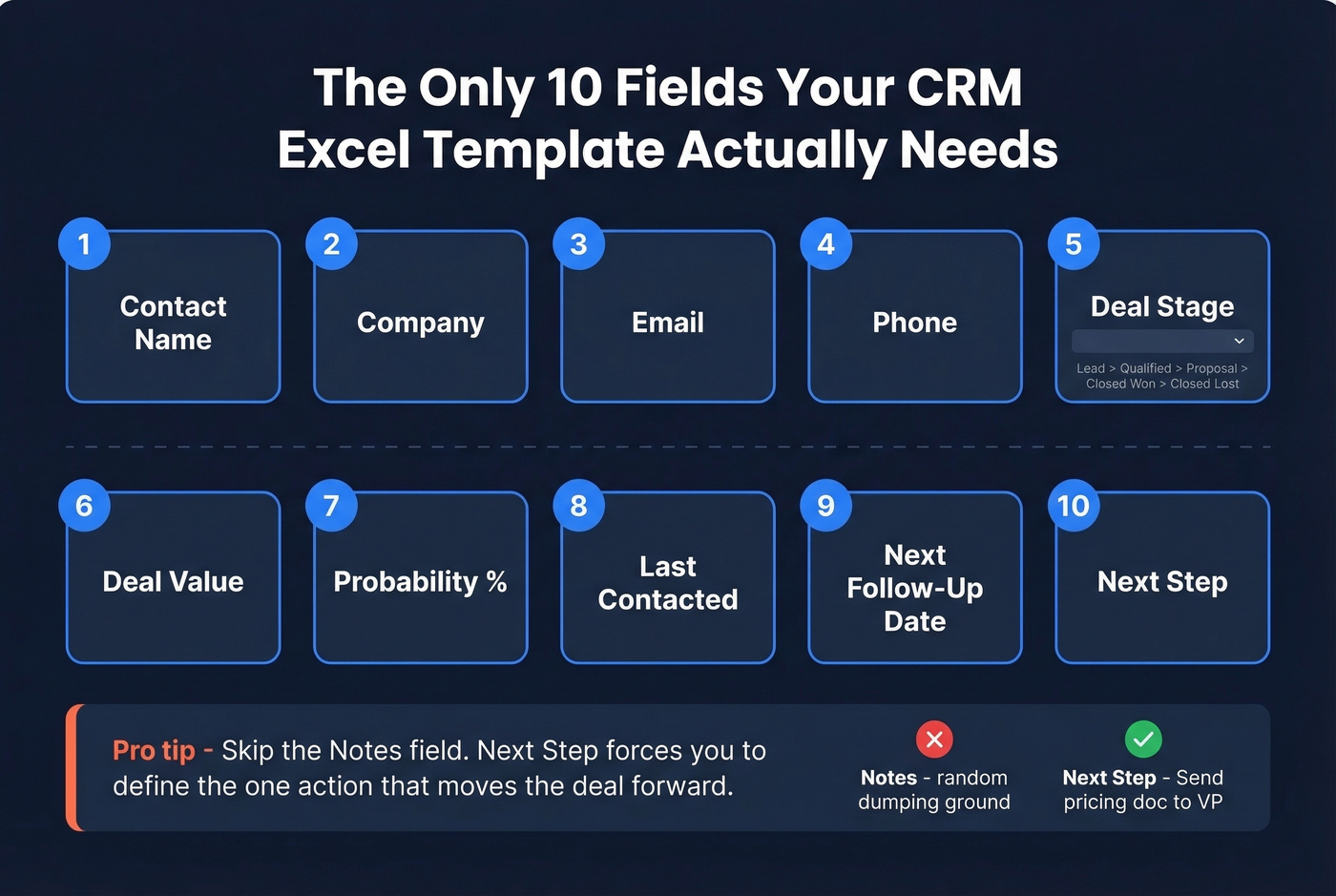
- Contact Name
- Company
- Phone
- Deal Stage (use a dropdown: Lead -> Qualified -> Proposal -> Closed Won -> Closed Lost)
- Deal Value
- Probability (%)
- Last Contacted (date)
- Next Follow-Up Date
- Next Step
That last one matters more than a "Notes" field. "Notes" becomes a dumping ground for random context nobody reads two weeks later. "Next Step" forces you to define the single action that moves the deal forward - "Send pricing doc," "Schedule demo with VP," "Follow up after board meeting." It's the difference between a spreadsheet you look at and one you act on.
Smartsheet's CRM templates bake this in with fields like date of last contact and date of next contact, which is one of the smartest structural choices you can copy into any Excel CRM.
And before pasting 200 contacts into your template, verify the emails. Prospeo checks addresses in bulk at 98% accuracy and flags invalid ones, so your pipeline isn't padded with contacts you can't actually reach. The free tier covers 75 verifications per month - plenty for an early-stage spreadsheet CRM. If you want a deeper process for keeping records clean over time, use a simple CRM data audit checklist.

How to Build a CRM in Excel
If none of the templates above fit your workflow, build your own. It takes about an hour, and you'll understand every formula in the sheet - which matters when something breaks at 11 PM before a board meeting. If you're deciding whether to stick with spreadsheets at all, see our guide on using Excel as a CRM.
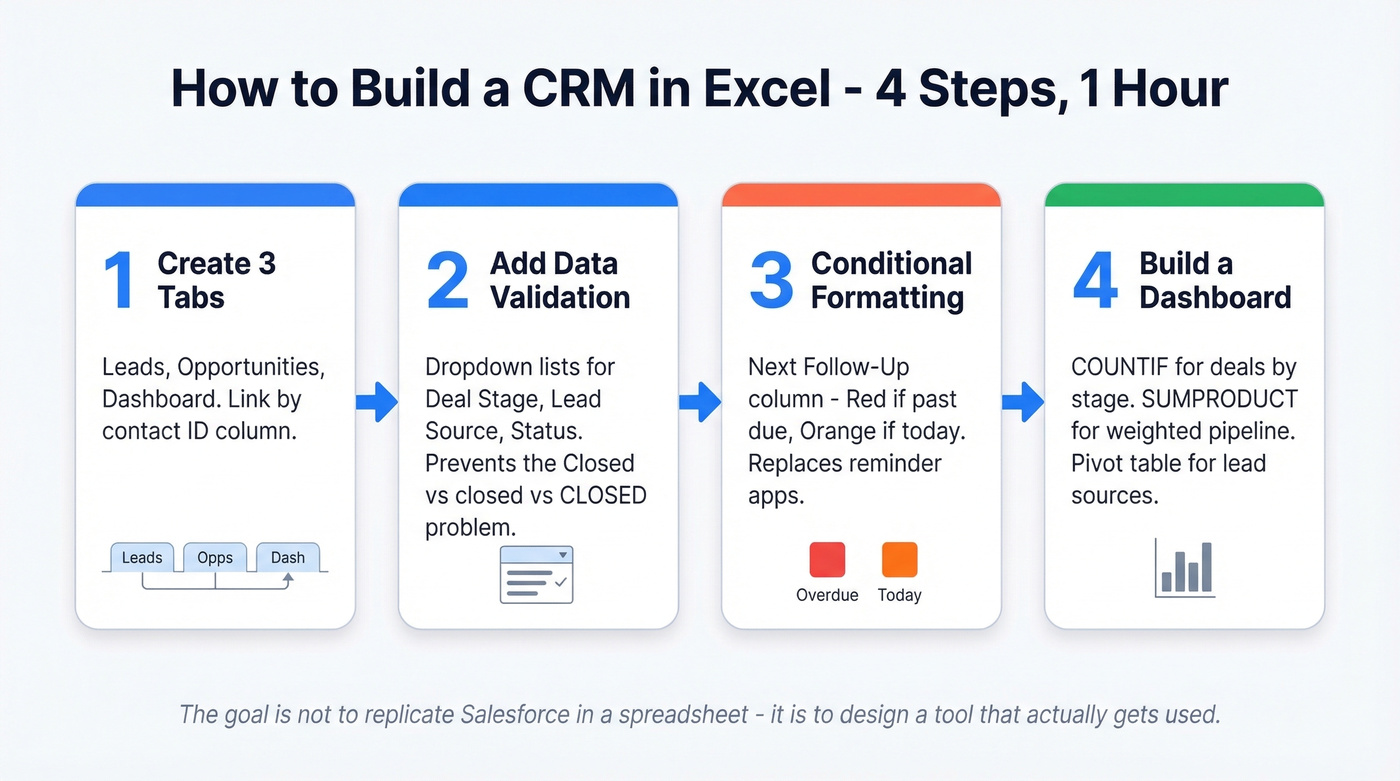
Step 1: Create three tabs. Follow Smartsheet's 3-tab structure: Leads, Opportunities, and Dashboard. Link Leads and Opportunities by a company or contact ID column.
Step 2: Add data validation. Use Excel's Data Validation feature to create dropdown lists for Deal Stage, Lead Source, and Status. This prevents the "Closed," "closed," "CLOSED," "Closed-Won" problem that makes your data unusable within a month. Standardized fields are the single biggest difference between a spreadsheet that scales to 50 contacts and one that falls apart at 20. If you want to go further, set basic CRM data governance rules (who edits what, and when).
Step 3: Set up conditional formatting. Create a rule on your Next Follow-Up Date column: red if the date is past due, orange if it's today. This takes two minutes and replaces the need for a reminder system. OnePageCRM's template does this out of the box, but it's trivial to add yourself. If follow-ups are your main pain point, consider graduating to dedicated sales follow-up software.
Step 4: Build a basic dashboard. Use COUNTIF formulas to count deals by stage, SUMPRODUCT for weighted pipeline value, and a pivot table for lead source distribution. A few summary numbers at the top of a Dashboard tab is enough - don't over-engineer this. For ideas on what to show, borrow from these sales dashboard examples and keep it lean.
As Adam Bilsing put it on Smartsheet: "The goal isn't to replicate Salesforce in a spreadsheet; it's to design a tool that actually gets used."
For teams that want more structure, Someka's 4-sheet architecture adds a dedicated task-tracking sheet and Kanban-style views. Worth bookmarking if you're tracking tasks per contact or need visual pipeline management. If you're already tracking deals across multiple stages, you may be better served by purpose-built deal tracking software.

Your Excel CRM is only as good as the data inside it. Prospeo verifies emails at 98% accuracy and flags invalid addresses before they bloat your pipeline. The free tier covers 75 verifications per month - exactly what an early-stage spreadsheet CRM needs.
Clean your contact list before row 50 becomes a graveyard.
Excel vs Google Sheets for CRM
The choice comes down to two questions: how many editors, and how many rows?
| Factor | Google Sheets | Excel (Desktop) | Microsoft 365 |
|---|---|---|---|
| Collaboration | Real-time, built-in | Requires setup | Better, still lags Sheets |
| Large datasets | Slows down | Handles well | Handles well |
| Mobile access | Strong mobile app | Desktop-first | Decent |
| Cost | Workspace: $6-$18/user/mo | $179.99 one-time | $6-$22/user/mo |
If more than one person will edit the CRM, use Google Sheets. Real-time collaboration isn't a nice-to-have - it's the difference between a shared system and a file that lives on someone's desktop. We've seen teams lose weeks of updates because two people edited the same Excel file offline and couldn't reconcile the versions.
Solo users working with larger datasets (100+ contacts with formula-heavy columns) will find Excel desktop snappier. But for most spreadsheet CRM use cases, Sheets wins. If you're planning to connect Sheets to outreach or enrichment later, it's worth thinking about CRM integration early.
The Hidden Cost of a Spreadsheet CRM
Let's do the math nobody wants to do.
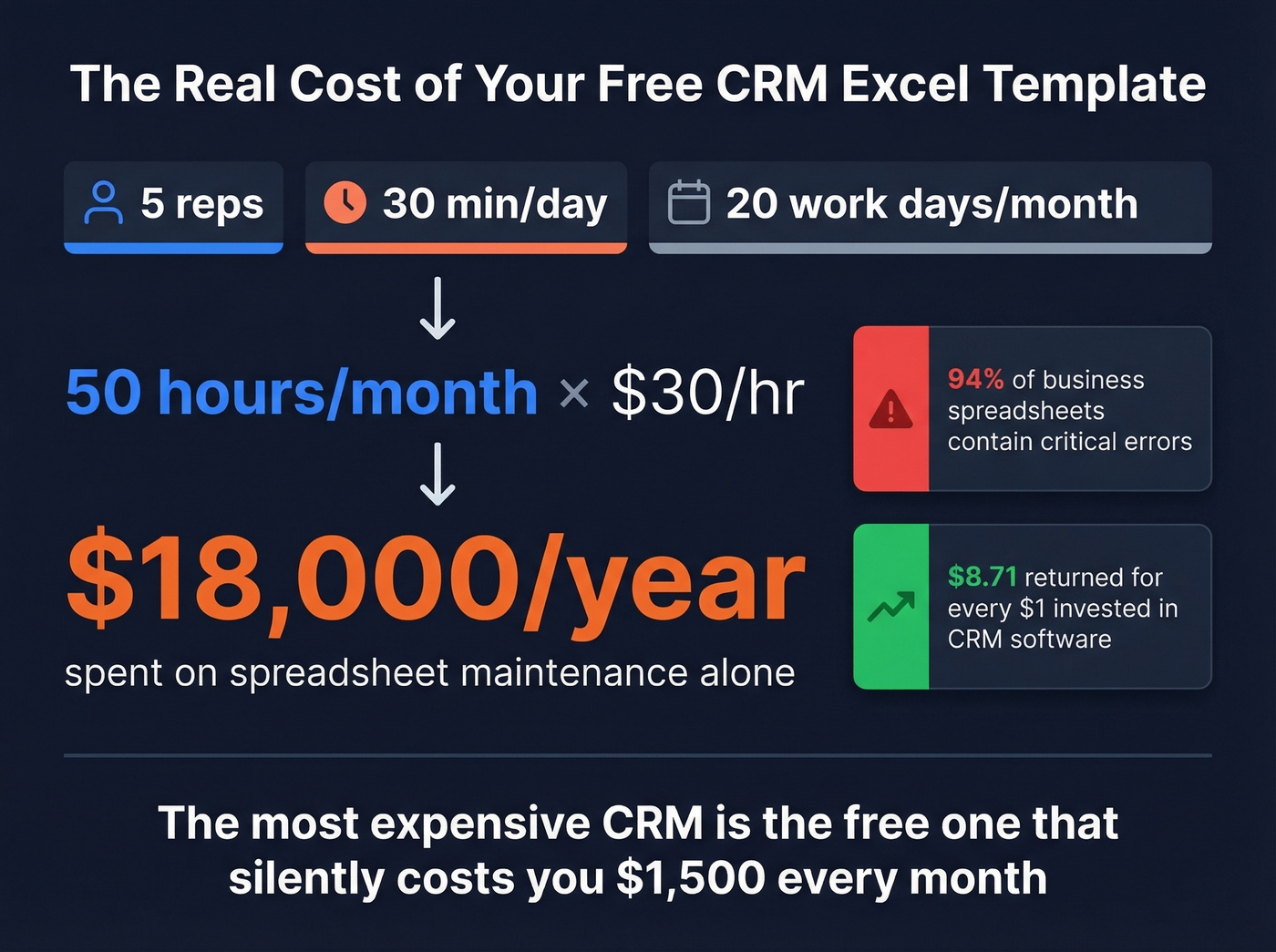
Say you have 5 reps each spending 30 minutes a day on manual CRM updates - entering contacts, updating stages, checking follow-up dates. That's 30 min x 5 reps x 20 working days = 50 hours per month. At $30/hour fully loaded, you're spending $1,500/month on spreadsheet maintenance. That's $18,000 a year, more than most paid CRM subscriptions cost.
And that's just the time cost. Nutshell cites that 94% of business spreadsheets contain critical errors - mistyped deal values, duplicated rows, formulas that break when someone inserts a column. (If this is happening, it's usually a CRM data entry process problem, not an Excel problem.)
Here's the thing: the most expensive CRM isn't the one with a high per-seat price. It's the "free" Excel spreadsheet that's silently costing you $1,500/month in labor and feeding you bad data. Most teams should graduate sooner than they think.
But the costliest mistake in any CRM spreadsheet isn't a broken formula - it's bad contact data. If 15% of your emails bounce, your pipeline is 15% fiction. Cleaning your data before it enters the spreadsheet is the highest-ROI thing you can do. A lightweight CRM verify workflow prevents most of this.

When to Stop Using Excel
Here's the graduation framework:
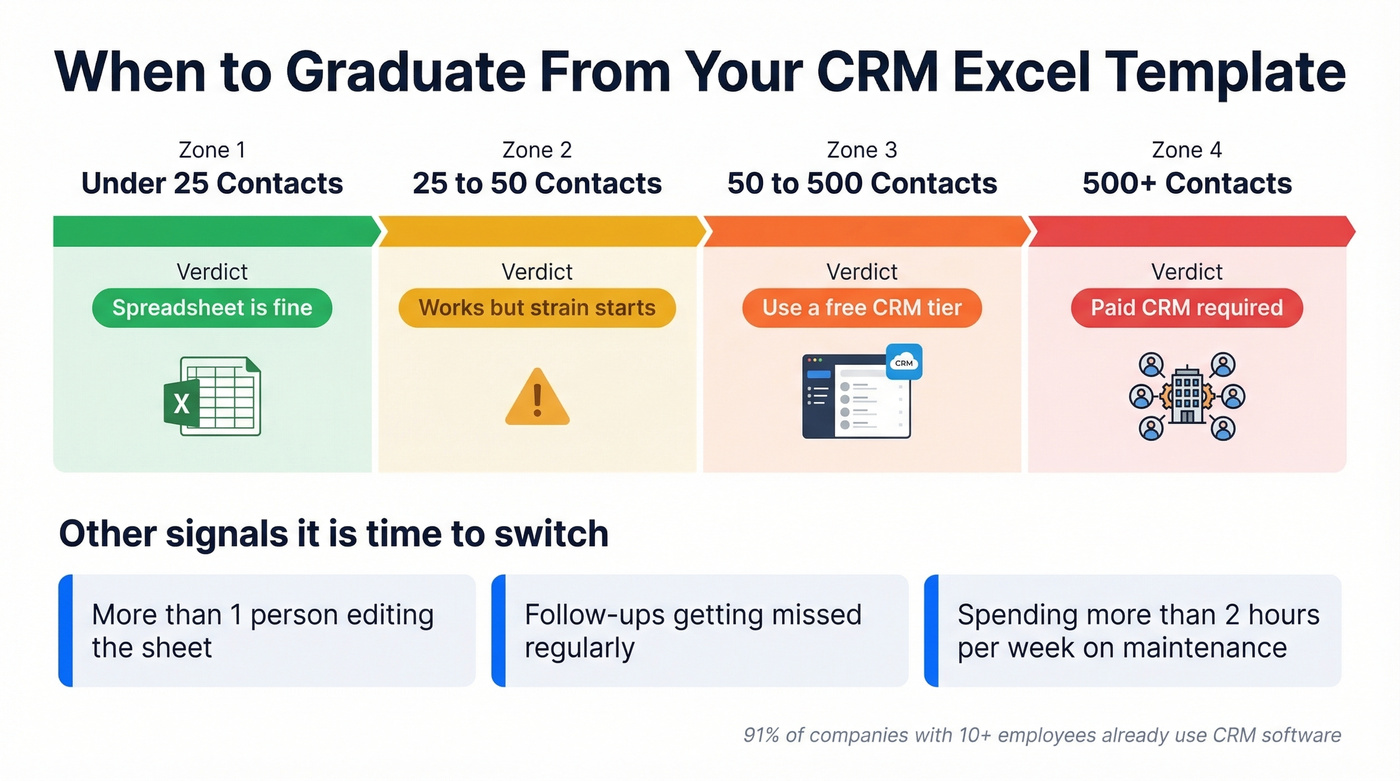
| Active Contacts | Verdict |
|---|---|
| Under 25 | Spreadsheet is fine |
| 25-50 | Spreadsheet works, strain starts |
| 50-500 | Use a free CRM (or a Sheets-to-CRM connector) |
| 500+ | Paid CRM required |
The contact count is just one trigger. You should also switch if more than one person is editing the sheet regularly, if follow-ups are getting missed, or if you're spending more than 2 hours a week on maintenance. In our experience, the "2 hours a week" threshold is where most founders realize they've been boiling the frog.
The ROI case is clear: CRM software returns an average of $8.71 for every $1 invested. And 91% of companies with 10+ employees already use CRM software. The spreadsheet phase is meant to be temporary. The question is whether you graduate before or after it costs you deals. If you're evaluating options, start with a practical CRM comparison so you don't overbuy.
Free CRM Alternatives
When you're ready to move off the spreadsheet, you don't need to spend money right away. These free plans are legitimate:
| CRM | Free Plan Limits |
|---|---|
| HubSpot | 2 users, 1,000 contacts |
| Zoho CRM | 3 users, 5,000 records |
| Bitrix24 | Unlimited users + contacts |
| Vtiger | 10 users, 3,000 contacts |
| Streak | 500 items, 50 mail merges/day |
HubSpot's free CRM is a natural next step if you've been using their Excel template - the field structure maps closely, so migration is painless. Bitrix24's unlimited free plan is real, but the catch is a cluttered interface and a steep learning curve. Zoho hits the sweet spot for small teams that want a clean UI without paying. If you want a broader shortlist, see our breakdown of the best free CRM software.
Skip Bitrix24 if your team doesn't have someone willing to spend a weekend configuring it. The "unlimited" plan sounds great until you're lost in a maze of modules you'll never use.
Whichever CRM you pick, import clean data. The "garbage in, garbage out" problem doesn't disappear when you upgrade from a CRM Excel template - it just gets more expensive to fix. If you're enriching rows as you migrate, a dedicated data enrichment tool can save hours.
Building a CRM template is step one. Filling it with verified, reachable contacts is what actually drives revenue. Prospeo's bulk email finder pulls verified emails at $0.01 each from 300M+ profiles - then enriches each row with 50+ data points like job title, company size, and phone number.
Stop manually Googling emails to paste into your spreadsheet.
FAQ
Can Excel really work as a CRM?
Yes - for fewer than 50 active contacts with one or two editors. Beyond that, manual maintenance eats hours and follow-ups slip through cracks. It's a solid starting point, not a permanent solution.
What's the best free CRM Excel template?
HubSpot's template is the strongest all-rounder: free to download, includes a dashboard tab, and handles 25-50 contacts with 1-2 hours of weekly upkeep. OnePageCRM is better if follow-up tracking is your top priority.
How many contacts before a spreadsheet CRM breaks?
Excel supports over a million rows, but CRM spreadsheets become unmanageable around 50 active contacts. The bottleneck isn't file size - it's the manual update burden and the error rate that climbs with every new row.
How do you keep spreadsheet CRM data accurate?
Verify emails before importing - Prospeo's free tier covers 75 checks per month at 98% accuracy. Update "Last Contacted" dates weekly, archive dead leads monthly, and use data validation dropdowns to prevent inconsistent entries.