

CRM Data Entry Is Broken - Here's How to Fix It
32% of sales reps spend an hour or more on CRM data entry every day. That's not a discipline problem. It's an architecture problem. Meanwhile, poor data quality costs U.S. businesses $3.1 trillion annually, and the contact records your reps painstakingly typed in six months ago are already decaying at alarming rates. The fix isn't stricter enforcement - it's eliminating the entry altogether.
What Manual Data Entry Actually Costs You
Take a team of 10 reps, each earning $100k OTE. If they're spending 25% of their time on data tasks, that's $250,000 in lost selling capacity per year.
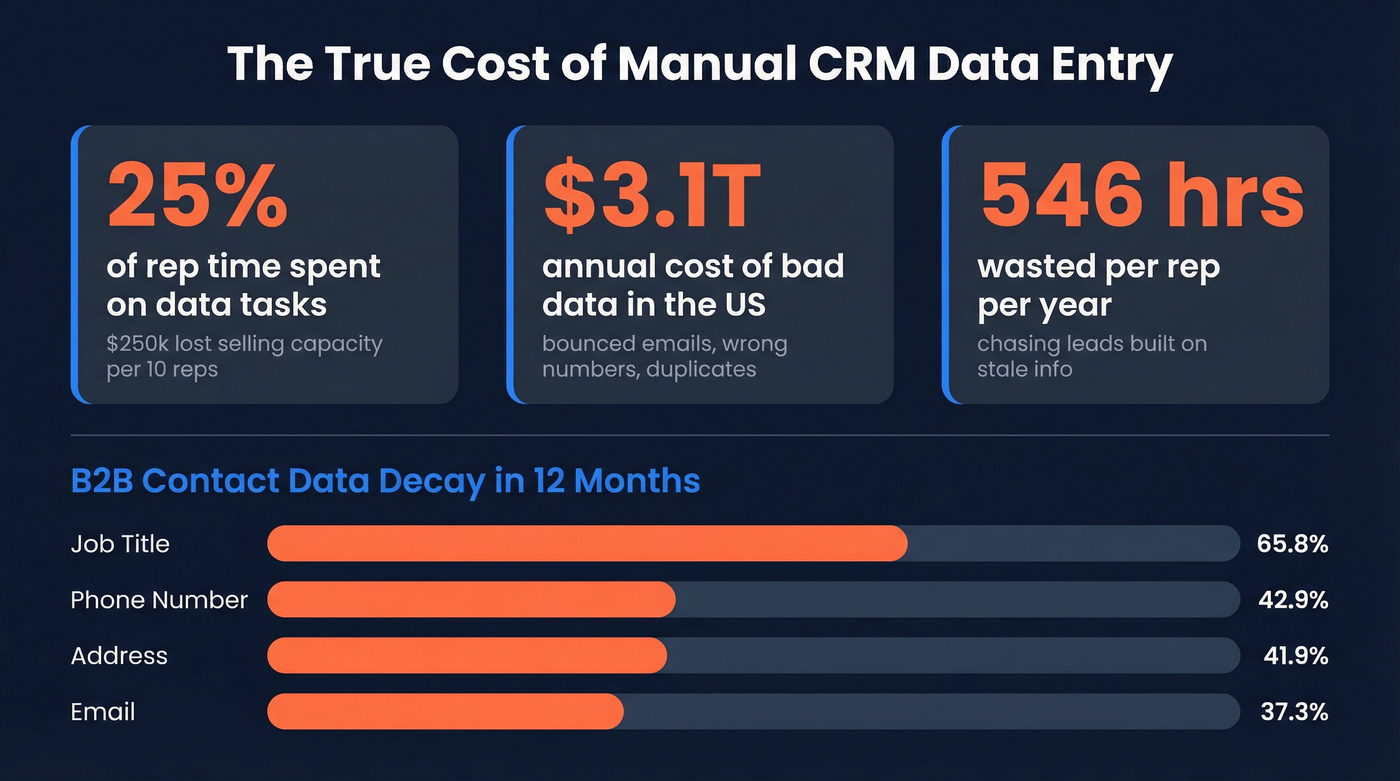
And that 25% isn't aggressive. Benchmarks routinely put sales teams at roughly 70% non-selling time overall, and a meaningful chunk of that is CRM admin. For SMBs, bad data costs between $203k and $732k annually when you factor in bounced emails, wrong numbers, duplicates, and missed opportunities. Data entry errors in sales compound fast: reps waste 27.3% of their time - roughly 546 hours annually - pursuing leads built on stale information.
B2B contact data rots faster than most teams realize. Within 12 months, 70.8% of your contacts will have changed something material:
| Field | Annual Decay Rate |
|---|---|
| Job title | 65.8% |
| Phone number | 42.9% |
| Address | 41.9% |
| 37.3% |
A CRM you cleaned in January is already unreliable by summer. Every manually entered record is a coin flip, and the data doesn't just go stale - it actively damages your outbound when reps call wrong numbers and emails bounce.

Why "Be More Disciplined" Doesn't Work
23% of CRM users cite manual data entry as their top challenge. That's a design failure, not a training gap.
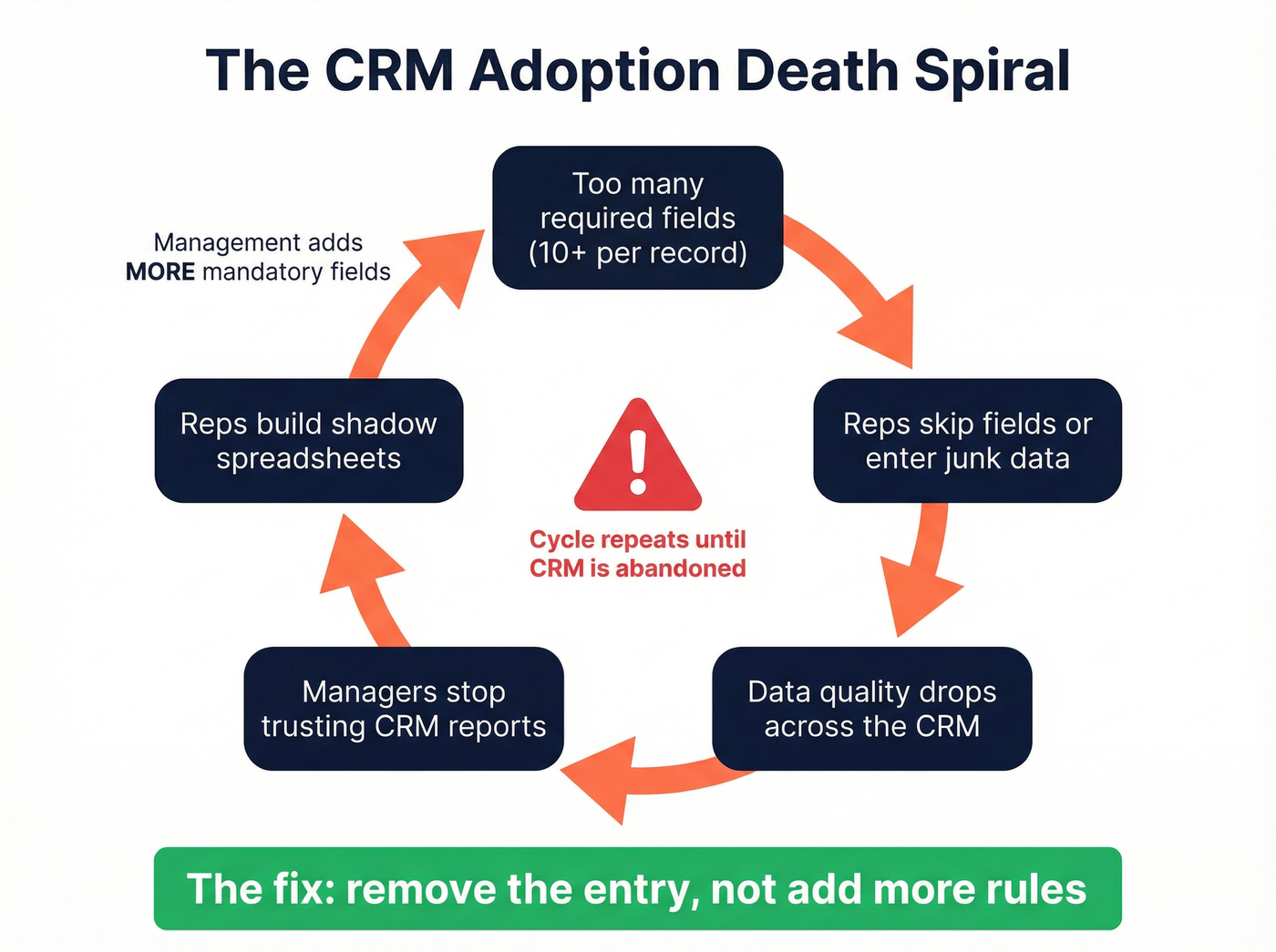
Here's the thing: when you require 8-10+ fields per object, you create an adoption death spiral. Reps skip fields. Data quality drops. Managers stop trusting the CRM. Reps have even less reason to update it. The recurring theme across RevOps communities on Reddit tells the same story - when the CRM feels like a surveillance tool, reps build shadow spreadsheets to avoid it. More mandatory fields won't fix that. Removing the entry will.
Five Ways to Eliminate Manual Entry
1. Data Enrichment: Pre-Fill Instead of Type
Use this if your biggest gap is contact data - emails, phone numbers, job titles, company info - and you want records filled before reps ever touch them.
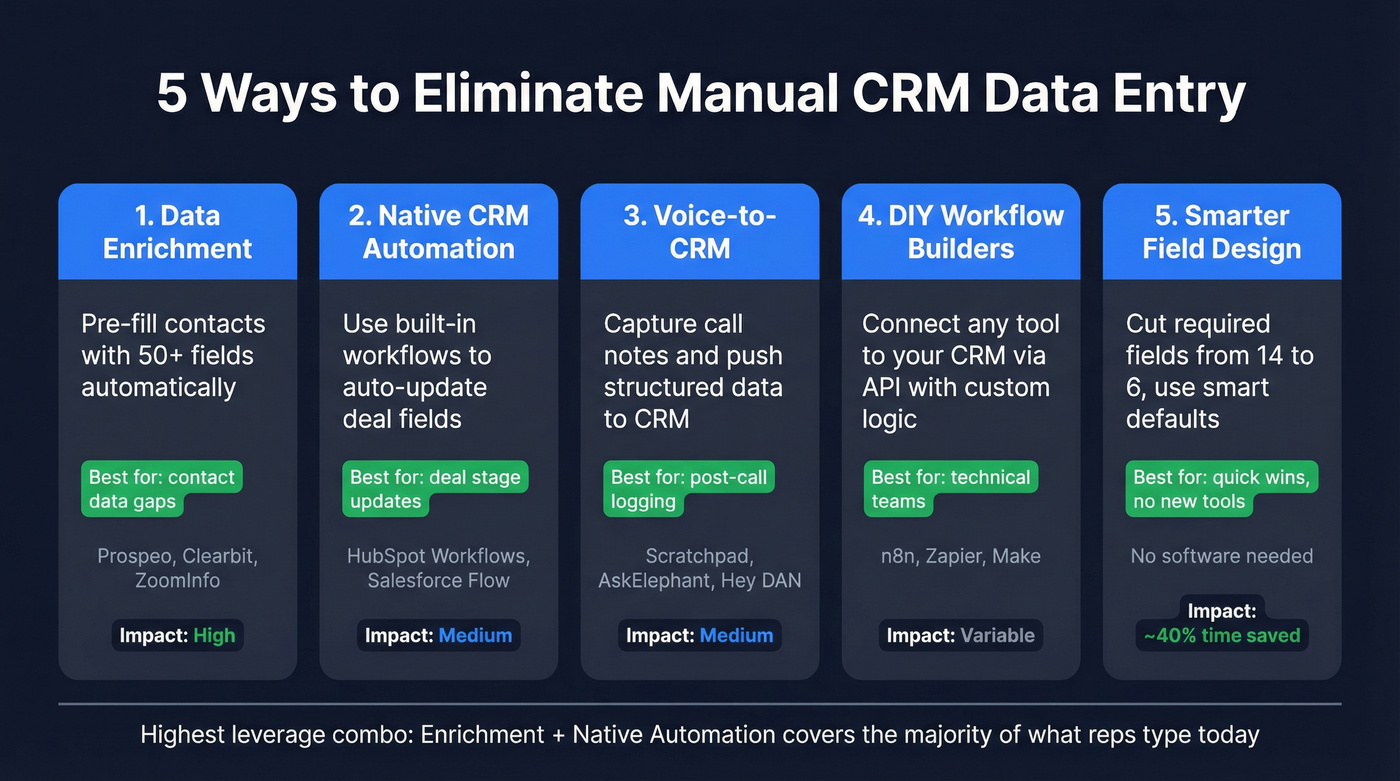
Skip this if your problem is deal-stage updates and call notes. Enrichment solves contact data, not activity logging.
We've tested this approach extensively, and the results speak for themselves. Prospeo pushes 50+ data points per contact into Salesforce or HubSpot with a 98% email accuracy rate and a 7-day refresh cycle, compared to the 6-week industry average. Snyk's 50 AEs went from a 35-40% bounce rate to under 5% after switching, with AE-sourced pipeline jumping 180%.
Enrichment is the highest-leverage fix because it attacks the most time-consuming part of CRM data entry: typing contact details that already exist in external databases. If you're evaluating vendors, start with data quality and prospect data accuracy benchmarks.
2. Native CRM Automation
HubSpot Workflows require either Marketing Hub Professional or Sales Hub Professional (Sales Hub Pro runs $90/seat/month) - solid for mid-market teams already in the ecosystem. Salesforce Flow comes included with most editions, but AI features push costs up fast: Einstein runs $125/user/month, and Agentforce starts at $550/user/month.
Let's be honest: Salesforce's AI add-ons now cost more than the CRM itself. For teams that just need "when a deal moves to Stage 3, auto-update these five fields," Flow handles it without the AI premium.
3. Voice-to-CRM Tools
Use this if your reps spend most of their day on calls and the real bottleneck is post-call logging.
Skip this if your problem is contact data quality, not activity capture.
Scratchpad ($19-60/user/month) is a Salesforce overlay that lets reps update fields inline without navigating the full CRM. One customer reported over 9,000 Salesforce updates and 455 hours saved per month. AskElephant ($99/month) writes structured data from calls directly into HubSpot and Salesforce fields. Hey DAN (~$200-500/month) offers an AI-plus-human approach for teams that want CRM admin handled end-to-end.
If call logging is the pain, pair this with a tighter outbound calling strategy and a lightweight cold call checklist so reps capture only what matters.
4. DIY Workflow Builders
For technical teams, n8n is the most flexible option - free self-hosted, or about $26/month for cloud. Wire it to your CRM via API, connect an LLM for parsing unstructured data, and you've got a custom automation pipeline. Zapier (free tier, paid from ~$20-70/month) and Make (free tier, paid from ~$10/month) offer similar capabilities with less setup.
McKinsey estimates 30%+ of sales tasks can be automated, and workflow builders capture the long tail that native CRM tools miss. This is also where no code sales automation and revenue workflow software can help you standardize what gets written back to the CRM.
5. Smarter Field Design
Before you automate anything, audit your CRM fields. In our experience, teams often cut entry time by roughly 40% just by dropping required fields from 14 to 6 - no new software needed.
The playbook: reduce required fields to the absolute minimum for pipeline reporting, then use smart defaults to pre-populate country, currency, and lead source. Apply progressive profiling to collect data across multiple touchpoints instead of demanding everything upfront. Add conditional logic so reps only see fields relevant to the deal type or stage. And adopt a naming convention for deal titles - something like "[Company] - [Use Case] - [Close Date]" - so pipeline reviews don't require opening every record. This is foundational to long-term CRM hygiene and better deal forecast accuracy.
If a human is typing a phone number into a CRM field in 2026, something is broken in your stack.

Your reps are spending 6+ hours a week typing contact data that already exists. Prospeo enriches CRM records with 50+ verified data points per contact - emails, phones, titles, company info - at 98% accuracy. Snyk's 50 AEs cut their bounce rate from 40% to under 5% and grew pipeline 180%.
Kill manual CRM data entry for $0.01 per enriched contact.
Tools for CRM Data Entry Automation
| Tool | Category | Starting Price | Best For | CRM Support |
|---|---|---|---|---|
| Prospeo | Enrichment | ~$0.01/email | Pre-filling records | SF + HubSpot |
| Scratchpad | SF overlay | $19-60/user/mo | Fast inline editing | Salesforce |
| AskElephant | Call-to-CRM | $99/mo | Conversation capture | SF + HubSpot |
| HubSpot Workflows | Native automation | $90/seat/mo | HubSpot users | HubSpot |
| Salesforce Flow | Native automation | Included / $125+ AI | Salesforce users | Salesforce |
| n8n | Workflow builder | Free / $26/mo | Technical teams | Any via API |
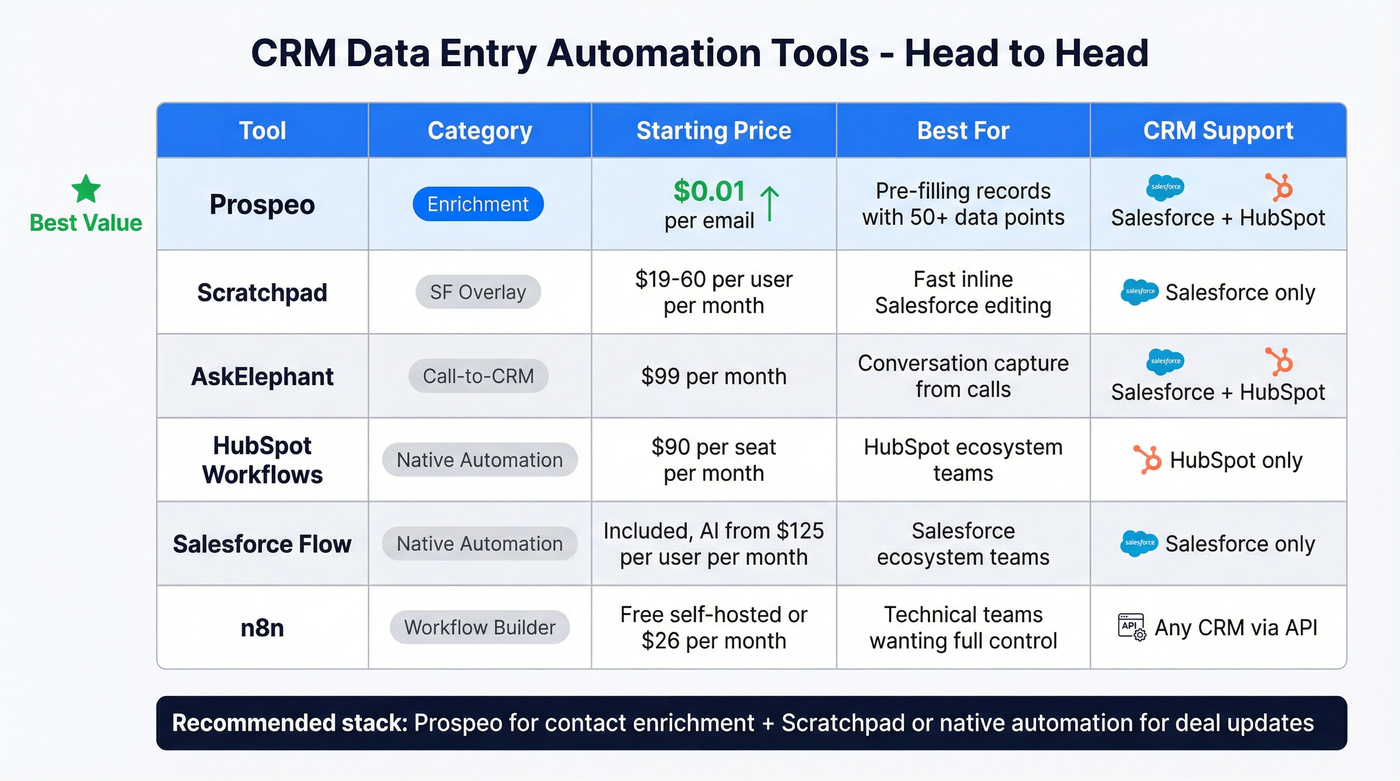
The highest-leverage move for most teams: combine enrichment to eliminate contact data entry with either native automation or Scratchpad for deal updates. That covers the vast majority of what reps manually type today. If you're going deeper, use a CRM analytics for sales view to track which fields are actually used.
Every record your reps manually entered six months ago is already decaying. Job titles change at 65.8% per year, emails at 37.3%. Prospeo refreshes all data every 7 days - not the 6-week industry average - so your CRM stays accurate without anyone touching it.
Stop cleaning your CRM. Let it clean itself.
Compliance: GDPR and CCPA
Automating CRM data entry doesn't exempt you from compliance. Under GDPR, every record with personal data must follow data minimization, accuracy obligations, storage limitations, and audit trail requirements. Automated enrichment actually helps here - keeping records current satisfies the accuracy mandate better than manual entry ever could.
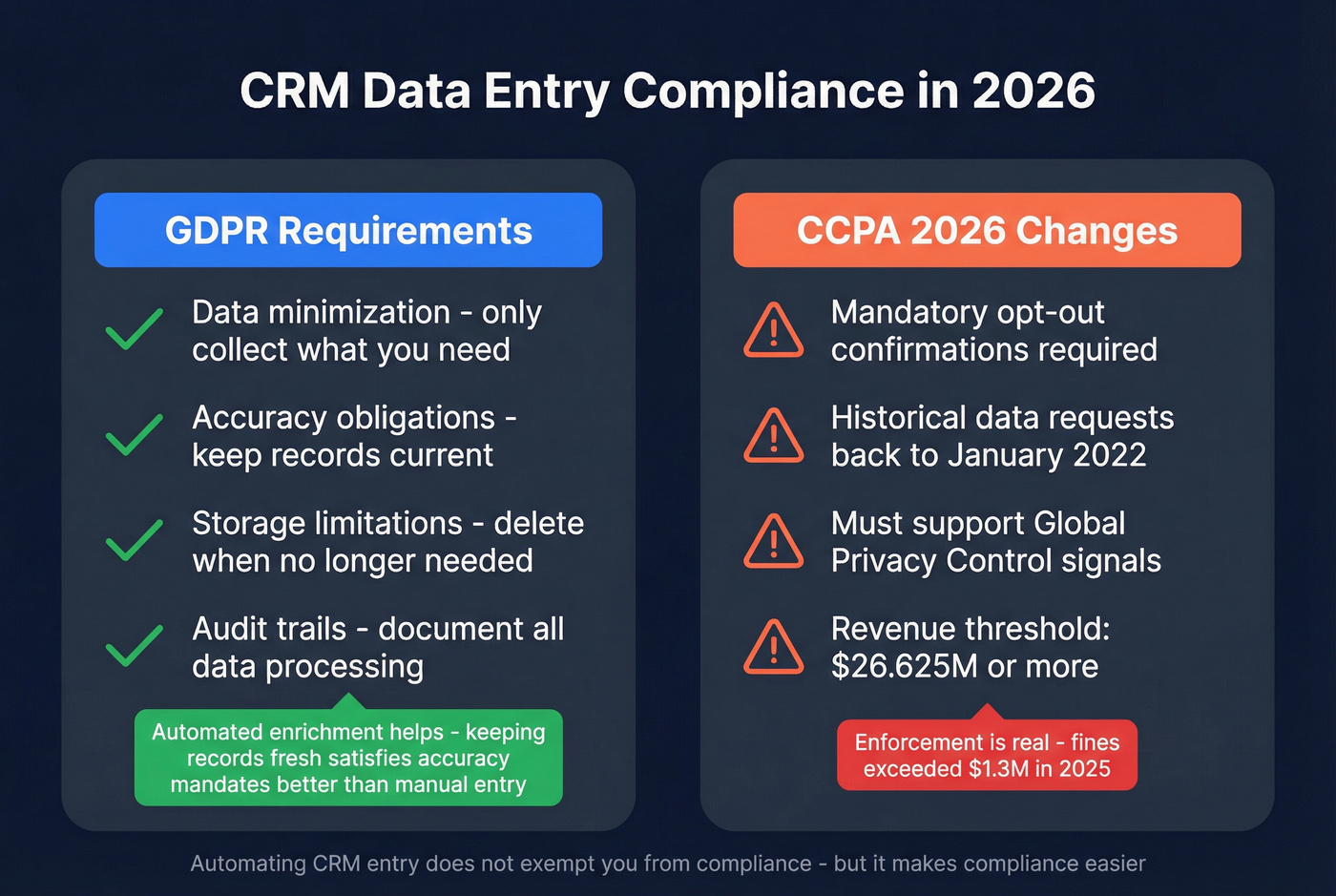
On the CCPA side, 2026 brought meaningful changes: mandatory opt-out confirmations, historical data requests back to January 2022, and required Global Privacy Control signal support. The revenue threshold sits at $26.625M+, and enforcement has real teeth - fines exceeded $1.3M in 2025.
CRM Data Entry FAQ
How many hours do sales reps spend on data entry?
The average CRM user spends roughly 6 hours per week on data entry and management - nearly a full workday lost. 32% of reps log an hour or more daily, adding up to 250+ hours per rep per year that could go toward selling.
What's the fastest way to reduce manual CRM entry?
Data enrichment delivers the most leverage because it eliminates the most common manual task: typing contact details. Pre-filling 50+ fields per record at 98% email accuracy removes the bulk of the work. Pair enrichment with native CRM workflows for deal-stage automation and you've covered the majority of manual entry.
What are CRM data entry best practices in 2026?
Minimize required fields to only what's needed for pipeline reporting, then automate everything you can with enrichment and workflows. For fields reps still touch, use dropdowns instead of free text, enforce naming conventions, and schedule quarterly audits to catch decay before it compounds.
Is CRM data entry still a real job?
Yes - specialist roles exist on Indeed and ZipRecruiter, often paying $20-35/hour. But the trend is clearly toward automation replacing dedicated data entry positions in favor of higher-value operations and analysis work.