

CRM Lead Generation: Build a System That Actually Converts
The average CRM returns $8.71 for every $1 invested. That's the headline stat vendors love to cite. Here's the one they don't: 76% of CRM users say less than half their data is accurate or complete. Your CRM isn't a lead generation strategy - it's a database. And if the data inside it is rotting, no amount of automation or AI scoring will save your pipeline.
Effective CRM lead generation starts with what's inside the system, not the system itself. Seven in ten B2B organizations increased their lead generation budgets in recent years. Most of that money gets wasted on tools layered over bad data.
What You Actually Need
You need three tools, not ten:
- A CRM that scores and routes leads automatically. HubSpot if you want the ecosystem. Zoho CRM if you want value and depth.
- A sequencing tool for multi-touch outreach. Instantly or Lemlist, depending on whether you prioritize volume or personalization.
Every other tool is optional until these three work together.
How CRM and Lead Generation Fit Together
This is a four-stage lifecycle. Miss any stage and leads leak out of your funnel. With 65% of marketers citing traffic and lead generation as their biggest challenge, getting this right matters more than adding another tool.
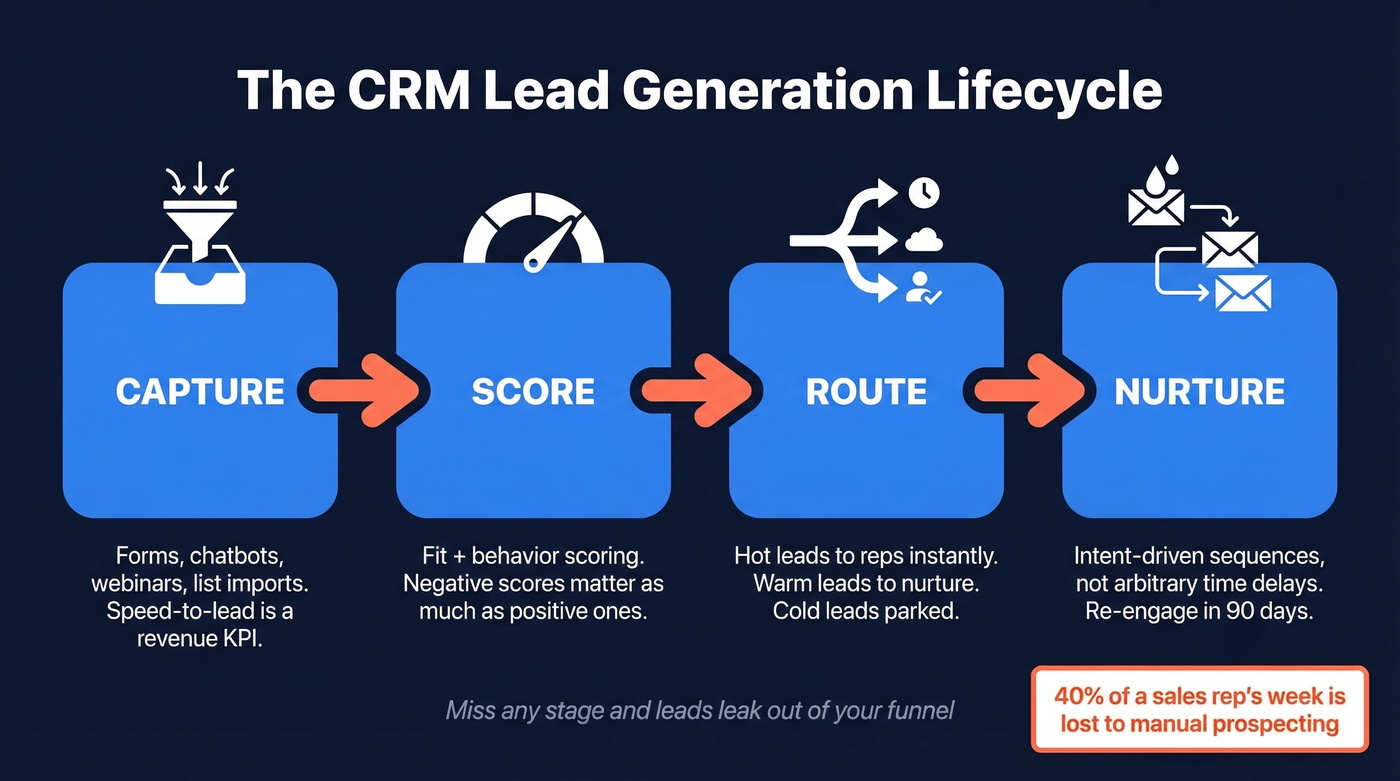
Capture is where leads enter the system - inbound forms, chatbots, webinar registrations, outbound list imports. The channel matters less than the speed. A lead contacted within five minutes converts at dramatically higher rates than one left sitting for 30, and most teams don't even route leads in real time. Treat speed-to-lead as a revenue KPI, not a vanity metric.
Score is where you separate signal from noise. Every lead gets a numeric score based on fit (job title, company size, industry) and behavior (email clicks, pricing page visits, demo requests). We'll build a full scoring model in the next section.
Route is the handoff. Hot leads go to reps immediately. Warm leads enter nurture sequences. Cold leads get parked until they show intent. The biggest failure here is manual routing - someone checking a spreadsheet or Slack channel to assign leads. Automate this or lose deals to competitors who did.
Nurture is where most programs die. A lead that isn't ready to buy today might be ready in 90 days, but without intent-driven nurture tracks triggered by behavior rather than arbitrary time delays, those leads go cold permanently. Intent data adds another dimension: tools tracking topics via Bombora tell you which accounts are actively researching your category, so you can prioritize leads showing real buying signals instead of guessing.
Here's the uncomfortable truth: manual prospecting still eats 40% of a sales rep's week. Two full days spent on work that a well-configured CRM should handle automatically. This four-stage framework is the difference between reps who sell and reps who search.
Build a Lead Scoring Model
Lead scoring without negative scoring is a vanity metric. Every lead looks warm when you only add points. We've seen teams skip negative scoring and end up with inflated pipelines and frustrated reps chasing ghosts.
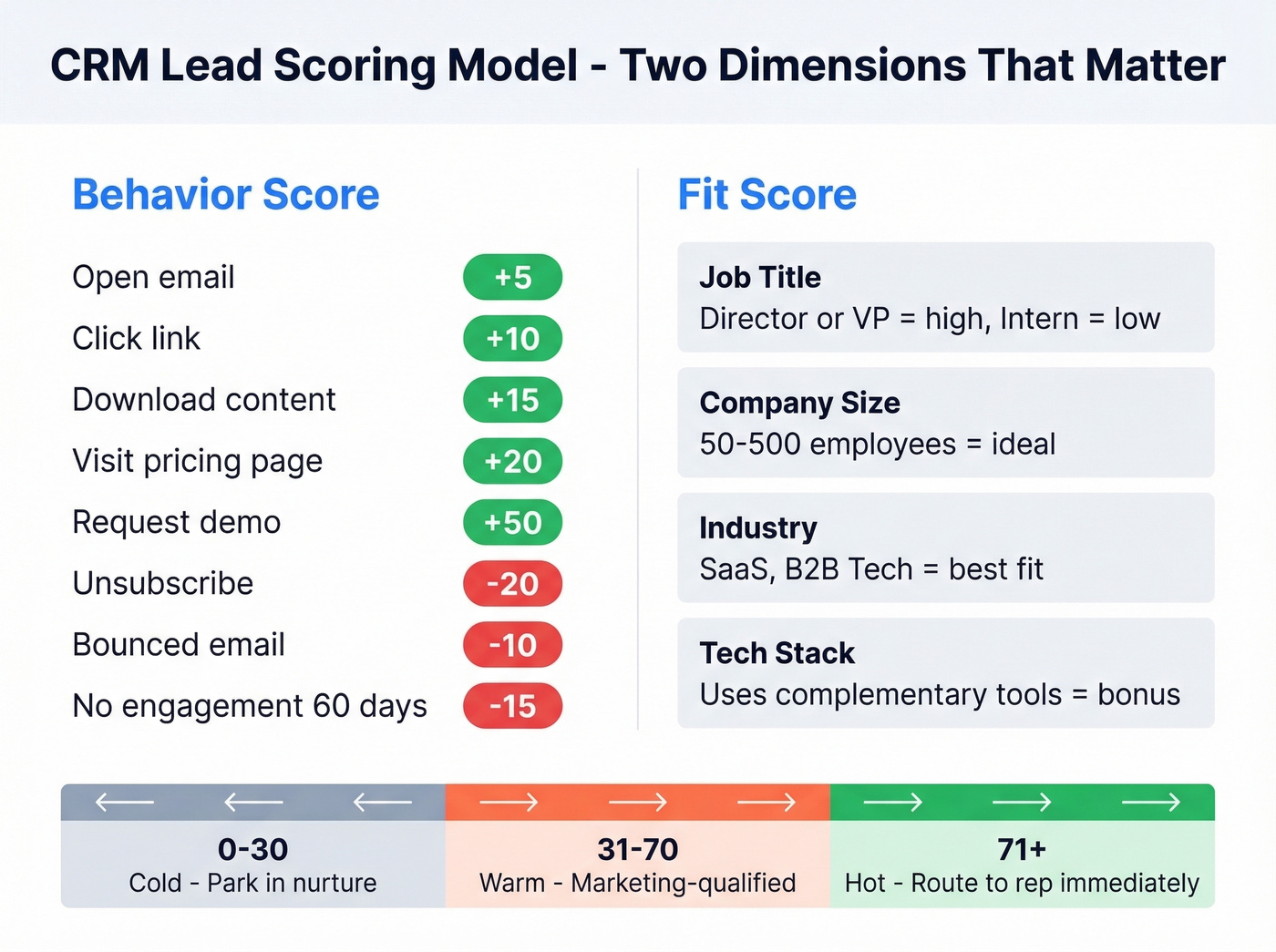
Behavioral Scoring
| Action | Points |
|---|---|
| Open email | +5 |
| Click link | +10 |
| Download content | +15 |
| Visit pricing page | +20 |
| Request demo | +50 |
| Unsubscribe | -20 |
| Bounced email | -10 |
| No engagement 60 days | -15 |
Threshold Bands
- 0-30: Cold. Park in nurture.
- 31-70: Warm. Marketing-qualified, not sales-ready.
- 71+: Hot. Route to a rep immediately.
Those negative scoring rows are what most teams skip. A lead who downloaded a whitepaper six months ago and hasn't opened an email since isn't warm - they're dead weight clogging your pipeline. Negative scoring forces that reality into the numbers.
Layer fit scoring on top of behavior. Job title, company size, industry, and tech stack all matter. A director at a 200-person SaaS company visiting your pricing page is a fundamentally different signal than an intern downloading a PDF for a class project - and your scoring model should reflect that gap with a 40+ point spread, not a 5-point nudge.
Modern CRMs handle this natively. Salesforce Einstein, Zoho Zia, and Freshsales Freddy AI all offer predictive scoring that adjusts weights based on which signals actually correlate with closed deals. If your CRM has AI scoring, use it - but start with a manual model so you understand what the AI is optimizing for.

Your scoring model is worthless if 30% of your CRM data has decayed. Prospeo enriches every contact with 50+ data points at a 92% match rate - on a 7-day refresh cycle, not the 6-week industry average. At $0.01 per email with 98% accuracy, you stop feeding bounced contacts into nurture sequences and start routing real buyers to reps.
Stop scoring leads built on stale data. Enrich your CRM today.
Five Mistakes That Kill Lead Gen
Broken marketing-sales handoffs. Marketing generates leads, throws them over the wall, and sales ignores half of them. The fix: define an SLA. Marketing delivers X MQLs per week; sales follows up within Y hours. Write it down. Measure it.
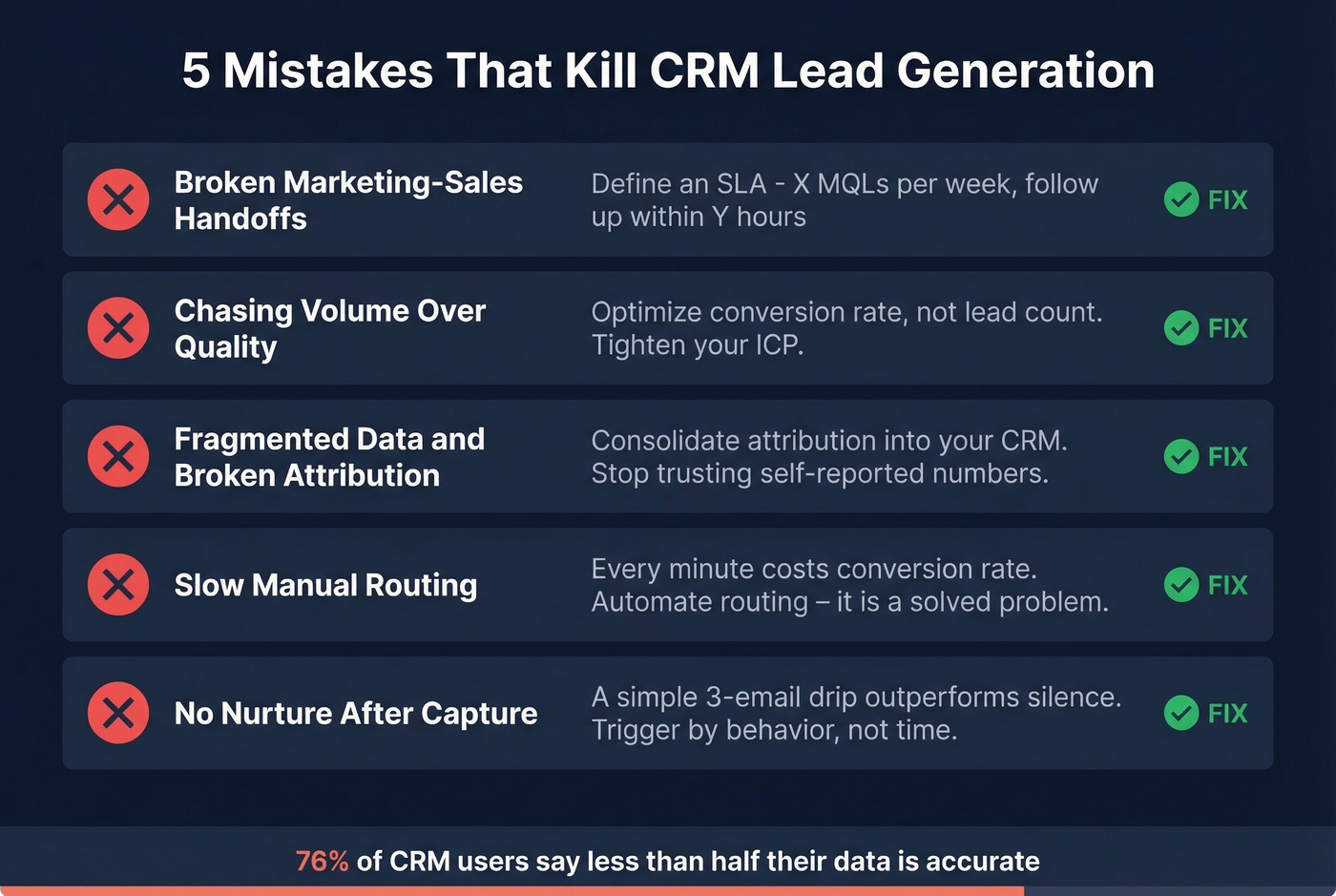
Chasing volume over quality. A thousand unqualified leads aren't worth ten qualified ones. If your team is celebrating lead count instead of conversion rate, you're optimizing the wrong metric. Tighten your ICP filters and accept smaller, better lists. (If you need a starting point, use an Ideal Customer Profile template.)
Fragmented data and broken attribution. When your CRM, marketing automation, and ad platforms don't share data, you can't tell which channels actually produce revenue. Consolidate attribution into your CRM or a dedicated tool - don't rely on each platform's self-reported numbers. Track the right lead generation metrics so you can prove what’s working.
Slow manual routing. Every minute between capture and contact costs you conversion rate. If leads sit in a queue waiting for a manager to assign them, you're losing to competitors with automated routing. This is a solved problem in every major CRM. Turn it on. (If routing is messy, standardize your lead status definitions first.)
No nurture after capture. A lead that isn't ready today might be ready in 90 days. Without automated nurture sequences triggered by behavior, those leads evaporate. Even a simple three-email drip outperforms silence. If you’re stuck, start with proven cold email follow-up templates.
The Data Quality Problem
CRM data decays up to 30% annually. People change jobs, companies get acquired, email addresses go stale. If you're not running enrichment, you're building your entire lead gen program on sand.
Snyk's sales team saw this firsthand. Their bounce rate was running 35-40% before they implemented a proper enrichment layer. After implementation, that dropped to under 5%, and AE-sourced pipeline jumped 180% with over 200 new opportunities per month.

The industry average refresh cycle is about six weeks. By the time you're calling a lead, the data might already be stale. A 7-day refresh cycle catches job changes, new phone numbers, and updated email addresses before they become bounces - a meaningful edge when your scoring model depends on accurate contact records. If you’re evaluating vendors, compare data enrichment services side by side.
Best CRM Lead Generation Tools
Forbes Advisor evaluated 41 providers across 35 metrics, weighting general features, consumer sentiment, pricing, and support. We've distilled the ones that actually matter for generating and managing leads. Fair warning: the "starting at" prices on vendor websites are almost never the price where lead gen features work.
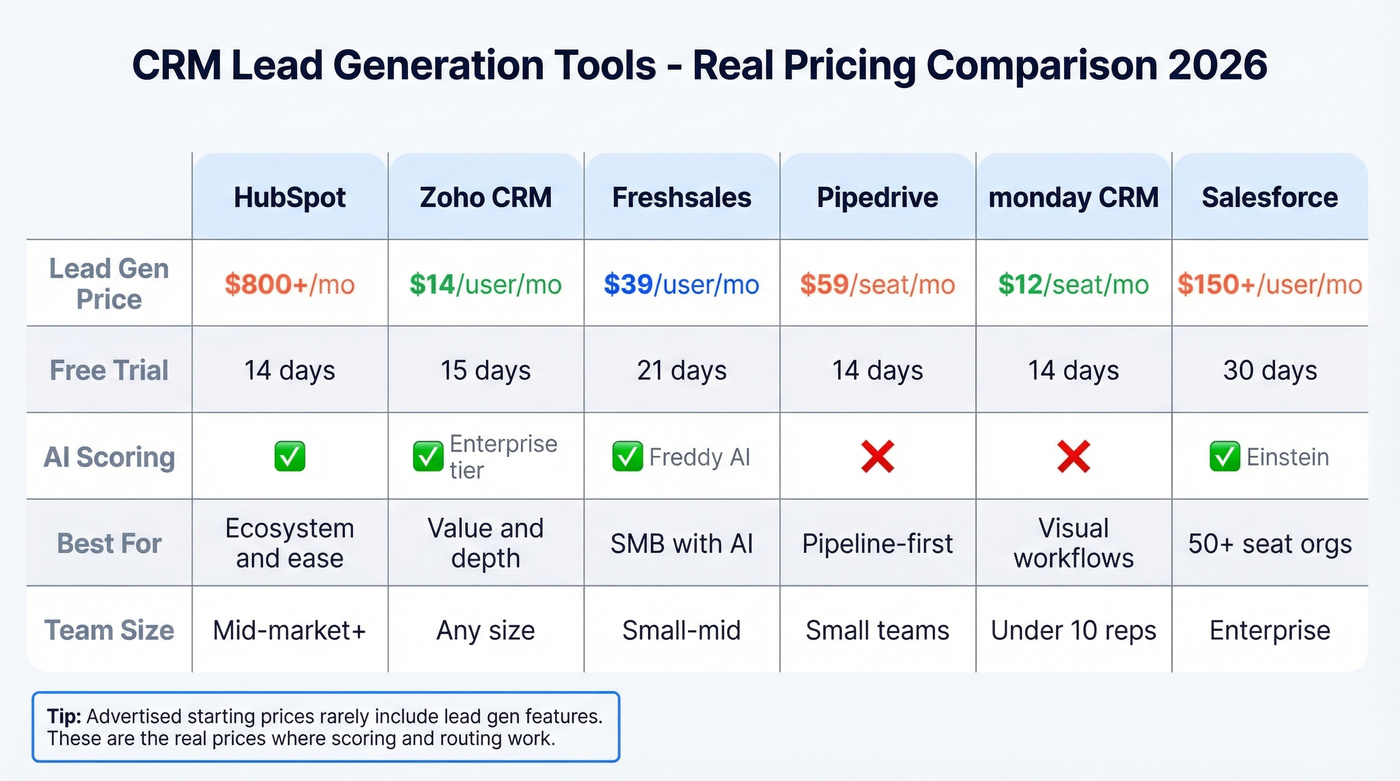
| Tool | Lead-Gen Starts At | Free Trial | Best For |
|---|---|---|---|
| HubSpot | ~$800+/mo | 14 days | Ecosystem & ease |
| Zoho CRM | $14/user/mo | 15 days | Value & depth |
| Freshsales | $39/user/mo (Pro) | 21 days | SMB with AI scoring |
| Pipedrive | $59/seat/mo (Premium) | 14 days | Pipeline-first teams |
| monday CRM | $12/seat/mo | 14 days | Visual workflows |
| Salesforce | $25/user/mo (Starter) | 30 days | 50+ seat orgs |
HubSpot
HubSpot's free CRM is genuinely useful for contact management, but lead scoring and automation sit behind paid tiers that get expensive fast - expect around $800+/mo once you're on the plans where those features are actually usable. The ecosystem is the real draw: marketing hub, sales hub, and service hub all share the same database, so attribution and handoffs happen natively. If you're already running HubSpot Marketing, adding the CRM is a no-brainer. Starting from scratch on a budget? Look elsewhere.
Zoho CRM
PCMag's Editors' Choice at 4.5/5, and for good reason. Zoho starts at $14/user/mo and packs deep customization with the Canvas Builder. Zia AI scoring kicks in at the Enterprise tier ($40/user/mo), which is still cheaper than most competitors' mid-tier plans. The tradeoff is a steep learning curve - Zoho gives you enormous flexibility, but you'll spend time configuring it. For teams that want power without enterprise pricing, it's the best value in the market right now.
Freshsales
Freshsales advertises $9/user/mo. The price where lead gen actually works is $39/user/mo on Pro. That's where you get Freshsales Freddy AI contact scoring, sales sequences, auto-assignment rules, and multiple pipelines. The Growth plan lacks all of these.
We've seen teams sign up for the $9 plan, realize they can't score or sequence, and upgrade within a month. Start your trial on Pro and save yourself the confusion.
Pipedrive
Pipeline-first CRM with clean UX, but lead gen features are expensive add-ons. Custom scoring and automatic routing sit in Premium at $59/seat/mo, and the LeadBooster add-on runs another $32.50/mo. Skip this if lead generation is your primary use case - you'll pay more for less.
monday CRM
Visual workflow builder at $12/seat/mo with a free plan. Good for small teams that think in Kanban boards, lighter on advanced scoring and AI. Use this if you have fewer than 10 reps and want something running by Friday.
Salesforce Sales Cloud
Starts at $25/user/mo for Starter, but many teams end up on higher tiers running roughly $150+/user/mo once they need advanced automation and lead management. Skip this if you're under 50 employees - the implementation complexity and cost aren't justified for smaller teams. (If you’re comparing options, see more examples of a CRM with real pricing.)
A Real-World Outbound Stack
This workflow comes from practitioners on r/sales. Build your ICP list in Apollo - it's "crazy powerful when you know how to use it," as one poster put it, but don't trust the data blindly. Apollo's contact database is populated by other users, and nobody is independently verifying anything. One important caveat: Apollo's built-in dialer uses Twilio VoIP numbers that get flagged as spam frequently. Use a separate dialer for calls. If you’re tightening your outbound motion, borrow from these sales prospecting techniques.
After exporting leads, run email verification through a dedicated tool with catch-all handling and spam-trap removal. Best practice from that r/sales workflow: use at least two verification tools and separate your phone verification from email verification. This step alone can cut your bounce rate from 30%+ to under 5%. (If you’re shopping around, compare Bouncer alternatives.)
For enrichment and workflow orchestration, Clay is worth a look. Several practitioners layer Clay with intent signals to build hyper-targeted lists before pushing contacts into their sequencing tool. It's an extra step, but the targeting precision pays for itself in reply rates. If you want the cost math and workflow, see Clay list building.
For sequencing, combine cold email with calls and social touches. Keep warm-up volume in your daily send math: if your limit is 30 emails per day, that's 25 outreach and 5 warm-up - not 30 plus 5. Disable open and click trackers in your email tool. The consensus on r/sales is clear: trackers hurt deliverability more than the data they provide is worth. (If deliverability is a recurring issue, use this email deliverability guide to fix it at the source.)
Let's be honest about something most "best CRM" articles won't say: if your average deal size is under $10k, you probably don't need a $150+/user/mo CRM. A $14 Zoho seat plus a solid data layer will outperform an expensive platform filled with garbage contacts. For B2B lead generation, CRM choice matters far less than the accuracy of the contacts inside it.
Snyk's 50 AEs cut their bounce rate from 35-40% to under 5% and generated 200+ new opportunities per month after layering Prospeo into their CRM workflow. Their AE-sourced pipeline jumped 180%. Same team, same CRM - better data.
Your reps deserve contacts that actually connect. Give them Prospeo.
FAQ
What is CRM lead generation?
It's the process of using your CRM to capture, score, route, and nurture leads into sales opportunities. It combines inbound capture (forms, chatbots) with outbound prospecting (list imports, enrichment), all managed through your CRM's automation and scoring features. Without a data enrichment layer, most CRM-driven programs decay within months as contact records go stale.
Which CRM is best for lead generation on a small budget?
Zoho CRM at $14/user/mo offers the deepest feature set for the price, including Canvas Builder customization and Zia AI scoring at $40/user/mo. Freshsales Pro at $39/user/mo is the next step up for teams that need AI contact scoring out of the box. Both beat HubSpot and Salesforce on value for teams under 20 reps.
Do I need a separate tool for lead data?
Yes. Your CRM stores data but doesn't keep it accurate. With 30% annual decay, a dedicated enrichment tool is essential. A 7-day refresh cycle keeps scoring models fed with current information, compared to the 6-week industry average that lets contacts go stale between updates.
How often should I clean my CRM data?
Weekly automated enrichment is ideal; quarterly is the bare minimum. With 30% annual decay, quarterly cleaning means roughly 7-8% of your database is already stale between cycles. Automated enrichment via API eliminates the manual effort entirely.