

CRM Lead Management: The Practitioner's Playbook for 2026
Monday morning. You open the CRM. 87 new leads from the weekend - 34 completely untouched. No notes, no owner, no next step. The SDR who was supposed to work them called in sick, and nobody picked up the slack. By Wednesday, half those leads are cold. By Friday, they're dead.
This is the most common failure mode in B2B sales, and it has nothing to do with lead volume. It's a CRM lead management problem. A recurring complaint on r/CRM is some version of "things fall through the cracks" - and the fix isn't more leads. It's a better system to manage the ones you already have.
Your lead management process has 7 stages, but it lives or dies on two things: speed-to-lead and data quality. Responding within 5 minutes increases conversion by 900%. Most teams don't even track lead response time.
What Is CRM Lead Management?
CRM lead management is the process of capturing, tracking, qualifying, scoring, routing, nurturing, and analyzing leads inside your CRM - from first touch to closed deal. It's not the same as lead generation (which fills the top of the funnel) or customer relationship management broadly (which includes post-sale). Think of it as lead organization: the discipline of keeping every prospect accounted for and moving forward.
Here's a clean way to think about the three concepts people constantly conflate:
| Lead Distribution | Lead Management | CRM | |
|---|---|---|---|
| Core job | Deliver the lead | Engage the lead | Store the result |
| Focus | Routing, assignment | Qualification, nurture | Full lifecycle |
| Users | Ops/automation | Sales reps, SDRs | Entire org |
| Time horizon | Seconds | Days to weeks | Months to years |
Lead distribution gets the right lead to the right rep. Lead management converts that lead into pipeline. The CRM holds the entire customer record long after the deal closes. Most teams need all three functions - the question is whether you handle them in one platform or a stack of specialized tools.
Zapier's take is that lead management works best as a suite, not a single app. That's true for large teams with dedicated ops. For everyone under 50 reps, a good CRM with solid lead management capabilities and clean data handles most of it.
The 7 Stages of Lead Management
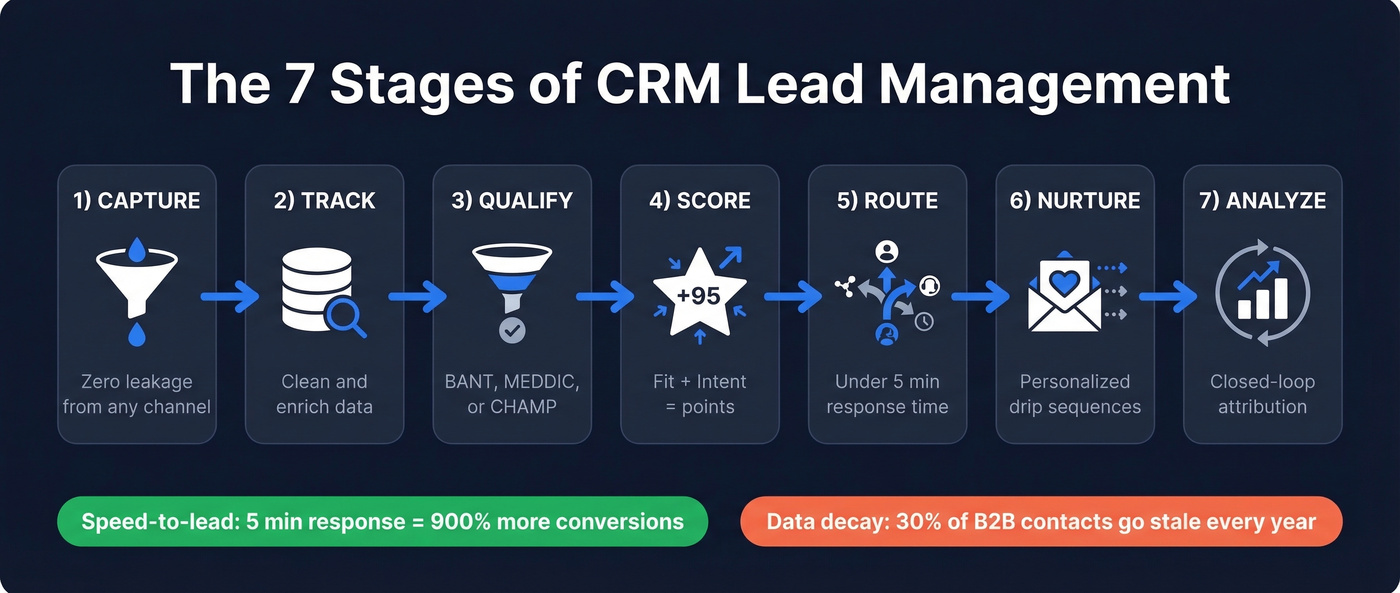
Every lead management process follows the same arc, whether you're running HubSpot, Salesforce, or a spreadsheet. The difference between teams that convert and teams that leak pipeline comes down to discipline at each stage.
Capture
Leads arrive from everywhere - web forms, chatbots, paid ads, events, manual entry by reps, inbound calls. The goal is simple: get every lead into one system with zero leakage. If a lead exists in a rep's inbox but not in the CRM, it doesn't exist. Automate ingestion from every channel. No exceptions.
Track
Once a lead is in the CRM, the record needs to be accurate and complete. This is where most pipelines quietly rot. B2B contact data decays roughly 30% per year - people change jobs, get promoted, switch emails. If your CRM is full of stale records, every downstream stage suffers. Before you score or route a single lead, verify and refresh your data with an enrichment tool. Clean data isn't a nice-to-have. It's the foundation everything else depends on.

Qualify
Not every lead deserves a rep's time. Use a qualification framework - BANT is the classic, but MEDDIC or CHAMP work too. The point is having a shared definition of "qualified" that marketing and sales agree on. Without it, reps waste hours chasing leads who were never going to buy, and marketing claims credit for volume that never converts.
Score
Assign a numerical value to each lead based on fit and behavior. A VP at a 500-person company who visited your pricing page twice is worth more than a student who downloaded a whitepaper. Behavioral scoring boosts conversion by up to 40%. We'll cover a concrete scoring template in the next section. If you want to go deeper, use a dedicated lead scoring framework and keep it updated.
Route
This is the stage where speed kills - in a good way. Responding within 5 minutes increases conversion by 900%, and 78% of buyers choose the first company to respond. Round-robin assignment, SLA timers, and Slack alerts aren't optional. They're revenue infrastructure. Treat lead response time as a KPI, not a suggestion.
Nurture
Not every qualified lead is ready to buy today. Drip sequences, intent-based follow-up, and timely content keep you top-of-mind without being annoying. The mistake here is over-automating - generic sequences with "[First Name], just checking in" kill trust faster than silence does. Personalize based on what the lead actually did, not just where they sit in a workflow. When reps need help, keep a set of sales follow-up templates ready.
Analyze
Close the loop. Track funnel metrics at every stage - visitor-to-lead, lead-to-MQL, MQL-to-SQL, SQL-to-close. Attribute revenue back to channels and campaigns. The biggest enterprise failure mode is fragmented attribution across CRM, marketing automation, and intent tools, where data lives in three places and nobody trusts any of it. Without closed-loop reporting, you're optimizing blind.
A Lead Scoring Template You Can Steal
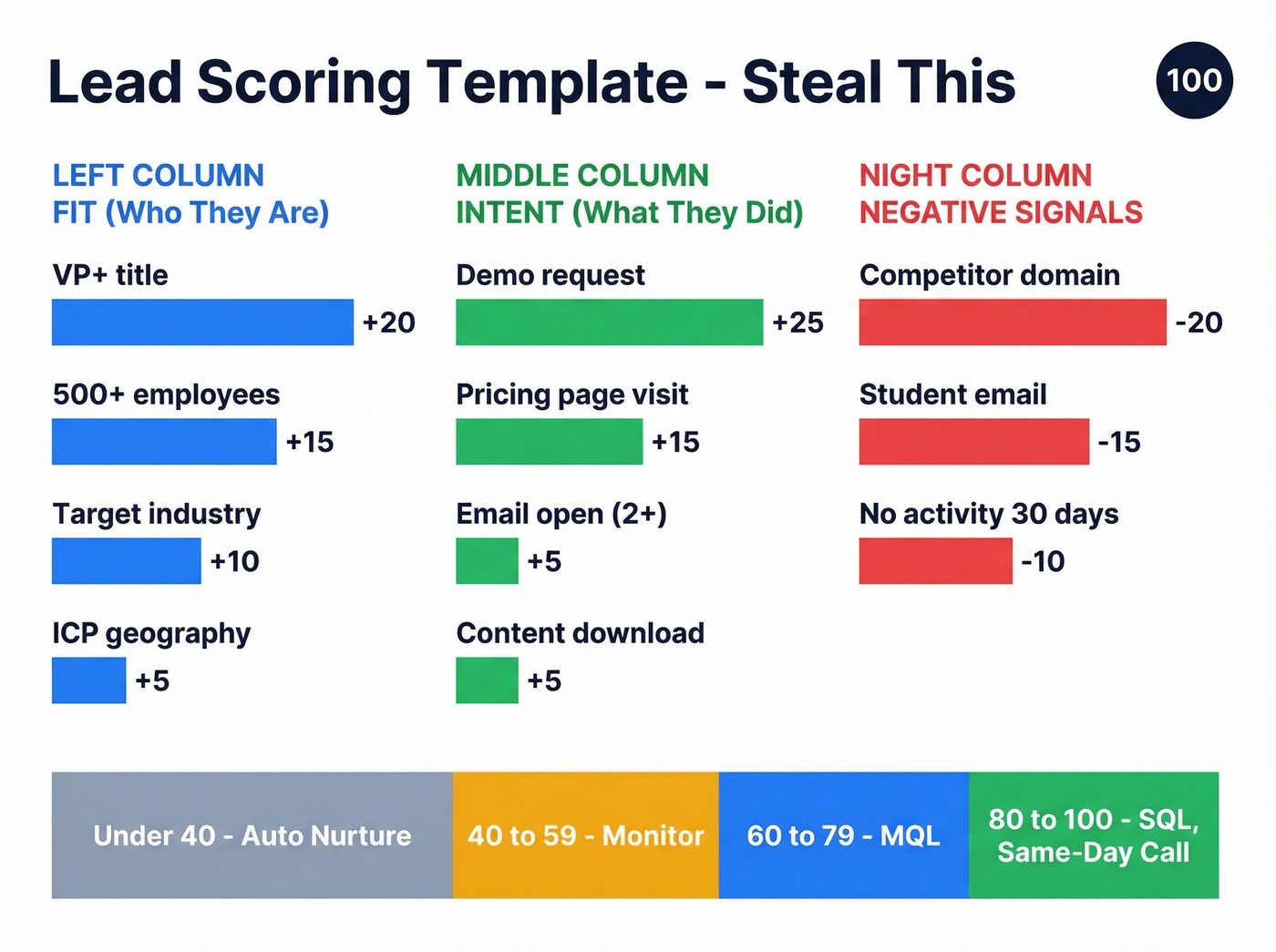
Here's a scoring model you can implement today. It splits into two dimensions: Fit (who they are) and Intent (what they've done). Total possible score: 100.
| Criteria | Type | Points |
|---|---|---|
| VP+ title | Fit | +20 |
| 500+ employees | Fit | +15 |
| Target industry | Fit | +10 |
| Located in ICP geo | Fit | +5 |
| Demo request | Intent | +25 |
| Pricing page visit | Intent | +15 |
| Email open (2+) | Intent | +5 |
| Content download | Intent | +5 |
| Competitor domain | Negative | -20 |
| Student email | Negative | -15 |
| No activity 30 days | Negative | -10 |
Thresholds: MQL at 60 points. SQL at 80. Anything below 40 stays in automated nurture. Anything above 80 gets a same-day call.
The specific point values matter less than having a system at all. Start here, then calibrate monthly based on which scored leads actually close. Most teams overthink the model and underthink the feedback loop - we've seen teams spend six weeks building a scoring model and then never revisit it once.

You just read that B2B contact data decays 30% per year. That means a third of your CRM leads are rotting right now. Prospeo's enrichment engine refreshes data every 7 days - not every 6 weeks like competitors - returning 50+ data points per contact at a 92% match rate. Plug it into HubSpot or Salesforce and stop scoring leads with stale records.
Clean data isn't stage two of lead management. It's stage zero.
Sales Lead Conversion Benchmarks
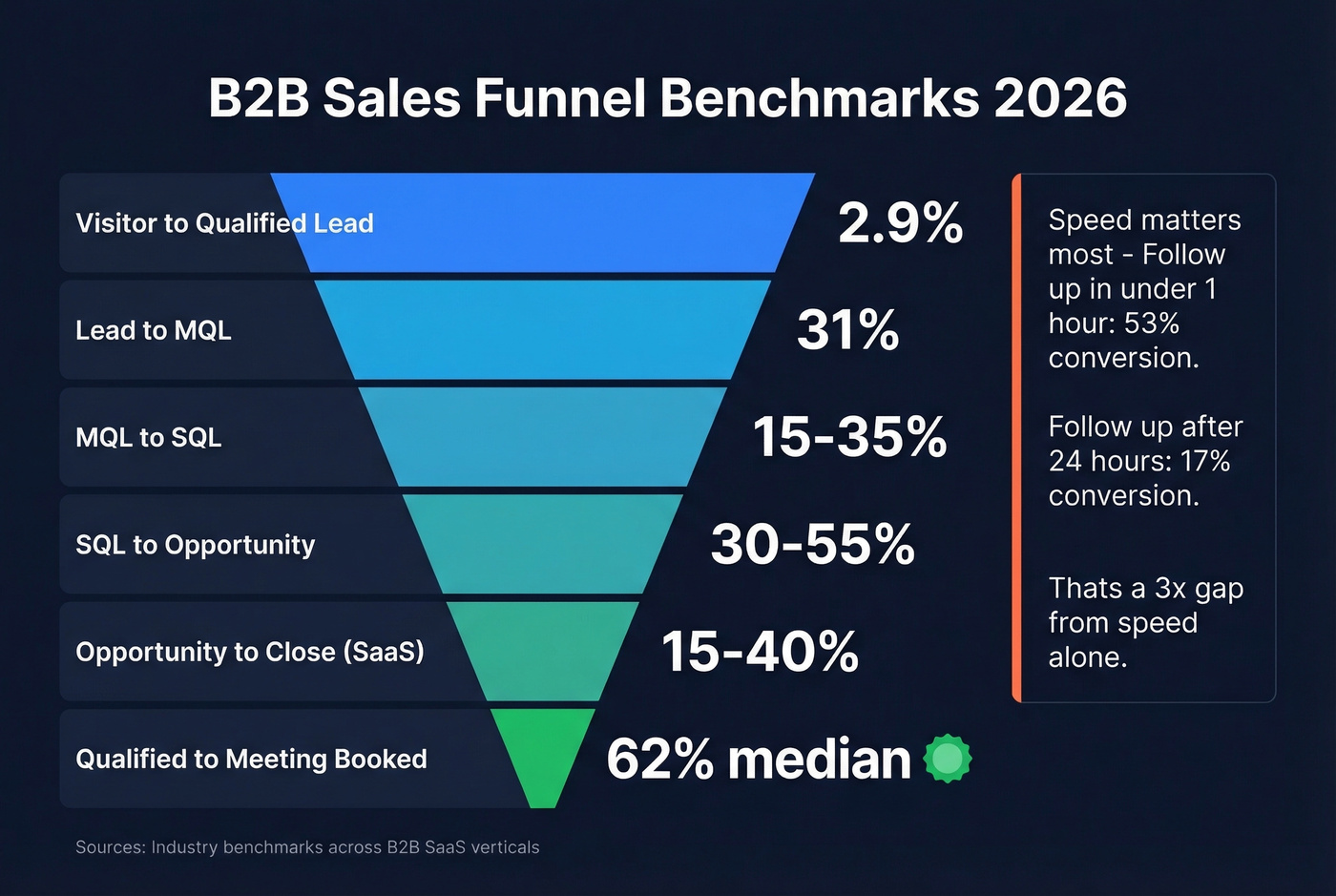
Benchmarks give you a baseline. Without them, you're guessing whether your funnel is healthy or hemorrhaging. Here's what good looks like across the full funnel:
| Funnel Stage | Benchmark |
|---|---|
| Visitor -> Qualified lead | 2.9% |
| Lead -> MQL | 31% |
| MQL -> SQL | 15-35% |
| SQL -> Opportunity | 30-55% |
| Opportunity -> Close (SaaS) | 15-40% |
| Qualified -> Meeting booked | 62% median |
That visitor-to-lead number varies wildly by industry. B2B SaaS averages just 1.1%, while legal services hits 7.4%. If you're benchmarking against a generic "2.9%," you might be celebrating mediocrity or panicking over a perfectly normal number for your vertical.
Not all channels convert equally either. Client referrals crush everything else, which shouldn't surprise anyone who's ever closed a warm intro in two calls versus eight cold touches:
| Channel | Lead -> MQL Rate |
|---|---|
| Client referrals | 56% |
| Executive events | 54% |
| SEO | 41% |
| 38% | |
| PPC | 29% |
| Outdoor | 14% |
PLG and SaaS Benchmarks
For product-led growth motions, the funnel math looks different. Free trial to paid conversion averages 29%. Freemium to paid sits at just 3.4% - which means your nurture sequences need to work much harder when the entry point is a free tier.
On acquisition costs, CAC tends to scale with ACV: $5K-$25K ACV often maps to $1K-$4K CAC, $25K-$100K maps to $4K-$15K, and $500K+ deals can run $50K-$150K in acquisition cost. (If you need to sanity-check your numbers, use a proper cost to acquire customer model.)
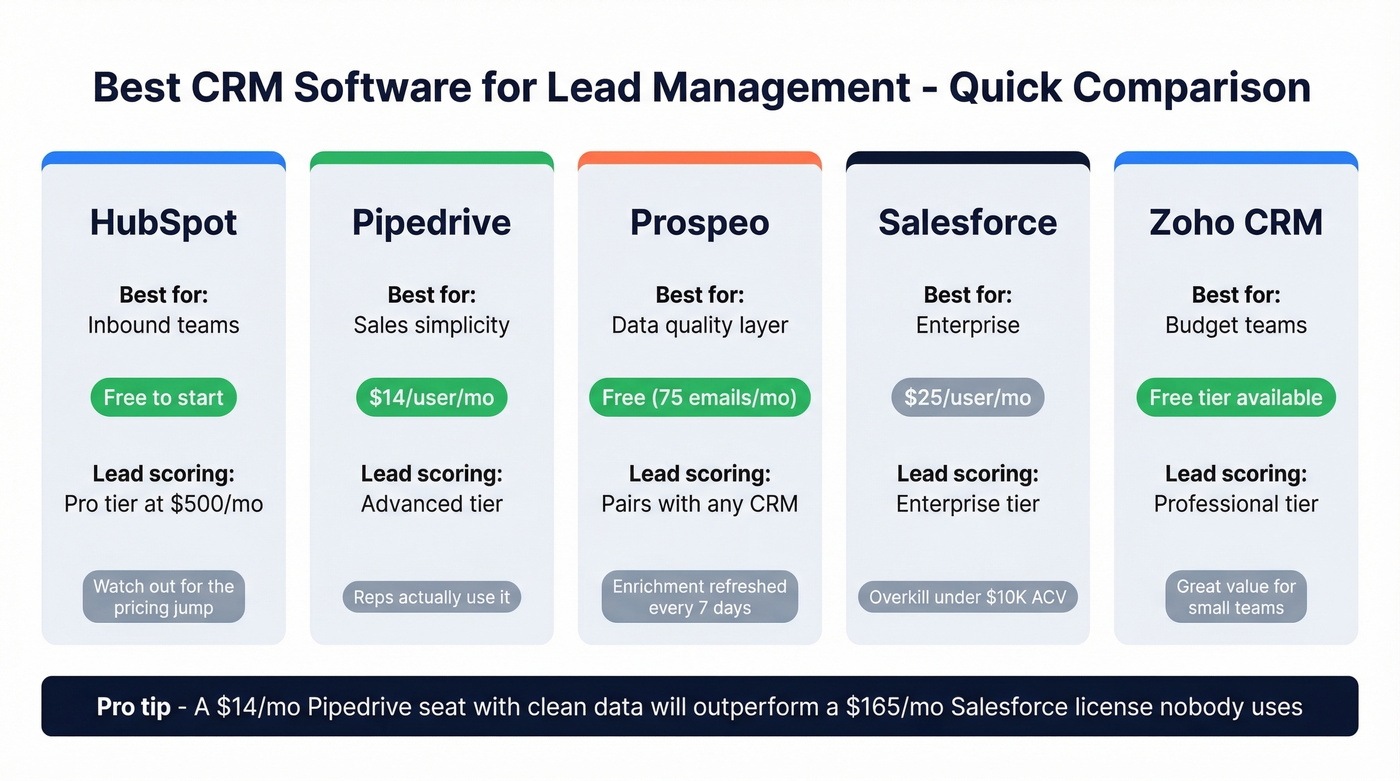
Let's be honest: if your average deal size is under $10K, you probably don't need Salesforce-level infrastructure. A $14/month Pipedrive seat with clean data will outperform a $165/month Salesforce license that nobody actually uses.
The speed-to-lead data is equally stark. Follow-up within the first hour converts at 53% versus 17% after 24 hours. That's a 3x gap driven entirely by response time. Not messaging, not offer, not product. Just speed.
Best Software for Lead Management
| Tool | Best For | Starting Price | Lead Scoring |
|---|---|---|---|
| HubSpot | Inbound teams | Free ($0) | Pro tier ($500/mo) |
| Pipedrive | Simplicity | $14/user/mo | Advanced tier |
| Prospeo | Data quality layer | Free (75 emails/mo) | Pairs with any CRM |
| Salesforce | Enterprise | $25/user/mo | Enterprise tier |
| Zoho CRM | Budget | Free tier available | Professional tier |
| monday CRM | No-code teams | Paid plans available | Built-in |
| noCRM | Small sales teams | Free 14-day trial | Simplified |
HubSpot: Best Free Option
HubSpot is the obvious starting point for marketing-driven teams. The free CRM is genuinely useful - contact management, deal tracking, email logging, and basic reporting at $0. For teams exploring free lead management software, that's hard to beat. If you're comparing options, it helps to look at a few examples of a CRM side-by-side.
The catch is the jump to Professional. Most teams that want serious automation end up on the $500/mo tier, which is a real sticker shock moment after starting on free. Enterprise runs $1,200/mo. We've seen teams grow into HubSpot beautifully, and we've seen teams get trapped by the pricing escalator. Know what tier you'll actually need before you commit.
Use this if you're running inbound marketing and want CRM + marketing automation in one platform.
Skip this if your budget can't absorb the Pro tier jump and you need advanced workflows now.
Pipedrive: Best for Sales Teams
Pipedrive does one thing exceptionally well: it makes pipeline management visual and intuitive. Reps actually use it, which is half the battle. The drag-and-drop pipeline and low learning curve mean you're productive on day one.
Essential starts at $14/user/mo, with Advanced at $29 and Professional at $49. Enterprise tops out at $99/user/mo. It's not an all-in-one platform - you won't get built-in marketing automation or a help desk. But for pure sales pipeline management, it's the best value in the market. The consensus on r/sales mirrors this: Pipedrive wins on simplicity, loses on breadth.
Prospeo: Best for Data Quality
Here's the thing most CRM articles miss: your CRM is only as good as the data inside it. You can have perfect scoring, flawless routing, and beautiful dashboards - and still fail because 30% of your contact records are stale.
Prospeo solves this at the foundation layer. It enriches and verifies CRM contacts with 98% email accuracy across 300M+ professional profiles, refreshing every record on a 7-day cycle compared to the 6-week industry average. Native integrations with HubSpot and Salesforce mean enrichment runs automatically - no CSV exports, no manual cleanup. The Chrome extension lets reps enrich records on the fly from any website. (If you're evaluating vendors, start with these data enrichment services.)
The free tier gives you 75 emails and 100 Chrome extension credits per month. Paid plans run about $0.01 per email - a fraction of what legacy data providers charge. Real results back this up: Snyk cut their bounce rate from 35-40% to under 5% after switching, and their AE-sourced pipeline jumped 180%.
Pair Prospeo with any CRM on this list. Clean data makes every other stage of the process work better.
Salesforce: Best for Enterprise
Salesforce is the most powerful CRM on the planet and the most complex. Essentials starts at $25/user/mo, but most teams doing serious automation end up on Enterprise at $165/user/mo or Unlimited at $330/user/mo. If you're budgeting, review real Salesforce pricing tradeoffs before you commit.
For teams with 20+ reps, dedicated admins, and complex workflows, nothing else comes close. For everyone else, it's overkill. The admin overhead alone can justify a full-time hire, and we've watched smaller teams drown in configuration before closing a single deal through the platform.
Zoho CRM: Best for Budget
Zoho earned PCMag's Editors' Choice for good reason - deep customization, Zia AI assistant, and pricing that undercuts nearly everyone at the same feature depth. The tradeoff is a steep learning curve. Zoho can do almost anything, but figuring out how takes longer than Pipedrive or HubSpot. Best for teams that want serious flexibility without serious pricing and don't mind investing in setup.
monday CRM
No-code workflows and AI automation make it a natural fit for teams already on monday.com for project management. Not purpose-built for sales, but surprisingly capable for lightweight lead tracking. If your team already lives in monday.com for everything else, adding CRM there eliminates one more tool to manage.
noCRM
A "pre-CRM" for pure sales teams under 10 reps who don't need post-sale lifecycle features. It strips the experience down to essentials - solving the rep-adoption problem by removing everything that isn't directly about closing deals. If your reps hate data entry, this is worth a serious look.
AI in Lead Management: What Actually Matters
Every CRM vendor is slapping "AI-powered" on their marketing page. Most of it is window dressing. Before you pay extra for AI features, run through this checklist - adapted from Capsule CRM's AI buyer's framework - and demand real answers:
- Does it suggest next actions based on deal patterns? Not just "follow up" - actual recommendations like "this deal stalled at the same stage as 40% of your losses, here's what closers did differently."
- Can it flag at-risk deals automatically? Engagement drops, missed follow-ups, and ghosted threads should trigger alerts without manual review.
- Does it auto-log interactions? Calls, emails, and meetings should flow into the CRM without reps copying and pasting.
- Can you query your pipeline in natural language? "Show me all SQLs in EMEA that haven't had activity in 7 days" should just work.
- Does it explain its recommendations? If the AI says "prioritize this lead," you need to see why. Black-box scoring erodes trust fast, and reps will ignore it within a month.
Look - AI in CRM is only as good as the data it sits on. Garbage records produce garbage recommendations. Clean, structured, regularly refreshed data is the prerequisite, not the model itself.
5 Mistakes That Kill Your Pipeline
1. Treating all leads the same. A demo request from a VP at a 1,000-person company and a whitepaper download from a student aren't the same lead. Without segmentation and scoring, reps waste equal time on both. Fix: implement the scoring template above. Today.
2. Slow follow-up. Every hour you wait, conversion drops. The 5-minute and 1-hour stats above aren't academic - they're the difference between a 53% conversion rate and a 17% one. Fix: set SLA timers. Alert in Slack at 5 minutes. Escalate at 15. If you need a system, borrow proven sales prospecting techniques and standardize them.
3. No qualification framework. If marketing and sales can't agree on what "qualified" means, you'll fight about lead quality forever. Fix: define MQL and SQL criteria in writing. Review monthly.
4. Failing to record interactions. When a lead gets handed off and the new rep has zero context, you've just reset the relationship to zero. This is the misaligned handoff problem that plagues enterprise teams - and it's entirely preventable. Fix: mandate activity logging. Auto-log where possible. Make it a performance metric. (If you need to define what “good” looks like, document clear sales activities for each stage.)
5. Over-automating without human contact. Generic drip sequences feel generic. Prospects can smell a template from three paragraphs away. Fix: automate the logistics (routing, reminders, data entry) but personalize the actual outreach. Even one custom sentence per email changes the response rate dramatically.
Speed-to-lead means nothing if you're calling the wrong number. Prospeo gives your reps 125M+ verified mobile numbers with a 30% pickup rate - 3x higher than ZoomInfo. Combine that with 98% email accuracy and intent data across 15,000 topics, and every lead your CRM routes actually connects to a real buyer.
Stop routing leads into a void. Start connecting reps to real buyers.
FAQ
What's the difference between lead management and CRM?
Lead management focuses on converting prospects - capturing, scoring, routing, and nurturing them through the pipeline until they become opportunities. A CRM manages the full customer lifecycle including post-sale support, account management, and renewals. Most teams use their CRM for lead management, but they're distinct functions with different success metrics.
What's a good lead-to-MQL conversion rate?
The average across industries is about 31%. Top-performing teams with strong scoring and segmentation reach 40%+. Channel matters a lot - client referrals convert at 56%, while PPC converts at 29%. If you're below 20%, revisit your qualification criteria or lead sources before blaming the reps.
How do I keep CRM data clean?
B2B contact data decays roughly 30% per year as people change roles, companies, and email addresses. Use an enrichment tool to verify emails and refresh records automatically - a 7-day refresh cycle with native CRM integrations means cleanup runs in the background without manual effort. In our experience, teams that automate enrichment see bounce rates drop from 30%+ to under 5% within weeks.
Is there a free lead tracker worth using?
HubSpot's free CRM is the strongest free option - it covers contact management, deal tracking, and basic reporting at $0. Zoho CRM also offers a free tier. For data enrichment, Prospeo's free plan includes 75 email credits and 100 Chrome extension lookups monthly. Advanced features like lead scoring typically require paid tiers on any platform.
What's the best lead management software for real estate?
Real estate teams need fast response times, mobile access, and strong contact organization. Solo agents and small brokerages do well with Pipedrive or noCRM for simplicity, while larger teams benefit from HubSpot's automation. Regardless of platform, pairing your CRM with a data enrichment layer ensures contact details stay current through long sales cycles.