

The CRM Lead Management Process Your Competitors Skip
It's Monday morning. You open your CRM and find 47 leads from the weekend sitting untouched. No one was assigned. No one was pinged. By the time your reps start working them, half have already talked to a competitor.
This isn't a hypothetical - 63.5% of companies never respond to leads at all, and the ones that do average 29+ hours. You don't have a lead quality problem. You have a CRM lead management process problem.
What You Need (Quick Version)
If you build nothing else, build these three things:
- A lead scoring model with actual point values. Not "hot/warm/cold" - a numeric model your CRM enforces. Template below. (If you want a deeper framework, see lead scoring.)
- A 5-minute response-time SLA for inbound leads. Companies with a formal SLA respond within 15 minutes 54.9% of the time vs. 29.5% without one.
- An enrichment step before anything enters your pipeline. A lead with just a name and email is unscoreable. Enrich it with verified contact data, company size, tech stack, and job title before scoring begins. (More on lead enrichment.)
The 7 Stages Explained
Every CRM vendor publishes a "lead management guide" that conveniently ends with "use our product." Let's skip that. CRM delivers $8.71 for every $1 invested - but only when the process inside it actually works.
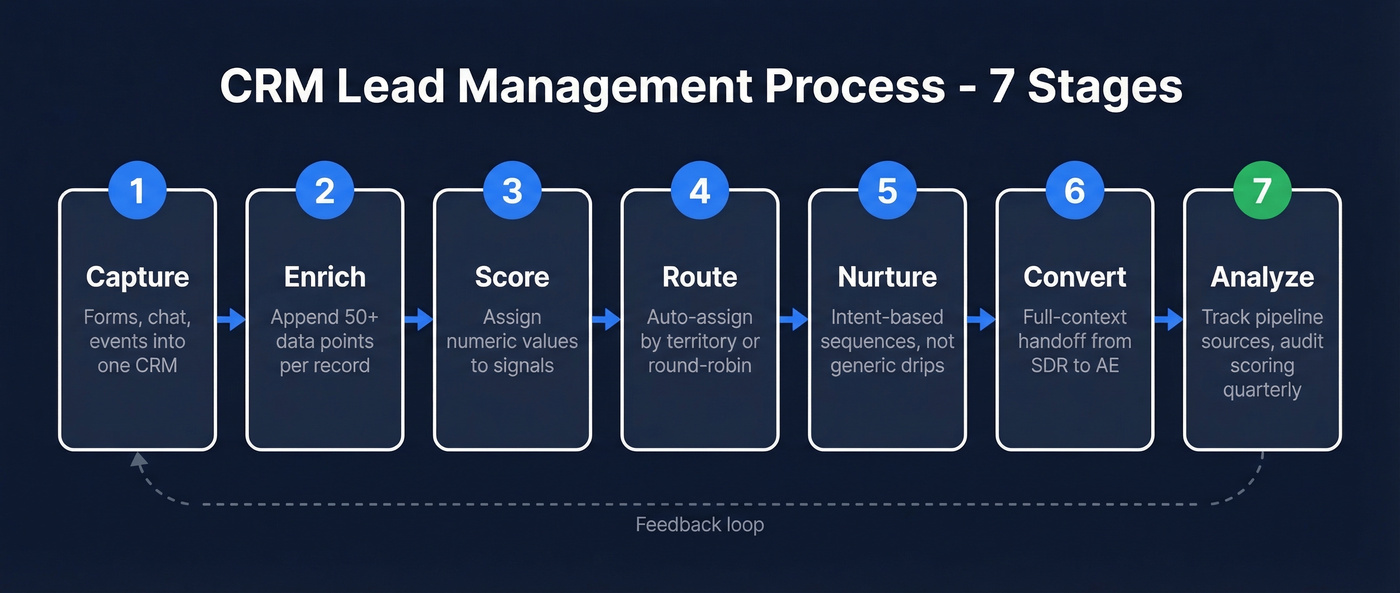
Stage 1: Capture
Keep your forms short. Name, email, company - that's it. Extra fields kill conversion rates, and you'll enrich the rest programmatically anyway.
Capture leads from every channel - web forms, chat, events, outbound replies - into a single CRM instance. The recurring ask on r/b2bmarketing is a "single source of truth," and this is where it starts. If leads live in three spreadsheets and a Notion doc, you don't have a pipeline. You have a scavenger hunt.
Stage 2: Enrich
A lead with just a name and email can't be scored, routed, or prioritized. This is the step most teams skip, and it's the one that makes everything downstream work.
Prospeo appends 50+ data points per record - verified email, direct dial, company size, tech stack, funding stage, department headcount - via native Salesforce and HubSpot integrations. The 83% enrichment match rate with a 7-day data refresh cycle keeps records current while the industry average sits at 6 weeks. We've seen teams cut bounce rates from 35-40% to under 5% just by cleaning and enriching contact data before outreach.

Stage 3: Score
Assign numeric values to behavioral and firmographic signals. Pricing page visit: +15. Form fill: +20. Email bounce: -25. Job title match: +10. Set an MQL threshold - we use >50 points as a starting point - and let the CRM auto-flag leads that cross it.
70% of companies now use AI in their CRM, mostly for scoring and forecasting. But a well-tuned manual model beats a poorly configured AI one every time. Full scoring template below.
Stage 4: Route
Auto-assign leads by territory, deal size, or round-robin - and ping the owner immediately. Wire this with Zapier ($19.99/mo on Starter, annual billing) or Make to auto-assign and notify in Slack. The recurring complaint on r/CRM is leads getting lost when sales is overwhelmed. They sit unassigned, untouched, and eventually forgotten. Automatic assignment plus stall reminders fix this without relying on discipline. (If you need a clean setup, start with lead status.)
For inbound, your SLA is 5 minutes. Over 40% of high-intent inquiries arrive evenings and weekends, and a typical team goes 61 hours silent from Friday evening to Monday morning. Automate after-hours routing or you're handing deals to competitors.
Stage 5: Nurture
The average B2B buying cycle runs 10.1 months. Most leads aren't ready to buy when they first engage. Build intent-based sequences, not generic drips - a lead who visited your pricing page three times gets a different cadence than one who downloaded a whitepaper once. (For structure, use these sales follow-up templates.)
Here's the uncomfortable truth: 92% of buyers start with at least one vendor in mind. If you're not in the consideration set early, no amount of nurture will get you there.
Stage 6: Convert
The handoff from SDR to AE needs full context - every touchpoint, every score change, every piece of enrichment data. Don't make the AE ask "so what do you know about this account?" (A simple handoff email template helps standardize this.)
The winning vendor is on the buyer's Day One shortlist 95% of the time, and 41% of buyers have a preferred vendor before formal evaluation even begins. Show up late and you're competing for second place.
Stage 7: Analyze
Close the loop. Track which lead sources produce pipeline, not just MQLs. (If you want a tighter measurement system, see funnel metrics.)
Audit your scoring model quarterly - if high-scoring leads aren't converting, your weights are wrong. If low-scoring leads are closing, you're missing signals. 37% of CRM users report revenue loss from poor data quality. The fix is systematic, not heroic. Recycle disqualified leads back to nurture with a 90-day re-engagement trigger. Dead leads aren't always dead, just early.
Lead Scoring Template
Every guide tells you to "implement lead scoring." None of them show you the model. Here's a starting framework - adjust the values to match your funnel's actual conversion data.
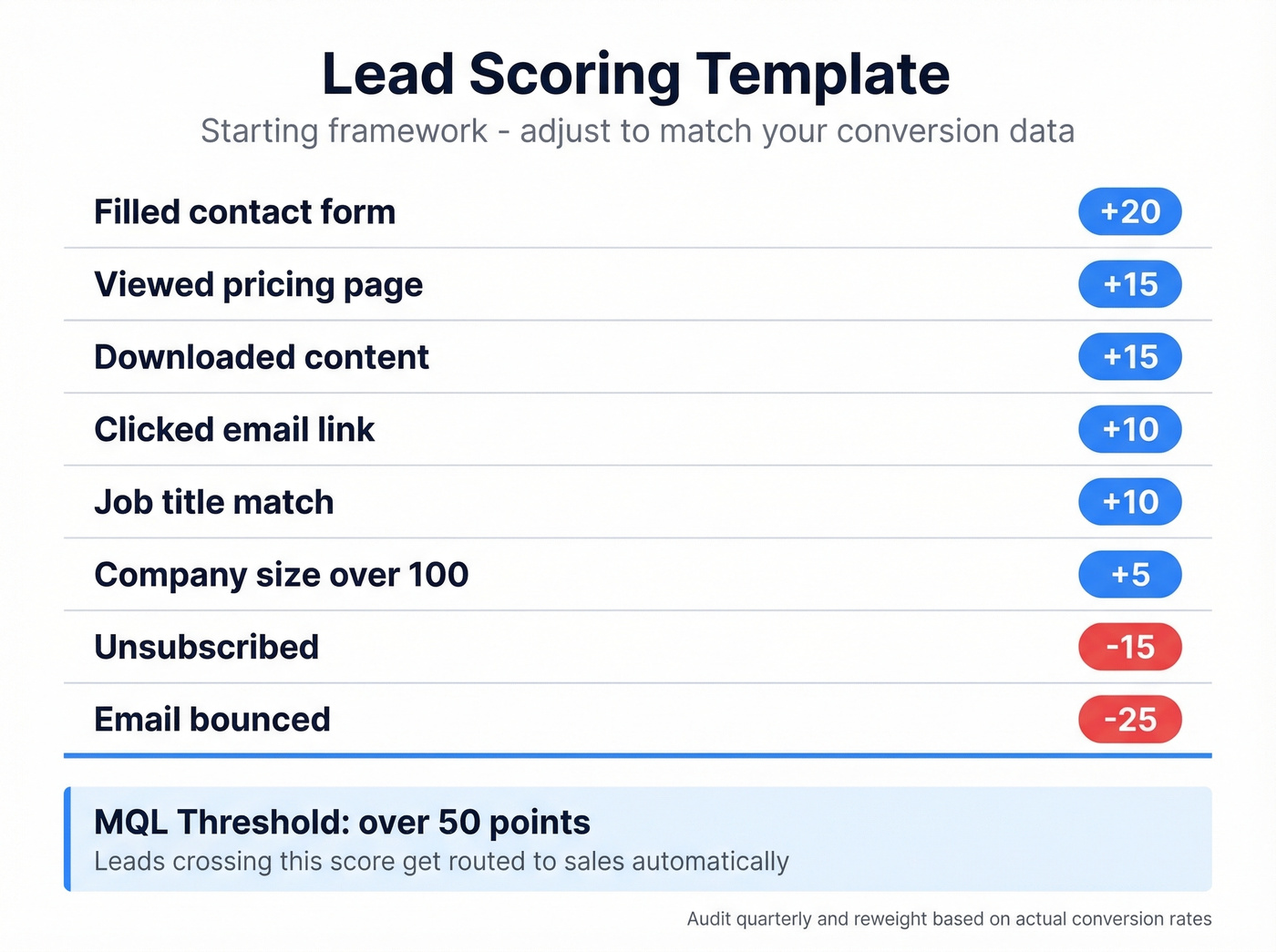
| Signal | Points |
|---|---|
| Viewed pricing page | +15 |
| Filled contact form | +20 |
| Downloaded content | +15 |
| Clicked email link | +10 |
| Job title match | +10 |
| Company size >100 | +5 |
| Email bounced | -25 |
| Unsubscribed | -15 |
MQL threshold: >50 points. Leads crossing this score get routed to sales automatically.
Two things to get right here. First, stop weighting email opens. Apple Mail privacy changes made open rates unreliable - shift toward on-site behavior like pricing page views and form submissions. Second, treat scoring as a feedback loop. In our experience, the original model is always wrong in some way. If your 60-point leads convert at 2% and your 35-point leads convert at 8%, the model is broken. Audit quarterly and reweight without being precious about the original framework.

Stage 2 is where most CRM lead management processes break. Prospeo enriches every record with 50+ data points - verified email, direct dial, company size, tech stack, funding - at an 83% match rate. Data refreshes every 7 days, not 6 weeks. Teams using Prospeo cut bounce rates from 35% to under 5%.
Stop scoring leads you know nothing about. Enrich first.
Marketing-to-Sales Handoff SLA
95% of salespeople say they receive low-quality leads from marketing. Only about 22% of companies feel marketing and sales are tightly aligned. The gap between those numbers is where pipeline goes to die.
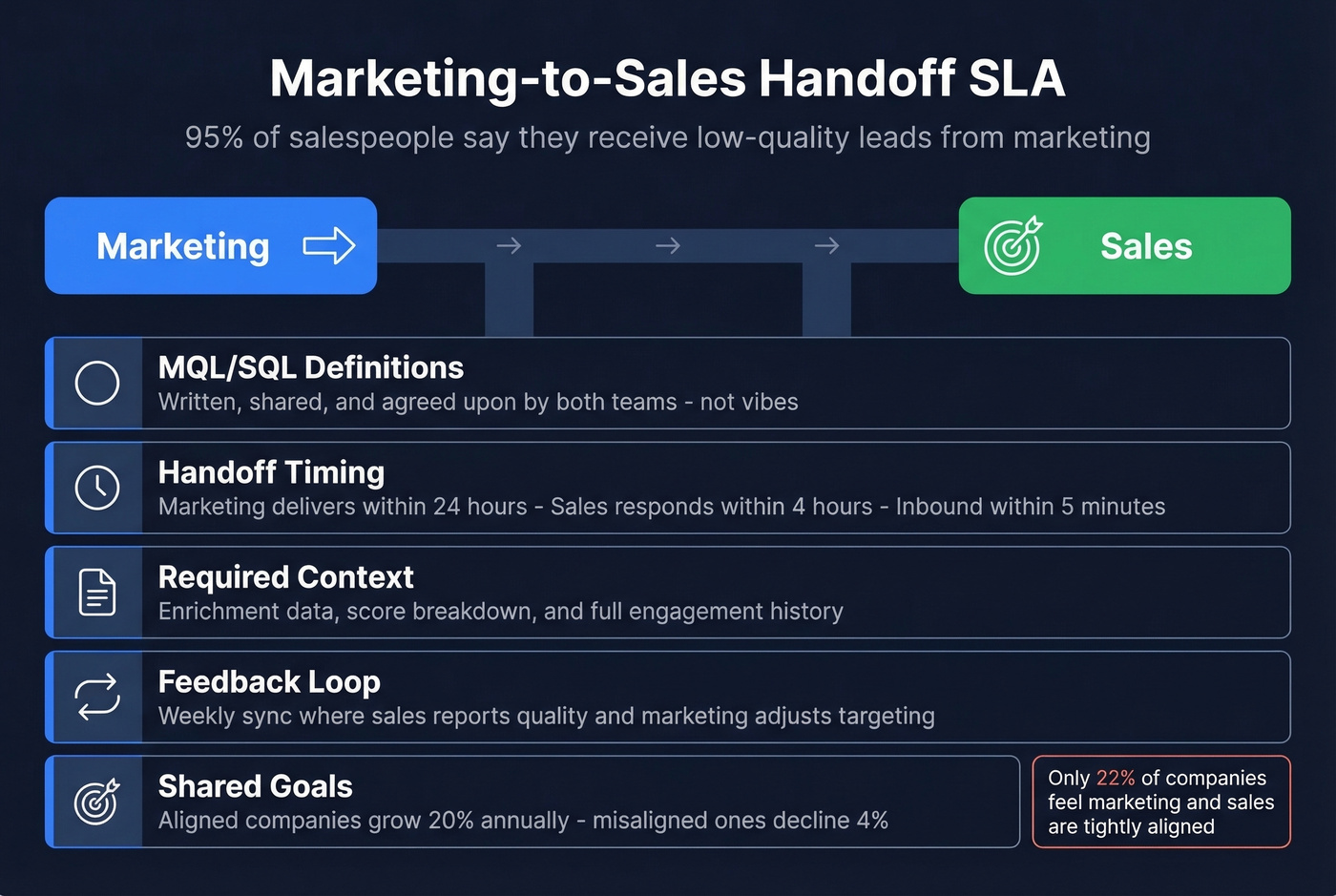
Your SLA needs five components:
- MQL/SQL definitions - written, shared, and agreed upon by both teams. Not vibes. (If you need a starting point, use an ideal customer profile rubric.)
- Handoff timing - marketing delivers qualified leads within 24 hours of threshold. Sales responds within 4 hours. Inbound leads get a response within 5 minutes.
- Required context - marketing provides enrichment data, score breakdown, and engagement history. Sales doesn't start from scratch.
- Feedback loop - weekly sync where sales reports on lead quality and marketing adjusts targeting.
- Shared goals - aligned companies grow 20% annually; misaligned ones decline 4%. Shared revenue targets make alignment non-optional.
5 Mistakes That Kill Your Pipeline
1. No response at all. 63.5% of companies never respond. 81.2% of those responding over one hour report losing leads to faster competitors. Speed-to-lead is the single highest-leverage fix in your entire funnel.
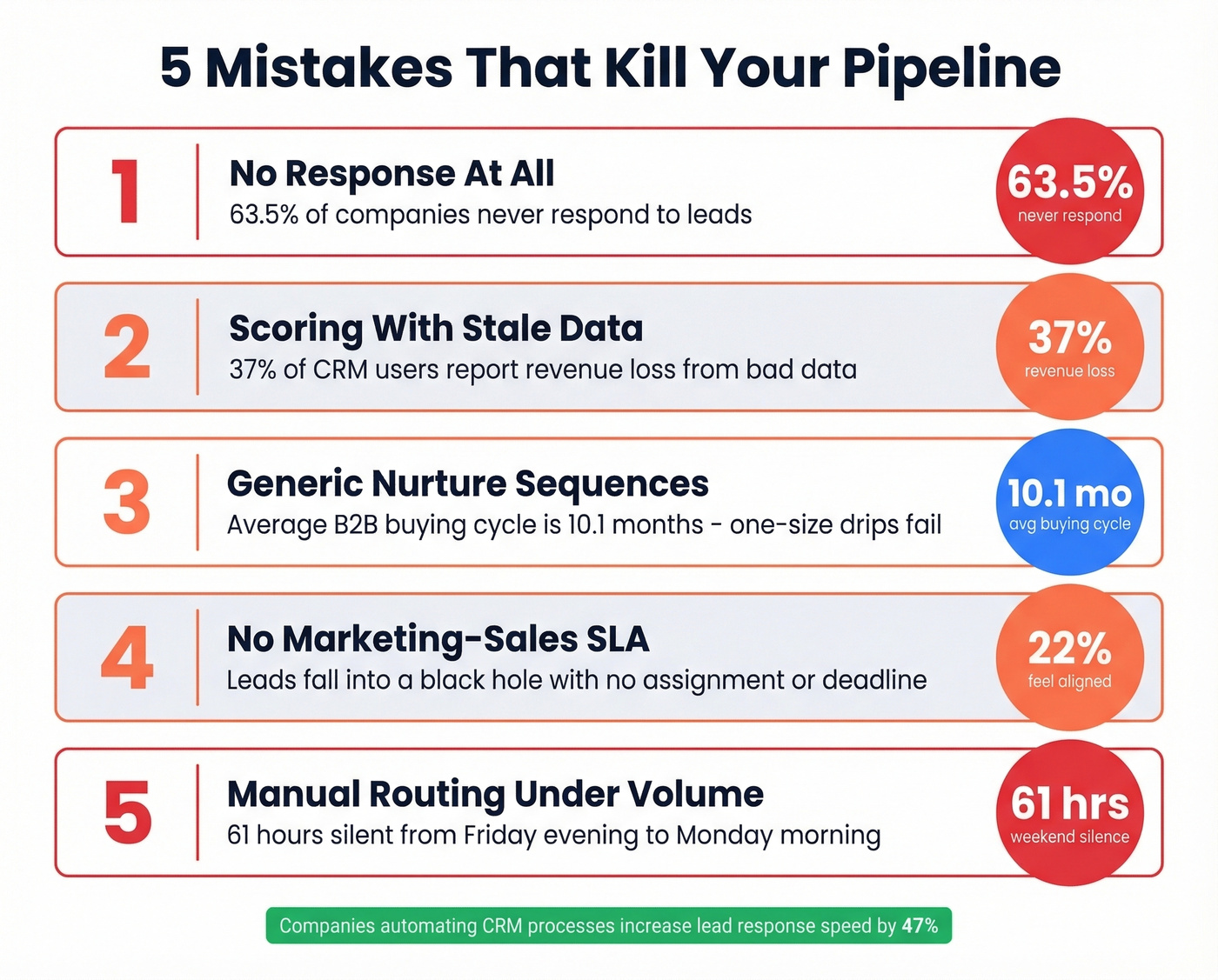
2. Scoring with stale or incomplete data. If your data provider refreshes every 6 weeks, your scores are based on outdated records. A 7-day refresh cycle is the difference between a live conversation and a dead record - and 37% of CRM users report direct revenue loss from bad data. (See a broader list of data enrichment services.)
3. Generic nurture sequences. A lead who visited your pricing page three times and a lead who opened one email are not the same person. Intent-based sequencing isn't optional in a 10-month buying cycle.
4. No SLA between marketing and sales. Without a written handoff protocol, leads fall into what one practitioner called "a black hole." No assignment rules, no response deadline, no feedback loop. The leads are there - nobody owns them.
5. Manual routing under volume. When 40% of high-intent inquiries arrive after hours and your team goes 61 hours silent over the weekend, manual assignment isn't a process - it's a prayer. Companies automating CRM processes increase lead response speed by 47%. If you're on Salesforce, you can automate lead status with Flow to move records through stages without rep intervention, triggering re-assignment and firing Slack alerts the moment a lead stalls. Skip this if your team handles fewer than 20 leads a week and someone's always online. For everyone else, automate routing and set stall reminders.
Choosing a CRM for Lead Management
Small teams (under 50 people): HubSpot's free CRM or Pipedrive (~$15-$30/user/mo). Near-zero onboarding. Don't overthink this. (If you want more options, here are examples of a CRM with pricing.)
Mid-market (50-1,000): Salesforce or HubSpot paid tiers (~$20-$100+/user/mo depending on edition and add-ons). The CRM becomes your source of truth for reporting, and no-code workflow builders plus role-based permissions start to matter.
Enterprise (1,000+): Salesforce or Dynamics (~$150-$300+/user/mo depending on edition and modules). Multi-region governance, audit trails, custom object modeling.
Look - the CRM matters less than the process you build inside it. I've seen a $14/mo Pipedrive instance with proper scoring, routing, and SLAs outperform a $300/seat Salesforce deployment where leads sat untouched for 29 hours. Pick the CRM your team will actually use, then invest your energy in the CRM lead management process around it.
Your scoring model is useless if the underlying data is stale or incomplete. Prospeo's native Salesforce and HubSpot integrations append 50+ verified data points per contact - at $0.01 per email with 98% accuracy. 15,000+ companies trust it to keep their CRM clean on a 7-day refresh cycle.
Fix your pipeline data before you audit another scoring model.
FAQ
What are the stages of a CRM lead management process?
Seven stages: capture, enrich, score, route, nurture, convert, and analyze. The enrichment step - appending verified contact data before scoring - is the one most teams skip and the one that makes every downstream stage work.
How fast should you respond to an inbound lead?
Under 5 minutes. Companies with a formal SLA hit that window 54.9% of the time. After one hour, 81.2% report losing leads to faster competitors. Automate routing and Slack notifications to eliminate manual delays.
What's the difference between MQL and SQL?
An MQL crosses a scoring threshold based on behavior and firmographic fit - typically 50+ points in a numeric model. An SQL has been vetted by sales for budget, authority, need, and timeline. The handoff needs a written SLA with shared definitions, not an informal "looks good, send it over."