

CRM Leads: The Complete Guide to Capturing, Scoring, and Converting
Your rep just spent 45 minutes calling disconnected numbers from a list the CRM swore was "up to date." Meanwhile, the lead who requested a demo yesterday sits untouched because nobody got the notification. Sound familiar?
Managing CRM leads well is the difference between a pipeline that converts and one that rots. The CRM market hit $112.91B in 2025 and is projected to reach $126.17B in 2026 - yet 80% of new leads never convert into sales. The tools aren't the problem. The way teams manage leads inside those tools is.
What You Need (Quick Version)
If you're short on time, here's the playbook:
Pick a CRM that fits your team size. HubSpot's free plan works for very small teams (it supports 2 users in the free tier). Zoho CRM is one of the best value picks as you scale. Pipedrive is the move if you think visually.
Set up lead scoring with actual point values. "Hot/warm/cold" labels are meaningless. Assign numbers - C-level contact gets +30, demo request gets +40, competitor employee gets -50. Set a threshold. Route automatically. (If you want a deeper framework, see our lead scoring guide.)
Fix your data before you automate anything. 76% of CRM users say less than half their data is accurate or complete. Automating bad data just creates faster garbage. Enrich and verify contacts first, then build workflows on top. (More options here: data enrichment services.)
What Are CRM Leads?
A CRM lead is any person or company that's entered your system as a potential buyer - whether they filled out a form, got added from a cold outreach list, or came in through a partner referral. The CRM's job is to track that lead from first touch to closed deal.
Lead management covers five core functions: capturing leads, qualifying and segmenting them, scoring and routing to the right rep, nurturing through content and touchpoints, and measuring what's actually working. Most teams think of their CRM as a database. It's really a workflow engine, and the leads inside it are only as valuable as the process wrapped around them.
The ROI case is strong. Companies using CRM software see an average return of $8.71 for every $1 spent, and 91% of companies already use a CRM. The question isn't whether you need one. It's whether you're using it to actually manage leads or just store them.
The Lead Lifecycle in Your CRM
Every lead follows the same five-stage path, whether it comes from an inbound form or an outbound cold email. The difference between teams that convert and teams that don't is how deliberately they manage each stage.
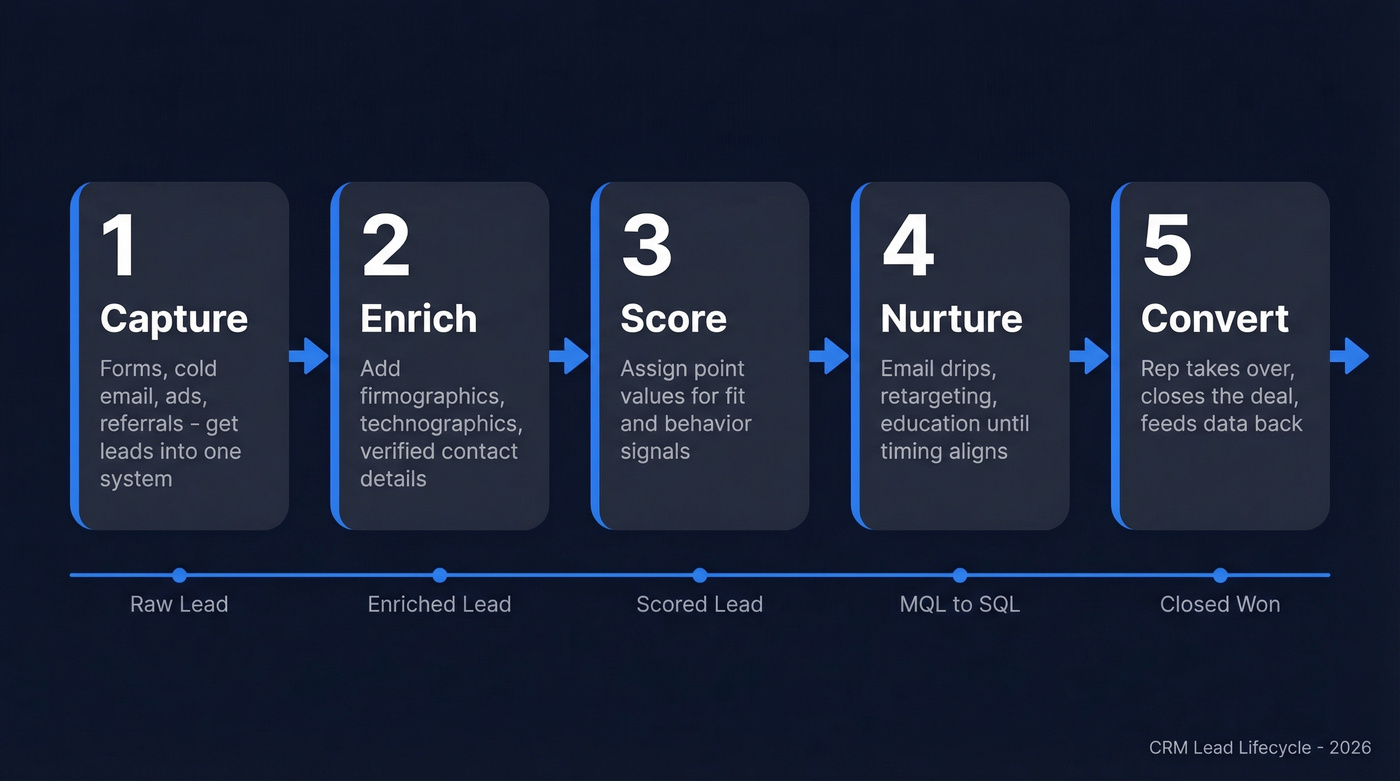
Stage 1: Capture. Leads enter through inbound channels (webinars, content downloads, chatbots, organic search) or outbound efforts (cold email, paid lead forms, direct outreach). Seven in ten B2B organizations increased their lead generation budgets heading into 2026, so the volume problem keeps growing. One r/CRM poster described leads "dying across 5 different tools" - forms, WhatsApp, personal spreadsheets, email - because nobody wanted to be the data cop forcing centralization. The real challenge isn't getting leads. It's getting them into one system. (If you need more sources, start with these free lead generation tools.)
Stage 2: Enrich. Raw leads are incomplete. A name and email isn't enough to route or score intelligently. This is where enrichment tools add firmographic data like company size, industry, and revenue, plus technographic signals and verified contact details. (More on this in our lead enrichment guide.)
Stage 3: Score. Assign numerical values based on fit (job title, company size, industry) and behavior (page visits, email opens, demo requests). We cover the exact scoring model below. (You can also standardize your pipeline with a clear lead status setup.)
Stage 4: Nurture. Not every lead is ready to buy today. Nurture sequences - email drips, retargeting, educational content - keep your brand in the conversation until timing aligns. The lifecycle stages here are MQL (marketing qualified), SQL (sales qualified), and Opportunity. Each handoff needs clear criteria, not vibes.
Stage 5: Convert. The rep takes over, runs the sales process, and closes. CRM tracking at this stage feeds back into scoring models and channel attribution, giving your team the data it needs to close deals more efficiently over time.
The Data Quality Crisis
Here's the thing: most CRM failures aren't CRM failures. They're data failures.
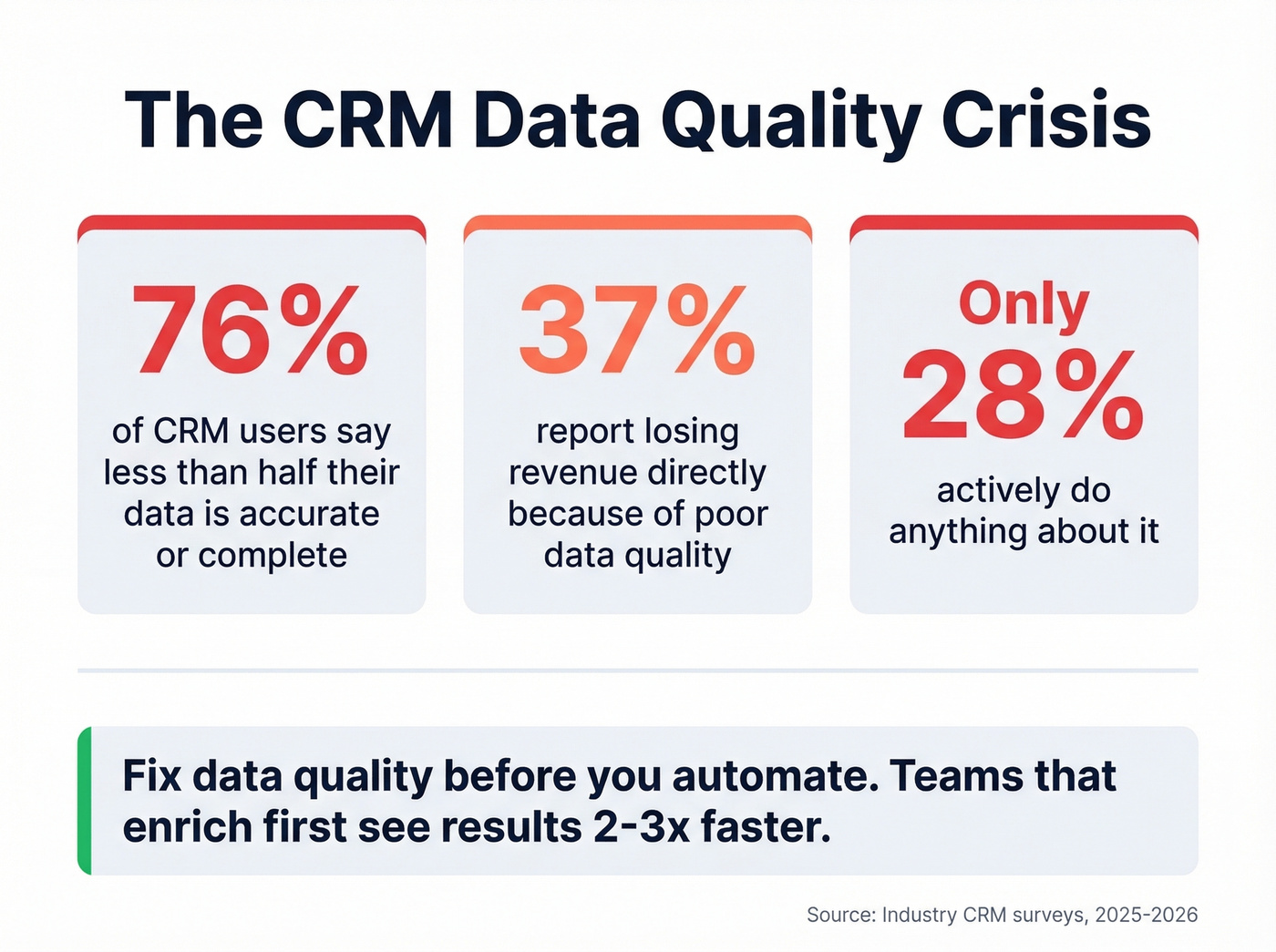
76% of CRM users say less than half their data is accurate or complete. 37% report losing revenue directly because of poor data quality. And only 28% actively do anything about it. Your CRM didn't fail you - your data did.
The downstream effects are brutal. Lead scoring becomes meaningless when half your records have wrong job titles. Nurture sequences bounce when emails decay. Reps waste hours calling numbers that haven't worked in months. Every automation you build on top of bad data just amplifies the problem. (If email bounces are a recurring issue, track and fix your email bounce rate.)

In our experience, teams that fix data quality before building automations see results 2-3x faster. This is where most teams need an enrichment layer sitting between their lead sources and their CRM. Prospeo plugs directly into HubSpot and Salesforce, enriching contacts with 50+ data points per record at a 92% match rate. The 98% verified email accuracy means your sequences actually land, and the 7-day data refresh cycle keeps records current instead of letting contacts go stale between updates. (If you’re tightening deliverability, use this email deliverability guide as your checklist.)

Your CRM leads are only as good as the data behind them. Prospeo enriches contacts with 50+ data points at a 92% match rate and 98% email accuracy - plugging directly into HubSpot and Salesforce. With a 7-day refresh cycle, your records never go stale.
Stop scoring leads with incomplete data. Fix it at the source.
How to Score Leads Effectively
Lead scoring separates the signal from the noise. Without it, every lead looks equally important - which means none of them get the attention they deserve.
A Scoring Template You Can Copy
We've seen teams waste months on scoring models with 20+ criteria. Start with 5-7 signals that actually predict conversion for your business. Here's a point-value framework you can adapt:
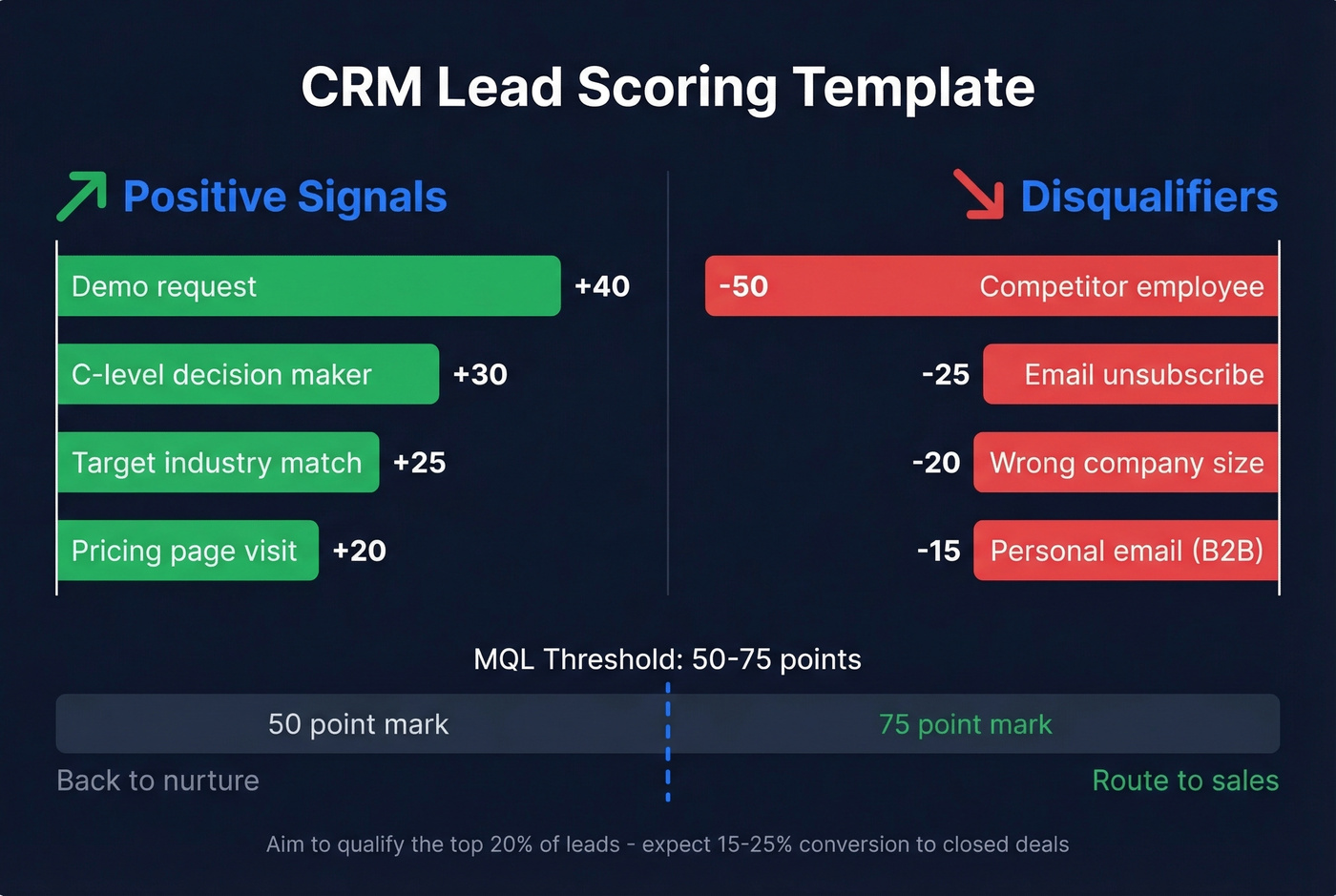
| Signal | Points | Type |
|---|---|---|
| C-level decision maker | +30 | Fit |
| Target industry match | +25 | Fit |
| Demo request | +40 | Behavior |
| Pricing page visit | +20 | Behavior |
| Personal email (B2B) | -15 | Disqualifier |
| Competitor employee | -50 | Disqualifier |
| Email unsubscribe | -25 | Disqualifier |
| Wrong company size | -20 | Disqualifier |
Set your MQL threshold to capture the top ~20% of leads. For most teams, that lands between 50-75 points on a 100-point scale. Leads above the threshold get routed to sales automatically. Leads below stay in nurture. Expect 15-25% conversion rates from qualified leads to closed deals when the model is calibrated properly. (To benchmark your funnel, see average B2B lead conversion rate.)
Score Decay
This is the part everyone skips.
A lead who visited your pricing page six months ago isn't hot anymore. Without score decay, your pipeline fills up with zombie leads that look qualified on paper but haven't engaged in weeks. Apply a 25% monthly reduction for leads without new activity. If someone scored 80 points in January and hasn't done anything since, they're at 34 points by April. That's below threshold - back to nurture they go.
Manual vs. AI Scoring
Manual scoring works fine when you're handling a few hundred leads per month and your sales cycle is straightforward. It breaks down at scale. You can't manually weight 30 behavioral signals across thousands of leads without missing patterns.
Around 75% of businesses now use AI-driven lead scoring, and companies using AI for this see conversions climb by roughly 25%. AI scoring picks up signals humans miss - page visit sequences, email response timing, technographic changes - and adjusts weights dynamically based on what's actually converting. The switch point? Once you're generating more than 500 leads per month or your sales team exceeds 5-10 reps, manual scoring becomes a bottleneck. Most mid-tier CRMs (HubSpot Professional, Zoho Enterprise, monday CRM) include some form of AI scoring at their higher tiers.
Lead Nurturing Benchmarks
Nurturing isn't optional. Industry-leading nurture campaigns generate 50% more sales-ready leads at 33% lower cost, and nurtured leads make 47% larger purchases than non-nurtured ones.
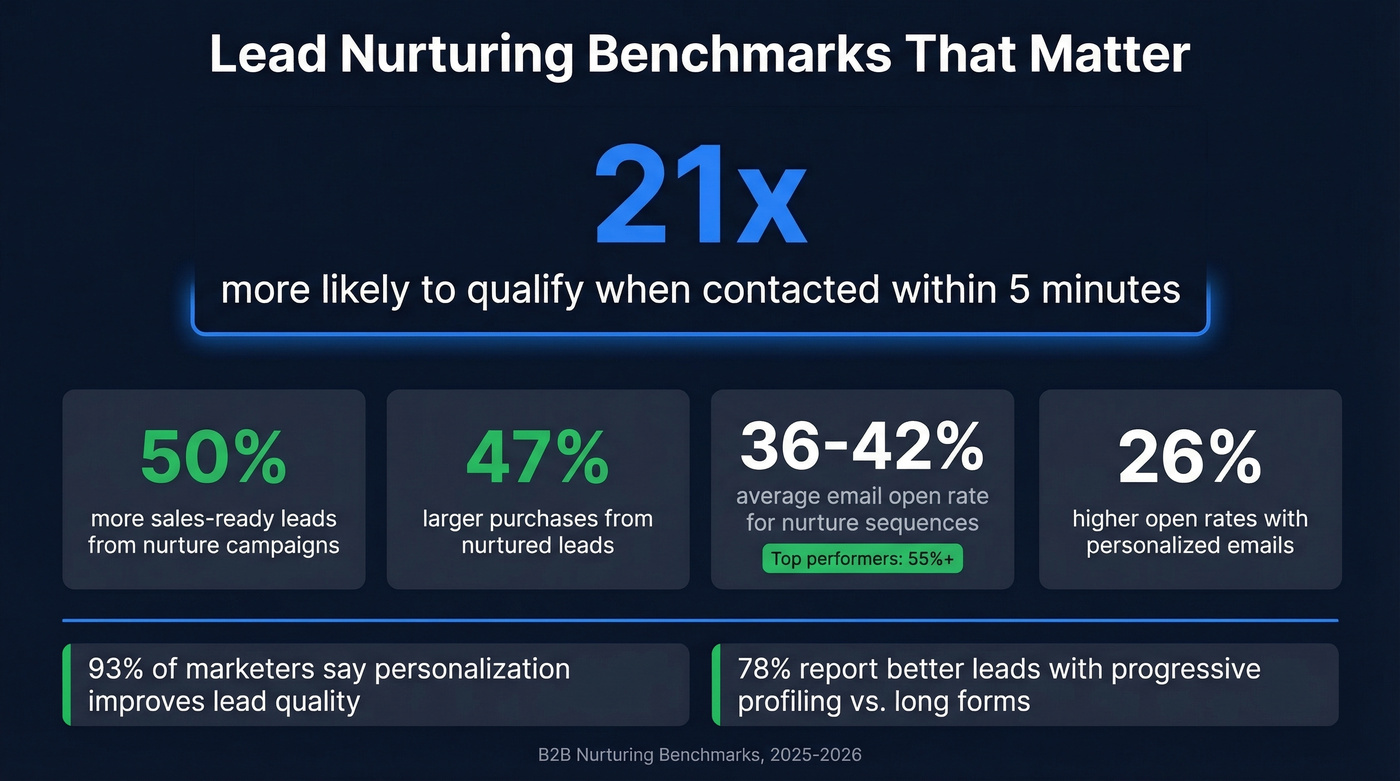
The single most important metric is speed-to-lead: leads contacted within 5 minutes are 21x more likely to qualify. That stat alone should reshape your entire workflow. If your CRM isn't triggering instant notifications when a high-scoring lead comes in, fix that before anything else.
Beyond speed, here are the benchmarks worth tracking. Email open rates for nurture sequences average 36.7-42.35%, with high performers hitting 55%+. Click-through rates sit around 8%, though top-quartile teams push 10-12%. Personalized emails see 26% higher open rates, and 93% of marketers report that personalization directly improves lead quality. 78% of marketers also report better lead quality when they collect data gradually through progressive profiling instead of front-loading a 15-field form.
Let's be honest: most teams set up a welcome email and call it a nurture campaign. That's not nurturing - that's a greeting. True nurture means a multi-touch sequence across email, retargeting, and direct outreach that adapts based on engagement signals. The CRM should orchestrate this automatically, not rely on reps to remember follow-ups. (If you need copy that actually gets replies, use these sales follow-up templates.)
CRM Workflows to Automate
Automation is where lead management tools earn their keep. Here are five workflows every team should have running from day one.
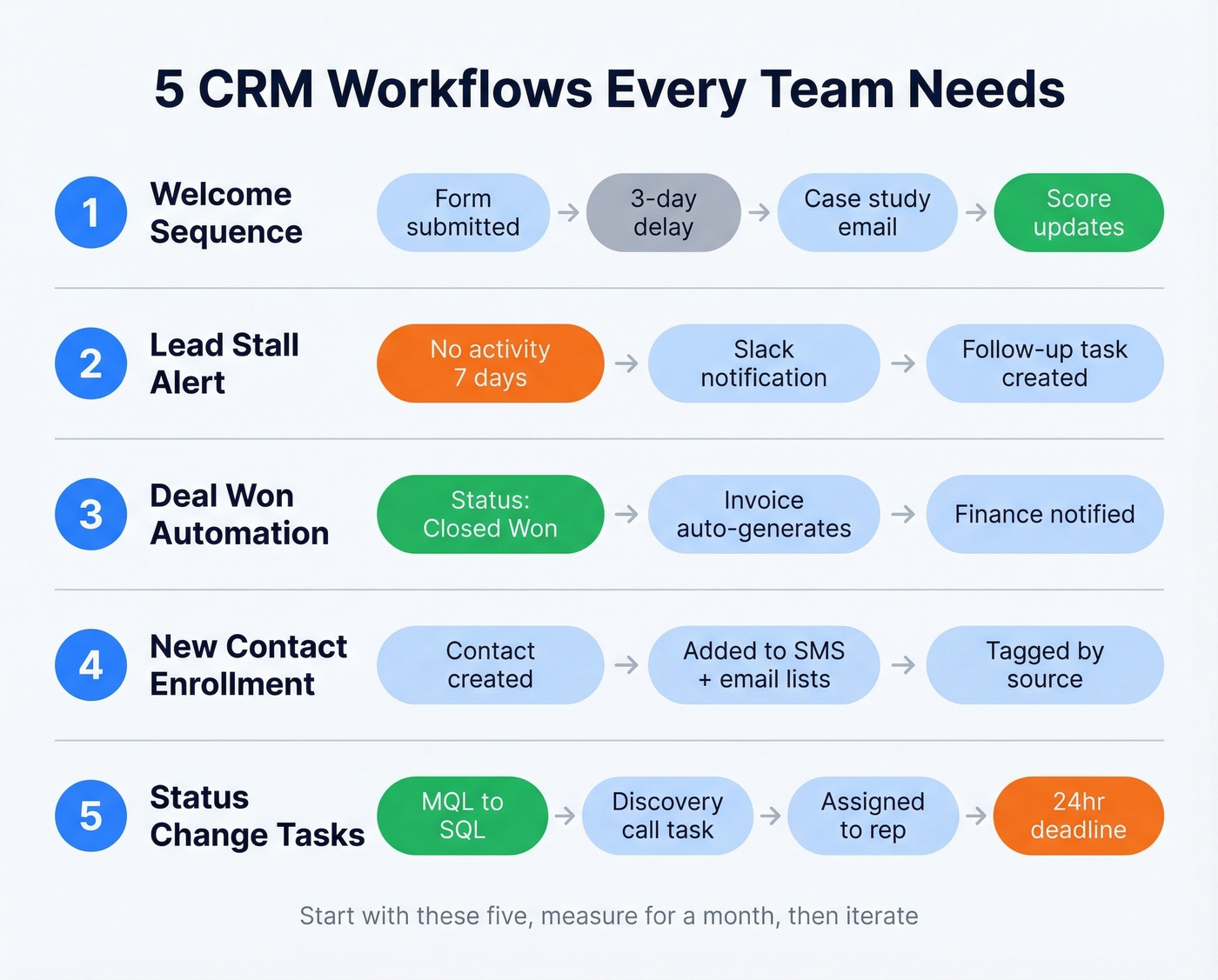
Welcome sequence. Form submission triggers a welcome email, followed by a 3-day delay, then a follow-up with a case study. The lead score updates based on opens and clicks. This is your first impression - don't waste it.
Lead stall alert. Most teams set up the welcome email but skip this one, and it matters more. No activity for 7 days on an MQL triggers a Slack notification to the assigned rep and auto-creates a follow-up task. The r/CRM threads are full of teams asking how to stop leads from falling through the cracks. This is how.
Deal won automation. When a deal closes, the last thing your rep wants to do is manually create an invoice. Deal status changes to "Closed Won," an invoice auto-generates, and finance gets notified. Removes a manual handoff that delays revenue recognition.
New contact enrollment. New contact created, added to SMS marketing list and email newsletter, tagged by source channel. Keeps your marketing lists current without manual exports.
Status change task creation. Lead moves from MQL to SQL, a discovery call task auto-creates, assigns to the rep, and sets a 24-hour deadline. Forces speed-to-lead without relying on someone checking the dashboard. (If you’re building a broader stack, compare top SDR tools.)
These workflows exist in some form across HubSpot, Zoho, Pipedrive, and Salesforce. The syntax differs, but the logic is identical. Start with these five, measure for a month, then iterate.
Best CRMs for Lead Management in 2026
The CRM you choose matters less than the data you feed it. If your average deal size is under $10k, you almost certainly don't need Salesforce-level complexity. Pick the simplest tool your team will actually use, then invest the savings in data quality. (If you want more options, see these examples of a CRM.)
| Tool | Best For | Starting Price | Free Plan | Key Lead Feature |
|---|---|---|---|---|
| HubSpot | First CRM for SMBs | $15/user/mo | Yes (2 users) | Built-in forms + email |
| Zoho CRM | Best value overall | $14/user/mo | Yes (3 users) | Canvas Builder + Zia AI |
| Pipedrive | Visual pipelines | $14/user/mo | No (14-day trial) | Drag-and-drop stages |
| Freshsales | Lowest entry price | $9/user/mo | Yes (3 users) | Built-in phone + email |
| monday CRM | monday.com teams | $12/seat/mo (3 min) | Yes | AI lead scoring |
| Salesforce | Enterprise orgs | $25/user/mo | No (30-day trial) | Unlimited customization |
| Bitrix24 | Large teams, budget | $49/mo (org) | Yes (unlimited) | Org-level pricing |
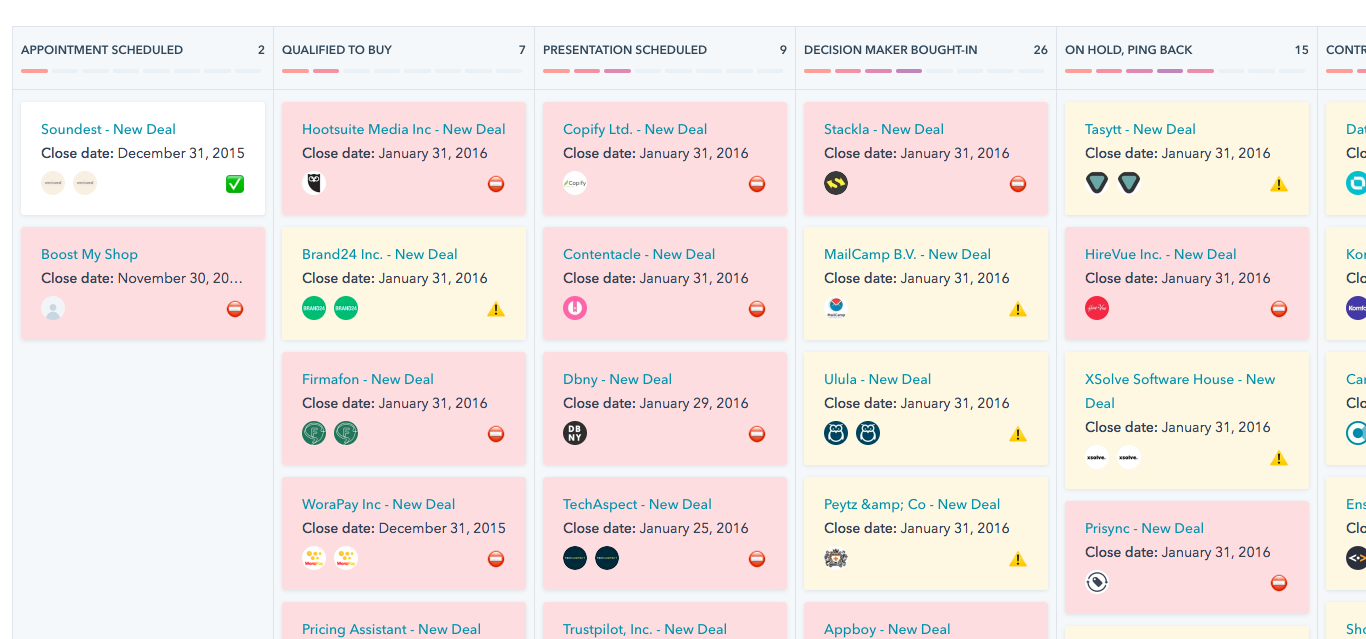
HubSpot is the default starting point for SMBs. The free plan gives you 2 users and 1,000 contacts with built-in forms, email tracking, and basic automation. It's genuinely usable without paying, which is rare. Paid plans start at $15/user/month and scale steeply, so watch the upgrade path. Skip HubSpot if you need deep customization without paying enterprise prices.
Zoho CRM earned PCMag's Editors' Choice for good reason. At $14/user/month, the value is hard to beat - 250,000+ businesses use it worldwide. Canvas Builder lets you design custom layouts, and Zia AI handles scoring and predictions at higher tiers. The learning curve is steeper than HubSpot, but the ceiling is much higher. I'd recommend Zoho for teams of 10-50 who want room to grow without outgrowing their CRM in a year.
Pipedrive is built for reps who think in pipelines. The drag-and-drop interface is the most intuitive in this list. The catch: lead scoring, web tracking, and chatbots are add-ons (LeadBooster runs ~$32/company/month extra). Budget accordingly. Skip Pipedrive if you need built-in marketing automation.
Freshsales starts at $9/user/month with a built-in phone and email - great for small teams that want everything in one place. Skip it if you need advanced reporting. monday CRM only makes sense if your team already lives in monday.com; otherwise, the 3-seat minimum at $12/seat/month is overpriced for what you get.
Salesforce is the enterprise standard at $25/user/month to start, but realistic mid-market contracts land in the $75-150/user/month range once you add the modules you actually need. Salesforce's own pricing page confirms this - the base price is misleading without context. Bitrix24 is the outlier with org-level pricing at $49/month, meaning large teams pay dramatically less per head, though the interface feels dated compared to newer options.
For pricing context: entry-level CRM plans average ~$15/user/month, mid-tier runs ~$60/user/month, and enterprise tiers start around $150+/user/month.
Mistakes That Kill Your Pipeline
Not scoring leads. You've got 500 prospects and reps are cherry-picking based on company name recognition. Without scoring, your best leads get the same attention as your worst ones.
Skipping nurture campaigns. A lead that isn't ready today might be ready in 90 days - but only if you stay in the conversation. No nurture sequence means those leads just decay in your database.
Ignoring data quality. Unverified emails, outdated phone numbers, wrong job titles. Every bad record wastes rep time and tanks your deliverability. CRM data decays roughly 30% per year as people change jobs and companies restructure.
Buying low-quality lead lists. Cheap lists feel like a shortcut until your bounce rate hits 25% and your domain reputation craters. The cost of recovery is always higher than the cost of doing it right. (If you’re considering it anyway, read Is It Illegal to Buy Email Lists?.)
Trying to do too much at rollout. The most common CRM failure pattern on Reddit: team buys Salesforce, tries to configure every workflow in week one, skips training, and six months later reps are back to spreadsheets. Start with three workflows. Get adoption. Then expand.
Lead scoring breaks when job titles are wrong and emails bounce. Prospeo's 5-step verification and 7-day data refresh keep every CRM record accurate - so your scoring model actually predicts conversions instead of routing garbage.
Accurate scoring starts at $0.01 per verified email. No contracts.
FAQ
What's the difference between a lead and a contact in a CRM?
A lead is an unqualified prospect who hasn't been vetted yet; a contact is someone you've verified and begun a relationship with. Most CRMs have a formal "convert" action that moves a lead to a contact after qualification, preserving the full activity history for attribution.
How many leads should a rep handle at once?
Most B2B reps manage 50-150 active leads effectively. Beyond that, prospects fall through the cracks unless you've got strong automation handling routing, reminders, and stall alerts. Enterprise reps with 6-month cycles handle fewer than SMB reps closing in 2 weeks.
What's a good lead-to-customer conversion rate?
B2B averages range from 2-5% across all leads. With proper scoring and nurturing, top performers hit 15-25% from qualified leads to closed deals. Below 2% usually points to a data quality or scoring problem, not a sales team problem.
How do I keep CRM data accurate over time?
Use an enrichment tool to refresh contact data automatically - a 7-day refresh cycle catches job changes before records go stale. Without active enrichment, expect ~30% of your data to decay annually, degrading every workflow built on top of it.