

How to Build a Data Enrichment Process That Doesn't Feed Your CRM Garbage
Your data enrichment process is either feeding your pipeline signal or poisoning it with noise. Poor data quality costs the average organization $12.9M per year. Reps burn 27.3% of their selling time - roughly 546 hours annually - chasing leads with wrong titles, dead emails, and disconnected phones. And 31% of organizations say poor-quality data costs them over 20% of annual revenue.
Here's the thing: most teams treat enrichment as a one-time project. Run a batch, dump it into Salesforce, move on. That's how you end up with a CRM full of ghosts.
What You Need (Quick Version)
Three things before you read another word:
- [CRM data decays 22.5% per year.](https://www.hubspot.com/database-decay) Job titles decay 65.8% per year (5.5% per month). That "VP of Sales" from January is probably a "CRO" somewhere else by July.
- Single-source enrichment leaves 40-60% of prospects unreachable. In a 6-week practitioner test, a waterfall approach delivered ~88% accuracy.
- You don't need a $15K/year platform. Layering 2-3 sources beats any single provider every time.
What Data Enrichment Is (and Isn't)
Data enrichment appends missing or outdated information to existing records - filling incomplete profiles with verified, up-to-date fields. Data cleansing fixes what's already there: deduplication, format standardization, removing invalids. Data enhancement is a related but distinct concept, focused on improving existing data rather than appending new datapoints at scale. These terms get used interchangeably, but they shouldn't be.
One distinction worth understanding: filtering narrows a dataset by removing irrelevant records, while enrichment expands it by appending new attributes to the records you keep. Most effective pipelines filter first, then enrich, so you're not spending credits on accounts you'll never work.
Enrichment spans firmographic data like company size and revenue, technographic signals from the tech stack, demographic data such as job title and seniority, and behavioral data including intent signals and website visits. Beyond sales, enrichment powers fraud detection, lead scoring, and personalization at scale. The market hit $2.37B in 2023 and is projected to reach $4.58B by 2030.
If you want a quick shortlist of vendors, start with our breakdown of the data enrichment tools that hold up in real workflows.
What Decays and How Fast
Enrichment isn't a quarterly project. It's continuous maintenance. Here's why, broken down by field:
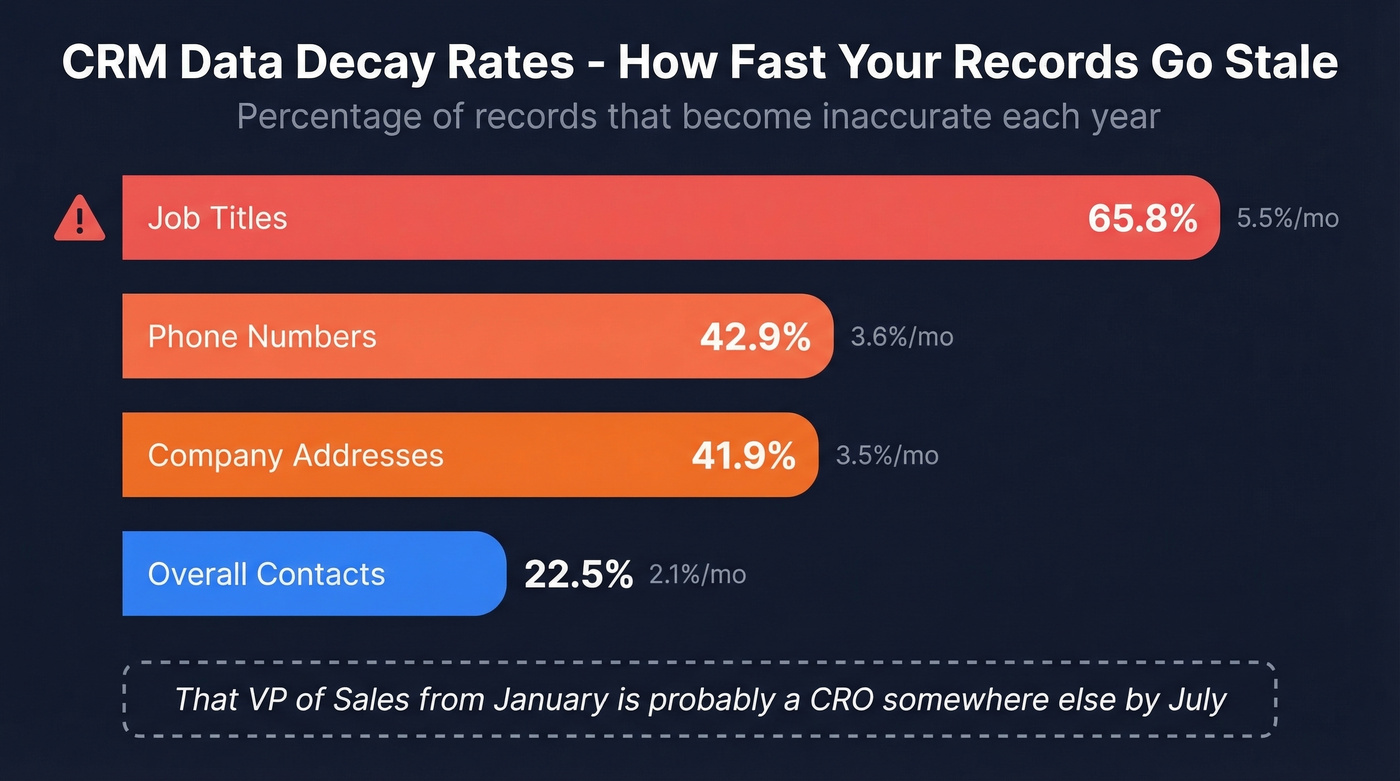
| Field | Monthly Decay | Annual Decay |
|---|---|---|
| Overall contacts | 2.1% | 22.5% |
| Job titles | 5.5% | 65.8% |
| Phone numbers | 3.6% | 42.9% |
| Company addresses | 3.5% | 41.9% |
ZeroBounce's 2026 report analyzing 11B+ emails found at least 23% of email lists degrade yearly. Email decay spiked to 28% in 2024 before settling back down - it's not linear, and it's not slowing. More than 9% of checked emails were catch-all addresses, which are notoriously hard to validate without actually sending. True decay is higher than any single metric captures.
If you’re tightening deliverability, pair enrichment with a dedicated email verifier so bad addresses don’t make it into sequences.


CRM data decays 22.5% per year. Prospeo's 7-day refresh cycle keeps your records current while the industry average lags at 6 weeks. With a 92% API match rate and 50+ data points returned per contact, your enrichment process finally has a source that doesn't go stale.
Stop enriching with data that's already decaying. Start with a 7-day refresh.
The 5-Step Data Enrichment Process
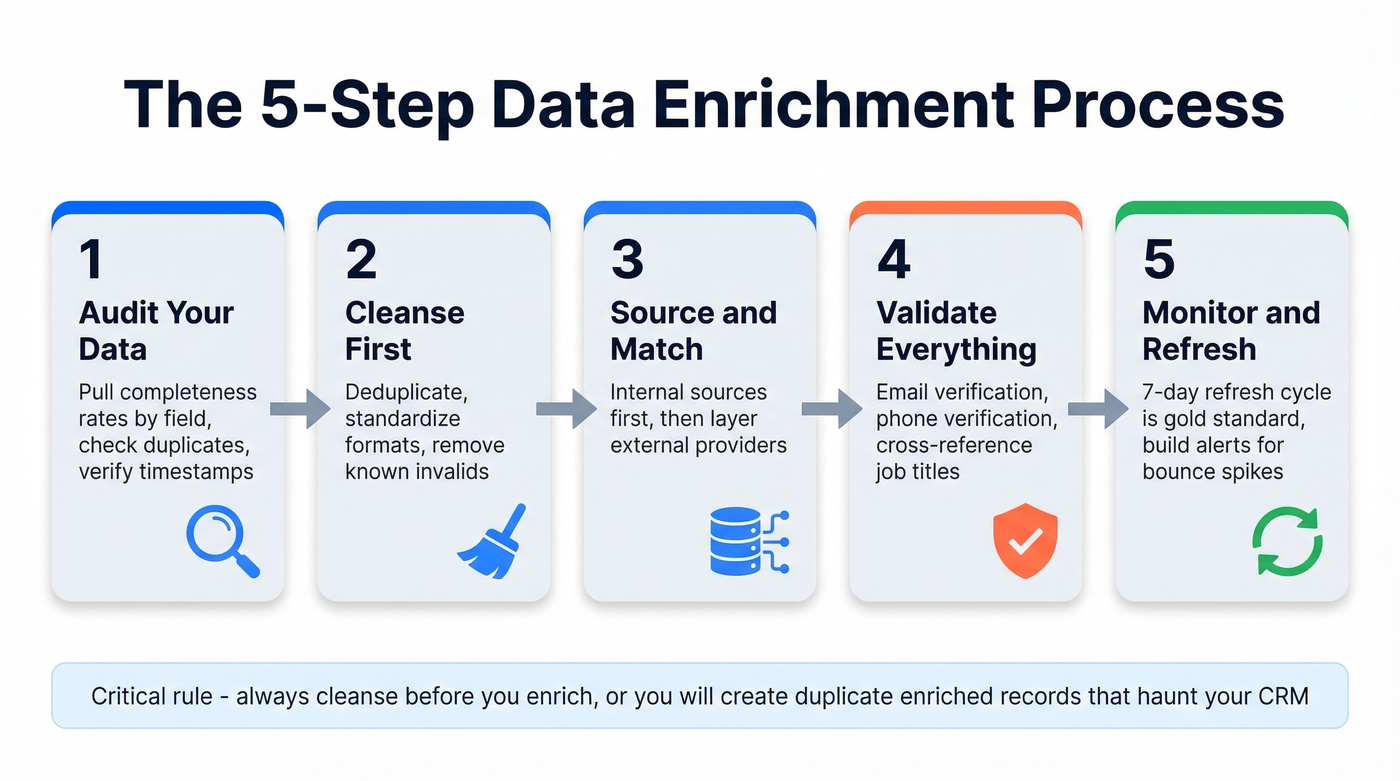
1. Audit Your Current Data
Pull completeness rates by field: what percentage of contacts have a verified email? A current job title? A direct dial? Check duplicate percentages and last-updated timestamps. We've seen teams discover their phone coverage is 30% lower than they assumed once they actually run the audit. If you can't trust your baseline, enrichment just layers new data on top of garbage.
This is also where a lot of teams realize their CRM management system isn’t enforcing the basics (required fields, validation rules, ownership, and lifecycle stages).
2. Cleanse Before You Enrich
Deduplicate records, standardize formats for phone numbers, company names, and state abbreviations, then remove known invalids. Most teams skip this because it feels like busywork. It isn't.
Do enrichment and cleansing in the wrong order and you'll create duplicate enriched records that haunt your CRM for months. We learned this the hard way watching customer accounts where the same contact appeared three times with slightly different formatting - each one "enriched" separately, each one burning credits.
If you’re automating this step, look at data validation automation so formatting and invalid detection happen before records hit sequences.
3. Source and Match
Pull from internal sources first - product usage data, support tickets, form fills, event registrations. Then layer external providers to unify data from multiple systems into a single, reliable record.
The architecture decision matters here. Batch enrichment through weekly CSV uploads or scheduled ETL jobs means your average data age is ~2 weeks with a max lag of 30 days if your batch cycle is monthly. Real-time enrichment via API eliminates that lag but requires handling rate limits and variable latency. Most mid-market teams start with weekly batches and move to real-time for high-priority segments - there's no reason to API-enrich a cold list of 50,000 contacts when a weekly batch handles it fine.
If you’re building lists from scratch, it helps to start with a reliable B2B database and then enrich/verify on top.
4. Validate Everything
Enrichment without verification is just adding more data you can't trust. Email verification, phone verification, and cross-referencing job titles against recent signals like job change alerts and company announcements - these aren't optional steps. Skip verification and you can push bounce rates into the danger zone. Your domain reputation can take months to recover from a bad send. This validation step is what separates a reliable enrichment workflow from one that just piles on unverified fields.
If you’re seeing deliverability issues, run a full email reputation check before scaling volume.
5. Monitor and Refresh
Set refresh cycles and stick to them. A 7-day refresh cycle is the gold standard; the industry average is a sluggish 6 weeks. 59% of organizations now use AI-driven algorithms for anomaly detection in their enrichment pipelines, flagging records that have likely changed before they go stale.
Build alerts for bounce rate spikes, reply rate drops, and phone disconnect rates. These are your canaries. If you need a broader system for this, map it into your RevOps tech stack so monitoring isn’t spread across five tools.
Why Single-Source Fails: The Case for Waterfall Enrichment
Waterfall enrichment - also called sequential enrichment - means querying multiple data providers in sequence. If Provider A doesn't return a verified email, you try Provider B, then Provider C. Cascade controls let you define the order, set confidence thresholds, and cap spend per record so you're not burning credits on low-priority leads.
If you’re orchestrating multiple providers, our Clay list building guide shows how teams structure waterfalls without wasting credits.
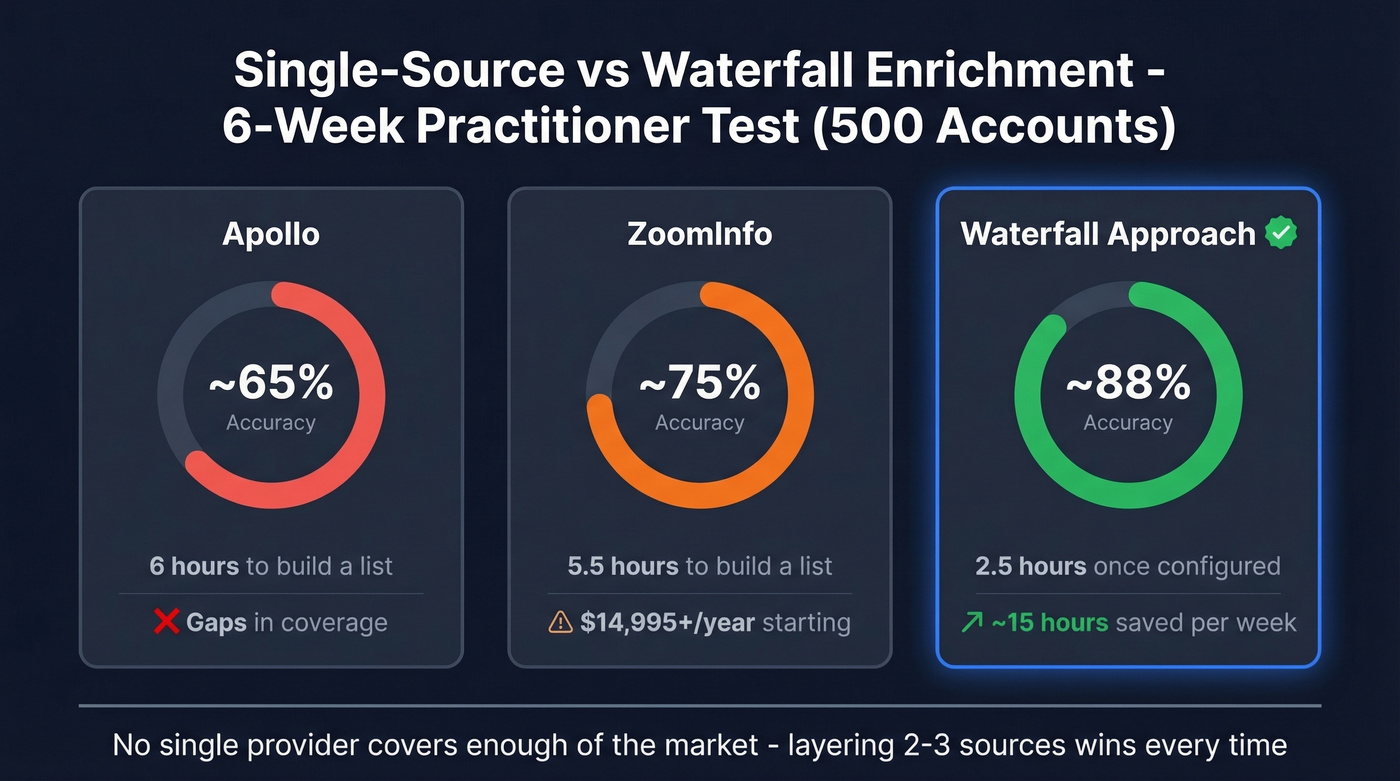
A practitioner test on r/SaaS ran a 6-week comparison across 500 accounts. The results were stark:
- Apollo: ~65% accuracy, 6 hours to build a list
- ZoomInfo: ~75% accuracy, 5.5 hours
- Waterfall approach: ~88% accuracy, 2.5 hours once configured
The poster reported saving ~15 hours per week. That matches what we've seen across customer accounts: no single provider covers enough of the market. One Prospeo customer, Meritt, cut bounce rates from 35% to under 4% by adding a strong verification layer to their enrichment stack - and tripled their pipeline from $100K to $300K per week.
What Enrichment Tools Cost in 2026
Let's be honest - most guides skip this part. Here's what enrichment actually costs right now.
If you’re comparing vendors, you can also cross-check against our list of B2B list providers (many teams end up mixing “list” + “enrichment” tools).
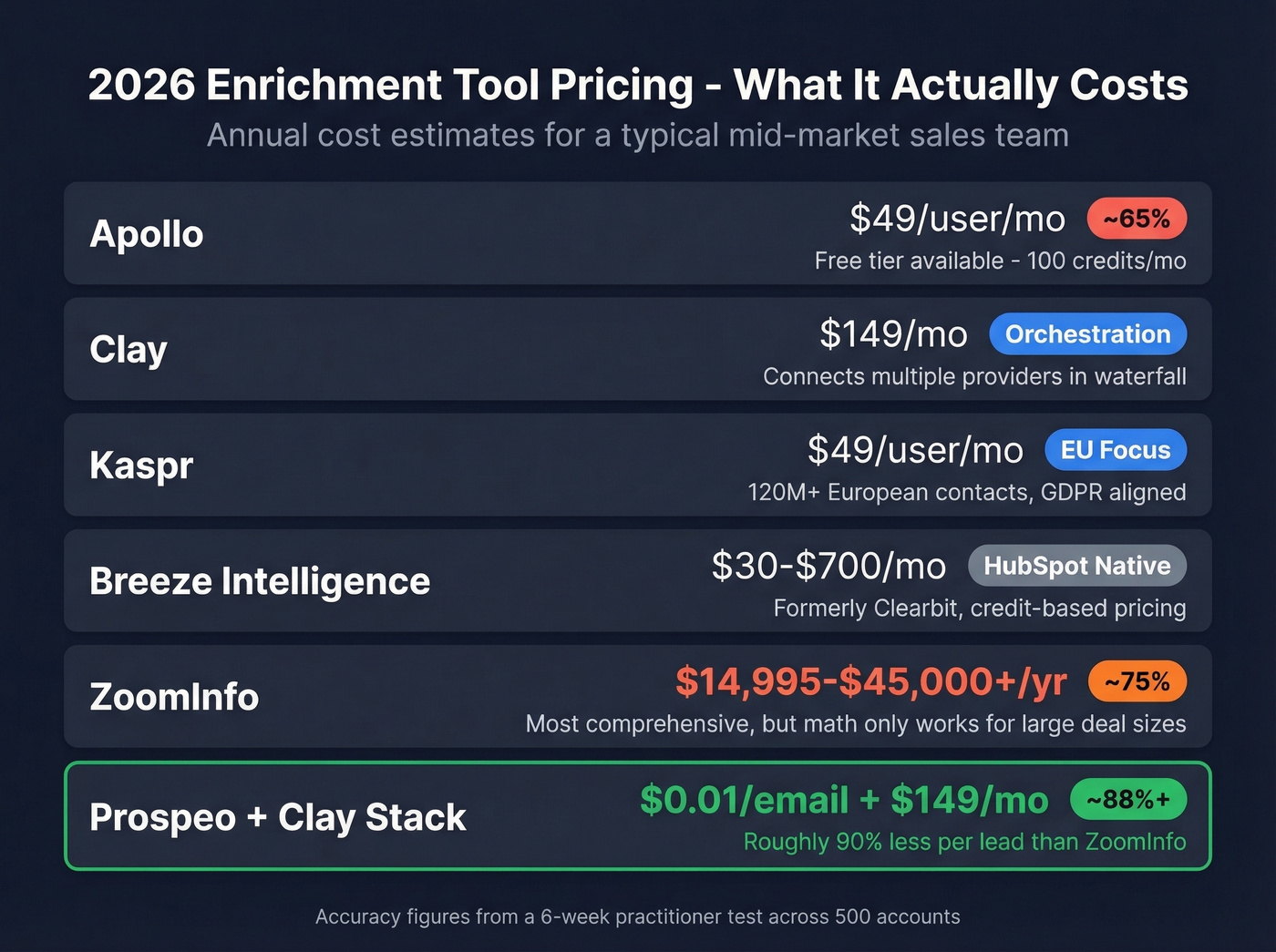
| Tool | Starting Price | Key Details |
|---|---|---|
| Apollo | Free (100 credits/mo); $49/user/mo | SMB-friendly; ~65% accuracy in practitioner tests |
| Clay | $149/mo | Waterfall orchestration; connects multiple providers |
| Kaspr | $49/user/mo | 120M+ European contacts; GDPR aligned |
| Breeze Intelligence | $30-$700/mo (credit packs) | HubSpot-native; formerly Clearbit |
| Enricher.io | $279/user/mo (10K credits) | Broad coverage; higher price point |
| ZoomInfo | $14,995-$45,000+/yr | Enterprise; ~75% accuracy |
ZoomInfo is still the most comprehensive all-in-one platform. But most teams don't need all-in-one. ZoomInfo's starting package gets you 3 users and 5,000 credits, and mid-market contracts routinely land in the $25K-$60K/year range. If your average deal size doesn't justify that spend, the math never works. A Prospeo + Clay stack delivers higher email accuracy at roughly 90% less per lead.
Skip Enricher.io unless you're already locked into their ecosystem - at $279/user/month for 10K credits, the per-lead economics get ugly fast for high-volume teams.
Single-source enrichment leaves 40-60% of prospects unreachable. Prospeo's enrichment API slots directly into your waterfall stack - 98% email accuracy, 125M+ verified mobiles, and credits at $0.01 per email. No contracts, no sales calls, no annual lock-in.
Add the verification layer that took Meritt from 35% bounce rates to under 4%.
GDPR Compliance Checklist
If you're enriching data on anyone in the EU, these five items aren't optional. CCPA adds similar requirements for California residents.
For a deeper audit framework, use our GDPR compliant database checklist alongside your vendor review.
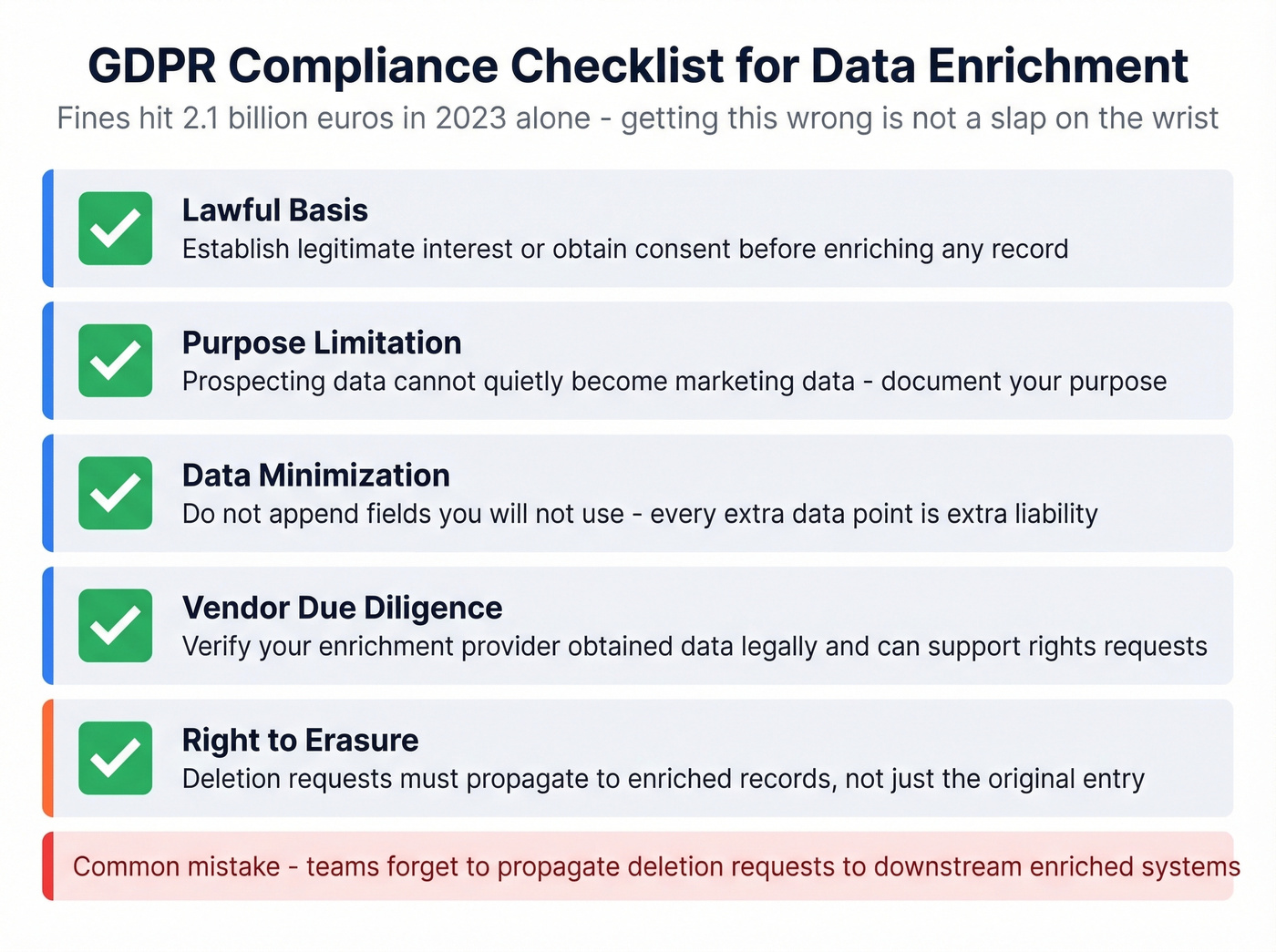
- Lawful basis: Establish legitimate interest or obtain consent before enriching.
- Purpose limitation: Enrich only for the purpose you've documented. Prospecting data can't quietly become marketing data.
- Data minimization: Don't append fields you won't use. Every extra data point is extra liability.
- Vendor due diligence: Verify your enrichment provider obtained data legally and can support rights requests.
- Right-to-erasure handling: Deletion requests must propagate to enriched records, not just the original entry.
For teams running outbound in Europe, Kaspr's GDPR alignment and Prospeo's opt-out enforcement are worth evaluating. Getting this wrong isn't a slap on the wrist - GDPR fines hit EUR 2.1B in 2023 alone.
FAQ
How often should I refresh enriched CRM data?
At minimum quarterly. Job titles decay at 5.5% per month, so lists go stale fast. For active outbound teams, a 7-day refresh cycle is the gold standard - the industry average sits at 6 weeks, which means most teams are working with data that's already degraded by the time they use it.
What's a good email accuracy rate after enrichment?
Single-source providers typically deliver 65-75%. Sequential waterfall enrichment reaches ~88%. For the verification layer specifically, target 95%+. In our experience, anything below that threshold starts showing up as bounce rate problems within the first few sends.
Can I run enrichment without violating GDPR?
Yes - establish a lawful basis (typically legitimate interest for B2B outreach), limit collection to fields you'll actually use, and verify your providers obtained data legally. Honor erasure requests across all enriched records, including downstream systems. It's doable, but it requires intentional process design, not afterthought compliance.
What's the difference between batch and real-time enrichment?
Batch enrichment processes records on a schedule - weekly CSV uploads, nightly ETL jobs. It's cheaper and simpler but introduces data lag. Real-time enrichment fires an API call the moment a lead enters your system, giving you instant data but requiring more technical setup and higher per-record costs. Most teams use batch for bulk lists and real-time for inbound leads or high-priority accounts.