

AI Email Address Generator: Which Type Do You Actually Need?
Five completely different tools all call themselves an AI email address generator. Username pickers, cold email writers, disposable inboxes, B2B prospecting tools - all jumbled under one label. No wonder people end up buying the wrong product.
Here's what each type actually does, and which one you need.
What You Need (Quick Version)
Before you read 2,000 words, here's the decision tree:
- Need a new professional email address? Use ChatGPT or Gemini for free name ideas, then register on a custom domain (around $10-$15/year). Done.
- Need multiple sending addresses for cold outreach? Set up dedicated domains with Instantly ($30/mo) or Smartlead ($39/mo), configure SPF/DKIM/DMARC, and warm them up.
If one of those solved your problem, you're welcome. For the full breakdown, keep reading.
The 5 Types of AI Email Generators
Every tool calling itself an "email address generator" falls into one of five categories. They solve completely different problems, and picking the wrong type wastes your time.
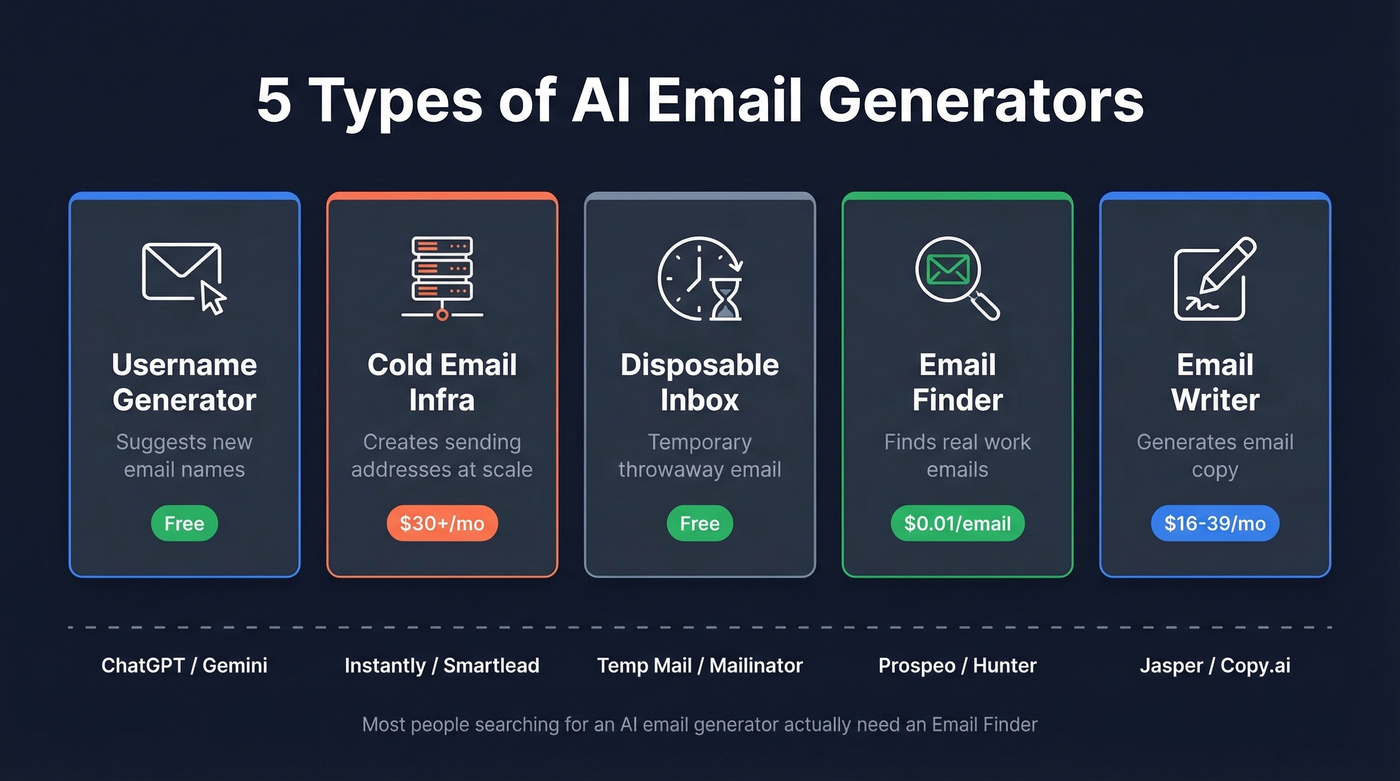
Email Name/Username Generators
These are the simplest tools in the category. You type in your name, maybe a keyword, and the tool spits out 10 to dozens of username suggestions like "sarah.chen.design" or "schen.creative." WriteMail.ai, Feedough, and Sequenzy all do this.
Use this if you're creating a personal or professional email account and want creative format ideas beyond firstname.lastname.
Skip this if you expect the tool to reliably check whether the username is actually available. That's a common complaint on Reddit - the generator suggests names, you try to register them, and they're all taken. Some tools claim to check availability for certain providers, but you still can't count on a generator to solve the availability problem end-to-end.
Here's the thing: most of these aren't even AI. They're permutation scripts that combine your first name, last name, and a keyword into predictable patterns. Only Sequenzy runs Gemini under the hood. The rest are string concatenation with a nice UI. You'd get the same results asking ChatGPT for free.
Cold Email Address Generators
This is where outbound sales teams live. The "generation" here isn't about picking a username - it's about spinning up multiple sending addresses across dedicated domains so you can run cold email campaigns at scale without torching your primary domain's reputation.
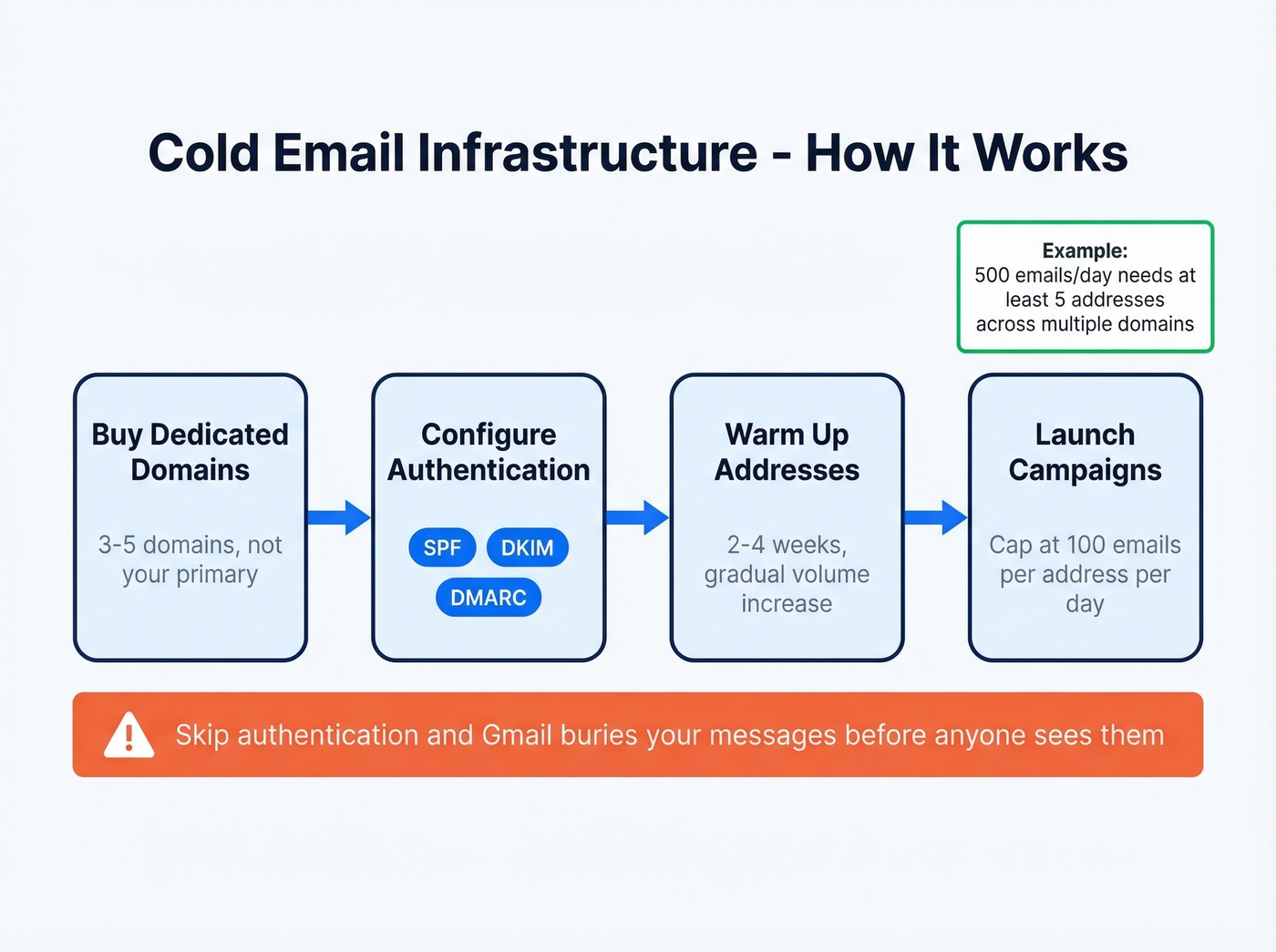
The math is straightforward: cap each sending address at roughly 100 emails per day. A campaign sending 500 emails daily needs at least 5 addresses, spread across multiple dedicated domains. Each domain needs SPF/DKIM/DMARC configured - skip authentication and Gmail's spam filters will bury your messages before a human ever sees them.
The tools that handle this well:
- Instantly - $30/mo, popular for cold email sending infrastructure and warmup
- Smartlead - $39/mo, popular for multi-inbox workflows
- Lemlist - $59/mo, combines sending with personalization features
These platforms let you connect multiple sending accounts, rotate between them automatically, and warm up new addresses before you go live. But infrastructure alone isn't enough. Bad prospect data undoes all of it. If 30% of your emails bounce, your new domains burn fast. The sending tools handle delivery; you still need verified contact data feeding into them.
If you're building a full outbound stack, pair your sending setup with outbound email automation and a process for email reputation check so deliverability issues don’t sneak up on you.
Disposable/Temporary Email Generators
The QA use case is the one most people miss. Mailinator is commonly used by engineering teams for testing registration flows, password resets, and transactional email delivery in CI/CD pipelines. That's the power-user play.
The more obvious use case: Temp Mail, Mailinator, and dozens of clones give you a throwaway inbox lasting anywhere from 10 minutes to 24 hours. No registration, no identity - just a working address that self-destructs. Use disposable addresses for 80% of random signups, keep a permanent address for the 20% of accounts that actually matter - banking, SaaS tools you pay for, anything with two-factor auth.
Email Finder & Permutator Tools
Now we're in different territory entirely. These tools don't create new email addresses - they find existing ones. You input a person's name and company, and the tool either looks up their verified email in a database or generates common permutations like first.last@company.com and flast@company.com, then verifies which one actually works.
This is what half the people searching for an AI-powered email address generator actually need. They don't want to create sarah@gmail.com. They want to find sarah.chen@targetcompany.com so they can send her a cold email. One Reddit thread even showed a builder proposing an "AI cold email generator" that was really just an AI subject line and body generator - the confusion runs deep, even among builders.
Hunter is the most well-known tool here, with 6M+ users, a free tier of 50 searches/month, and paid plans starting at $34/mo. It carries a solid G2 rating of 4.4/5 across 554 reviews. Hunter combines a database of publicly available emails found on the web with a deduction engine that guesses the most likely format, then runs verification.

If you’re comparing tools in this category, it helps to understand how an email permutator differs from a true verifier, and why teams often switch to best verified contact databases once they scale.
AI Email Writing Tools
Reply rates range from 2% to 14% depending on the tool and approach, according to a LaGrowthMachine test across 15 tools. That's a massive spread.
Tools like ChatGPT ($20/mo for Plus), Jasper ($39/mo), and Copy.ai ($36/mo) generate email content - subject lines, body copy, follow-up sequences. Other options include Writesonic ($16/mo), Superhuman ($30/mo), and Shortwave ($14/mo), each with different strengths depending on whether you need bulk generation or inbox-integrated writing. Context-aware AI generators consistently outperformed template-based ones in that same testing.
These are useful tools. But they don't generate email addresses at all. The differentiator isn't the writing tool - it's the data and targeting underneath it. If you want a deeper breakdown, see our guide to AI email personalization and the full list of AI email writer tools.
Comparison Table
| Type | What It Does | Best Tool | Price | Real AI? |
|---|---|---|---|---|
| Username generator | Suggests new email names | ChatGPT/Gemini | Free | Yes (LLM) |
| Cold email infra | Creates sending addresses | Instantly | $30/mo | No (config tool) |
| Disposable inbox | Temporary throwaway email | Temp Mail | Free | No |
| Email finder | Finds existing work emails | Prospeo | Free-$0.01/email | Yes (verification + scoring) |
| Email writer | Generates email copy | ChatGPT | $20/mo | Yes (LLM) |
How These Tools Actually Work
Let's be honest about the "AI" label. Most email name generators run simple permutation logic: take first name, last name, maybe a keyword, and combine them in 15-20 predictable patterns. firstname.lastname, f.lastname, firstname_keyword - it's string concatenation, not intelligence. A developer on Reddit built a GPT-based name generator in about 20 minutes using the ChatGPT API. That's the level of complexity we're talking about.
The tools that actually use AI - Sequenzy with Gemini, or just ChatGPT/Gemini directly - can do more creative things. They'll consider industry context, suggest domain-appropriate names, and generate options that feel less formulaic. But none of them can check whether a username is available at Gmail or Outlook.
If you need creative email name suggestions, skip the dedicated tools entirely. Open ChatGPT or Gemini, type "suggest 20 professional email address formats for Sarah Chen who works in product design," and you'll get better results than any purpose-built generator. Free. Thirty seconds.
Where AI genuinely earns its keep is in email finding and verification - the systems that predict email formats across millions of companies and then verify deliverability in real time. That's a harder technical problem than string concatenation, and it's where the real engineering investment happens. If you’re building this into a workflow, start with how to confirm an email address is valid and a dedicated email verifier.

You don't need to guess email formats. Prospeo's email finder searches 300M+ verified profiles and returns real work emails at 98% accuracy - no permutation scripts, no bounced guesses. Pay $0.01 per verified email.
Skip the permutator. Get the actual email, verified in real time.
The Availability Problem (and the Real Fix)
The single biggest frustration with email name generators is that they can't tell you if a username is taken. You get 15 creative suggestions, try to register the first one at Gmail - taken. Second - taken. Third - taken. You end up with sarah.chen.design.2026@gmail.com anyway, which defeats the entire purpose.
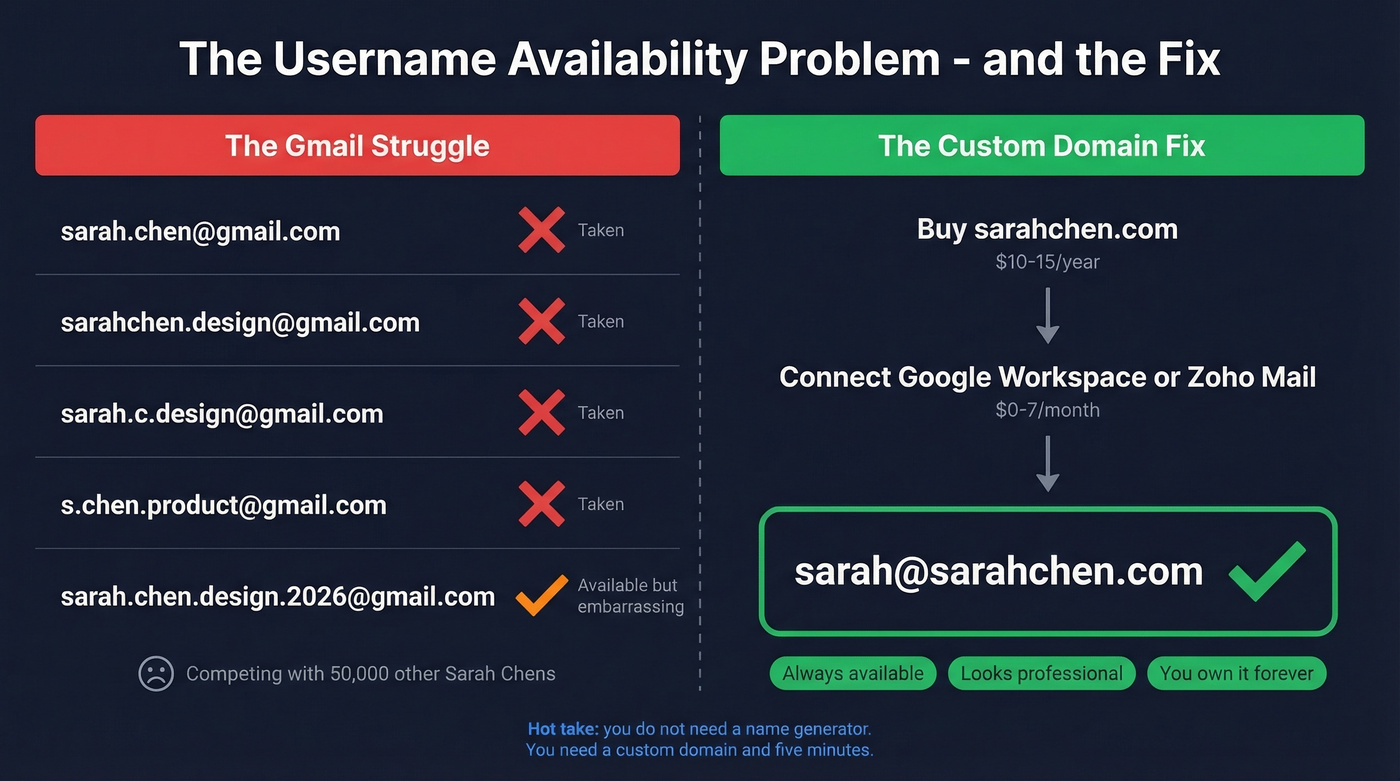
No generator solves this cleanly because Gmail and Outlook don't expose availability via API. The tools literally can't check.
Here's the hot take that no generator tool wants you to hear: you don't need a fancy name generator. You need a custom domain and five minutes.
Buy yourname.com or yourname.co from any registrar. Connect it to Google Workspace (around $6-$7/user/mo) or Zoho Mail (free for one user). Now you're sarah@sarahchen.com. No availability conflicts, no random numbers, no competing with 50,000 other Sarah Chens for a Gmail handle. In our experience, the custom domain route pays for itself within a week of not fighting Gmail for usernames. If you want the step-by-step, follow a proper Google Workspace email setup.
A custom domain also signals professionalism in a way that @gmail.com never will. If you're doing any kind of business outreach, client communication, or job searching, this is the move.
Professional Email Format Best Practices
Common best-practice formats, based on GMass guidance and industry convention:
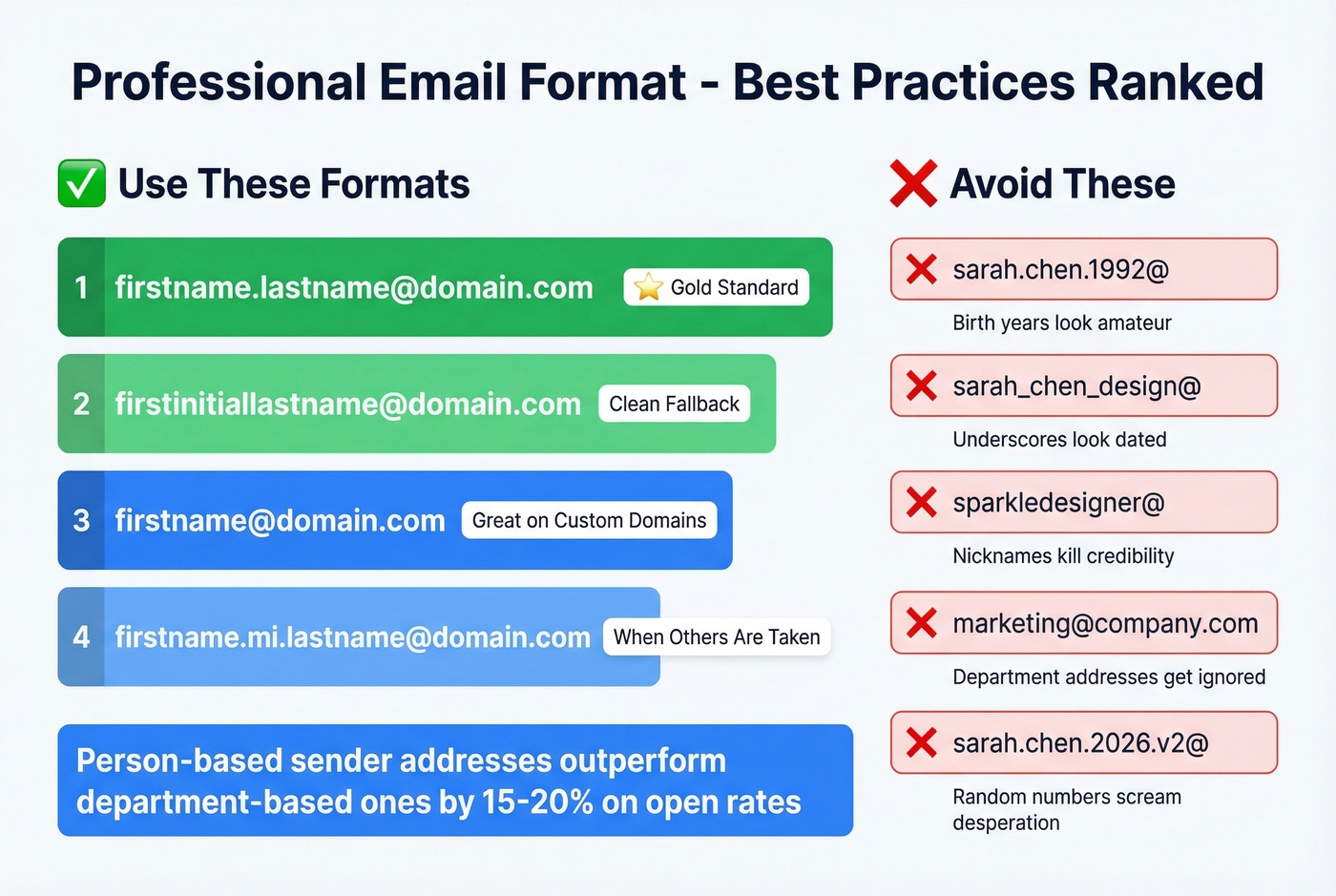
- firstname.lastname@yourdomain.com - the gold standard
- firstinitiallastname@yourdomain.com - clean fallback
- firstname@yourdomain.com - works great on custom domains
- firstname.middleinitial.lastname@yourdomain.com - when the above are taken
What to avoid: birth years like sarah.chen.1992@, random number strings, underscores (they look dated), nicknames like sparkledesigner@, and department-based addresses for outbound such as marketing@ or sales@.
That last point matters more than people realize. Person-based sender addresses like sarah@company.com outperform department-based ones by roughly 15-20% on open rates. When someone sees a real name in their inbox, they're more likely to open it. When they see "marketing@," it reads as automated - because it usually is. For more on keeping messages out of junk, see outbound email spam prevention.
Address Strategy Beats Copywriting
Sales teams obsess over subject lines and email body copy. They A/B test every word. Meanwhile, their sender reputation is quietly tanking because they're sending from a poorly configured domain with a 25% bounce rate.
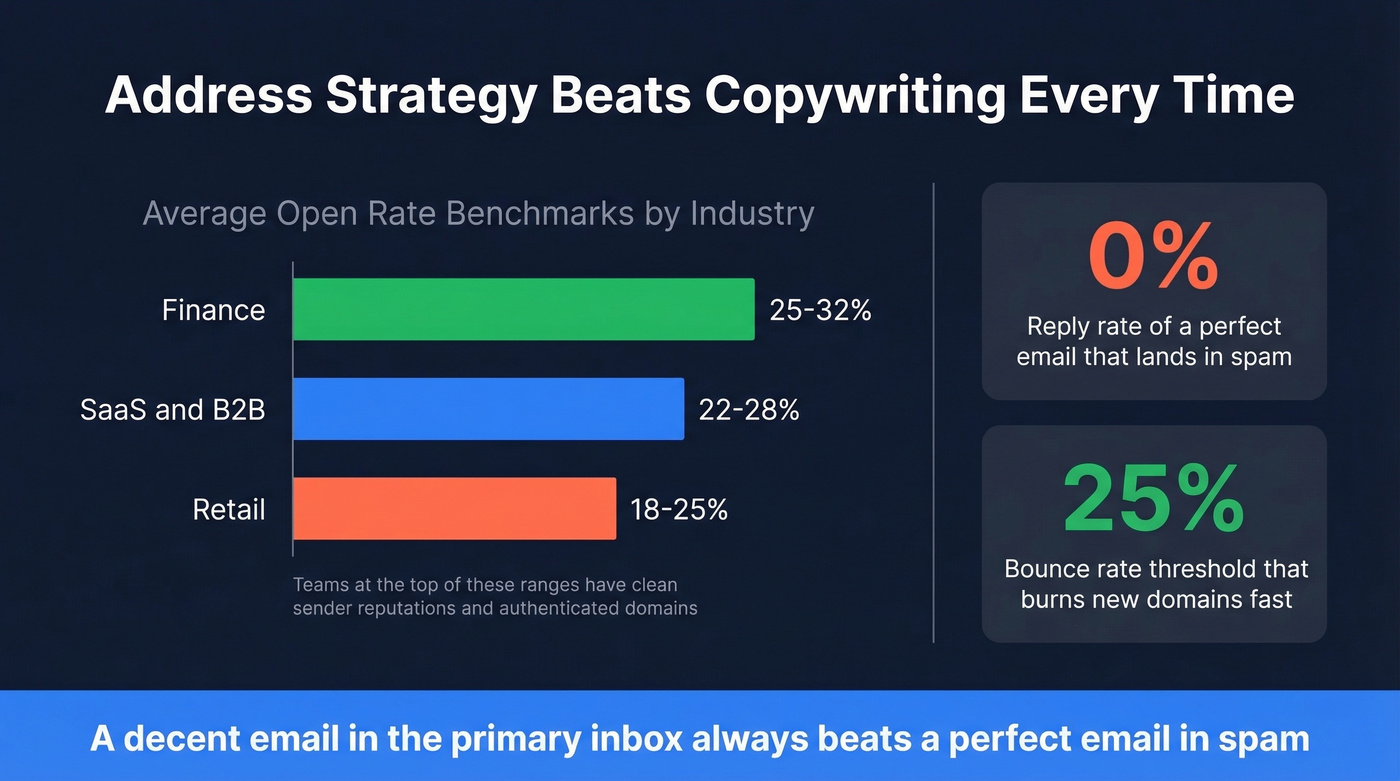
Open-rate benchmarks tell the story: SaaS and B2B services average 22-28%, retail runs 18-25%, finance hits 25-32%. The teams at the top of those ranges aren't just writing better emails. They've got clean sender reputations, authenticated domains, and verified contact data.
A perfectly written email that lands in spam has a 0% reply rate. A decent email that hits the primary inbox from a warmed, authenticated domain will outperform it every time. This is exactly why email verification matters before hitting send - and why tools with 98% accuracy pay for themselves in preserved domain reputation. If you’re troubleshooting deliverability, start with how to check domain reputation and Gmail inbox placement.
Bad prospect data burns your cold email domains faster than any infrastructure can save them. Prospeo delivers 98% email accuracy with a 7-day data refresh cycle, so your sending addresses stay clean and your bounce rate stays under 4%.
Pair your sending tool with data that won't destroy your domains.
FAQ
Are AI email address generators actually free?
Most username generators are free - WriteMail.ai, Feedough, and Sequenzy all cost nothing. Email finder tools offer free tiers with 50-75 searches/month (Prospeo gives 75). Cold email platforms start at $30/mo, and AI writing tools like ChatGPT run $20/mo for Plus.
Can AI check if an email username is taken?
No. AI name generators suggest usernames but can't verify availability with Gmail or Outlook - those platforms don't expose availability via API. You still need to manually check each suggestion, which is why registering a custom domain ($10-$15/year) is the better long-term solution.
What's the best email address format for business?
firstname.lastname@yourdomain.com is the gold standard. If that's taken, use firstinitiallastname@ or firstname@ on a custom domain. Avoid numbers, underscores, and nicknames. Person-based addresses outperform department-based ones by 15-20% on open rates.
How do I find someone's existing work email?
Use an email finder tool, not a name generator. Prospeo covers 300M+ professional profiles with 98% verified accuracy and a 7-day data refresh cycle - 75 free searches/month, no credit card. Hunter offers 50 free searches/month at $34/mo for paid plans.
How many sending addresses do I need for cold outreach?
Plan for roughly 100 emails per day per sending address. A 500-email/day campaign needs at least 5 addresses across multiple dedicated domains, each with SPF/DKIM/DMARC configured. Tools like Instantly and Smartlead handle multi-inbox rotation and warmup automatically.