

Email Appointment Confirmation: Templates and Tactics That Cut No-Shows in Half
You booked 12 meetings last week. Four people showed up. The other eight ghosted - despite the calendar invite, the morning-of email, and the text you sent an hour before.
Sales reps on r/sales vent about this constantly, and the frustration isn't limited to sales. Healthcare, professional services, salons - everyone bleeds revenue from no-shows. A well-crafted email appointment confirmation sequence changes the math. A study of 135,393 primary care appointments found that an AI-driven no-show workflow reduced no-show rates by 50.7%. We've seen similar results across B2B sales teams that fix their confirmation sequence.
Here's how to build one that actually works.
The Quick Version
Your confirmation email needs seven elements: date and time, location or meeting link, contact info, a calendar file, a reschedule option, a confirm/cancel button, and prep instructions. Send on a 3-3-3 cadence - 3 weeks before, 3 days before, 3 hours before. Use email for the initial confirmation, SMS for the day-of nudge.
Don't mix promotional content into transactional emails. It kills deliverability. And verify your contact data before automating anything - a confirmation that bounces is worse than no confirmation at all. (If you’re troubleshooting bounces, see bounce rate benchmarks and fixes.)
Why Confirmations Reduce No-Shows
That 50.7% reduction isn't an outlier. An MGMA poll of 265 healthcare practices found 73% report no-show rates stable or declining, with leaders crediting consistent patient communication - frequent digital reminders, automated calls, and occasional live outreach. In healthcare, a single no-show costs an estimated $196 in lost revenue. For B2B sales, the math is different but the pain is the same: every ghosted meeting is a dead pipeline slot you can't get back (and it shows up fast in your pipeline health).
Here's the thing - most teams don't have a no-show problem. They have a confirmation problem. Fix the workflow and attendance fixes itself.
Essential Elements to Include
Think of your confirmation email as a contract. Miss a key element and you're giving the attendee a reason to forget, get confused, or bail.
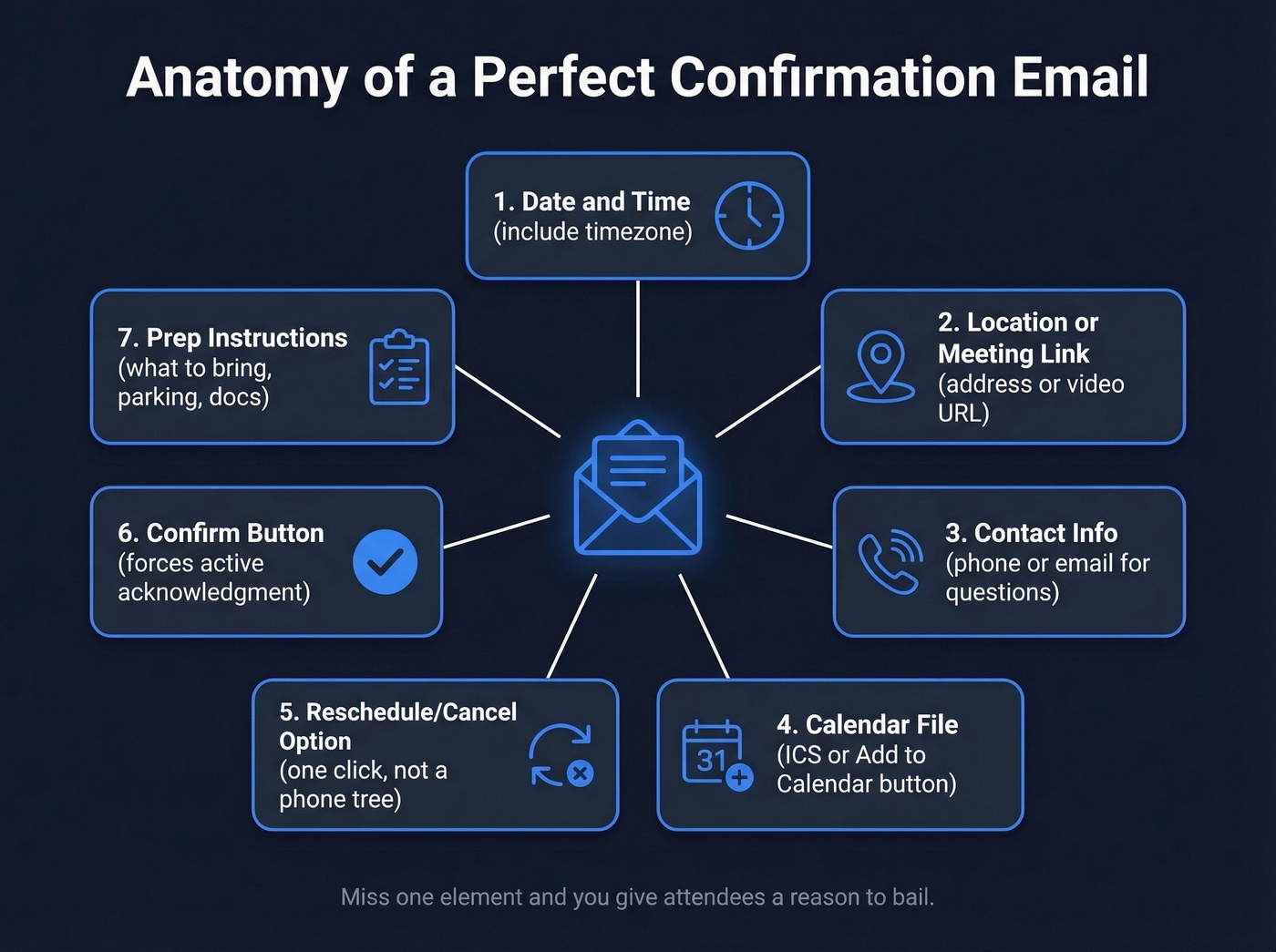
- Date and time, including timezone for remote meetings
- Location or meeting link - physical address with map link, or video URL
- Contact info - a phone number or email for questions
- Calendar file via ICS attachment or "Add to Calendar" button
- Reschedule/cancel option - a single click, not a phone tree
- Confirm button - forces active acknowledgment
- Prep instructions - what to bring, what to review, parking details
Keep your subject line under 50 characters. "Your appointment: Jan 15 at 2 PM" beats "Reminder About Your Upcoming Scheduled Appointment With Our Team." Set your preheader text intentionally - Postmark's deliverability guide flags that lazy preheaders like alt text from your logo image waste prime inbox real estate. If you want more options, pull from these email subject line examples.
10 Ready-to-Use Templates
Swap the bracketed fields and send. Each template takes under two minutes to customize.
First Appointment
Subject: Your appointment: [Date] at [Time]
Hi [Name], you're confirmed for [Date] at [Time] at [Location/Link]. Need to reschedule? [Reschedule Link]. Questions? Reply to this email or call [Phone]. We look forward to seeing you.
Recurring Appointment
Subject: Next session: [Date] at [Time]
Hi [Name], confirming your next [Service] appointment on [Date] at [Time]. Same location: [Address/Link]. Need to change it? [Reschedule Link]. See you then.
Virtual Meeting
Subject: Meeting link: [Date] at [Time]
Hi [Name], here's your link for our [Date] meeting at [Time] [Timezone]: [Video Link]. Add it to your calendar: [ICS Link]. Please join 1-2 minutes early to test your audio. Reply here if anything changes. (For more on running remote calls, use these remote sales meeting tips.)
Reschedule Request
Subject: Can we reschedule [Date]?
Hi [Name], we need to move your [Date] appointment. Here are three available slots: [Option 1], [Option 2], [Option 3]. Click the one that works and we'll confirm immediately.
Cancellation Policy
Subject: Confirmed: [Date] at [Time] - cancellation policy
Hi [Name], you're set for [Date] at [Time] at [Location]. Cancellations within [X hours] of the appointment incur a [fee/policy]. Need to reschedule? [Link].
Confirm or Cancel
This is a common r/sales tactic: give people a binary choice and a deadline. Passive non-responders become active confirmers or cancelers - either way, you stop guessing.
Subject: Please confirm: [Date] at [Time]
Hi [Name], your appointment is [Date] at [Time]. Please click one: ✅ [Confirm] or ❌ [Cancel]. If we don't hear from you by [Deadline], we'll open this slot for other clients.
Post-Appointment Follow-Up
Subject: Thanks for meeting, [Name]
Hi [Name], thanks for coming in on [Date]. Here's a summary: [Key Points/Next Steps]. Your next appointment is [Date] - confirm here: [Link]. (If you need a tighter post-call workflow, use these sales follow-up templates.)
Urgent / Same-Day
Subject: Today at [Time] - [Service] appointment
Hi [Name], quick reminder: you're booked today at [Time] at [Location/Link]. Running late? Call us at [Phone]. See you shortly.
Healthcare-Specific
This one needs extra elements that general templates miss. Insurance info, early arrival for check-in, and provider name aren't optional for healthcare confirmations.
Subject: Appointment: Dr. [Name], [Date] at [Time]
Hi [Name], you're confirmed with Dr. [Provider] on [Date] at [Time] at [Clinic]. Please bring: [Insurance card / ID / forms]. Arrive 15 minutes early. Cancel or reschedule: [Link].
B2B Sales Meeting
Most B2B confirmation emails are forgettable. The version below works because it adds an agenda - giving the prospect a reason to show up, not just a reminder that they should.
Before: "Looking forward to our call on Thursday."
After:
Subject: Confirmed: [Your Company] + [Their Company], [Date]
Hi [Name], looking forward to our conversation on [Date] at [Time] [Timezone]. Agenda: [1-2 bullet points]. Video link: [URL]. If the timing shifts, grab a new slot here: [Scheduling Link].

A confirmation sequence that bounces is worse than no sequence at all. Every bad email in your CRM is a meeting that never gets confirmed - and a no-show you never had a chance to prevent. Prospeo's 98% email accuracy and 7-day data refresh means your confirmations actually land.
Fix your data before you fix your no-show rate.
The 3-3-3 Reminder Cadence
A Solutionreach analysis of 20 million appointments gives us a clear framework.
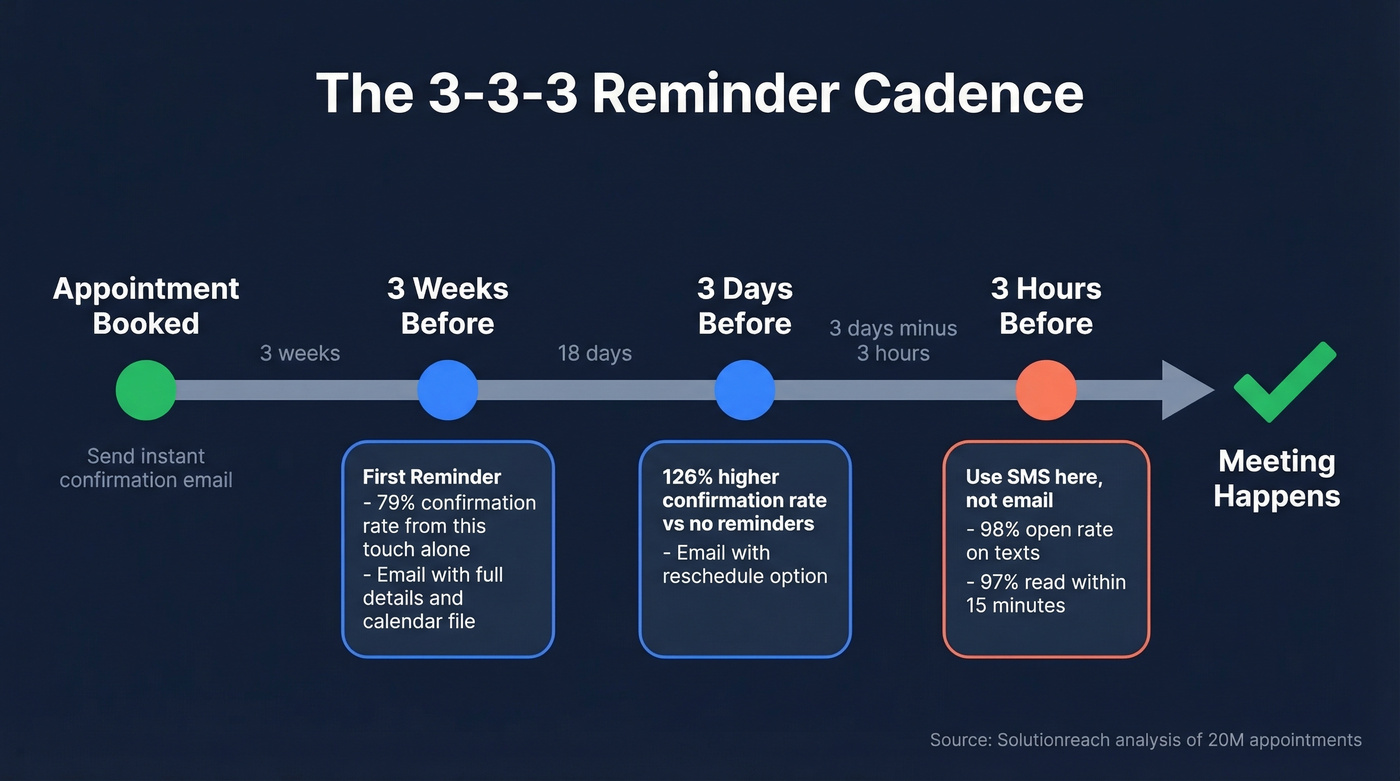
Send three reminders: 3 weeks before, 3 days before, and 3 hours before. Strategies that include a weekly reminder see a 126% higher confirmation rate compared to no automated reminders. Adding a daily reminder lifts confirmation rates another 26%. The 3-week first touch alone drives a 79% confirmation rate. If you’re building this into a tool, treat it like sequence management, not a one-off blast.
There's a ceiling, though. Twilio's messaging engagement data shows 52% of people would unsubscribe if a company emailed them every day. Three well-timed touches hit the sweet spot between persistence and annoyance.
Email vs SMS: When to Use Each
Use both, but for different jobs. Email carries the detail - calendar files, prep instructions, reschedule links. SMS carries the urgency, with a 98% open rate and 97% of texts read within 15 minutes.
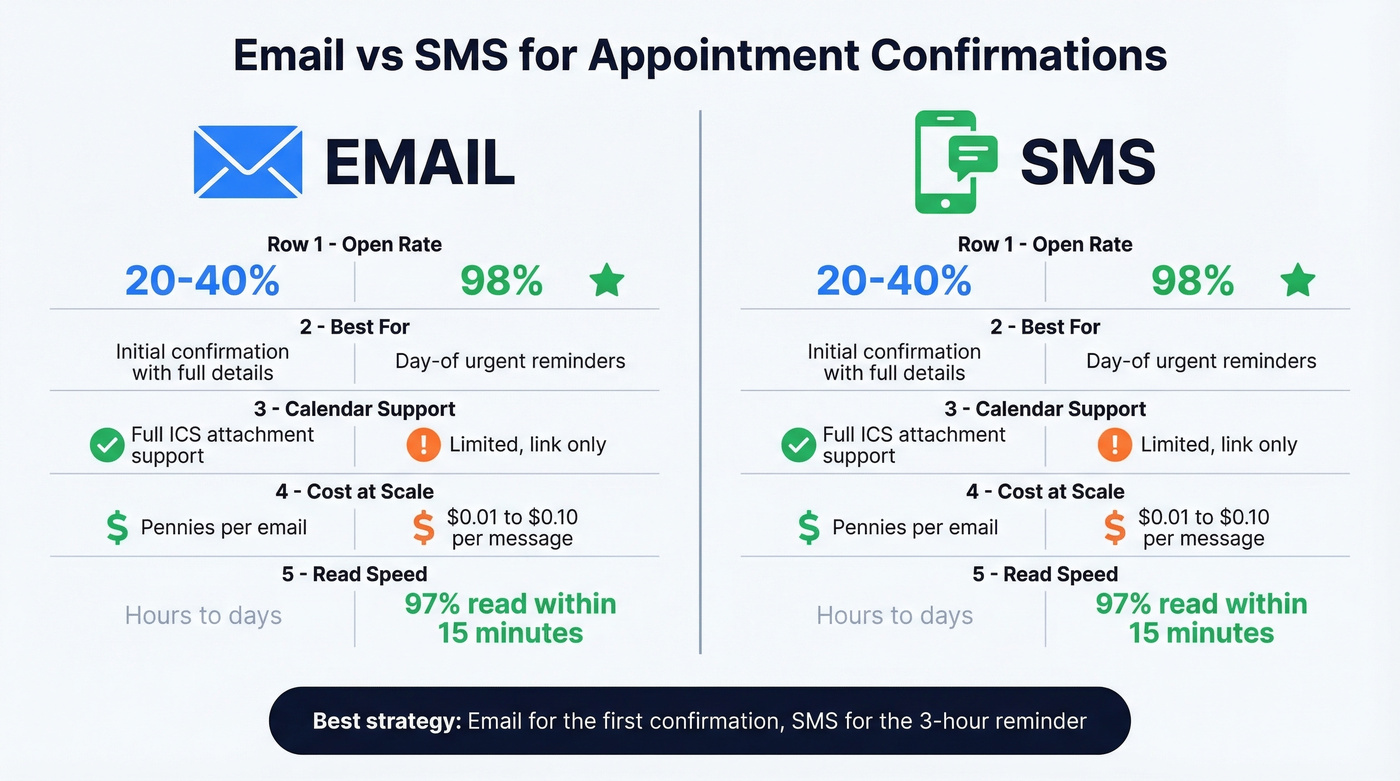
| Factor | SMS | |
|---|---|---|
| Open rate | ~20-40% | 98% |
| Best for | Initial confirm with detail | Day-of reminder |
| Calendar link | Yes, via ICS | Limited |
| Cost | Pennies at scale | ~$0.01-$0.10/msg |
For the initial confirmation, email wins. For the 3-hour reminder, SMS wins. One stat that surprised us: a study of 8,054 palliative clinic appointments found virtual appointments had a 9% no-show rate versus 5% for in-person. If you're running virtual meetings, you need the stronger reminder cadence - your attendees are more likely to ghost.
Five Mistakes That Kill Confirmations
Mixing marketing into transactional emails. Confirmation emails get a 65% click-through rate, which makes it tempting to drop in a coupon. Don't. Adding promotional content causes mailbox providers to reclassify the email as promotional and route it to spam. Under CAN-SPAM, it can shift the email's "primary purpose" to commercial, triggering full compliance requirements. (If you’re diagnosing inboxing issues, start with an email deliverability guide.)
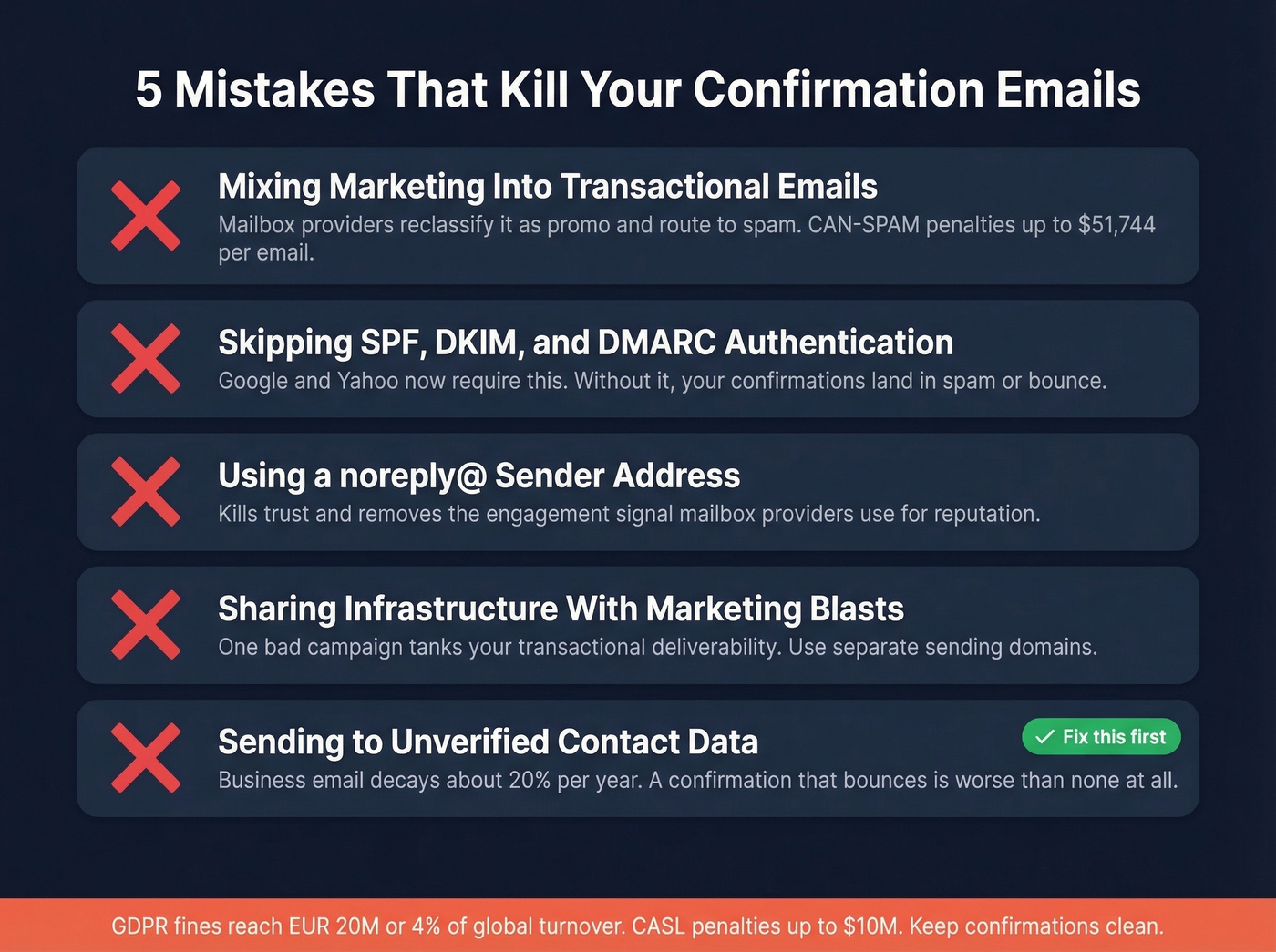
Skipping SPF/DKIM/DMARC. Google and Yahoo require email authentication for senders. Skip this and your confirmations land in spam or don't land at all. If you’re stuck, use these SPF record examples and check DMARC alignment.
Using a noreply@ sender address. It kills trust and removes a positive engagement signal that mailbox providers use to gauge sender reputation. Use a real reply-to address.
Not separating transactional and marketing infrastructure. If your confirmation emails share an IP with your marketing blasts, a bad campaign tanks your transactional deliverability. Keep them on separate sending domains.
Sending to unverified contact data. In our experience, this is the #1 silent killer of confirmation workflows. Business email data decays roughly 20% per year. If you're automating confirmations to a list you haven't verified, you're sending into a void. Prospeo's real-time email verification catches bad addresses before they enter your workflow - 98% accuracy across 143M+ verified emails. Verify before you automate.
You just built the perfect B2B sales meeting confirmation template. Now make sure it reaches real inboxes. Prospeo verifies 143M+ emails through a 5-step process - spam-trap removal, catch-all handling, honeypot filtering - so your confirmation cadence doesn't die on delivery.
Start with emails that actually exist. Everything else follows.
Compliance Quick Reference
Confirmation emails get special treatment under most regulations - but only if you keep them purely transactional.
| Regulation | Transactional Only | Confirmation + Promo |
|---|---|---|
| CAN-SPAM | No unsubscribe link required | Unsubscribe link required |
| GDPR | Contract performance basis | Consent required |
| CASL | Implied consent applies | Express consent needed |
The key test is "primary purpose." A pure appointment confirmation qualifies as transactional under CAN-SPAM and doesn't need an unsubscribe link. Add a coupon or promotional banner and the primary purpose shifts to commercial. Penalties reach up to $51,744 per email under CAN-SPAM, EUR 20M or 4% of global turnover under GDPR, and $10M under CASL.
Let's be blunt: keep confirmations clean.
FAQ
How far in advance should I send a confirmation?
Immediately after booking, then follow the 3-3-3 cadence: 3 weeks, 3 days, and 3 hours before. The 3-week first touch alone drives a 79% confirmation rate based on an analysis of 20 million appointments.
Do confirmation emails need an unsubscribe link?
Not if they're purely transactional under CAN-SPAM. Add any promotional content and the email's primary purpose shifts to commercial - requiring an unsubscribe link. Penalties reach $51,744 per violation.
What's the best subject line format?
Under 50 characters with the date and time included. "Your appointment: Jan 15 at 2 PM" outperforms vague subjects like "Your upcoming appointment" because it conveys specifics at a glance and boosts open rates.
Should I use email or SMS for reminders?
Both. Email for the initial confirmation with full detail and calendar links. SMS for the day-of nudge - 98% open rate, 97% read within 15 minutes. The combination outperforms either channel alone.
How do I keep confirmation emails out of spam?
Authenticate your domain with SPF, DKIM, and DMARC. Separate transactional and marketing email streams. Avoid noreply@ addresses. Don't add promotional content. And verify your contact data first - bad addresses that bounce wreck sender reputation across every email you send.