

Email Availability Checker: What It Does, How It Works, and Which Tools Are Worth Using
You sent 500 cold emails last Tuesday. 47 bounced. Your domain reputation took a hit, your sequence stalled, and now you're wondering if the "verified" list you bought was verified against anything at all. That's when most teams realize they need an email availability checker - and it's the right instinct, just about six months too late.
What "Email Availability" Actually Means
"Email availability checker," "email verifier," "email existence checker" - they all describe the same thing: a tool that confirms whether an email address can actually receive mail. You're not checking if a username is available to register. You're checking if jane.smith@acme.com has a real mailbox behind it.
The distinction that matters is between validation and verification. Validation checks format - does the address have an @ symbol, does the domain look right? That's table stakes. An address like nonexistent@valid-domain.com passes validation just fine. Verification goes deeper: it confirms the mailbox exists on the server, flags disposable addresses, and catches spam traps.
Validation alone misses up to 40% of undeliverable addresses. One in ten emails either gets lost in spam or blocked by the ESP before it reaches anyone. That's the gap that gets your domain flagged. The industry benchmark is clear: keep total bounces below 2%, with top performers targeting hard bounces under 1%.
What You Need (Quick Version)
If you don't want to read 1,800 words, here's the short answer:
- Best budget bulk verifier: MillionVerifier - $0.0003/email.
- Best accuracy-focused standalone checker: ZeroBounce - 97.8% tested accuracy, 100 free monthly verifications.
Still here? Good. Let's get into how these tools actually work.
How Verification Tools Work
Every verification tool runs roughly the same five-step process, though the quality of each step varies wildly between providers. Some vendors market "30+ verification steps," but those are granular sub-checks within these same five core phases.
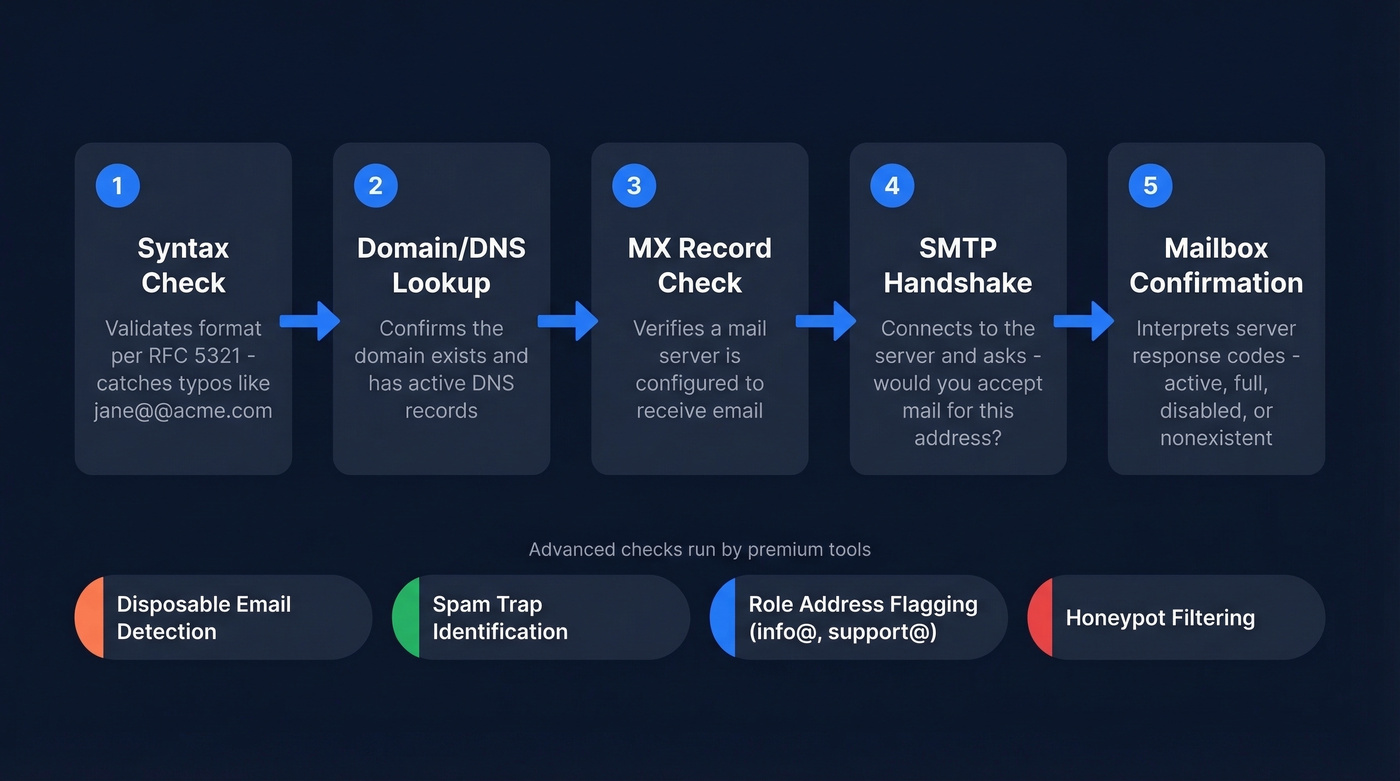
Syntax check (RFC 5321/5322). The tool confirms the address follows proper email formatting rules - valid characters, correct structure, no spaces or illegal symbols. This catches typos like
jane@@acme.com.Domain/DNS lookup. It checks whether the domain actually exists and has active DNS records. Dead domains get flagged immediately.
MX record check. The tool queries the domain's mail exchange records to confirm a mail server is configured to receive email. A domain can exist without accepting mail.
SMTP handshake. This is where real verification happens. The tool initiates a connection with the mail server and asks, essentially, "Would you accept a message for this address?" - without actually sending one. The server's response reveals whether the mailbox exists.
Mailbox confirmation. The tool interprets the server's response codes to determine if the specific mailbox is active, full, disabled, or nonexistent.
Better tools run additional checks beyond these five: flagging disposable email services like Guerrilla Mail and Mailinator, identifying role-based addresses like info@ or support@, detecting known spam traps, and filtering honeypot addresses that exist solely to catch spammers.
The Catch-All Problem
Here's where most verification tools hit a wall.
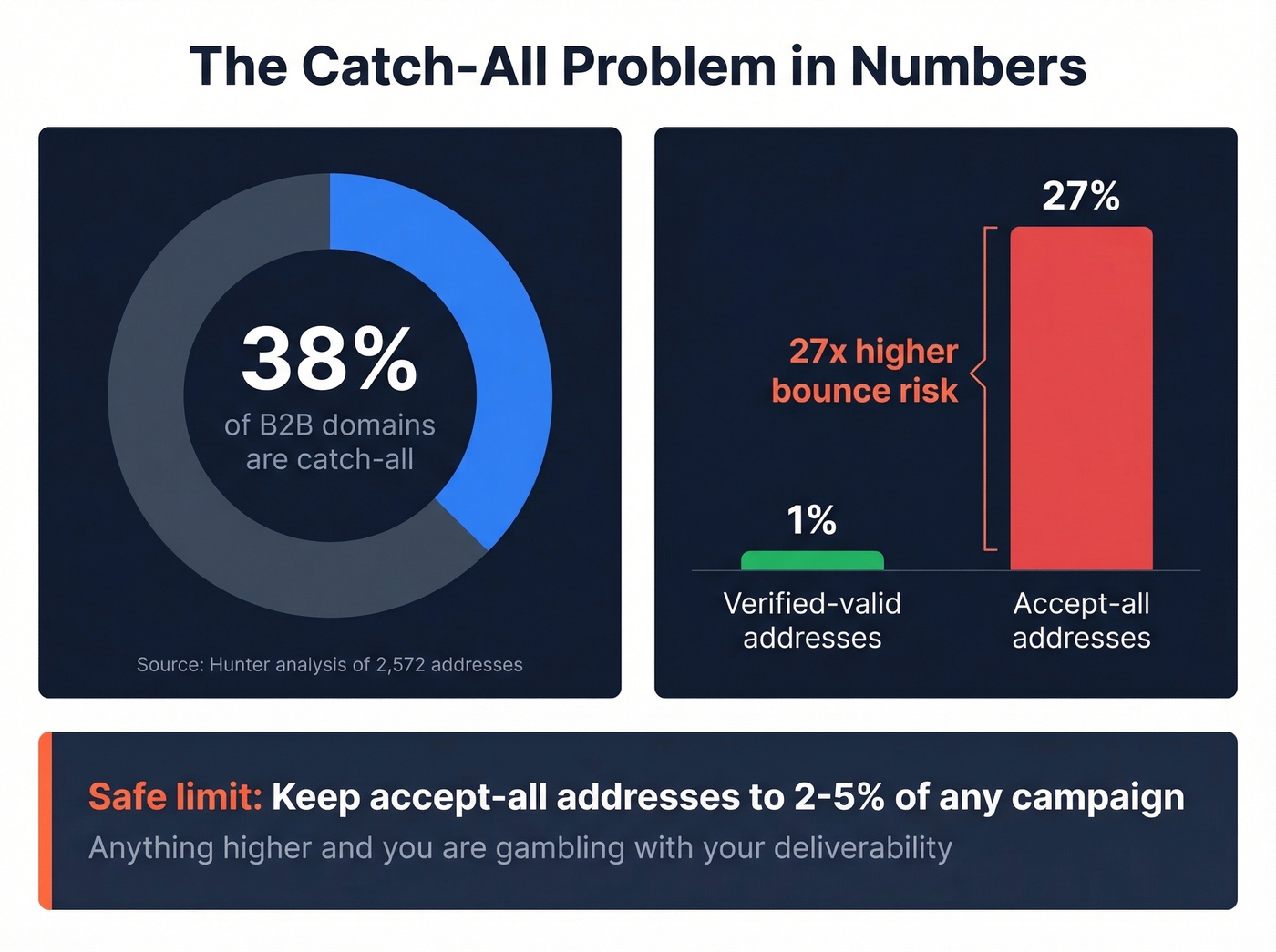
Catch-all domains are configured to accept mail sent to any address at that domain - whether the mailbox exists or not. When a verifier runs the SMTP handshake, the server says "sure, I'll take it" regardless. According to Hunter's analysis of 2,572 email addresses, 38% of email domains are configured as accept-all. That's not a niche edge case. It's more than a third of the domains you're prospecting into.
The risk is real: emails to accept-all addresses bounce at 27%, compared to 1% for verified-valid addresses. That's a 27x increase in bounce risk. One bad campaign heavy on catch-all domains can tank your sender reputation overnight.
Detection works through SMTP "tickling" - the verifier asks the server about a deliberately random, nonexistent address. If the server accepts it, the domain is catch-all. The problem is resolving which specific addresses within that domain are real. Most tools just label the whole domain "risky" and move on. The best ones use proprietary methods to resolve a meaningful percentage.
If you're closing deals north of $20K and selling into enterprise, catch-all resolution isn't a nice-to-have - it's the single most important feature in your verification stack. Enterprise domains are disproportionately catch-all, and discarding them means throwing away your highest-value prospects because your tool can't do its job.
Operational guidance: limit accept-all addresses to 2-5% of any campaign. Anything higher and you're gambling with your deliverability.

Most email availability checkers stop at catch-all domains. Prospeo doesn't. Every email from our 300M+ profile database runs through 5-step verification with catch-all handling, spam-trap removal, and honeypot filtering - delivering 98% accuracy at ~$0.01/email.
Find and verify in one step. No more cleaning lists after the fact.
How to Read Your Results
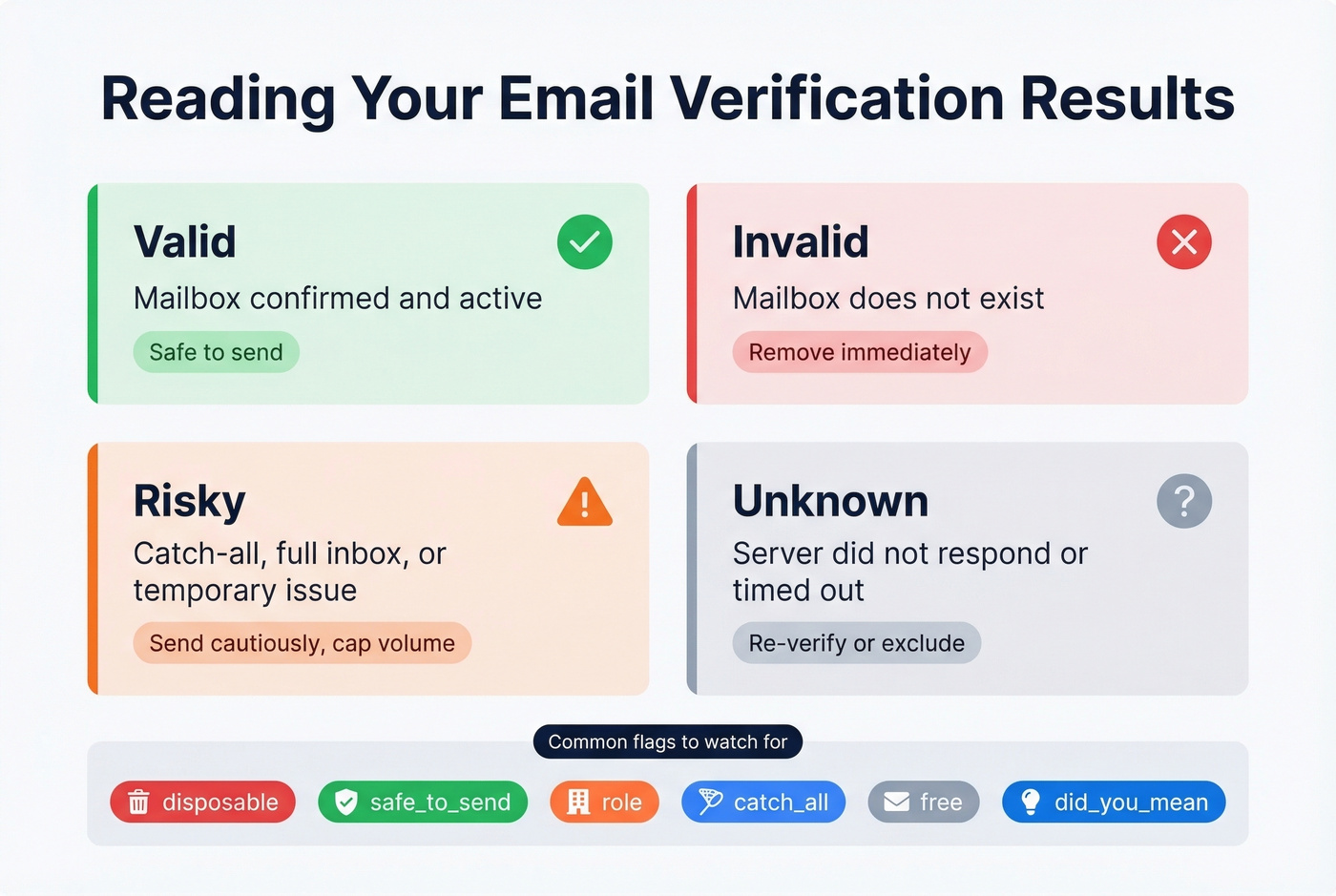
Most checkers return results in four categories:
| Status | What It Means | Action |
|---|---|---|
| Valid | Mailbox confirmed | Safe to send |
| Invalid | Mailbox doesn't exist | Remove immediately |
| Risky | Catch-all, full, or temp issue | Send cautiously, cap volume |
| Unknown | Server didn't respond | Re-verify or exclude |
Beyond the top-level status, look for these flags:
- disposable - throwaway address, skip it
- safe_to_send - composite confidence score, the most actionable flag
- role - generic addresses like info@ or sales@, usually low-value
- catch_all - accept-all domain
- free - Gmail, Yahoo; fine for B2C, suspect for B2B
- did_you_mean - typo correction suggestions
Tools like QuickEmailVerification expose all of these in their JSON output, which is useful if you're building automated workflows.
If you want a broader comparison beyond this shortlist, see our breakdown of email verification tools and email checker tools.
Best Tools to Check Email Availability in 2026
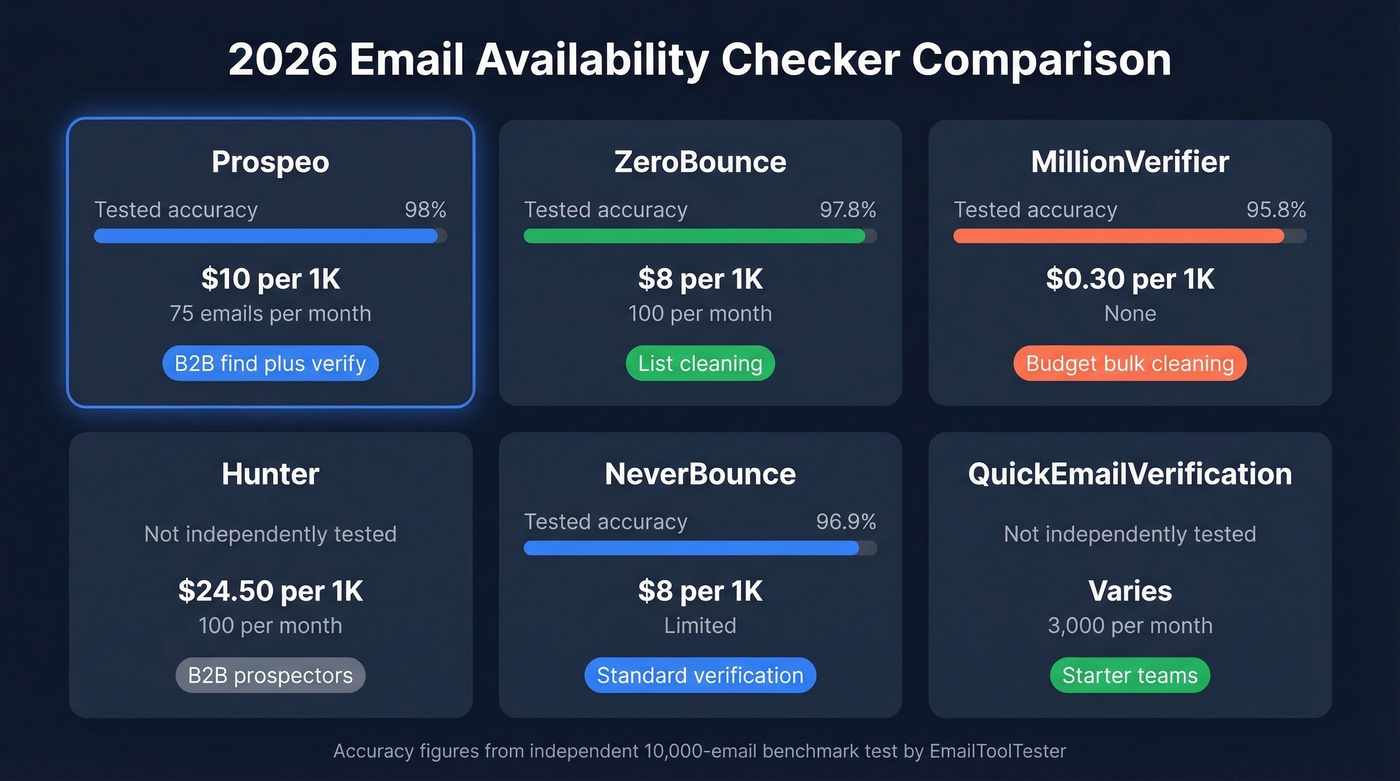
| Tool | Tested Accuracy | Pricing | Free Tier | Best For |
|---|---|---|---|---|
| Prospeo | 98% | ~$10/1K | 75 emails/mo | B2B find + verify |
| ZeroBounce | 97.8% | ~$8/1K | 100/mo | List cleaning |
| MillionVerifier | 95.8% | ~$0.30/1K | No | Budget bulk |
| Hunter | Not independently tested | ~$24.50/1K | 100/mo | B2B prospectors |
| NeverBounce | 96.9% | ~$8/1K | Limited | Standard verify |
| QEV | Not independently tested | Varies | 3,000/mo | Starter teams |
| Verifalia | Not independently tested | Credit-based | 25/day | Developers |
| Mailmeteor | Not independently tested | Free | 50/mo (Sheets add-on) | One-off checks |
| Email Hippo | Not independently tested | Not public | 100/day | Established teams |
Prospeo
Use this if you're a B2B team that needs to find and verify emails in one workflow. Prospeo doesn't just check if an address is deliverable - it finds contacts from a database of 300M+ professional profiles and runs every result through a 5-step verification process with catch-all handling, spam-trap removal, and honeypot filtering.

The accuracy numbers back it up: 98% email accuracy, with every record refreshed on a 7-day cycle. For context, the industry average refresh is six weeks. At roughly $0.01/email, it's a fraction of what you'd pay combining a separate finder and verifier. The free tier gives you 75 emails plus 100 Chrome extension credits monthly - enough to test before committing. (If you're comparing finders, start with our guide to B2B email lookup tools.)
Real results: Meritt dropped their bounce rate from 35% to under 4% after switching. Stack Optimize maintains 94%+ deliverability across all client campaigns with zero domain flags. We've seen these numbers hold up consistently across different industries and list sizes.
ZeroBounce
In a 10,000-email benchmark test, ZeroBounce hit 97.8% accuracy - the highest among pure verification tools we've tested. If you've got existing lists that need cleaning, this is the tool to reach for.

The catch-all gap is the tradeoff. ZeroBounce only resolved 12% of catch-all addresses in that same test. For domains that make up 38% of the B2B landscape, that's a significant blind spot. Pricing runs $0.008/email pay-as-you-go or $15/month for 2,000 verifications, with 100 free checks monthly. For a deeper look, compare it in our ZeroBounce Email Verifier review.
Skip this if you're prospecting into enterprise domains, which are disproportionately catch-all. You'll get a lot of "risky" results you can't act on.
MillionVerifier
$0.0003 per email. That's $6 to verify 10,000 addresses. If you're sitting on a massive list - 100K, 500K, a million addresses - and you need to clean it without spending a fortune, MillionVerifier is one of the cheapest ways to do it.
The tradeoff is precision. Tested accuracy came in at 95.8%, the lowest among the top-tier tools, with minimal catch-all resolution. For high-volume newsletter lists or marketing databases where a few extra bounces won't kill your sender reputation, that's acceptable. For targeted outbound where every bounce matters, it's not. If you're doing this at scale, follow a repeatable email list hygiene process.
Skip this if your list is under 5,000 addresses or you're running cold outbound sequences. The accuracy gap costs more in bounced reputation than you save on verification.
Hunter
Hunter's verifier is solid but expensive at roughly $24.50 per 1,000 - about 3x the cost of ZeroBounce or NeverBounce. Where it earns that premium is the B2B context: Hunter cross-references results against its B2B database and runs proprietary accept-all verification for major email providers. Clazar reported a 15-20% improvement in valid/invalid determination after switching to Hunter's verifier. The free plan gives you 100 verifications monthly, and paid starts at $34/month.
If you're already in Hunter's ecosystem for email finding, adding verification takes no extra setup. As a standalone verifier, though, the per-email cost is hard to justify. If you're evaluating alternatives, see our roundup of Hunter.io competitors.
NeverBounce
NeverBounce is the reliable workhorse - 96.9% tested accuracy at $0.008/email. In the 10K benchmark, it processed the list in about 18 minutes. It does what it says without surprises.
The catch-all resolution is the weakest we've seen in benchmarks: just 8% of catch-all addresses resolved. For standard verification of known-good domain types, NeverBounce is perfectly fine. For enterprise-heavy prospect lists, you'll want something with better catch-all handling. For more options, compare bulk email checkers.
QuickEmailVerification
A strong starter option. The free tier is generous - 3,000 credits monthly - and paid plans start at just $4 for 500 verifications with credits that never expire. The detailed JSON output, including typo suggestions and composite confidence scores, makes it particularly useful for teams building automated verification into forms or workflows. Over 191,000 businesses use it, which speaks to reliability even without the brand recognition of larger players. If you need programmatic checks, see our benchmarks for an email check API.
Verifalia
Credit-based verification with 25 free checks per day. Verifalia's pricing is structured around daily credits and verification quality levels: 1 credit equals 1 standard verification, while higher-intensity checks consume more credits. Its real strength is developer tooling - REST API, SDKs in multiple languages, and an embeddable widget. If you're building verification into your own SaaS product, it's worth evaluating. For sales teams just cleaning lists, it's overkill.
Mailmeteor
Free single-email checks and a Google Sheets add-on with 50 free verifications monthly. Mailmeteor is for the person who needs to check one address before sending a follow-up, not for teams running campaigns. Use it for spot-checking. Nothing more. If you're doing this in spreadsheets, use our Google Sheets email verification guide.
Email Hippo
A long-standing provider offering 100 free verifications per day, resetting at midnight UTC. They've been in email verification since 2009. For bulk and API pricing, you'll need to choose a product tier and start with their free trial flow. Email Hippo has been around long enough to be reliable, but the lack of transparent bulk pricing puts it behind more modern alternatives.
Why Verification Alone Isn't Enough
Here's the thing most "email checker" articles won't tell you: a verified email can still be the wrong email. A Dropcontact benchmark testing 15 email finders across 20,000 contacts found that many tools return emails that verify as "valid" but belong to the wrong person or wrong domain entirely. The address is deliverable - it just isn't your prospect's.
Worse, teams that see "risky" catch-all flags often discard those addresses entirely, throwing away high-value enterprise contacts because their checker couldn't resolve them.
On r/coldemail and r/EmailProspecting, practitioners consistently report Apollo and Lusha yielding only 60-70% valid emails in real outbound campaigns. And the emails that do verify aren't always the right ones. One thread put it bluntly: "I stopped trusting 'verified' labels after my third domain got burned."
The fix is using a tool that finds and verifies in one step, against a database that's continuously refreshed - so you're never verifying against stale data. If you're still piecing together a stack, start with a tested list of email finding tools.
47 bounces from 500 emails means your data source failed you. Prospeo refreshes all records every 7 days - not every 6 weeks like most providers. Teams using Prospeo keep bounce rates under 4% and book 26% more meetings than ZoomInfo users.
Replace your verify-after-the-fact workflow with data that's accurate on day one.
How Often to Re-Verify
Email lists decay at roughly 21% per year. With 41% average workforce turnover driving corporate email invalidation, that address you verified in January will bounce by June. Run a full list re-verification every four months minimum - quarterly is better - and always re-verify before a major campaign, even if the list was clean last month. (For a step-by-step SOP, follow our guide on how to clean your email list.)
For form submissions, run real-time verification on every entry. Don't let bad addresses into your CRM in the first place. For trigger-based re-checks, when a contact's company shows layoffs, mergers, or leadership changes, re-verify immediately.
The teams with the best deliverability don't treat verification as a one-time event. They treat it as ongoing hygiene - and the right email availability checker makes that process automatic rather than manual.
FAQ
Is email verification legal?
Yes. Verification tools simulate an SMTP connection but never send an actual email. No messages are delivered, no inboxes are accessed, and no personal data is collected beyond the address itself.
What's the difference between validation and verification?
Validation checks syntax and domain format. Verification confirms the mailbox actually exists and can receive mail. Validation alone misses up to 40% of undeliverable addresses - always verify before sending.
How accurate are free email checkers?
Free single-email checkers are fine for spot-checking individual addresses. At scale, published tests show 95.8% to 99.5% accuracy across paid tools. Catch-all handling is where cheaper and free tools consistently fall short - expect 8-12% resolution rates versus proprietary solutions that handle a much larger share.
What's a good free option for checking email availability?
Prospeo's free tier includes 75 email lookups plus 100 Chrome extension credits monthly with full verification - the best value for small B2B teams. ZeroBounce offers 100 free verifications per month, and QuickEmailVerification gives 3,000 free credits. For one-off checks, Mailmeteor's Google Sheets add-on works.
How do I verify emails before sending a campaign?
Upload your list to a bulk verification tool like Prospeo, ZeroBounce, or NeverBounce. They'll flag invalid, risky, and unknown addresses so you can remove them before hitting send. Run this check within 48 hours of your send date - addresses go stale fast.